Page 335 of 552

3355-1. Using the air conditioning system and defogger
5
Interior features
*: If equipped
Turns the heated steering wheel
on/off
The indicator light comes on when
the heated steering wheel is oper-
ating.
■Operation condition
The engine switch is in ON.
■Timer function
The heated steering wheel will auto-
matically turn off after a period of
time.
■Front
Each time the switch is pressed,
the operation condition changes
as follows.
Hi (3 segments lit) Mid (2 seg-
ments lit) Lo (1 segment
lit) Off
The level indicator (amber)
lights up during operation.
Heated steering
wheel*/seat heat-
ers*/seat ventilators*
Heated steering wheel
Warms up the grip of the
steering wheel
Seat heaters
Warm up the seat upholstery
Seat ventilators
Maintain good ventilation
using a fan built into the seat
WARNING
■To prevent minor burn inju-
ries
Care should be taken if anyone in
the following categories comes in
contact with the steering wheel or
seats when the heater is on:
●Babies, small children, the
elderly, the sick and the physi-
cally challenged
●Persons with sensitive skin
●Persons who are fatigued
●Persons who have taken alco-
hol or drugs that induce sleep
(sleeping drugs, cold remedies,
etc.)
NOTICE
■To prevent damage to the
seat heaters
Do not put heavy objects that
have an uneven surface on the
seat and do not stick sharp
objects (needles, nails, etc.) into
the seat.
■To prevent battery discharge
Do not use the functions when the
engine is off.
Heated steering wheel
Seat heaters
Page 336 of 552
3365-1. Using the air conditioning system and defogger
■Rear
Each time the switch is pressed,
the operation condition changes
as follows.
Hi (3 segments lit) Mid (2 seg-
ments lit) Lo (1 segment
lit) Off
The level indica tor (amber)
lights up during operation.
■Operation condition
The engine switch is in ON.
Each time the switch is pressed,
the operation condition changes
as follows.
Hi (3 segments lit) Mid (2 seg-
ments lit) Lo (1 segment
lit) Off
The level indicato r (green) lights
up during operation.
■Operation condition
The engine switch is in ON.
WARNING
■To prevent overheating and
minor burn injuries
Observe the following precautions
when using the seat heaters.
●Do not cover the seat with a
blanket or cushion when using
the seat heater.
●Do not use seat heater more
than necessary.
Seat ventilators
Page 338 of 552
3385-2. Using the interior lights
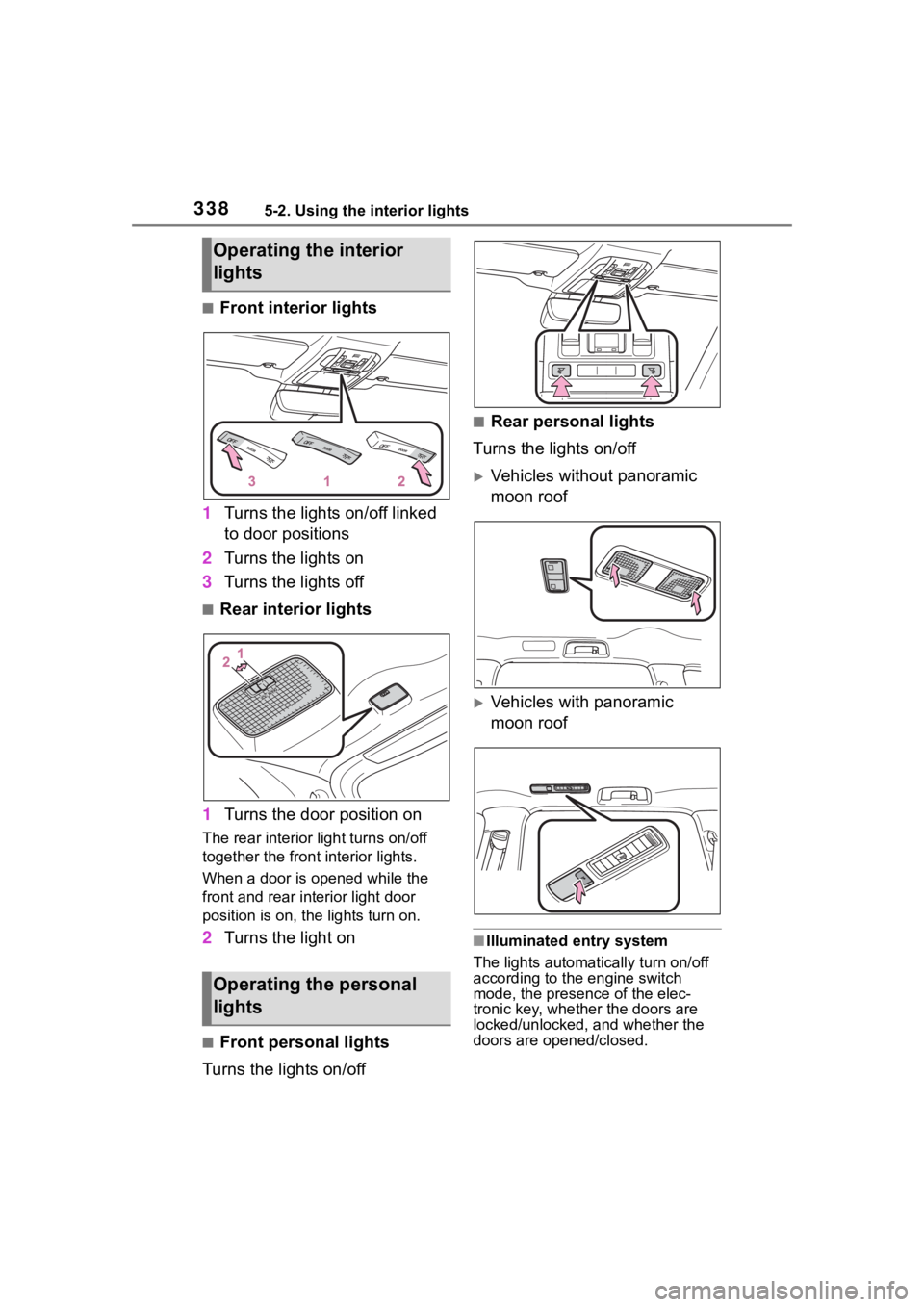
■Front interior lights
1 Turns the lights on/off linked
to door positions
2 Turns the lights on
3 Turns the lights off
■Rear interior lights
1 Turns the door position on
The rear interior light turns on/off
together the front interior lights.
When a door is opened while the
front and rear interior light door
position is on, the lights turn on.
2Turns the light on
■Front personal lights
Turns the lights on/off
■Rear personal lights
Turns the lights on/off
Vehicles without panoramic
moon roof
Vehicles with panoramic
moon roof
■Illuminated entry system
The lights automatically turn on/off
according to the engine switch
mode, the presence of the elec-
tronic key, whether the doors are
locked/unlocked, and whether the
doors are opened/closed.
Operating the interior
lights
Operating the personal
lights
Page 339 of 552
3395-2. Using the interior lights
5
Interior features
■To prevent the battery from
being discharged
If the interior lights remain on when
the engine switch is turned off, the
lights will go off automatically after
20 minutes.
■The interior lights may turn on
automatically when
If any of the SRS airbags deploy
(inflate) or in the event of a strong
rear impact, the interior lights will
turn on automatically.
The interior lights will turn off auto-
matically after approximately 20
minutes.
The interior lights can be turned off
manually. However, in order to help
prevent further collisions, it is rec-
ommended that they be left on until
safety can be ensured.
(The interior lights may not turn on
automatically depending on the
force of the impact and conditions of
the collision.)
■Customization
Some functions can be customized.
( P.494)
NOTICE
■To prevent battery discharge
Do not leave the lights on longer
than necessary when the engine
is not running.
Page 349 of 552
3495-4. Using the other interior features
5
Interior features
5-4.Using the other interior features
The USB charging ports are
used to supply 3 A of electricity
at 5 V to external devices.
The USB charging ports are for
charging only. They are not
designed for data transfer or
other purposes.
Depending on the external
device, it may not charge prop-
erly. Refer to the manual
included with the device before
using a USB charging port.
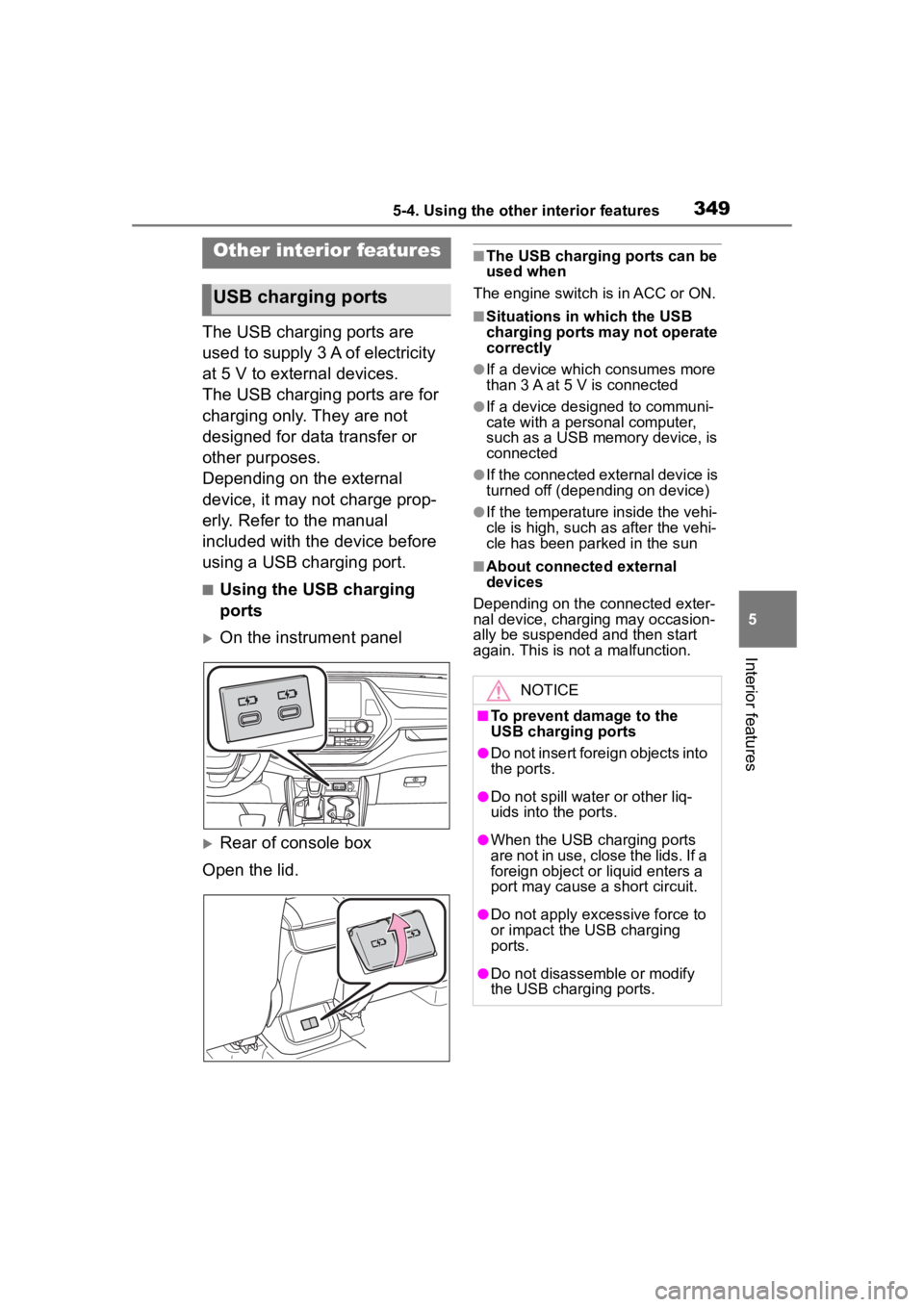
■Using the USB charging
ports
On the instrument panel
Rear of console box
Open the lid.
■The USB charging ports can be
used when
The engine switch i s in ACC or ON.
■Situations in which the USB
charging ports may not operate
correctly
●If a device which consumes more
than 3 A at 5 V is connected
●If a device designed to communi-
cate with a personal computer,
such as a USB memory device, is
connected
●If the connected external device is
turned off (depending on device)
●If the temperature inside the vehi-
cle is high, such as after the vehi-
cle has been parked in the sun
■About connected external
devices
Depending on the connected exter-
nal device, charging may occasion-
ally be suspended and then start
again. This is not a malfunction.
Other interior features
USB charging ports
NOTICE
■To prevent damage to the
USB charging ports
●Do not insert foreign objects into
the ports.
●Do not spill water or other liq-
uids into the ports.
●When the USB charging ports
are not in use, close the lids. If a
foreign object or liquid enters a
port may cause a short circuit.
●Do not apply excessive force to
or impact the USB charging
ports.
●Do not disassemble or modify
the USB charging ports.
Page 350 of 552
3505-4. Using the other interior features
A portable device, such as a
smartphone or mobile battery,
can be charged by just placing it
on the charging area, provided
the device is compatible with the
Qi wireless charging standard
created by the Wireless Power
Consortium.
The wireless charger cannot be
used with a portable device that
is larger than the charging area.
Additionally, depending on the
portable device, the wireless
charger may not operate prop-
erly. Refer to the operation man-
ual of the portable device.
■The “Qi” logo
The “Qi” logo is a trademark of
the Wireless Power Consortium.
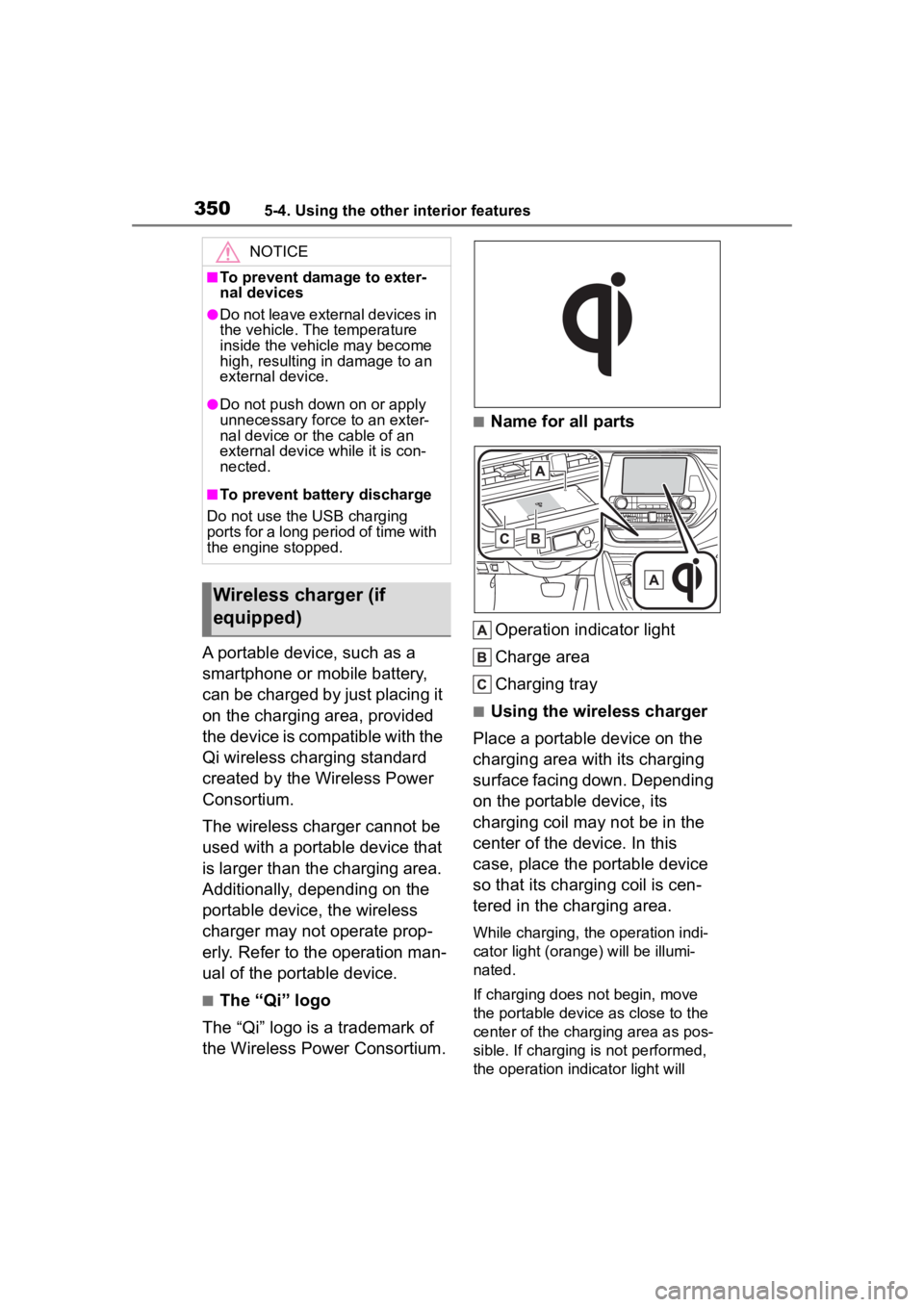
■Name for all parts
Operation indicator light
Charge area
Charging tray
■Using the wireless charger
Place a portable device on the
charging area with its charging
surface facing down. Depending
on the portable device, its
charging coil may not be in the
center of the device. In this
case, place the portable device
so that its charging coil is cen-
tered in the charging area.
While charging, the operation indi-
cator light (oran ge) will be illumi-
nated.
If charging does not begin, move
the portable device as close to the
center of the charging area as pos-
sible. If charging is not performed,
the operation indicator light will
NOTICE
■To prevent damage to exter-
nal devices
●Do not leave external devices in
the vehicle. The temperature
inside the vehicle may become
high, resulting in damage to an
external device.
●Do not push down on or apply
unnecessary force to an exter-
nal device or the cable of an
external device while it is con-
nected.
■To prevent battery discharge
Do not use the USB charging
ports for a long period of time with
the engine stopped.
Wireless charger (if
equipped)
Page 352 of 552
3525-4. Using the other interior features
illuminated (orange) after charging has completed.
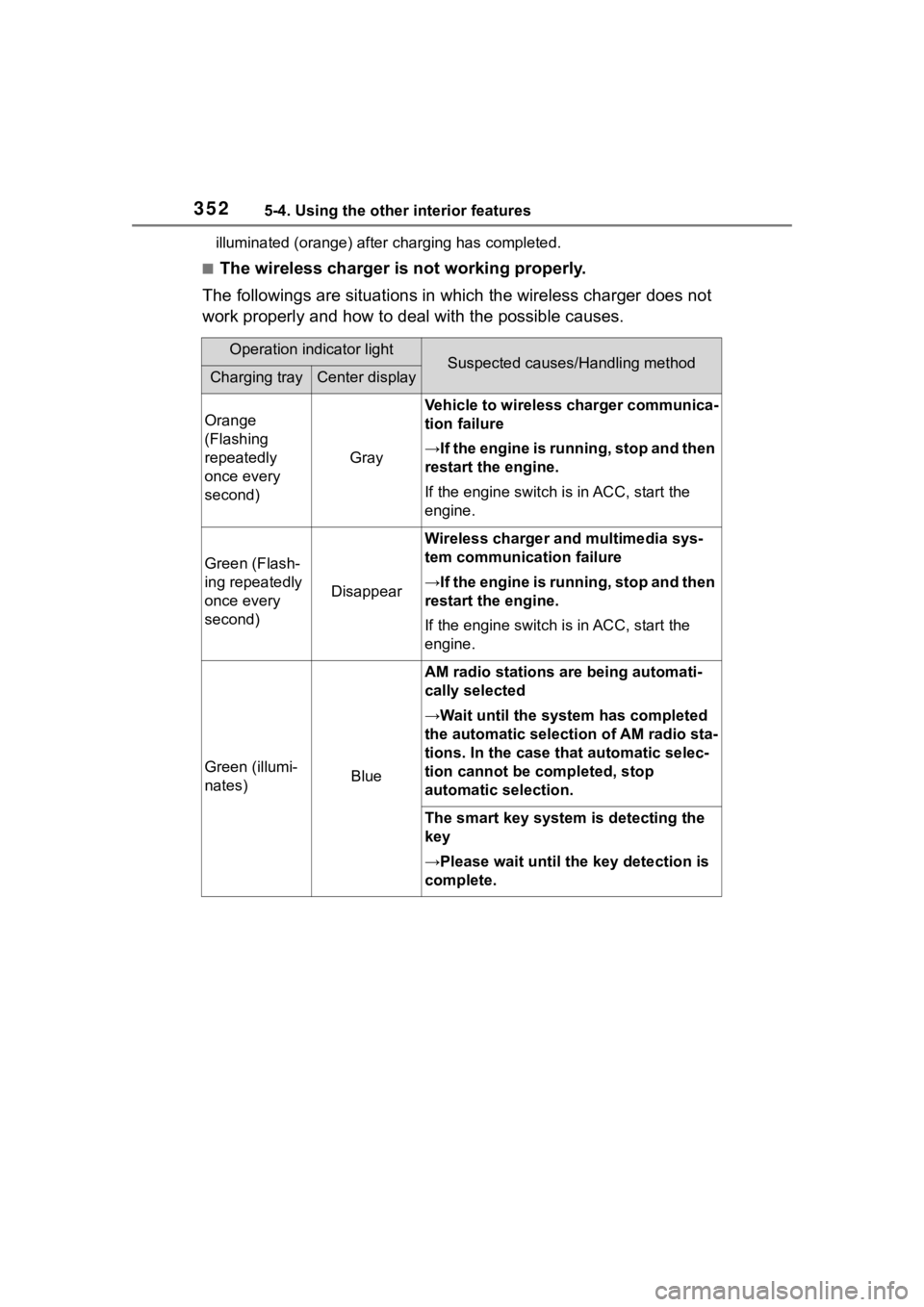
■The wireless charger is not working properly.
The followings are situations in which the wireless charger doe s not
work properly and how to deal with the possible causes.
Operation indicator lightSuspected causes/Handling methodCharging trayCenter display
Orange
(Flashing
repeatedly
once every
second)
Gray
Vehicle to wireless charger communica-
tion failure
→If the engine is running, stop and then
restart the engine.
If the engine switch is in ACC, start the
engine.
Green (Flash-
ing repeatedly
once every
second)
Disappear
Wireless charger and multimedia sys-
tem communica tion failure
→If the engine is running, stop and then
restart the engine.
If the engine switch is in ACC, start the
engine.
Green (illumi-
nates)Blue
AM radio stations are being automati-
cally selected
→Wait until the sys tem has completed
the automatic select ion of AM radio sta-
tions. In the case that automatic selec-
tion cannot be completed, stop
automatic selection.
The smart key system is detecting the
key
→Please wait until the key detection is
complete.
Page 353 of 552
3535-4. Using the other interior features
5
Interior features
■The wireless charger can be
operated when
The engine switch is in ACC or ON.
■Portable devices that can be
charged
●Portable devices compatible with
the Qi wireless charging standard
can be charged by the wireless
charger. However, compatibility
with all devices which meet the Qi
wireless charging standard is not
guaranteed.
●The wireless charger is designed
to supply low power electricity (5
W or less) to a cellular phone,
smartphone, or other portable
device.
●Failure to do so may result in the
possibility of fire, However, porta- ble devices, such as the following,
can be charged with more than 5
W.
• 7.5 W charging compatible iPhones can be charged at 7.5 W
or less.
• Portable devices which conform to WPC Ver 1.2.4 (Extended Power
profile ) can be charged at 10 W or
less.
■If a cover or accessory is
attached to the portable device
Do not charge a portable device if a
cover or accessory w hich is not Qi
compatible is atta ched. Depending
on the type of cover (including for
certain genuine manufacturer parts)
and/or accessory a ttached, it may
not be possible to charge the porta-
ble device. If the portable device is
placed on the charging area and
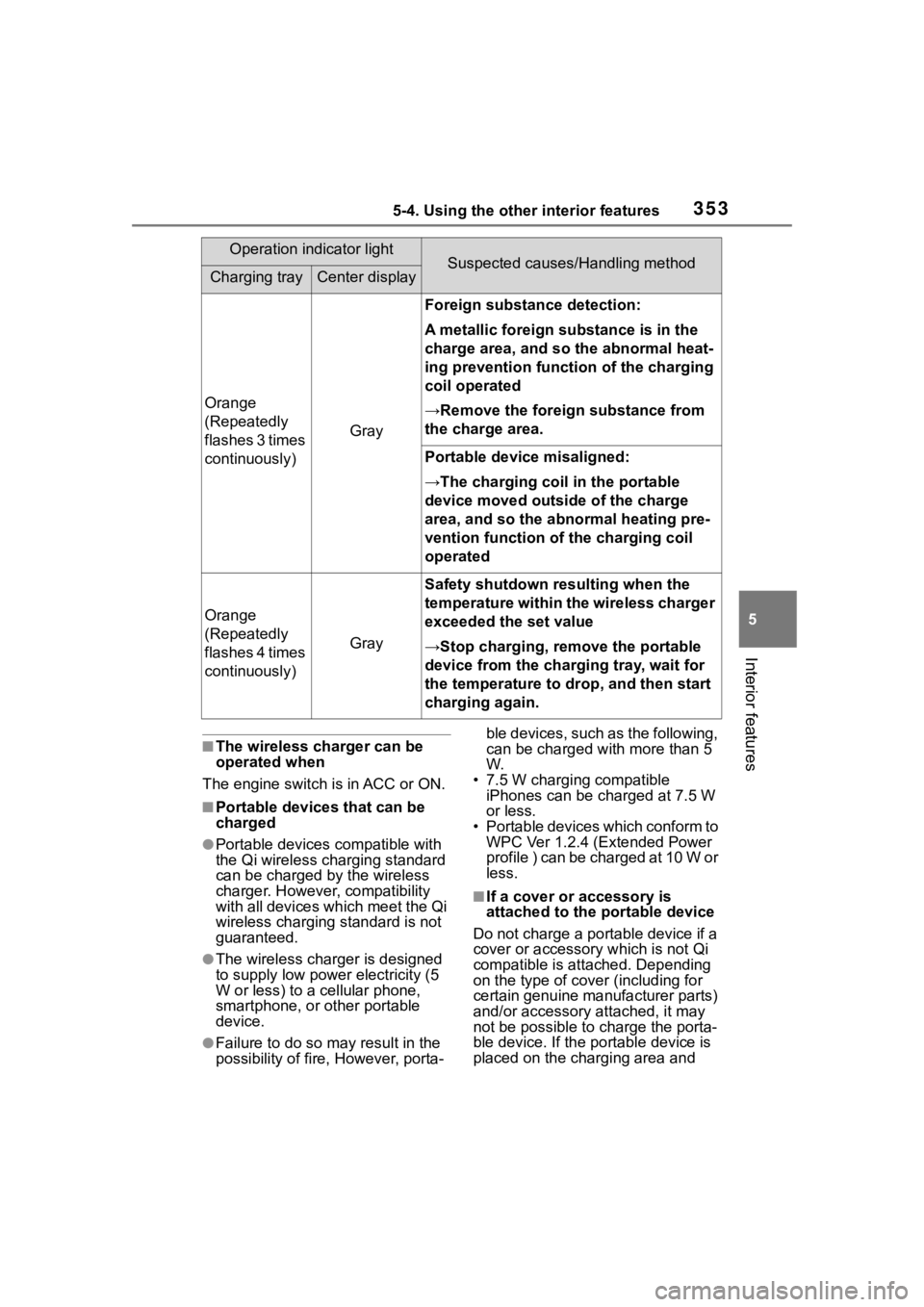
Orange
(Repeatedly
flashes 3 times
continuously)
Gray
Foreign substance detection:
A metallic foreign substance is in the
charge area, and so the abnormal heat-
ing prevention function of the charging
coil operated
→Remove the foreign substance from
the charge area.
Portable device misaligned:
→The charging coil in the portable
device moved outside of the charge
area, and so the abnormal heating pre-
vention function of the charging coil
operated
Orange
(Repeatedly
flashes 4 times
continuously)
Gray
Safety shutdown resulting when the
temperature within the wireless charger
exceeded the set value
→Stop charging, remove the portable
device from the charging tray, wait for
the temperature to drop, and then start
charging again.
Operation indicator lightSuspected causes/Handling methodCharging trayCenter display