2023 TOYOTA HIGHLANDER engine
[x] Cancel search: enginePage 200 of 552

2004-2. Driving procedures
2ACC
Some electrical components such
as the audio system can be used.
“ACCESSORY” will be displayed
on the multi-information display.
3ON
All electrical com ponents can be
used.
“IGNITION ON” will be displayed on
the multi-information display.
*: If the shift lever is in a position other than P when turning off the
engine, the engine switch will be
turned to ACC, not to OFF.
■Auto power off function
If the vehicle is le ft in ACC for more
than 20 minutes or ON (the engine
is not running) for more than an
hour with the shift lever in P, the
engine switch will automatically turn
off. However, this function cannot
entirely prevent battery discharge.
Do not leave the vehicle with the
engine switch in ACC or ON for long
periods of time when the engine is
not running.
If the engine is stopped with the
shift lever in a position other
than P, the engine switch will not
be turned off but instead be
turned to ACC. Perform the fol-
lowing procedure to turn the
switch off:
1 Check that the parking brake
is set.
2 Shift the shift lever to P.
3 Check that “ACCESSORY” is
displayed on the multi-infor-
mation display and press the
engine switch shortly and
firmly.
4 Check that “ACCESSORY”
or “IGNITION ON” on the
multi-information display are
off.
NOTICE
■To prevent battery discharge
●Do not leave the engine switch
in ACC or ON for long periods of
time without the engine running.
●If “ACCESSORY” or “IGNITION
ON” is displayed on the
multi-informatio n display, the
engine switch is not off. Exit the
vehicle after turning the engine
switch off.
When stopping the engine
with the shift lever in a
position other than P
NOTICE
■To prevent battery discharge
Do not stop the engine when the
shift lever is in a position other
than P. If the engine is stopped in
another shift lever position, the
engine switch will not be turned
off but instead be turned to ACC.
If the vehicle is left in ACC, bat-
tery discharge may occur.
Page 201 of 552
2014-2. Driving procedures
4
Driving
*1: Shifting to the D position allows the system to select a gear suit-
able for the driving conditions.
Setting the shift lever to the D
position is recommended for nor-
mal driving.
*2: Selecting gears using M mode fixes the gear s tep, controls
engine braking force, and pre-
vents unnecessary upshifting.
■To protect the automatic trans-
mission
If the automatic transmission fluid
temperature is high, “High Trans-
mission Fluid Temp See Owner's
Manual” will be displayed on the
multi-information display and the
vehicle will go into transmission pro-
tection mode automatically. Have
the vehicle inspected by your Toyota
dealer.
■When driving with dynamic
radar cruise control with
full-speed range activated
Even when switching the driving
mode to sport mode with the intent
of enabling engine braking, engine
braking will not activate because
dynamic radar cruise control with
full-speed range will not be can-
celed.
■Drive-Start Control (DSC)
P.175
■AI-SHIFT
●The AI-SHIFT automatically
selects the suit able gear accord-
ing to driver performance and driv-
ing conditions.
The AI-SHIFT automatically oper-
ates when the shift lever is in D.
(Shifting the shift lever to the M posi-
tion cancels the function.)
●G AI-SHIFT automatically selects
a suitable gear fo r sporty driving
according to driver’s input and
driving conditio ns. G AI-SHIFT
operates automat ically when the
shift lever is in D and sport mode
is selected for the driving mode.
(Selecting normal mode with the
driving mode select switch or shift-
ing the shift lever to the M position
cancels this function.)
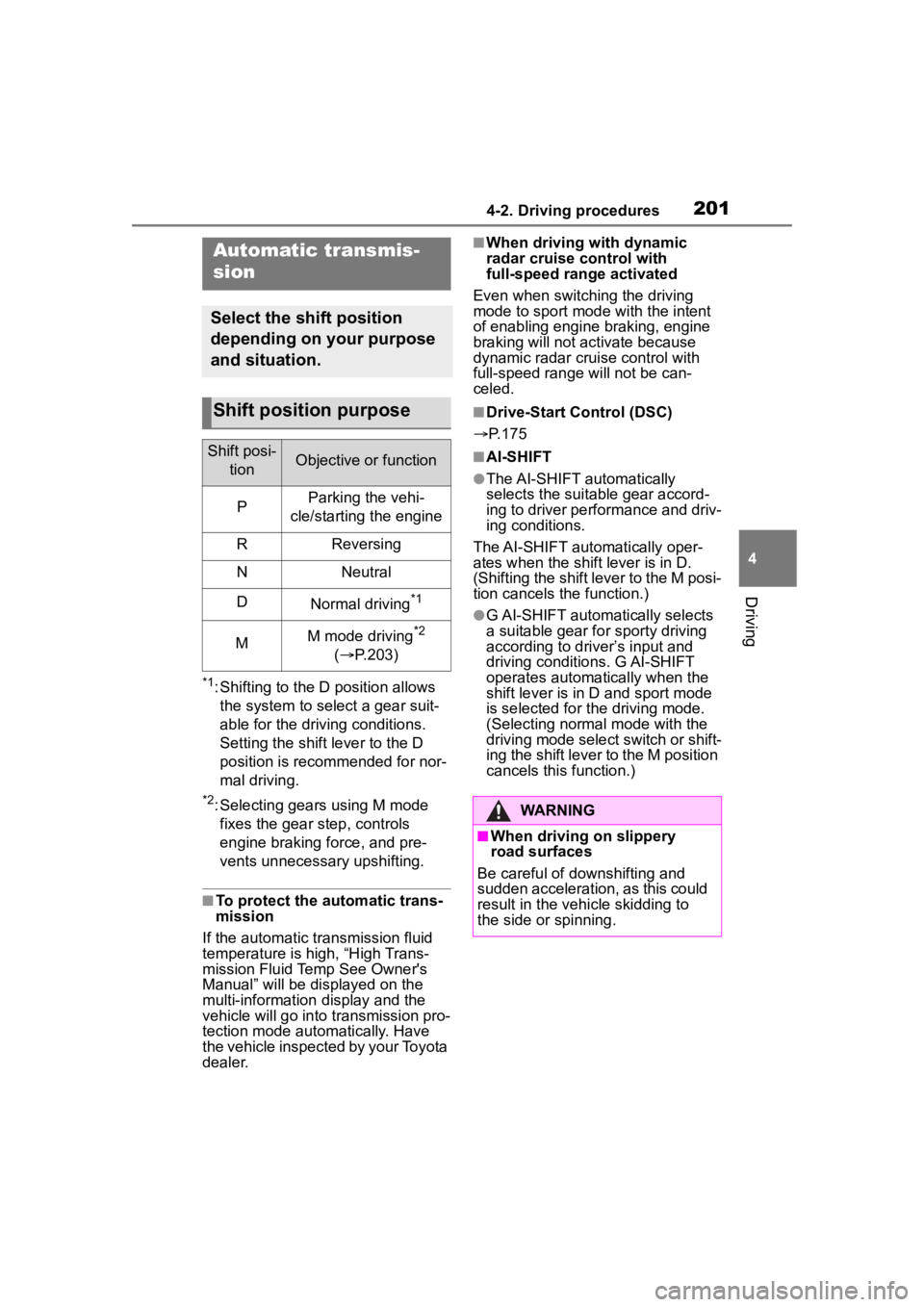
Automatic transmis-
sion
Select the shift position
depending on your purpose
and situation.
Shift position purpose
Shift posi-
tionObjective or function
PParking the vehi-
cle/starting the engine
RReversing
NNeutral
DNormal driving*1
MM mode driving*2
( P.203)
WARNING
■When driving on slippery
road surfaces
Be careful of downshifting and
sudden acceleration, as this could
result in the vehicle skidding to
the side or spinning.
Page 202 of 552

2024-2. Driving procedures
: While the engine switch is in
ON and the brake pedal
depressed
*, shift the shift lever
while pushing the shift release
button on the shift knob.
: Shift the shift lever while
pushing the shift release button
on the shift knob.
: Shift the shift lever normally.
When shifting the shift lever
between P and D, make sure that
the vehicle is completely stopped.
*: For the vehicle to be able to be
shifted from P, the brake pedal
must be depresse d before the
shift release button is pushed. If
the shift release button is pushed
first, the shift lock will not be
released.
■Shift lock system
The shift lock system is a system to
prevent accidental operation of the
shift lever in starting.
The shift lever can be shifted from P
only when the engine switch is in ON and the brake pedal is being
depressed.
■If the shift lever cannot be
shifted from P
First, check whether the brake pedal
is being depressed.
If the shift lever cannot be shifted
with your foot on the brake pedal,
there may be a p roblem with the
shift lock system. Have the vehicle
inspected by your Toyota dealer
immediately.
The following steps may be used as
an emergency measure to ensure
that the shift lev er can be shifted.
Releasing the shift lock:
1 Turn the engine switch to ON
and check that the parking brake
is set. ( P.199, 205)
2 Turn the engine switch to off.
3 Depress the brake pedal.
4 Pry the cover up with a flathead
screwdriver or equivalent tool.
To prevent damag e to the cover,
cover the tip of the screwdriver with
a rag.
5 Press and hold the shift lock
override button.
The shift lever can be shifted while
both buttons are pressed.
Shifting the shift lever
Page 203 of 552
2034-2. Driving procedures
4
DrivingP.300, 304
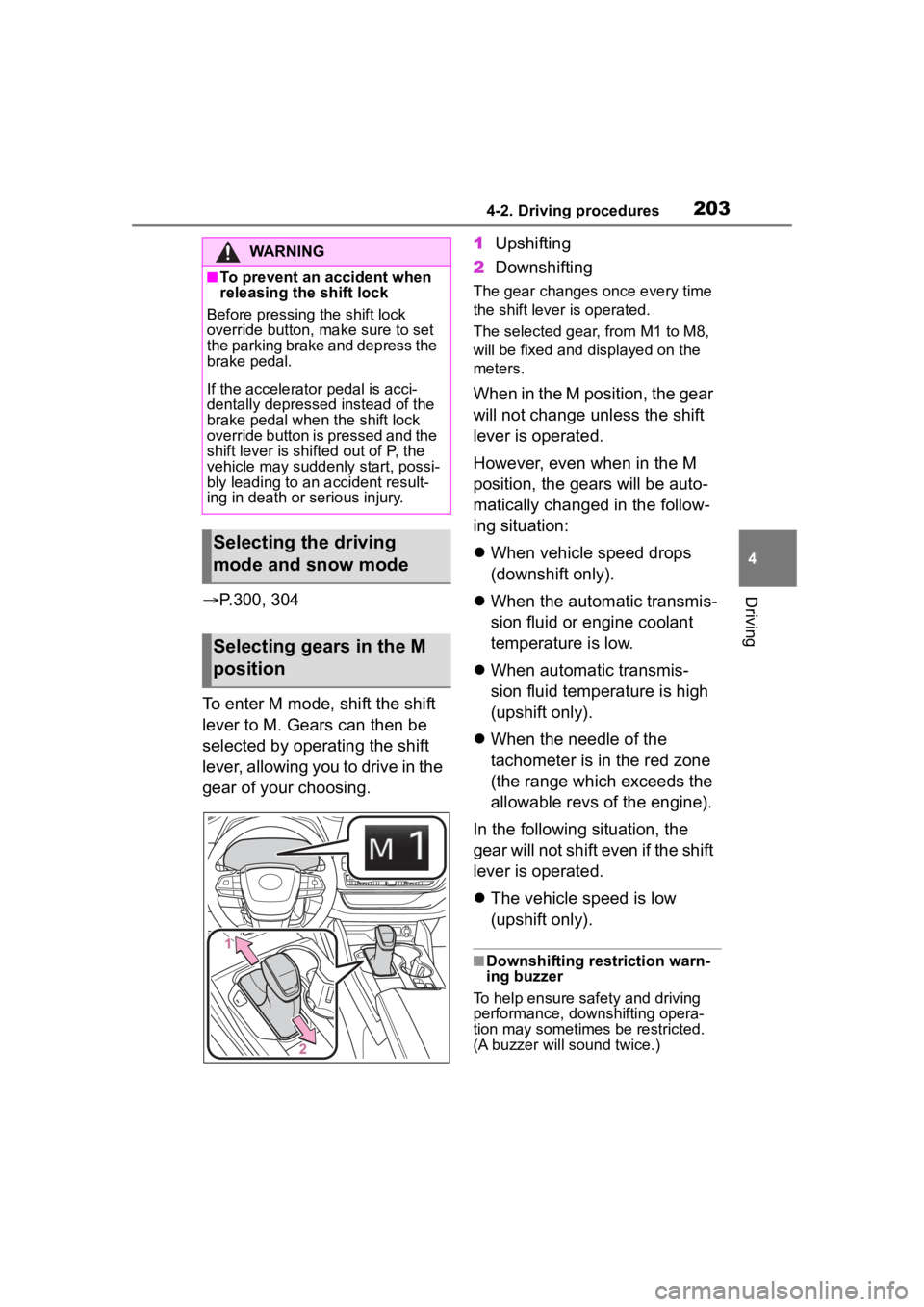
To enter M mode, shift the shift
lever to M. Gears can then be
selected by operating the shift
lever, allowing you to drive in the
gear of your choosing. 1
Upshifting
2 Downshifting
The gear changes once every time
the shift lever is operated.
The selected gear, from M1 to M8,
will be fixed and displayed on the
meters.
When in the M position, the gear
will not change unless the shift
lever is operated.
However, even when in the M
position, the gears will be auto-
matically changed in the follow-
ing situation:
When vehicle speed drops
(downshift only).
When the automatic transmis-
sion fluid or engine coolant
temperature is low.
When automatic transmis-
sion fluid temperature is high
(upshift only).
When the needle of the
tachometer is in the red zone
(the range which exceeds the
allowable revs of the engine).
In the following situation, the
gear will not shift even if the shift
lever is operated.
The vehicle speed is low
(upshift only).
■Downshifting restriction warn-
ing buzzer
To help ensure safety and driving
performance, dow nshifting opera-
tion may sometimes be restricted.
(A buzzer will sound twice.)
WARNING
■To prevent an accident when
releasing the shift lock
Before pressing the shift lock
override button, make sure to set
the parking brake and depress the
brake pedal.
If the accelerator pedal is acci-
dentally depressed instead of the
brake pedal when the shift lock
override button is pressed and the
shift lever is shifted out of P, the
vehicle may suddenly start, possi-
bly leading to an accident result-
ing in death or serious injury.
Selecting the driving
mode and snow mode
Selecting gears in the M
position
Page 204 of 552

2044-2. Driving procedures
1Right turn
2 Lane change to the right
(move the lever partway and
release it)
The right hand signals will flash 3
times.
3Lane change to the left
(move the lever partway and
release it)
The left hand signals will flash 3
times.
4Left turn
■Turn signals can be operated
when
The engine switch is in ON.
■If the indicator flashes faster
than usual
Check that a light bulb in the front or
rear turn signal lights has not burned out.
Tur n signal lever
Operating instructions
Page 206 of 552
2064-2. Driving procedures
When the shift lever is moved
into P, the parking brake will
be set, and the parking brake
indicator light and parking
brake light turn on.
Operate the shift lever with the
brake pedal depressed.
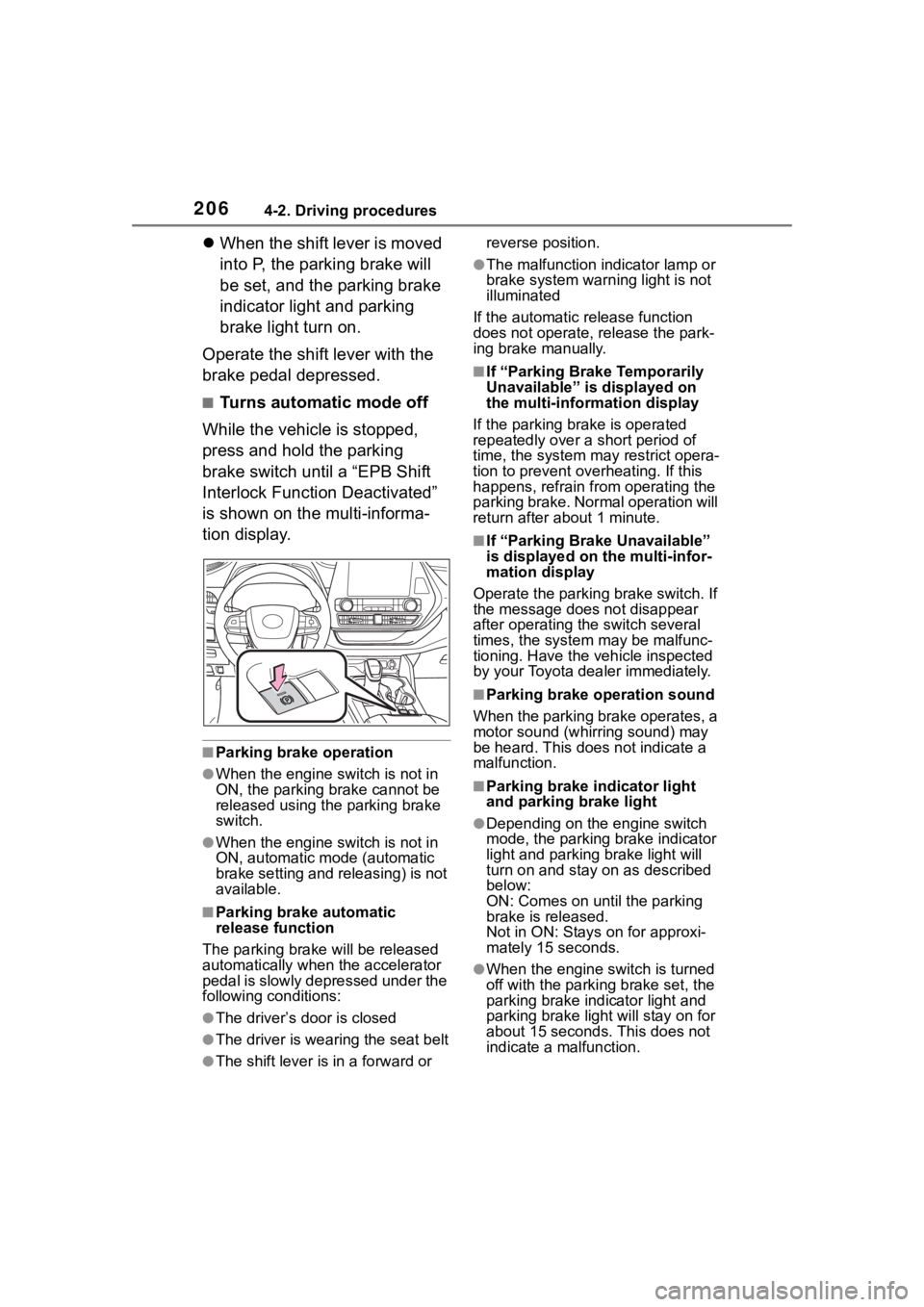
■Turns automatic mode off
While the vehicle is stopped,
press and hold the parking
brake switch until a “EPB Shift
Interlock Function Deactivated”
is shown on the multi-informa-
tion display.
■Parking brake operation
●When the engine switch is not in
ON, the parking brake cannot be
released using the parking brake
switch.
●When the engine switch is not in
ON, automatic mode (automatic
brake setting and releasing) is not
available.
■Parking brake automatic
release function
The parking brake will be released
automatically when the accelerator
pedal is slowly depressed under the
following conditions:
●The driver’s door is closed
●The driver is wearing the seat belt
●The shift lever is in a forward or reverse position.
●The malfunction in
dicator lamp or
brake system warning light is not
illuminated
If the automatic release function
does not operate, release the park-
ing brake manually.
■If “Parking Brake Temporarily
Unavailable” is displayed on
the multi-info rmation display
If the parking brake is operated
repeatedly over a short period of
time, the system may restrict opera-
tion to prevent ove rheating. If this
happens, refrain from operating the
parking brake. Normal operation will
return after about 1 minute.
■If “Parking Brake Unavailable”
is displayed on the multi-infor-
mation display
Operate the parking brake switch. If
the message does not disappear
after operating the switch several
times, the system may be malfunc-
tioning. Have the vehicle inspected
by your Toyota dealer immediately.
■Parking brake operation sound
When the parking brake operates, a
motor sound (whirr ing sound) may
be heard. This does not indicate a
malfunction.
■Parking brake indicator light
and parking brake light
●Depending on the engine switch
mode, the parking brake indicator
light and parking brake light will
turn on and stay on as described
below:
ON: Comes on until the parking
brake is released.
Not in ON: Stays on for approxi-
mately 15 seconds.
●When the engine switch is turned
off with the parking brake set, the
parking brake indicator light and
parking brake light will stay on for
about 15 seconds. This does not
indicate a malfunction.
Page 209 of 552
2094-2. Driving procedures
4
Driving
indicator light goes off. (P.205)
■When an inspection at your
Toyota dealer is necessary
When the brake hold standby indi-
cator (green) does not illuminate
even when the brake hold switch is
pressed with the brake hold system
operating conditions met, the sys-
tem may be malfunctioning. Have
the vehicle inspected at your Toyota
dealer.
■If “Brake Hold Malfunction
Press Brake to Deactivate Visit
Your Dealer” or “Brake Hold
Malfunction Visit Your Dealer”
is displayed on the multi-infor-
mation display
The system may be malfunctioning.
Have the vehicle inspected by your
Toyota dealer.
■Warning messages and buzzers
Warning messages and buzzers are
used to indicate a system malfunc-
tion or to inform the driver of the
need for caution. If a warning mes-
sage is shown on the multi-informa-
tion display, read the message and
follow the instructions.
■If the brake hold operated indi-
cator flashes
P. 4 3 8
WARNING
■When the vehicle is on a
steep incline
When using the brake hold sys-
tem on a steep incline, exercise
caution. The brake hold function
may not hold the vehicle in such a
situation.
■When stopped on a slippery
road
The system cannot stop the vehi-
cle when the gripping ability of the
tires has been exceeded. Do not
use the system when stopped on
a slippery road.
NOTICE
■When parking the vehicle
The brake hold system is not
designed for use when parking
the vehicle for a long period of
time. Turning the engine switch off
while the system is holding the
brake may release the brake,
which would cause the vehicle to
move. When operating the engine
switch, depress the brake pedal,
shift the shift lever to P and set
the parking brake.
Page 210 of 552
2104-3. Operating the lights and wipers
4-3.Operating the lights and wipers
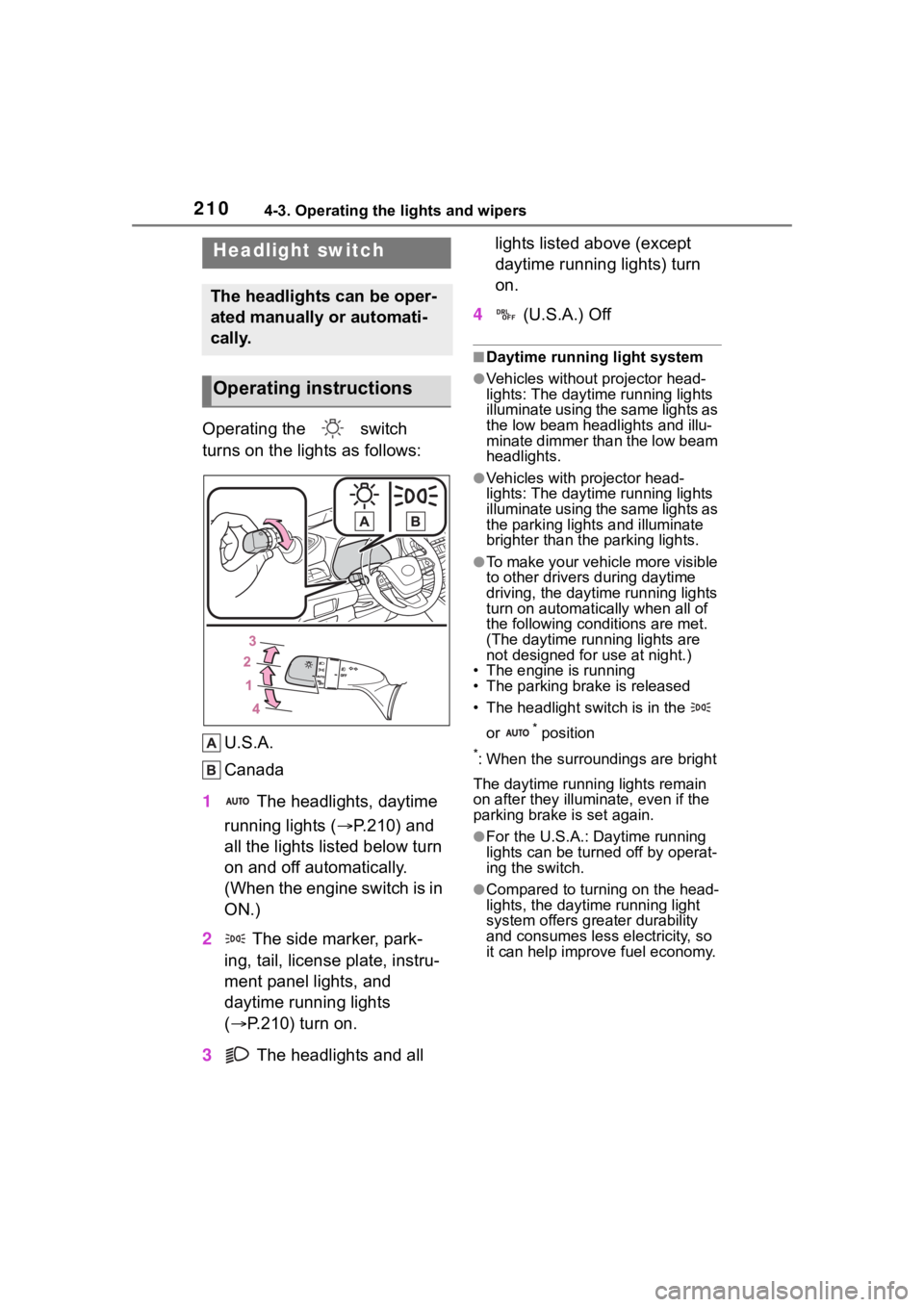
Operating the switch
turns on the lights as follows:U.S.A.
Canada
1 The headlights, daytime
running lights ( P.210) and
all the lights listed below turn
on and off automatically.
(When the engine switch is in
ON.)
2 The side marker, park-
ing, tail, license plate, instru-
ment panel lights, and
daytime running lights
( P.210) turn on.
3 The headlights and all lights listed above (except
daytime running lights) turn
on.
4 (U.S.A.) Off
■Daytime running light system
●Vehicles without projector head-
lights: The daytime running lights
illuminate using the same lights as
the low beam headlights and illu-
minate dimmer than the low beam
headlights.
●Vehicles with projector head-
lights: The daytime running lights
illuminate using the same lights as
the parking light s and illuminate
brighter than the parking lights.
●To make your vehicle more visible
to other drivers during daytime
driving, the daytime running lights
turn on automatically when all of
the following conditions are met.
(The daytime running lights are
not designed for use at night.)
• The engine is running
• The parking brake is released
• The headlight switch is in the
or
* position
*: When the surroundings are bright
The daytime running lights remain
on after they illumi nate, even if the
parking brake is set again.
●For the U.S.A.: Daytime running
lights can be turned off by operat-
ing the switch.
●Compared to turning on the head-
lights, the daytime running light
system offers greater durability
and consumes less electricity, so
it can help improve fuel economy.
Headlight switch
The headlights can be oper-
ated manually or automati-
cally.
Operating instructions