2023 TOYOTA HIGHLANDER engine
[x] Cancel search: enginePage 153 of 552
1533-4. Adjusting the steering wheel and mirrors
3
Before driving
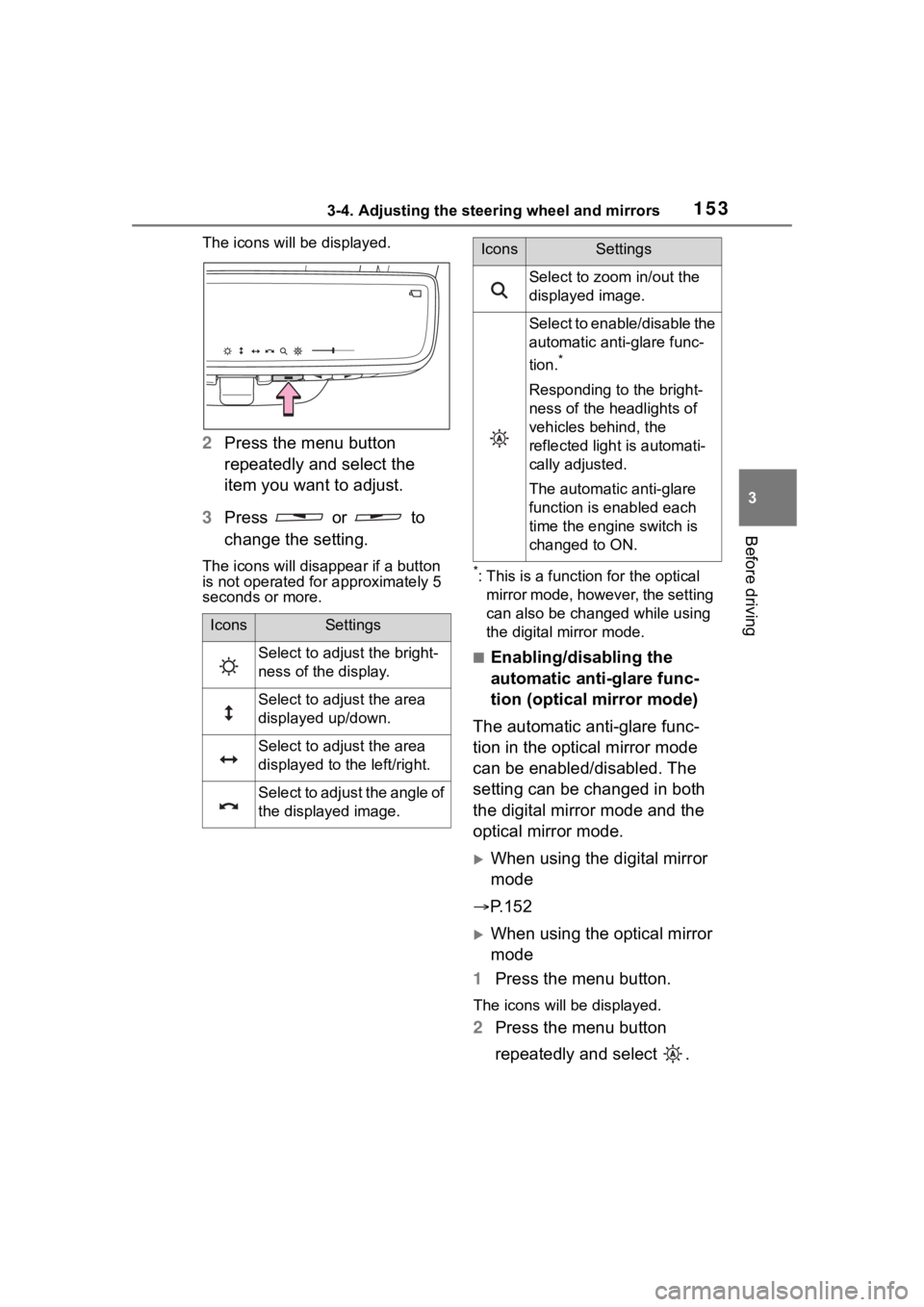
The icons will be displayed.
2Press the menu button
repeatedly and select the
item you want to adjust.
3 Press or to
change the setting.
The icons will disapp ear if a button
is not operated fo r approximately 5
seconds or more.*: This is a functi on for the optical
mirror mode, however, the setting
can also be changed while using
the digital mirror mode.
■Enabling/disabling the
automatic anti-glare func-
tion (optical mirror mode)
The automatic anti-glare func-
tion in the optical mirror mode
can be enabled/disabled. The
setting can be changed in both
the digital mirror mode and the
optical mirror mode.
When using the digital mirror
mode
P.152
When using the optical mirror
mode
1 Press the menu button.
The icons will be displayed.
2Press the menu button
repeatedly and select .
IconsSettings
Select to adjust the bright-
ness of the display.
Select to adjust the area
displayed up/down.
Select to adjust the area
displayed to the left/right.
Select to adjust the angle of
the displayed image.
Select to zoom in/out the
displayed image.
Select to enable/disable the
automatic anti-glare func-
tion.
*
Responding to the bright-
ness of the headlights of
vehicles behind, the
reflected light is automati-
cally adjusted.
The automatic anti-glare
function is enabled each
time the engine switch is
changed to ON.
IconsSettings
Page 160 of 552
1603-4. Adjusting the steering wheel and mirrors
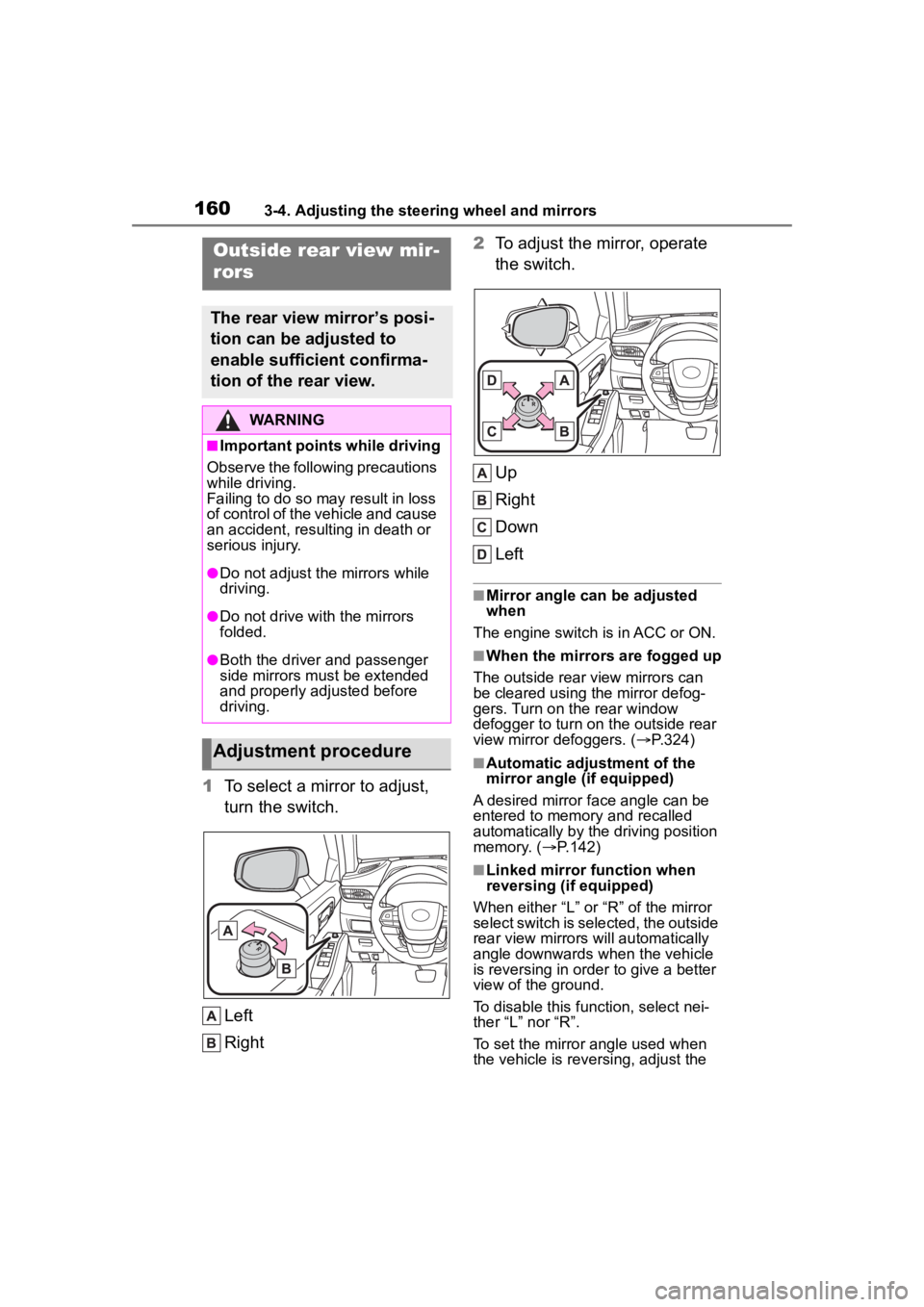
1To select a mirror to adjust,
turn the switch.
Left
Right 2
To adjust the mirror, operate
the switch.
Up
Right
Down
Left
■Mirror angle can be adjusted
when
The engine switch i s in ACC or ON.
■When the mirrors are fogged up
The outside rear view mirrors can
be cleared using the mirror defog-
gers. Turn on the rear window
defogger to turn on the outside rear
view mirror defoggers. ( P.324)
■Automatic adjustment of the
mirror angle (if equipped)
A desired mirror face angle can be
entered to memory and recalled
automatically by the driving position
memory. ( P.142)
■Linked mirror function when
reversing (if equipped)
When either “L” or “R” of the mirror
select switch is selected, the outside
rear view mirrors will automatically
angle downwards when the vehicle
is reversing in order to give a better
view of the ground.
To disable this function, select nei-
ther “L” nor “R”.
To set the mirror angle used when
the vehicle is reversing, adjust the
Outside rear view mir-
rors
The rear view mirror’s posi-
tion can be adjusted to
enable sufficient confirma-
tion of the rear view.
WARNING
■Important points while driving
Observe the following precautions
while driving.
Failing to do so may result in loss
of control of the vehicle and cause
an accident, resul ting in death or
serious injury.
●Do not adjust the mirrors while
driving.
●Do not drive with the mirrors
folded.
●Both the driver and passenger
side mirrors must be extended
and properly adjusted before
driving.
Adjustment procedure
Page 162 of 552
1623-5. Opening, closing the windows and moon roof
3-5.Opening, closing the windows and moon roof
The power windows can be
opened and closed using the
switches.
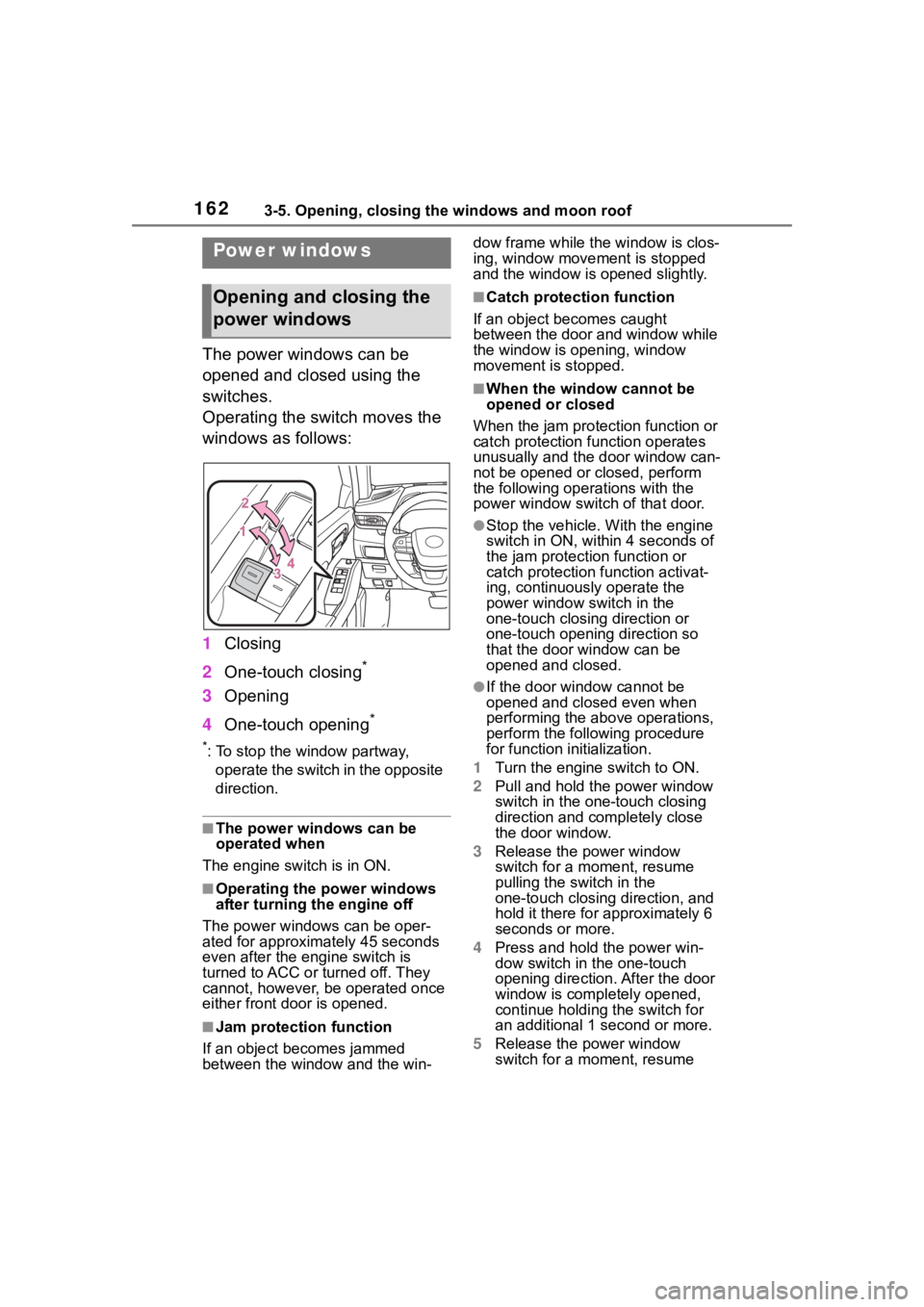
Operating the switch moves the
windows as follows:
1Closing
2 One-touch closing
*
3Opening
4 One-touch opening
*
*: To stop the window partway,
operate the switch in the opposite
direction.
■The power windows can be
operated when
The engine switch is in ON.
■Operating the power windows
after turning the engine off
The power windows can be oper-
ated for approximately 45 seconds
even after the engine switch is
turned to ACC or turned off. They
cannot, however, be operated once
either front door is opened.
■Jam protection function
If an object becomes jammed
between the window and the win- dow frame while the
window is clos-
ing, window move ment is stopped
and the window is opened slightly.
■Catch protection function
If an object becomes caught
between the door and window while
the window is opening, window
movement is stopped.
■When the window cannot be
opened or closed
When the jam protection function or
catch protection function operates
unusually and the door window can-
not be opened or closed, perform
the following operations with the
power window swit ch of that door.
●Stop the vehicle. With the engine
switch in ON, within 4 seconds of
the jam protection function or
catch protection function activat-
ing, continuously operate the
power window switch in the
one-touch closing direction or
one-touch opening direction so
that the door window can be
opened and closed.
●If the door window cannot be
opened and closed even when
performing the above operations,
perform the follo wing procedure
for function initialization.
1 Turn the engine switch to ON.
2 Pull and hold the power window
switch in the on e-touch closing
direction and completely close
the door window.
3 Release the power window
switch for a m oment, resume
pulling the switch in the
one-touch closing direction, and
hold it there for approximately 6
seconds or more.
4 Press and hold the power win-
dow switch in the one-touch
opening direction. After the door
window is completely opened,
continue holding the switch for
an additional 1 second or more.
5 Release the power window
switch for a m oment, resume
Power windows
Opening and closing the
power windows
Page 163 of 552

1633-5. Opening, closing the windows and moon roof
3
Before driving
pushing the switch in the
one-touch opening direction, and
hold it there for approximately 4
seconds or more.
6 Pull and hold the power window
switch in the one-touch closing
direction again. After the door
window is completely closed,
continue holding the switch for a
further 1 second or more.
If you release the switch while the
window is moving, start again from
the beginning.
If the window reverses and cannot
be fully closed or opened, have the
vehicle inspected by your Toyota
dealer.
■Door lock linked window opera-
tion
●The power windows can be
opened and closed using the
mechanical key.
* ( P.463)
●The power windows can be
opened using the wireless remote
control.
* ( P. 1 1 5 )*: These settings must be custom-
ized at your Toyota dealer.
■Power windows open warning
buzzer
A buzzer sounds and a message is
shown on the multi -information dis-
play when the engine switch is
turned off and the driver’s door is
opened with the power windows
open.
■Customization
Some functions can be customized.
( P.494)
WARNING
Observe the following precau-
tions.
Failing to do so may result in
death or serious injury.
■Closing the windows
●The driver is responsible for all
the power window operations,
including the operation for the
passengers. In order to prevent
accidental operation, especially
by a child, do not let a child
operate the power windows. It is
possible for children and other
passengers to have body parts
caught in the power window.
Also, when ridin g with a child, it
is recommended to use the win-
dow lock switch. (
P.164)
●Check to make sure that all pas-
sengers do not have any part of
their body in a pos ition where it
could be caught when a window
is being operated.
●When using the wireless remote
control or mechanical key and
operating the power windows,
operate the power window after
checking to make sure that
there is no possibility of any
passenger having any of their
body parts caug ht in the win-
dow. Also do not let a child
operate window by the wireless
remote control or mechanical
key. It is possib le for children
and other passengers to get
caught in the power window.
●When exiting the vehicle, turn
the engine switch off, carry the
key and exit the vehicle along
with the child. There may be
accidental operation, due to
mischief, etc., that may possibly
lead to an accident.
Page 164 of 552
1643-5. Opening, closing the windows and moon roof
This function can be used to
prevent children from acciden-
tally opening or closing a pas-
senger window.
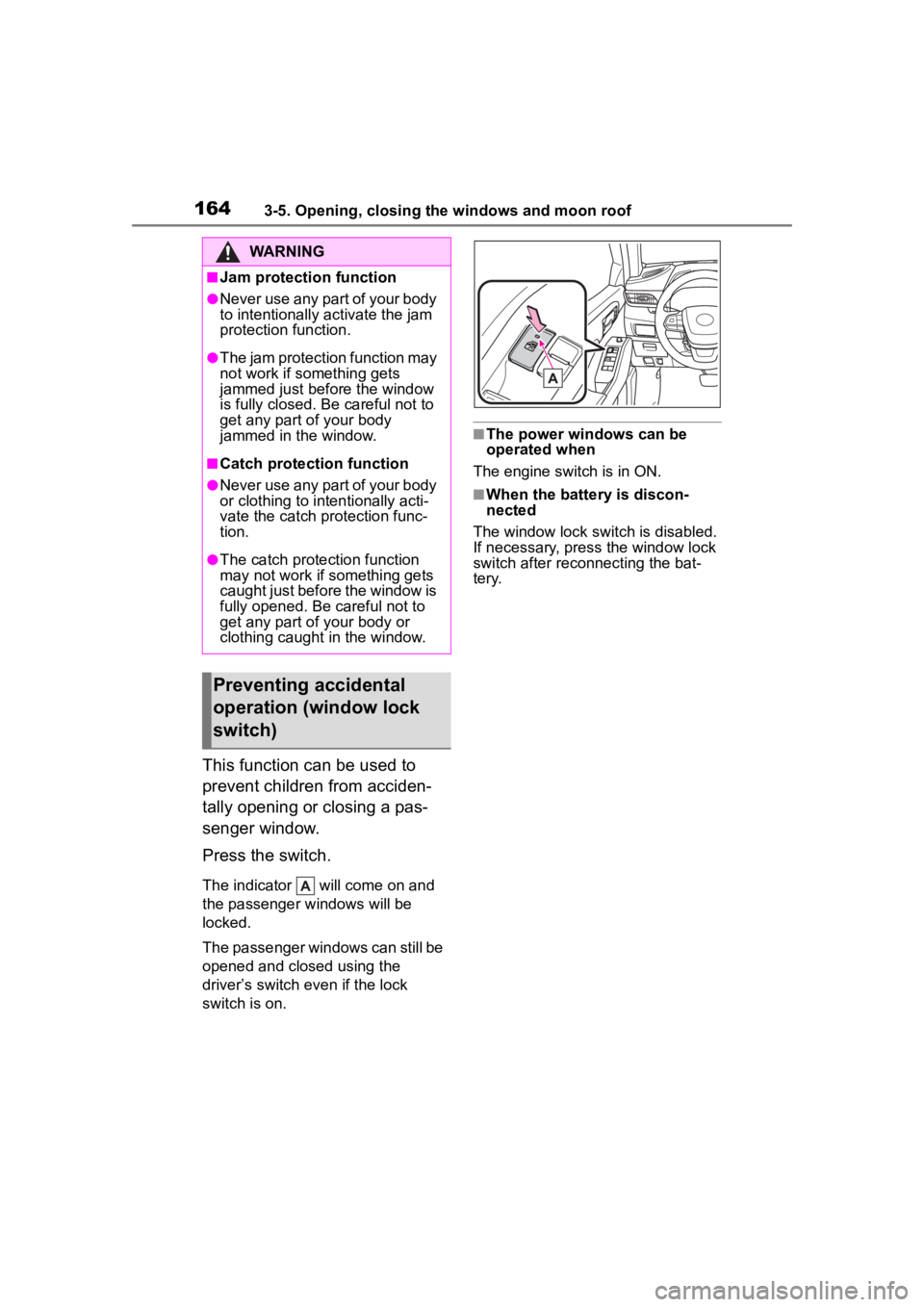
Press the switch.
The indicator will come on and
the passenger windows will be
locked.
The passenger windows can still be
opened and closed using the
driver’s switch even if the lock
switch is on.
■The power windows can be
operated when
The engine switch is in ON.
■When the battery is discon-
nected
The window lock switch is disabled.
If necessary, press the window lock
switch after reconnecting the bat-
tery.
WARNING
■Jam protection function
●Never use any part of your body
to intentionally a ctivate the jam
protection function.
●The jam protection function may
not work if something gets
jammed just before the window
is fully closed. Be careful not to
get any part of your body
jammed in the window.
■Catch protection function
●Never use any part of your body
or clothing to intentionally acti-
vate the catch p rotection func-
tion.
●The catch protection function
may not work if something gets
caught just before the window is
fully opened. Be careful not to
get any part of your body or
clothing caught in the window.
Preventing accidental
operation (window lock
switch)
Page 165 of 552
1653-5. Opening, closing the windows and moon roof
3
Before driving
*: If equipped
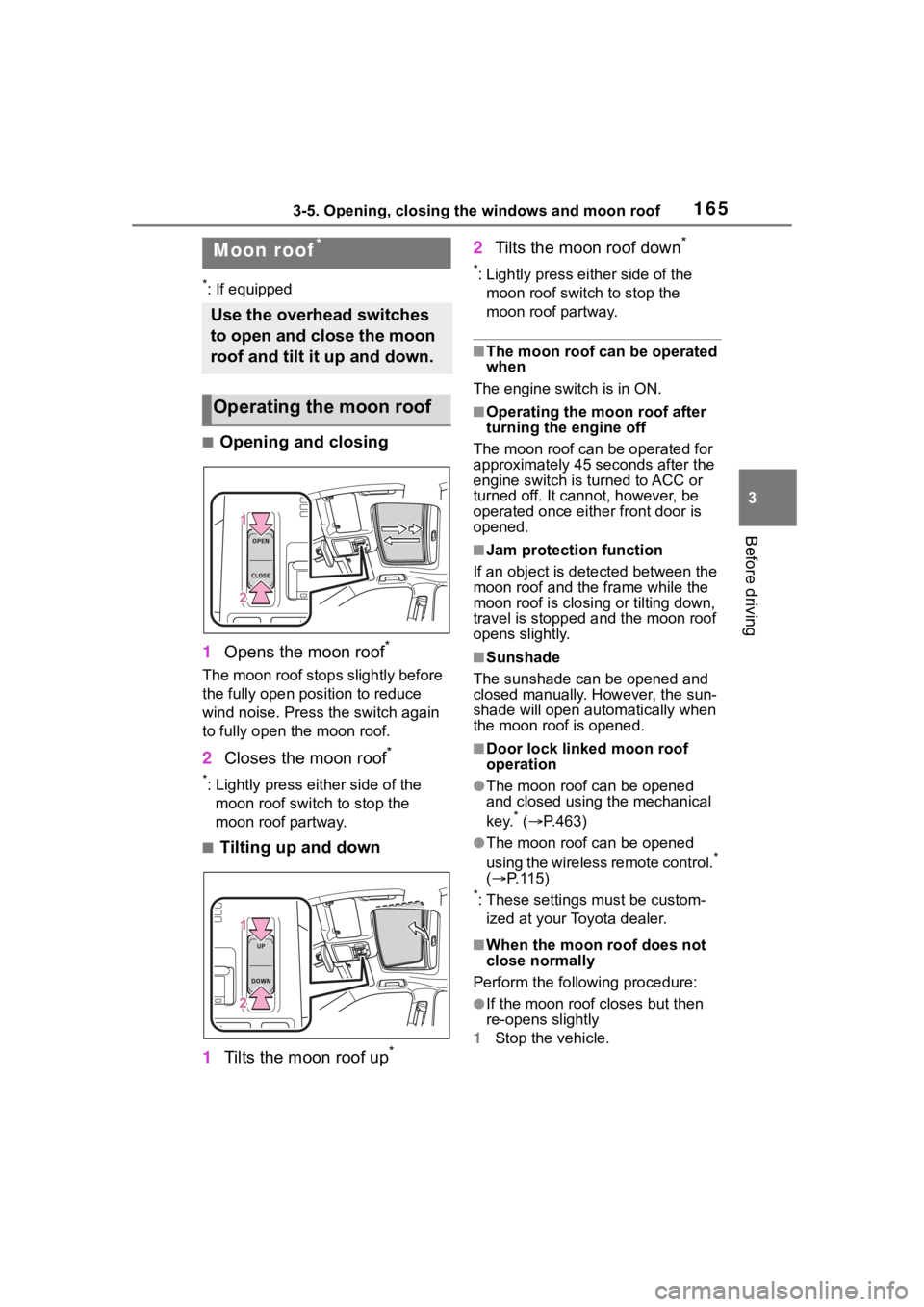
■Opening and closing
1 Opens the moon roof
*
The moon roof stops slightly before
the fully open position to reduce
wind noise. Press the switch again
to fully open the moon roof.
2Closes the moon roof*
*: Lightly press either side of the
moon roof switch to stop the
moon roof partway.
■Tilting up and down
1 Tilts the moon roof up
*
2Tilts the moon roof down*
*: Lightly press e ither side of the
moon roof switch to stop the
moon roof partway.
■The moon roof can be operated
when
The engine switch is in ON.
■Operating the moon roof after
turning the engine off
The moon roof can be operated for
approximately 45 s econds after the
engine switch is turned to ACC or
turned off. It cannot, however, be
operated once eithe r front door is
opened.
■Jam protection function
If an object is dete cted between the
moon roof and the frame while the
moon roof is closing or tilting down,
travel is stopped and the moon roof
opens slightly.
■Sunshade
The sunshade can be opened and
closed manually. However, the sun-
shade will open aut omatically when
the moon roof is opened.
■Door lock linked moon roof
operation
●The moon roof can be opened
and closed using the mechanical
key.
* ( P.463)
●The moon roof can be opened
using the wireless remote control.*
( P. 1 1 5 )
*: These settings must be custom-
ized at your Toyota dealer.
■When the moon roof does not
close normally
Perform the following procedure:
●If the moon roof closes but then
re-opens slightly
1 Stop the vehicle.
Moon roof*
Use the overhead switches
to open and close the moon
roof and tilt it up and down.
Operating the moon roof
Page 167 of 552

1673-5. Opening, closing the windows and moon roof
3
Before driving
WARNING
●Check to make sure that all pas-
sengers do not have any part of
their body in a position where it
could be caught when the moon
roof is being operated.
●When using the wireless remote
control or mechanical key and
operating the moon roof, oper-
ate the moon roof after checking
to make sure that there is no
possibility of any passenger
having any of their body parts
caught in the moon roof. Also,
do not let a child operate moon
roof by the wireless remote con-
trol or mechanical key. It is pos-
sible for children and other
passengers to get caught in the
moon roof.
●When exiting the vehicle, turn
the engine switch off, carry the
key and exit the vehicle along
with the child. There may be
accidental operation, due to
mischief, etc., that may possibly
lead to an accident.
■Jam protection function
●Never use any part of your body
to intentionally a ctivate the jam
protection function.
●The jam protection function may
not work if something gets
caught just before the moon
roof is fully closed. Also, the jam
protection function is not
designed to operate while the
switch is being pressed. Take
care so that your fingers, etc. do
not get caught.
Page 169 of 552

1693-5. Opening, closing the windows and moon roof
3
Before driving
*: To stop operation partway, quickly slide and release the switch
again.
■The panoramic moon roof can
be operated when
The engine switch is in ON.
■Operating the panoramic moon
roof after turning the engine off
The panoramic moon roof and elec-
tronic sunshade can be operated for
approximately 45 seconds after the
engine switch is turned to ACC or
turned off. It cannot, however, be
operated once either front door is
opened.
■Closing the shade when the
panoramic moon roof is open
1 Slide the shade switch forward.
The shade closes up to its
half-closed position and then the
panoramic moon roof closes up to
the tilt-up position.
2 Slide and hold the shade switch
again.
The panoramic moon roof closes as
long as the switch is being held.
After the panoramic moon roof is
fully closed, the shade will fully
close automatically.
■Jam protection function
If an object is det ected between the
panoramic moon roof and the frame
in the followin g situations, travel is
stopped and the panoramic moon
roof opens slightly:
●The panoramic moon roof is clos- ing or tilting down.
●The electronic sunshade is clos-
ing.
■When the panoramic moon roof
does not close normally
Perform the following procedure:
●If the panoramic moon roof closes
but then re-opens slightly
1 Stop the vehicle.
2 Slide the panoramic moon roof
switch forward and hold it.
*
The panoramic moo n roof will close
then reopen and pau se for approxi-
mately 10 seconds. Then it will
close up to the tilt-up position.
3 Release the switch and then
slide it forward and hold it again.
The panoramic moo n roof will close
as long as the switch is being held.
4 Check to make sure that the pan-
oramic moon roof is completely
closed and then release the
switch.
●If the panoramic moon roof tilts
down but then tilts back up
1 Stop the vehicle.
2 Slide the panoramic moon roof
switch forward and hold it.
*
The panoramic moo n roof will tilt
down then tilt up and pause for
approximately 10 seconds. Then it
will close.
3 Check to make sure that the pan-
oramic moon roof is completely
closed and then release the
switch.
*: If the switch is released at the
incorrect time, the procedure will
have to be perfo rmed again from
the beginning.
If the panoramic moon roof does not
fully close even after performing the
above procedure correctly, have the
vehicle inspected by your Toyota
dealer.