2023 TOYOTA HIGHLANDER engine
[x] Cancel search: enginePage 115 of 552

1153-2. Opening, closing and locking the doors
3
Before driving
3-2.Opening, closing and locking the doors
■Smart key system
Carry the electronic key to
enable this function.
1 Grip the driver’s door handle
to unlock the door. Holding
the driver’s door handle for
approximately 2 seconds
unlocks all the doors. Grip
the front passenger’s door
handle to unlock all the
doors.
*
Make sure to touch the sensor on
the back of the handle.
The doors cannot be unlocked for 3
seconds after the doors are locked.
*: The door unlock settings can be
changed. ( P.115, 494)
2 Touch the lock sensor (the
indentation on the upper part of the front door handle) to
lock all the doors.
Check that the d
oor is securely
locked.
■Wireless remote control
1 Locks all the doors
Check that the d oor is securely
locked.
2 Unlocks all the doors
Pressing the button unlocks the
driver’s door. Pressing the button
again within 5 seconds unlocks the
other doors.
Press and hold to open the win-
dows
*1 and moon roof*1, 2
*1
: This setting must be customized at your Toyota dealer.
*2: If equipped
■Switching the door unlock func-
tion
It is possible to set which doors the
entry function unlocks using the
wireless remote control.
1 Turn the engine switch off.
2 When the indicator light on the
key surface is not on, press and
hold , or for
approximately 5 seconds while
pressing and holding .
The setting changes each time an
operation is per formed, as shown
below. (When changing the setting
Side doors
The vehicle can be locked
and unlocked using the
entry function, wireless
remote control or door lock
switches.
Unlocking and locking the
doors from the outside
Page 117 of 552

1173-2. Opening, closing and locking the doors
3
Before driving
■Conditions affecting the opera-
tion of the smart key system or
wireless remote control
P. 1 3 3
■If the smart key system or the
wireless remote control does
not operate properly
Use the mechanical key to lock and
unlock the doors. ( P.463)
Replace the key battery with a new
one if it is depleted. ( P.410)
■If the battery is discharged
The doors cannot be locked and
unlocked using the smart key sys-
tem or wireless remote control. Lock
or unlock the doors using the
mechanical key. ( P.463)
■Rear seat reminder function
In order to remind you not to forget
luggage, etc. in the rear seat, when
the engine switch is turned off after
any of the following conditions are
met, a buzzer will sound and a mes-
sage will be displayed on the
multi-information di splay for approx-
imately 6 seconds.
●The engine is started within 10
minutes after opening and closing
a rear door.
●A rear door has been opened and
closed after the engine was
started.
However, if a rear door is opened
and then closed within approxi-
mately 2 seconds , the rear seat
reminder function may not operate.
The rear seat rem inder function
determines that luggage, etc. has
been placed in a rear seat based on
opening and closing of a rear door.
Therefore, depending on the situa-
tion, the rear seat reminder function
may not operate and you may still
forget luggage, etc. in the rear seat,
or it may operate unnecessarily.
The rear seat reminder function can
be enabled/disabled. ( P.494)
■Customization
Some functions can be customized.
( P.494)
WARNING
■To prevent an accident
Observe the following precautions
while driving the vehicle. Failure
to do so may result in a door
opening and an occupant falling
out, resulting in death or serious
injury.
●Ensure that all doors are prop-
erly closed and locked.
●Do not pull the inside handle of
the doors while driving.
Be especially careful for the front
doors, as the doors may be
opened even if the inside lock but-
tons are in locked position.
●Set the rear door child-protector
locks when children are seated
in the rear seats.
■When opening or closing a
door
Check the surroundings of the
vehicle such as wh ether the vehi-
cle is on an incline, whether there
is enough space for a door to
open and whether a strong wind
is blowing. When opening or clos-
ing the door, hold the door handle
tightly to prepare for any unpre-
dictable movement.
Page 118 of 552

1183-2. Opening, closing and locking the doors
■Door lock switches
1 Locks all the doors
2 Unlocks all the doors
■Inside lock buttons
1 Locks the door
2 Unlocks the door
The front doors can be opened by
pulling the inside ha ndle even if the
lock buttons are in the lock position.
■Locking the front doors from
the outside without a key
1 Move the inside lock button to
the lock position.
2 Close the door.
The door cannot be locked if the
engine switch is in ACC or ON, or
the electronic key is left inside the
vehicle.
The key may not b e detected cor-
rectly and the door may be locked.
■Open door warning buzzer
If a door or the hood is not fully
closed, a buzzer will sound when
the vehicle speed reaches 3 mph (5
km/h).
The open door(s) or hood is dis-
played on the multi-information dis-
play.
The door cannot be opened
from inside the vehicle when the
lock is set.
1 Unlock
2 Lock
These locks can be set to prevent
children from opening the rear
doors. Push down on each rear
door switch to lock both rear doors.
The following functions can be
set or canceled:
For instructions on customizing,
refer to P.494.
Unlocking and locking the
doors from the inside
Rear door child-protector
lock
Automatic door locking
and unlocking systems
Page 125 of 552

1253-2. Opening, closing and locking the doors
3
Before driving
operation to occur.
Kick sensor
Hands Free Power Back
Door operation detection
area
3 When the kick sensor detects
that your foot is pulled back,
a buzzer will sound and the
back door will automatically
fully open/close.
If kick operation is performed while
the back door is opening/closing,
the back door will st op the opera-
tion. Perform a kick operation again
will operate the ba ck door in the
opposite direction.
■Back door closer
In the event that the back door is left
slightly open, the back door closer
will automatically close it to the fully
closed position.
●The back door closer can function
when the engine s witch is in any
mode.
●The back door can be opened
using the back door opener switch
even if the back door closer is
operating.
■Power back door operating con-
ditions
If the following conditions are met,
the power back door can be opened
and closed automatically.
●When the power back door sys- tem is enabled. (
P.494)
●When the engine s witch is in ON,
one of the following conditions
must be met in a ddition to the
above conditions:
• The parking brake is engaged.
• The brake pedal is depressed.
• The shift lever is in P.
■Operation of the power back
door
●When the power back door begins
to operate, the emergency flash-
ers will flash twice and a buzzer
will sound.
●When the power back door is dis-
abled, the powe r back door will
not operate but can be opened
and closed manually.
●When the power back door is
opening/closing, if the power back
door becomes obstructed, opera-
tion will stop.
■Jam protection function
Sensors are installed on the right
and left sides of the power back
door. When the door is automati-
cally closing and the sensors are
pushed due to an object being
clamped, etc., the jam protection
function operates.
From that position the door auto-
matically moves a little in the oppo-
site direction and then the function
stops.
■Back door reserve lock function
This function reserves the locking of
the power back door when the
power back door is open. If the fol-
lowing operations are performed, all
of the doors except the power back
door will lock and then the power
Page 126 of 552
1263-2. Opening, closing and locking the doors
back door will lock when it is com-
pletely closed.
1Close all of the doors, except the
back door.
2 Perform an automatic closing
operation of the power back door
and lock the doors using the
wireless remote control ( P. 1 1 5 )
or smart key system ( P.115)
while the power back door is
closing.
A buzzer sounds and the emer-
gency flashers flash to indicate that
all the doors have been closed and
locked.
●If the electronic key is placed
inside the vehicle after starting a
close operation via the door
reserve lock function, the elec-
tronic key may become locked
inside the vehicle.
●If the back door does not fully
close due to the operation of the
jam protection function, etc., while
the back door is automatically
closing after a door reserve lock
operation is performed, the door
reserve lock function is canceled
and all the do ors will unlock.
●Before leaving t he vehicle, make
sure that all the doors are closed
and locked.
■Kick sensor operating condi-
tions (vehicles with a Hands
Free Power Back Door)
●When the kick sensor operation
setting is turned on ( P.494) and
the engine switch is turned off.
●When an electronic key is carried
within the operation detection
area.
■Situations in which the Hands
Free Power Back Door may not
operate properly (if equipped)
In the following situations, the
Hands Free Power Back Door may
not operate properly:
●When a foot remains under the
rear bumper.
●If the rear bumper is strongly hit
with a foot or is touched for a
while.
If the rear bumper has been touched
for a while, wait f or a short time
before attempting to operate the
Hands Free Power Back Door
again.
●When standing excessively close
to the rear bumper.
●When an external radio wave
source interferes with the commu-
nication between the electronic
key and the vehicle. ( P.133)
●When the vehicle is parked near
an electrical noise source which
affects the sensitivity of the Hands
Free Power Back Door, such as a
pay parking spot, gas station,
electrically heated road, or fluo-
rescent light.
●When the vehicle is near a TV
tower, electric pow er plant, radio
station, large display, airport or
other facility that generates strong
radio waves or electrical noise.
●When a large amount of water is
applied to the rea r bumper, such
as when the vehicle is being
washed or in heavy rain.
●When mud, snow, ice, etc. is
attached to the rear bumper.
●When the vehicle has been
parked for a while near objects
that may move and contact the
rear bumper, such as plants.
●When an accessory i s installed to
the rear bumper.
If an accessory has been installed,
turn the kick sensor operation set-
ting off. ( P.494)
■Preventing unintentional opera-
tion of the Hands Free Power
Back Door (if equipped)
When an electronic key is in the
operation detection area, the Hands
Free Power Back Door may operate
unintentionally, so be careful in the
following situations:
Page 128 of 552

1283-2. Opening, closing and locking the doors
WARNING
●If the power back door system is
disabled while the power back
door is operating, the back door
will stop operating. The back
door must then be operated
manually. Take extra care in this
situation, as the back door may
open or close suddenly.
●If the operating conditions of the
power back door (
P.125) are
no longer met, a buzzer may
sound and the back door may
stop opening or closing. The
back door must then be oper-
ated manually. Take extra care
on an incline in this situation, as
the back door may move sud-
denly.
●On an incline, t he back door
may suddenly shut after it
opens. Make sure the back door
is fully open and secure.
●In the following situations, the
power back door may detect an
abnormality and automatic
operation may be stopped. In
this case, the back door must
then be operated manually.
Take extra care in this situation,
as the stopped back door may
suddenly open or close, causing
an accident.
• When the back door contacts an obstacle
• When the battery voltage sud- denly drops, such as when the
engine switch is turned to ON or
the engine is started during
automatic operation
●If a heavy objec t is attached to
the back door, the back door
may not operate, causing a mal-
function, or the back door may
suddenly shut again after being
opened, causing someone’s
hands, arms, head or neck to be
caught and injured. Do not
attach any acce ssories other
than genuine Toyota parts to the
back door.
■Jam protection function
Observe the following precau-
tions. Failure to do so may cause
death or serious injury.
●Never use any part of your body
to intentionally activate the jam
protection function.
●The jam protection function may
not work if something gets
caught just before the back door
fully closes. Be careful not to
get fingers caught or anything
else.
●The jam protection function may
not work depending on the
shape of the object that is
caught. Be careful not to catch
fingers or anything else.
■Hands Free Power Back Door
(if equipped)
Observe the following precautions
when operating the Hands Free
Power Back Door. Failure to do so
may cause death or serious injury.
●Check the safety of the sur-
rounding area to make sure
there are no obs tacles or any-
thing that could cause any of
your belongings to get caught.
●Exhaust gasses cause the
exhaust pipes to become quite
hot. When operating the Hands
Free Power Back Door, be care-
ful not to touch the exhaust
pipe.
Page 131 of 552
1313-2. Opening, closing and locking the doors
3
Before driving
■When setting the open position
of the back door by the
multi-information display
The open position of the power back
door can be adjusted using the
multi-information display. ( P.494)
When opened, the power back door
will open to the last position set
using the power back door switch on
the back door or on the multi-infor-
mation display.
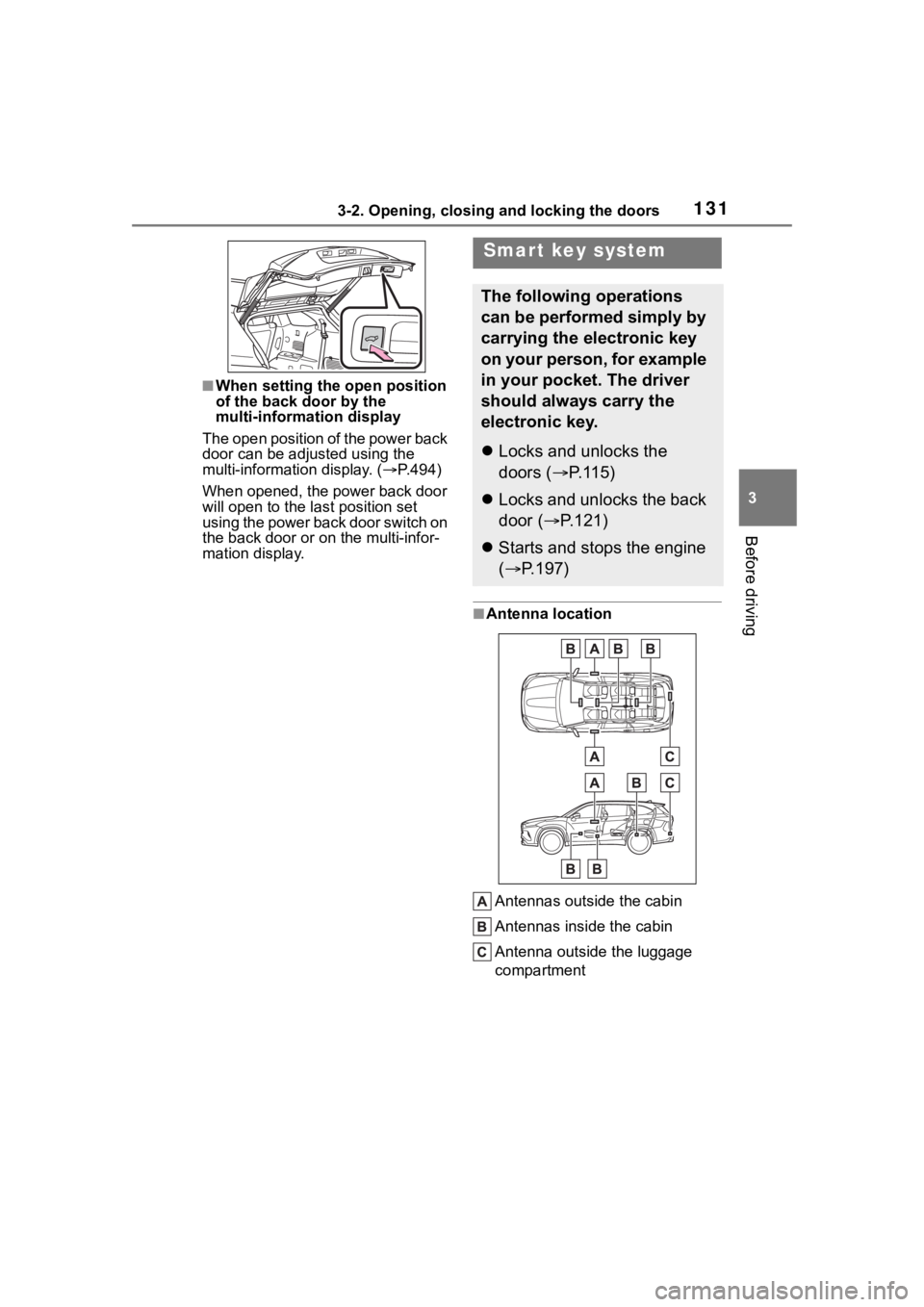
■Antenna location
Antennas outside the cabin
Antennas inside the cabin
Antenna outside the luggage
compartment
Smart key system
The following operations
can be performed simply by
carrying the electronic key
on your person, for example
in your pocket. The driver
should always carry the
electronic key.
Locks and unlocks the
doors ( P.115)
Locks and unlocks the back
door ( P.121)
Starts and stops the engine
( P.197)
Page 132 of 552
1323-2. Opening, closing and locking the doors
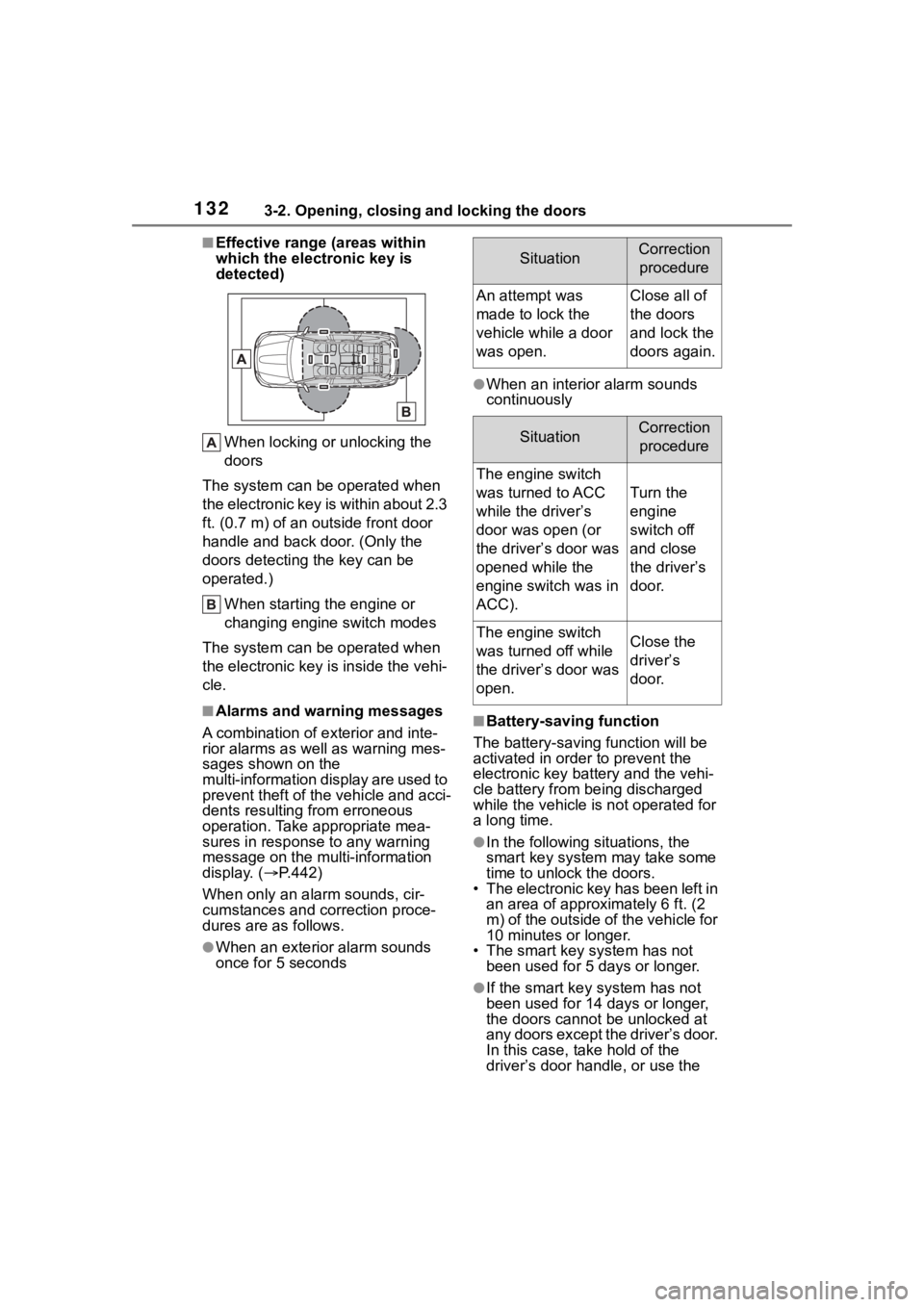
■Effective range (areas within
which the electronic key is
detected)When locking or unlocking the
doors
The system can be operated when
the electronic key is within about 2.3
ft. (0.7 m) of an outside front door
handle and back door. (Only the
doors detecting t he key can be
operated.)
When starting the engine or
changing engine switch modes
The system can be operated when
the electronic key is inside the vehi-
cle.
■Alarms and warning messages
A combination of e xterior and inte-
rior alarms as well as warning mes-
sages shown on the
multi-information display are used to
prevent theft of the vehicle and acci-
dents resulting from erroneous
operation. Take appropriate mea-
sures in response to any warning
message on the multi-information
display. ( P.442)
When only an ala rm sounds, cir-
cumstances and c orrection proce-
dures are as follows.
●When an exterior alarm sounds
once for 5 seconds
●When an interior alarm sounds
continuously
■Battery-saving function
The battery-saving function will be
activated in ord er to prevent the
electronic key battery and the vehi-
cle battery from being discharged
while the vehicle is not operated for
a long time.
●In the following situations, the
smart key system may take some
time to unlock the doors.
• The electronic key has been left in
an area of approxi mately 6 ft. (2
m) of the outside of the vehicle for
10 minutes or longer.
• The smart key system has not been used for 5 days or longer.
●If the smart key system has not
been used for 14 days or longer,
the doors cannot be unlocked at
any doors except the driver’s door.
In this case, take hold of the
driver’s door handle, or use the
SituationCorrection
procedure
An attempt was
made to lock the
vehicle while a door
was open.Close all of
the doors
and lock the
doors again.
SituationCorrection procedure
The engine switch
was turned to ACC
while the driver’s
door was open (or
the driver’s door was
opened while the
engine switch was in
ACC).
Turn the
engine
switch off
and close
the driver’s
door.
The engine switch
was turned off while
the driver’s door was
open.Close the
driver’s
door.