2023 TOYOTA HIGHLANDER engine
[x] Cancel search: enginePage 211 of 552

2114-3. Operating the lights and wipers
4
Driving
■Headlight control sensor
The sensor may not function prop-
erly if an object is placed on the sen-
sor, or anything that blocks the
sensor is affixed to the windshield.
Doing so interfere s with the sensor
detecting the level of ambient light
and may cause the automatic head-
light system to malfunction.
■Automatic light off system
●When the headlights are on: The
headlights and tail lights turn off
30 seconds after a door is opened
and closed if the engine switch is
turned to ACC or OFF. (The lights
turn off immediately if on the
key is pressed afte r all the doors
are closed.)
●When only the tail lights are on:
The tail lights tu rn off automati-
cally if the engine switch is turned
to ACC or OFF an d the driver’s
door is opened.
Except for Canada: To turn the lights
on again, turn the engine switch to
ON, or turn the light switch off once
and then back to or .
For Canada: To tu rn the lights on
again, turn the engine switch to ON,
or turn the light s witch to once
and then back to or .
■Automatic headlight leveling
system (if equipped)
The level of the headlights is auto-
matically adjusted according to the
number of passengers and the load-
ing condition of the vehicle to
ensure that the headlights do not interfere with o
ther road users.
■Light reminder buzzer
A buzzer sounds when the engine
switch is turned off or turned to ACC
and the driver’s door is opened
while the lights are turned on.
■Welcome lighting
The parking lights and tail lights
automatically turn on at night when
the doors are un locked using the
entry function or wireless remote
control if the light switch is in the
position.
■Windshield wiper linked head-
light illumination
When driving during daytime with
the headlight switch turned to , if
the windshield wipers are used, the
headlights will turn o n automatically
after several se conds to help
enhance the visibility of your vehi-
cle.
■Battery-saving function
In order to prevent the battery of the
vehicle from discharging, if the
headlights and/or tail lights are on
when the engine switch is turned off
the battery saving function will oper-
ate and automatically turn off all the
lights after approximately 20 min-
utes. When the engine switch is
turned to ON, the battery-saving
function will be disabled.
When any of the following are per-
formed, the battery-saving function
is canceled once and then reacti-
vated. All the lights will turn off auto-
matically 20 minutes after the
battery-saving function has been
reactivated:
●When the headlight switch is oper-
ated
●When a door is opened or closed
■Customization
Some functions can be customized.
( P.494)
Page 212 of 552
2124-3. Operating the lights and wipers
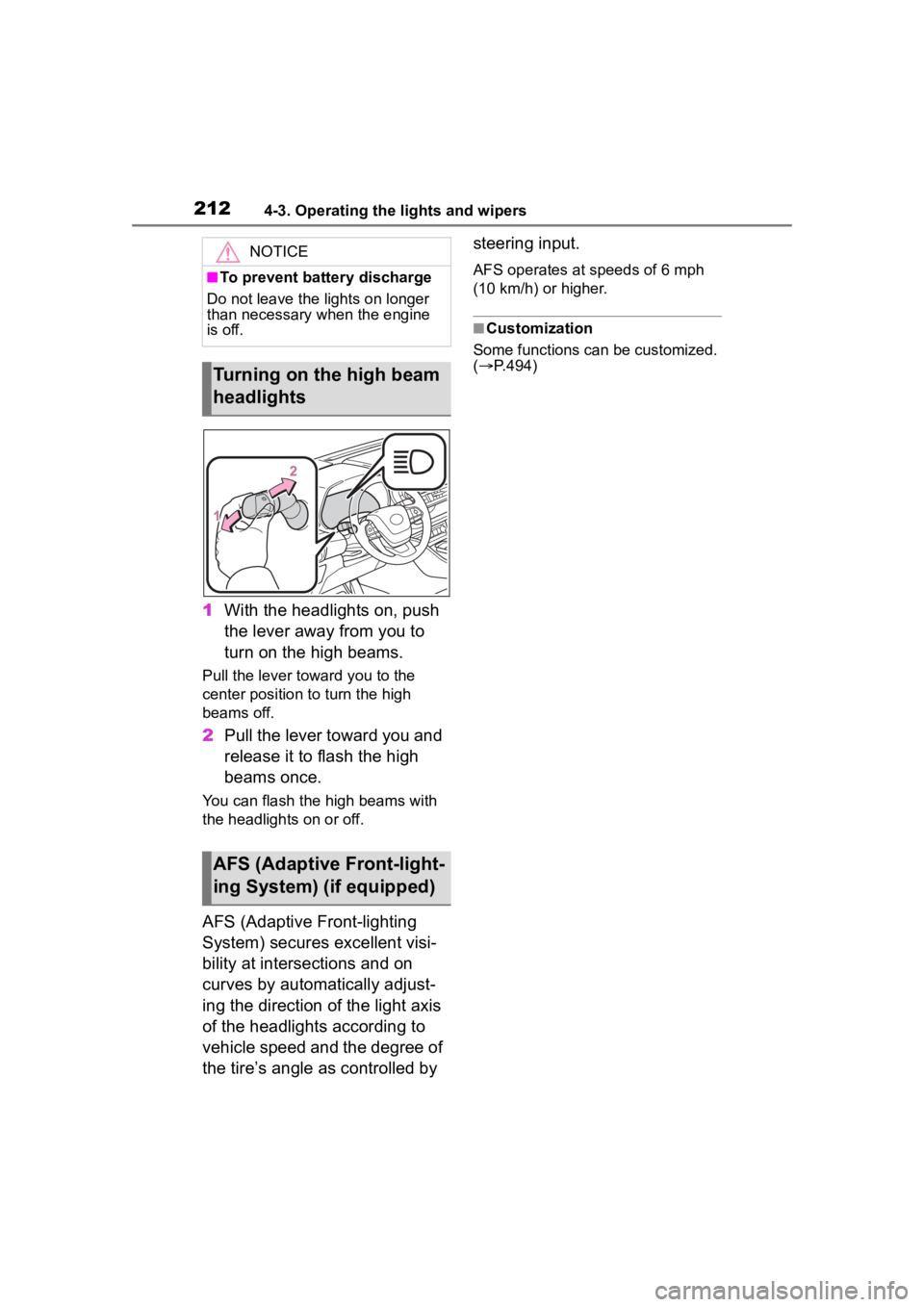
1With the headlights on, push
the lever away from you to
turn on the high beams.
Pull the lever toward you to the
center position to turn the high
beams off.
2Pull the lever toward you and
release it to flash the high
beams once.
You can flash the high beams with
the headlights on or off.
AFS (Adaptive Front-lighting
System) secures excellent visi-
bility at intersections and on
curves by automatically adjust-
ing the direction of the light axis
of the headlights according to
vehicle speed and the degree of
the tire’s angle as controlled by steering input.
AFS operates at speeds of 6 mph
(10 km/h) or higher.
■Customization
Some functions can be customized.
( P.494)
NOTICE
■To prevent battery discharge
Do not leave the lights on longer
than necessary when the engine
is off.
Turning on the high beam
headlights
AFS (Adaptive Front-light-
ing System) (if equipped)
Page 215 of 552

2154-3. Operating the lights and wipers
4
Driving
■Temporarily lowering sensor
sensitivity
The sensitivity of the sensor can be
temporarily lowered.
1 Turn the engine s witch off while
the following cond itions are met.
●The headlight switch is in or
.
●The headlight switch lever is in
high beam position.
●Automatic High Beam switch is
on.
2 Turn the engine switch to ON.
3 Within 60 seconds after step 2,
repeat pulling the headlight
switch lever to the original posi-
tion then pushing it to the high
beam position qu ickly 10 times,
then leave the lever in high beam
position.
4 If the sensitivity is changed, the
Automatic High Beam indicator
is turn on and off 3 times.
Automatic High Beam (headlights)
may turn on even w hen the vehicle
is stopped.
■Switching to the low beams
Pull the lever to its original posi-
tion.
The Automatic High Beam indicator
will turn off.
Push the lever away from you to
activate the Automatic High Beam
system again.
■Switching to the high
beams
Press the Automatic High Beam
switch.
The Automatic High Beam indicator
will turn off and the high beam indi-
cator will turn on.
Press the switch to activate the
Automatic High Beam system
again.
Turning the high beams
on/off manually
Page 218 of 552

2184-3. Operating the lights and wipers
the sensor sensitivity can be
adjusted by turning the switch
ring.
6Increases the sensitivity
7 Decreases the sensitivity
8 Washer/wiper dual
operation
Pulling the lever o perates the wip-
ers and washer.
The wipers will au tomatically oper-
ate a couple of times after the
washer squirts.
■The windshield wipers and
washer can be operated when
The engine switch is in ON.
■Dripping prevention wiper
sweep
After washing and wiping operation
several times, the wipers operate
one more time after a short delay to
prevent dripping. However, this
function will not operate while driv-
ing.
■Effects of vehicle speed on
wiper operation
Vehicle speed affects the intermit-
tent wiper interval.
■Raindrop sensor (vehicles with
rain-sensing windshield wipers)
●The raindrop sensor judges the
amount of raindrops.
An optical sensor is adopted. It
may not operate properly when
sunlight from the rising or setting
of the sun intermittently strikes the
windshield, or if bugs, etc. are
present on the windshield
●If the wiper switch i s turned to the
“AUTO” position while the engine
switch is in ON, the wipers will
operate once to show that AUTO
mode is activated.
●When the sensor sensitivity ring is
turned toward high while in
“AUTO” position, the wipers will
operate once to indicate that the
sensor sensitivity is enhanced.
●If the temperature of the raindrop
sensor is 185°F (85°C) or higher,
or 5°F (-15°C) or lower, automatic
operation may not occur. In this
case, operate the wipers in any
mode other than AUTO mode.
■If no windshield washer fluid
sprays
Check that the washer nozzles are
not blocked, if there is washer fluid
in the washer fluid tank.
■Front door opening linked wind-
shield wiper stop function
(vehicles with rain-sensing
windshield wipers)
When “AUTO” is selected and the
Page 220 of 552

2204-3. Operating the lights and wipers
4 Washer/wiper dual
operation
Pushing the lever operates the
wiper and washer.
The wiper will automatically operate
a couple of times after the washer
squirts.
The washer will automatically oper-
ate and clean the camera for the
Digital Rearview Mirror
*1 ( P.155)
and rear camera
*2.
*1: If equipped
*2: Refer to “MULTIMEDIA OWNER’S MANUAL”.
■The rear window wiper and
washer can be operated when
The engine switch is in ON.
■If no washer fluid sprays
Check that the washer nozzle is not
blocked if there is washer fluid in the
washer fluid tank.
■Reverse-linked rear window
wiper function
When the shift lever is shifted to R
when the front wipers are operating,
the rear window wiper will operate
once.
■Customization
Setting of the reverse-linked func-
tion can be changed. ( P.494)
NOTICE
■When the washer fluid tank is
empty
Do not operate the switch continu-
ally as the washer fluid pump may
overheat.
Page 221 of 552
2214-4. Refueling
4
Driving
4-4.Refueling
Close all the doors and win-
dows, and turn the engine
switch off.
Confirm the type of fuel.
■Fuel types
P. 4 8 2
■Fuel tank opening for unleaded
gasoline
To help prevent incorrect fueling,
your vehicle has a fuel tank opening
that only accommodates the spe-
cial nozzle on unle aded fuel pumps.
■If the malfunction indicator
lamp illuminates
The malfunction indicator lamp may
illuminate erroneous ly if refueling is
performed repeatedly when the fuel
tank is nearly full.
Opening the fuel tank
cap
Perform the following steps
to open the fuel tank cap:
Before refueling the vehi-
cle
WARNING
■When refueling the vehicle
Observe the following precautions
while refueling the vehicle. Failure
to do so may result in death or
serious injury.
●After exiting the vehicle and
before opening the fuel door,
touch an unpainted metal sur-
face to discharge any static
electricity. It is important to dis-
charge static electricity before
refueling because sparks result-
ing from static electricity can
cause fuel vapors to ignite while
refueling.
●Always hold the grips on the
fuel tank cap and turn it slowly
to remove it.
A whooshing sound may be
heard when the f uel tank cap is
loosened. Wait until the sound
cannot be heard before fully
removing the cap. In hot
weather, pressurized fuel may
spray out of the filler neck and
cause injury.
●Do not allow anyone that has
not discharged static electricity
from their body to come close to
an open fuel tank.
●Do not inhale vaporized fuel.
Fuel contains substances that
are harmful if inhaled.
●Do not smoke while refueling
the vehicle.
Doing so may cause the fuel to
ignite and cause a fire.
●Do not return to the vehicle or
touch any person or object that
is statically charged.
This may cause static electricity
to build up, resulting in a possi-
ble ignition hazard.
■When refueling
Observe the following precautions
to prevent fuel overflowing from
the fuel tank:
●Securely insert the fuel nozzle
into the fuel filler neck.
●Stop filling the tank after the fuel
nozzle automatically clicks off.
Page 231 of 552
2314-5. Using the driving support systems
4
Driving
■Enabling/disabling the
pre-collision system
The pre-collision system can be
enabled/disabled on ( P.92,
102) of the multi-information dis-
p l a y.
The system is automatically
enabled each time the engine
switch is turned to ON.
If the system is disabled, the
PCS warning light will turn on
and a message will be displayed
on the multi-information display.
WARNING
Page 232 of 552
2324-5. Using the driving support systems
■Changing the pre-collision
warning timing
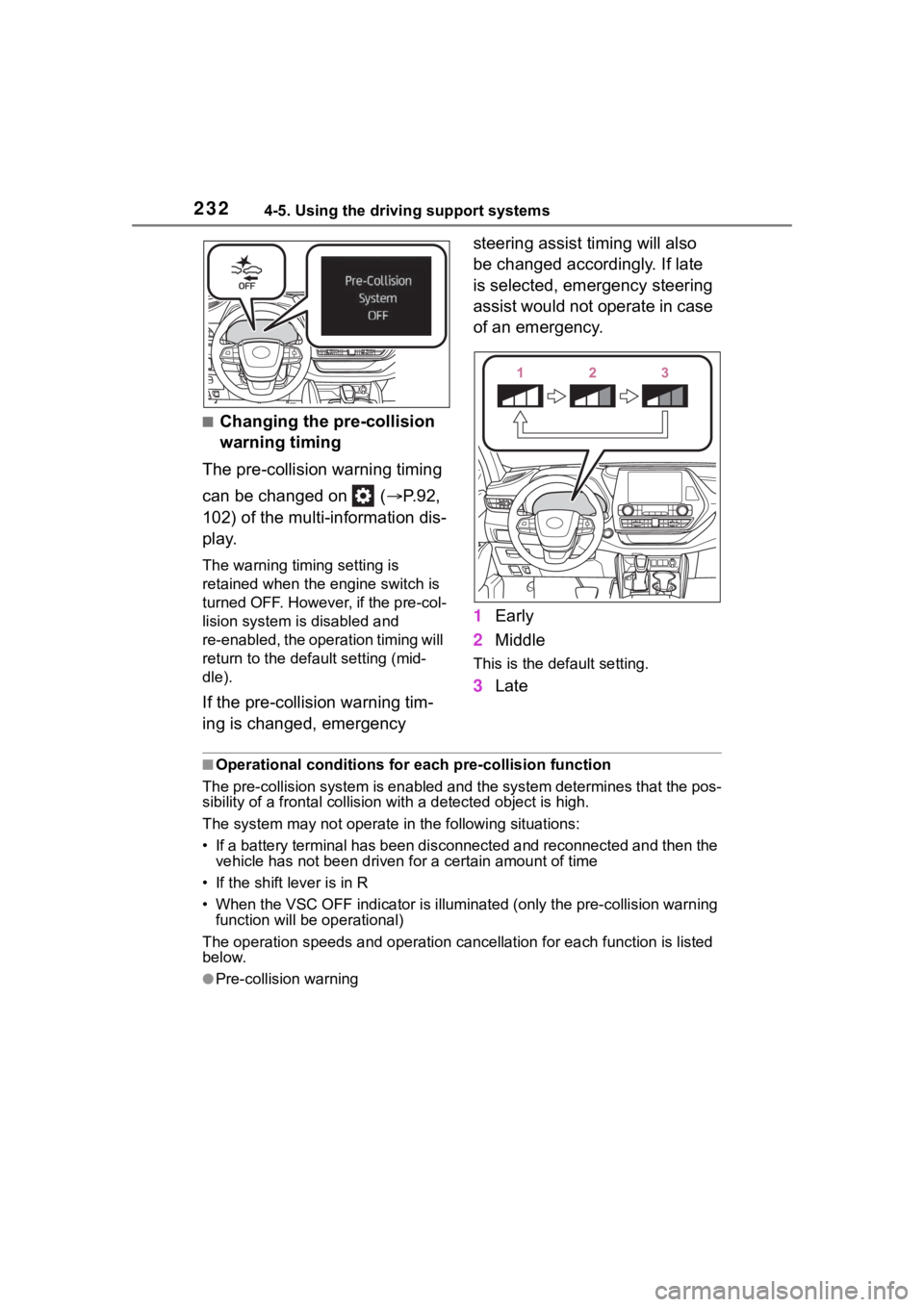
The pre-collision warning timing
can be changed on ( P.92,
102) of the multi-information dis-
play.
The warning timing setting is
retained when the engine switch is
turned OFF. However, if the pre-col-
lision system is disabled and
re-enabled, the operation timing will
return to the default setting (mid-
dle).
If the pre-collision warning tim-
ing is changed, emergency steering assist timing will also
be changed accordingly. If late
is selected, emergency steering
assist would not operate in case
of an emergency.
1
Early
2 Middle
This is the default setting.
3Late
■Operational conditions for e ach pre-collision function
The pre-collision syst em is enabled and the system determines t hat the pos-
sibility of a frontal c ollision with a detected object is high.
The system may not operate in the following situations:
• If a battery terminal has been disconnected and reconnected an d then the
vehicle has not been driven for a certain amount of time
• If the shift lever is in R
• When the VSC OFF indicator is illuminated (only the pre-collision warning
function will be operational)
The operation speeds and operati on cancellation for each function is listed
below.
●Pre-collision warning