2023 TOYOTA COROLLA stop start
[x] Cancel search: stop startPage 4 of 468

4TABLE OF CONTENTS
Tire inflation pressure.........328
Wheels ............................... 330
Air conditioning filter ........... 331
Wireless remote control/elec- tronic key battery.............. 333
Checking and replacing fuses ......................................... 336
Headlight aim ..................... 339
Light bulbs .......................... 340
7-1. Essential information Emergency flashers ........... 348
If your vehicle has to be stopped in an emergency .............. 348
If the vehicle is submerged or water on the road is rising......................................... 350
7-2. Steps to take in an emergency If your vehicle needs to be towed......................................... 351
If you think something is wrong ......................................... 354
Fuel pump shut off system ......................................... 355
If a warning light turns on or a warning buzzer sounds .... 356
If a warning message is dis- played .............................. 366
If you have a flat tire ........... 370
If the engine will not start ... 379
If you lose your keys .......... 381
If the electronic key does not operate properly ............... 381
If the vehicle battery is dis- charged ............................ 383
If your vehicle overheats .... 387
If the vehicle becomes stuck ......................................... 3898-1. Specifications
Maintenance data (fuel, oil level, etc.) .................................. 392
Fuel information ................. 399
Tire information .................. 401
8-2. Customization Customizable features ....... 412
8-3. Initialization Items to initialize ................ 422
9-1. For owners Reporting safety defects for U.S. owners ............................. 424
Reporting safety defects for Canadian owners ............. 424
Seat belt instructions for Cana- dian owners (in French) ... 425
SRS airbag instructions for Canadian owners (in French)......................................... 426
What to do if... (Troubleshooting) ......................................... 436
Alphabetical Index.............. 439
7When trouble arises
8Vehicle specifications
9For owners
Index
Page 15 of 468
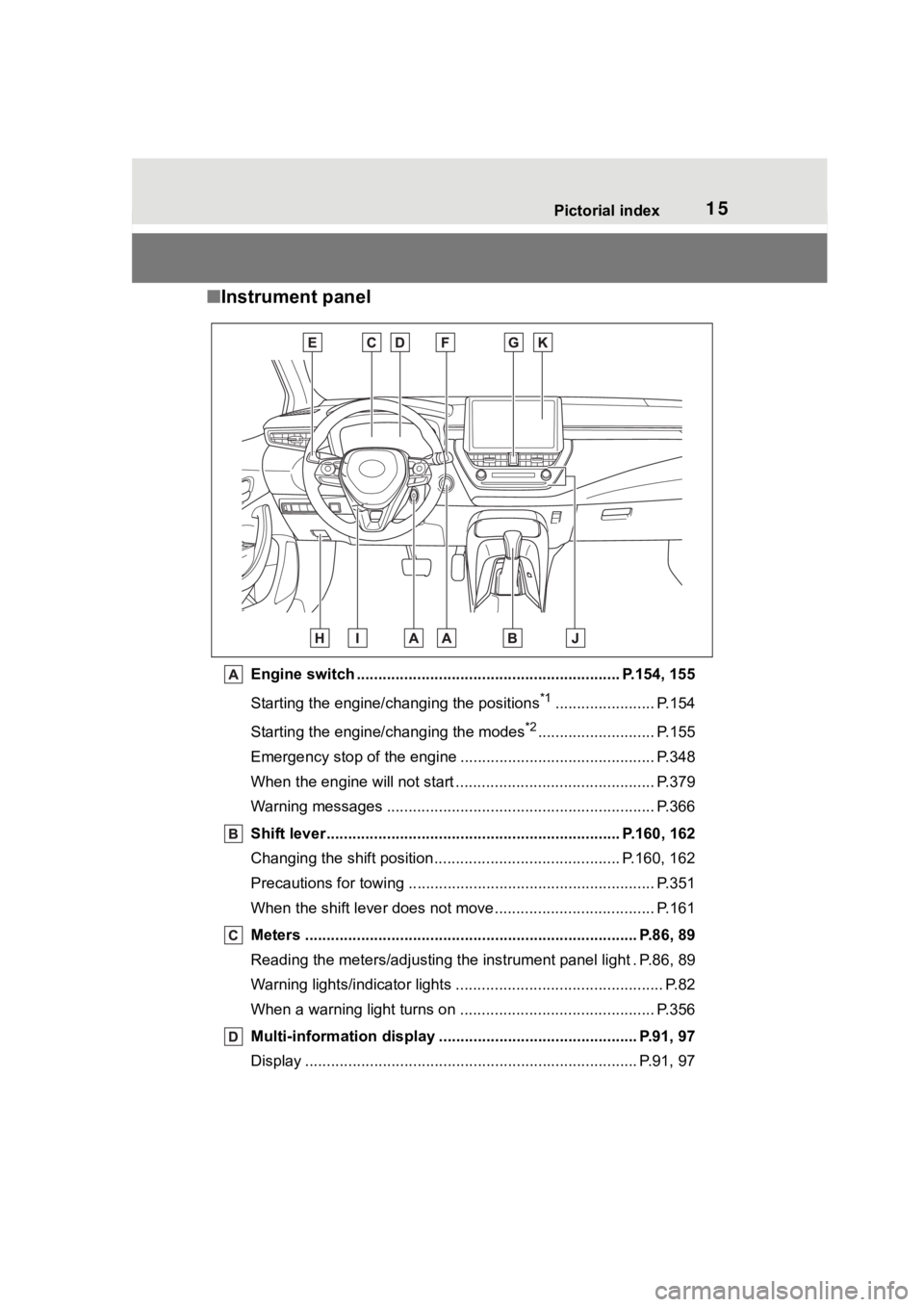
15Pictorial index
■Instrument panel
Engine switch ............................................................. P.154, 155
Starting the engine/changing the positions
*1....................... P.154
Starting the engine/changing the modes
*2........................... P.155
Emergency stop of the engin e ............................................. P.348
When the engine will not start ................................. ............. P.379
Warning messages ............................................... ............... P.366
Shift lever.................................................... ................ P.160, 162
Changing the shift position.................................... ....... P.160, 162
Precautions for towing .. ....................................... ................ P.351
When the shift lever does not move............................. ........ P.161
Meters ............................................................................. P.86, 89
Reading the meters/adjusting the instrument panel light . P.86, 8 9
Warning lights/indicator lights ................................ ................ P.82
When a warning light turns on .................................. ........... P.356
Multi-information display . ............................................. P.91, 97
Display ........................................................ ..................... P.91, 97
Page 24 of 468
241-1. For safe use
1-1.For safe use
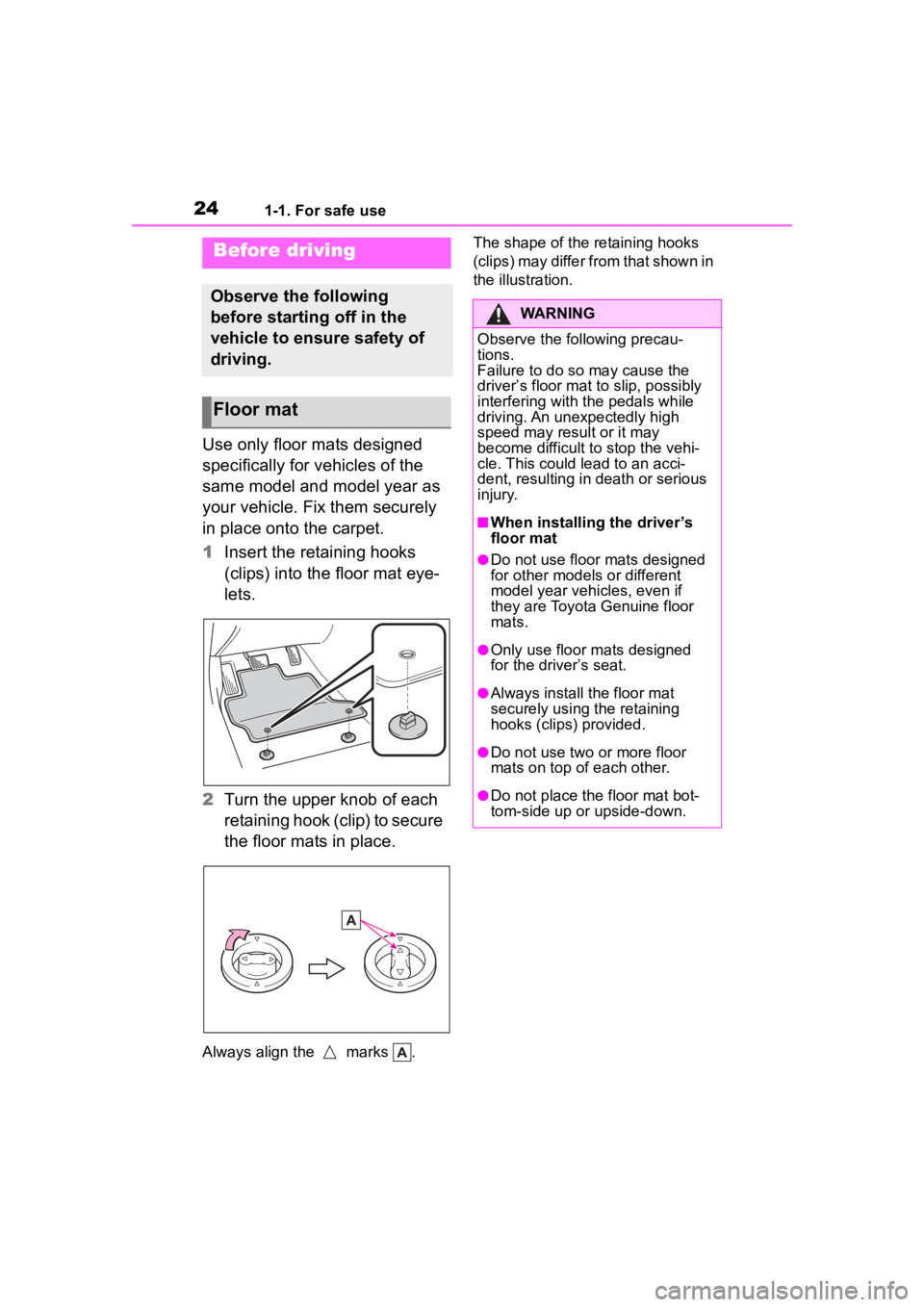
Use only floor mats designed
specifically for vehicles of the
same model and model year as
your vehicle. Fix them securely
in place onto the carpet.
1Insert the retaining hooks
(clips) into the floor mat eye-
lets.
2 Turn the upper knob of each
retaining hook (clip) to secure
the floor mats in place.
Always align the marks . The shape of the retaining hooks
(clips) may differ from that shown in
the illustration.
Before driving
Observe the following
before starting off in the
vehicle to ensure safety of
driving.
Floor mat
WARNING
Observe the following precau-
tions.
Failure to do so may cause the
driver’s floor mat to slip, possibly
interfering with t
he pedals while
driving. An unexpectedly high
speed may result or it may
become difficult to stop the vehi-
cle. This could lead to an acci-
dent, resulting in death or serious
injury.
■When installing the driver’s
floor mat
●Do not use floor mats designed
for other models or different
model year vehicles, even if
they are Toyota Genuine floor
mats.
●Only use floor mats designed
for the driver’s seat.
●Always install the floor mat
securely using the retaining
hooks (clips) provided.
●Do not use two or more floor
mats on top of each other.
●Do not place the floor mat bot-
tom-side up or upside-down.
Page 26 of 468
261-1. For safe use
Make sure that all occupants are
wearing their seat belts before
driving the vehicle. (P.27)
Use a child restraint system
appropriate for the child until the
child becomes large enough to
properly wear the vehicle’s seat
belt. ( P.48)
Make sure that you can see
backward clearly by adjusting
the inside and outside rear view
mirrors properly. ( P.131, 132)
WARNING
■For safe driving
Observe the following precau-
tions.
Failure to do so m ay result in
death or serious injury.
●Do not adjust the position of the
driver’s seat while driving.
Doing so could cause the driver
to lose control of the vehicle.
●Do not place a cushion between
the driver or passenger and the
seatback.
A cushion may prevent correct
posture from being achieved,
and reduce the effectiveness of
the seat belt and head restraint.
●Do not place anything under the
front seats.
Objects placed under the front
seats may become jammed in
the seat tracks and stop the
seat from locking in place. This
may lead to an accident and the
adjustment mechanism may
also be damaged.
●Always observe the legal speed
limit when driving on public
roads.
●When driving over long dis-
tances, take regular breaks
before you start to feel tired.
Also, if you feel tired or sleepy
while driving, do not force your-
self to continue driving and take
a break immediately.
●Take care when adjusting the
seat position to ensure that
other passengers are not
injured by the moving seat.
●When adjusting the seat posi-
tion, do not put your hands
under the seat or near the mov-
ing parts to avoid injury. Fingers
or hands may become jammed
in the seat mechanism.
Correct use of the seat
belts
Adjusting the mirrors
Page 77 of 468
771-4. Theft deterrent system
1
For safety and security
1-4.Theft deterrent system
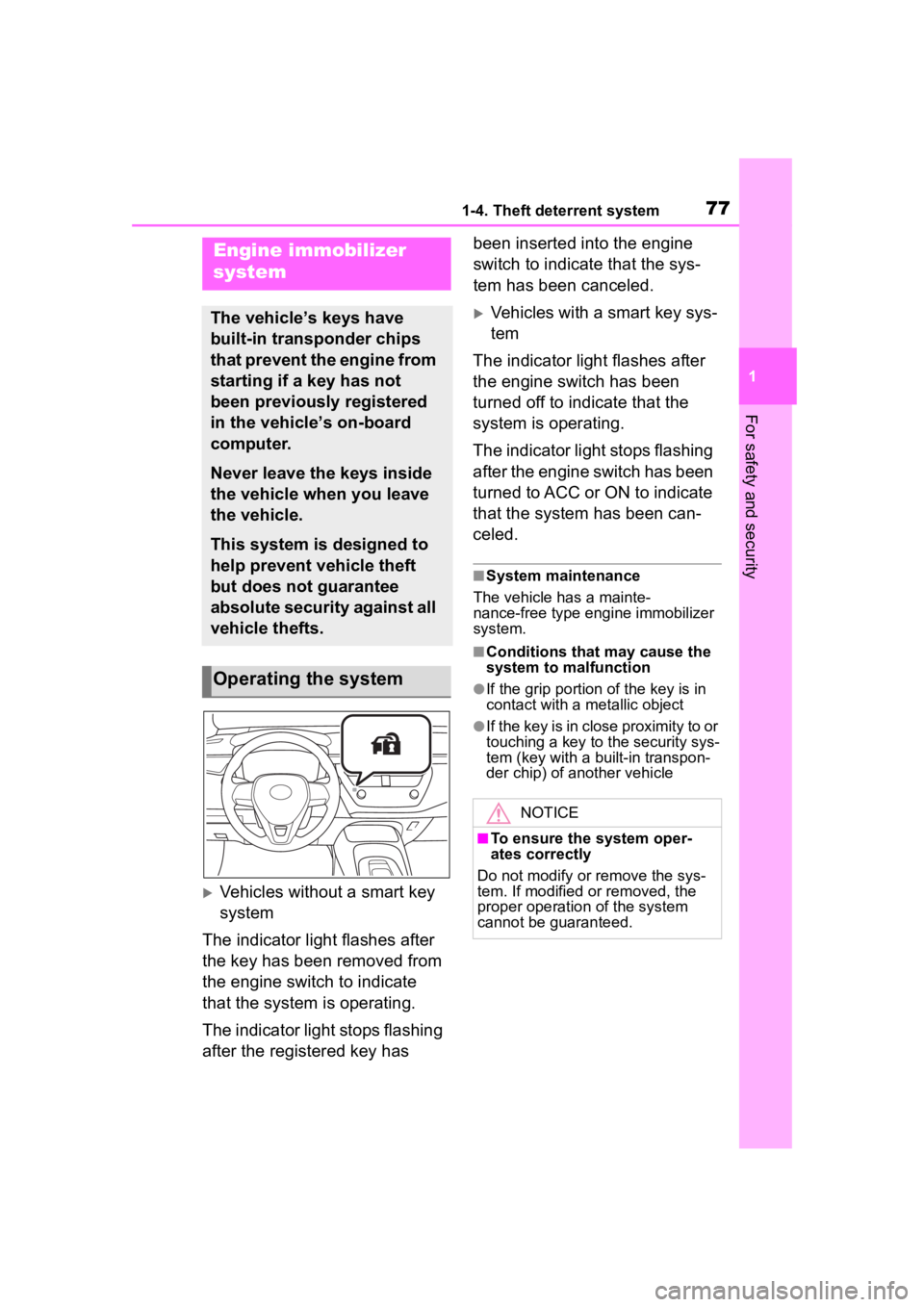
Vehicles without a smart key
system
The indicator light flashes after
the key has been removed from
the engine switch to indicate
that the system is operating.
The indicator light stops flashing
after the registered key has been inserted into the engine
switch to indicate that the sys-
tem has been canceled.
Vehicles with a smart key sys-
tem
The indicator light flashes after
the engine switch has been
turned off to indicate that the
system is operating.
The indicator light stops flashing
after the engine switch has been
turned to ACC or ON to indicate
that the system has been can-
celed.
■System maintenance
The vehicle has a mainte-
nance-free type engine immobilizer
system.
■Conditions that may cause the
system to malfunction
●If the grip portion of the key is in
contact with a metallic object
●If the key is in close proximity to or
touching a key to the security sys-
tem (key with a built-in transpon-
der chip) of another vehicle
Engine immobilizer
system
The vehicle’s keys have
built-in transponder chips
that prevent the engine from
starting if a key has not
been previously registered
in the vehicle’s on-board
computer.
Never leave the keys inside
the vehicle when you leave
the vehicle.
This system is designed to
help prevent vehicle theft
but does not guarantee
absolute security against all
vehicle thefts.
Operating the system
NOTICE
■To ensure the system oper-
ates correctly
Do not modify or remove the sys-
tem. If modified or removed, the
proper operation of the system
cannot be guaranteed.
Page 78 of 468

781-4. Theft deterrent system
*: If equipped
■Items to check before lock-
ing the vehicle
To prevent unexpected trigger-
ing of the alarm and vehicle
theft, make sure of the following:
Nobody is in the vehicle.
The windows and moon roof
(if equipped) are closed
before the alarm is set.
No valuables or other per-
sonal items are left in the
vehicle.
■Setting
Close the doors, trunk and hood, and lock all the doors.
The system will set automati-
cally after 30 seconds.
The indicator light changes from
being on to flashing when the sys-
tem is set.
■Deactivating or stopping
Do one of the following to deac-
tivate or stop the alarms:
Unlock the doors.
Turn the engine switch to
ACC or ON, or start the
engine. (The alarm will be
deactivated or stopped after a
few seconds.)
■System maintenance
The vehicle has a mainte-
nance-free type alarm system.
■Triggering of the alarm
The alarm may be triggered in the
following situations:
(Stopping the alarm deactivates the
alarm system.)
●A person inside the vehicle opens
a door, the trunk or hood, or
unlocks the vehicle using a door
lock switch or insi de lock button.
Alarm*
The alarm uses light and
sound to give an alert when
an intrusion is detected.
The alarm is triggered in the
following situations when
the alarm is set:
A locked door or trunk is
unlocked or opened in any
way other than using the
entry function (if equipped),
wireless remote control,
mechanical key (if
equipped) or key (if
equipped). (The doors will
lock again automatically.)
The hood is opened.
Setting/deactivating/stop-
ping the alarm system
Page 124 of 468
1243-2. Opening, closing and locking the doors
●Do not leave the electronic key
inside the trunk.
The key confinement prevention
function may not operate, depend-
ing on the location of the key (the
inside edge of the trunk), condi-
tions (inside a met al bag, close to
metallic objects) and the radio
waves in the surrounding area.
( P.119)
■If the smart key system does
not operate properly
●Locking and unlocking the doors:
P. 3 8 2
●Starting the engine: P.382
■Customization
Some functions can be customized.
( P.412)
■If the smart key system has
been deactivated in a custom-
ized setting
●Locking and unlocking the doors:
Use the wireless remote control or
mechanical key. ( P.111, 382)
●Starting the engine and changing
engine switch modes: P. 3 8 2
●Stopping the engine: P. 1 5 7
WARNING
■Caution regarding interfer-
ence with electronic devices
●People with implantable car-
diac pacemakers, cardiac
resynchronization ther-
apy-pacemakers or implantable
cardioverter defib rillators should
keep away from the smart key
system antennas. ( P.120)
The radio waves may affect the
operation of such devices. If
necessary, the entry function
can be disabled. Ask your Toy-
ota dealer for details, such as
the frequency of radio waves
and timing of the emitted radio
waves. Then, consult your doc-
tor to see if you should disable
the entry function.
●Users of any electrical medical
device other than implantable
cardiac pacemakers, cardiac
resynchronization ther-
apy-pacemakers or implantable
cardioverter defibrillators should
consult the manufacturer of the
device for information about its
operation under the influence of
radio waves.
Radio waves could have unex-
pected effects on the operation
of such medical devices.
Ask your Toyota dealer for details
on disabling the entry function.
Page 143 of 468
1434-1. Before driving
4
Driving
4-1.Before driving
■Starting the engine
P.154, 155
■Driving
1 With the brake pedal
depressed, shift the shift
lever to D. ( P.160)
2 Release the parking brake.
( P.168)
If the parking brake is in automatic
mode, the parkin g brake will be
released automatically. ( P.169)
3 Gradually release the brake
pedal and gently depress the
accelerator pedal to acceler-
ate the vehicle.
■Stopping
1 With the shift lever in D,
depress the brake pedal.
2 If necessary, set the parking
brake. ( P.168)
If the vehicle is to be stopped for an
extended period of time, shift the
shift lever to P. ( P.160)
■Parking the vehicle
1 With the shift lever in D,
depress the brake pedal to
stop the vehicle completely.
2 Set the parking brake
( 168), and shift the shift
lever to P. ( P.160)
Make sure the park ing brake indi-
cator light is on.
3 Vehicles without a smart key
system: Turn the engine
switch to OFF to stop the
engine.
Vehicles with a smart key
system: Press the engine
switch to stop the engine.
4 Slowly release the brake
pedal.
5 Lock the door, making sure
that you have the key on your
person.
If parking on a hill, block the wheels
as needed.
■Starting off on a steep
uphill
1 Make sure that the parking
brake is set and shift the shift
lever to D.
2 Gently depress the accelera-
tor pedal.
3 Release the parking brake.
■Driving in the rain
●Drive carefully whe n it is raining,
because visibility will be reduced,
the windows may become
fogged-up, and the road will be
slippery.
●Drive carefully whe n it starts to
rain, because the road surface will
be especially slippery.
●Refrain from hig h speeds when
driving on an expressway in the
rain, because there may be a
layer of water between the tires
and the road surface, preventing
the steering and brakes from
operating properly.
Driving the vehicle
The following procedures
should be observed to
ensure safe driving:
Driving procedure