Page 49 of 582
1
1-43
Information Be aware of the followings when using battery conditioning mode.
• The driving distance may be reduced as energy is required to increase the battery temperature.
• If the battery temperature is low during driving or when the scheduled air conditioner/heater is activated, the battery conditioning mode is operated to improve driving performance. To ensure
driving distance the battery conditioning mode will not be operated when the battery level is too
low.
• If you set the DC charging station as your destination while using the battery conditioning mode, the battery temperature is optimized for charging and you can shorten the charging time after
you arrive and start charging.
• Battery conditioning mode is available for vehicles equipped with the battery heater.
Setting Utility Mode
Utility mode allows the high voltage battery to be used instead of the 12 V auxiliary
battery for purposes other than driving. You can use the audio and lights of the vehicle
without discharging the 12 V auxiliary battery and even use the indoor V2L feature.
Information • You cannot drive the vehicle while the utility mode is activated, and the gear can only be shifted to P (Park).
• You can use every electric device in the vehicle while the utility mode is activated.
• When the utility mode is activated, the Electronic Parking Brake (EPB) is applied automatically.
Follow the instructions below to set the utility mode.
1. Check the operation conditions of the utility mode. • The (ready indicator) is displayed on the instrument cluster.
• The gear is shifted to P (Park).
2. On the infotainment system, swipe the Home screen to the left to display the All menus screen.
3. On the All menus screen, select EV > (EV Settings) > Utility mode and select Activate
Utility mode to activate the function (Utility Mode: ON).
Hyundai_CE_en_US.book Page 43
Page 58 of 582
Introduction/Getting Started with Your Electric Vehicle
1-52
Aux. Battery Saver+
The Aux. Battery Saver+ is a function that monitors the charging status of the 12 V battery.
If the 12 V battery level is low, the main high voltage battery charges the 12 V battery.
Information • The Aux. Battery Saver+ activates maximum of 20 minutes. If the Aux. Battery Saver+ function activates more than 10 times consecutively, in the Automatic Mode the function will stop
activating, judging that there is a problem with the auxiliary battery.
In this case, drive the vehicle for some period of time. The function will start activating if the
auxiliary battery returns to normal.
• The Aux. Battery Saver+ function cannot prevent battery discharge if the auxiliary battery is damaged, worn out, used as a power supply or unauthorized electronic devices are used.
• If the Aux. Battery Saver+ function was activated the high voltage battery level may have decreased.
WARNING
B5019903_1
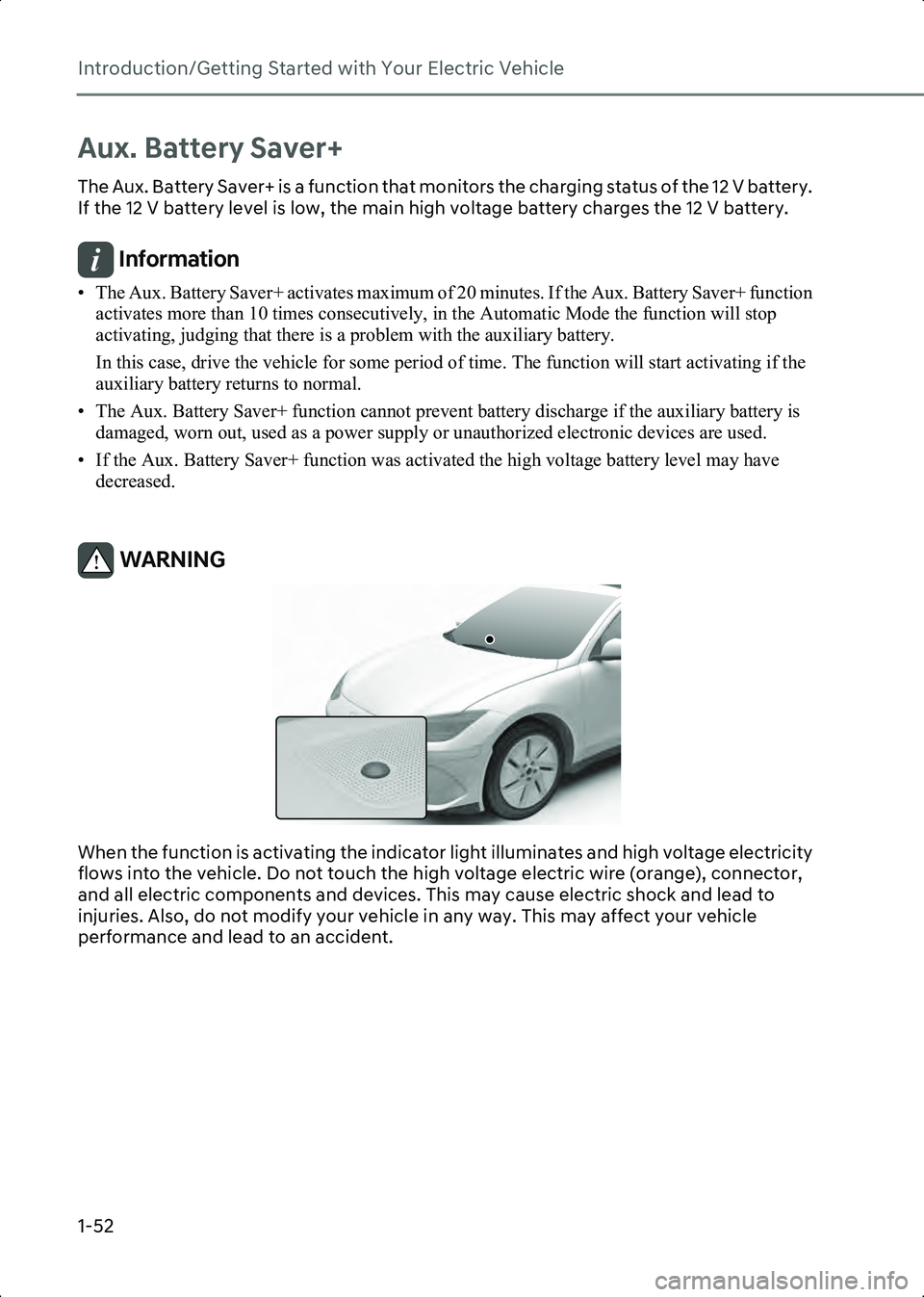
When the function is activating the indicator light illuminates and high voltage electricity
flows into the vehicle. Do not touch the high voltage electric wire (orange), connector,
and all electric components and devices. This may cause electric shock and lead to
injuries. Also, do not modify your vehicle in any way. This may affect your vehicle
performance and lead to an accident.
Hyundai_CE_en_US.book Page 52
Page 242 of 582

Convenience Features
5-64
- An object is located above the head-up display cover
- The vehicle is driven on a wet road
- Any improper lighting accessory is installed inside the vehicle, or there is
incoming light from outside of the
vehicle
- The driver wears glasses
- The driver wears contact lenses
When it is difficult to read the head-up
display information, adjust the image
position or brightness level from the
Settings menu in the infotainment
system.
• Since the information displayed on the head-up display partially overlaps with
the road ahead, you may feel fatigue
and discomfort while driving. If you feel
tired or uncomfortable, adjust the
image, and if the symptoms persist,
turn off the head-up display before
driving.
• For your safety, make sure to stop the vehicle before adjusting the settings.
• Do not tint the front windshield glass or add other types of metallic coating.
Otherwise, the head-up display image
may be invisible.
• Do not place any accessories on the dashboard or attach any objects on the
windshield glass.
• When replacing the front windshield glass, replace it with a windshield glass
designed for head-up display
operation. Otherwise, duplicated
images may be displayed on the
windshield glass.
WARNING • The warning information of Blind-Spot Safety on the Head-Up Display are
supplemental. Do not solely depend on
them to change lanes. Always take a
look around before changing lanes.
The driving route guidance display in
the augmented reality mode is an auxiliary function. Be sure to check the
navigation screen together.
• ALWAYS pay attention on the road while driving when the Head-up display
is on.
Information Head-up display includes GPL, LGPL, MPL
and other open source license software. All
license notices including related source code
are provided at
http://www.mobis.co.kr/opensource/list.do.
If the driver requests on-board software open
source code via
[email protected] within 3
years after buying this product, a CD-ROM or
other storage device will be sent with the
minimum cost covering storage device cost
and delivery cost.
Hyundai_CE_en_US.book Page 64
Page 524 of 582
Maintenance
9-8
Normal Maintenance Schedule
The following maintenance services must be performed to ensure good vehicle
performance.
Keep receipts for all vehicle services to protect your warranty. Where both mileage and
time are shown, the frequency of service is determined by whichever occurs first.
I: Inspect and if necessary, adjust, correct, clean or replace.
R: Replace or change.
MAINTENANCE INTERVALS
MAINTENANCE ITEM
Months1224364860728496108120132144156
Miles
×1,00081624324048566472808896104
Km
×1,00013263952657891104117130143156169
Cooling system
I I I I I I I I I I I I I
12 V auxiliary battery
condition
Brake lines, hoses, and
connections
Disc brakes and pads
Brake pedal
Steering gear rack,
linkage, and boots
Air conditioning
compressor, air
conditioner refrigerant
and performance
Hyundai_CE_en_US.book Page 8
