2023 HYUNDAI IONIQ 6 park assist
[x] Cancel search: park assistPage 447 of 582
7
7-103
Rear Cross-Traffic
Collision-Avoidance
Assist (RCCA)
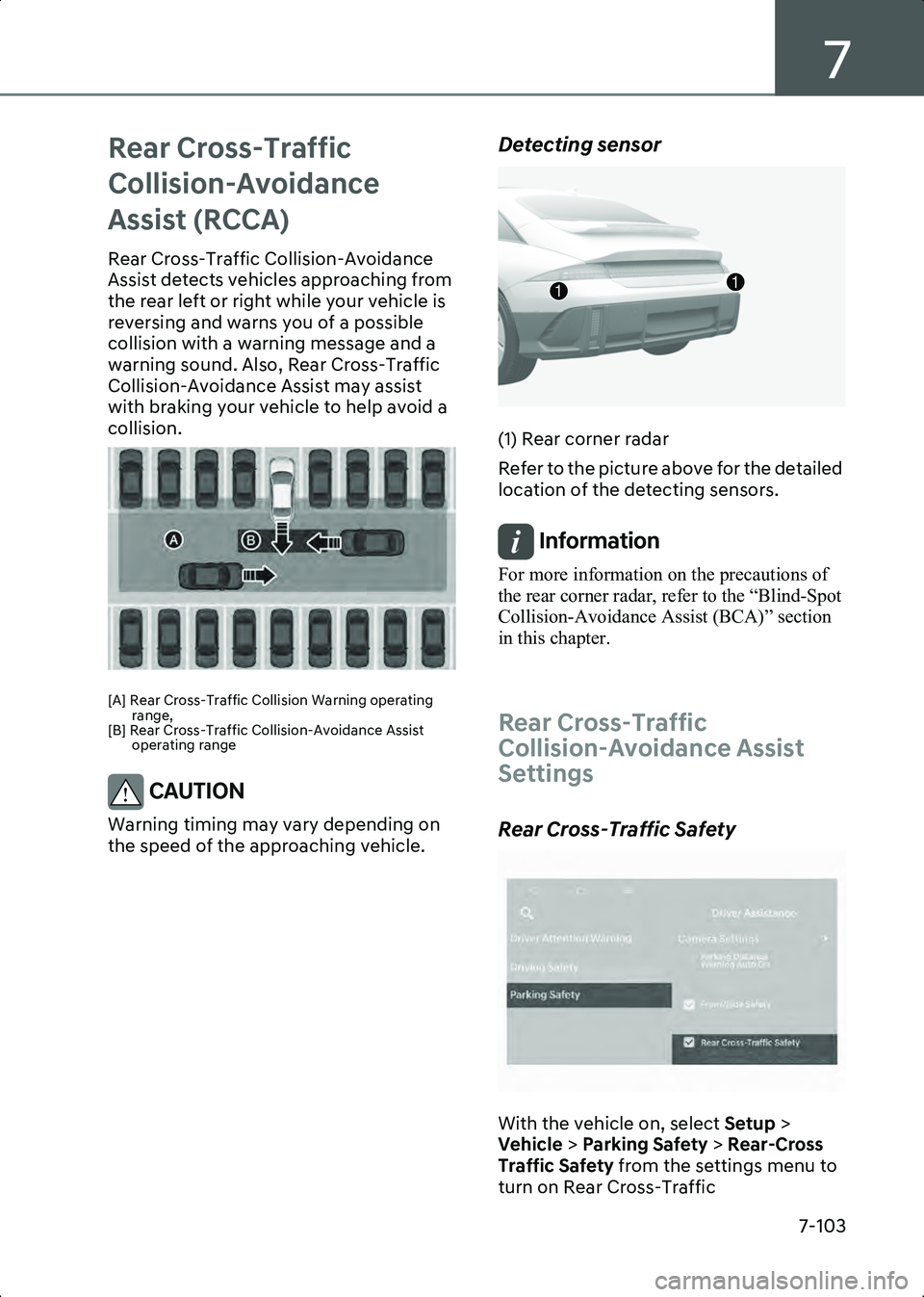
Rear Cross-Traffic Collision-Avoidance
Assist detects vehicles approaching from
the rear left or right while your vehicle is
reversing and warns you of a possible
collision with a warning message and a
warning sound. Also, Rear Cross-Traffic
Collision-Avoidance Assist may assist
with braking your vehicle to help avoid a
collision.
B7006601
[A] Rear Cross-Traffic Collision Warning operating range,
[B] Rear Cross-Traffic Collision-Avoidance Assist operating range
CAUTION Warning timing may vary depending on
the speed of the approaching vehicle.
Detecting sensor
B7006602
(1) Rear corner radar
Refer to the picture above for the detailed
location of the detecting sensors.
Information For more information on the precautions of
the rear corner radar, refer to the “Blind-Spot
Collision-Avoidance Assist (BCA)” section
in this chapter.
Rear Cross-Traffic
Collision-Avoidance Assist
Settings
Rear Cross-Traffic Safety
B7006701
With the vehicle on, select Setup >
Vehicle > Parking Safety > Rear-Cross
Traffic Safety from the settings menu to
turn on Rear Cross-Traffic
11
Hyundai_CE_en_US.book Page 103
Page 450 of 582
Driver Assistance System
7-106
• The driver depresses the brake pedal with sufficient power
Stopping vehicle and ending brake
control
B7006807
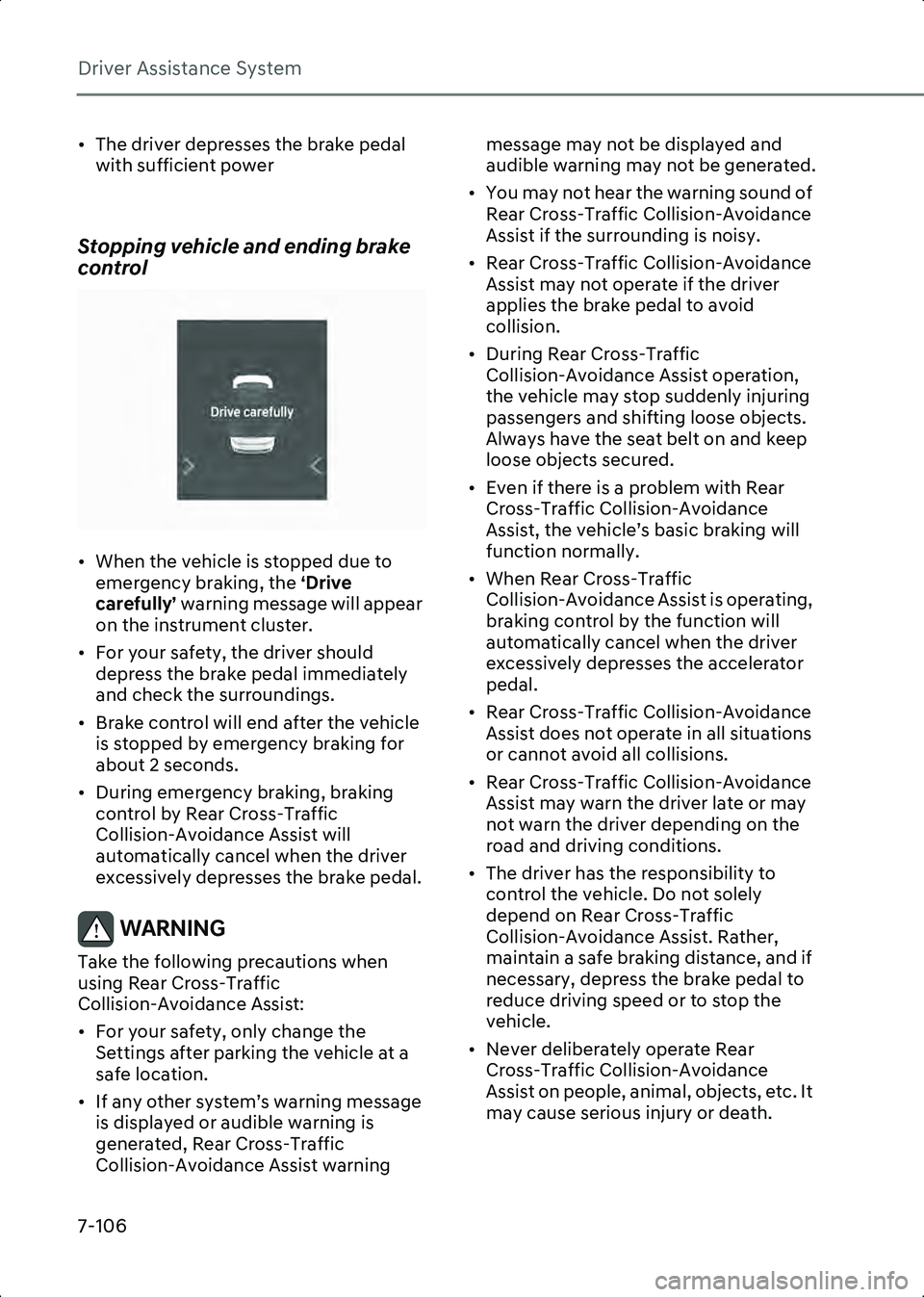
• When the vehicle is stopped due to emergency braking, the ‘Drive
carefully’ warning message will appear
on the instrument cluster.
• For your safety, the driver should depress the brake pedal immediately
and check the surroundings.
• Brake control will end after the vehicle is stopped by emergency braking for
about 2 seconds.
• During emergency braking, braking control by Rear Cross-Traffic
Collision-Avoidance Assist will
automatically cancel when the driver
excessively depresses the brake pedal.
WARNING Take the following precautions when
using Rear Cross-Traffic
Collision-Avoidance Assist:
• For your safety, only change the Settings after parking the vehicle at a
safe location.
• If any other system’s warning message is displayed or audible warning is
generated, Rear Cross-Traffic
Collision-Avoidance Assist warning message may not be displayed and
audible warning may not be generated.
• You may not hear the warning sound of Rear Cross-Traffic Collision-Avoidance
Assist if the surrounding is noisy.
• Rear Cross-Traffic Collision-Avoidance Assist may not operate if the driver
applies the brake pedal to avoid
collision.
• During Rear Cross-Traffic Collision-Avoidance Assist operation,
the vehicle may stop suddenly injuring
passengers and shifting loose objects.
Always have the seat belt on and keep
loose objects secured.
• Even if there is a problem with Rear Cross-Traffic Collision-Avoidance
Assist, the vehicle’s basic braking will
function normally.
• When Rear Cross-Traffic Collision-Avoidance Assist is operating,
braking control by the function will
automatically cancel when the driver
excessively depresses the accelerator
pedal.
• Rear Cross-Traffic Collision-Avoidance Assist does not operate in all situations
or cannot avoid all collisions.
• Rear Cross-Traffic Collision-Avoidance Assist may warn the driver late or may
not warn the driver depending on the
road and driving conditions.
• The driver has the responsibility to control the vehicle. Do not solely
depend on Rear Cross-Traffic
Collision-Avoidance Assist. Rather,
maintain a safe braking distance, and if
necessary, depress the brake pedal to
reduce driving speed or to stop the
vehicle.
• Never deliberately operate Rear Cross-Traffic Collision-Avoidance
Assist on people, animal, objects, etc. It
may cause serious injury or death.
Hyundai_CE_en_US.book Page 106
Page 452 of 582
Driver Assistance System
7-108
foreign material, such as snow or rain, or
installing a trailer or carrier, it can reduce
the detecting performance and
temporarily limit or disable Rear
Cross-Traffic Collision-Avoidance Assist.
If this occurs, the ‘Rear Cross-Traffic
Safety system disabled. Radar blocked’
warning message will appear on the
instrument cluster.
Rear Cross-Traffic Collision-Avoidance
Assist will operate properly when such
foreign material or trailer, etc., is
removed.
If Rear Cross-Traffic Collision-Avoidance
Assist does not operate properly after it is
removed, have the vehicle inspected by
an authorized HYUNDAI dealer.
WARNING • Even though the warning message does not appear on the instrument
cluster, Rear Cross-Traffic
Collision-Avoidance Assist may not
operate properly.
• Rear Cross-Traffic Collision-Avoidance Assist may not operate properly in an
area (for example, open terrain), where
any objects are not detected after
turning ON the vehicle.
CAUTION Turn off Rear Cross-Traffic
Collision-Avoidance Assist to install or
remove a trailer, carrier, or another
attachment. Turn on Rear Cross-Traffic
Collision-Avoidance Assist when finished.
Limitations of Rear Cross-Traffic
Collision-Avoidance Assist
Rear Cross-Traffic Collision-Avoidance
Assist may not operate properly, or it may
operate unexpectedly under the
following circumstances: • Departing from where trees or grass are
overgrown
• Departing from where roads are wet
• Speed of the approaching vehicle is fast or slow
Braking control may not work, driver’s
attention is required in the following
circumstances:
• The vehicle severely vibrates while driving over a bumpy road, uneven road
or concrete patch
• Driving on a slippery surface due to snow, water puddle, ice, etc.
• The tire pressure is low or a tire is damaged
• The braking system has been modified
• Remote Smart Parking Assist is operating (if equipped)
Information For more information on the limitations of the
rear corner radar, refer to the “Blind-Spot
Collision-Avoidance Assist (BCA)” section
in this chapter.
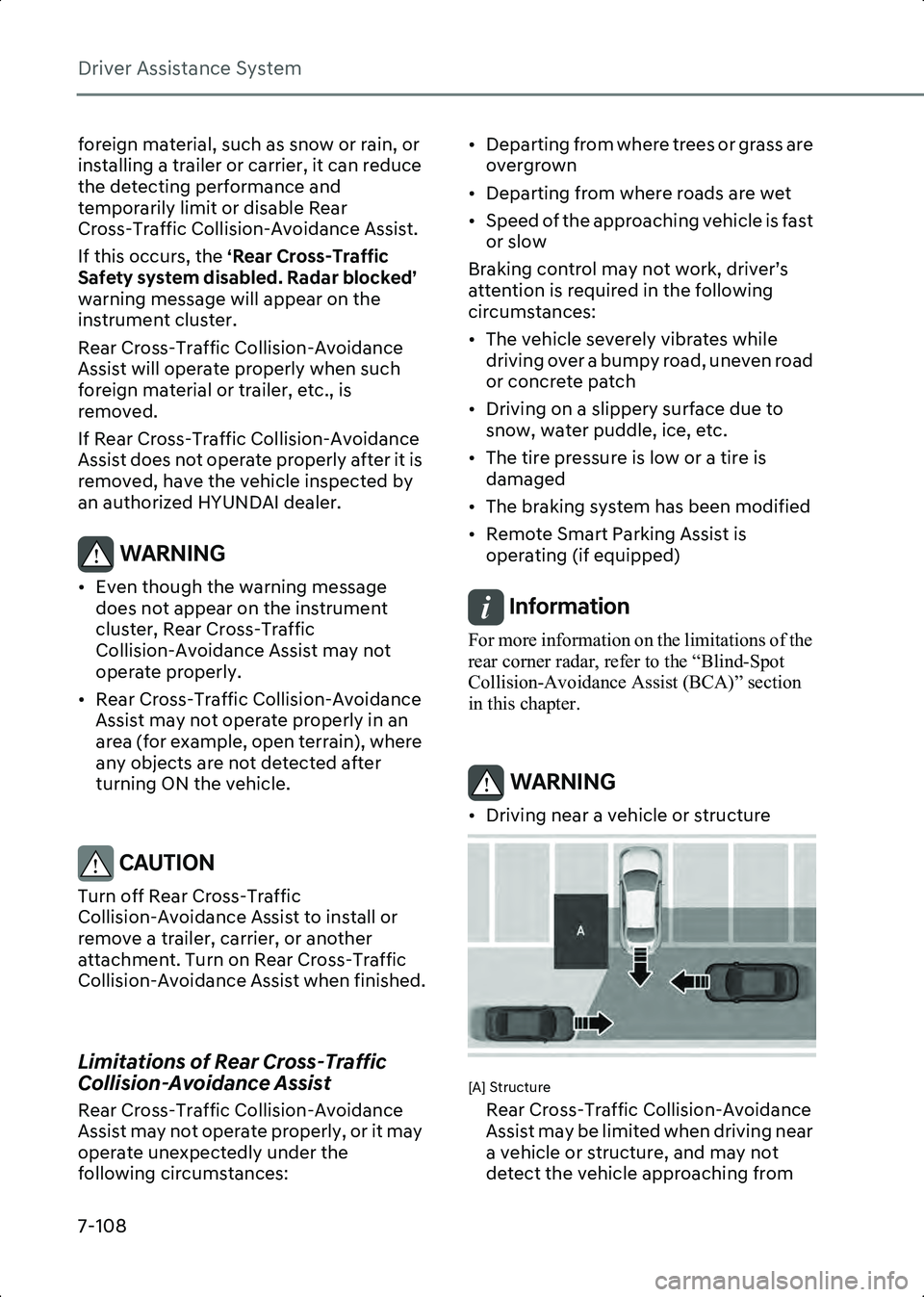
WARNING • Driving near a vehicle or structure
B7006904
[A] Structure
Rear Cross-Traffic Collision-Avoidance
Assist may be limited when driving near
a vehicle or structure, and may not
detect the vehicle approaching from
Hyundai_CE_en_US.book Page 108
Page 453 of 582
7
7-109
the left or right. If this occurs, the
function may not warn the driver or
control the brakes when necessary.
Always check your surroundings while
backing up.
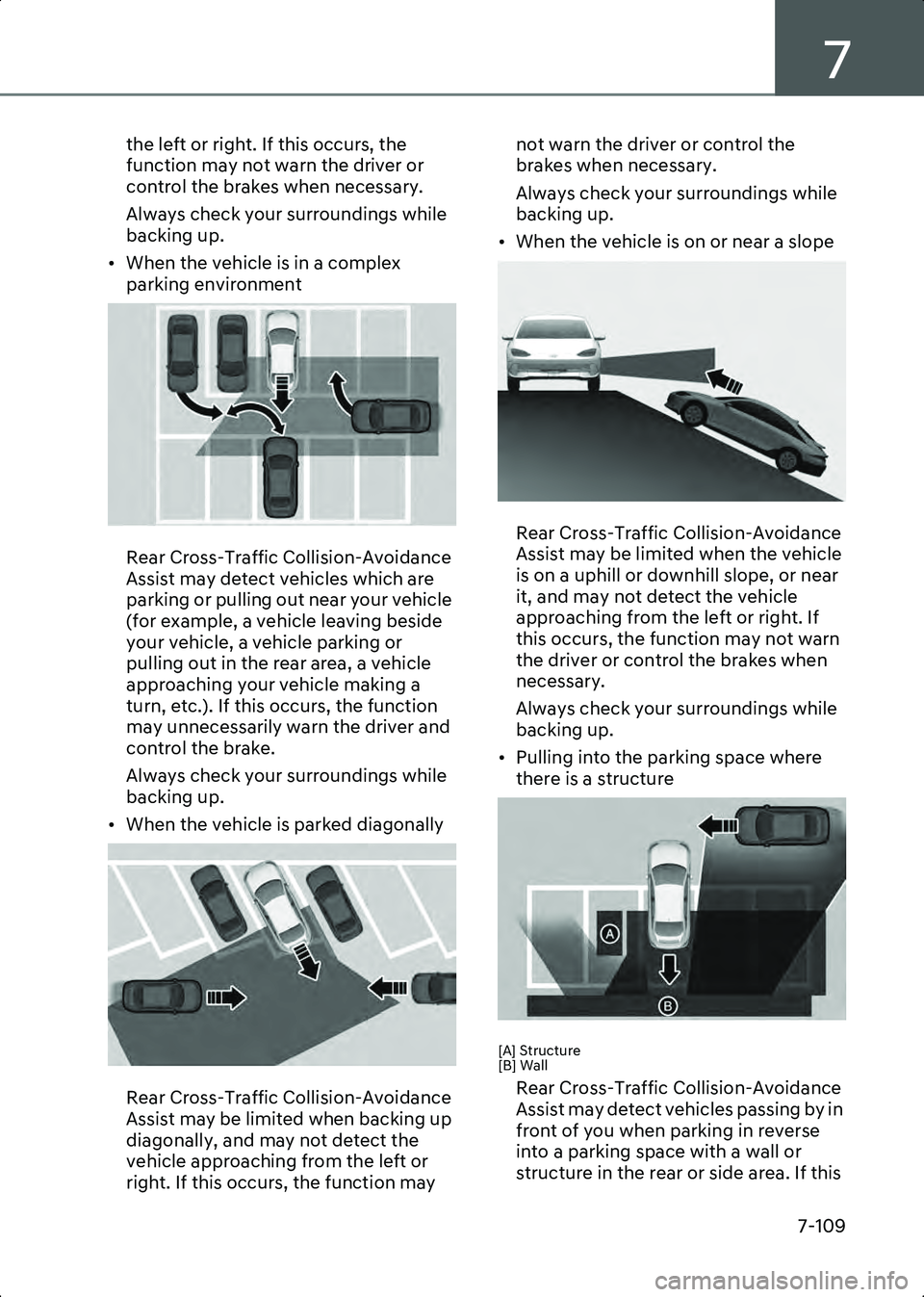
• When the vehicle is in a complex parking environment
B7006905
Rear Cross-Traffic Collision-Avoidance
Assist may detect vehicles which are
parking or pulling out near your vehicle
(for example, a vehicle leaving beside
your vehicle, a vehicle parking or
pulling out in the rear area, a vehicle
approaching your vehicle making a
turn, etc.). If this occurs, the function
may unnecessarily warn the driver and
control the brake.
Always check your surroundings while
backing up.
• When the vehicle is parked diagonally
B7006906
Rear Cross-Traffic Collision-Avoidance
Assist may be limited when backing up
diagonally, and may not detect the
vehicle approaching from the left or
right. If this occurs, the function may not warn the driver or control the
brakes when necessary.
Always check your surroundings while
backing up.
• When the vehicle is on or near a slope
B7006907
Rear Cross-Traffic Collision-Avoidance
Assist may be limited when the vehicle
is on a uphill or downhill slope, or near
it, and may not detect the vehicle
approaching from the left or right. If
this occurs, the function may not warn
the driver or control the brakes when
necessary.
Always check your surroundings while
backing up.
• Pulling into the parking space where there is a structure
B7006908
[A] Structure
[B] Wall
Rear Cross-Traffic Collision-Avoidance
Assist may detect vehicles passing by in
front of you when parking in reverse
into a parking space with a wall or
structure in the rear or side area. If this
Hyundai_CE_en_US.book Page 109
Page 454 of 582
Driver Assistance System
7-110
occurs, the function may unnecessarily
warn the driver and control the brake.
Always check your surroundings while
backing up.
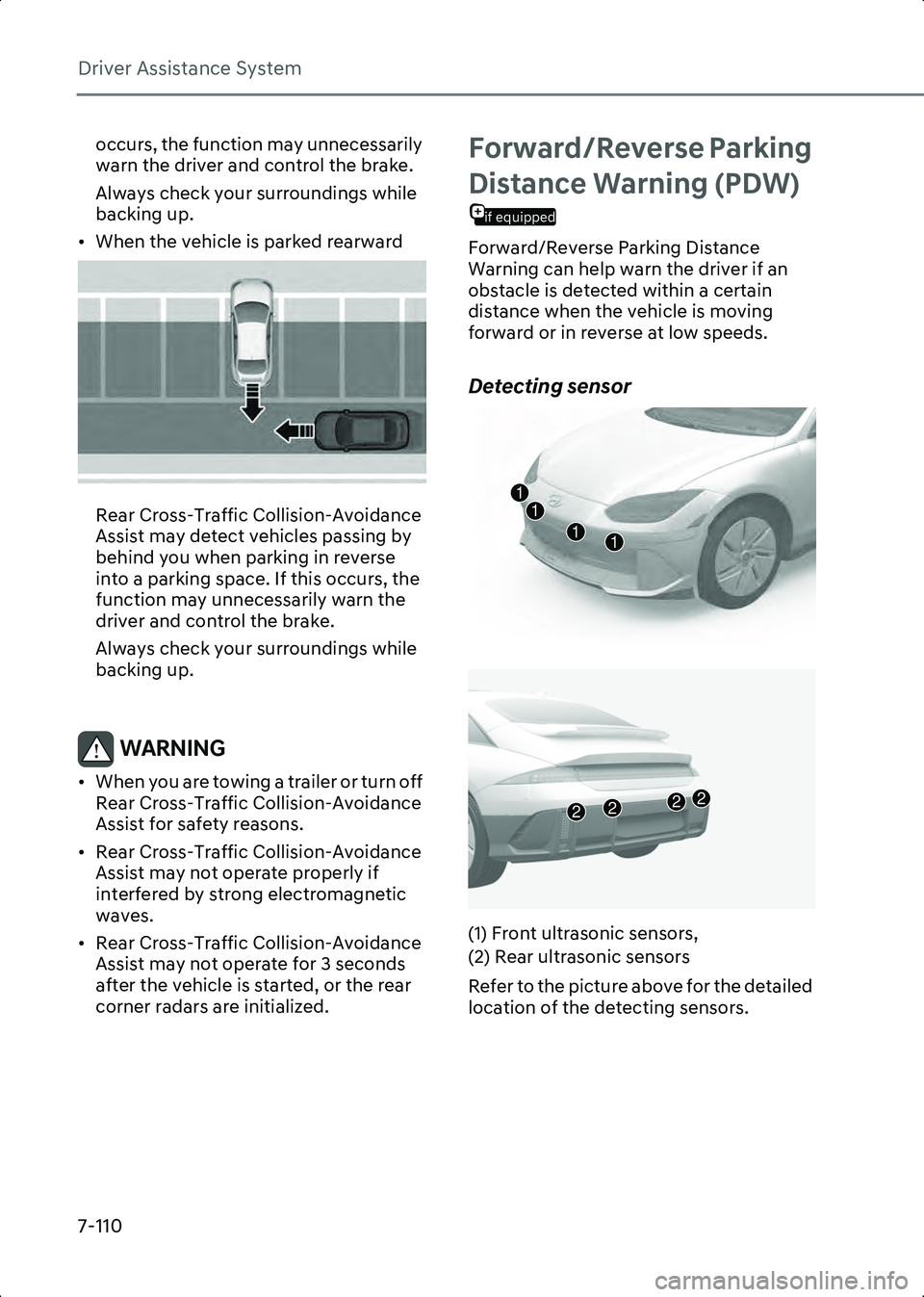
• When the vehicle is parked rearward
B7006909
Rear Cross-Traffic Collision-Avoidance
Assist may detect vehicles passing by
behind you when parking in reverse
into a parking space. If this occurs, the
function may unnecessarily warn the
driver and control the brake.
Always check your surroundings while
backing up.
WARNING • When you are towing a trailer or turn off Rear Cross-Traffic Collision-Avoidance
Assist for safety reasons.
• Rear Cross-Traffic Collision-Avoidance Assist may not operate properly if
interfered by strong electromagnetic
waves.
• Rear Cross-Traffic Collision-Avoidance Assist may not operate for 3 seconds
after the vehicle is started, or the rear
corner radars are initialized.
Forward/Reverse Parking
if equipped
Distance Warning (PDW)
Forward/Reverse Parking Distance
Warning can help warn the driver if an
obstacle is detected within a certain
distance when the vehicle is moving
forward or in reverse at low speeds.
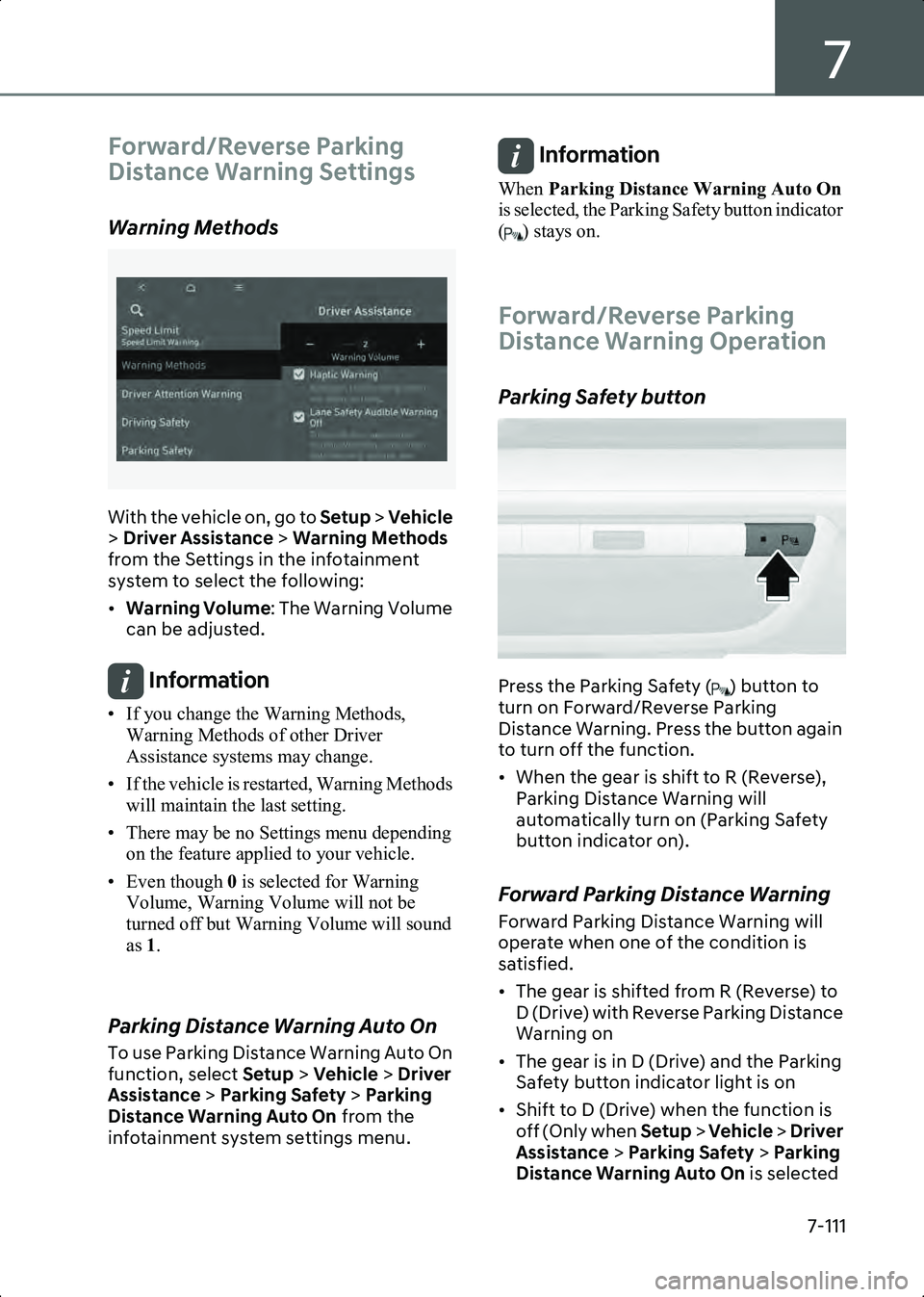
Detecting sensor
B7007001
B7007002
(1) Front ultrasonic sensors,
(2) Rear ultrasonic sensors
Refer to the picture above for the detailed
location of the detecting sensors.
1111
2222
Hyundai_CE_en_US.book Page 110
Page 455 of 582
7
7-111
Forward/Reverse Parking
Distance Warning Settings
Warning Methods
B7001902_2
With the vehicle on, go to Setup > Vehicle
> Driver Assistance > Warning Methods
from the Settings in the infotainment
system to select the following:
• Warning Volume : The Warning Volume
can be adjusted.
Information • If you change the Warning Methods, Warning Methods of other Driver
Assistance systems may change.
• If the vehicle is restarted, Warning Methods will maintain the last setting.
• There may be no Settings menu depending on the feature applied to your vehicle.
• Even though 0 is selected for Warning
Volume, Warning Volume will not be
turned off but Warning Volume will sound
as 1.
Parking Distance Warning Auto On
To use Parking Distance Warning Auto On
function, select Setup > Vehicle > Driver
Assistance > Parking Safety > Parking
Distance Warning Auto On from the
infotainment system settings menu.
Information When Parking Distance Warning Auto On
is selected, the Parking Safety button indicator
( ) stays on.
Forward/Reverse Parking
Distance Warning Operation
Parking Safety button
B7007201
Press the Parking Safety ( ) button to
turn on Forward/Reverse Parking
Distance Warning. Press the button again
to turn off the function.
• When the gear is shift to R (Reverse), Parking Distance Warning will
automatically turn on (Parking Safety
button indicator on).
Forward Parking Distance Warning
Forward Parking Distance Warning will
operate when one of the condition is
satisfied.
• The gear is shifted from R (Reverse) to D (Drive) with Reverse Parking Distance
Warning on
• The gear is in D (Drive) and the Parking Safety button indicator light is on
• Shift to D (Drive) when the function is off (Only when Setup > Vehicle > Driver
Assistance > Parking Safety > Parking
Distance Warning Auto On is selected
Hyundai_CE_en_US.book Page 111
Page 456 of 582
Driver Assistance System
7-112
from the infotainment system settings
menu.)
• The gear is shifted to R (only front corner warning is on)
Information • Forward Parking Distance Warning will operate only when the vehicle’s forward
speed is below 6 mph (10 km/h).
• Forward Parking Distance Warning is deactivated if the vehicle speed reaches
above 18 mph (30 km/h). It will not
reactivate although the vehicle speed drops
below 6 mph (10 km/h).
(Only when Setup > Vehicle > Driver
Assistance > Parking Safety > Parking
Distance Warning Auto On is not selected
from the infotainment system settings menu.)
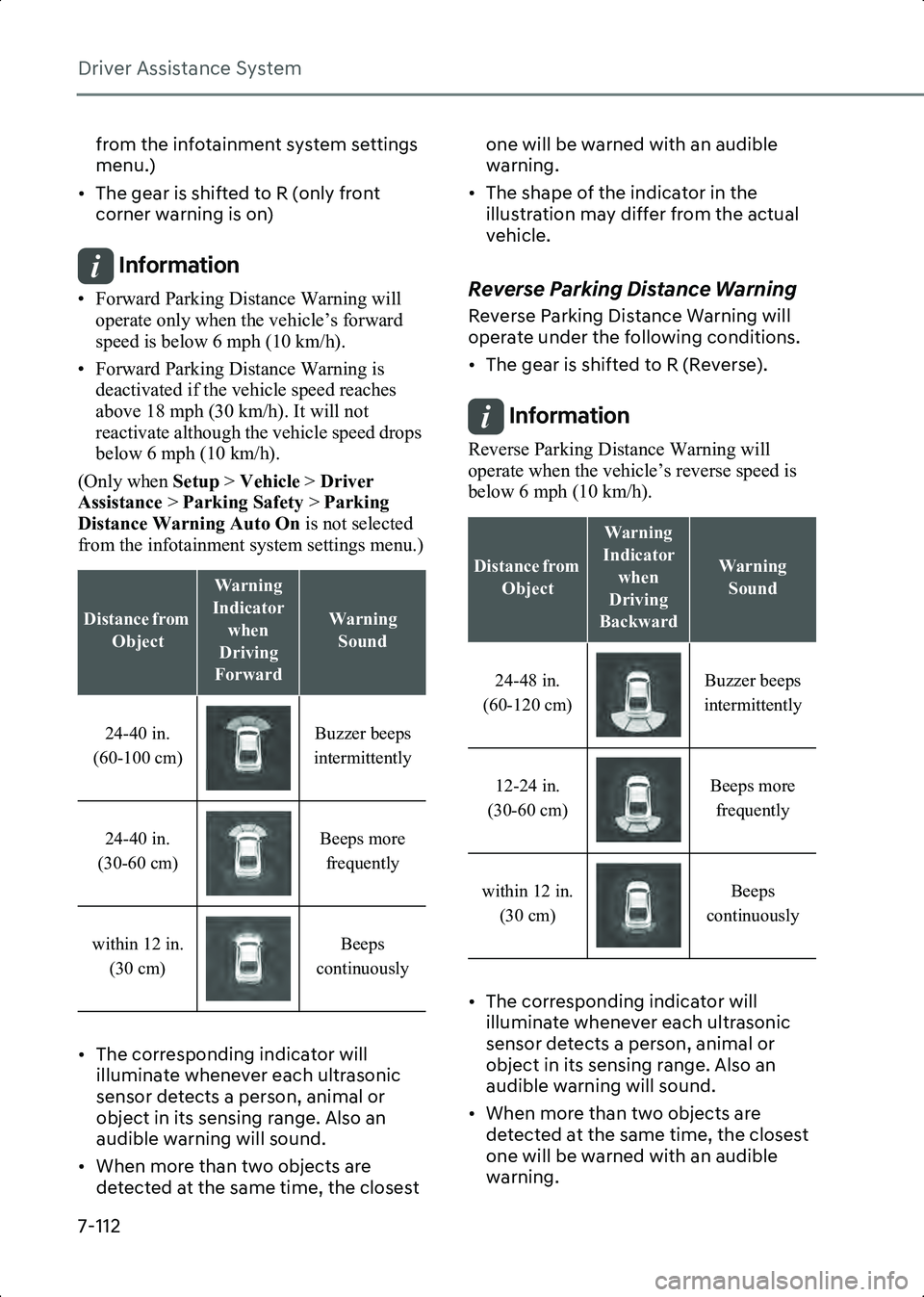
• The corresponding indicator will illuminate whenever each ultrasonic
sensor detects a person, animal or
object in its sensing range. Also an
audible warning will sound.
• When more than two objects are detected at the same time, the closest one will be warned with an audible
warning.
• The shape of the indicator in the illustration may differ from the actual
vehicle.Reverse Parking Distance Warning
Reverse Parking Distance Warning will
operate under the following conditions.
• The gear is shifted to R (Reverse).
Information Reverse Parking Distance Warning will
operate when the vehicle’s reverse speed is
below 6 mph (10 km/h).
• The corresponding indicator will illuminate whenever each ultrasonic
sensor detects a person, animal or
object in its sensing range. Also an
audible warning will sound.
• When more than two objects are detected at the same time, the closest
one will be warned with an audible
warning.
Distance from
Object
Warning
Indicator when
Driving
Forward
Warning Sound
24-40 in.
(60-100 cm) Buzzer beeps
intermittently
24-40 in.
(30-60 cm) Beeps more
frequently
within 12 in. (30 cm) Beeps
continuously
Distance from Object
Warning
Indicator when
Driving
Backward
Warning Sound
24-48 in.
(60-120 cm) Buzzer beeps
intermittently
12-24 in.
(30-60 cm) Beeps more
frequently
within 12 in. (30 cm) Beeps
continuously
Hyundai_CE_en_US.book Page 112
Page 458 of 582
Driver Assistance System
7-114
Warning will operate properly when
such substance is removed.)
- The weather is extremely hot or cold
- The sensor or sensor assembly is disassembled
- The surface of the sensor is pressed hard or hit with a hard object
- The surface of the sensor is scratched with a sharp object
- The sensors or its surrounding area is directly sprayed with high pressure
washer
• Parking Distance Warning may malfunction when:
- Heavy rain or water spray is present
- Water flows on the surface of the sensor
- Affected by another vehicle’s sensors
- The sensor is covered with snow or ice
- Driving on uneven road, gravel roads or bushes
- Objects that generate ultrasonic waves are near the sensor
- License plate is installed in a different spot from the original location
- The vehicle bumper height or ultrasonic sensor installation has
been modified
- Attaching equipment or accessories next to the ultrasonic sensors
• The following objects may not be detected:
- Sharp or slim objects, such as ropes, chains or small poles.
- Narrow objects, such as corners of a square column
- Objects, which tend to absorb sensor frequency, such as clothes, spongy
material or snow.
- Objects smaller than 100 cm (40 in.) in length and narrower than 6 in. (14
cm) in diameter. - Pedestrians, animals or objects that
are very close to the ultrasonic
sensors
WARNING • Parking Distance Warning is a supplemental function. The operation
of Parking Distance Warning can be
affected by several factors (including
environmental conditions). It is the
responsibility of the driver to always
check the front and rear views before
and while parking.
• Your new vehicle warranty does not cover any accidents or damage to the
vehicle due to the malfunction of
Parking Distance Warning.
• Pay close attention when driving near objects, pedestrians, and especially
children. Some objects may not be
detected by the ultrasonic sensors, due
to the objects distance, size or material,
all of which can limit the effectiveness
of the sensor.
• Parking Distance Warning does not warn you in the order of detection. It
varies depending on the speed of the
vehicle or the shape of a person,
animal, or object.
• If the Parking Distance Warning does not operate properly, you have the
vehicle inspected by an authorized
HYUNDAI dealer.
Hyundai_CE_en_US.book Page 114