2023 HYUNDAI IONIQ 5 turn signal
[x] Cancel search: turn signalPage 503 of 680
07
7-101
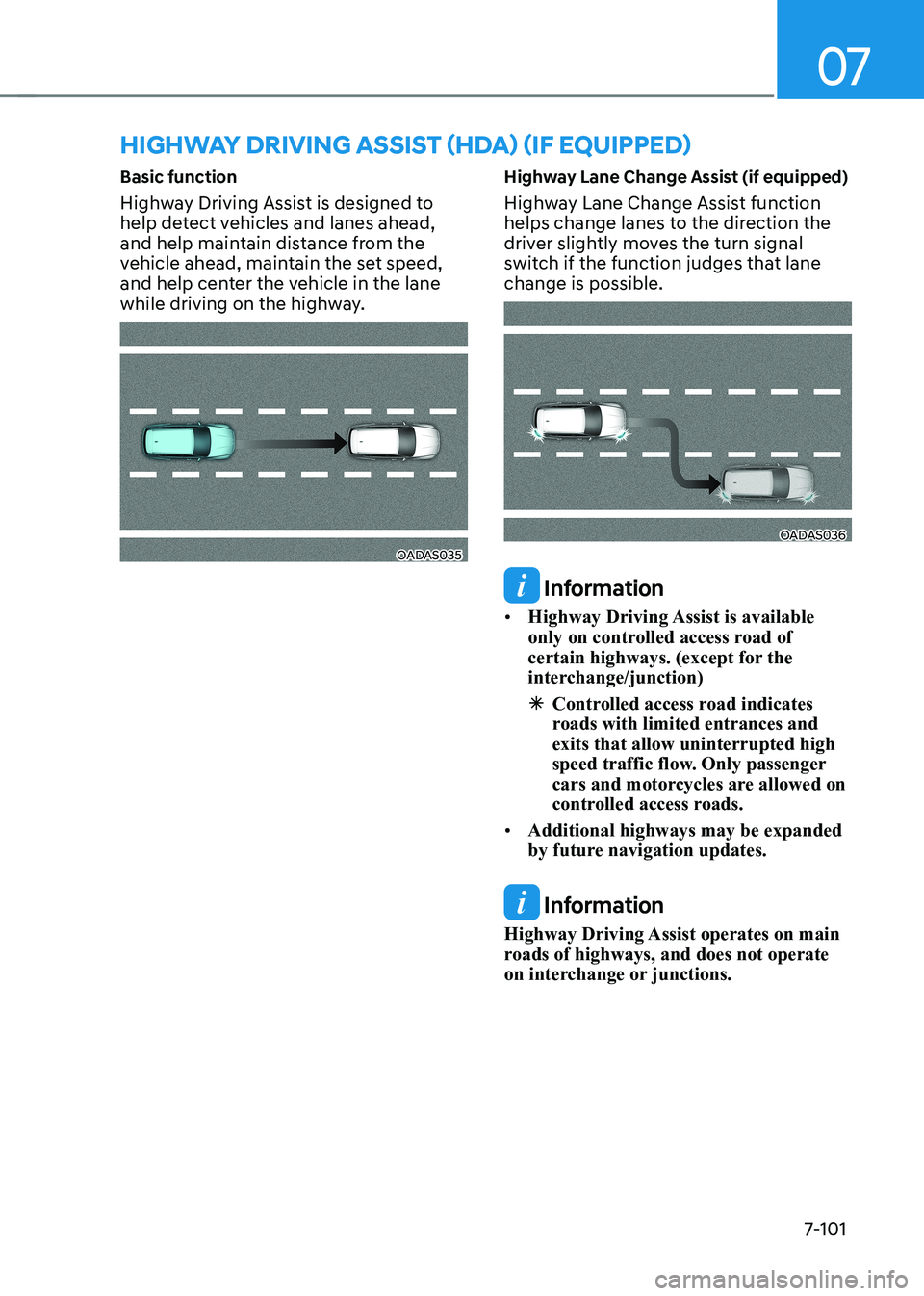
Basic function
Highway Driving Assist is designed to
help detect vehicles and lanes ahead,
and help maintain distance from the
vehicle ahead, maintain the set speed,
and help center the vehicle in the lane
while driving on the highway.
OADAS035
Highway Lane Change Assist (if equipped)
Highway Lane Change Assist function
helps change lanes to the direction the
driver slightly moves the turn signal
switch if the function judges that lane change is possible.OADAS036
Information
• Highway Driving Assist is available
only on controlled access road of
certain highways. (except for the
interchange/junction)
à Controlled access road indicates
roads with limited entrances and exits that allow uninterrupted high
speed traffic flow. Only passenger
cars and motorcycles are allowed on
controlled access roads.
• Additional highways may be expanded
by future navigation updates.
Information
Highway Driving Assist operates on main
roads of highways, and does not operate
on interchange or junctions.
HIGHWAY DRIVING ASSIST (HDA) (IF EQUIPPED)
Page 509 of 680
07
7-107
Highway Lane Change Assist (if equipped)
Display and control
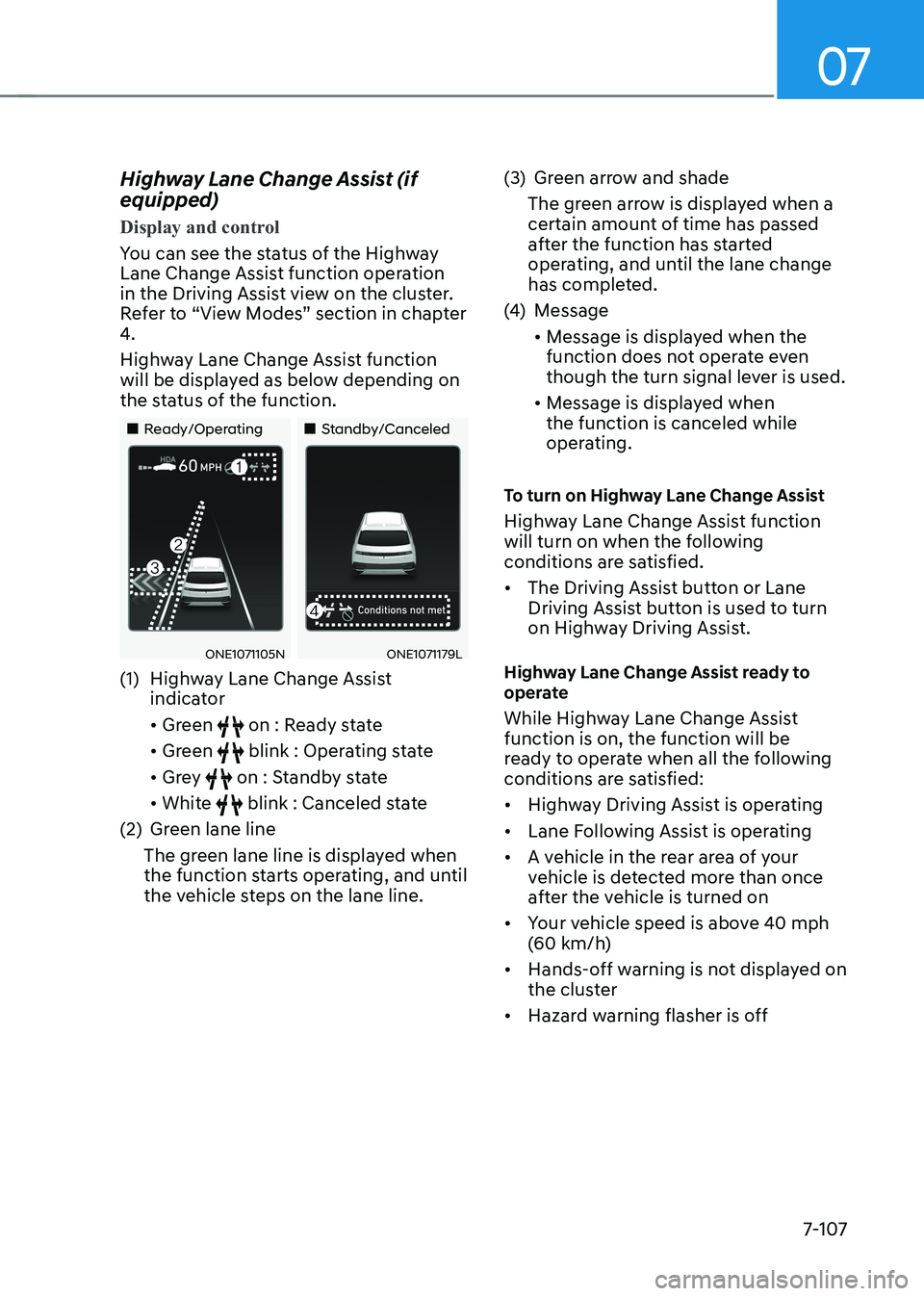
You can see the status of the Highway
Lane Change Assist function operation
in the Driving Assist view on the cluster.
Refer to “View Modes” section in chapter
4.
Highway Lane Change Assist function
will be displayed as below depending on
the status of the function.
„„Ready/Operating
„„Standby/Canceled
ONE1071105NONE1071179L
(1) Highway Lane Change Assist indicator • Green
on : Ready state
• Green
blink : Operating state
• Grey
on : Standby state
• White
blink : Canceled state
(2) Green lane line
The green lane line is displayed when
the function starts operating, and until
the vehicle steps on the lane line. (3) Green arrow and shade
The green arrow is displayed when a
certain amount of time has passed
after the function has started
operating, and until the lane change
has completed.
(4) Message • Message is displayed when the
function does not operate even
though the turn signal lever is used.
• Message is displayed when the function is canceled while
operating.
To turn on Highway Lane Change Assist
Highway Lane Change Assist function
will turn on when the following
conditions are satisfied. • The Driving Assist button or Lane
Driving Assist button is used to turn
on Highway Driving Assist.
Highway Lane Change Assist ready to
operate
While Highway Lane Change Assist function is on, the function will be
ready to operate when all the following
conditions are satisfied: • Highway Driving Assist is operating
• Lane Following Assist is operating
• A vehicle in the rear area of your
vehicle is detected more than once
after the vehicle is turned on
• Your vehicle speed is above 40 mph
(60 km/h)
• Hands-off warning is not displayed on
the cluster
• Hazard warning flasher is off
Page 510 of 680
Driver Assistance System
7-108
Information
• While Lane Change Assist function
is turned on (indicator on), Lane
Following Assist will not cancel even
if the turn signal indicator or hazard
warning flasher is operating.
• Lane Change Assist function turns off automatically when driven in the
following road conditions:
- One driving lane
- A road with a intersection or
crosswalk ahead
- A road with no structure, such as a medium strip, guardrails, etc.
- There is a pedestrian or cyclist on the
road ahead
• When the function is in the ready state, and vehicle speed is below 35 mph (55 km/h), the function will change to the standby state.
WARNING
When Highway Lane Change Assist
function turns off while operating,
steering assist will be temporarily
canceled. Always be cautious while driving. Highway Lane Change Assist operating
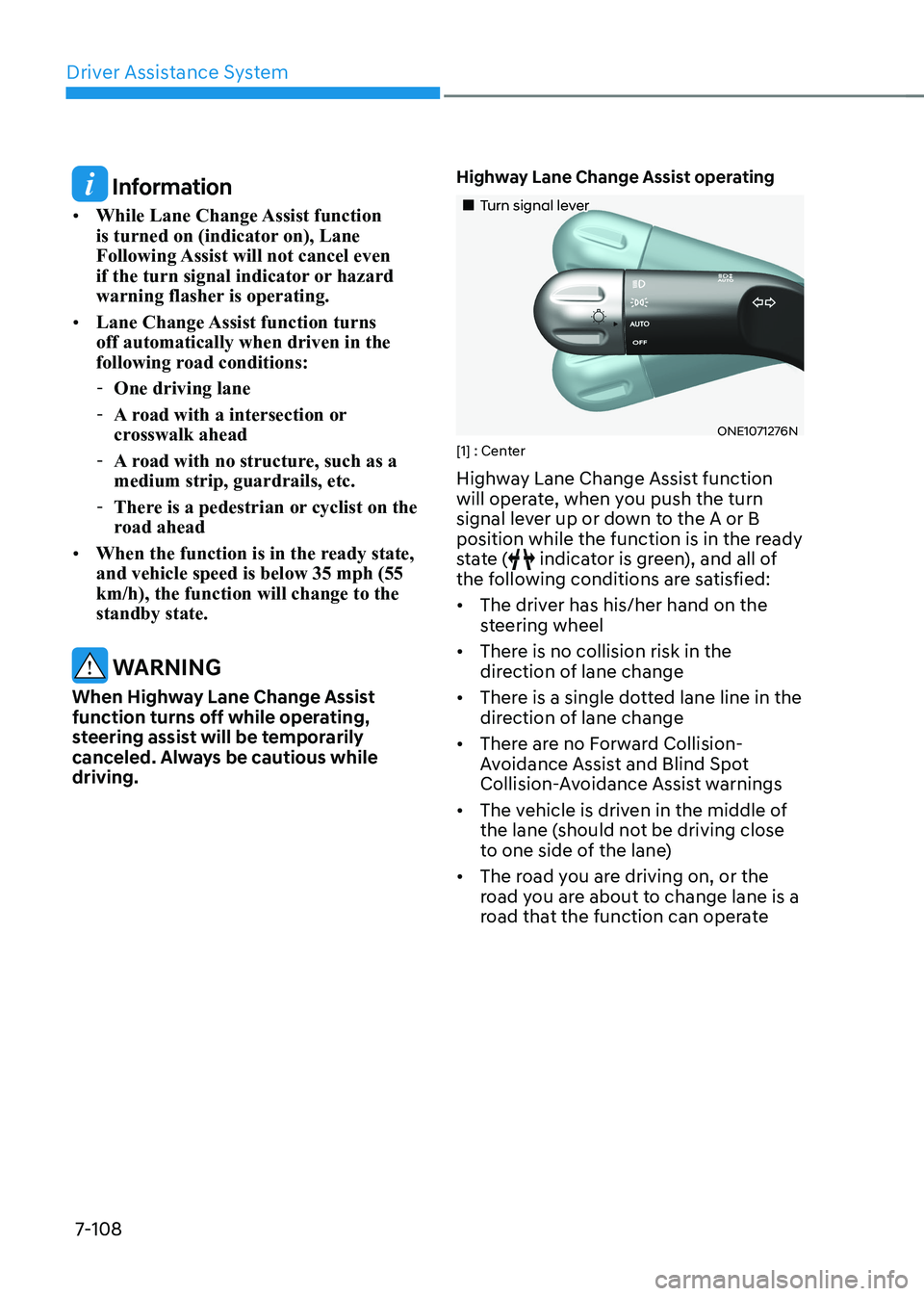
„„Turn signal lever
ONE1071276N
[1] : Center
Highway Lane Change Assist function
will operate, when you push the turn
signal lever up or down to the A or B
position while the function is in the ready
state (
indicator is green), and all of
the following conditions are satisfied: • The driver has his/her hand on the
steering wheel
• There is no collision risk in the
direction of lane change
• There is a single dotted lane line in the
direction of lane change
• There are no Forward Collision-
Avoidance Assist and Blind Spot
Collision-Avoidance Assist warnings
• The vehicle is driven in the middle of
the lane (should not be driving close
to one side of the lane)
• The road you are driving on, or the
road you are about to change lane is a
road that the function can operate
Page 511 of 680
07
7-109
Information
• When the turn signal lever is placed at A
When the turn signal lever is placed at
A position, the Highway Lane Change
Assist function is performed. After
that, if the turn signal lever is placed in
neutral, Highway Lane Change Assist
function is canceled before stepping on the lane.
The Highway Lane Change Assist
function is not canceled after stepping on the lane, but when the lane change is completed, it is canceled and the turn signal turns off.
• When the turn signal lever is placed at
B position for a certain period of time,
the green arrow will appear. At this
time, even when the lever is released
and returns to it’s original position (1), lane change will still be assisted. While lane change is being made by the
function, the turn signal indicator will
blink even when the turn signal lever is
not held, and the turn signal indicator will turn off when lane change is complete. Highway Lane Change Assist standby
Highway Lane Change Assist function
will be in the standby state when one of
the ready state condition is not satisfied,
or when entering or driving on one of the
following roads: •
Road within a certain distance from
the tollgate on the main road of the
highway
• The road ahead ends without an
interchange or junction
• Road with sharp curves
• Road with narrow lanes
Highway Lane Change Assist cancel The function will be canceled when:• · When the turn signal lever is moved
to A and placed in neutral before
stepping on the lane while the
Highway Lane Change Assist function
is operating
• The turn signal lever is turned on in
the opposite direction of lane change
• The steering wheel is steered sharply
Page 512 of 680
Driver Assistance System
7-110
WARNING
• While Highway Driving Assist is
operating, the function will cancel if
one of the following occurs:
- Highway Driving Assist is turned
off
- Lane Following Assist or Smart
Cruise Control is turned off or
temporarily canceled
- Hands-off warning message is
displayed on the cluster
- The hazard warning flasher is turned on
- Forward Collision-Avoidance
Assist or Blind-Spot Collision-
Avoidance Assist warning message
is displayed
- Possible collision is detected in the
next lane, even though there are
no Forward Collision-Avoidance
Assist and Blind Spot Collision-
Avoidance Assist warning
- The target lane to make a lane
change disappears
- The target lane to make a lane
change is not detected
- There is a problem with turn signal lamps -
Highway Lane Change Assist
function is off (The function turns
off when the function is turned off
from the settings menu, when the
road changes to a one-way road,
when there is a intersection or
crosswalk ahead, when you enter
a road with no structure, such as
a medium strip, guardrail, etc.,
or when there is a pedestrian or
cyclist on the driving lane.)
- Your vehicle speed is below 35
mph (55 km/h)
• While the function is operating,
when the function is canceled,
depending on the driving conditions,
the vehicle may drive to the middle
of the driving lane or steering assist
may stop. Always pay attention to
road and driving conditions while driving.
• The function may not operate
properly on roads with pedestrians
or cyclists, such as an intersection
or crosswalk. Always pay attention
to road and driving conditions while driving.
Information
The images or colors may be displayed
differently depending on the specifications
of the instrument panel or theme.
Page 514 of 680

Driver Assistance System
7-112
•
If the vehicle is driven at high speed
above a certain speed at a curve,
your vehicle may drive to one side or
may depart from the driving lane.
• When you are towing a trailer or
another vehicle, turn off Highway
Driving Assist for safety reasons.
• The hands–off warning message
may appear early or late depending
on how the steering wheel is held or
road conditions. Always have your
hands on the steering wheel while driving.
• For your safety, please read the
owner's manual before using the
Highway Driving Assist.
• Highway Driving Assist will not
operate when the vehicle is started,
or when the detecting sensors or
navigation is being initialized.
Limitations of Highway Driving
Assist
Highway Driving Assist and Highway
Lane Change function may not operate
properly, or may not operate under the
following circumstances: • The map information and the
actual road is different because the
navigation is not updated
• The map information and the actual
road is different because of real-time
GPS data or map information error
• The infotainment system is overloaded
by simultaneously performing
functions such as route search, video
playback, voice recognition, etc. •
GPS signals are blocked in areas such as a tunnel
• The driver goes off course or the
route to the destination is changed or
canceled by resetting the navigation
• The vehicle enters a service station or
rest area
• Android Auto or Car Play is operating
• The navigation cannot detect the
current vehicle position (for example,
elevated roads including overpass
adjacent to general roads or nearby
roads exist in a parallel way)
• White single dotted lane line or road
edge cannot be detected
• The road is temporarily controlled due
to construction, etc.
• There is no structure, such as a
medium strip, guardrails, etc., on the
road
• There is a changeable lane in the
direction of lane change
Information
For more details on the limitations of
the front view camera, front radar, front
corner radar and rear corner radar, refer
to “Forward Collision-Avoidance Assist
(FCA)” section in this chapter.
Page 566 of 680
Driver Assistance System
7-164
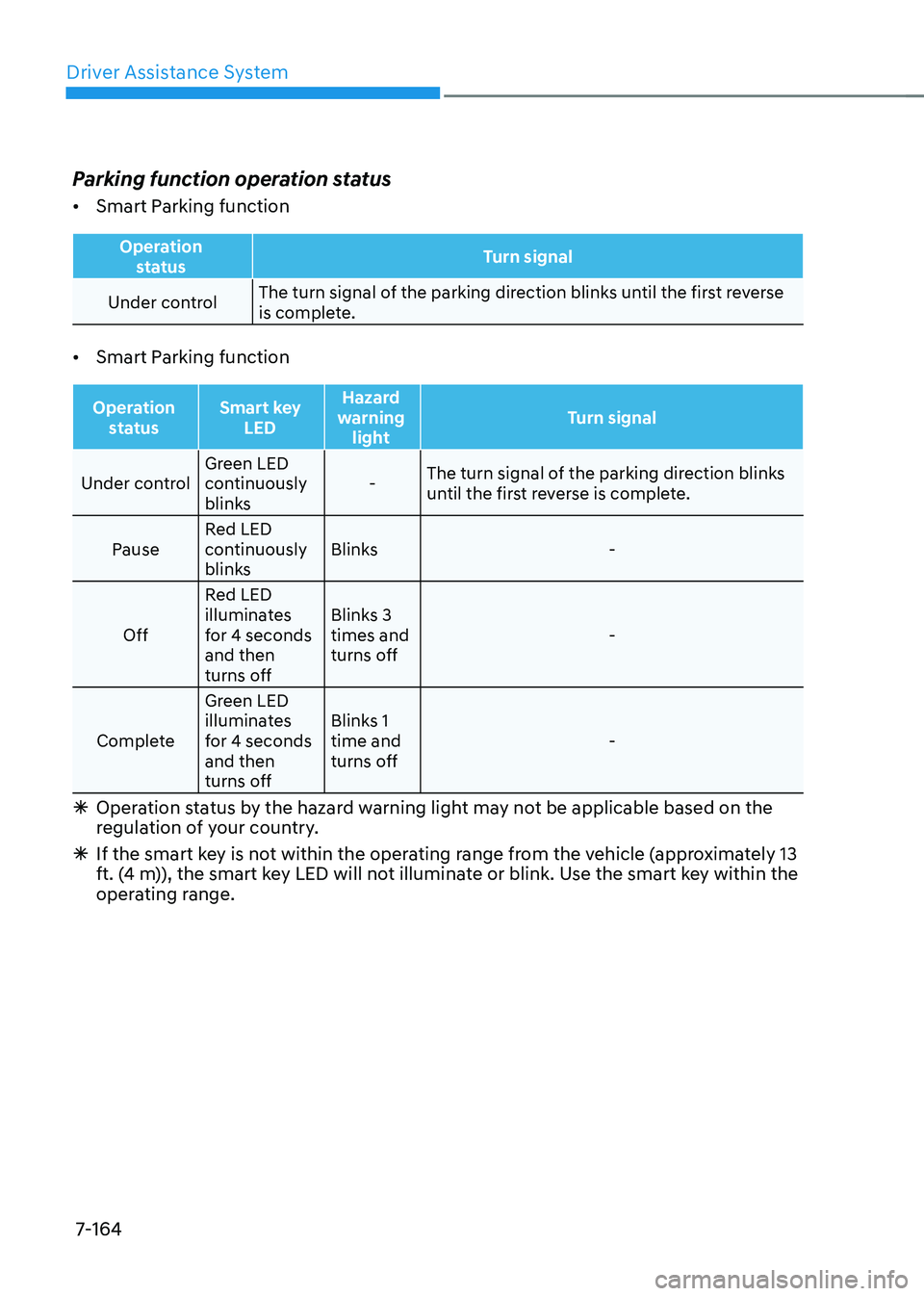
Parking function operation status •
Smart Parking function
Operation
status Turn signal
Under controlThe turn signal of the parking direction blinks until the first reverse
is complete.
• Smart Parking function
Operation
status Smart key
LED Hazard
warning light Turn signal
Under controlGreen LED
continuously
blinks -
The turn signal of the parking direction blinks
until the first reverse is complete.
Pause Red LED
continuously
blinks Blinks -
Off Red LED
illuminates
for 4 seconds and then
turns off Blinks 3 times and
turns off
-
Complete Green LED
illuminates
for 4 seconds and then
turns off Blinks 1 time and
turns off
-
à Operation status by the hazard warning light may not be applicable based on the
regulation of your country.
à If the smart key is not within the operating range from the vehicle (approximately 13
ft. (4 m)), the smart key LED will not illuminate or blink. Use the smart key within the
operating range.
Page 570 of 680
Driver Assistance System
7-168
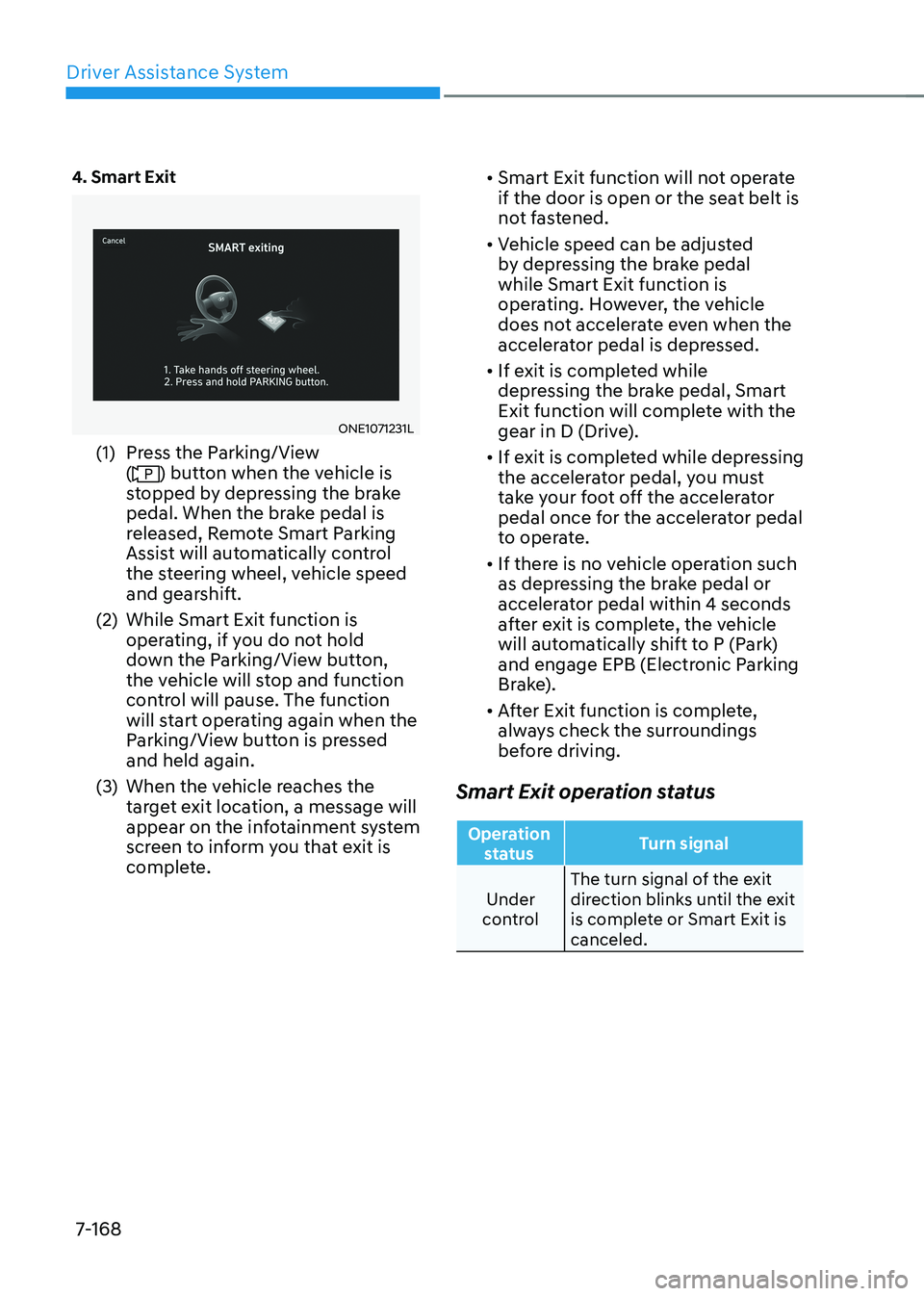
4. Smart Exit
ONE1071231L
(1) Press the Parking/View (
) button when the vehicle is
stopped by depressing the brake
pedal. When the brake pedal is
released, Remote Smart Parking
Assist will automatically control
the steering wheel, vehicle speed
and gearshift.
(2) While Smart Exit function is operating, if you do not hold
down the Parking/View button,
the vehicle will stop and function
control will pause. The function
will start operating again when the
Parking/View button is pressed and held again.
(3) When the vehicle reaches the target exit location, a message will
appear on the infotainment system
screen to inform you that exit is
complete. •
Smart Exit function will not operate
if the door is open or the seat belt is
not fastened.
• Vehicle speed can be adjusted
by depressing the brake pedal while Smart Exit function is
operating. However, the vehicle
does not accelerate even when the
accelerator pedal is depressed.
• If exit is completed while
depressing the brake pedal, Smart
Exit function will complete with the
gear in D (Drive).
• If exit is completed while depressing
the accelerator pedal, you must
take your foot off the accelerator
pedal once for the accelerator pedal
to operate.
• If there is no vehicle operation such
as depressing the brake pedal or
accelerator pedal within 4 seconds
after exit is complete, the vehicle
will automatically shift to P (Park)
and engage EPB (Electronic Parking
Brake).
• After Exit function is complete,
always check the surroundings
before driving.
Smart Exit operation status
Operation status Turn signal
Under
control The turn signal of the exit
direction blinks until the exit
is complete or Smart Exit is canceled.