Page 645 of 814

uuHonda Sensing ®u Traffic Sign Recognition System
644
Driving
The Traffic Sign Recognition system may incorrectly recognize, be slow to identify,
or fail to recognize the traffi c sign in the following cases.
■Environmental conditions
• Driving into low sunlight (e.g., at dawn or dusk).
• Strong light is reflected onto the roadway.
• Driving at night, in dark areas such as long tunnels.
• Driving in bad weather (rain, fog, snow, etc.).
• Sudden changes between light and dark, such as the entrance or exit of a tunnel
or the shadows of trees, buildings, etc.
• Water is sprayed by or snow blown from a vehicle ahead.
■Roadway conditions
• Your vehicle is strongly shaken on uneven road surfaces.
■Vehicle conditions
• When lighting is weak due to dirt covering the headlight lenses, or there is poor
visibility in a dark place due to th e headlights being improperly adjusted.
• The front of the camera is covered by dirt, fog, rain, mud, wet snow, seals,
accessories, stickers, or film on the windshield.
• There is residue on the windshie ld from the windshield wipers.
• An abnormal tire or wheel condition (incorre ct sizes, varied sizes or construction,
improperly inflated, compact spare tire
*, etc.).
• The vehicle is tilted due to heavy lo ad in the cargo area or rear seats.
• The suspension has been modified.
• Tire chains are installed.
• Driving at night or in a dark place (e .g., a tunnel) with the headlights off.
• The vehicle is towing a trailer.
■Traffic Sign Recognition System Conditions and Limitations1Traffic Sign Recognition System Conditions and Limitations
When the traffic sign recognition system
malfunctions, appears on the gauge. If this
message does not disappear, have your vehicle
checked by a dealer.
Models with A-type meter
Models with B-type meter
Head-up display*
* Not available on all models
23 PILOT-31T906000_03.book 644 ページ 2022年10月31日 月曜日 午前10時26分
Page 647 of 814
646
uuHonda Sensing ®u Traffic Sign Recognition System
Driving
The traffic sign recognition system may not operate correctly, such as displaying
signs that do not adhere to the actual regulations for the roadway or do not exist at
all in the following cases.
u A speed limit sign may display at a higher or lower speed than the actual speed
limit.
• There is a supplementary sign with furth er information such as weather, time,
vehicle type, school zone, etc.
• Figures on the sign are hard to read (electric signs, numbers on the sign are
blurred, etc.).
• The sign is in the vicinity of the lane yo u are driving in, even though it is not for
the lane, such as a speed limit sign situated at an exit or an intersection between
the side road and the main road.
• There are things that look similar in color or shape to recognized objects (similar
sign, electric sign, signboard, structure, etc.).
23 PILOT-31T906000_03.book 646 ページ 2022年10月31日 月曜日 午前10時26分
Page 648 of 814
647
uuHonda Sensing ®u Traffic Sign Recognition System
Driving
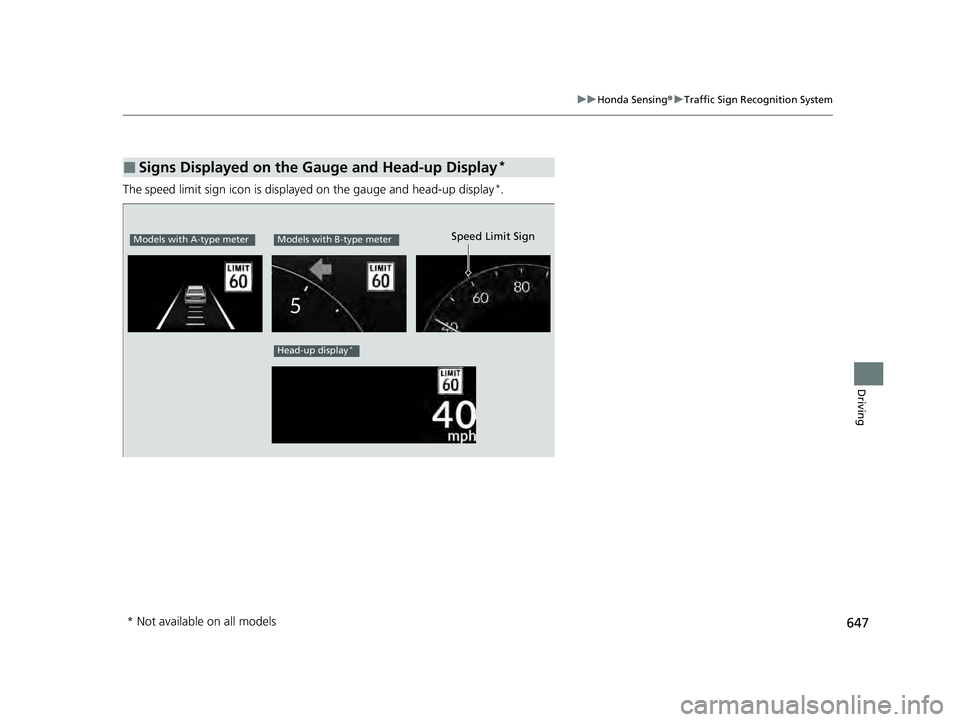
The speed limit sign icon is displa yed on the gauge and head-up display*.
■Signs Displayed on the Gauge and Head-up Display*
Models with A-type meterModels with B-type meter
Head-up display*
Speed Limit Sign
* Not available on all models
23 PILOT-31T906000_03.book 647 ページ 2022年10月31日 月曜日 午前10時26分
Page 665 of 814

uuParking Your Vehicle uParking Sensor System*
664
Driving
■Parking sensor system on and off
You can turn the system on and off us ing the driver information interface.
2Switching the Display P. 125, 154
2 Safety Support P. 136, 164
The front corner, rear corner and rear center sensors start to detect an obstacle
when the transmission is in
(R, and the vehicle speed is less than 5 mph (8 km/h).
The front corner and front center sensor s start to detect an obstacle when the
transmission is in any position other than
(P or (R, and the vehicle speed is less
than 5 mph (8 km/h).
1 Parking sensor system on and off
When you set the power mode to ON, the system will
be in the previously selected condition.
You can turn the rear park ing sensor system on and
off using the audio/information screen. 2 Customized Features P. 429
When the Drive Mode is in TOW mode, the rear
parking sensor system will turn off.
2 Drive Mode System P. 548
23 PILOT-31T906000_03.book 664 ページ 2022年10月31日 月曜日 午前10時26分
Page 670 of 814

Continued669
uuParking Your Vehicle uCross Traffic Monitor*
Driving
The system activates when:
• The power mode is in ON.
• The Cross Traffic Monitor is turned on.
2 Cross Traffic Monitor On and Off P. 671
•The transmission is in (R.
• Your vehicle is moving at 3 mph (5 km/h) or
lower.
When a vehicle is detected approaching from a rear corner, Cross Traffic Monitor
alerts you with a buzzer and a displayed warning.
The system will not detect a vehicle that approaches from directly behind your
vehicle, nor will it provide alerts about a detected vehicle when it moves directly
behind your vehicle.
The system does not provide alerts for a vehicle that is moving away from your
vehicle, and it may alert for pedestrians, bicycles, or stationary objects.
■How the System Works1 Cross Traffic Monitor*
Cross Traffic Monitor may not detect or may delay
alerting an approach ing vehicle, or may alert without
an approaching vehicle under the following
conditions:
•An obstacle, such as anothe r vehicle or a wall near
your vehicle's rear bumpe r, is blocking the radar
sensor's scope.
•Your vehicle is moving at a speed of about 3 mph
(5 km/h) or higher.
•A vehicle is approaching at a speed other than
between about 6 and 16 mph (10 and 25 km/h).
•The system picks up external interference such as
other radar sensors from an other vehicle or strong
radio wave transmitted fr om a facility nearby.
•Either corner of the rear bumper is covered with
snow, ice, mud or dirt.
•When there is bad weather.
•Your vehicle is on an incline.
•Your vehicle is tilted due to a heavy load in the rear.
•Your vehicle is reversing toward a wall, a pole, a
vehicle, and so on.
If the rear bumper or the sensors have been
improperly repaired or the rear bumper has been
deformed. Have a vehicle checked by a dealer.
For proper operation, always keep the rear bumper
corner area clean.
Do not cover the rear bumper corner area with labels
or stickers of any kind.
Radar sensors:
Underneath the rear bumper
corners
* Not available on all models
23 PILOT-31T906000_03.book 669 ページ 2022年10月31日 月曜日 午前10時26分
Page 671 of 814

uuParking Your Vehicle uCross Traffic Monitor*
670
Driving
An arrow icon appears on the side a vehicl e is approaching on the audio/information
screen.
■When the System Detects a Vehicle1 When the System Detects a Vehicle
If the changes to in amber when the
transmission is in
(R, mud, snow or ice, etc. may
have accumulated in the vi cinity of the sensor. The
system is temporarily canceled. Check the bumper
corners for any obstructions, and thoroughly clean
the area if necessary.
If the comes on when the transmission is in
( R,
there may be a problem with the Cross Traffic
Monitor system. Do not use the system and have your
vehicle checked by a dealer.
If the display remains the same with the transmission
in
( R, there may be a problem with the rear camera
system and the Cross Traffic Monitor system.
Do not use the system and have your vehicle checked
by a dealer.
Wide View
Normal View Arrow Icon
Models with multi-view rear camera system
Top Down View
Rear Wide View/
Ground View
Rear Normal View/
Ground View Arrow Icon
Models with surround view camera system
23 PILOT-31T906000_03.book 670 ページ 2022年10月31日 月曜日 午前10時26分
Page 673 of 814
672
Driving
Multi-View Rear Camera*
About Your Multi-View Rear Camera
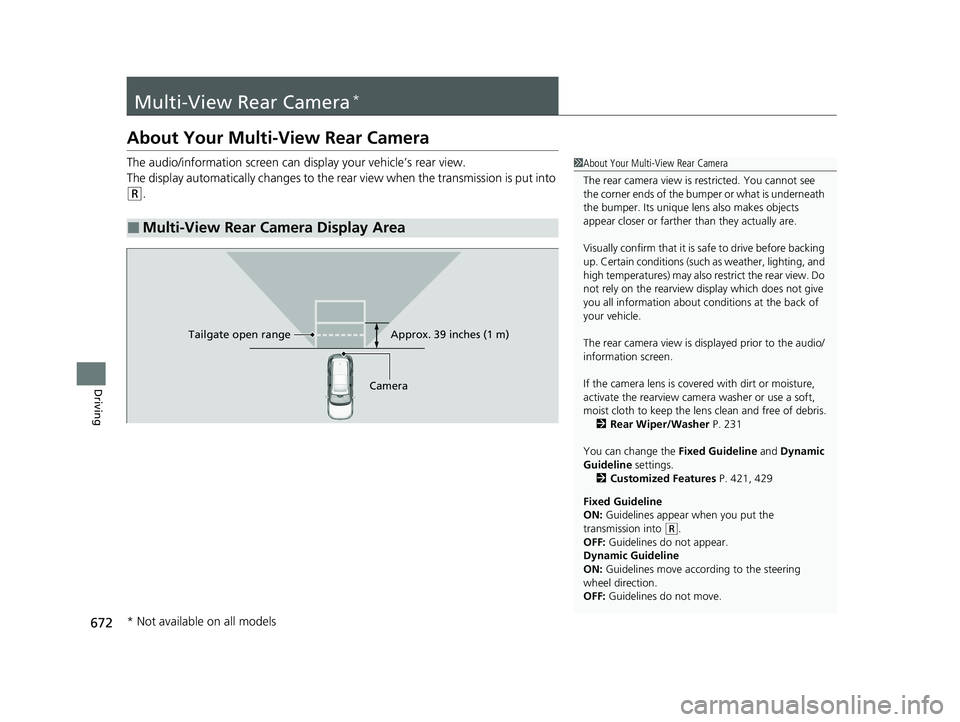
The audio/information screen can display your vehicle’s rear view.
The display automatically changes to the rear view when the transmission is put into
(R.
■Multi-View Rear Camera Display Area
1About Your Multi-View Rear Camera
The rear camera view is restricted. You cannot see
the corner ends of the bumper or what is underneath
the bumper. Its unique le ns also makes objects
appear closer or farther than they actually are.
Visually confirm that it is safe to drive before backing
up. Certain conditions (such as weather, lighting, and
high temperatures) may also restrict the rear view. Do
not rely on the rearview display which does not give
you all information about conditions at the back of
your vehicle.
The rear camera view is di splayed prior to the audio/
information screen.
If the camera lens is cove red with dirt or moisture,
activate the rearview camera washer or use a soft,
moist cloth to keep the lens clean and free of debris.
2 Rear Wiper/Washer P. 231
You can change the Fixed Guideline and Dynamic
Guideline settings. 2 Customized Features P. 421, 429
Fixed Guideline
ON: Guidelines appear when you put the
transmission into
( R.
OFF: Guidelines do not appear.
Dynamic Guideline
ON: Guidelines move according to the steering
wheel direction.
OFF: Guidelines do not move.
Approx. 39 inches (1 m)
Camera
Tailgate open range
* Not available on all models
23 PILOT-31T906000_03.book 672 ページ 2022年10月31日 月曜日 午前10時26分
Page 674 of 814

673
uuMulti-View Rear Camera*uAbout Your Multi-View Rear Camera
Driving
You can view three different camera modes on the audio/information screen.
Touch the appropriate icon to switch the mode.
• If you were last using Wide view mode or Normal view mode, the same view
mode will be activated the next ti me you put the transmission into
(R.
• If you were using Top down view mode before you turned off the engine, Wide
view mode will be activated the next time you set the power mode to ON and put
the transmission into
(R.
• If you were using Top down view mode and 10 seconds elapsed after you took
the transmission out of
(R, Wide view mode will be activated the next time you
put the transmission into
(R.
• If you were using Top down view mode and put the transmission back into
(R
within 10 seconds after you took it out of
(R, Top down view mode will be
activated.
Bumper BumperBumper
Wide view modeNormal view modeTop down view mode
1About Your Multi-View Rear Camera
If the vehicle’s rear view is not displayed on the audio/
information screen while the shift position is in
( R,
there may be a problem with the system. Have your
vehicle checked by a dealer immediately.
23 PILOT-31T906000_03.book 673 ページ 2022年10月31日 月曜日 午前10時26分