Page 611 of 814
uuHonda Sensing ®u Adaptive Cruise Control (ACC) with Low Speed Follow
610
Driving
Each time you press the RES/+/SET/– switch up or down, the vehicle speed is
increased or decreased by about 1 mph (1 km/h).
If you keep the RES/+/SET/– switch pressed up or down, the vehicle speed increases
or decreases by about 5 mph or 5 km/h accordingly.
To cancel cruise control, do any of the following:
• Press the CANCEL button.
u The indicator (green) on the gauge change to the indicator (white).
• Press the button.
u indicator (green) goes off.
• Depress the brake pedal.
u The indicator (green) on the gauge change to the indicator (white).
■To Adjust the Vehicle Speed
■To Cancel
1To Cancel
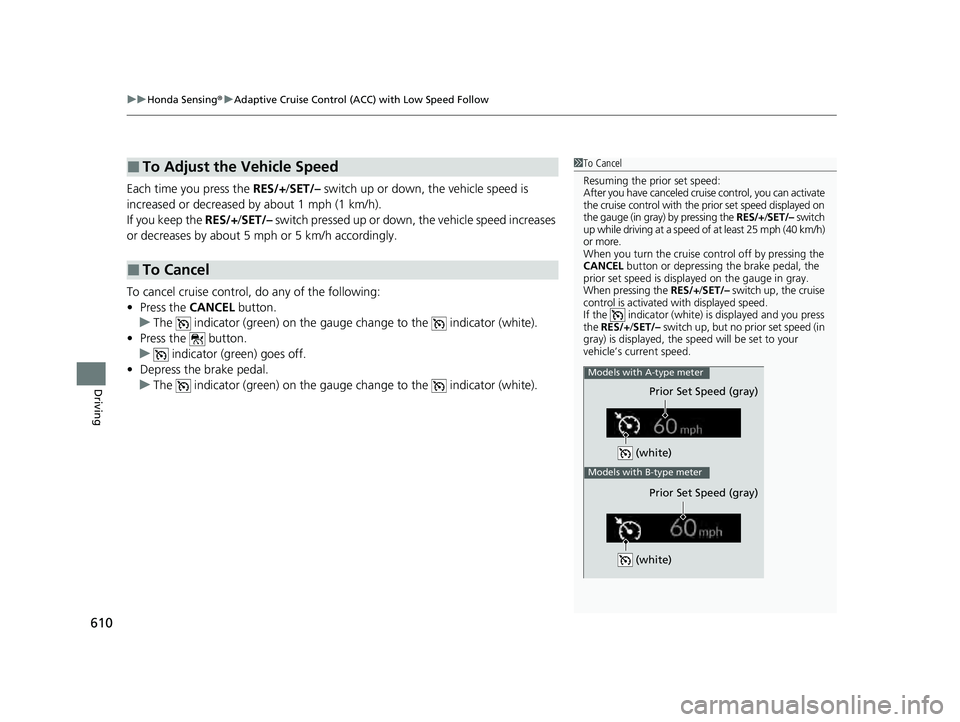
Resuming the prior set speed:
After you have canceled cruise control, you can activate
the cruise control with the prior set speed displayed on
the gauge (in gray) by pressing the RES/+/SET/– switch
up while driving at a speed of at least 25 mph (40 km/h)
or more.
When you turn the cruise control off by pressing the
CANCEL button or depressing the brake pedal, the
prior set speed is displayed on the gauge in gray.
When pressing the RES/+/SET/– switch up, the cruise
control is activated with displayed speed.
If the indicator (white) is displayed and you press
the RES/+ /SET/– switch up, but no prior set speed (in
gray) is displayed, the sp eed will be set to your
vehicle’s current speed.
(white)
Prior Set Speed (gray)
Models with A-type meter
Models with B-type meter
Prior Set Speed (gray)
(white)
23 PILOT-31T906000_03.book 610 ページ 2022年10月31日 月曜日 午前10時26分
Page 613 of 814

612
uuHonda Sensing ®u Lane Keeping Assist System (LKAS)
Driving
Lane Keeping Assist System (LKAS)
Provides steering input to help keep the vehicle in the middle of a detected lane and
provides tactile and visual alerts if the ve hicle is detected drifting out of its lane.1Lane Keeping Assist System (LKAS)
Important Safety Reminders
The LKAS is for your convenience only. It is not an
autonomous driving system and always requires
driver attention and control. The system does not
work if you take your hands off the steering wheel or
fail to steer the vehicle.
The LKAS is convenient when it is used on
expressways or freeways.
Do not place objects on the instrument panel.
Objects may reflect on th e windshield and prevent
correct detection of the traffic lanes.
The LKAS only alerts you when lane drift is detected
without a turn signal in use. The LKAS may not detect
all lane markings or lane departures; accuracy will
vary based on weather, speed, and lane marker
condition.
It is always your responsibility to safely operate the
vehicle and avoid collisions.
You can read about handling information for the
camera equipped with this system. 2 Front Sensor Camera P. 648
The LKAS may not work properly or may work
improperly under the certain conditions: 2 LKAS Conditions and Limitations P. 621
When you operate the turn signals to chan ge lanes, the system is suspended, and
resumes after the signals are off.
If you make a lane change without operating the turn signals, the LKAS alerts
activate, and torque is applied to the steering.
■Front Sensor
Camera
Monitors the
lane lines■Tactile and visual alerts
Rapid vibrations on the steering wheel
and a warning display alert you that the
vehicle is drifting out of a detected lane.
■Steering input assist
The system applies torque to the steering to keep the vehicle between the left
and right lane lines. The applied torque becomes stronger as the vehicle gets
closer to either of the lane lines.
23 PILOT-31T906000_03.book 612 ページ 2022年10月31日 月曜日 午前10時26分
Page 615 of 814
614
uuHonda Sensing ®u Lane Keeping Assist System (LKAS)
Driving
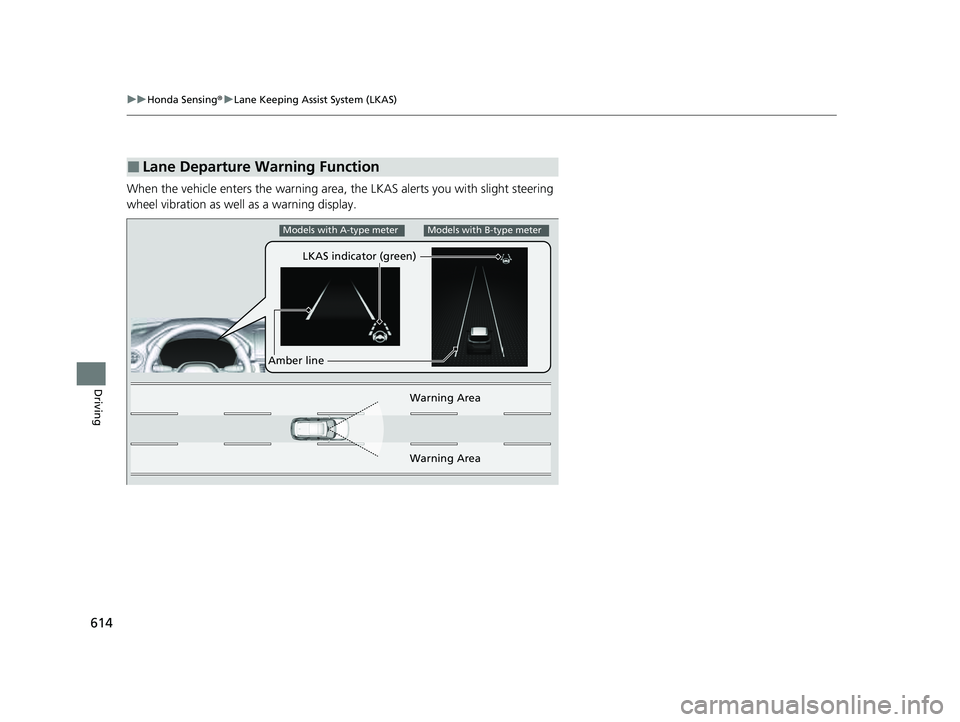
When the vehicle enters the warning area, the LKAS alerts you with slight steering
wheel vibration as well as a warning display.
■Lane Departure Warning Function
LKAS indicator (green)
Amber line Warning Area
Warning Area
Models with A-type meterModels with B-type meter
23 PILOT-31T906000_03.book 614 ページ 2022年10月31日 月曜日 午前10時26分
Page 627 of 814
626
uuHonda Sensing ®u Traffic Jam Assist
Driving
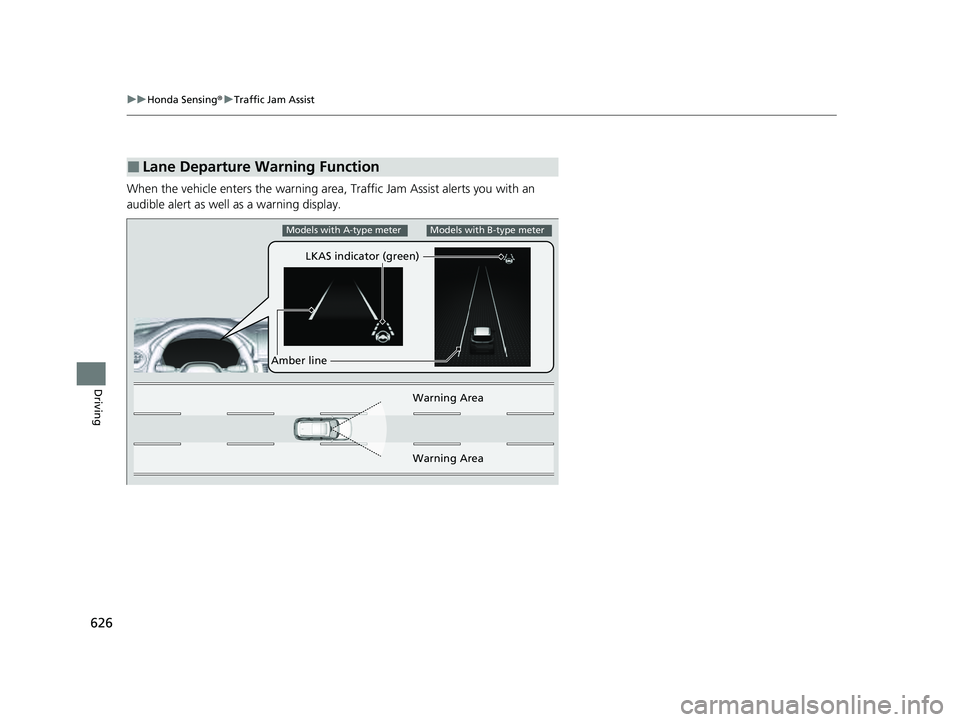
When the vehicle enters the warning area, Traffic Jam Assist alerts you with an
audible alert as well as a warning display.
■Lane Departure Warning Function
LKAS indicator (green)
Amber line Warning Area
Warning Area
Models with A-type meterModels with B-type meter
23 PILOT-31T906000_03.book 626 ページ 2022年10月31日 月曜日 午前10時26分
Page 628 of 814

Continued627
uuHonda Sensing ®u Traffic Jam Assist
Driving
Traffic Jam Assist is activated when all of the following conditions exist:
• LKAS is activated.
• The lane in which you are driving has detectable lane markers on both sides, and
your vehicle is in the center of the lane.
• The vehicle is traveling between about 0 and 45 mph (0 and 72 km/h).
• You are driving on a straight or slightly curved road.
• The driver is grippi ng the steering wheel.
• The shift position is in
(D or (S.
Do not use Traffic Jam Assist in any of the following situations:
• You are traveling on a road with sharp curves.
u The system may not allow your vehicle to respond in a manner best suited for
the road conditions.
• You are entering a toll booth, inte rchange, service area, or parking area.
• You are driving in adverse weat her (rain, fog, snow, etc.).
• The surface of the road is slippery; for ex ample, it is icy or covered with snow.
u The tire may slip, causing you to lose control of the vehicle.
■Traffic Jam Assist Activation1Traffic Jam Assist Activation
Refer to the following pa ge for proper handling of
the Lane Keeping Assist System (LKAS):
2 Lane Keeping Assist System (LKAS) P. 612
Refer to the following page for steering buttons and
displays: 2 Operation Switches for the Adaptive
Cruise Control (ACC) with Low Speed
Follow/Lane Keeping Assist System
(LKAS)/Traffic Jam Assist P. 568
2 Gauge Content P. 570
23 PILOT-31T906000_03.book 627 ページ 2022年10月31日 月曜日 午前10時26分
Page 638 of 814

Continued637
uuHonda Sensing ®u Road Departure Mitigation System
Driving
You can turn the system on and off using the driver information interface.
2 Switching the Display P. 125, 154
2 Safety Support P. 136, 164
The Road Departure Mitigation system is in the previously selected on or off setting
each time you start the engine.
■Road Departure Mitigation system On and Off1Road Departure Mitigation system On and Off
When you have selected Warning only
*/Warning
Only*, the system does not operate the steering
wheel. 2 Settings
* P. 140
2 Customized Features P. 429
The Vehicle Stability Assist
TM (VSA ®) system, Adaptive
Cruise Control (ACC) with Low Speed Follow, brake
system (amber), and safety support indicators may
come on in amber along with a message in the driver
information interface when you set the power mode
to ON after reconnecting the battery.
Drive a short distance at more than 12 mph (20 km/h).
Each indicator should go off. If any do not, have your
vehicle checked by a dealer.
* Not available on all models
23 PILOT-31T906000_03.book 637 ページ 2022年10月31日 月曜日 午前10時26分
Page 643 of 814

642
uuHonda Sensing ®u Traffic Sign Recognition System
Driving
Traffic Sign Recognition System
Reminds you of speed limit sign your vehicl e has just passed through, showing it on
the gauge and the head-up display*.
1 Traffic Sign Recognition System
Not all signs may be displa yed, but any signs posted
on roadsides should not be ignored. The system does
not work on the designated traffic signs of all the
countries you travel, nor in all situations.
Do not rely too much on the system. Always drive at
speeds appropriate fo r the road conditions.
Never apply a film or attach any objects to the
windshield that could obstruc t the camera’s field of
vision and cause the system to operate abnormally.
Scratches, nicks, and othe r damage to the windshield
within the camera’s field of vision can cause the
system to operate abnormally. If this occurs, we
recommend that you replace the windshield with a
genuine Honda replacement windshield. Making even
minor repairs within the ca mera’s field of vision or
installing an aftermarket replacement windshield may
also cause the system to operate abnormally. After
replacing the windshield, have a dealer recalibrate the
camera. Proper calibration of the camera is necessary
for the system to operate properly.
To help reduce the likelihood that high interior
temperatures will cause the camera’s sensing system to
shut off, when parking, find a shady area or face the front
of the vehicle away from the sun. If you use a reflective sun
shade, do not allow it to cover the camera housing.
Covering the camera can concentrate heat on it.
You can read about handling information for the
camera equipped with this system. 2 Front Sensor Camera P. 648
* Not available on all models
23 PILOT-31T906000_03.book 642 ページ 2022年10月31日 月曜日 午前10時26分
Page 644 of 814
Continued643
uuHonda Sensing ®u Traffic Sign Recognition System
Driving
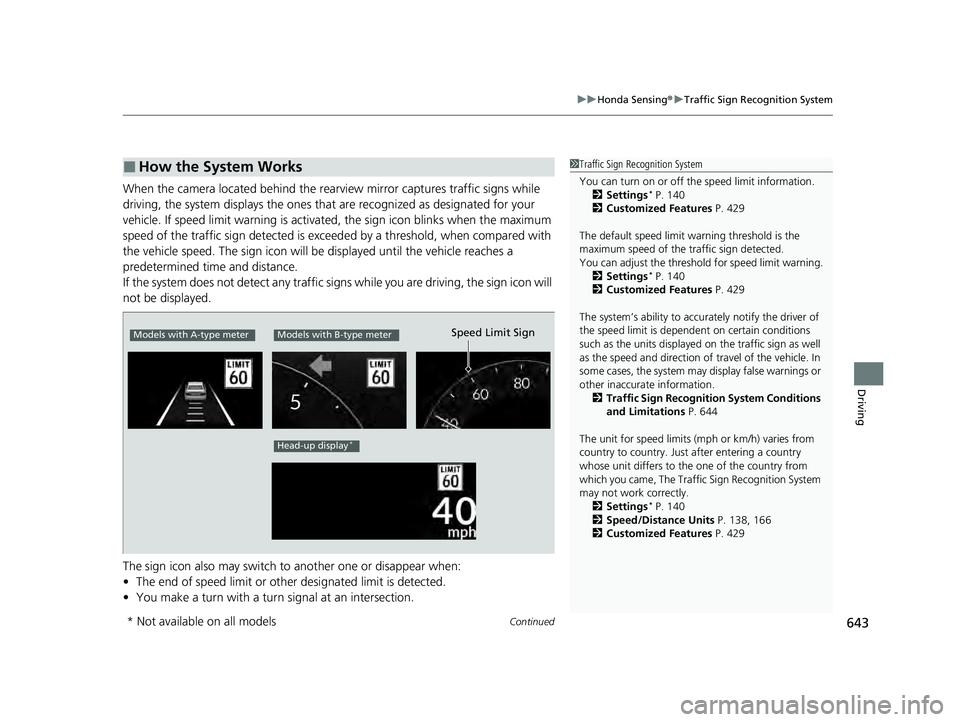
When the camera located behind the rear view mirror captures traffic signs while
driving, the system displays the ones that are recognized as designated for your
vehicle. If speed limit warning is activated, the sign icon blinks when the maximum
speed of the traffic sign detected is exceeded by a threshold, when compared with
the vehicle speed. The sign icon will be displayed until the vehicle reaches a
predetermined time and distance.
If the system does not detect any traffic signs while you are driving, the sign icon will
not be displayed.
The sign icon also may switch to another one or disappear when:
• The end of speed limit or other designated limit is detected.
• You make a turn with a turn signal at an intersection.
■How the System Works1Traffic Sign Recognition System
You can turn on or off the speed limit information.
2 Settings
* P. 140
2 Customized Features P. 429
The default speed limit wa rning threshold is the
maximum speed of the traffic sign detected.
You can adjust the threshol d for speed limit warning.
2 Settings
* P. 140
2 Customized Features P. 429
The system’s ability to accurately notify the driver of
the speed limit is depend ent on certain conditions
such as the units displayed on the traffic sign as well
as the speed and direction of travel of the vehicle. In
some cases, the system may display false warnings or
other inaccurate information.
2 Traffic Sign Recognition System Conditions
and Limitations P. 644
The unit for speed limits (mph or km/h) varies from
country to country. Just after entering a country
whose unit differs to the one of the country from
which you came, The Traffi c Sign Recognition System
may not work correctly.
2 Settings
* P. 140
2 Speed/Distance Units P. 138, 166
2 Customized Features P. 429
Models with A-type meterModels with B-type meter
Head-up display*
Speed Limit Sign
* Not available on all models
23 PILOT-31T906000_03.book 643 ページ 2022年10月31日 月曜日 午前10時26分