Page 15 of 814
14
Quick Reference Guide
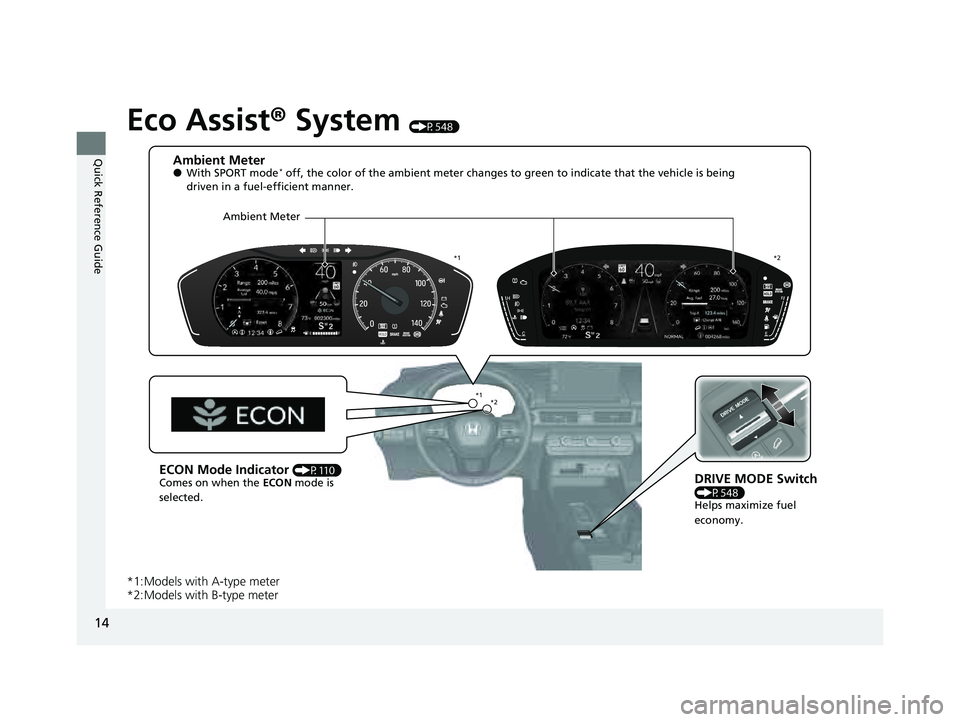
Eco Assist® System (P548)
*1:Models with A-type meter
*2:Models with B-type meter
Ambient Meter●With SPORT mode* off, the color of the ambient meter changes to green to indica te that the vehicle is being
driven in a fuel-efficient manner.
DRIVE MODE Switch
(P548) Helps maximize fuel
economy.
ECON Mode Indicator (P110)
Comes on when the ECON mode is
selected.
*1 *2
*1 *2
Ambient Meter
23 PILOT-31T906000_03.book 14 ページ 2022年10月31日 月曜日 午前10時26分
Page 100 of 814

99
uuIndicators u
Continued
Instrument Panel
*1 : When you set the power mode to ON, these indicators come on to indicate that system checks are being performed. They go off a few seconds later or after the engine
has started. If an indicator does not come on or turn off, ther e may be a malfunction in the corresponding system. To resolve the issue, follow the instructions in the
owner's manual.
Auto High-Beam
Indicator
High Beam
Indicator
Fog Light
Indicator*
System Message
Indicator Adaptive Cruise Control
(ACC) with Low Speed
Follow Indicator
(Amber)Lane Keeping Assist
System (LKAS) Indicator
(Amber)
Safety Support
Indicator (Green/Gray)
Auto Idle Stop System
Indicator (Amber)
P. 113
P. 108
P. 108
P. 115
P. 108 Immobilizer System
Indicator
P.
112
Se
curity System Alarm
Indicator
P.
112
P. 109
P. 116
P. 120
*1
Adaptive Cruise Control
(ACC) with Low Speed
Follow Indicator
(White/Green) P. 115
*1
Lane Keeping Assist
System (LKAS) Indicator
(White/Green)
P. 116
*1 *1Safety Support
Indicator (Amber)
P. 117
*1
SNOW Mode
Indicator
P. 110
Auto Idle Stop Off
Indicator
P. 113
Auto
Idle Stop
Suspen
d Indicator P. 114
ECON Mode
Indicator
P. 110
Low Temperature
Indicator* P. 111
Cruise Mode Indicator
(Whi
te/Green)
P. 116
Adaptive Cruise Control
(ACC) with Low Speed
Follow Interval
Indicator
*
P. 116
*1
Auto Idle Stop
Indicator (Green)
P. 113
Hill Descent Control
System Indicator
(White/Green)
P. 109*1
NORMAL Mode
Indicator
P. 110
SPORT Mode
Indicator* P. 110
SAND Mode
Indicator* P. 111
TOW Mode
Indicator
P. 111
TRAIL Mode
Indicator* P. 111
* Not available on all models
23 PILOT-31T906000_03.book 99 ページ 2022年10月31日 月曜日 午前10時26分
Page 111 of 814
110
uuIndicators u
Instrument Panel
IndicatorNameOn/BlinkingExplanation
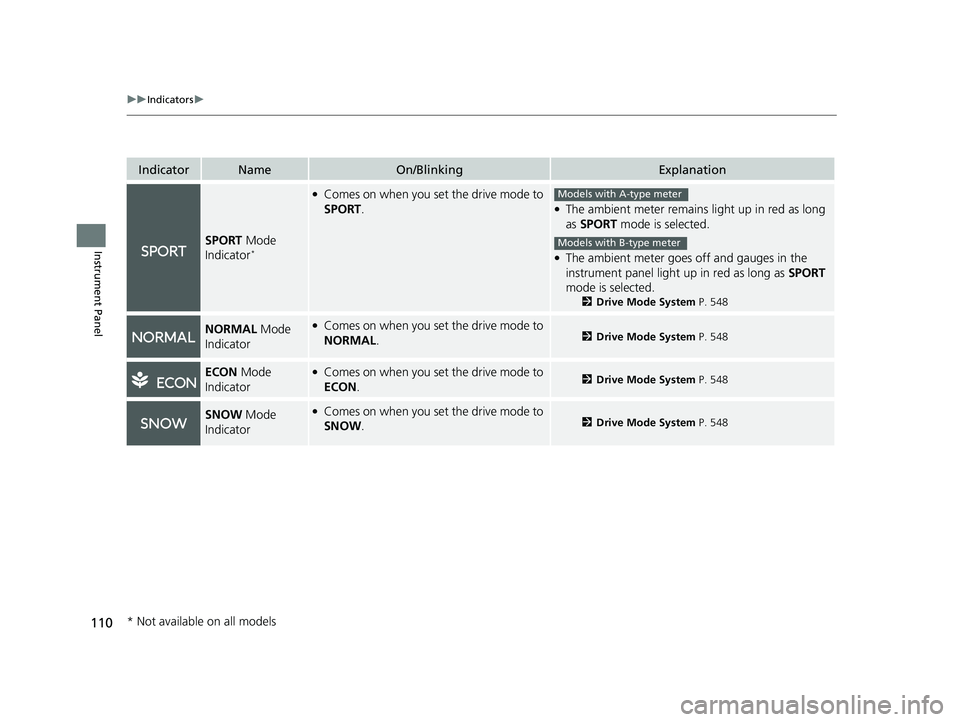
SPORT Mode
Indicator*
●Comes on when you set the drive mode to
SPORT.●The ambient meter remains light up in red as long
as SPORT mode is selected.
●The ambient meter goes off and gauges in the
instrument panel light up in red as long as SPORT
mode is selected.
2 Drive Mode System P. 548
NORMAL Mode
Indicator●Comes on when you set the drive mode to
NORMAL .2Drive Mode System P. 548
ECON Mode
Indicator●Comes on when you set the drive mode to
ECON .2Drive Mode System P. 548
SNOW Mode
Indicator●Comes on when you set the drive mode to
SNOW .2Drive Mode System P. 548
Models with A-type meter
Models with B-type meter
* Not available on all models
23 PILOT-31T906000_03.book 110 ページ 2022年10月31日 月曜日 午前10時26分
Page 115 of 814
114
uuIndicators u
Instrument Panel
IndicatorNameOn/BlinkingExplanation
Auto Idle Stop
Suspend Indicator
●Comes on while Auto Idle Stop is
temporarily suspended in the following
situations.
—
-Brake pedal is not fully pressed●Depress the brake pedal firmly.
-The transmission is in a position other than
(D
2Auto Idle Stop P. 542-System charging is prioritized
-Climate control system is prioritized
-Engine coolant temperature is not in
operating range
-SNOW , TOW, SPORT*, TRAIL*, or SAND*
mode is selected.2 Auto Idle Stop P. 542
2 Drive Mode System P. 548
-The battery temperature is too low.
- Auto Idle Stop does not activate for some
reason.
2 Auto Idle Stop P. 542
—
●If you press and hold the Auto Idle Stop OFF
button, you can select whether to display the status
messages or not.
* Not available on all models
23 PILOT-31T906000_03.book 114 ページ 2022年10月31日 月曜日 午前10時26分
Page 203 of 814

uuTailgate uOpening/Closing the Power Tailgate*
202
Controls
Press the power tailgate button for more than
one second to operate when the power mode
is in VEHICLE OFF.
u Some exterior lights flash and the beeper
sounds.
If you press the button again while the power
tailgate is moving, it will stop. Press the button
for more than one second, and the power
tailgate will reverse direction.
■Customizing when to open the tailgate
Anytime: The power tailgate unlocks and open s at the same time. This is the
default setting.
When unlocked
*1/When Unlocked*2: The tailgate opens when all doors are
unlocked.
2 Settings* P. 140
2 How to Customize the Vehicle Settings P. 444
*1 : Models with 7-in. Color Touchscreen
*2 : Models with 9-in. Color Touchscreen
■Using the Remote Transmitter1Opening/Closing the Power Tailgate*
If you close the power tail gate when all the doors are
locked, the power tailgate locks automatically.
If you replace the battery or the power tailgate fuse
while the tailgate is open, the power tailgate may be
disabled. The power tail gate resumes once you
manually close the tailgate.
Installing aftermarket com ponents other than Honda
genuine accessories on the power tailgate may
prevent it from fully opening or closing.
Make sure the power tailgate is fully open before you
transport your ca rgo in and out.
The beeper sounds when you start driving while the
power tailgate is still open, or closing.
Do not touch the sensors located on both sides of the
tailgate. The power tailga te does not close if you
touch either sensor when you are trying to close the
tailgate.
Be careful not to scratch the sensors with a sharp
object. If scratched, they can be damaged, and the
power tailgate closing feature malfunctions.
If the power tailgate meet s resistance while opening
or closing, the auto reverse feature reverses the
direction. The beeper sounds three times.
Power
Tailgate
Button
Models with 7-in. Color Touchscreen
Models with 9-in. Color Touchscreen
* Not available on all models
23 PILOT-31T906000_03.book 202 ページ 2022年10月31日 月曜日 午前10時26分
Page 240 of 814
239Continued
Controls
Seats
Front Seats
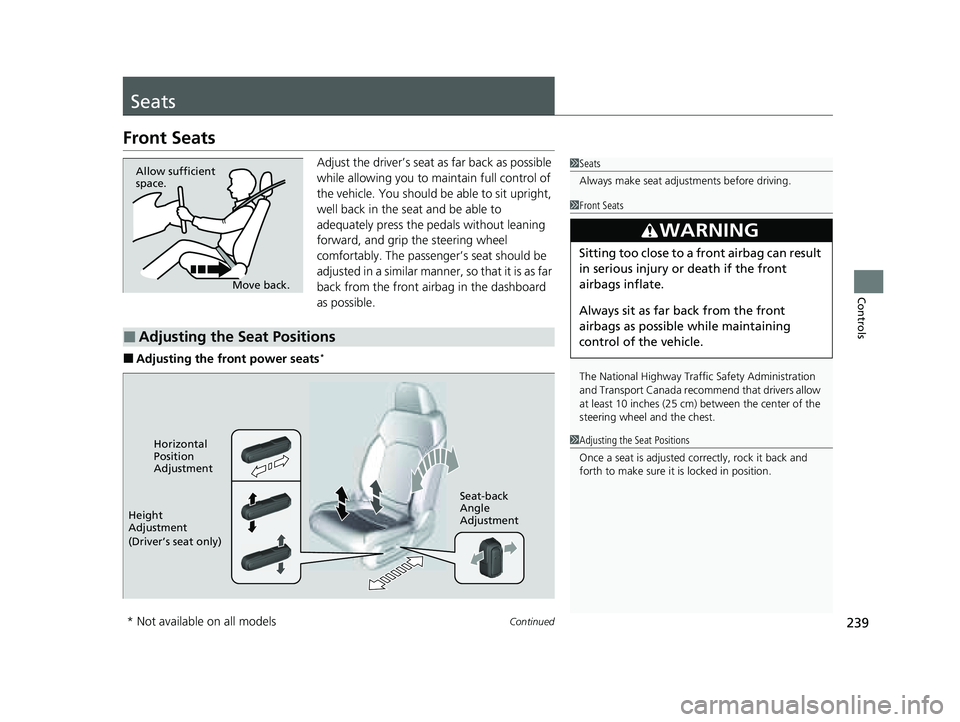
Adjust the driver’s seat as far back as possible
while allowing you to ma intain full control of
the vehicle. You should be able to sit upright,
well back in the seat and be able to
adequately press the pedals without leaning
forward, and grip the steering wheel
comfortably. The passenger’s seat should be
adjusted in a similar manner, so that it is as far
back from the front airbag in the dashboard
as possible.
■Adjusting the front power seats*
1 Seats
Always make seat adjustments before driving.
Move back.
Allow sufficient
space.
■Adjusting the Seat Positions
1
Front Seats
The National Highway Traffic Safety Administration
and Transport Cana da recommend that drivers allow
at least 10 inches (25 cm) between the center of the
steering wheel and the chest.
3WARNING
Sitting too close to a front airbag can result
in serious injury or death if the front
airbags inflate.
Always sit as far back from the front
airbags as possible while maintaining
control of the vehicle.
1 Adjusting the Seat Positions
Once a seat is adjusted co rrectly, rock it back and
forth to make sure it is locked in position.Horizontal
Position
Adjustment
Height
Adjustment
(Driver’s seat only) Seat-back
Angle
Adjustment
* Not available on all models
23 PILOT-31T906000_03.book 239 ページ 2022年10月31日 月曜日 午前10時26分
Page 362 of 814
Continued361
uuAudio System Basic Operation uPlaying SiriusXM ® Radio
Features
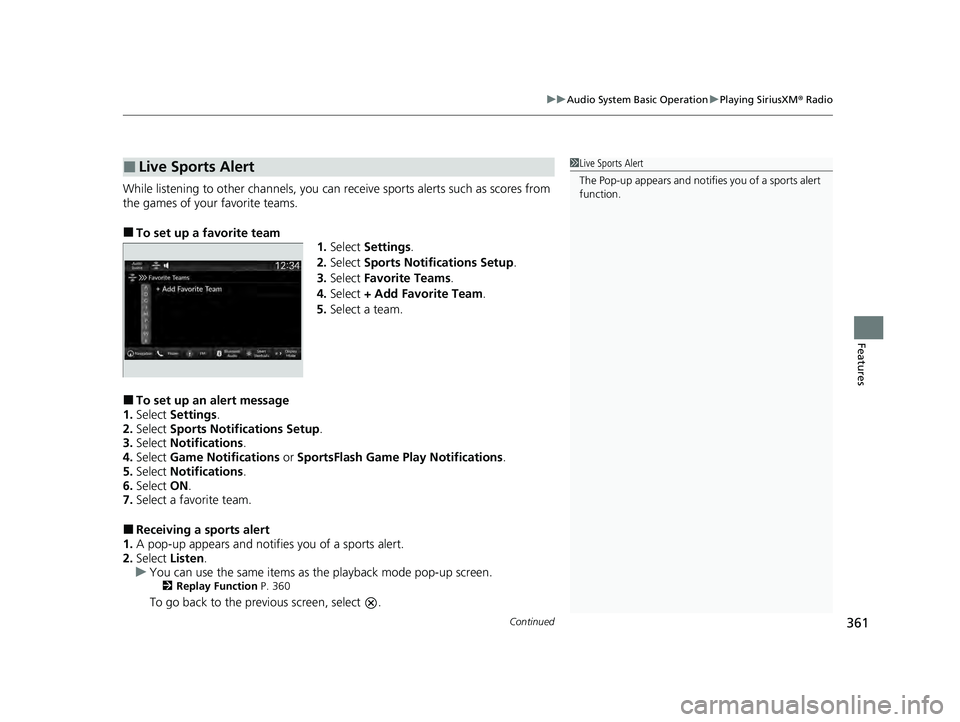
While listening to other channels, you can re ceive sports alerts such as scores from
the games of your favorite teams.
■To set up a favorite team 1.Select Settings .
2. Select Sports Notifications Setup .
3. Select Favorite Teams .
4. Select + Add Favorite Team .
5. Select a team.
■To set up an alert message
1. Select Settings .
2. Select Sports Notifications Setup .
3. Select Notifications .
4. Select Game Notifications or SportsFlash Game Pl ay Notifications.
5. Select Notifications .
6. Select ON.
7. Select a favorite team.
■Receiving a sports alert
1. A pop-up appears and notifies you of a sports alert.
2. Select Listen.
u You can use the same items as the playback mode pop-up screen.
2 Replay Function P. 360
To go back to the previous screen, select .
■Live Sports Alert1Live Sports Alert
The Pop-up appears and notifies you of a sports alert
function.
23 PILOT-31T906000_03.book 361 ページ 2022年10月31日 月曜日 午前10時26分
Page 367 of 814
366
uuAudio System Basic Operation uPlaying SiriusXM ® Radio
Features
Change the SiriusXM ® settings.
1. Select Settings .
2. Select an option.
• TuneMix: Turns multiple channel mix preset on and off.
• Tune Mode: Choose whether to group by category or channel number when
changing channels.
2 To Change the Tune Mode P. 357
•Scan Mode: Select the scan mode fro m all channels or presets.
2Scan P. 365
•Tune Start: Start the currently playing song at the beginning when you switch to
a music channel preset.
2 Tune Start: P. 357
•Sports Notifi cations Setup: Set to receive sports alerts such as scores from your
favorite teams.
2 Live Sports Alert P. 361
•Traffic & Weather Now Setup: Set to receive traffic and weather information.
2Traffic and Weather Information P. 362
•Manage Program Alerts: Change settings for the alert function.
2Manage Program Alert P. 364
■SiriusXM® Settings
23 PILOT-31T906000_03.book 366 ページ 2022年10月31日 月曜日 午前10時26分