Page 438 of 814
437
uuCustomized Features u
Continued
Features
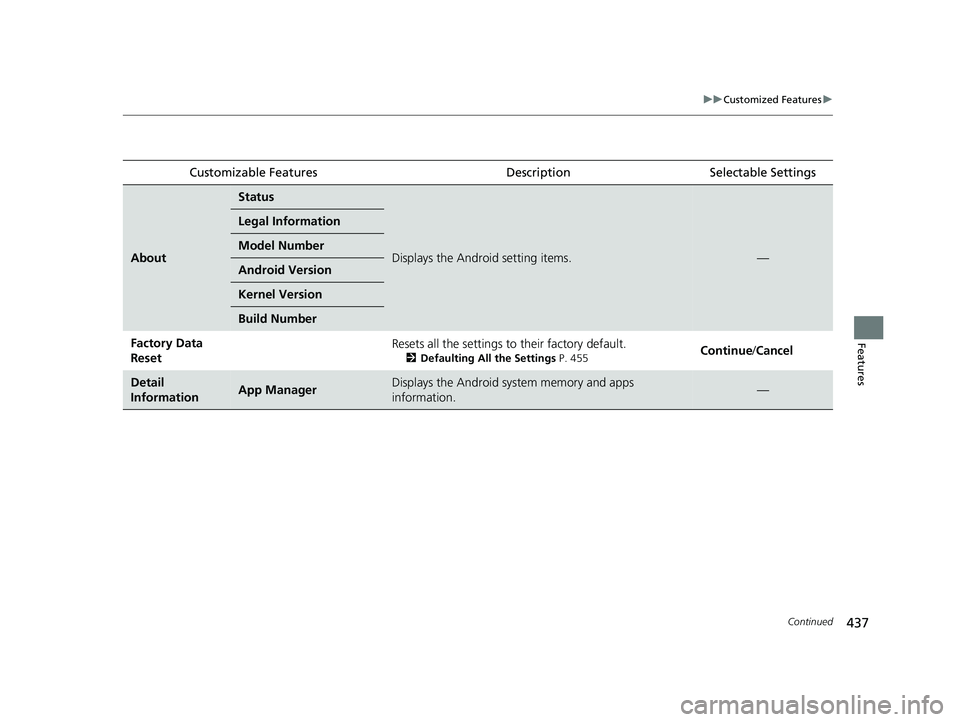
Customizable FeaturesDescriptionSelectable Settings
About
Status
Displays the Android setting items.—
Legal Information
Model Number
Android Version
Kernel Version
Build Number
Factory Data
ResetResets all the settings to their factory default.
2Defaulting All the Settings P. 455Continue /Cancel
Detail
InformationApp ManagerDisplays the Android system memory and apps
information.—
23 PILOT-31T906000_03.book 437 ページ 2022年10月31日 月曜日 午前10時26分
Page 440 of 814

439
uuCustomized Features u
Continued
Features
■Connections
*1:Default Setting
*2:Appears only when Apple CarPlay or Android Auto is connected wirelessly. Customizable Features Description Selectable Settings
Wi-Fi
Change ModeChanges the Wi-Fi mode.Network*1/
Smartphone*2/ OFF
(Available Networks/Connected
Devices)Displays the available networ k(s) or current connected
device(s).—
OptionsAdd NetworkAdds a new network to connect Wi-Fi.—
Saved NetworksSaves the connected network.—
Setup
Network SSIDSets the network name.—
SecurityDisplays the network security.—
PasswordSets password for require entering password when
connecting Wi-Fi device to the network.—
Wi-Fi BandDisplays the Wi-Fi band.—
Bluetooth
OptionsBluetoothTurns the Bluetooth ® on and off.ON*1/OFF
Priority DeviceDisplays the priority device.—
+ Connect New DevicePairs a new phone to HFL.
2 Phone Setup P. 484—
(Saved Devices)Connects, disconnects, or deletes a paired phone.
2Phone Setup P. 484—
23 PILOT-31T906000_03.book 439 ページ 2022年10月31日 月曜日 午前10時26分
Page 441 of 814
440
uuCustomized Features u
Features
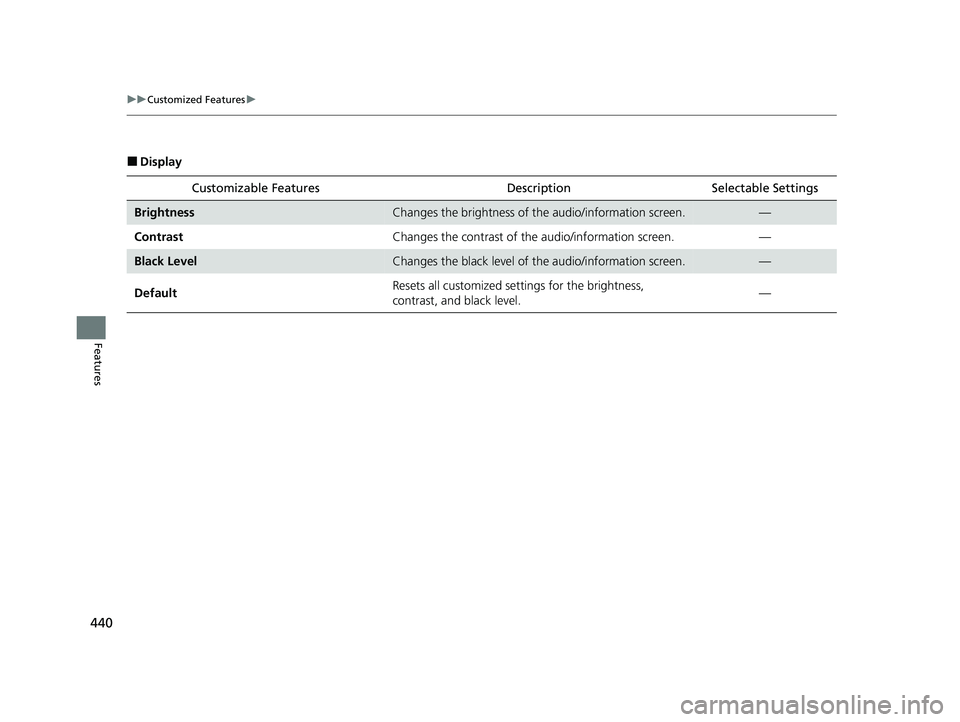
■Display
Customizable Features Descri ption Selectable Settings
BrightnessChanges the brightness of the audio/information screen.—
Contrast Changes the contrast of the audio/information screen. —
Black LevelChanges the black level of the audio/information screen.—
Default Resets all customized settings for the brightness,
contrast, and black level.
—
23 PILOT-31T906000_03.book 440 ページ 2022年10月31日 月曜日 午前10時26分
Page 443 of 814

442
uuCustomized Features u
Features
■Camera
*1:Default Setting Customizable Features Desc
ription Selectable Settings
Rear Camera*
Fixed Guideline
Shows the guideline that does not move with the
steering wheel.
2 Multi-View Rear Camera* P. 672
ON*1/OFF
Dynamic Guideline
Shows the guideline that moves with the steering
wheel.
2 Multi-View Rear Camera* P. 672
ON*1/OFF
Multi
View
Camera
*
Guidelines
Fixed Guideline
Shows the guideline that does not move with the
steering wheel.
2 Surround View Camera System* P. 674
ON*1/OFF
Dynamic Guideline
Shows the guideline that moves with the steering
wheel.
2 Surround View Camera System* P. 674
ON*1/OFF
Customize
Show after shifting
from ReverseSelects whether to display the forward camera image
after shifting from
(R to (D.ON /OFF*1
Auto display when
obstacle is detectedDisplays the forward camera image when a parking
sensor detects an obstacle.ON*1/OFF
Cross Traffic Monitor
Shows arrows on the rear camera image to indicate
vehicles approaching from the sides.
2 Cross Traffic Monitor* P. 668
ON*1/OFF
* Not available on all models
23 PILOT-31T906000_03.book 442 ページ 2022年10月31日 月曜日 午前10時26分
Page 446 of 814
445
uuCustomized Features u
Continued
Features
■Customization flow
Press the button.
Forward Collision Warning Distance
Head-up Warning*
Traffic Sign Recognition System Display Setting
ACC Forward Vehicle Detect Beep
Road Departure Mitigation Setting
Lane Keeping Assist Suspend Beep
Traffic Sign Recognition System Speed Limit Warning
Speed Limit Warning Threshold Setting
Driver Attention Monitor
Driver Assist System Setup
Select Vehicle Settings .
Rear Sensor Setting
Blind Spot Info
Driver Assist System Setup
* Not available on all models
23 PILOT-31T906000_03.book 445 ページ 2022年10月31日 月曜日 午前10時26分
Page 447 of 814
446
uuCustomized Features u
FeaturesTurn By Turn Auto Display
Speed/Distance Units
Keyless Access Light Flash
Rear Seat Reminder
Door Unlock Mode
Keyless Access Beep
Remote Start System ON/OFF
Lockout Protection
Keyless Access Setup
Meter Setup
(Meter/HUD Setup )Adjust Outside Temp. Display
"Trip A" Reset Timing
"Trip B" Reset Timing
Adjust Alarm Volume
Fuel Efficiency Backlight
Tachometer*
Reverse Alert Tone
Memory Position LinkDriving Position Setup
Seat Position Movement At Entry/Exit
* Not available on all models
23 PILOT-31T906000_03.book 446 ページ 2022年10月31日 月曜日 午前10時26分
Page 450 of 814

449
uuCustomized Features u
Continued
Features
*1:Default Setting
Customizable Features Description Selectable Settings
Traffic Sign Recognition
System Display SettingDisplays the traffic sign recognition system on instrument panel.
2Traffic Sign Recognition System P. 642Display*1/None
Traffic Sign Recognition
System Speed Limit
Warning Enables over speed limit warning
when speed limit is exceeded.
2Traffic Sign Recognition System P. 642ON/OFF*1
Speed Limit Warning
Threshold SettingSelect speed limit warning threshold based on personal preference.
2 Traffic Sign Recognition System P. 642
Speed Limit*1/
Speed Limit +3mph /
Speed Limit +5mph /
Speed Limit +10mph
(When mph is selected)
Speed Limit
*1/
Speed Limit +5km/h /
Speed Limit +10km/h /
Speed Limit +15km/h
(When km/h is selected)
Driver Attention Monitor Changes the setting for the
driver attention monitor.
2Driver Attention Monitor P. 132, 160
OFF/Tactile Alert /Tactile
And Audible Alert*1
Rear Sensor SettingTurns the rear parking sensors on and off.ON*1/ OFF
23 PILOT-31T906000_03.book 449 ページ 2022年10月31日 月曜日 午前10時26分
Page 451 of 814
450
uuCustomized Features u
Features
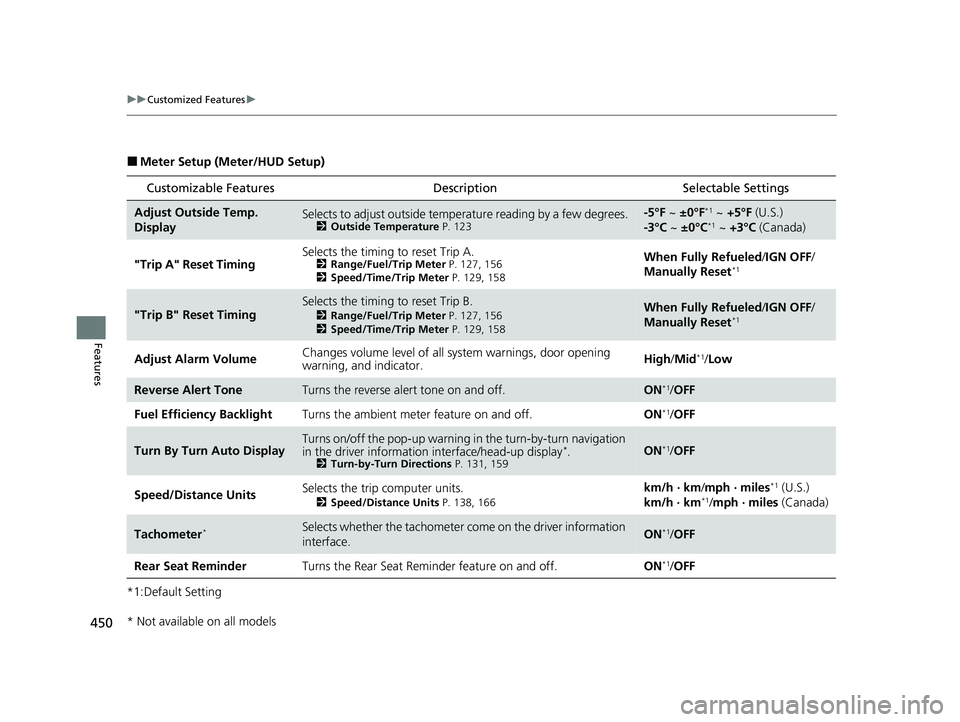
■Meter Setup (Meter/HUD Setup)
*1:Default Setting
Customizable Features Description Selectable Settings
Adjust Outside Temp.
DisplaySelects to adjust outside temperature reading by a few degrees.2Outside Temperature P. 123
-5°F ~ ±0°F*1 ~ +5°F (U.S.)
-3°C ~ ±0°C*1 ~ +3°C (Canada)
"Trip A" Reset Timing Selects the timing to reset Trip A.
2
Range/Fuel/Trip Meter P. 127, 156
2 Speed/Time/Trip Meter P. 129, 158When Fully Refueled /IGN OFF /
Manually Reset*1
"Trip B" Reset TimingSelects the timing to reset Trip B.
2 Range/Fuel/Trip Meter P. 127, 156
2 Speed/Time/Trip Meter P. 129, 158When Fully Refueled /IGN OFF /
Manually Reset*1
Adjust Alarm Volume Changes volume level of all system warnings, door opening
warning, and indicator. High/
Mid*1/Low
Reverse Alert ToneTurns the reverse alert tone on and off.ON*1/OFF
Fuel Efficiency Backlight Turns the ambient meter feature on and off. ON
*1/OFF
Turn By Turn Auto DisplayTurns on/off the pop-up warning in the turn-by-turn navigation
in the driver informatio n interface/head-up display*.2Turn-by-Turn Directions P. 131, 159ON*1/OFF
Speed/Distance Units Selects the trip computer units.
2
Speed/Distance Units P. 138, 166
km/h · km /mph · miles*1 (U.S.)
km/h · km*1/ mph · miles (Canada)
Tachometer*Selects whether the tachometer come on the driver information
interface.ON*1/ OFF
Rear Seat Reminder Turns the Rear Seat Reminder feature on and off. ON
*1/OFF
* Not available on all models
23 PILOT-31T906000_03.book 450 ページ 2022年10月31日 月曜日 午前10時26分