Page 372 of 814
Continued371
uuAudio System Basic Operation uPlaying a USB Flash Drive
Features
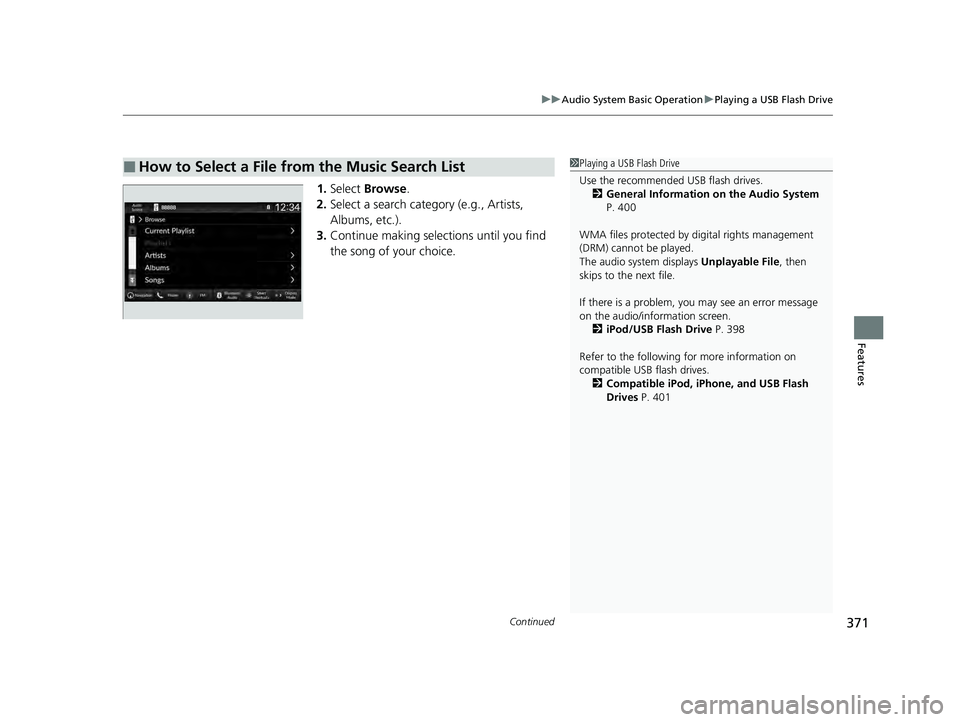
1. Select Browse .
2. Select a search catego ry (e.g., Artists,
Albums, etc.).
3. Continue making selections until you find
the song of your choice.
■How to Select a File from the Music Search List1Playing a USB Flash Drive
Use the recommended USB flash drives.
2 General Information on the Audio System
P. 400
WMA files protected by di gital rights management
(DRM) cannot be played.
The audio system displays Unplayable File, then
skips to the next file.
If there is a problem, you may see an error message
on the audio/information screen.
2 iPod/USB Flash Drive P. 398
Refer to the following for more information on
compatible USB flash drives. 2 Compatible iPod, iPhone, and USB Flash
Drives P. 401
23 PILOT-31T906000_03.book 371 ページ 2022年10月31日 月曜日 午前10時26分
Page 374 of 814

373
uuAudio System Basic Operation uPlaying Bluetooth ® Audio
Continued
Features
Playing Bluetooth ® Audio
Your audio system allows you to listen to music from your Bluetooth-compatible
phone.
This function is available when the phone is paired and connected to the vehicle’s
Bluetooth ® HandsFreeLink ® (HFL) system.
2Phone Setup P. 484
1Playing Bluetooth ® Audio
Not all Bluetooth -enabled phones with streaming
audio capabilities are compatible with the system.
For a list of compatible phones:
•U.S.: Visit automobiles.honda.com/handsfreelink/ ,
or call 1-888-528-7876.
•Canada: For more info rmation on smartphone
compatibility, call 1-855-490-7351.
It may be illegal to perform some data device
functions while driving.
Only one phone can be used with HFL at a time.
When there is more than one paired phone in the
vehicle, the system automatically connects to the
prioritized phone. You can a ssign priority to a phone
in the Bluetooth ® device list.
2 Phone Setup P. 484
The connected phone for Bluetooth® Audio can be
different.
If more than one phone is paired to the HFL system,
there may be a delay before the system begins to play.
In some cases, the name of the artist, album, or track
may not appear correctly.
Some functions may not be available on some devices.
If a phone is currently conne cted via Apple CarPlay or
Android Auto, Bluetooth® Audio from that phone is
unavailable. However, a se cond previously paired
phone can stream Bluetooth® Audio by selecting
from the Bluetooth ® device list.
2 Phone Setup P. 484
Audio/Information Screen
Browse Icon
Select to display the menu items. Play/Pause IconBluetooth Indic
a
tor
Appears when your phone
is connected to HFL.
Track Icons
Select or to change tracks.
Select and hold to move rapidly
within a track.
Repeat Icon
Select to repeat the
current track.
(Back) Button
Press to go back
to the previous
display.VOL/ AUDIO
(Volume/Power) Knob
Press to turn the audio
system on and off.
Turn to adjust the
volume.
Shuffle Icon
Select to play all files
in the current
category in random
order.
23 PILOT-31T906000_03.book 373 ページ 2022年10月31日 月曜日 午前10時26分
Page 375 of 814

uuAudio System Basic Operation uPlaying Bluetooth ® Audio
374
Features
1. Make sure that your phone is paired and
connected to the system.
2 Phone Setup P. 484
2.Select the Bluetooth® Audio mode.
If the phone is not recognized, another HFL-
compatible phone, which is not compatible
for Bluetooth ® Audio, may already be
connected.
■To play or pause a file
Select the play/pause icon.
1.Select Browse .
2. Select a search category (e.g., Albums).
3. Select an item.
u The selection begins playing.
■To Play Bluetooth ® Audio Files1 To Play Bluetooth ® Audio Files
To play the audio files, y ou may need to operate your
phone. If so, follow the phone maker’s operating
instructions.
Switching to another mode pauses the music playing
from your phone.
You can change the connected phone by selecting
Change Device .
2 Phone Setup P. 484
■Searching for Music1Searching for Music
Depending on the Bluetooth® device you connect,
some or all of the list s may not be displayed.
23 PILOT-31T906000_03.book 374 ページ 2022年10月31日 月曜日 午前10時26分
Page 376 of 814
375
uuAudio System Basic Operation uPlaying Bluetooth ® Audio
Features
You can select shuffle and repeat modes when playing a file.
■Shuffle/Repeat
Repeatedly select the shuffle or repeat icon
until you find a play mode option of your
preference.
■To turn off a play mode
Select the mode you want to turn off.
■How to Select a Play Mode1 How to Select a Play Mode
Play Mode Menu Items
Shuffle
Shuffle off: Shuffle mode to off.
Shuffle All Songs: Plays all available songs in a
selected list in random order.
Repeat Repeat off: Repeat mode to off.
Repeat Song: Repeats the current song.
Repeat Group: Repeats the current group.
Repeat all: Repeats all songs.
Depending on the Bluetooth® device you connect,
some or all of the functi ons may not be displayed.
Repeat Icon
Shuffle Icon
23 PILOT-31T906000_03.book 375 ページ 2022年10月31日 月曜日 午前10時26分
Page 377 of 814
376
uuAudio System Basic Operation uHondaLink ®
Features
HondaLink ®
HondaLink® connects you to the latest information from Honda. You can connect
your phone wirelessly through Wi-Fi or Bluetooth®.
2Wi-Fi Connection P. 383
2 Phone Setup P. 484
■Connect
Displays the connection status of the vehicle.
■Help & Support
Displays tips for vehicle usage, and get support via roadside or customer service
center.
■Message
Displays helpful and important information from Honda.
■HondaLink® Menu
1HondaLink ®
The HondaLink® connect app is compatible with most
iPhone and Android phones.
Some cell phone carriers charge for tethering and
smartphone data use. Check your phone’s data
subscription package.
If there is an active connection to Appl e CarPlay or
Android Auto, HondaLink ® can only be connected
through Wi-Fi.
23 PILOT-31T906000_03.book 376 ページ 2022年10月31日 月曜日 午前10時26分
Page 379 of 814
378
uuAudio System Basic Operation uHondaLink ®
Features
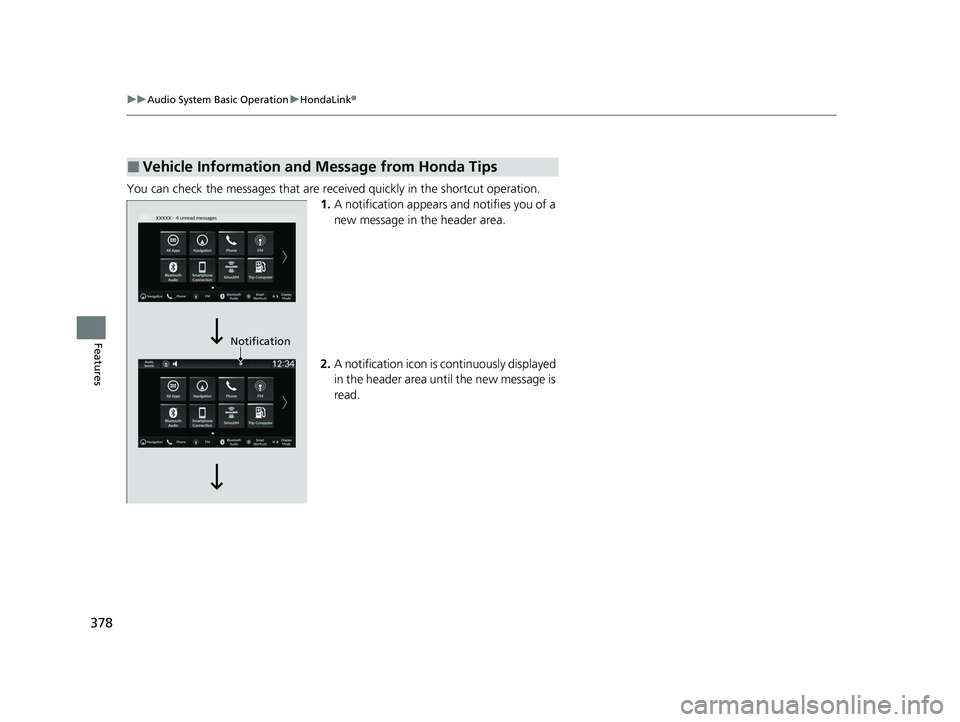
You can check the messages that are rece ived quickly in the shortcut operation.
1. A notification appears and notifies you of a
new message in the header area.
2. A notification icon is continuously displayed
in the header area until the new message is
read.
■Vehicle Information and Message from Honda Tips
Notification
23 PILOT-31T906000_03.book 378 ページ 2022年10月31日 月曜日 午前10時26分
Page 382 of 814

Continued381
uuAudio System Basic Operation uSmart Shortcuts
Features
1. Press the button.
2. Select Smart Shortcuts .
3. Select a shortcut to take the action
suggested.
• Call Suggestions: When selected, a call to the contact or number suggested will
be placed and shown. Based on your call ing patterns, contacts will be suggested
for you to call.
u Connect your smartphone through Bluetooth® to get contact suggestions.
u Call suggestions will not be displayed when you are connected to Apple
Carplay.
• Navigation Suggestions
*: When selected, a route will be started to the
suggested destination and the embedded navigation app will open.
u When a long route is set in your navigation system, you can receive
recommendations for gas stations and places to stop at along the way.
u The places you frequently navigate to while using the embedded navigation
system will be suggested as shortcuts.
u Save your home location in the embedded navigation app to have a shortcut
suggestion for it when you’re away from home.
■How to Use1How to Use
You can change the profile by selecting on the
top of the Smart Shortcuts screen.
You can customize the foll owing items by selecting
Options on the top of the Smart Shortcuts screen.
•Profiles: Create, change, a nd manage profiles.
•View App Walkthrough : View the Smart
Shortcuts walkthrough.
•Suggestion Settings : Change where suggestions
can appear.
•License: Shows the license information.
To create a profile:
1. Select Options on the Smart Shortcuts screen.
2. Select Profiles .
3. Select Manage Profiles .
4. Select + Add New Profile .
5. Enter name for your profile.
6. Select Done .
u A new profile has been cr eated and the Smart App
will automatically switch to that profile.
To change a profile:
1. Select Options on the Smart Shortcuts screen.
2. Select Profiles .
3. Select Change Current Profile .
4. Select a profile from the list.
u The change to the selected profile has been made.
* Not available on all models
23 PILOT-31T906000_03.book 381 ページ 2022年10月31日 月曜日 午前10時26分
Page 384 of 814
383
uuAudio System Basic Operation uWi-Fi Connection
Features
Wi-Fi Connection
This vehicle is equipped with Wi-Fi connectivity. You can connect to an external Wi-
Fi hotspot or communication device.
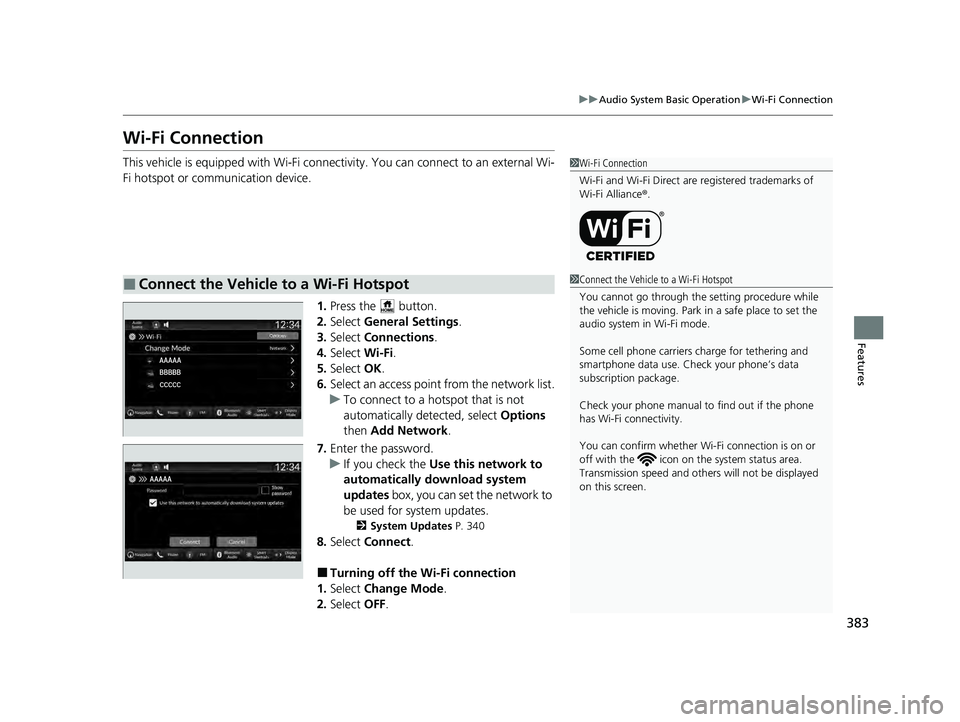
1.Press the button.
2. Select General Settings .
3. Select Connections .
4. Select Wi-Fi.
5. Select OK.
6. Select an access point from the network list.
u To connect to a hotspot that is not
automatically detected, select Options
then Add Network .
7. Enter the password.
u If you check the Use this network to
automatically download system
updates box, you can set the network to
be used for system updates.
2 System Updates P. 340
8.Select Connect .
■Turning off the Wi-Fi connection
1. Select Change Mode .
2. Select OFF.
■Connect the Vehicle to a Wi-Fi Hotspot
1Wi-Fi Connection
Wi-Fi and Wi-Fi Direct are registered trademarks of
Wi-Fi Alliance ®.
1 Connect the Vehicle to a Wi-Fi Hotspot
You cannot go through the setting procedure while
the vehicle is moving. Park in a safe place to set the
audio system in Wi-Fi mode.
Some cell phone carriers charge for tethering and
smartphone data use. Check your phone’s data
subscription package.
Check your phone manual to find out if the phone
has Wi-Fi connectivity.
You can confirm whether Wi -Fi connection is on or
off with the icon on th e system status area.
Transmission speed and others will not be displayed
on this screen.
23 PILOT-31T906000_03.book 383 ページ 2022年10月31日 月曜日 午前10時26分