2023 HONDA PILOT flat tire
[x] Cancel search: flat tirePage 7 of 814

Contents
This owner’s manual should be considered a permanent part of the
vehicle and should remain with the vehicle when it is sold.
The Navigation Manual is available online at owners.honda.com
(U.S.) or honda.ca (Canada). If you are the first registered owner
of your vehicle, you may request a complimentary printed
copy of the Navigation Manual within the first six months of
vehicle purchase. To request a copy, visit owners.honda.com. In
Canada, please request a copy from your Honda dealer.
This owner’s manual covers all models of your vehicle. You may find
descriptions of equipment and features that are not on your
particular model.
Images throughout this owner’s ma nual (including the front cover)
represent features and equipment that are available on some, but
not all, models. Your particular mo del may not have some of these
features.
This owner’s manual is for vehicles sold in the United States and
Canada.
The information and specifications in cluded in this publication were
in effect at the time of approval for printing. Honda Motor Co., Ltd.
reserves the right, however, to discontinue or change specifications
or design at any time without notice and without incurring any
obligation.2 Safe Driving P. 37
For Safe Driving P. 38 Seat Belts P. 43 Airbags P. 59
2Instrument Panel P. 97
Indicators P. 98 Gauges and Displays P. 121
2Controls P. 175
Clock P. 176 Locking and Unlocking the Doors P. 178
Panoramic Roof* P. 213
Seats P. 239 Interior Convenience Items P. 260
2 Features P. 291
Audio System P. 292 Audio System Basic Operation P. 301, 326
Customized Features P. 421, 429 HomeLink ® Universal Transceiver* P. 456
CabinTalk ®* P. 499
2Driving P. 501
Before Driving P. 502 Towing a Trailer P. 508
Parking Your Vehicle P. 661Multi-View Rear Camera* P. 672
2Maintenance P. 691
Before Performing Maintenance P. 692 Maintenance MinderTM P. 695
Checking and Maintaining Wiper Blades P. 723
Climate Control System Main tenance P. 740 Cleaning P. 742
2Handling the Unexpected P. 749
Tools P. 750 If a Tire Goes Flat P. 751
Overheating P. 769 Indicator Coming On/Blinking P. 771
If You Cannot Unlock the Fuel Fill Door P. 786
2 Information P. 789
Specifications P. 790 Identification Numbers P. 792
Emissions Testing P. 795 Warranty Coverages P. 797
23 PILOT-31T906000_03.book 6 ページ 2022年10月31日 月曜日 午前10時26分
Page 34 of 814

Quick Reference Guide
33
Handling the Unexpected (P749)
Flat Tire (P751)
●Park in a safe location and replace the
flat tire with the spare tire located under
the cargo area.
Indicators Come On (P771)
●Identify the indicator and consult the
owner’s manual.
Engine Won’t Start (P762)
●If the battery is dead, jump start using a
booster battery.
Blown Fuse (P778)
●Check for a blown fuse if an electrical
device does not operate.
Overheating (P769)
●Park in a safe location. If you do not see
steam under the hood, open the hood,
and let the engine cool down.
Emergency Towing (P785)
●Call a professional towing service if you
need to tow your vehicle.
23 PILOT-31T906000_03.book 33 ページ 2022年10月31日 月曜日 午前10時26分
Page 109 of 814

108
uuIndicators u
Instrument Panel
IndicatorNameOn/BlinkingExplanation
Low Tire Pressure/
TPMS Indicator
●Comes on if the tire pressure of any of the
tires becomes low.●Comes on while driving - Stop in a safe place,
check tire pressures, a nd inflate the tire(s) if
necessary.
●Blinks for about one minute, and then stays
on if there is a problem with the TPMS with
Tire Fill Assist, or when a spare tire is
temporarily installed.●Blinks and remains on - Have your vehicle
checked by a dealer. If the vehicle is fitted with a
spare tire, get your regular tire repaired or replaced
and put back on your vehicle as soon as you can.
Turn Signal and
Hazard Warning
Indicators• Blinks when you oper ate the turn signal
lever.
• Blinks along with all turn signals when you
press the hazard warning button.•Does not blink or blinks rapidly
2 Replacing Light Bulbs P. 718, 719
Lights On Indicator•Comes on when the parking, tail, and
other external lights are on.2 Lights P. 220
High Beam
Indicator•Comes on when the high beam headlights
are on.—
Auto High-Beam
Indicator•Comes on when all the operating
conditions of the auto high-beam are met.2 Auto High-Beam P. 226
Fog Light
Indicator*
•Comes on when the fog lights are on.2 Fog Lights* P. 224
* Not available on all models
23 PILOT-31T906000_03.book 108 ページ 2022年10月31日 月曜日 午前10時26分
Page 517 of 814

516
uuTowing a Trailer uDriving Safely with a Trailer
Driving
Driving Safely with a Trailer
• Have the trailer properly serviced and keep it in good condition.
• Make sure that all the weights and load in the vehicle and trailer are within limits.
2Towing Load Limits P. 508
•Securely attach the hitch, safety chains, and other necessary parts to the trailer.
• Securely store all the items in and on the tr ailer so that they do not shift while
driving.
• Check if the lights and brakes on the trailer are working properly.
• Check the pressures of the traile r tires, including the spare.
• Turn off the Auto Idle Stop syst em using the Auto Idle Stop OFF button. The
trailer weight can affect your vehicle's br ake effectiveness if Auto Idle Stop is
activated on a hill while towing a trailer.
• Select TOW mode for optimized transmissio n operation when towing a trailer.
2Drive Mode System P. 548
•Turn off the rear parking sensor system.
2 Parking sensor system on and off P. 664
•Turn off the Low Speed Braking Control syst em. It may activate if it detects the
towed object as an obstacle.
2 System On and Off P. 587
■Things You Need To Know Before Towing a Trailer1Driving Safely with a Trailer
Operating speed when towing a trailer must not
exceed 62 mph (100 km/h).
Parking
In addition to the normal precautions, place wheel
chocks at each of the trailer’s tires.
Remember to unhitch the tra iler before changing a
flat tire. Ask the trailer sales or rental agency where
and how to store the trailer’s spare tire.
Models with Parking Sensor System
Models with Low Speed Braking Control
23 PILOT-31T906000_03.book 516 ページ 2022年10月31日 月曜日 午前10時26分
Page 560 of 814

559
uuWhen Driving uTire Pressure Monitoring System (TPMS) with Tire Fill Assist
Continued
Driving
Tire Pressure Monitoring System (TPMS) with Tire
Fill Assist
Monitors the tire pr essure while you are
driving. If your vehicle’s tire pressure becomes
significantly low, the Low Tire Pressure/TPMS
indicator comes on and a message appears on
the driver information interface.
1 Tire Pressure Monitoring System (TPMS) with Tire Fill Assist
Conditions such as low ambient temperature and
altitude change directly affect tire pressure and can
trigger the Low Tire Pressure/TPMS indicator to come
on. 2 If the Low Tire Pressure/TPMS Indicator
Comes On or Blinks P. 776
Tire pressure checked and inflated in:
•Warm weather can beco me under-inflated in
colder weather.
•Cold weather can become overinflated in warmer
weather.
The Low Tire Pressure/TPMS indicator will not come
on as a result of overinflation.
Only use genuine TPMS specified wheels since your
vehicle’s wheels are equipped with the low tire
pressure/TPMS sensor.
If you drive your vehicle without the genuine TPMS
specified wheels, the low tire pressure/TPMS
indicator blinks for one minutes and then stays on.
2 Tire and Wheel Replacement P. 734
The TPMS audibly and visually informs you of
changes in tire pressure of the individual tire that you
are adjusting using audibl e and visual indications.
If a change in tire pressure has been significant, the
system beeps and the hazard lights flash continuously
for five seconds when the specified tire pressure is
reached. Stop filling the tire.
Low Tire Pressure/
TPMS Indicator
23 PILOT-31T906000_03.book 559 ページ 2022年10月31日 月曜日 午前10時26分
Page 561 of 814
uuWhen Driving uTire Pressure Monitoring System (TPMS) with Tire Fill Assist
560
Driving
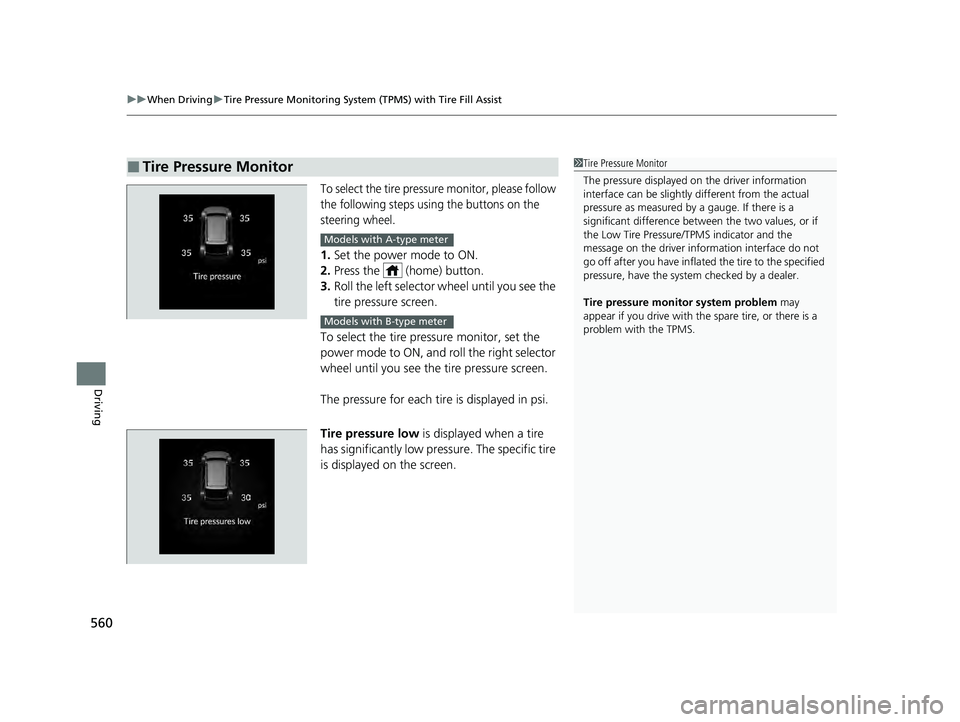
To select the tire pressure monitor, please follow
the following steps using the buttons on the
steering wheel.
1. Set the power mode to ON.
2. Press the (home) button.
3. Roll the left selector wheel until you see the
tire pressure screen.
To select the tire pressure monitor, set the
power mode to ON, and roll the right selector
wheel until you see the tire pressure screen.
The pressure for each tire is displayed in psi.
Tire pressure low is displayed when a tire
has significantly low pressure. The specific tire
is displayed on the screen.
■Tire Pressure Monitor1 Tire Pressure Monitor
The pressure displayed on the driver information
interface can be slightly different from the actual
pressure as measured by a gauge. If there is a
significant di fference between the two values, or if
the Low Tire Pressure/TPMS indicator and the
message on the driver info rmation interface do not
go off after you have inflated the tire to the specified
pressure, have the system checked by a dealer.
Tire pressure monitor system problem may
appear if you drive with the spare tire, or there is a
problem with the TPMS.
Models with A-type meter
Models with B-type meter
23 PILOT-31T906000_03.book 560 ページ 2022年10月31日 月曜日 午前10時26分
Page 562 of 814
561
uuWhen Driving uTire Pressure Monitoring System (TPMS) - Required Federal Explanation
Continued
Driving
Tire Pressure Monitoring System (TPMS) - Required
Federal Explanation
Each tire, including the spare (if provided), should be checked
monthly when cold and inflated to the inflation pressure
recommended by the vehicle manufa cturer on the vehicle placard
or tire inflation pressure label.
(If your vehicle has tires of a diff erent size than the size indicated
on the vehicle placard or tire inflation pressure label, you should
determine the proper tire inflat ion pressure for those tires.)
As an added safety feature, your vehicle has been equipped with
a tire pressure monitoring system (TPMS) that illuminates a low
tire pressure telltale
when one or more of your tires is significantly under-inflated.
Accordingly, when the low tire pressure telltale illuminates, you
should stop and check your tires as soon as possible, and inflate
them to the proper pressure.
Driving on a significantly under-inf lated tire causes the tire to
overheat and can lead to tire fail ure. Under-inflation also reduces
fuel efficiency and tire tread life, and may affect the vehicle’s
handling and stopping ability.
23 PILOT-31T906000_03.book 561 ページ 2022年10月31日 月曜日 午前10時26分
Page 563 of 814

562
uuWhen Driving uTire Pressure Monitoring System (TPMS) - Required Federal Explanation
Driving
Please note that the TPMS is not a substitute for proper tire
maintenance, and it is the driver ’s responsibility to maintain
correct tire pressure, even if un der-inflation has not reached the
level to trigger illumina tion of the TPMS low ti re pressure telltale.
Your vehicle has also been eq uipped with a TPMS malfunction
indicator to indicate when the sy stem is not operating properly.
The TPMS malfunction indicator is combined with the low tire
pressure telltale. When the system detects a malfunction, the
telltale will flash fo r approximately one minute and then remain
continuously illuminated. This sequence will continue upon
subsequent vehicle start-ups as long as the malfunction exists.
When the malfunction indicator is illuminated, the system may
not be able to detect or signal low tire pressure as intended.
TPMS malfunctions may occur for a variety of reasons, including
the installation of replacement or alternate tires or wheels on the
vehicle that prevent the TPMS from functioning properly.
Always check the TPMS malfunction telltale after replacing one or
more tires or wheels on your vehicle to ensure that the
replacement or alternate tires and wheels allow the TPMS to
continue to function properly.
23 PILOT-31T906000_03.book 562 ページ 2022年10月31日 月曜日 午前10時26分