Page 566 of 814
Continued565
uuWhen Driving uBlind Spot Information System*
Driving
You can turn the system on and off using the driver information interface.
2 Switching the Display P. 125, 154
2 Safety Support P. 136, 164
The blind spot information system will stay on the previously selected on or off
setting each time you start the engine.
■Blind spot information system On and Off1Blind Spot Information System*
You can change the settings for the blind spot
information system.
2 Settings
* P. 140
2 Customized Features P. 429
1How the System works
Turn the system off when towing a trailer.
The system may not work properly for the following
reasons:
•The added mass tilts the vehicle and changes the
radar coverage.
•The trailer itself can be detected by the radar
sensors, causing the blind spot information system
alert indicators to come on.
* Not available on all models
23 PILOT-31T906000_03.book 565 ページ 2022年10月31日 月曜日 午前10時26分
Page 571 of 814
uuHonda Sensing ®u
570
Driving
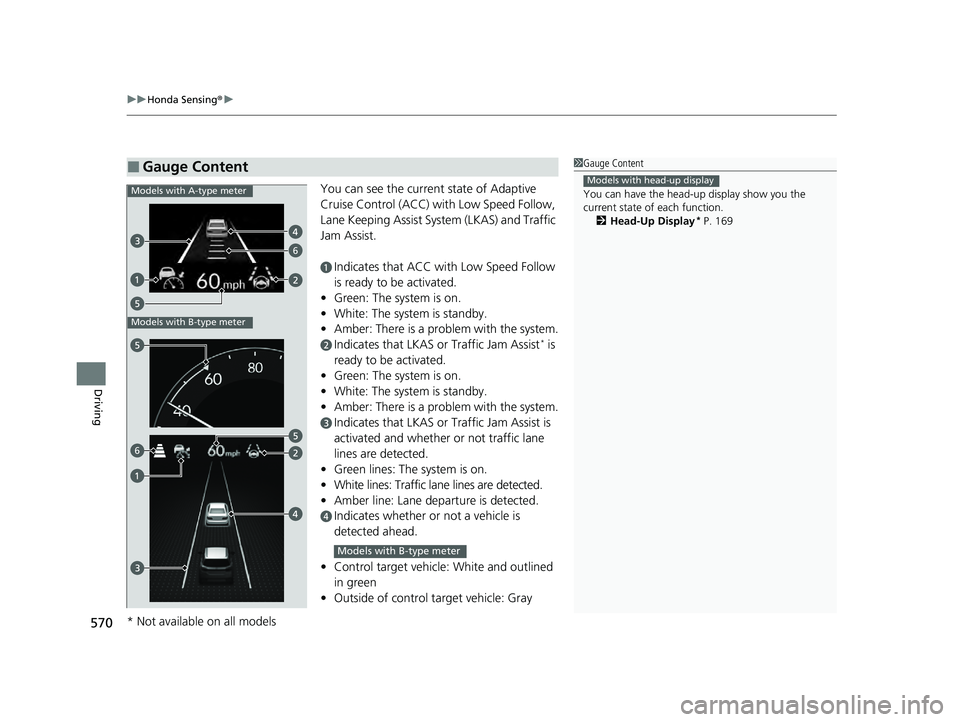
You can see the current state of Adaptive
Cruise Control (ACC) wi th Low Speed Follow,
Lane Keeping Assist System (LKAS) and Traffic
Jam Assist.
aIndicates that ACC with Low Speed Follow
is ready to be activated.
• Green: The system is on.
• White: The system is standby.
• Amber: There is a problem with the system.
bIndicates that LKAS or Traffic Jam Assist* is
ready to be activated.
• Green: The system is on.
• White: The system is standby.
• Amber: There is a problem with the system.
cIndicates that LKAS or Traffic Jam Assist is
activated and whether or not traffic lane
lines are detected.
• Green lines: The system is on.
• White lines: Traffic lane lines are detected.
• Amber line: Lane departure is detected.
dIndicates whether or not a vehicle is
detected ahead.
• Control target vehicle: White and outlined
in green
• Outside of control target vehicle: Gray
■Gauge Content1Gauge Content
You can have the head-up display show you the
current state of each function.
2 Head-Up Display
* P. 169
Models with head-up display
6
Models with A-type meter
Models with B-type meter
6
Models with B-type meter
* Not available on all models
23 PILOT-31T906000_03.book 570 ページ 2022年10月31日 月曜日 午前10時26分
Page 574 of 814

Continued573
uuHonda Sensing ®u Collision Mitigation Braking SystemTM (CMBSTM)
Driving
■How the system works
The CMBS
TM will be canceled when your vehicle stops or the system determines
there no longer is the potential for a collision.
The CMBS
TM may also be canceled when a dr iver operates the steering wheel and
the brake or accelerator pe dal to avoid a collision.
1How the system works
The camera in the CMBS
TM is also designed to detect
pedestrians.
However, this pedestrian detection feature may not
activate or may not detect a pedestrian in front of
your vehicle under certain conditions.
Refer to the ones indicating the pedestrian detection
limitations from the list. 2 CMBS
TM Conditions and Limitations P. 577
The head-up warning uses a lens located at the front
end of the dashboard.
Do not cover the lens or spill any liquid on it.
Models with head-up display
Lens
A front sensor
camera is located
behind the
rearview mirror.
The system starts monitoring the roadway ahead when your vehicle speed is about
3 mph (5 km/h) or above and will search for a vehicle, pedestrian, or moving bicycle
in front of you.
The CMBS
TM activates when:●The speed difference between your vehicl e and a vehicle, pedestrian, or moving
bicycle detected in front of you becomes about 3 mph (5 km/h) and over with a
chance of a collision.
●Your vehicle drives at about 18 mph (30 km/h) or less and there is a chance of a
frontal collision with a detected oncoming vehicle when you turn left at an
intersection.
●Your vehicle speed is about 62 mph (100 km /h) or less and the system determines
there is a chance of a collision with:
- An oncoming or stationary vehicle detected in front of you.
- A pedestrian or moving bicycle detected in front of you.
When to use
The radar sensor is
behind the Honda
emblem on the
front grille.
23 PILOT-31T906000_03.book 573 ページ 2022年10月31日 月曜日 午前10時26分
Page 577 of 814

uuHonda Sensing ®u Collision Mitigation Braking SystemTM (CMBSTM)
576
Driving
You can turn the system on and off us ing the driver information interface.
2Switching the Display P. 125, 154
2 Safety Support P. 136, 164
The CMBSTM is turned on every time you start th e engine, even if you turned it off
the last time you drove the vehicle.
■CMBSTM On and Off1 Collision Mitigation Braking SystemTM (CMBSTM)
You cannot turn the CMBS
TM off while driving.
The CMBS
TM may automatically shut off, and the
safety support indicator (amb er) will come and stay
on under certain conditions: 2 CMBS
TM Conditions and Limitations P. 577
When the CMBS
TM is activated, it will continue to
operate even if the accele rator pedal is partially
depressed. However, it w ill be canceled if the
accelerator pedal is fully depressed.
Have your vehicle checked by a dealer if you find any
unusual behavior of the system (e.g., the warning
message appears too frequently).
The Vehicle Stability Assist
TM (VSA ®) system, Adaptive
Cruise Control (ACC) with Low Speed Follow, brake
system (amber), and safety support indicators may
come on in amber along with a message in the driver
information interface when you set the power mode
to ON after reconnecting the battery.
Drive a short distance at more than 12 mph (20 km/h).
Each indicator should go off. If any do not, have your
vehicle checked by a dealer.
23 PILOT-31T906000_03.book 576 ページ 2022年10月31日 月曜日 午前10時26分
Page 588 of 814
Continued587
uuHonda Sensing ®u Low Speed Braking Control*
Driving
You can turn the system on and off using the driver information interface.
2 Switching the Display P. 125, 154
2 Safety Support P. 136, 164
The system is turned on every time you sta rt the engine, even if you turned it off the
last time you drove the vehicle.
■System On and Off 1 System On and Off
The Low Speed Braking Control system may
temporarily turn off after reconnecting the battery.
The system will automatically turn ON after the
vehicle has been moving at over 12 mph (20 km/h)
for some time.
If the system does not turn on, have your vehicle
checked by a dealer.
23 PILOT-31T906000_03.book 587 ページ 2022年10月31日 月曜日 午前10時26分
Page 594 of 814
Continued593
uuHonda Sensing ®u Adaptive Cruise Control (ACC) with Low Speed Follow
Driving
When driving slower than about 25 mph (40 km/h): If the vehicle is moving
and the brake pedal is not depressed, pressing the switch fixes the set speed to
about 25 mph (40 km/h) regardless of current vehicle speed. If your vehicle is
stationary, you can set the vehicle speed even with the brake pedal depressed.
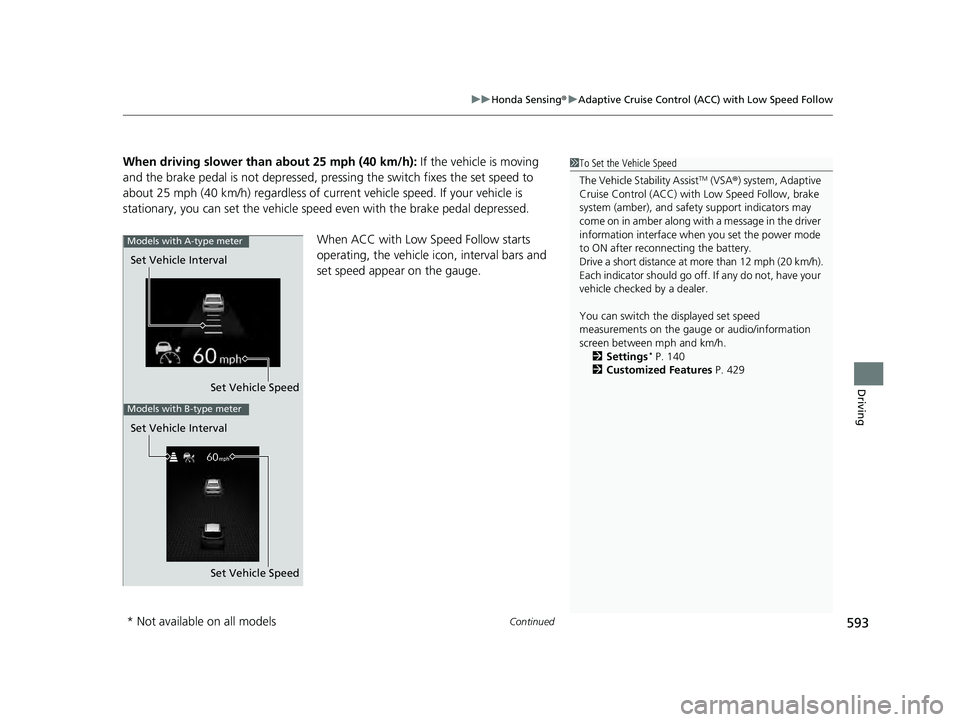
When ACC with Low Speed Follow starts
operating, the vehicle icon, interval bars and
set speed appear on the gauge.1To Set the Vehicle Speed
The Vehicle Stability Assist
TM (VSA ®) system, Adaptive
Cruise Control (ACC) with Low Speed Follow, brake
system (amber), and safety support indicators may
come on in amber along with a message in the driver
information interface when you set the power mode
to ON after reconnecting the battery.
Drive a short distance at more than 12 mph (20 km/h).
Each indicator should go off. If any do not, have your
vehicle checked by a dealer.
You can switch the displayed set speed
measurements on the gauge or audio/information
screen between mph and km/h. 2 Settings
* P. 140
2 Customized Features P. 429
Set Vehicle Speed
Set Vehicle Interval
Models with A-type meter
Set Vehicle Speed
Set Vehicle Interval
Models with B-type meter
* Not available on all models
23 PILOT-31T906000_03.book 593 ページ 2022年10月31日 月曜日 午前10時26分
Page 607 of 814
uuHonda Sensing ®u Adaptive Cruise Control (ACC) with Low Speed Follow
606
Driving
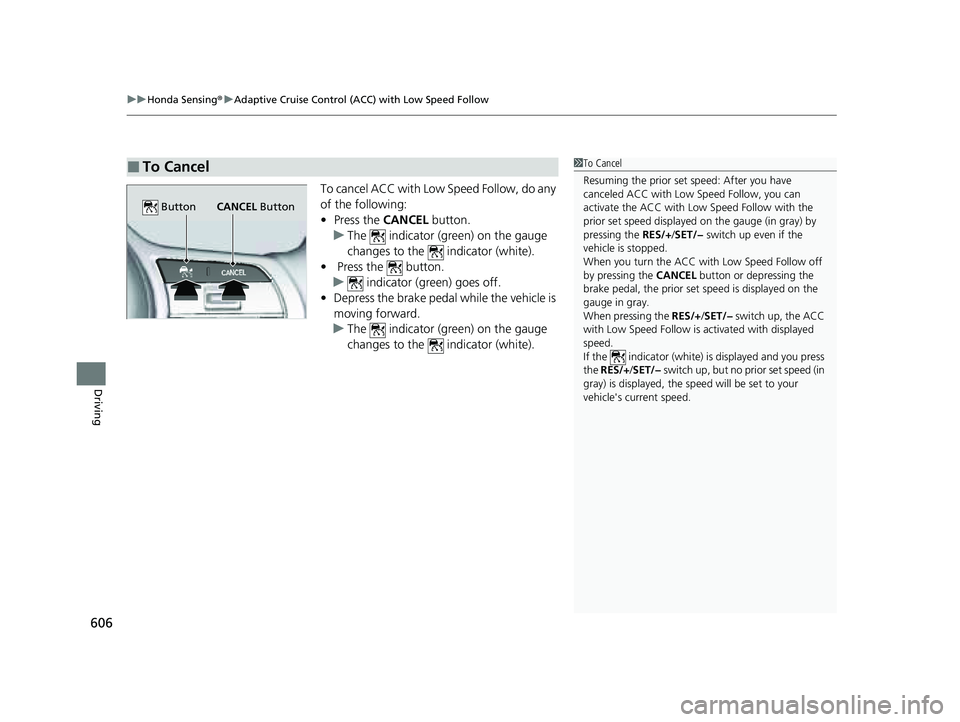
To cancel ACC with Low Speed Follow, do any
of the following:
• Press the CANCEL button.
u The indicator (green) on the gauge
changes to the indicator (white).
• Press the button.
u indicator (green) goes off.
• Depress the brake pedal while the vehicle is
moving forward.
u The indicator (green) on the gauge
changes to the indicator (white).
■To Cancel1To Cancel
Resuming the prior set speed: After you have
canceled ACC with Low Speed Follow, you can
activate the ACC with Low Speed Follow with the
prior set speed displayed on the gauge (in gray) by
pressing the RES/+/SET/− switch up even if the
vehicle is stopped.
When you turn the ACC with Low Speed Follow off
by pressing the CANCEL button or depressing the
brake pedal, the prior set speed is displayed on the
gauge in gray.
When pressing the RES/+/SET/− switch up, the ACC
with Low Speed Follow is activated with displayed
speed.
If the indicator (white) is displayed and you press
the RES/+ /SET/− switch up, but no prior set speed (in
gray) is displayed, the sp eed will be set to your
vehicle's current speed.
CANCEL Button
Button
23 PILOT-31T906000_03.book 606 ページ 2022年10月31日 月曜日 午前10時26分
Page 610 of 814
Continued609
uuHonda Sensing ®u Adaptive Cruise Control (ACC) with Low Speed Follow
Driving
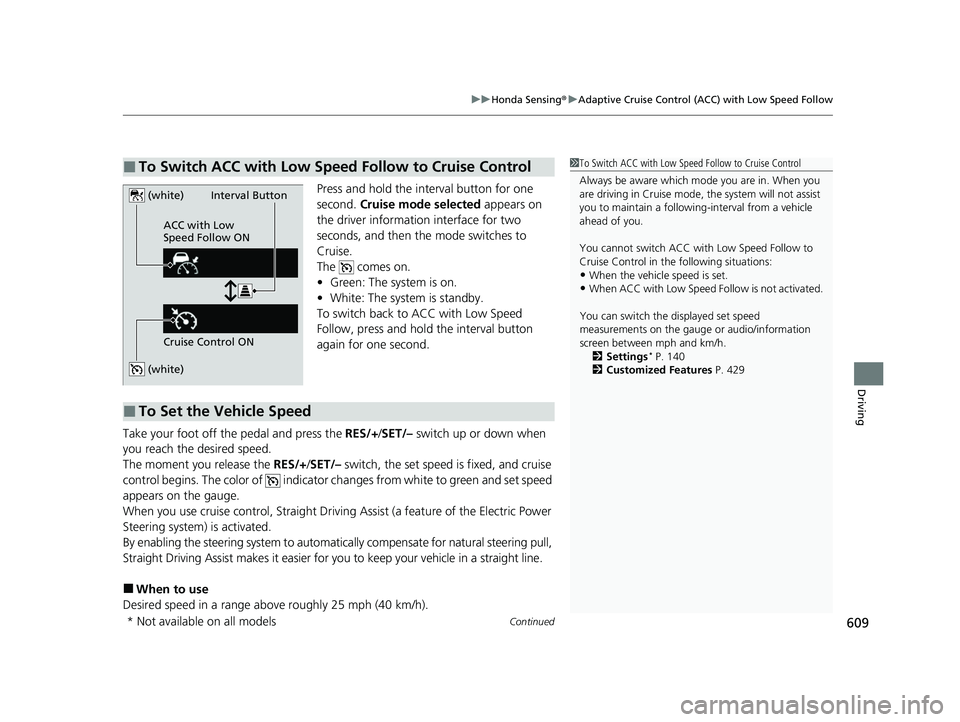
Press and hold the interval button for one
second. Cruise mode selected appears on
the driver information interface for two
seconds, and then the mode switches to
Cruise.
The comes on.
• Green: The system is on.
• White: The system is standby.
To switch back to ACC with Low Speed
Follow, press and hold the interval button
again for one second.
Take your foot off the pedal and press the RES/+/SET/– switch up or down when
you reach the desired speed.
The moment you release the RES/+/SET/– switch, the set speed is fixed, and cruise
control begins. The color of indicator changes from white to green and set speed
appears on the gauge.
When you use cruise control, Straight Drivin g Assist (a feature of the Electric Power
Steering system) is activated.
By enabling the steering system to automatica lly compensate for natural steering pull,
Straight Driving Assist makes it easier for you to keep your vehicle in a straight line.
■When to use
Desired speed in a range above roughly 25 mph (40 km/h).
■To Switch ACC with Low Speed Follow to Cruise Control1 To Switch ACC with Low Speed Follow to Cruise Control
Always be aware which mode you are in. When you
are driving in Cruise mode, the system will not assist
you to maintain a following-interval from a vehicle
ahead of you.
You cannot switch ACC with Low Speed Follow to
Cruise Control in the following situations:
•When the vehicle speed is set.
•When ACC with Low Speed Follow is not activated.
You can switch the displayed set speed
measurements on the gauge or audio/information
screen between mph and km/h. 2 Settings
* P. 140
2 Customized Features P. 429
(white)
(white)
ACC with Low
Speed Follow ON
Cruise Control ONInterval Button
■To Set the Vehicle Speed
* Not available on all models
23 PILOT-31T906000_03.book 609 ページ 2022年10月31日 月曜日 午前10時26分

