2023 FORD SUPER DUTY ECU
[x] Cancel search: ECUPage 184 of 738
This equipment complies with FCCradiation exposure limits set forth for anuncontrolled environment. End Users mustfollow the specific operating instructionsfor satisfying RF exposure compliance. Thistransmitter must be at least 8 in (20 cm)from the user and must not be co-locatedor operating in conjunction with any otherantenna or transmitter.
PROGRAMMING THE GARAGE
DOOR OPENER
To clear all stored codes in the garage dooropener in your vehicle, use the clearfunction. To override one button, use thereprogram function.
Note:Make sure that the garage door andsecurity device are free from obstructionwhen you are programming. Do not programthe system with the vehicle in the garage.
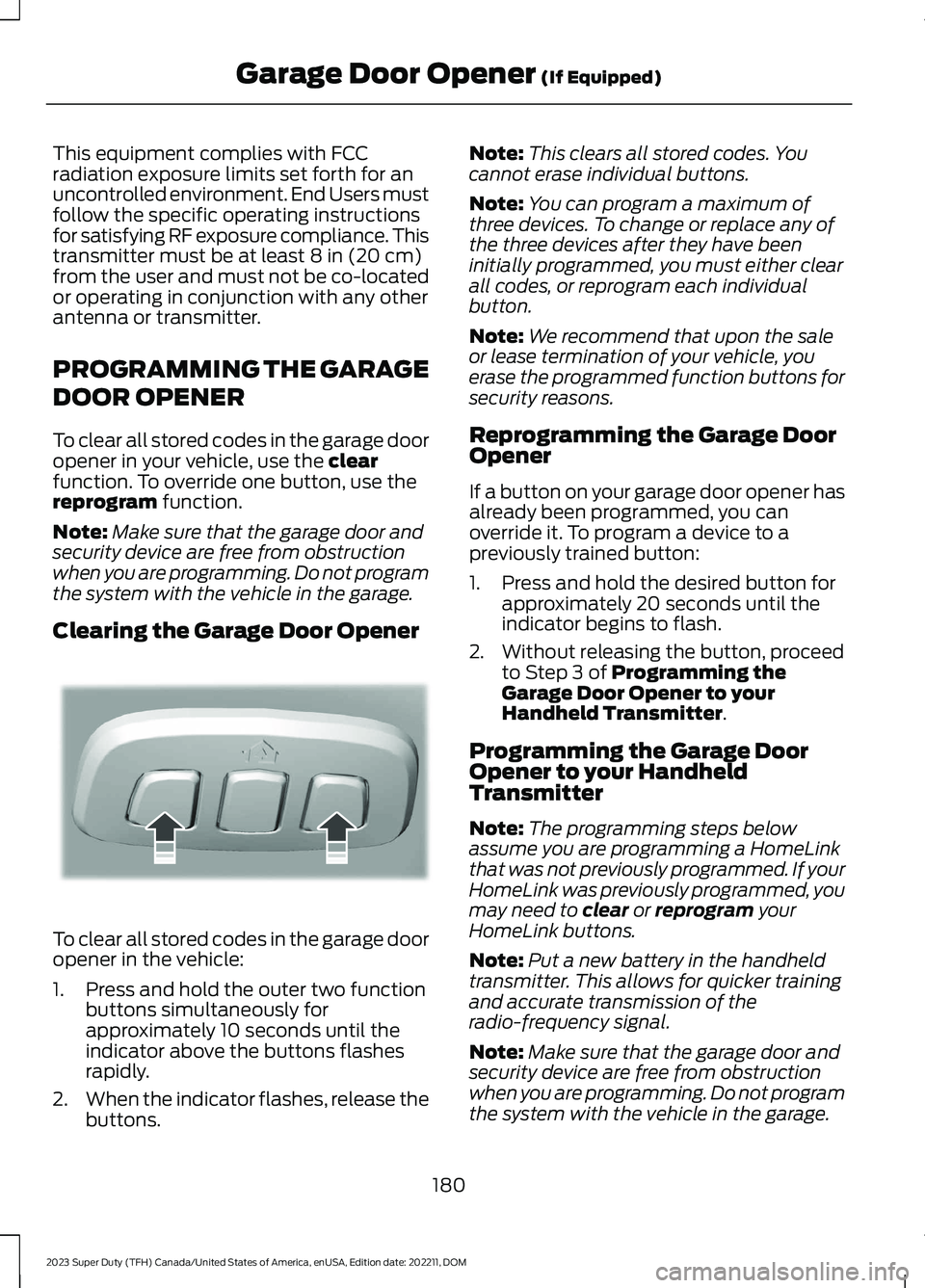
Clearing the Garage Door Opener
To clear all stored codes in the garage dooropener in the vehicle:
1.Press and hold the outer two functionbuttons simultaneously forapproximately 10 seconds until theindicator above the buttons flashesrapidly.
2.When the indicator flashes, release thebuttons.
Note:This clears all stored codes. Youcannot erase individual buttons.
Note:You can program a maximum ofthree devices. To change or replace any ofthe three devices after they have beeninitially programmed, you must either clearall codes, or reprogram each individualbutton.
Note:We recommend that upon the saleor lease termination of your vehicle, youerase the programmed function buttons forsecurity reasons.
Reprogramming the Garage DoorOpener
If a button on your garage door opener hasalready been programmed, you canoverride it. To program a device to apreviously trained button:
1.Press and hold the desired button forapproximately 20 seconds until theindicator begins to flash.
2.Without releasing the button, proceedto Step 3 of Programming theGarage Door Opener to yourHandheld Transmitter.
Programming the Garage DoorOpener to your HandheldTransmitter
Note:The programming steps belowassume you are programming a HomeLinkthat was not previously programmed. If yourHomeLink was previously programmed, youmay need to clear or reprogram yourHomeLink buttons.
Note:Put a new battery in the handheldtransmitter. This allows for quicker trainingand accurate transmission of theradio-frequency signal.
Note:Make sure that the garage door andsecurity device are free from obstructionwhen you are programming. Do not programthe system with the vehicle in the garage.
180
2023 Super Duty (TFH) Canada/United States of America, enUSA, Edition date: 202211, DOMGarage Door Opener (If Equipped)E188213
Page 185 of 738
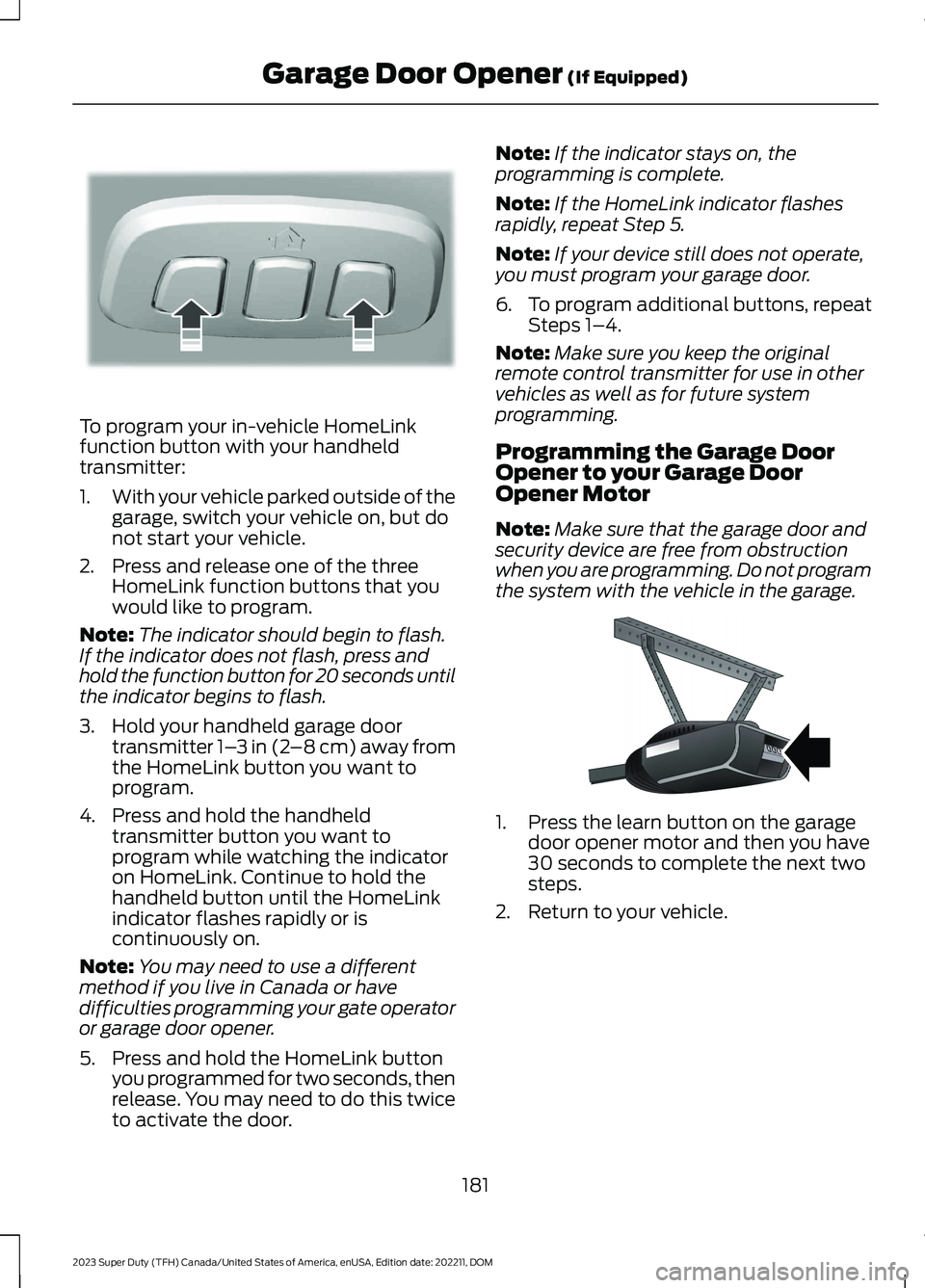
To program your in-vehicle HomeLinkfunction button with your handheldtransmitter:
1.With your vehicle parked outside of thegarage, switch your vehicle on, but donot start your vehicle.
2.Press and release one of the threeHomeLink function buttons that youwould like to program.
Note:The indicator should begin to flash.If the indicator does not flash, press andhold the function button for 20 seconds untilthe indicator begins to flash.
3.Hold your handheld garage doortransmitter 1–3 in (2–8 cm) away fromthe HomeLink button you want toprogram.
4.Press and hold the handheldtransmitter button you want toprogram while watching the indicatoron HomeLink. Continue to hold thehandheld button until the HomeLinkindicator flashes rapidly or iscontinuously on.
Note:You may need to use a differentmethod if you live in Canada or havedifficulties programming your gate operatoror garage door opener.
5.Press and hold the HomeLink buttonyou programmed for two seconds, thenrelease. You may need to do this twiceto activate the door.
Note:If the indicator stays on, theprogramming is complete.
Note:If the HomeLink indicator flashesrapidly, repeat Step 5.
Note:If your device still does not operate,you must program your garage door.
6.To program additional buttons, repeatSteps 1–4.
Note:Make sure you keep the originalremote control transmitter for use in othervehicles as well as for future systemprogramming.
Programming the Garage DoorOpener to your Garage DoorOpener Motor
Note:Make sure that the garage door andsecurity device are free from obstructionwhen you are programming. Do not programthe system with the vehicle in the garage.
1.Press the learn button on the garagedoor opener motor and then you have30 seconds to complete the next twosteps.
2.Return to your vehicle.
181
2023 Super Duty (TFH) Canada/United States of America, enUSA, Edition date: 202211, DOMGarage Door Opener (If Equipped)E188213 E142659
Page 310 of 738
•The brake pedal is pressed.
•Adaptive cruise control button isswitched off on the steering wheel.
The lane centering system is momentarilysuppressed when either of the followingactions are performed:
•Turn signal indicator is latched ortapped with added steering input.
•You steer the vehicle out of lane.
LANE CENTERING INDICATORS
Illuminates when you switchlane centering on. The color ofthe indicator changes to indicatethe system status.
Gray status indicates the system is on butin standby mode.
Blue status indicates the system is enabledand applying steering assistance to keepthe vehicle in the center of the lane.
Amber status with an audible tone, thatthen changes to gray status, indicates asystem automatic cancellation.
PREDICTIVE SPEED ASSIST (IF
EQUIPPED)
HOW DOES PREDICTIVE SPEEDASSIST WORK
Predictive Speed Assist works withadaptive cruise control and adjusts thevehicle speed to the road geometry and tothe speed limit detected by the speed signrecognition system. As the systemidentifies curves and highway exits, thevehicle speed temporarily decreases aheadof and during the changing road geometry.When passing new speed signs, the setspeed updates. See Predictive SpeedAssist Precautions (page 306).
There are limitations that affect theaccuracy of the speed sign recognitionsystem and its ability to determine thecurrent speed limit. Predictive speed assistand its ability to determine the currentspeed limit shares these limitations. SeeSpeed Sign Recognition (page 348).
Note:The adaptive cruise control gapsetting operates normally when the featureis enabled.
PREDICTIVE SPEED ASSISTPRECAUTIONS
WARNING: You are responsible forcontrolling your vehicle at all times. Thesystem is designed to be an aid and doesnot relieve you of your responsibility todrive with due care and attention. Failureto follow this instruction could result inthe loss of control of your vehicle,personal injury or death.
WARNING: Pay close attention tochanging road conditions. You may needto override the system by pressing thebrake or accelerator pedal if the adjustedspeed becomes higher or lower thannecessary.
WARNING: The system onlyprovides limited braking. Your vehiclemay not always decelerate quicklyenough to avoid a crash without driverintervention. Apply the brakes whennecessary.
WARNING: The system does notactivate the turn signal.
Adaptive cruise control precautions applyto predictive speed assist unless statedotherwise or contradicted by a predictivespeed assist precaution. See AdaptiveCruise Control Precautions (page 296).
306
2023 Super Duty (TFH) Canada/United States of America, enUSA, Edition date: 202211, DOMAdaptive Cruise Control (If Equipped)E297977
Page 320 of 738
HOW DOES THE SPEED
LIMITER WORK
The system allows you to set a speed towhich your vehicle becomes limited. Theset speed sets the effective maximumspeed of your vehicle. You can temporarilyexceed the set speed if required, forexample to overtake.
The controls are on the steering wheel.
SWITCHING THE SPEED
LIMITER ON AND OFF
Press to switch the system on.
The system activates with thecurrent vehicle speed as the setspeed. Press again to switch the systemoff.
SETTING THE SPEED LIMIT
Press with the limiter in standbymode to set the limiter to thecurrent vehicle speed. Speedlimitation activates and thesymbol in the instrument clusterappears green.
CHANGING THE SET SPEED
LIMIT
You can adjust the set speed insmall or large increments. Pressthe toggle button upward ordownward once to adjust the setspeed in small increments. Pressand hold the toggle buttonupward or downward to adjust the setspeed in large increments.
CANCELING THE SET SPEED
LIMIT
Press to cancel the limiter andplace it in standby mode. Thesymbol in the instrument clusterappears grey.
RESUMING THE SET SPEED
LIMIT
Press again to resume thelimiter. The symbol in theinstrument cluster appearsgreen.
INTENTIONALLY EXCEEDING
THE SET SPEED LIMIT
Firmly press the accelerator to temporarilyturn the system off. The system reactivatesonce your vehicle speed drops below theset speed.
SPEED LIMITER INDICATORS
It illuminates in the instrumentcluster when the system isstandby or active.
SPEED LIMITER AUDIBLE
WARNINGS
If you accidently exceed the set speed, theset speed indicator flashes and an audiblewarning tone sounds.
If you intentionally exceed the set speed,only the set speed indicator flashes.
316
2023 Super Duty (TFH) Canada/United States of America, enUSA, Edition date: 202211, DOMSpeed Limiter (If Equipped)E280228 E246884 E246885 E246884 E246885 E308130 E308130 E280228
Page 360 of 738
PICKUP BED PRECAUTIONS
WARNING: Do not allow people oranimals in truck beds that havemodifications, such as bed covers orslide-in campers, when the engine isrunning. Exhaust fumes are toxic. Failureto follow this instruction could result inpersonal injury or death.
WARNING: It is extremelydangerous to ride in a cargo area, insideor outside of a vehicle. In a crash, peopleriding in these areas are more likely to beseriously injured or killed. Do not allowpeople to ride in any area of your vehiclethat is not equipped with seats andseatbelts. Make sure everyone in yourvehicle is in a seat and properly using aseatbelt. Failure to follow this warningcould result in serious personal injury ordeath.
PICKUP BED ANCHOR POINTS
PICKUP BED ANCHOR POINTPRECAUTIONS
WARNING: Always properly securecargo to prevent shifting cargo or cargofalling from the vehicle. Failure to do socould result in compromised vehiclestability and serious personal injury tovehicle occupants or others.
WARNING: The appropriateloading capacity of your vehicle can belimited either by volume capacity (howmuch space is available) or by payloadcapacity (how much weight the vehicleshould carry). Once you have reached
the maximum payload of your vehicle,do not add more cargo, even if there isspace available. Overloading orimproperly loading your vehicle cancontribute to loss of vehicle control andvehicle rollover.
WARNING: Do not use the loadretaining fixtures for towing. Failure tofollow this instruction could result inpersonal injury.
WARNING: Do not exceed themaximum load rating of the loadretaining fixtures. Failure to follow thisinstruction could result in personal injury.
WARNING: Check the loadretaining fixtures for damage beforeusing them. Failure to follow thisinstruction could result in personal injury.
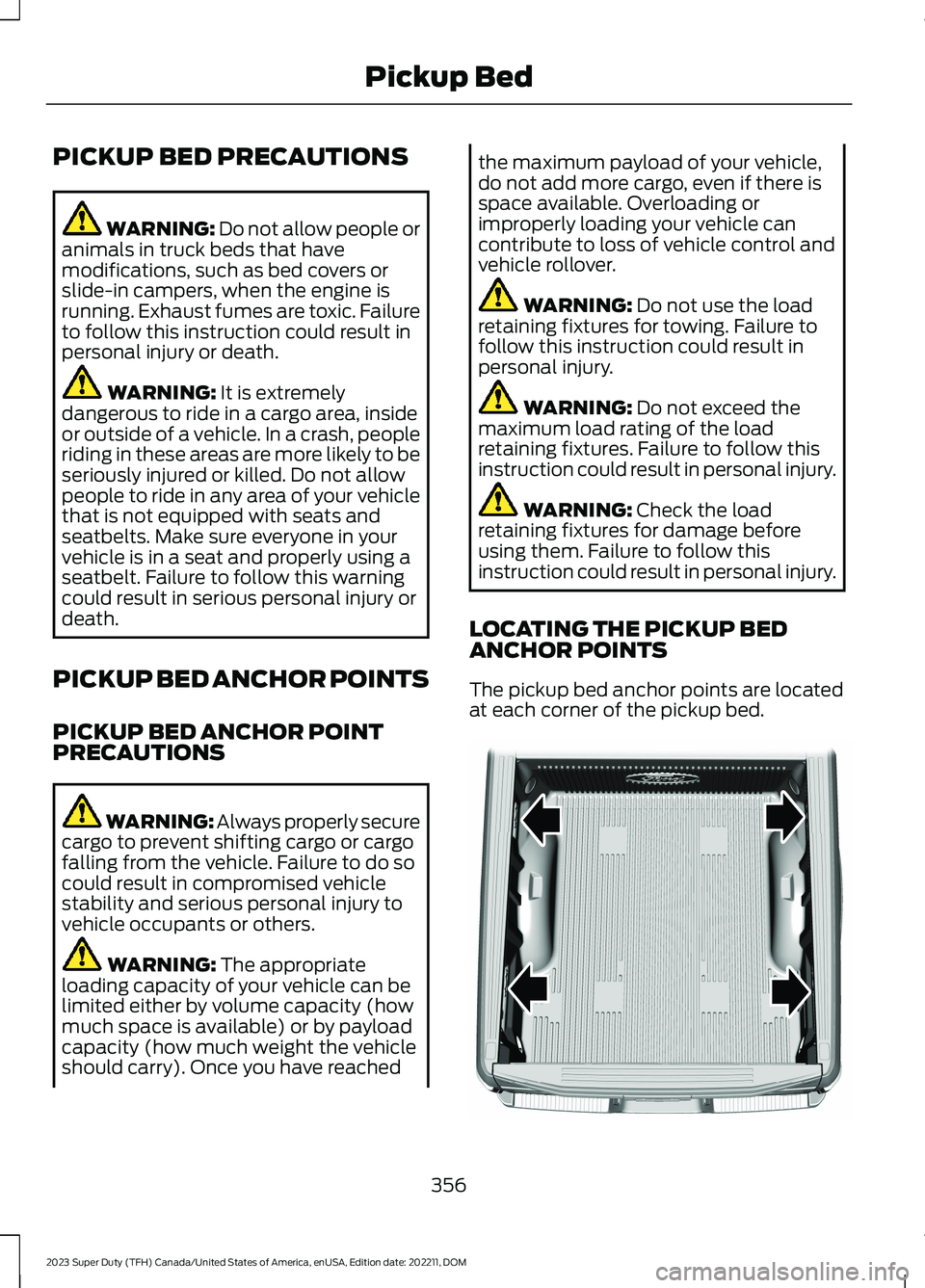
LOCATING THE PICKUP BEDANCHOR POINTS
The pickup bed anchor points are locatedat each corner of the pickup bed.
356
2023 Super Duty (TFH) Canada/United States of America, enUSA, Edition date: 202211, DOMPickup BedE327579
Page 361 of 738
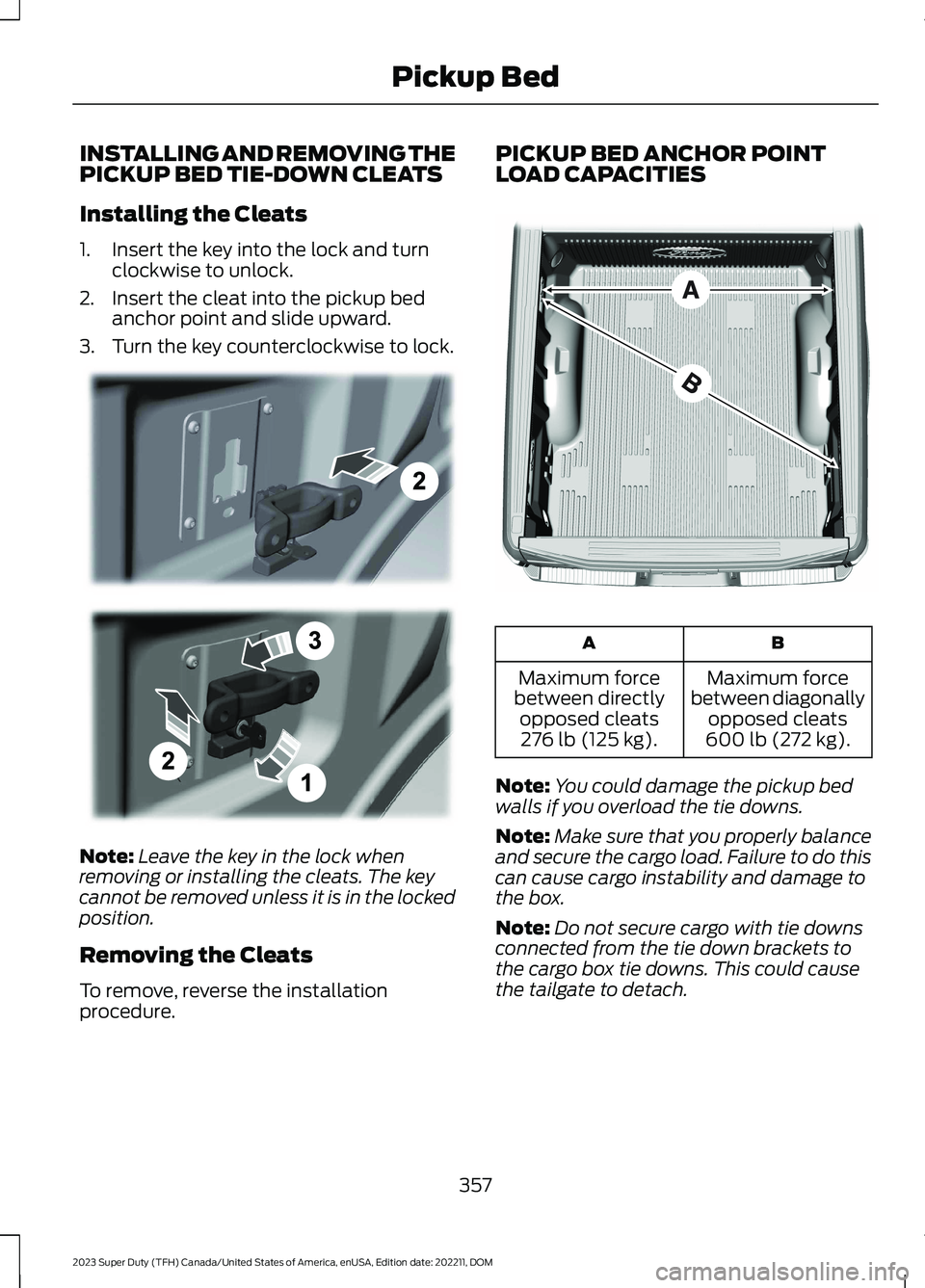
INSTALLING AND REMOVING THEPICKUP BED TIE-DOWN CLEATS
Installing the Cleats
1.Insert the key into the lock and turnclockwise to unlock.
2.Insert the cleat into the pickup bedanchor point and slide upward.
3.Turn the key counterclockwise to lock.
Note:Leave the key in the lock whenremoving or installing the cleats. The keycannot be removed unless it is in the lockedposition.
Removing the Cleats
To remove, reverse the installationprocedure.
PICKUP BED ANCHOR POINTLOAD CAPACITIES
BA
Maximum forcebetween diagonallyopposed cleats600 lb (272 kg).
Maximum forcebetween directlyopposed cleats276 lb (125 kg).
Note:You could damage the pickup bedwalls if you overload the tie downs.
Note:Make sure that you properly balanceand secure the cargo load. Failure to do thiscan cause cargo instability and damage tothe box.
Note:Do not secure cargo with tie downsconnected from the tie down brackets tothe cargo box tie downs. This could causethe tailgate to detach.
357
2023 Super Duty (TFH) Canada/United States of America, enUSA, Edition date: 202211, DOMPickup BedE327575 E327576
Page 362 of 738
TAILGATE ANCHOR POINTS
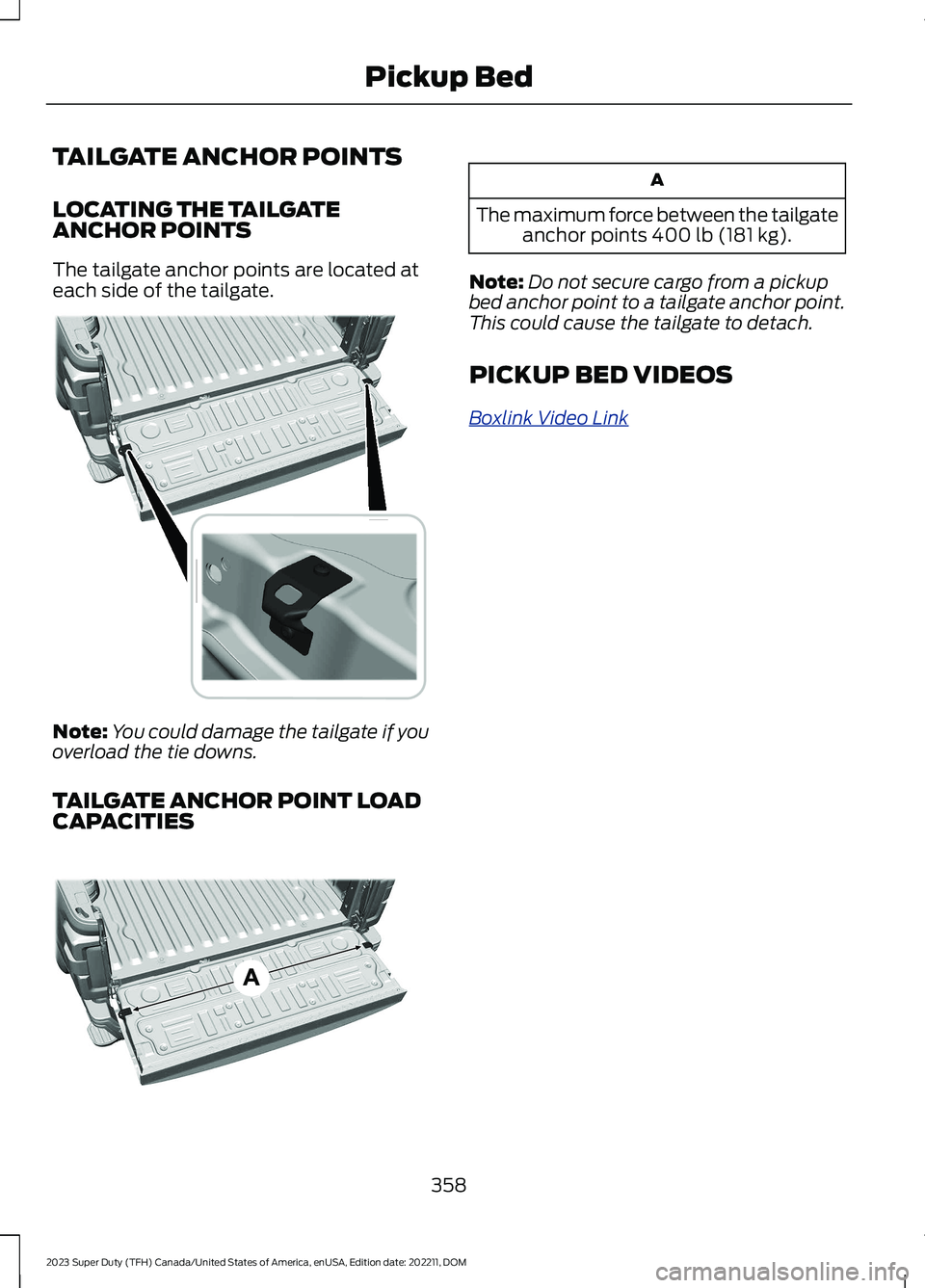
LOCATING THE TAILGATEANCHOR POINTS
The tailgate anchor points are located ateach side of the tailgate.
Note:You could damage the tailgate if youoverload the tie downs.
TAILGATE ANCHOR POINT LOADCAPACITIES
A
The maximum force between the tailgateanchor points 400 lb (181 kg).
Note:Do not secure cargo from a pickupbed anchor point to a tailgate anchor point.This could cause the tailgate to detach.
PICKUP BED VIDEOS
Boxlink Video Link
358
2023 Super Duty (TFH) Canada/United States of America, enUSA, Edition date: 202211, DOMPickup Bed E390666 E390667
Page 375 of 738
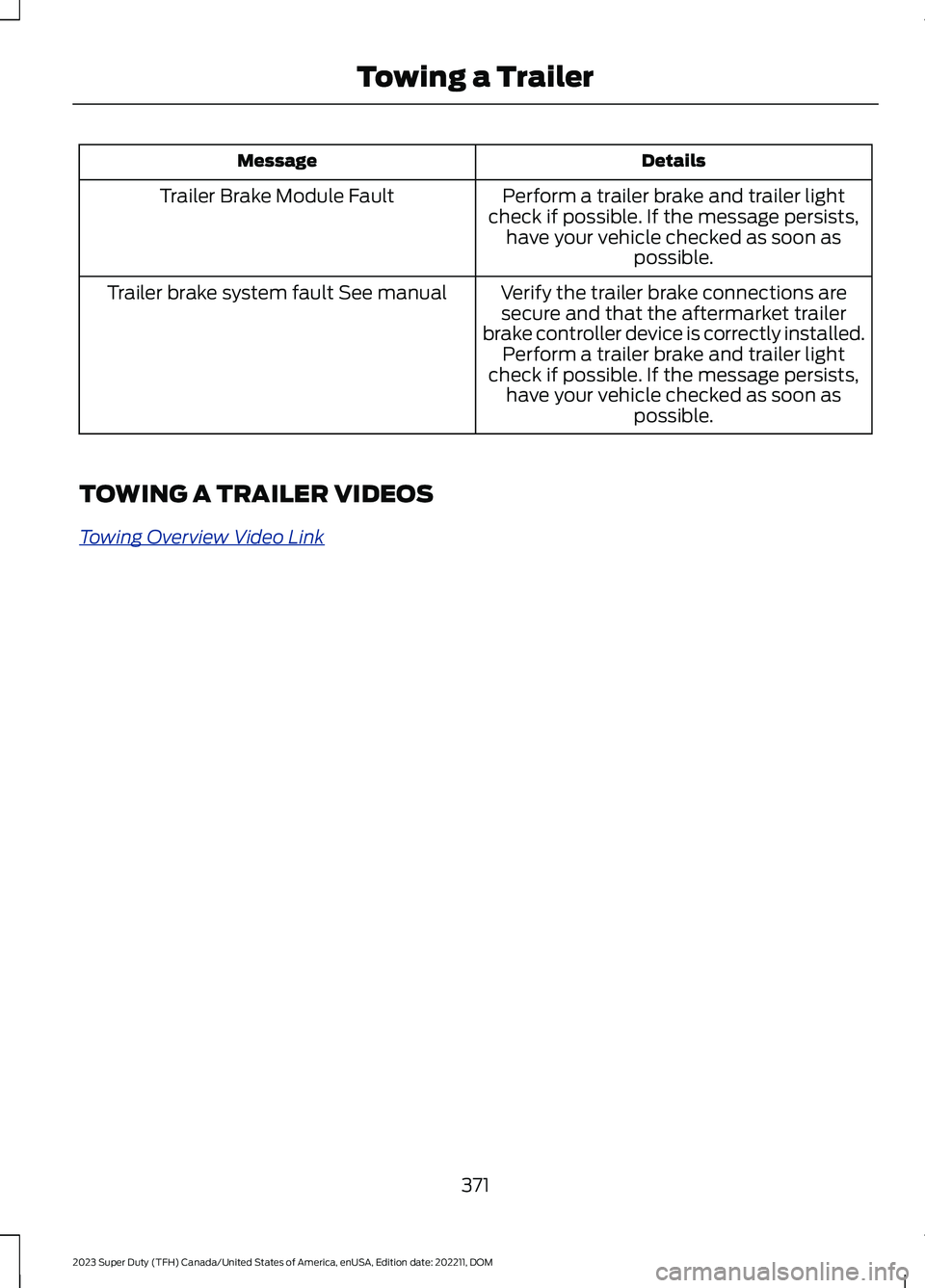
DetailsMessage
Perform a trailer brake and trailer lightcheck if possible. If the message persists,have your vehicle checked as soon aspossible.
Trailer Brake Module Fault
Verify the trailer brake connections aresecure and that the aftermarket trailerbrake controller device is correctly installed.Perform a trailer brake and trailer lightcheck if possible. If the message persists,have your vehicle checked as soon aspossible.
Trailer brake system fault See manual
TOWING A TRAILER VIDEOS
Towing Overview Video Link
371
2023 Super Duty (TFH) Canada/United States of America, enUSA, Edition date: 202211, DOMTowing a Trailer