2023 FORD SUPER DUTY ECU
[x] Cancel search: ECUPage 450 of 738

Change the air filter element at the correctservice interval. See ScheduledMaintenance (page 591). Your vehicle maybe equipped with electronic engine air filtermaintenance minder, that providesoptimized service intervals and remindersbased on driving habits and environmentalconditions.
1.Clean any loose dirt or debris aroundthe air filter hosing.
2.Disconnect the mass air flow sensorelectrical connector, if required.
3.Remove the clips (x3) that secure theair filter housing cover. Remove the airfilter housing cover. Disconnect andpull the air intake tube away, asneeded.
4.Remove the air filter element from theair filter housing.
5.Inspect the air filter element for anydamage. Replace the air filter elementif the seal, paper, foam or steel meshhas any holes, cut or gouges.
6.Inspect the air filter housing for dirt,dust, snow, ice or debris in the aircleaner tray.
7.To install, reverse the removalprocedure. You can oscillate thehousing cover slightly left to right toassist with installation as needed, untilpositioned such that all three clips canbe re-engaged.
After operating your vehicle during heavysnowfall or extreme rain, do the following:
•Snow: At the earliest opportunity, openthe hood, clear any snow and ice fromthe air filter housing inlet.
•Extreme rain: The air filter elementdries out after approximately 15–30minutes of driving at highway speeds.
Note:Do not remove the foam block fromthe air cleaner tray.
RESETTING THE AIR FILTERREMINDER
1.Press the menu button on the steeringwheel to enter the instrument clusterdisplay main menu.
2.Select Vehicle Maintenance.
3.Select Engine Air Filter.
4.Press and hold the OK button until thesystem reset confirmation appears.
Note:The system displays 100% afterbeing successfully reset.
446
2023 Super Duty (TFH) Canada/United States of America, enUSA, Edition date: 202211, DOMMaintenanceE350657 E310319
Page 462 of 738

If you disconnect or replace the batteryand your vehicle has an automatictransmission, it must relearn its adaptivestrategy. Because of this, the transmissionmay shift firmly when first driven. This isnormal operation while the transmissionfully updates its operation to optimumshift feel.
Removing the Battery
1.Apply the parking brake and switch theignition off.
2.Switch all electrical equipment off, forexample lights and radio.
3.Wait a minimum of two minutes beforedisconnecting the battery.
Note:The engine management system hasa power hold function and remains poweredfor a period of time after you switch theignition off. This is to allow diagnostic andadaptive tables to be stored. Disconnectingthe battery without waiting can causedamage not covered by the vehicleWarranty.
4.Disconnect and isolate the negativebattery cable terminal.
5.Disconnect and isolate the positivebattery cable terminal.
6.Remove the battery securing clamp.
7.Remove the battery.
If you disconnect or replace the vehiclebattery, you must reset the followingfeatures:
•Window bounce-back. See WindowBounce-Back (page 129).
•Clock Settings.
•Pre-set radio stations.
Replacing the Battery
Note:Before reconnecting the battery,make sure the ignition remains switched off.
You must replace the battery with one ofexactly the same specification.
To install, reverse the removal procedure.
Note:Make sure that you correctly installthe battery terminal covers, battery coverand battery cable terminals.
RESETTING THE BATTERYSENSOR
When you install a new battery, reset thebattery sensor by doing the following:
1.Switch the ignition on, and leave theengine off.
Note:Complete Steps 2 and 3 within 10seconds.
2.Flash the high beam headlamps fivetimes, ending with the high beams off.
3.Press and release the brake pedal threetimes.
The battery warning lamp flashes threetimes to confirm that the reset issuccessful.
RECYCLING AND DISPOSING OFTHE 12V BATTERY
Make sure that you dispose ofold batteries in anenvironmentally friendly way.Seek advice from your local authorityabout recycling old batteries.
458
2023 Super Duty (TFH) Canada/United States of America, enUSA, Edition date: 202211, DOMMaintenanceE107998
Page 492 of 738
cause steering, suspension, axle, transfercase or power transfer unit failure.Follow the recommended tire inflationpressures found on the SafetyCompliance Certification label, or theTire Label on the B-Pillar or the edge ofthe driver door. Failure to follow thisinstruction could result in loss of vehiclecontrol, vehicle rollover, or personal injuryor death.
Note:Do not use snow chains on vehicleswith LT275/65R20 or LT 285/75R18 sizedtires.
Note:The suspension insulation andbumpers will help prevent vehicle damage.Do not remove these components from yourvehicle when using snow tires and chains.
The tires on your vehicle have all-weathertreads to provide traction in rain and snow.However, in some climates, you may needto use snow tires and cables. If you needto use cables, we recommend that you usesteel wheels of the same size andspecification, as cables may chipaluminum wheels.
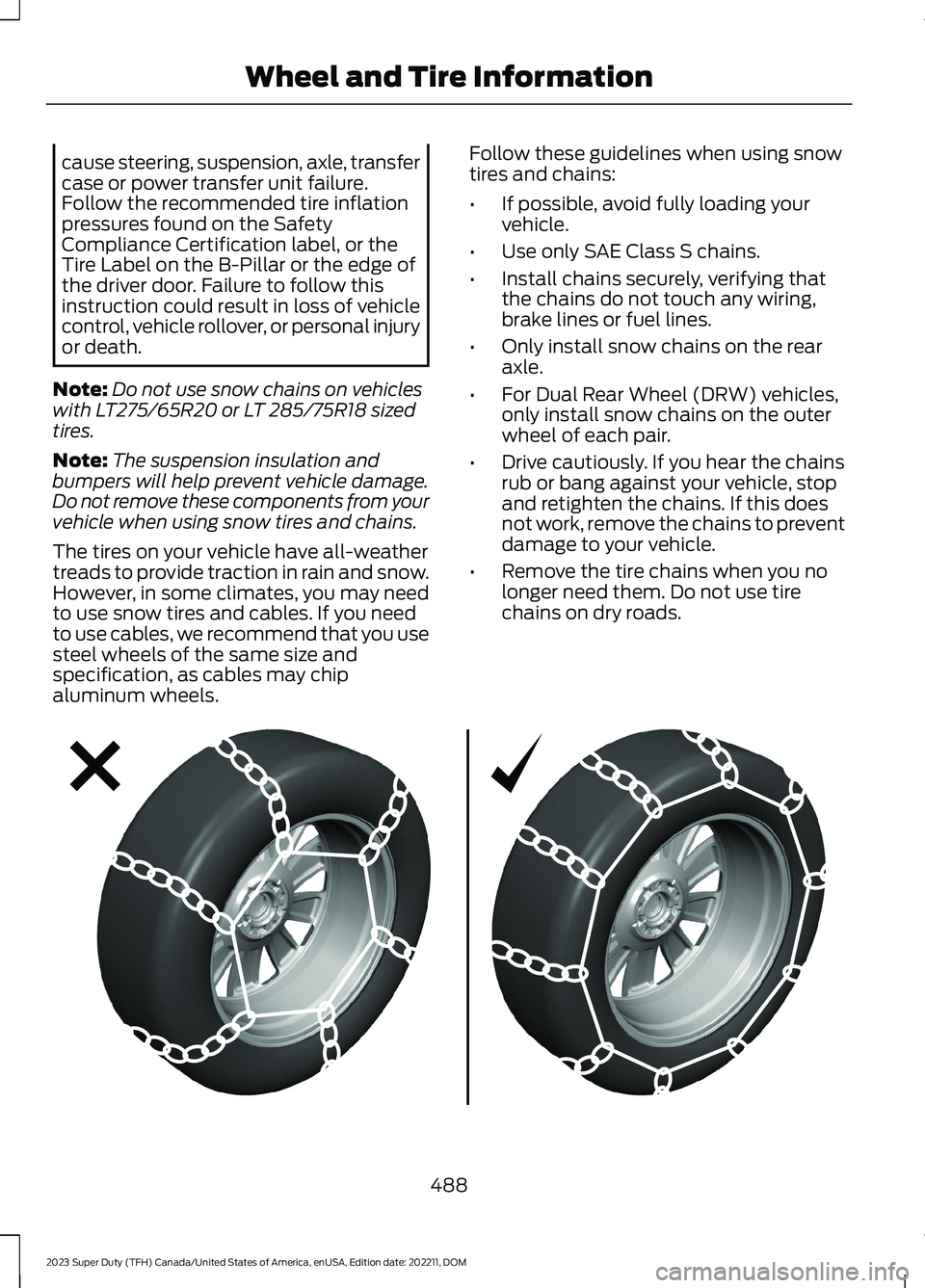
Follow these guidelines when using snowtires and chains:
•If possible, avoid fully loading yourvehicle.
•Use only SAE Class S chains.
•Install chains securely, verifying thatthe chains do not touch any wiring,brake lines or fuel lines.
•Only install snow chains on the rearaxle.
•For Dual Rear Wheel (DRW) vehicles,only install snow chains on the outerwheel of each pair.
•Drive cautiously. If you hear the chainsrub or bang against your vehicle, stopand retighten the chains. If this doesnot work, remove the chains to preventdamage to your vehicle.
•Remove the tire chains when you nolonger need them. Do not use tirechains on dry roads.
488
2023 Super Duty (TFH) Canada/United States of America, enUSA, Edition date: 202211, DOMWheel and Tire InformationE292547
Page 514 of 738
When driving with the full-size dissimilarspare wheel and tire assembly additionalcaution should be given to:
•Towing a trailer.
•Driving vehicles equipped with acamper body.
•Driving vehicles with a load on thecargo rack.
Drive cautiously when using a full-sizedissimilar spare wheel and tire assemblyand seek service as soon as possible.
Location of the Spare Tire andTools
See the following table for their locations:
LocationItem
Under the vehicle, just forward of the rearbumper.Spare tire - pick-up trucks only
Fastened to the floor pan behind the rear-most seat on the passenger side.Jack
Regular Cab: Fastened to floor behind thedriver seat.Jack handle, lug wrench, lug wrench exten-sion - only provided on dual rear wheelvehicles.Super Cab and Crew Cab: Fastened to thefloor under the rear seat on the driver's side.
Tire Change Procedure
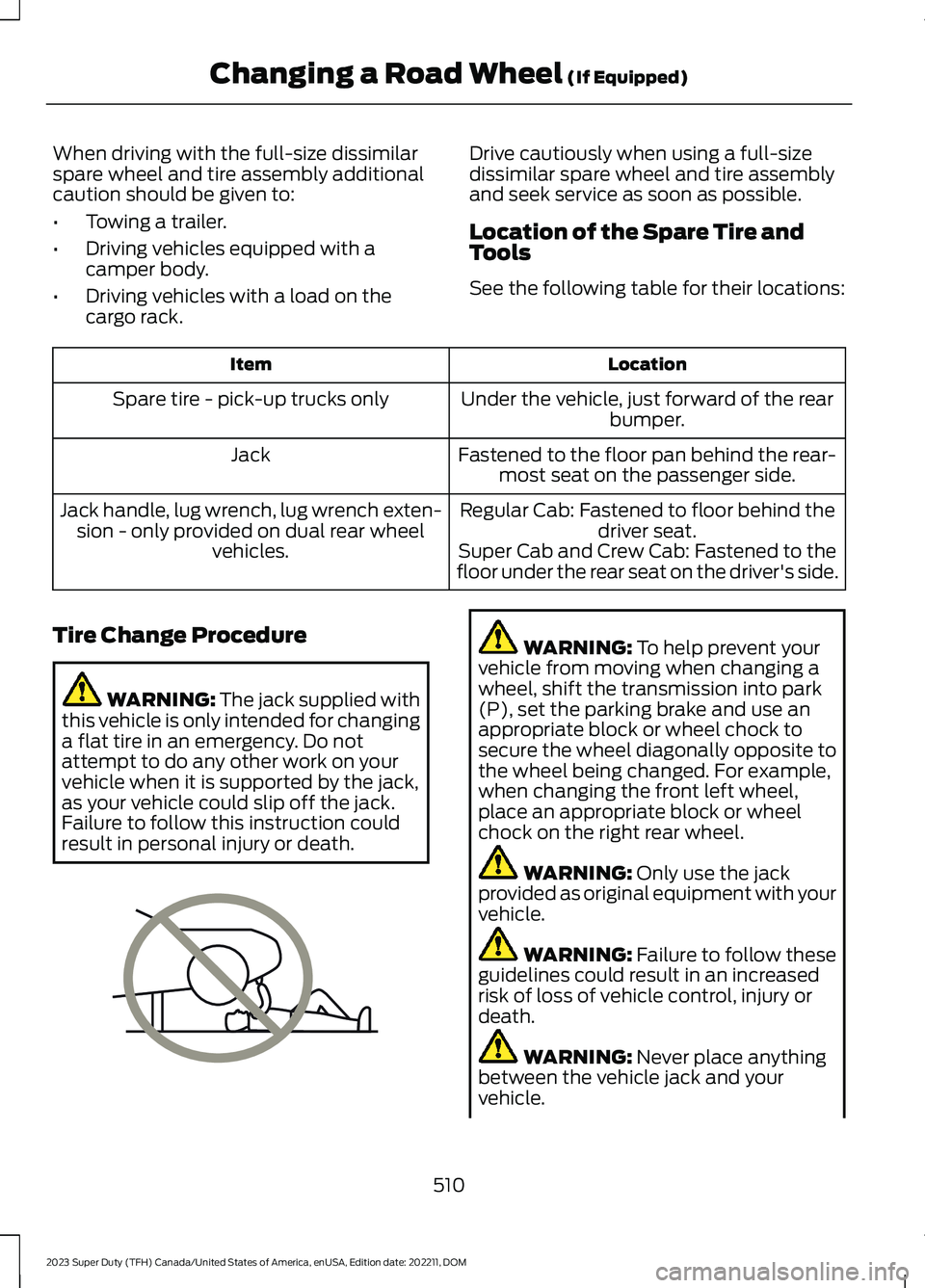
WARNING: The jack supplied withthis vehicle is only intended for changinga flat tire in an emergency. Do notattempt to do any other work on yourvehicle when it is supported by the jack,as your vehicle could slip off the jack.Failure to follow this instruction couldresult in personal injury or death.
WARNING: To help prevent yourvehicle from moving when changing awheel, shift the transmission into park(P), set the parking brake and use anappropriate block or wheel chock tosecure the wheel diagonally opposite tothe wheel being changed. For example,when changing the front left wheel,place an appropriate block or wheelchock on the right rear wheel.
WARNING: Only use the jackprovided as original equipment with yourvehicle.
WARNING: Failure to follow theseguidelines could result in an increasedrisk of loss of vehicle control, injury ordeath.
WARNING: Never place anythingbetween the vehicle jack and yourvehicle.
510
2023 Super Duty (TFH) Canada/United States of America, enUSA, Edition date: 202211, DOMChanging a Road Wheel (If Equipped)E166722
Page 515 of 738
WARNING: Never place anythingbetween the vehicle jack and the ground.
WARNING: Do not attempt tochange a tire on the side of the vehicleclose to moving traffic. Pull far enoughoff the road to not obstruct the flow oftraffic and avoid the danger of being hitwhen operating the jack or changing thewheel.
WARNING: The jack supplied withthis vehicle is only intended for changinga flat tire in an emergency. Do notattempt to do any other work on yourvehicle when it is supported by the jack,as your vehicle could slip off the jack.Failure to follow this instruction couldresult in personal injury or death.
WARNING: Only use the sparewheel carrier to stow wheels providedwith your vehicle.
Note:Do not use impact tools or powertools operating at over 200 RPM on thespare wheel carrier winch, which may causeit to malfunction and result in the wheel andtire not being securely stowed.
Note:Passengers should not remain in thevehicle when the vehicle is being jacked.
1.Park the vehicle on a level firm groundand activate the hazard flashers.
2.Apply the parking brake, place thetransmission in park (P), switch theengine off.
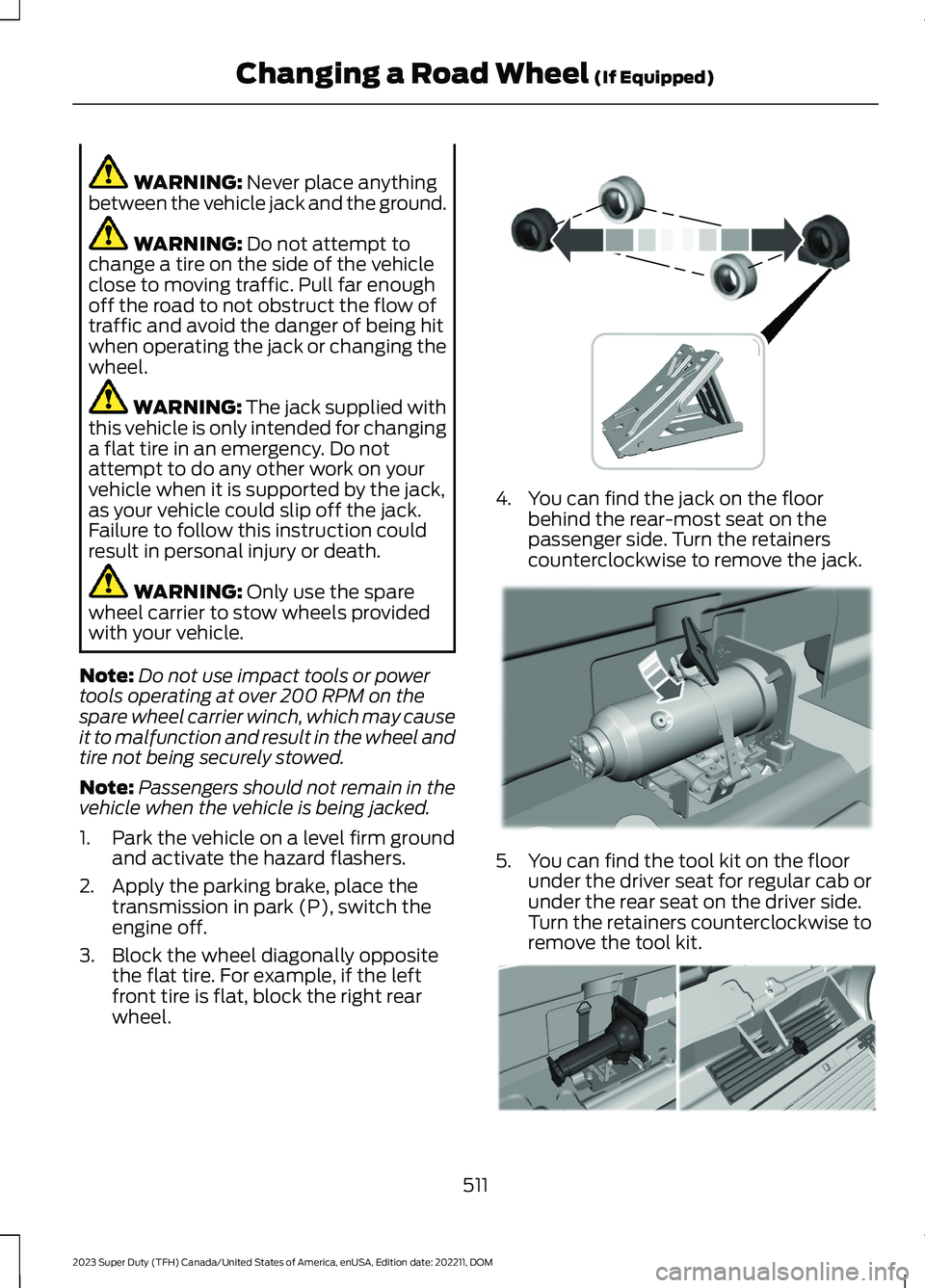
3.Block the wheel diagonally oppositethe flat tire. For example, if the leftfront tire is flat, block the right rearwheel.
4.You can find the jack on the floorbehind the rear-most seat on thepassenger side. Turn the retainerscounterclockwise to remove the jack.
5.You can find the tool kit on the floorunder the driver seat for regular cab orunder the rear seat on the driver side.Turn the retainers counterclockwise toremove the tool kit.
511
2023 Super Duty (TFH) Canada/United States of America, enUSA, Edition date: 202211, DOMChanging a Road Wheel (If Equipped) E388040 E309424 E309795
Page 523 of 738
3.Reinsert the lug wrench extension(s)through the rear bumper and guidetube and turn the lug wrench clockwiseuntil the tire is raised to its stowedposition underneath the vehicle. Thewrench will become harder to turn andthe spare tire winch will ratchet or slipwhen the tire is raised to maximumtightness. You will hear a clicking soundfrom the winch indicating that the tireis properly stowed, tighten until aminimum of three clicks are heard.Check that the tire lies flat against theframe and is secure.
4.Carefully place all tools back in the toolkit bag.
5.Reinstall the tool kit bag and tightenthe wing nut.
6.Properly reinstall the jack into thebracket and tighten the wing nut.
WHEEL NUTS
WARNING: When you install awheel, always remove any corrosion, dirtor foreign materials present on themounting surfaces of the wheel or thesurface of the wheel hub, brake drum orbrake disc that contacts the wheel. Makesure to secure any fasteners that attachthe rotor to the hub so they do notinterfere with the mounting surfaces ofthe wheel. Installing wheels withoutcorrect metal-to-metal contact at thewheel mounting surfaces can cause thewheel nuts to loosen and the wheel tocome off while your vehicle is in motion,resulting in loss of vehicle control,personal injury or death.
lb.ft (Nm)1Bolt Size
150 lb.ft (204 Nm)M14 x 1.5
1 Torque specifications are for nut and boltthreads free of dirt and rust. Use only ourrecommended replacement wheel nutsand or wheel bolts.
Retighten the wheel nuts to the specifiedtorque within 100 mi (160 km) after anywheel disturbance, such as tire rotation,changing a flat tire or wheel removal.
On vehicles equipped with dual rearwheels, retighten the wheel lug nuts to thespecified torque at 100 mi (160 km), andagain at 500 mi (800 km) of new vehicleoperation and after any wheel disturbance,such as tire rotation, changing a flat tire,or wheel removal.
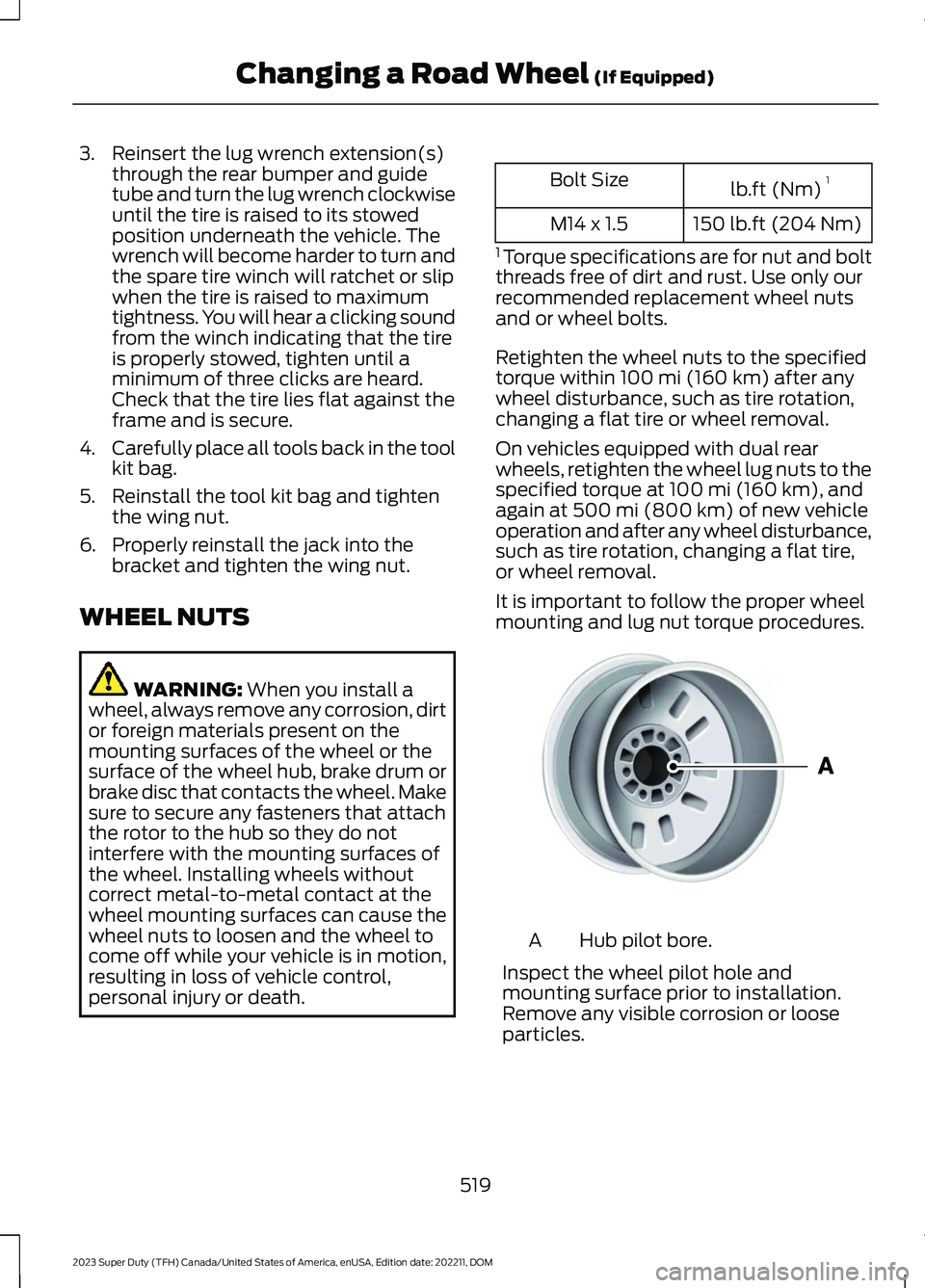
It is important to follow the proper wheelmounting and lug nut torque procedures.
Hub pilot bore.A
Inspect the wheel pilot hole andmounting surface prior to installation.Remove any visible corrosion or looseparticles.
519
2023 Super Duty (TFH) Canada/United States of America, enUSA, Edition date: 202211, DOMChanging a Road Wheel (If Equipped)E145950
Page 552 of 738
WHAT IS A CONNECTED
VEHICLE
A connected vehicle has technology thatallows your vehicle to connect to a mobilenetwork and for you to access a range offeatures. When used in conjunction withthe FordPass app, it could allow you tomonitor and control your vehicle further,for example checking the tire pressures,the fuel level and the vehicle location. Foradditional information, refer to the localFord website.
CONNECTED VEHICLE
REQUIREMENTS
Connected service and related featurefunctionality requires a compatible vehiclenetwork.
Some remote features require additionalservice activation. Log in to your Fordaccount for details. Some restrictions, thirdparty terms and message or data ratesmay apply.
CONNECTED VEHICLE
LIMITATIONS
Evolving technology, cellular networks, orregulations could affect functionality andavailability, or continued provision of somefeatures. These changes could even stopsome features from functioning.
CONNECTING THE VEHICLE TO
A MOBILE NETWORK
WHAT IS THE MODEM
The modem allows access to arange of features built into yourvehicle.
ENABLING AND DISABLING THEMODEM
1.Press Settings.
2.Press Connectivity.
3.Press Connected Vehicle Features.
4.Switch vehicle connectivity on or off.
CONNECTING FORDPASS TO THEMODEM
1.Make sure that the modem is enabledusing the vehicle settings menu.
2.Open the FordPass app on your deviceand log in.
3.Add your vehicle or select your vehicleif already added.
4.Select the option to activate yourvehicle.
5.Make sure that the name on the screenmatches the name shown in yourFordPass account.
6.Confirm that FordPass account isconnected to the modem.
CONNECTING THE VEHICLE TO
A WI-FI NETWORK
Select the settings option on thefeature bar.
1.Press Connectivity.
2.Press Manage Wi-Fi Networks.
3.Switch Wi-Fi on.
4.Press View Available Networks.
5.Select an available Wi-Fi network.
Note:Enter the network password toconnect to a secure network.
548
2023 Super Duty (TFH) Canada/United States of America, enUSA, Edition date: 202211, DOMConnected Vehicle E280315
Page 554 of 738
Why can I not see a network Iexpect to see in the list of availablenetworks?
•The network is hidden. Make thenetwork visible and try again, ormanually add a network in the Wi-Fisettings menu.
•Some network security types are notsupported, for example WEP.
Why do software downloads taketoo long?
•The network signal is weak. Move yourvehicle closer to the Wi-Fi router or toa place where the network signal is notobstructed.
•Wi-Fi network is in high demand or hasa slow Internet connection. Use a morereliable Wi-Fi network.
Why does the software not updatewhen the system seems to connectto a Wi-Fi network and the signalstrength is excellent?
•No software update is available at thistime.
•Select automatic updates option in thesettings menu to enable automaticsoftware update or contact anauthorized dealer.
•There could be a connection problem.Test the network using another device.
CONNECTED VEHICLE VIDEOS
FordPass: Vehicle Overview Video Link
FordPass: Vehicle Health Alerts and ReportsVideo Link
FordPass Overview Video Link
Using the FordPass App with FordPassConnect Video Link
550
2023 Super Duty (TFH) Canada/United States of America, enUSA, Edition date: 202211, DOMConnected Vehicle