2023 FORD SUPER DUTY ESP
[x] Cancel search: ESPPage 59 of 738
•When the ignition is on, a warninginforms the driver about the status ofeach seat, following each seat buckleor unbuckle. You can acknowledge this,or the system will time out after 60seconds.
•If a seatbelt is unfastened, a secondwarning informs the driver about whichseatbelt was unfastened. A warningremains until all occupied seatbelts arefastened.
SEATBELT REMINDERINDICATORS
A warning lamp illuminates if the ignitionis on, a front seat is occupied and theseatbelt has not been fastened.
The warning lamp illuminatesuntil you fasten your seatbelt.
SEATBELT REMINDER AUDIBLEWARNINGS
A warning tone sounds and the warninglamp illuminates if you are not wearingyour seatbelt when your vehicle exceedsa relatively low speed.
The warning tone sounds for a short periodof time or until you fasten your seatbelt.
SWITCHING THE SEATBELTREMINDER ON AND OFF
WARNING: While the systemallows you to deactivate it, this systemis designed to improve your chances ofbeing safely belted and surviving anaccident. We recommend you leave thesystem activated for yourself and otherswho may use the vehicle.
Note:The driver and front passengerwarnings switch off independently. Whenyou perform this procedure for one seatingposition, do not buckle the other position asthis cancels the process.
Read Steps 1 - 4 before proceeding withthe programming procedure.
Make sure that:
•You set the parking brake.
•The transmission is in park (P).
•The ignition is off.
•You close all vehicle doors.
•You unfasten the driver and frontpassenger seatbelts.
1.Switch the ignition on. Do not start theengine.
2.Wait about one minute until theseatbelt warning light switches off.After Step 2, wait an additional fiveseconds before proceeding with Step3. Once you start Step 3, you mustcomplete the procedure within 30seconds.
3.For the seating position you areswitching off, fasten then unfasten theseatbelt three times at a moderatespeed, ending in the unfastened state.After Step 3, the seatbelt warning lightswitches on.
4.When the seatbelt warning light is on,fasten then unfasten the seatbelt. AfterStep 4, the seatbelt warning lightflashes for confirmation.
This switches the feature off for thatseating position if it is currently on.
This switches the feature on for thatseating position if it is currently off.
55
2023 Super Duty (TFH) Canada/United States of America, enUSA, Edition date: 202211, DOMSeatbeltsE71880
Page 66 of 738
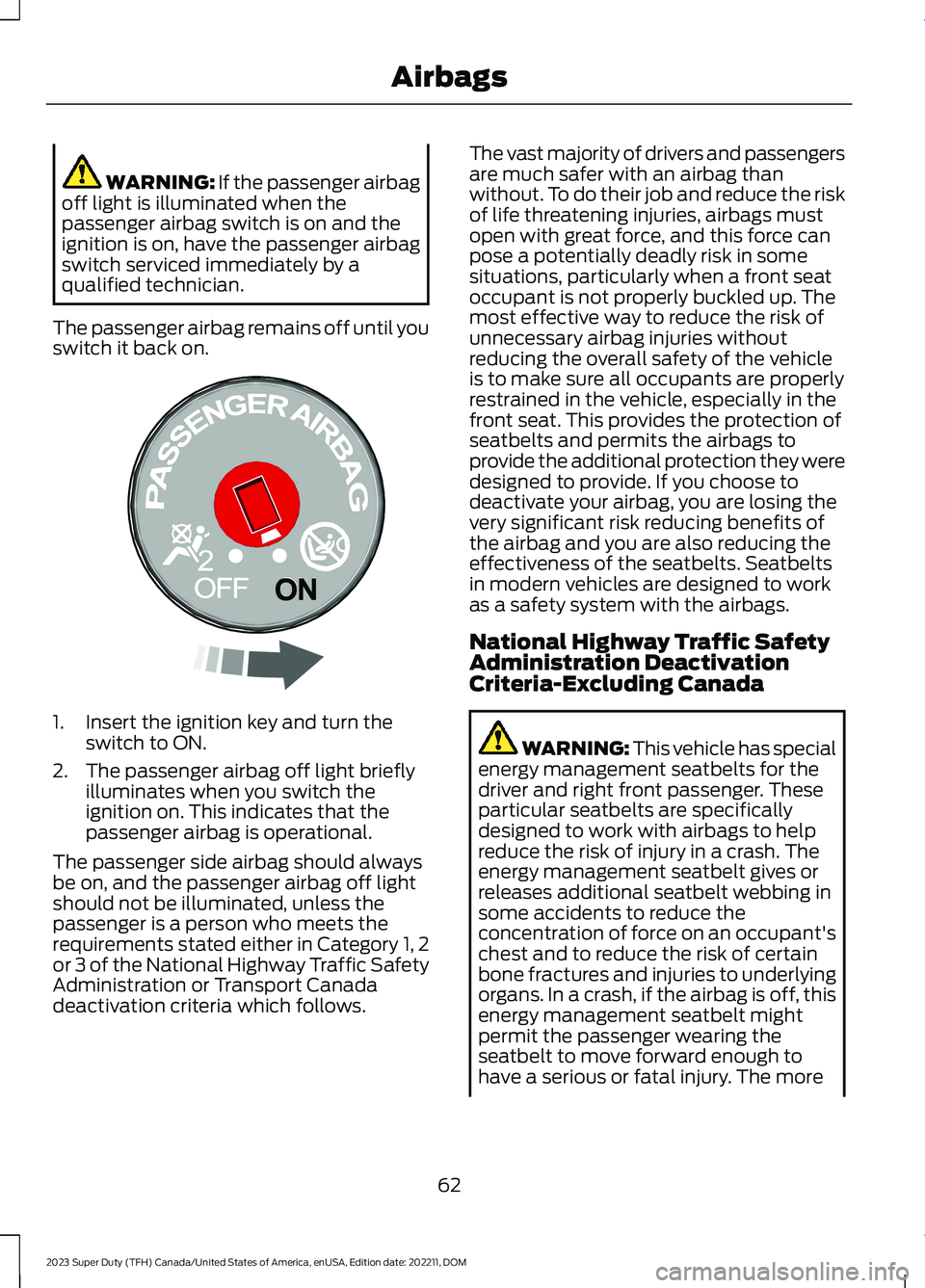
WARNING: If the passenger airbagoff light is illuminated when thepassenger airbag switch is on and theignition is on, have the passenger airbagswitch serviced immediately by aqualified technician.
The passenger airbag remains off until youswitch it back on.
1.Insert the ignition key and turn theswitch to ON.
2.The passenger airbag off light brieflyilluminates when you switch theignition on. This indicates that thepassenger airbag is operational.
The passenger side airbag should alwaysbe on, and the passenger airbag off lightshould not be illuminated, unless thepassenger is a person who meets therequirements stated either in Category 1, 2or 3 of the National Highway Traffic SafetyAdministration or Transport Canadadeactivation criteria which follows.
The vast majority of drivers and passengersare much safer with an airbag thanwithout. To do their job and reduce the riskof life threatening injuries, airbags mustopen with great force, and this force canpose a potentially deadly risk in somesituations, particularly when a front seatoccupant is not properly buckled up. Themost effective way to reduce the risk ofunnecessary airbag injuries withoutreducing the overall safety of the vehicleis to make sure all occupants are properlyrestrained in the vehicle, especially in thefront seat. This provides the protection ofseatbelts and permits the airbags toprovide the additional protection they weredesigned to provide. If you choose todeactivate your airbag, you are losing thevery significant risk reducing benefits ofthe airbag and you are also reducing theeffectiveness of the seatbelts. Seatbeltsin modern vehicles are designed to workas a safety system with the airbags.
National Highway Traffic SafetyAdministration DeactivationCriteria-Excluding Canada
WARNING: This vehicle has specialenergy management seatbelts for thedriver and right front passenger. Theseparticular seatbelts are specificallydesigned to work with airbags to helpreduce the risk of injury in a crash. Theenergy management seatbelt gives orreleases additional seatbelt webbing insome accidents to reduce theconcentration of force on an occupant'schest and to reduce the risk of certainbone fractures and injuries to underlyingorgans. In a crash, if the airbag is off, thisenergy management seatbelt mightpermit the passenger wearing theseatbelt to move forward enough tohave a serious or fatal injury. The more
62
2023 Super Duty (TFH) Canada/United States of America, enUSA, Edition date: 202211, DOMAirbagsE181521
Page 71 of 738
WHAT IS 911 ASSIST
911 Assist is a SYNC system feature thatcan call for help.
For more information, visitwww.owner.ford.com.
HOW DOES 911 ASSIST WORK
If a crash deploys an airbag, excluding kneeairbags and rear inflatable seatbelts, oractivates the fuel pump shut-off, yourvehicle may be able to contact emergencyservices by dialing 911 through a paired andconnected Bluetooth® enabled phone.
Not all crashes deploy an airbag or activatethe fuel pump shut-off. If a connected cellphone sustains damage or loses itsconnection to SYNC during a crash, SYNCsearches for and tries to connect to apreviously paired cell phone. SYNC thenattempts to call the emergency services.
Before making the call:
•SYNC provides about 10 seconds tocancel the call. If you fail to cancel thecall, SYNC attempts to dial 911.
•SYNC says the following, or a similarmessage: SYNC will attempt to call 911,to cancel the call, press Cancel on yourscreen or press and hold the phonebutton on your steering wheel.
If you do not cancel the call and SYNCmakes a successful call a pre-recordedmessage plays for the 911 operator. Theoccupants in your vehicle are able to talkwith the operator. Be prepared to provideyour name, phone number and locationimmediately because not all 911 systemsare capable of receiving this informationelectronically.
During an emergency call the systemtransmits vehicle data to the emergencyservice.
EMERGENCY CALL
REQUIREMENTS
WARNING: Do not wait for 911Assist to make an emergency call if youcan do it yourself. Dial emergencyservices immediately to avoid delayedresponse time which could increase therisk of serious injury or death after acrash. If you do not hear 911 Assist withinfive seconds of the crash, the system orphone may be damaged ornon-functional.
WARNING: Always place yourphone in a secure location in your vehicleso it does not become a projectile or getdamaged in a crash. Failure to do so maycause serious injury to someone ordamage the phone which could prevent911 Assist from working properly.
WARNING: Unless the 911 Assistsetting is set on before a crash, thesystem will not dial for help which coulddelay response time, potentiallyincreasing the risk of serious injury ordeath after a crash.
•SYNC is powered and working properlyat the time of the incident andthroughout feature activation and use.
•The 911 Assist feature must be set onbefore the incident.
•You must pair and connect aBluetooth® enabled and compatiblecell phone to SYNC.
•A connected Bluetooth® enabledphone must have the ability to makeand maintain an outgoing call at thetime of the incident.
67
2023 Super Duty (TFH) Canada/United States of America, enUSA, Edition date: 202211, DOM911 Assist
Page 73 of 738
REMOTE CONTROL
LIMITATIONS
WARNING: Changes ormodifications not expressively approvedby the party responsible for compliancecould void the user's authority to operatethe equipment. The term "IC:" before theradio certification number only signifiesthat Industry Canada technicalspecifications were met.
This device complies with Part 15 of theFCC Rules and with Industry Canadalicense-exempt RSS standard(s).Operation is subject to the following twoconditions: (1) This device may not causeharmful interference, and (2) This devicemust accept any interference received,including interference that may causeundesired operation.
Make sure a valid remote control is within3 ft (1 m) from the front door handles andrear of vehicle.
The system may not function if:
•The remote control remains stationaryfor about a minute.
•The vehicle battery has no charge.
•The remote control battery has nocharge.
•There is interference causing issueswith the remote control frequencies.
•The remote control is too close tometal objects or electronic devices, forexample keys or a cell phone.
USING THE REMOTE CONTROL
Use your remote control to access variousvehicle systems.
Note:The buttons on your remote may varydepending on the vehicle region or options.
Unlock
Press the button to unlock alldoors. See Unlocking andLocking the Doors Using theRemote Control (page 81).
Lock
Press the button to lock alldoors. See Unlocking andLocking the Doors Using theRemote Control (page 81).
Remote Start (If Equipped)
Press the button to remote start.See What Is Remote Start(page 149).
Tailgate (If Equipped)
Press the button to open thetailgate. See Opening theTailgate Using the RemoteControl (page 99).
Panic Alarm (If Equipped)
Press the button to sound thepanic alarm. See Sounding thePanic Alarm (page 74).
USING THE KEY CARDS
Allows you to unlock and start your vehiclewith a compatible key card using near fieldcommunication technology, the sametechnology that powers tap-to-pay cardand mobile device payments. Your vehiclehas key readers that recognize the keycards. Tap your key card on a key readerjust like you would tap a card at a paymentterminal.
69
2023 Super Duty (TFH) Canada/United States of America, enUSA, Edition date: 202211, DOMKeys and Remote ControlsE138629 E138623 E138625 E191530 E138624
Page 96 of 738
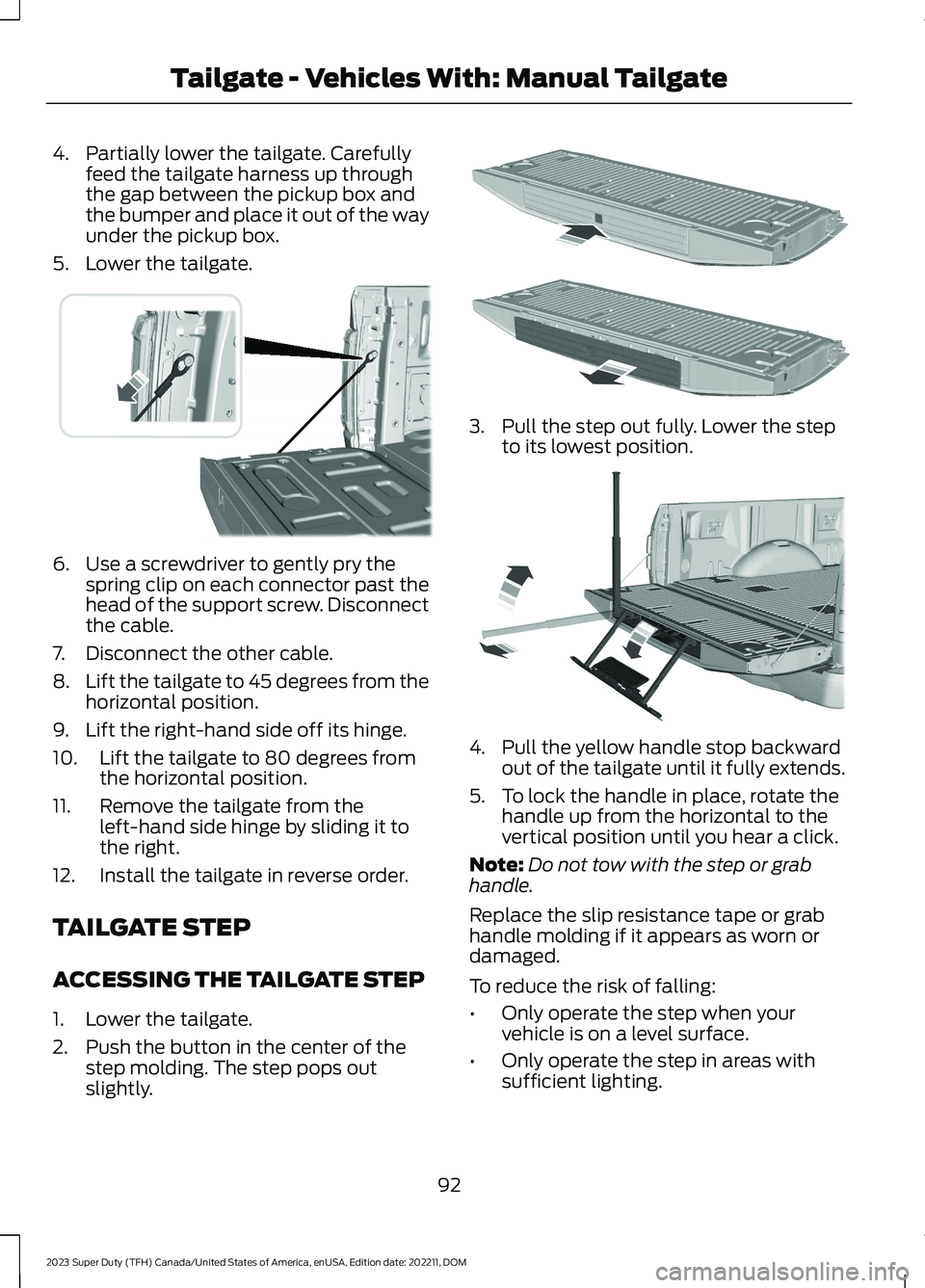
4.Partially lower the tailgate. Carefullyfeed the tailgate harness up throughthe gap between the pickup box andthe bumper and place it out of the wayunder the pickup box.
5.Lower the tailgate.
6.Use a screwdriver to gently pry thespring clip on each connector past thehead of the support screw. Disconnectthe cable.
7.Disconnect the other cable.
8.Lift the tailgate to 45 degrees from thehorizontal position.
9.Lift the right-hand side off its hinge.
10.Lift the tailgate to 80 degrees fromthe horizontal position.
11.Remove the tailgate from theleft-hand side hinge by sliding it tothe right.
12.Install the tailgate in reverse order.
TAILGATE STEP
ACCESSING THE TAILGATE STEP
1.Lower the tailgate.
2.Push the button in the center of thestep molding. The step pops outslightly.
3.Pull the step out fully. Lower the stepto its lowest position.
4.Pull the yellow handle stop backwardout of the tailgate until it fully extends.
5.To lock the handle in place, rotate thehandle up from the horizontal to thevertical position until you hear a click.
Note:Do not tow with the step or grabhandle.
Replace the slip resistance tape or grabhandle molding if it appears as worn ordamaged.
To reduce the risk of falling:
•Only operate the step when yourvehicle is on a level surface.
•Only operate the step in areas withsufficient lighting.
92
2023 Super Duty (TFH) Canada/United States of America, enUSA, Edition date: 202211, DOMTailgate - Vehicles With: Manual TailgateE311529 E187718 E189557
Page 100 of 738
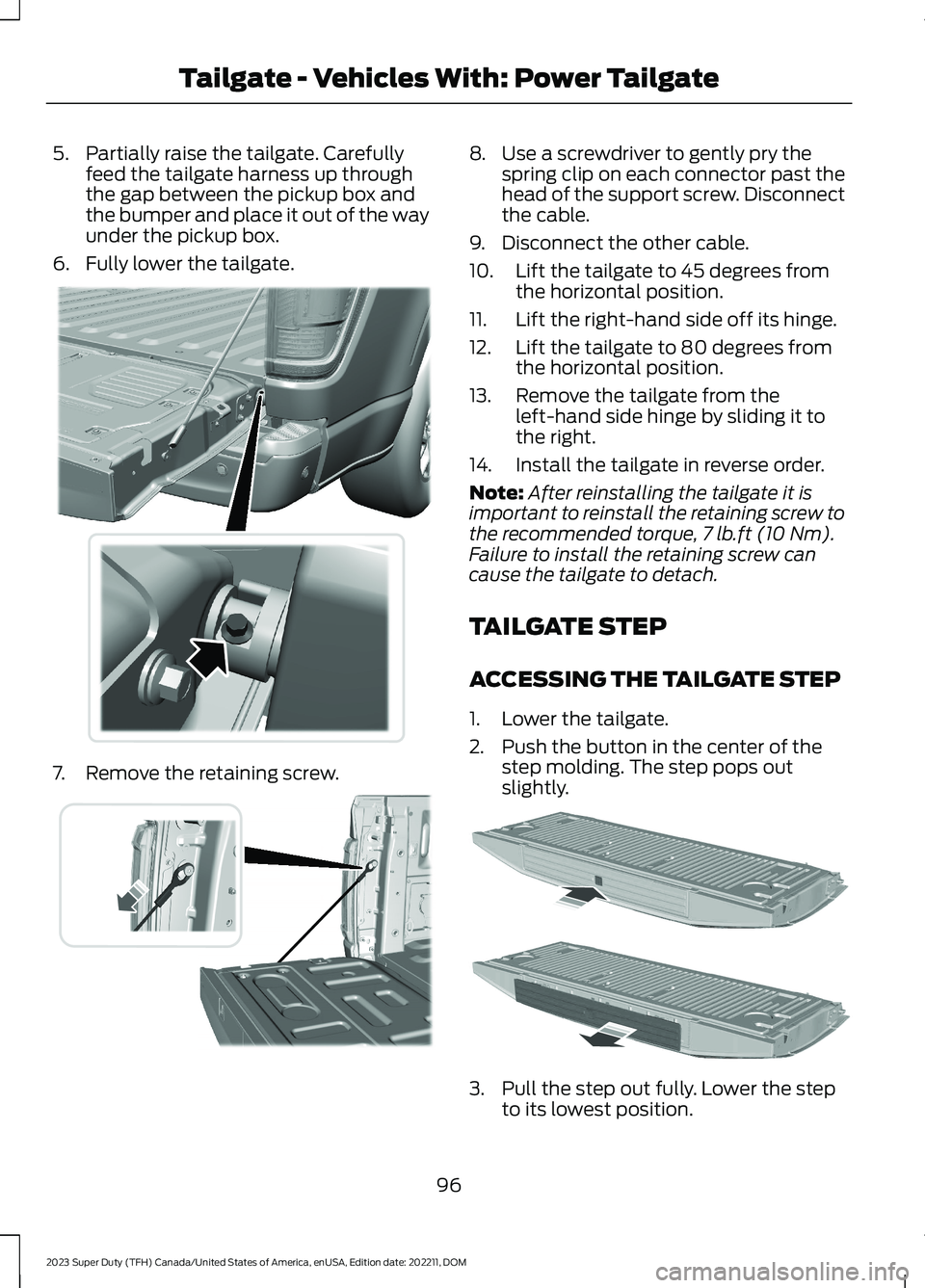
5.Partially raise the tailgate. Carefullyfeed the tailgate harness up throughthe gap between the pickup box andthe bumper and place it out of the wayunder the pickup box.
6.Fully lower the tailgate.
7.Remove the retaining screw.
8.Use a screwdriver to gently pry thespring clip on each connector past thehead of the support screw. Disconnectthe cable.
9.Disconnect the other cable.
10.Lift the tailgate to 45 degrees fromthe horizontal position.
11.Lift the right-hand side off its hinge.
12.Lift the tailgate to 80 degrees fromthe horizontal position.
13.Remove the tailgate from theleft-hand side hinge by sliding it tothe right.
14.Install the tailgate in reverse order.
Note:After reinstalling the tailgate it isimportant to reinstall the retaining screw tothe recommended torque,7 lb.ft (10 Nm).Failure to install the retaining screw cancause the tailgate to detach.
TAILGATE STEP
ACCESSING THE TAILGATE STEP
1.Lower the tailgate.
2.Push the button in the center of thestep molding. The step pops outslightly.
3.Pull the step out fully. Lower the stepto its lowest position.
96
2023 Super Duty (TFH) Canada/United States of America, enUSA, Edition date: 202211, DOMTailgate - Vehicles With: Power Tailgate E310339 E311529 E187718
Page 104 of 738
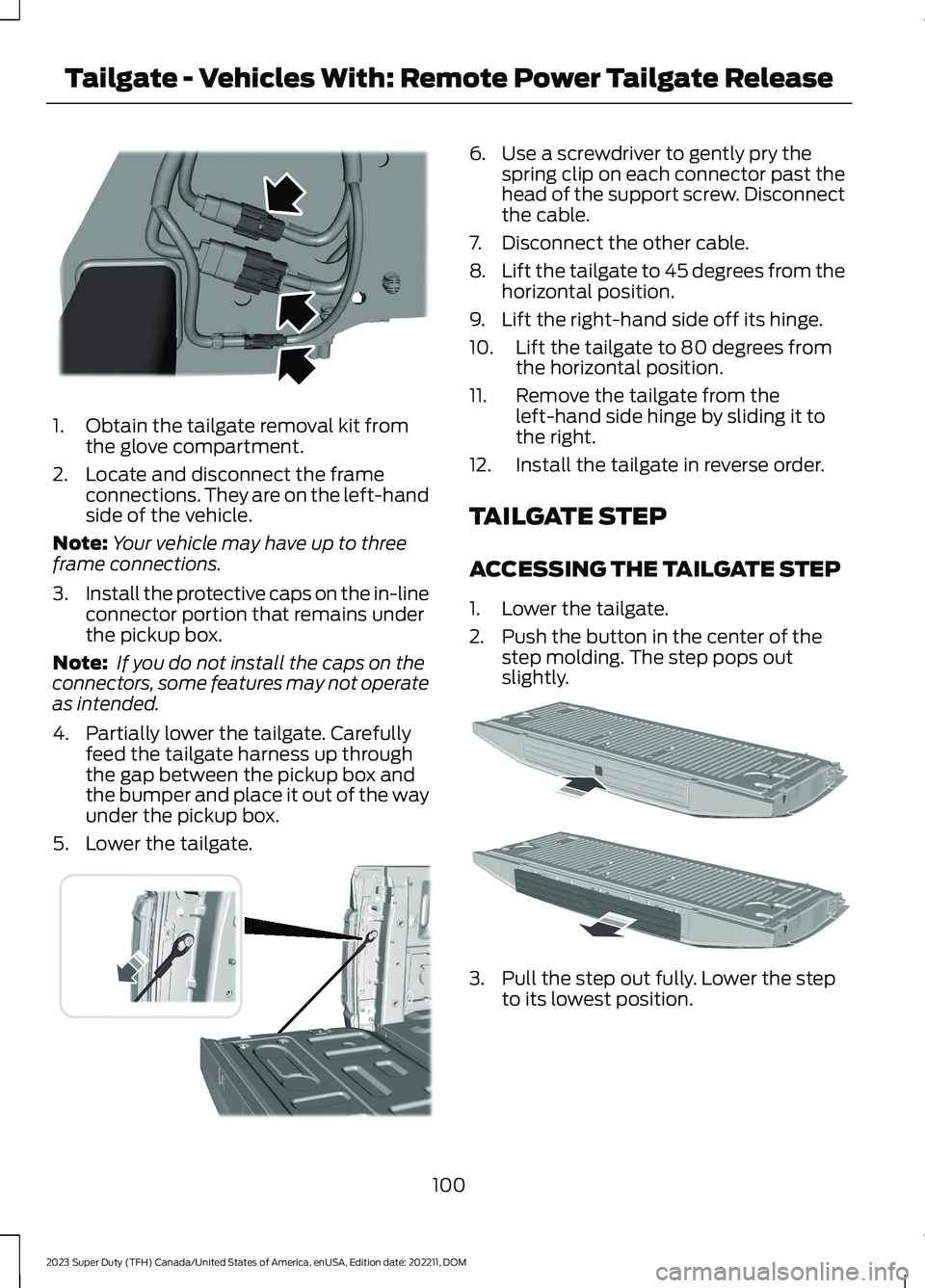
1.Obtain the tailgate removal kit fromthe glove compartment.
2.Locate and disconnect the frameconnections. They are on the left-handside of the vehicle.
Note:Your vehicle may have up to threeframe connections.
3.Install the protective caps on the in-lineconnector portion that remains underthe pickup box.
Note: If you do not install the caps on theconnectors, some features may not operateas intended.
4.Partially lower the tailgate. Carefullyfeed the tailgate harness up throughthe gap between the pickup box andthe bumper and place it out of the wayunder the pickup box.
5.Lower the tailgate.
6.Use a screwdriver to gently pry thespring clip on each connector past thehead of the support screw. Disconnectthe cable.
7.Disconnect the other cable.
8.Lift the tailgate to 45 degrees from thehorizontal position.
9.Lift the right-hand side off its hinge.
10.Lift the tailgate to 80 degrees fromthe horizontal position.
11.Remove the tailgate from theleft-hand side hinge by sliding it tothe right.
12.Install the tailgate in reverse order.
TAILGATE STEP
ACCESSING THE TAILGATE STEP
1.Lower the tailgate.
2.Push the button in the center of thestep molding. The step pops outslightly.
3.Pull the step out fully. Lower the stepto its lowest position.
100
2023 Super Duty (TFH) Canada/United States of America, enUSA, Edition date: 202211, DOMTailgate - Vehicles With: Remote Power Tailgate ReleaseE248384 E311529 E187718
Page 117 of 738

WIPERS
WIPER PRECAUTIONS
Do not operate the wipers on a drywindshield. This could scratch the glass ordamage the wiper blades. Use thewindshield washers before wiping a drywindshield.
Fully defrost the windshield before youswitch the windshield wipers on.
Switch the windshield wipers off beforeentering a car wash.
SWITCHING WINDSHIELD WIPERSON AND OFF
High-speed wipe.A
Low-speed wipe.B
Intermittent wipe.C
Off.D
Use the rotary control.
AUTOWIPERS (IF EQUIPPED)
WHAT ARE AUTOWIPERS
Autowipers turns on and controls thespeed and frequency of the windshieldwipers.
AUTOWIPERS SETTINGS
1.Using the instrument cluster controlson the steering wheel, select Settings.
2.Select Vehicle.
3.Select Wipers.
4.Switch Rain Sensing on or off.
Note:When you switch the feature off, thewipers do not operate based on the rainsensor. When you switch on the windshieldwipers to the intermittent wipe position withthe feature off, the wipers use the wipespeed set by the rotary control.
ADJUSTING THE SENSITIVITY OFTHE RAIN SENSOR
Low sensitivity.A
High sensitivity.B
Use the rotary control to set the rain sensorsensitivity.
113
2023 Super Duty (TFH) Canada/United States of America, enUSA, Edition date: 202211, DOMWipers and WashersE382879 E270969 E383614