Page 29 of 556
MOBILE DEVICE DATA
If you connect a mobile device to yourvehicle, you can display data from yourdevice on the touchscreen for example,music and album art. You can share yourvehicle data with mobile apps on yourdevice through the system. See Apps(page 428).
The mobile apps function operates by yourconnected device sending data to us in theUnited States. The data is encrypted andincludes, for example, the vehicleidentification number of your vehicle, theSYNC module serial number, odometer,enabled apps, usage statistics anddebugging information. We retain it onlyas long as necessary to provide the service,to troubleshoot, for continuousimprovement and to offer you productsand services that may be of interest to youaccording to your preferences and whereallowed by law.
If you connect a cell phone to the system,the system creates a profile that links tothat cell phone. The cell phone profileenables more mobile features and efficientoperation. The profile contains, forexample data from your phonebook, readand unread text messages and call history,including history of calls when your cellphone was not connected to the system.
If you connect a media device, the systemcreates and retains a media device indexof supported media content. The systemalso records a short diagnostic log ofapproximately 10 minutes of all recentsystem activity.
The cell phone profile, media device indexand diagnostic log remain in your vehicleunless you delete them and are generallyaccessible only in your vehicle when youconnect your cell phone or media device.If you no longer plan to use the system oryour vehicle, we recommend you use themaster reset function to erase the storedinformation. See Settings (page 430).
System data cannot be accessed withoutspecial equipment and access to yourvehicle's module.
For additional information about ourprivacy policy, refer to the local Fordwebsite.
Note:To find out if your vehicle hasconnectivity technology, visitwww.FordConnected.com.
EMERGENCY CALL SYSTEM
DATA
When the emergency call system is active,it may disclose to emergency services thatyour vehicle has been in a crash involvingthe deployment of an airbag or activationof the fuel pump shut-off. Certain versionsor updates to the emergency call systemmay also be capable of electronically orverbally disclosing to emergency servicesoperators your vehicle location or otherdetails about your vehicle or crash to assistemergency services operators to providethe most appropriate emergency services.If you do not want to disclose thisinformation, do not activate the emergencycall system.
Note:You cannot deactivate emergencycall systems that are required by law.
25
2023 Maverick (CFE) Canada/United States of America, enUSA, Edition date: 202208, First-PrintingData Privacy
Page 33 of 556
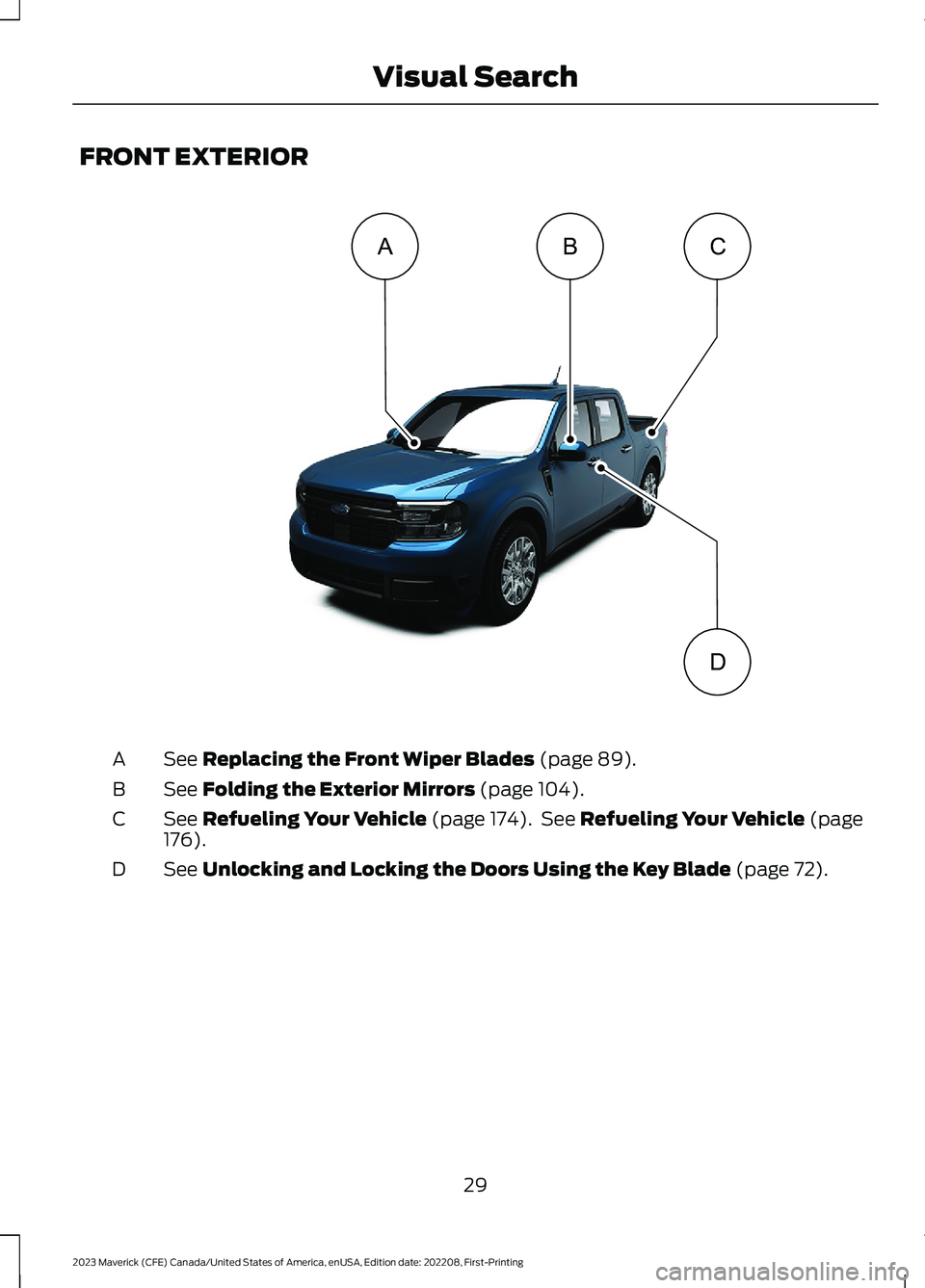
FRONT EXTERIOR
See Replacing the Front Wiper Blades (page 89).A
See Folding the Exterior Mirrors (page 104).B
See Refueling Your Vehicle (page 174). See Refueling Your Vehicle (page176).C
See Unlocking and Locking the Doors Using the Key Blade (page 72).D
29
2023 Maverick (CFE) Canada/United States of America, enUSA, Edition date: 202208, First-PrintingVisual SearchABDC E358430
Page 63 of 556

WHAT IS 911 ASSIST
911 Assist is a SYNC system feature thatcan call for help.
For more information, visitwww.owner.ford.com.
HOW DOES 911 ASSIST WORK
If a crash deploys an airbag, excluding kneeairbags and rear inflatable seatbelts, oractivates the fuel pump shut-off, yourvehicle may be able to contact emergencyservices by dialing 911 through a paired andconnected Bluetooth® enabled phone.
Not all crashes deploy an airbag or activatethe fuel pump shut-off. If a connected cellphone sustains damage or loses itsconnection to SYNC during a crash, SYNCsearches for and tries to connect to apreviously paired cell phone. SYNC thenattempts to call the emergency services.
Before making the call:
•SYNC provides about 10 seconds tocancel the call. If you fail to cancel thecall, SYNC attempts to dial 911.
•SYNC says the following, or a similarmessage: SYNC will attempt to call 911,to cancel the call, press Cancel on yourscreen or press and hold the phonebutton on your steering wheel.
If you do not cancel the call and SYNCmakes a successful call a pre-recordedmessage plays for the 911 operator. Theoccupants in your vehicle are able to talkwith the operator. Be prepared to provideyour name, phone number and locationimmediately because not all 911 systemsare capable of receiving this informationelectronically.
During an emergency call the systemtransmits vehicle data to the emergencyservice.
EMERGENCY CALL
REQUIREMENTS
WARNING: Do not wait for 911Assist to make an emergency call if youcan do it yourself. Dial emergencyservices immediately to avoid delayedresponse time which could increase therisk of serious injury or death after acrash. If you do not hear 911 Assist withinfive seconds of the crash, the system orphone may be damaged ornon-functional.
WARNING: Always place yourphone in a secure location in your vehicleso it does not become a projectile or getdamaged in a crash. Failure to do so maycause serious injury to someone ordamage the phone which could prevent911 Assist from working properly.
WARNING: Unless the 911 Assistsetting is set on before a crash, thesystem will not dial for help which coulddelay response time, potentiallyincreasing the risk of serious injury ordeath after a crash.
•SYNC is powered and working properlyat the time of the incident andthroughout feature activation and use.
•The 911 Assist feature must be set onbefore the incident.
•You must pair and connect aBluetooth® enabled and compatiblecell phone to SYNC.
•A connected Bluetooth® enabledphone must have the ability to makeand maintain an outgoing call at thetime of the incident.
59
2023 Maverick (CFE) Canada/United States of America, enUSA, Edition date: 202208, First-Printing911 Assist
Page 71 of 556
WHAT IS MYKEY
MyKey allows you to program keys withrestricted driving modes to promote gooddriving habits.
You can program the restrictions to all keysexcept one. Any keys that you did notprogram are administrator keys or adminkeys.
Note:Every MyKey receives the samerestrictions and settings. You cannotprogram them individually.
MYKEY SETTINGS
NON-CONFIGURABLE MYKEYSETTINGS
Seatbelt Reminder or Belt-Minder™
MyKey mutes the audio system until thefront seat passengers buckle the front seatbelts.
Note:If your vehicle includes an AM/FMradio or a very basic audio system, the radiomay not mute.
Satellite Radio (If Equipped)
Some satellite radio channels haverestricted access to adult radio content.
Early Low Fuel
The low fuel level warning lamp turns onearlier.
Driving and Parking Aids
You cannot configure settings for parkingaids, blind spot information system, andcross traffic alert. These systems turn onwhen the vehicle turns on, and you cannotswitch them off with a MyKey.
You cannot configure settings forpre-collision assist and lane keeping. Thesesystems turn on when the vehicle turns on.
A new destination in the navigation systemcan only be set using voice commandswhen using a MyKey, and with your vehiclemoving.
Note:MyKey drivers may be able to switchthe lane keeping assist off, but this featureturns back on automatically with every newkey cycle.
CONFIGURABLE MYKEYSETTINGS
You can configure the following settingsafter creating a MyKey. See Creating aMyKey (page 68).
Speed Limit
WARNING: Do not set MyKeymaximum speed limit to a limit that willprevent the driver from maintaining asafe speed considering posted speedlimits and prevailing road conditions. Thedriver is always responsible to drive inaccordance with local laws andprevailing conditions. Failure to do socould result in accident or injury.
You can set a speed limit for your vehicle.Warning messages appear on thetouchscreen and a tone sounds if yourvehicle reaches the set speed. You cannotoverride the set speed when using a MyKey.
Speed Minder
You can set a speed reminder for yourvehicle. Warning messages appear on thetouchscreen and a tone sounds if yourvehicle exceeds the set speed.
67
2023 Maverick (CFE) Canada/United States of America, enUSA, Edition date: 202208, First-PrintingMyKey™
Page 106 of 556
INTERIOR MIRROR
PRECAUTIONS
WARNING: Do not adjust themirrors when your vehicle is moving. Thiscould result in the loss of control of yourvehicle, serious personal injury or death.
Note:Do not clean the mirror housing orglass with harsh abrasives, fuel or otherpetroleum-based cleaning products.
MANUALLY DIMMING THE
INTERIOR MIRROR
Pull the tab below the mirror toward youto reduce glare at night.
102
2023 Maverick (CFE) Canada/United States of America, enUSA, Edition date: 202208, First-PrintingInterior Mirror
Page 111 of 556
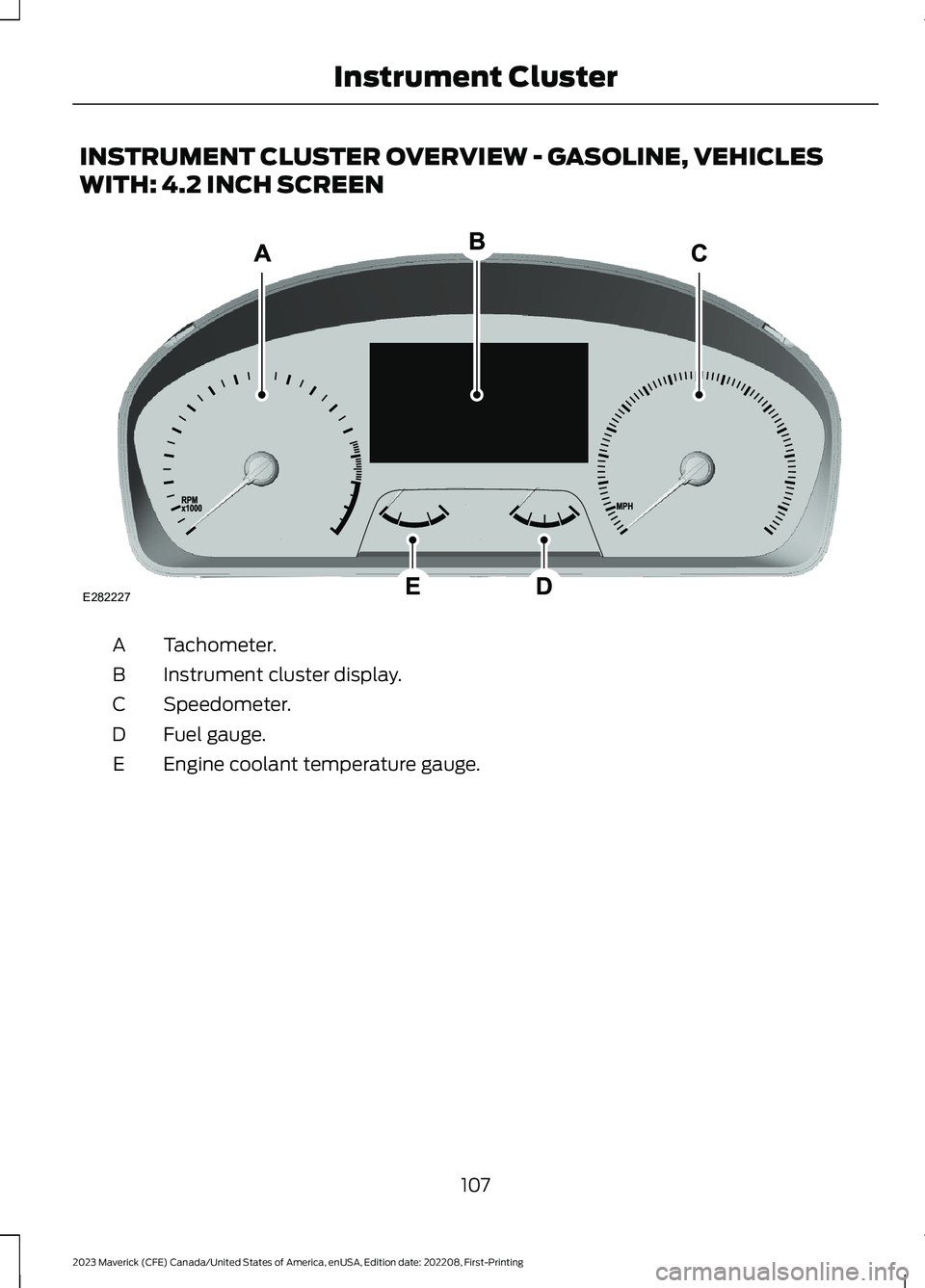
INSTRUMENT CLUSTER OVERVIEW - GASOLINE, VEHICLES
WITH: 4.2 INCH SCREEN
Tachometer.A
Instrument cluster display.B
Speedometer.C
Fuel gauge.D
Engine coolant temperature gauge.E
107
2023 Maverick (CFE) Canada/United States of America, enUSA, Edition date: 202208, First-PrintingInstrument ClusterE282227
Page 112 of 556
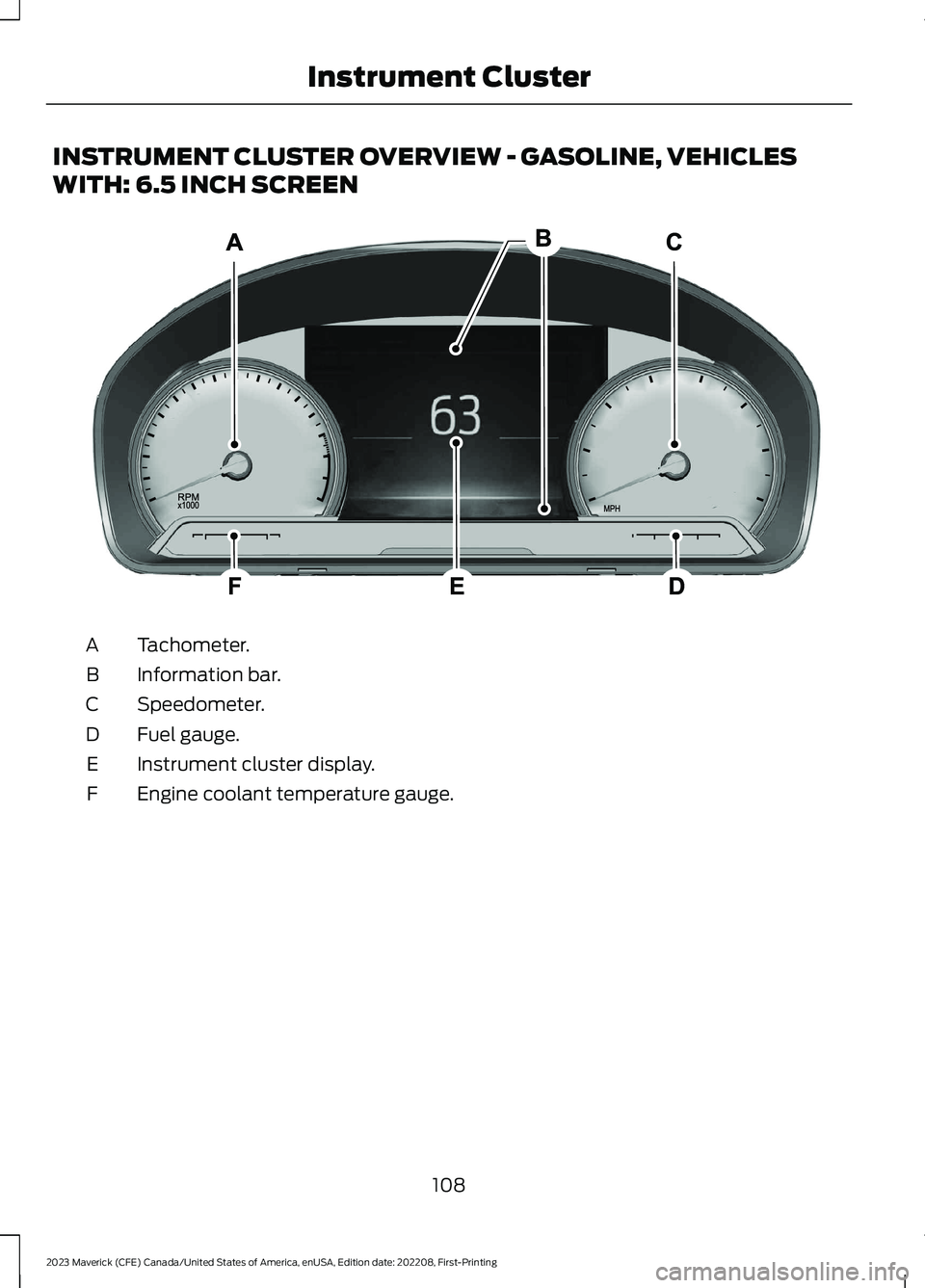
INSTRUMENT CLUSTER OVERVIEW - GASOLINE, VEHICLES
WITH: 6.5 INCH SCREEN
Tachometer.A
Information bar.B
Speedometer.C
Fuel gauge.D
Instrument cluster display.E
Engine coolant temperature gauge.F
108
2023 Maverick (CFE) Canada/United States of America, enUSA, Edition date: 202208, First-PrintingInstrument ClusterE282067
Page 113 of 556
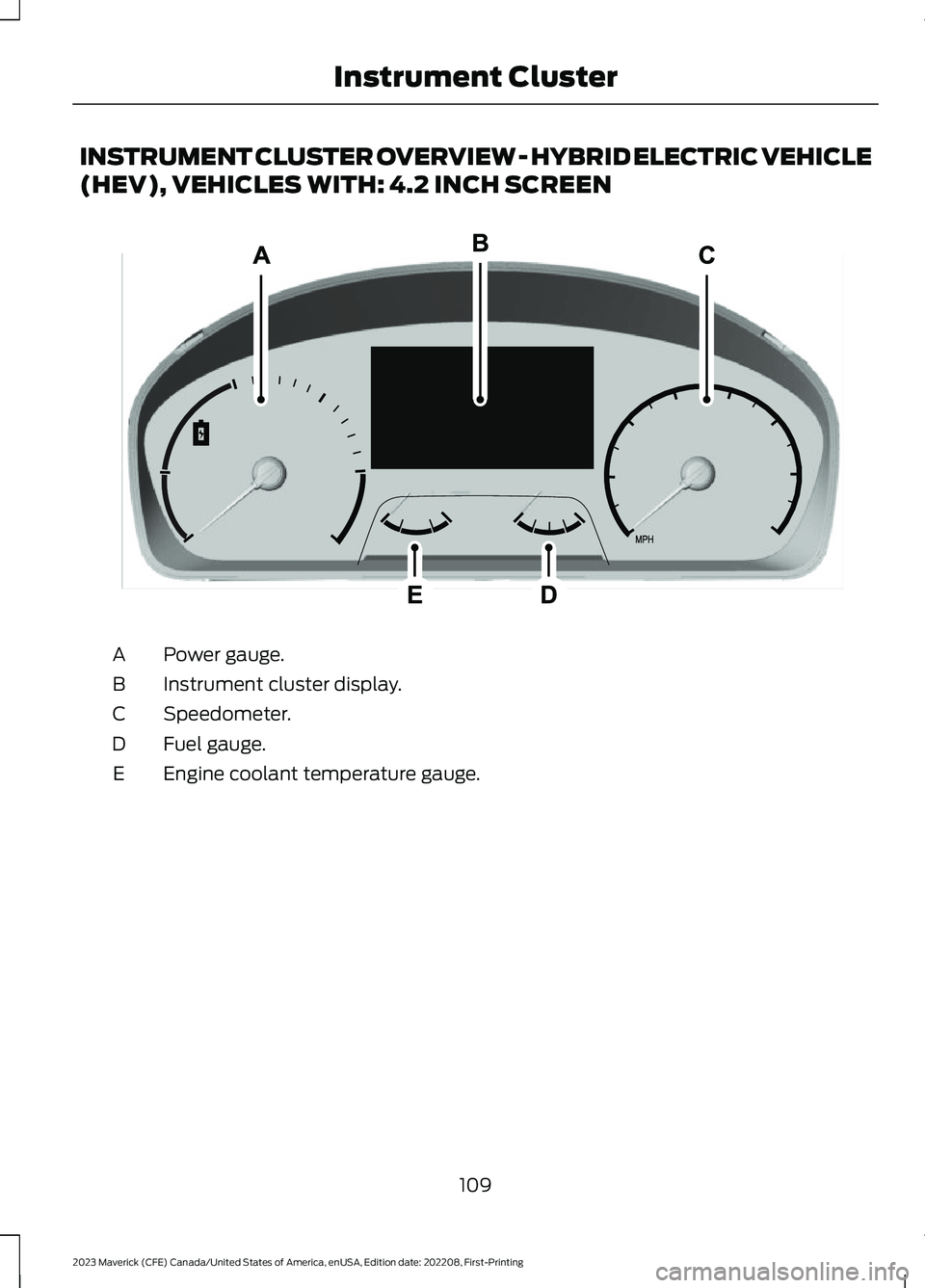
INSTRUMENT CLUSTER OVERVIEW - HYBRID ELECTRIC VEHICLE
(HEV), VEHICLES WITH: 4.2 INCH SCREEN
Power gauge.A
Instrument cluster display.B
Speedometer.C
Fuel gauge.D
Engine coolant temperature gauge.E
109
2023 Maverick (CFE) Canada/United States of America, enUSA, Edition date: 202208, First-PrintingInstrument Cluster E354646