2023 FORD MAVERICK fuel
[x] Cancel search: fuelPage 114 of 556
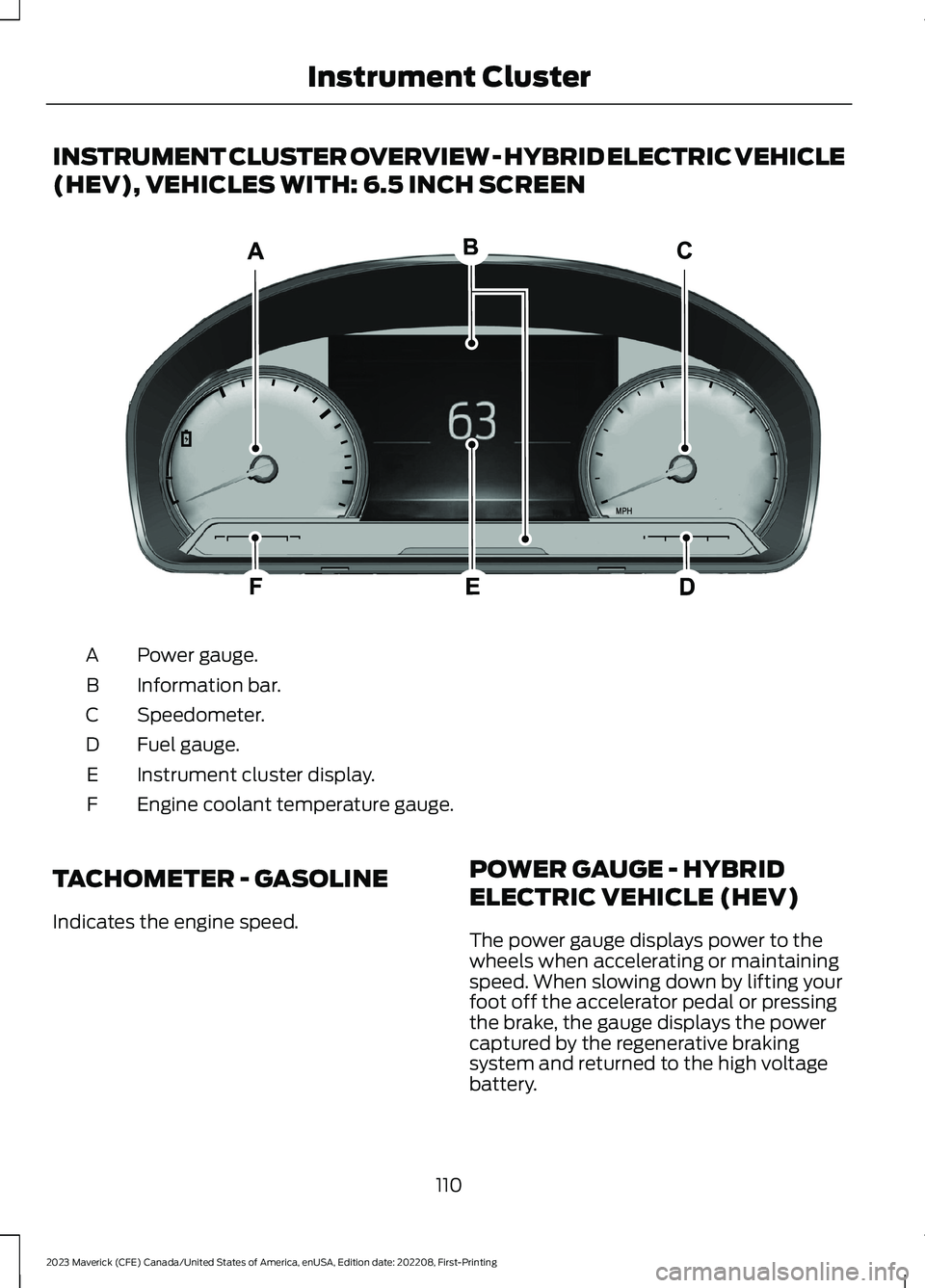
INSTRUMENT CLUSTER OVERVIEW - HYBRID ELECTRIC VEHICLE
(HEV), VEHICLES WITH: 6.5 INCH SCREEN
Power gauge.A
Information bar.B
Speedometer.C
Fuel gauge.D
Instrument cluster display.E
Engine coolant temperature gauge.F
TACHOMETER - GASOLINE
Indicates the engine speed.
POWER GAUGE - HYBRID
ELECTRIC VEHICLE (HEV)
The power gauge displays power to thewheels when accelerating or maintainingspeed. When slowing down by lifting yourfoot off the accelerator pedal or pressingthe brake, the gauge displays the powercaptured by the regenerative brakingsystem and returned to the high voltagebattery.
110
2023 Maverick (CFE) Canada/United States of America, enUSA, Edition date: 202208, First-PrintingInstrument ClusterE385954
Page 115 of 556
SPEEDOMETER
Indicates the vehicle speed.
FUEL GAUGE
WHAT IS THE FUEL GAUGE
Indicates approximately how much fuel isin the fuel tank.
FUEL GAUGE LIMITATIONS
The fuel gauge may not provide anaccurate reading when your vehicle is onan incline.
LOCATING THE FUEL FILLERDOOR
The arrow adjacent to the fuel pumpsymbol indicates on which side of yourvehicle the fuel filler door is located.
WHAT IS THE LOW FUELREMINDER
A low fuel level reminder displays andsounds when the distance to emptyreaches 75 mi (120 km) to empty forMyKey, and at 50 mi (80 km),25 mi(40 km),12 mi (20 km) and 0 mi (0 km)for all vehicle keys.
Note:The low fuel reminder can appear atdifferent fuel gauge positions depending onfuel economy conditions. This variation isnormal.
WHAT IS DISTANCE TO EMPTY
Indicates the approximate distance yourvehicle can travel on the fuel remaining inthe tank. Changes in driving pattern cancause the value to not only decrease butalso increase or stay constant for periodsof time.
ENGINE COOLANT
TEMPERATURE GAUGE
Indicates the engine coolant temperature.
WHAT IS THE INFORMATION
BAR
The information bar displays informationrelated to the ambient air temperature,odometer, compass, indicators andwarning lamps.
WHAT ARE THE INSTRUMENT
CLUSTER WARNING LAMPS
Warning lamps alert you to a vehiclecondition that could become serious.Some lamps illuminate when you startyour vehicle to make sure they work. If anylamps remain on after starting your vehicle,refer to the respective system warninglamp for further information.
111
2023 Maverick (CFE) Canada/United States of America, enUSA, Edition date: 202208, First-PrintingInstrument Cluster
Page 117 of 556

Low Beam Warning
It illuminates when the lowbeam headlamp requires service.Have the system checked assoon as possible.
Low Fuel Level
It illuminates when the fuel levelis low.
Low Tire Pressure Warning
It illuminates when your tirepressure is low. If illuminated,check your tire pressure as soonas possible. If it begins to flash at anytime,have the system checked as soon aspossible.
Low Washer Fluid
It illuminates when the washerfluid is low.
Malfunction Indicator Lamp
It illuminates when the ignitionis on and the engine is off, this isnormal operation. If it illuminateswhen the engine is on this indicates thatthe emission control system requiresservice. If it flashes, have your vehiclechecked immediately. See Starting andStopping the Engine – Warning Lamps(page 162).
Oil Pressure
It illuminates when the engineoil pressure is low.
Powertrain Fault
Illuminates when the powertrainrequires service. Have thesystem checked as soon aspossible.
WHAT ARE THE INSTRUMENT
CLUSTER INDICATORS
Indicators notify you of various featuresthat are active on your vehicle.
INSTRUMENT CLUSTER
INDICATORS
Adaptive Cruise Control
See Adaptive Cruise Control(page 219).
Airbag
See Airbags (page 50).
Automatic High Beam Control
See Automatic High BeamControl Indicators (page 96).
Auto Hold
See Auto Hold (page 198).
113
2023 Maverick (CFE) Canada/United States of America, enUSA, Edition date: 202208, First-PrintingInstrument ClusterE181350 E139232 E132353 E67028 E67022 E144524 E67017 E146105 E323448 E323449 E322410 E322411
Page 120 of 556

INSTRUMENT CLUSTER
DISPLAY MAIN MENU -
VEHICLES WITH: 6.5 INCH
SCREEN
Menu Item
Select Screens
Audio
Phone
Settings
Display Setup
CUSTOMIZING THE
INSTRUMENT CLUSTER
DISPLAY - VEHICLES WITH: 4.2
INCH SCREEN
1.Using the information display controlson the steering wheel, select MyView.
2.Press the menu button.
3.Select a screen.
4.Press the OK button.
CUSTOMIZING THE
INSTRUMENT CLUSTER
DISPLAY - VEHICLES WITH: 6.5
INCH SCREEN
Adding Screens Using SelectScreens
You can select various screens to show onthe instrument cluster display.
1.Select Select Screens.
2.Use the controls on the steering wheelto highlight a screen to add.
3.Press the OK button.
Note:The amount of screens you can addis limited. If the selected screen does notappear, you must deselect items from themenu.
Select Screens
Calm screen
Fuel economy
Trip 1
Trip 2
This trip
EV Coach
Tire pressure
Intelligent AWD
Off-Road
Trailer light check
Seatbelts
Auto StartStop
Now playing
Note:Some options may appear slightlydifferent or not at all if items are optional.
Configuring Gauges
You can select which values yourspeedometer shows in the instrumentcluster display.
1.Select Display Setup.
2.Select a speed unit to display.
116
2023 Maverick (CFE) Canada/United States of America, enUSA, Edition date: 202208, First-PrintingInstrument Cluster Display
Page 122 of 556
4.Select a tire pressure unit.
CHANGING THE TIRE PRESSUREUNIT - VEHICLES WITH: 6.5 INCHSCREEN
You can change the tire pressure unit usingthe instrument cluster display.
1.Select Display Setup.
2.Select Tire pressure.
3.Select a pressure unit.
FUEL ECONOMY DISPLAY -
GASOLINE
An instant fuel economy gauge is providedalong with average fuel economy. Averagefuel economy is continuously averagedsince the last reset.
Note:Press and hold the OK button on thecontrols on the steering wheel to reset youraverage fuel economy.
FUEL ECONOMY DISPLAY -
HYBRID ELECTRIC VEHICLE
(HEV)
An instant fuel economy gauge is providedalong with average fuel economy. Averagefuel economy is continuously averagedsince the last reset.
When the gasoline engine is off, the instantfuel economy gauge is replaced with anelectric driving message.
Note:Press and hold the OK button on thecontrols on the steering wheel to reset youraverage fuel economy.
Note:Fuel economy display is a selectablescreen. See Customizing the InstrumentCluster Display (page 116). SeeCustomizing the Instrument ClusterDisplay (page 116).
EV COACH - HYBRID ELECTRIC
VEHICLE (HEV)
EV coach can help you get the most out ofyour vehicle's electric driving capabilities.
Note:EV coach is a selectable screen. SeeCustomizing the Instrument ClusterDisplay (page 116).
When you are accelerating or maintainingspeed you see a blue or white solid barindicating vehicle power. You may also seea blue rectangular box which shows thepower level at which the engine turns on.
•When the power level is within the box,the color of the bar is blue. This meansyou are in electric operation and theengine is off.
•When the power level is outside of thebox, the color of the bar is white. Thismeans you are in hybrid operation witha combination of the electric motorand the engine providing vehicle power.
When you are decelerating with either yourfoot off the accelerator pedal or on thebrake pedal, a green or white solid bardisplays indicating the power being usedto slow down your vehicle. You may alsosee a green rectangular box which showsthe amount of power that can berecaptured by the regenerative brakingsystem and returned to the high voltagebattery.
•When the power level is within the box,the color of the bar is green. Thismeans that the regenerative brakingsystem is being used to efficiently slowyour vehicle down and return themaximum percentage of energy to thehigh voltage battery.
•When the power level is outside of thebox, the color of the bar is white. Thismeans both the regenerative brakingsystem and conventional brakingsystem are being used.
118
2023 Maverick (CFE) Canada/United States of America, enUSA, Edition date: 202208, First-PrintingInstrument Cluster Display
Page 124 of 556
ACCESSING THE TRIP
COMPUTER - VEHICLES WITH:
4.2 INCH SCREEN
1.Use the instrument cluster displaycontrols to navigate the home screen.
2.Select the trip screen.
3.Press the menu button on the steeringwheel.
4.Select Trip 1 or Trip 2.
ACCESSING THE TRIP
COMPUTER - VEHICLES WITH:
6.5 INCH SCREEN
Using Select Screens
1.Use the instrument cluster displaycontrols to navigate the home menu.
2.Select Select Screens.
3.Use the control on the steering wheelto navigate the menu. SeeCustomizing the Instrument ClusterDisplay (page 116).
Using the Home Screen
Once the screens have been added, usethe instrument cluster display controls onthe steering wheel to view each trip screen.
RESETTING THE TRIP
COMPUTER
1.Use the instrument cluster displaycontrols to navigate the home screen.
2.Select the trip screen you want to reset.
3.Press and hold the OK button until thesystem reset confirmation appears.
RESETTING THE INDIVIDUAL
TRIP VALUES - VEHICLES
WITH: 4.2 INCH SCREEN
1.Use the instrument cluster displaycontrols to navigate the home screen.
2.Select the trip screen.
3.Press the menu button on the steeringwheel.
4.Select Reset Individual Values.
5.Select a trip value to reset.
6.Press and hold the OK button until thesystem reset confirmation appears.
CONFIGURING THE TRIP
COMPUTER - VEHICLES WITH:
4.2 INCH SCREEN
1.Use the instrument cluster displaycontrols to navigate the home screen.
2.Select the trip screen.
3.Press the menu button on the steeringwheel.
4.Select Configure View.
5.Select values to display.
TRIP DATA
Trip 1 and 2
Provides trip timer, trip average fueleconomy and total trip distance traveled.For hybrid vehicles, the trip also shows thedistance traveled on electric power onlywith the engine off.
Note:Trip 1 and 2 are selectable screens.See Accessing the Trip Computer (page120).
120
2023 Maverick (CFE) Canada/United States of America, enUSA, Edition date: 202208, First-PrintingTrip Computer
Page 125 of 556
This Trip
Provides trip timer, trip average fueleconomy, total trip distance traveled, anddistance traveled on electric power onlywith the engine off. If the gasoline enginehas not turned on during the trip then tripaverage fuel economy is not shown. ThisTrip resets each time you start your vehicle.
Note:This trip is a selectable screen. SeeAccessing the Trip Computer (page 120).
121
2023 Maverick (CFE) Canada/United States of America, enUSA, Edition date: 202208, First-PrintingTrip Computer
Page 126 of 556

WHAT IS REMOTE START
The system allows you to remotely startyour vehicle and to adjust the interiortemperature according to the settings thatyou chose.
REMOTE START
PRECAUTIONS
WARNING: Do not start the enginein a closed garage or in other enclosedareas. Exhaust fumes are toxic. Alwaysopen the garage door before you startthe engine. Failure to follow thisinstruction could result in personal injuryor death.
REMOTE START LIMITATIONS
Remote start does not work under thefollowing conditions:
•The alarm horn is sounding.
•The hood is open.
•The transmission is not in park (P).
•The ignition is on.
•The battery voltage is below theminimum operating voltage.
•Remote start is not enabled.
Note:Do not use remote start if the fuellevel is low.
ENABLING REMOTE START
1.Using the information display controlson the steering wheel, select Settings.
2.Select Vehicle Settings.
3.Select Remote Start.
4.Switch System on.
Note:To use remote start, make sure thatthe modem is enabled. See Enabling andDisabling the Modem (page 377).
REMOTELY STARTING AND
STOPPING THE VEHICLE
Remotely Starting the Vehicle
Press the button on the remotecontrol.
Within three seconds, press thebutton twice on the remotecontrol.
Note:You can also use the FordPass Appto start the vehicle.
Note:The turn signals flash twice.
Note:The parking lamps turn on when thevehicle is running.
Note:The horn sounds if the system failsto start.
Note:All other vehicle systems remain offwhen you have remotely started the vehicle.
Note:The vehicle remains secured whenyou have remotely started the vehicle. Avalid key must be inside your vehicle toswitch the ignition on and drive your vehicle.
Remotely Stopping the Vehicle
Within three seconds, press thebutton twice on the remotecontrol.
EXTENDING THE REMOTE
START DURATION
To extend the remote start duration duringremote start, do the following:
Press the button on the remotecontrol.
122
2023 Maverick (CFE) Canada/United States of America, enUSA, Edition date: 202208, First-PrintingRemote Start (If Equipped)E138623 E138625 E138625 E138623