2023 FORD F150 keyless entry
[x] Cancel search: keyless entryPage 114 of 786

WHAT IS THE KEYLESS ENTRY
KEYPAD
The keyless entry keypad allows you tolock and unlock your vehicle using thekeypad on the window trim.
KEYLESS ENTRY KEYPAD
LIMITATIONS
The system may not function if:
•The vehicle battery has no charge.
LOCATING THE KEYLESS
ENTRY KEYPAD
The keypad is near the driver window andilluminates when you touch it.
KEYLESS ENTRY KEYPAD
MASTER ACCESS CODE
What Is the Master Access Code
The master access code is a factory-setfive-digit entry code. You can operate thekeypad with the master access code atany time. The master access code is on theowner’s wallet card in the glove box andis available from an authorized dealer.
KEYLESS ENTRY KEYPAD
PERSONAL ACCESS CODES
Programming a Personal EntryCode
1.Enter the five-digit master code.
2.Press 1·2 on the keypad within fiveseconds.
3.Enter your personal five-digit code.You must do this within five secondsof completing Step 2.
4.Press 1·2 on the keypad to savepersonal code 1.
The doors lock then unlock to confirm thatprogramming was successful.
To program additional personal entrycodes, repeat Steps 1 through 3, then forStep 4:
•Press 3·4 to save personal code 2.
•Press 5·6 to save personal code 3.
•Press 7·8 to save personal code 4.
•Press 9·0 to save personal code 5.
If your vehicle comes with SYNC, you canalso program the system with a personalentry code.
Hints:
•Do not set a code that uses five of thesame number.
•Do not use five numbers in sequentialorder.
•The five-digit master code works evenif you have set your own personal code.
Erasing a Personal Code
1.Enter the five-digit master code.
2.Press and release 1·2 on the keypadwithin five seconds.
3.Press and hold 1·2 for two seconds.You must do this within five secondsof completing Step 2.
110
2023 F-150 (TFD) Canada/United States of America, enUSA, Edition date: 202206, DOMKeyless Entry Keypad (If Equipped)E190936
Page 115 of 786
All personal codes erase and only thefive-digit master code works.
Anti-Scan Feature
The keypad goes into an anti-scan modeif you enter the wrong code seven times.This mode turns off the keypad for oneminute and the keypad lamp flashes.
The anti-scan feature turns off after:
•One minute of keypad inactivity.
•You press the unlock button on theremote control.
•You switch the ignition on.
•You unlock your vehicle using keylessentry.
USING THE KEYLESS ENTRY
KEYPAD
Unlocking the Doors
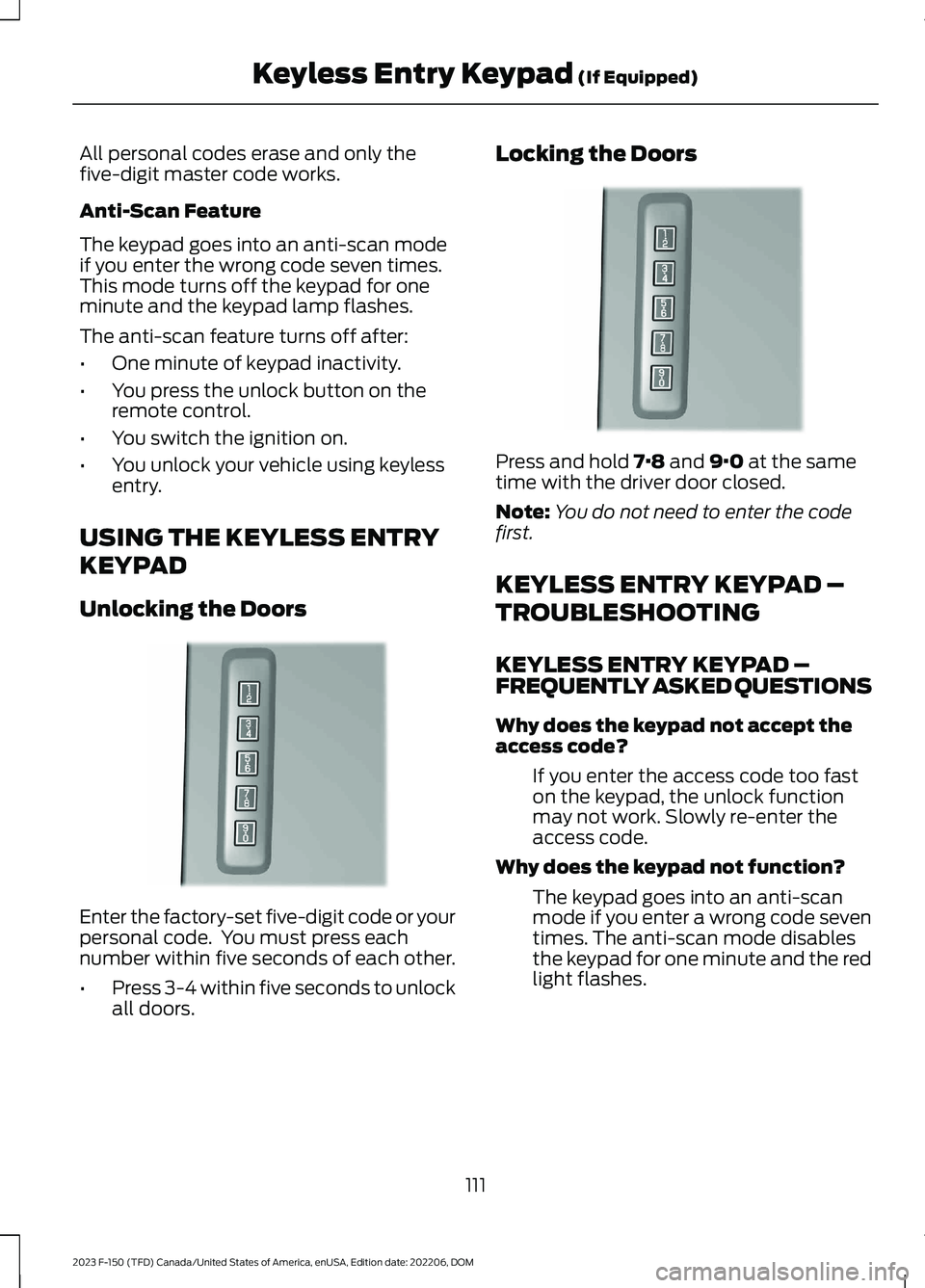
Enter the factory-set five-digit code or yourpersonal code. You must press eachnumber within five seconds of each other.
•Press 3-4 within five seconds to unlockall doors.
Locking the Doors
Press and hold 7·8 and 9·0 at the sametime with the driver door closed.
Note:You do not need to enter the codefirst.
KEYLESS ENTRY KEYPAD –
TROUBLESHOOTING
KEYLESS ENTRY KEYPAD –FREQUENTLY ASKED QUESTIONS
Why does the keypad not accept theaccess code?
If you enter the access code too faston the keypad, the unlock functionmay not work. Slowly re-enter theaccess code.
Why does the keypad not function?
The keypad goes into an anti-scanmode if you enter a wrong code seventimes. The anti-scan mode disablesthe keypad for one minute and the redlight flashes.
111
2023 F-150 (TFD) Canada/United States of America, enUSA, Edition date: 202206, DOMKeyless Entry Keypad (If Equipped)E190936 E190936
Page 243 of 786
1.With your vehicle running and thetransmission in park (P), press thepolice idle button on the instrumentpanel. See Instrument ClusterIndicators (page 173). An indicatorlamp illuminates to confirm the systemis on.
2.Switch the ignition off and remove thekey.
When the system is on:
•The power window switches turn offand the windows remain in their currentstate.
Note:When the system is on, you can usethe key blade or the remote control to lockand unlock your vehicle.
Switching the System Off
•To disable Police Idle and keep theengine running, insert key and turn tothe run position.
•To disable Police Idle and turn theengine off, press the police idle buttonon the instrument panel.
Note:If you switch the system off beforeswitching the ignition to the run position,your vehicle shuts down.
AUTOMATIC ENGINE STOP -
VEHICLES WITH: KEYLESS
ENTRY AND PUSH BUTTON
START
WHAT IS AUTOMATIC ENGINESTOP
Automatic engine stop is a feature thatswitches the engine off if it has been idlingfor an extended period to help you savefuel.
HOW DOES AUTOMATIC ENGINESTOP WORK
Automatic engine stop turns the engineoff. The ignition also turns off in order tosave battery power. Before the engineshuts down, a message appears in theinformation display showing a timercounting down. If you do not intervenewithin 30 seconds, the engine shuts down.Another message appears in theinformation display to inform you that theengine has shut down in order to save fuel.Start your vehicle as you normally do.
SWITCHING AUTOMATIC ENGINESTOP ON AND OFF
1.Press Settings on the touchscreen.
2.Press Vehicle Settings.
3.Switch 30min Max Idle on or off.
Note:You cannot permanently switch offthe automatic shutdown. If you switch it off,it turns on each time you switch the ignitionon.
OVERRIDING AUTOMATIC ENGINESTOP
You can stop the engine shutdown, or resetthe timer, at any point before the30-second countdown has expired bydoing any of the following:
•Pressing the brake pedal or acceleratorpedal.
•Pressing the OK or RESET buttonduring the countdown.
Note: You cannot permanently switch offthe automatic engine shutdown feature.When you switch it off temporarily, it turnson at the next ignition cycle.
239
2023 F-150 (TFD) Canada/United States of America, enUSA, Edition date: 202206, DOMStarting and Stopping the Engine
Page 244 of 786
ACCESSING THE PASSIVE KEY
BACKUP POSITION -
VEHICLES WITH: KEYLESS
ENTRY AND PUSH BUTTON
START
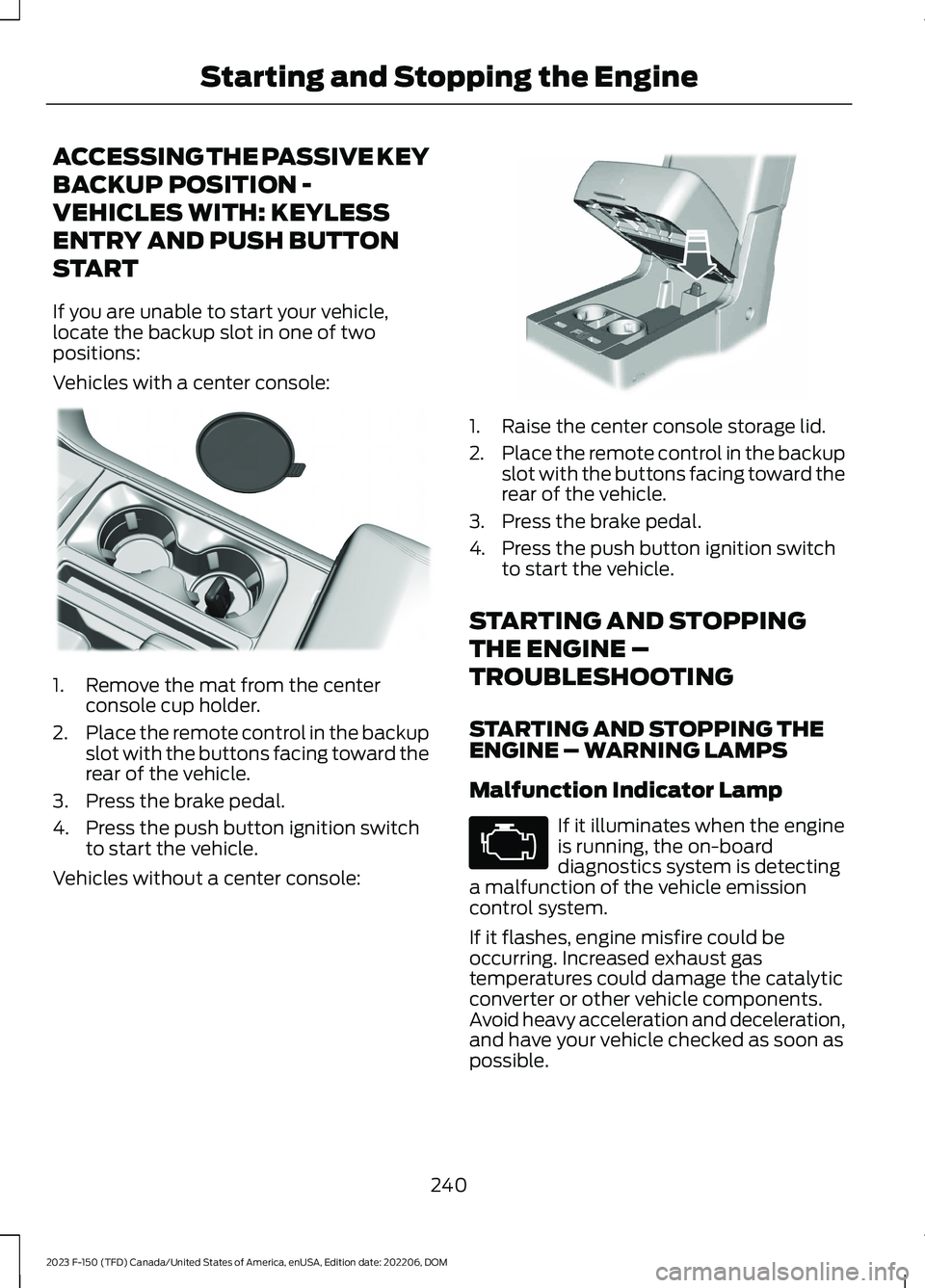
If you are unable to start your vehicle,locate the backup slot in one of twopositions:
Vehicles with a center console:
1.Remove the mat from the centerconsole cup holder.
2.Place the remote control in the backupslot with the buttons facing toward therear of the vehicle.
3.Press the brake pedal.
4.Press the push button ignition switchto start the vehicle.
Vehicles without a center console:
1.Raise the center console storage lid.
2.Place the remote control in the backupslot with the buttons facing toward therear of the vehicle.
3.Press the brake pedal.
4.Press the push button ignition switchto start the vehicle.
STARTING AND STOPPING
THE ENGINE –
TROUBLESHOOTING
STARTING AND STOPPING THEENGINE – WARNING LAMPS
Malfunction Indicator Lamp
If it illuminates when the engineis running, the on-boarddiagnostics system is detectinga malfunction of the vehicle emissioncontrol system.
If it flashes, engine misfire could beoccurring. Increased exhaust gastemperatures could damage the catalyticconverter or other vehicle components.Avoid heavy acceleration and deceleration,and have your vehicle checked as soon aspossible.
240
2023 F-150 (TFD) Canada/United States of America, enUSA, Edition date: 202206, DOMStarting and Stopping the EngineE312216 E269950 E67028
Page 490 of 786

6.Press and hold the brake pedal.
7.Using the instrument cluster controlson the steering wheel, select Settings.
8.Select Neutral Tow.
9.Press and hold the OK button until aconfirmation message appears in theinformation display.
Note: If completed successfully, theinformation display shows Neutral TowEnabled Leave Transmission in Neutral.This indicates that your vehicle is safe totow with all wheels on the ground.
Note:If you do not see a confirmationmessage in the instrument cluster display,you must perform the procedure again fromthe beginning.
Note:You may hear noise as the transfercase shifts into its neutral position. This isnormal.
10.Release the brake pedal.
11.Leave the transmission in neutral (N)and switch your vehicle off bypressing the push button ignitionswitch once without pressing thebrake pedal or turning the key as fartoward the off position.
Note:Vehicles with keys do not turn to theoff position when the transmission is inneutral (N). You must leave the key in theignition when towing. Use the keyless entrykeypad or an extra set of keys to lock andunlock your vehicle.
Switching Neutral Tow Off
1.With your vehicle properly secured tothe tow vehicle, press and hold thebrake pedal and start the engine.
2.Switch your vehicle off by pressing thepush button ignition switch once orturning the key as far towards the offposition and release the brake pedal.
3.Place your vehicle in accessory modeby pressing the push button ignitionswitch once without pressing the brakepedal or by turning the ignition key tothe on position.
4.Press and hold the brake pedal.
5.Shift into park (P).
6.Release the brake pedal.
Note:If completed successfully, theinstrument cluster displays 2H and NeutralTow Disabled.
Note:You must perform the switchingneutral tow on and switching neutral towoff procedures again from the beginning ifthe indicator light and message do notdisplay.
Note:You may hear a noise as the transfercase shifts out of its neutral position. Thisis normal.
7.Apply the parking brake, thendisconnect your vehicle from the towvehicle.
8.Release the parking brake, start theengine, and shift into drive (D) to makesure the transfer case is out of theneutral tow position.
9.If the transfer case does notsuccessfully shift out of its neutralposition, set the parking brake. Haveyour vehicle checked as soon aspossible.
Resolving the Shift Delayed DriveForward Message
1.Press and hold the brake pedal.
2.Start your vehicle.
3.Shift into neutral (N).
4.With the vehicle running, shift into drive(D) and let the vehicle roll forward upto 3 ft (1 m).
486
2023 F-150 (TFD) Canada/United States of America, enUSA, Edition date: 202206, DOMTowing Your Vehicle
Page 759 of 786

3
360 Degree Camera...................................332360 Degree Camera Settings.......................334360 Degree Camera Guide Lines...........333360 Degree Camera Precautions..........332360 Degree Camera Settings.................334Switching the 360 Degree Camera On andOff.......................................................................334Switching the 360 Degree CameraView...................................................................335
4
4WDSee: Four-Wheel Drive.....................................274
9
911 Assist...........................................................88
A
A/CSee: Climate Control - Vehicles With:Automatic Temperature Control.............184See: Climate Control - Vehicles With: ManualTemperature Control...................................189About This Publication.................................24About Us.............................................................21ABSSee: Brakes............................................................291Accessing Apps...........................................650Accessing Navigation................................654Accessing the Passive Key BackupPosition - Vehicles With: Keyless Entryand Push Button Start...........................240Accessing the Trip Computer - VehiclesWith: 4.2 Inch Screen...............................180Accessing the Trip Computer - VehiclesWith: 8 Inch Screen/12 InchScreen...........................................................180Accessories...................................................660Active Park Assist........................................336Active Park Assist –Troubleshooting............................................338Active Park Assist Precautions...............336
Active Park Assist –Troubleshooting........................................338Active Park Assist – Frequently AskedQuestions........................................................338Active Park Assist – InformationMessages.........................................................338Adaptive Cruise Control............................342Adaptive Cruise Control –Troubleshooting............................................354Lane Centering...................................................349Predictive Speed Assist....................................351Predictive Speed Assist –Troubleshooting............................................353Adaptive Cruise Control AutomaticCancellation...............................................345Adaptive Cruise ControlIndicators.....................................................348Adaptive Cruise ControlLimitations..................................................343Adaptive Cruise ControlPrecautions.................................................342Adaptive Cruise Control –Troubleshooting........................................354Adaptive Cruise Control – InformationMessages.........................................................354Adaptive Front Lighting..............................157How Does Adaptive Front LightingWork....................................................................157Switching Adaptive Front Lighting On andOff.......................................................................158Adjustable Pedals........................................142Adjusting the Exterior Mirrors..................164Adjusting the Headlamps - VehiclesWith: Halogen Headlamps.....................515Adjusting the Headlamps - VehiclesWith: LED Headlamps.............................514Adjusting the Instrument Panel LightingBrightness....................................................160Adjusting the Integrated Trailer BrakeController Mode.........................................427Adjusting the Map.......................................654Changing the Format of the Map................654Zooming the Map In and Out.......................654Adjusting the Pedals...................................142Adjusting the Seatbelt Height...................67Adjusting the Seatbelt Length..................68Adjusting the Seatbelts DuringPregnancy......................................................67
755
2023 F-150 (TFD) Canada/United States of America, enUSA, Edition date: 202206, DOMIndex
Page 761 of 786
Auto Hold Indicators..................................305Autolamps......................................................148Autolamp Settings.............................................148What Are Autolamps........................................148Autolock...........................................................105Autolock Requirements...................................105What Is Autolock................................................105Automatically Releasing the ElectricParking Brake.............................................295Automatic Crash Shutoff.........................482Automatic Crash ShutoffPrecautions.....................................................482Re-Enabling Your Vehicle...............................482What Is Automatic Crash Shutoff...............482Automatic Emergency Braking..............396Switching Automatic Emergency BrakingOn and Off......................................................396What Is Automatic EmergencyBraking..............................................................396Automatic Engine Stop - Vehicles With:Keyless Entry and Push ButtonStart...............................................................239How Does Automatic Engine StopWork...................................................................239Overriding Automatic Engine Stop.............239Switching Automatic Engine Stop On andOff.......................................................................239What Is Automatic Engine Stop...................239Automatic High Beam Control................152Automatic High Beam ControlIndicators..........................................................154Automatic High Beam ControlLimitations........................................................153Automatic High Beam ControlPrecautions......................................................153Automatic High Beam ControlRequirements..................................................153How Does Automatic High Beam ControlWork....................................................................152Overriding Automatic High BeamControl...............................................................154Switching Automatic High Beam ControlOn and Off.......................................................154Automatic High Beam Control –Troubleshooting.........................................154Automatic High Beam Control –Information Messages.................................154
Automatic Locking Mode...........................66Disengaging Automatic Locking Mode........67Engaging Automatic Locking Mode..............66What Is Automatic Locking Mode.................66When to Use Automatic LockingMode....................................................................66Automatic Return to Park (P)................269Automatic Return to Park (P)Limitations.......................................................270How Does Automatic Return to Park (P)Work...................................................................270What Is Automatic Return to Park(P)......................................................................269Automatic Transmission AudibleWarnings.......................................................273Automatic Transmission..........................264Automatic Return to Park (P)......................269Automatic Transmission Positions.............264Manually Shifting Gears.................................266Manual Park Release.........................................271Temporary Neutral Mode...............................268Automatic TransmissionPositions......................................................264Drive (D)................................................................264Manual (M)..........................................................265Neutral (N)..........................................................264Park (P).................................................................264Reverse (R)..........................................................264Automatic TransmissionPrecautions.................................................264Auto Mode......................................................186Auto Mode Indicators.......................................186Switching Auto Mode On and Off................186Switching Dual Mode On and Off.................187Auto-Start-Stop..........................................248Auto-Start-Stop – Troubleshooting..........249Auto-Start-Stop Indicators.....................248Auto-Start-Stop Precautions.................248Auto-Start-Stop –Troubleshooting........................................249Auto-Start-Stop – Frequently AskedQuestions........................................................250Auto-Start-Stop – InformationMessages.........................................................249Autounlock.....................................................105Autounlock Requirements..............................105Switching Autounlock On and Off...............105What Is Autounlock...........................................105
757
2023 F-150 (TFD) Canada/United States of America, enUSA, Edition date: 202206, DOMIndex
Page 771 of 786

Integrated Trailer Brake Controller........425Integrated Trailer Brake Controller –Troubleshooting............................................428Integrated Trailer Brake ControllerPrecautions.................................................425Integrated Trailer Brake Controller –Troubleshooting........................................428Integrated Trailer Brake Controller –Frequently Asked Questions....................429Integrated Trailer Brake Controller –Information Messages................................428Interior Air Quality........................................192Interior Bulbs.................................................526Interior Bulb Specification Chart.................526Interior Lamp Function..............................160Switching the Interior Lamp Function Onand Off..............................................................160What Is the Interior Lamp Function............160Interior Lighting.............................................159Ambient Lighting................................................160Interior Lamp Function....................................160Interior Lighting – Troubleshooting.............160Interior Lighting –Troubleshooting........................................160Interior Lighting – Frequently AskedQuestions.........................................................160Interior Mirror..................................................163Auto-Dimming Interior Mirror.........................163Interior Mirror Precautions........................163Introduction......................................................24
J
Jump Starting the Vehicle.......................480Jump Starting Precautions............................480Jump Starting the Vehicle...............................481Preparing the Vehicle......................................480
K
Keyless Entry..................................................108Keyless Entry – Troubleshooting..................109Keyless Entry Keypad...................................110Keyless Entry Keypad –Troubleshooting...............................................111Keyless Entry Keypad Limitations...........110Keyless Entry Keypad Master AccessCode................................................................110
Keyless Entry Keypad Personal AccessCodes..............................................................110Keyless Entry Keypad –Troubleshooting...........................................111Keyless Entry Keypad – Frequently AskedQuestions............................................................111Keyless Entry Limitations..........................108Keyless Entry Settings................................108Keyless Entry – Troubleshooting...........109Keyless Entry – Frequently AskedQuestions.........................................................109Keys and Remote Controls........................90Keys and Remote Controls –Troubleshooting..............................................98Keys and Remote Controls –Troubleshooting..........................................98Keys and Remote Controls – InformationMessages...........................................................98
L
Lane Centering.............................................349How Does Lane Centering Work..................349Lane Centering Alerts......................................350Lane Centering AutomaticCancellation...................................................350Lane Centering Indicators................................351Lane Centering Limitations...........................349Lane Centering Manual Cancellation..........351Lane Centering Precautions..........................349Lane Centering Requirements......................349Switching Lane Centering On andOff......................................................................350Lane Keeping System Indicators...........378Lane Keeping System.................................375Aid Mode................................................................377Alert and Aid Mode............................................377Alert Mode............................................................376Lane Keeping System –Troubleshooting............................................379Lane Keeping System Limitations.........375Lane Keeping System Precautions.......375Lane Keeping System –Troubleshooting........................................379Lane Keeping System – Frequently AskedQuestions........................................................380Lane Keeping System – InformationMessages.........................................................379
767
2023 F-150 (TFD) Canada/United States of America, enUSA, Edition date: 202206, DOMIndex