2023 FORD EXPLORER display
[x] Cancel search: displayPage 205 of 573
WARNING: If the parking brake isfully released, but the brake warninglamp remains illuminated, the brakesmay not be working properly. Have yourvehicle checked as soon as possible.
WARNING: Do not drive yourvehicle until you verify that thestoplamps are working.
Use the manual park release to move yourtransmission from the park (P) position inthe event of an electrical malfunction oremergency.
Activating the Manual Park ReleaseCable
1.Apply the parking brake. See ElectricParking Brake (page 211).
Note:If the vehicle battery is dead, forexample, no electrical power is available,you require an external power to apply theparking brake.
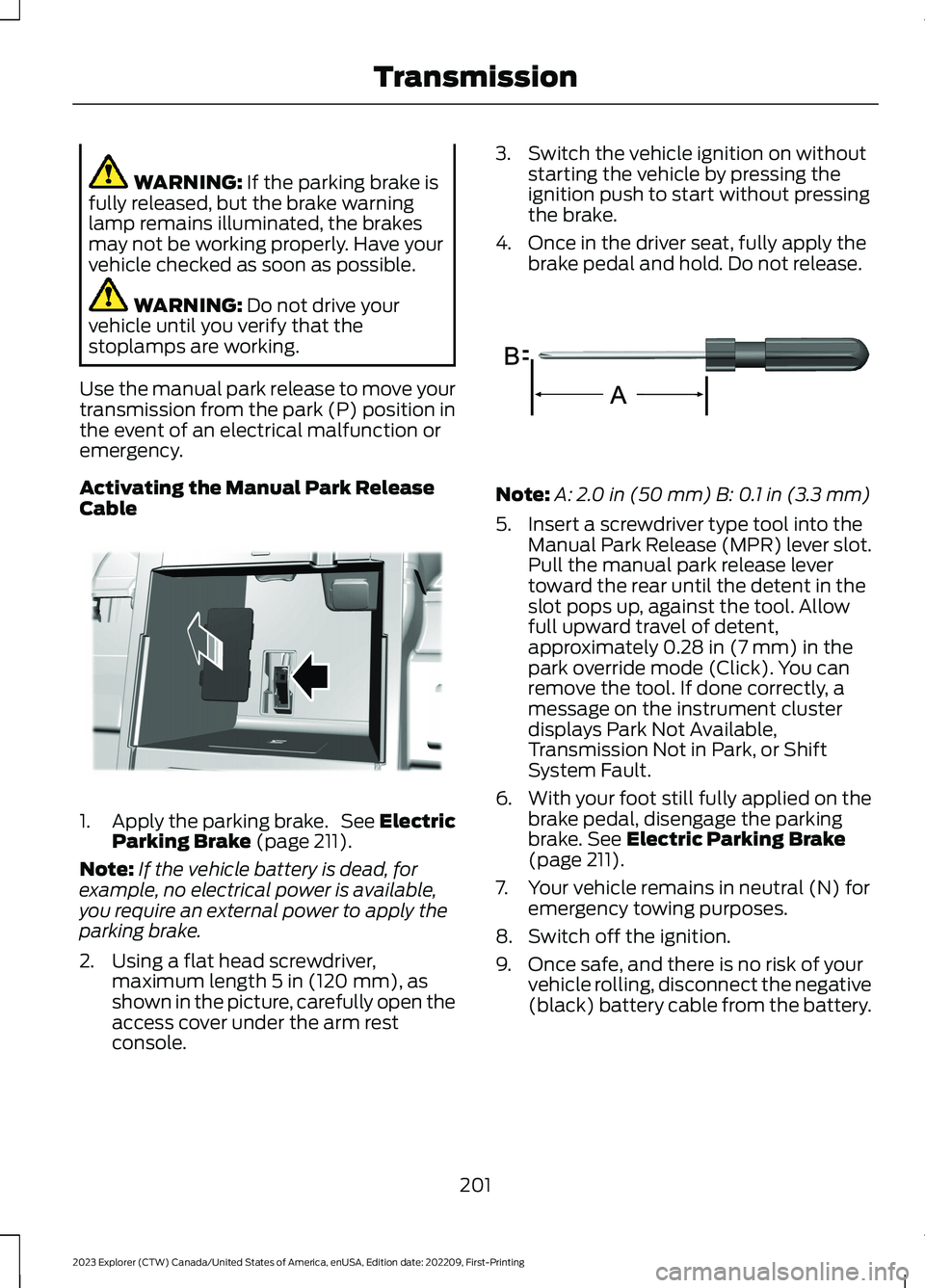
2.Using a flat head screwdriver,maximum length 5 in (120 mm), asshown in the picture, carefully open theaccess cover under the arm restconsole.
3.Switch the vehicle ignition on withoutstarting the vehicle by pressing theignition push to start without pressingthe brake.
4.Once in the driver seat, fully apply thebrake pedal and hold. Do not release.
Note:A: 2.0 in (50 mm) B: 0.1 in (3.3 mm)
5.Insert a screwdriver type tool into theManual Park Release (MPR) lever slot.Pull the manual park release levertoward the rear until the detent in theslot pops up, against the tool. Allowfull upward travel of detent,approximately 0.28 in (7 mm) in thepark override mode (Click). You canremove the tool. If done correctly, amessage on the instrument clusterdisplays Park Not Available,Transmission Not in Park, or ShiftSystem Fault.
6.With your foot still fully applied on thebrake pedal, disengage the parkingbrake. See Electric Parking Brake(page 211).
7.Your vehicle remains in neutral (N) foremergency towing purposes.
8.Switch off the ignition.
9.Once safe, and there is no risk of yourvehicle rolling, disconnect the negative(black) battery cable from the battery.
201
2023 Explorer (CTW) Canada/United States of America, enUSA, Edition date: 202209, First-PrintingTransmissionE292050 E317360
Page 206 of 573
Returning Your Vehicle to NormalMode
1.Reconnect the negative (black) batterycable to the battery.
2.Apply the parking brake. See ElectricParking Brake (page 211).
Note: If the vehicle battery is dead, forexample, no electrical power is available,you require an external power to apply theparking brake.
3.Fully apply the brake pedal and hold,do not release.
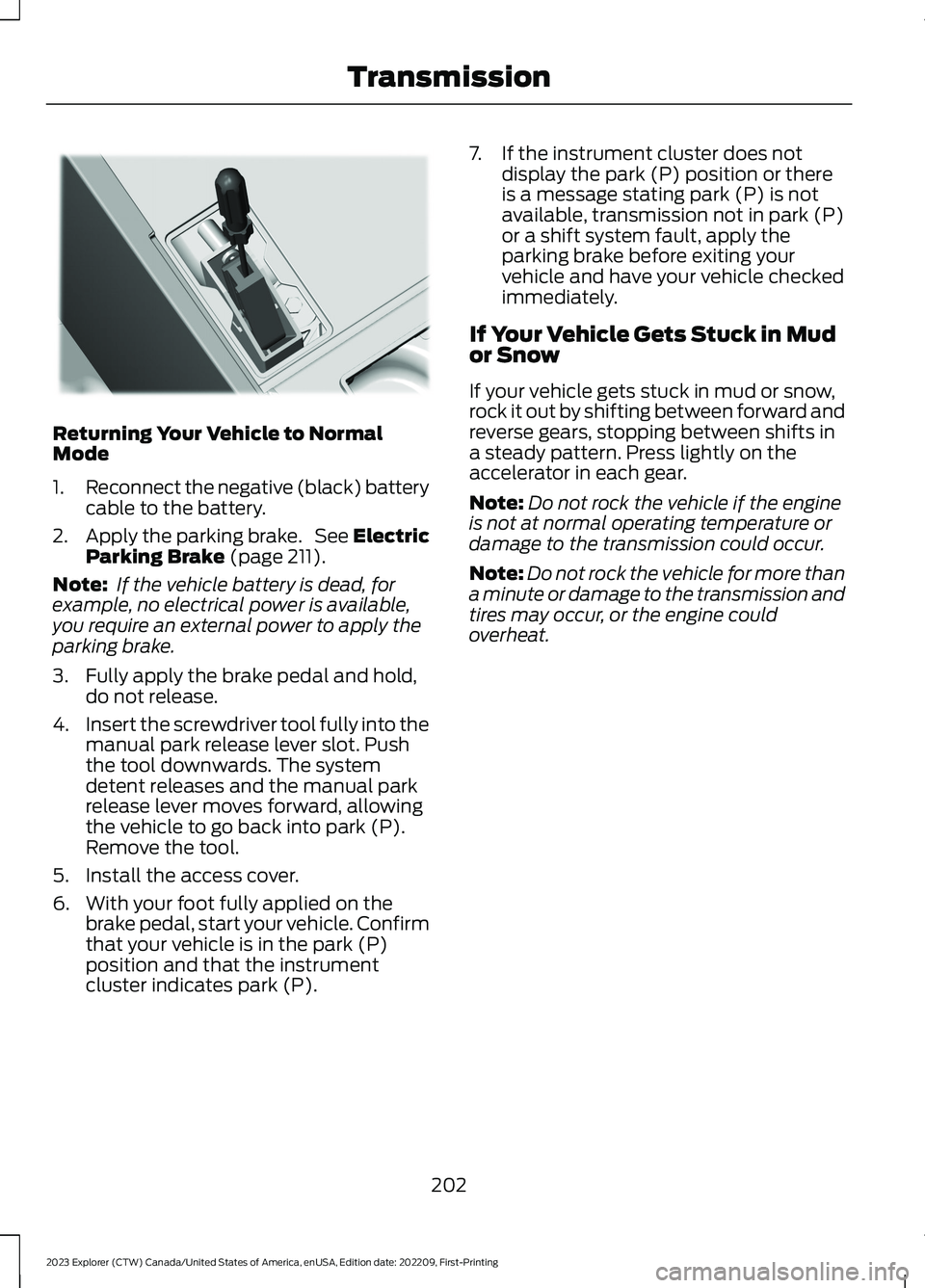
4.Insert the screwdriver tool fully into themanual park release lever slot. Pushthe tool downwards. The systemdetent releases and the manual parkrelease lever moves forward, allowingthe vehicle to go back into park (P).Remove the tool.
5.Install the access cover.
6.With your foot fully applied on thebrake pedal, start your vehicle. Confirmthat your vehicle is in the park (P)position and that the instrumentcluster indicates park (P).
7.If the instrument cluster does notdisplay the park (P) position or thereis a message stating park (P) is notavailable, transmission not in park (P)or a shift system fault, apply theparking brake before exiting yourvehicle and have your vehicle checkedimmediately.
If Your Vehicle Gets Stuck in Mudor Snow
If your vehicle gets stuck in mud or snow,rock it out by shifting between forward andreverse gears, stopping between shifts ina steady pattern. Press lightly on theaccelerator in each gear.
Note:Do not rock the vehicle if the engineis not at normal operating temperature ordamage to the transmission could occur.
Note:Do not rock the vehicle for more thana minute or damage to the transmission andtires may occur, or the engine couldoverheat.
202
2023 Explorer (CTW) Canada/United States of America, enUSA, Edition date: 202209, First-PrintingTransmissionE297270
Page 207 of 573

PRINCIPLE OF OPERATION
This system is a proactive system. It hasthe ability to anticipate wheel slip andtransfer torque to the front wheels beforeslip occurs. Even when wheel slip is notpresent, the system is continuouslyadjusting to the torque distribution, in anattempt to improve straight line andcornering behavior, both on and off road.
The system automatically turns on everytime you switch the ignition on.
If any component requires maintenance,a message appears in the informationdisplay.
USING FOUR-WHEEL DRIVE
WARNING: Vehicles with a highercenter of gravity (utility and four-wheeldrive vehicles) handle differently thanvehicles with a lower center of gravity(passenger cars). Avoid sharp turns,excessive speed and abrupt steering inthese vehicles. Failure to drive cautiouslyincreases the risk of losing control of yourvehicle, vehicle rollover, personal injuryand death.
The intelligent 4WD system continuouslymonitors vehicle conditions and adjuststhe power distribution between the frontand rear wheels. It combines transparentall-surface operation with highly capablefour-wheel drive.
The 4WD system is always active andrequires no driver input. It is capable ofhandling all road conditions includingstreet and highway driving as well asoff-road and winter driving. You canoptimize more 4WD control by selectingdifferent drive modes. See Selecting aDrive Mode (page 273).
Note:A warning message displays in theinformation display when a 4WD systemfault is present. See InformationMessages (page 119). A 4WD system faultcauses the 4WD system to default torear-wheel drive only mode. When thiswarning message is displayed, have yourvehicle serviced at an authorized dealer.
Note:A warning message displays in theinformation display if the 4WD systemoverheats. See Information Messages(page 119). This condition could occur if thevehicle is operated in extreme conditionswith excessive wheel slip, such as deepsand. To resume normal 4WD function assoon as possible, stop the vehicle in a safelocation and stop the engine for at least 10minutes. After the engine is restarted andthe 4WD system is adequately cooled, thewarning message turns off and normal 4WDfunction returns.
Operating Four-Wheel Drive (4WD)Vehicles With Spare Tires
Do not use a different size spare tire otherthan the tire provided. If the mini-spare tireis installed, the 4WD system will disableand enter rear-wheel drive only mode toprotect driveline components. Somelimited 4WD traction could be provided ifthe mini-spare is installed on one of thefront wheels. If you are in driving conditionswhere limited 4WD traction is neededwhile the mini-spare is installed, it isrecommended the mini-spare be installedon the front axle. See InformationMessages (page 119).
If the mini-spare is installed, this conditionis indicated by a warning in the informationdisplay. If there is a warning message inthe information display from using thespare tire, this indicator should turn offafter reinstalling or replacing the normalroad tire and cycling the ignition off andon. We recommended reinstalling or
203
2023 Explorer (CTW) Canada/United States of America, enUSA, Edition date: 202209, First-PrintingFour-Wheel Drive (If Equipped)
Page 217 of 573

HILL START ASSIST
WARNING: The system does notreplace the parking brake. When youleave your vehicle, always apply theparking brake.
WARNING: You must remain inyour vehicle when the system turns on.At all times, you are responsible forcontrolling your vehicle, supervising thesystem and intervening, if required.Failure to take care may result in the lossof control of your vehicle, seriouspersonal injury or death.
WARNING: The system will turnoff if a malfunction is apparent or if yourev the engine excessively. Failure to takecare may result in the loss of control ofyour vehicle, serious personal injury ordeath.
The system makes it easier to pull awaywhen your vehicle is on a slope without theneed to use the parking brake.
When the system is active, your vehicleremains stationary on the slope for two tothree seconds after you release the brakepedal. This allows time to move your footfrom the brake to the accelerator pedal.The system releases the brakesautomatically once the engine hasdeveloped sufficient torque to prevent yourvehicle from rolling down the slope. Thisis an advantage when pulling away on aslope, for example from a car park ramp,traffic lights or when reversing uphill intoa parking space.
The system activates on any slope thatcauses your vehicle to roll.
Note:There is no warning light to indicatethe system is either on or off.
Using Hill Start Assist
1.Press the brake pedal to bring yourvehicle to a complete standstill. Keepthe brake pedal pressed and shift intofirst gear when facing uphill or reverse(R) when facing downhill.
2.If the sensors detect that your vehicleis on a slope, the system activatesautomatically.
3.When you remove your foot from thebrake pedal, your vehicle remains onthe slope without rolling away forabout two to three seconds. This holdtime automatically extends if you arein the process of driving off.
4.Drive off in the normal manner. Thesystem releases the brakesautomatically.
Note:When you remove your foot from thebrake pedal and press the pedal again whenthe system is active, you will experiencesignificantly reduced brake pedal travel. Thisis normal.
Switching the System On and Off
Vehicles with Manual Transmission
You can switch this feature on or off in theinformation display. The systemremembers the last setting when you startyour vehicle.
Vehicles with Automatic Transmission
You cannot turn the system on or off.When you switch the ignition on, thesystem automatically turns on.
213
2023 Explorer (CTW) Canada/United States of America, enUSA, Edition date: 202209, First-PrintingBrakes
Page 218 of 573
AUTO HOLD
WARNING: The system does notreplace the parking brake. When youleave your vehicle, always apply theparking brake.
WARNING: You must remain inyour vehicle when the system turns on.At all times, you are responsible forcontrolling your vehicle, supervising thesystem and intervening, if required.Failure to take care may result in the lossof control of your vehicle, seriouspersonal injury or death.
WARNING: The system turns off ifthere is a malfunction.
The system is designed to apply the brakesto hold your vehicle at a standstill after youstop your vehicle and release the brakepedal. This could be beneficial in certainsituations, for example when waiting on ahill or in traffic.
Switching Auto Hold On and Off
Press the button on the centerconsole. The button illuminateswhen you switch the system on.
Note:You can only switch the system onafter you close the driver door, and start theengine.
Note:The system remembers the lastsetting when you start your vehicle.
Make sure you switch the system off beforetowing with your vehicle or before using anautomatic car wash.
Using Auto Hold
1.Use the brakes to bring your vehicle toa complete stop. The auto hold activeindicator illuminates in the informationdisplay.
2.Release the brake pedal. The systemholds your vehicle at a standstill. Theauto hold active indicator remainsilluminated in the information display.
Note:The system only activates if youapply enough brake pressure. If your vehicleis on a steep slope, you might need to pressthe brake pedal harder before the systemactivates.
Note:Under certain conditions, the systemcould apply the electric parking brake. Thebrake system warning lamp illuminates. Theelectric parking brake releases when youpress the accelerator pedal. See ElectricParking Brake (page 211).
Note:If auto-start-stop turns off theengine, auto hold remains active.
Note:The system deactivates if you shiftinto reverse (R) and press the brake pedal.
3.Pull away in the normal manner. Thesystem releases the brakes and theauto hold active indicator turns off.
Auto Hold Indicator
The auto hold indicator illuminates in theinformation display when the system is onand is either active or unavailable.
Illuminates when the system isactive. Your vehicle remainsstationary after you release thebrake pedal.
Illuminates when the system ison but unavailable to hold yourvehicle at a standstill.
The system could be unavailable when anyof the following occur:
•During an active park assist maneuver.
•Your vehicle is in stay in neutral mode.
214
2023 Explorer (CTW) Canada/United States of America, enUSA, Edition date: 202209, First-PrintingBrakesE297843 E197933 E197934
Page 222 of 573

REVERSE BRAKING ASSIST – TROUBLESHOOTING
REVERSE BRAKING ASSIST – INFORMATION MESSAGES
DescriptionMessage
Displays when the system applies thebrakes and remains on for a few seconds.Reverse Brake Assist
Make sure that all doors, liftgate or tailgateand hood are closed. Drive the vehicle on astraight road for a short period. Make surethe parking aids and cross traffic alertsystems are on. If the message remains on,have the system checked as soon aspossible.
Reverse Brake Assist Not Available SeeManual
Displays when a system error has occurred.Have your vehicle checked as soon aspossible.
Reverse Brake Assist Fault
Displays when reverse brake assist is off.Reverse Brake Assist Off
218
2023 Explorer (CTW) Canada/United States of America, enUSA, Edition date: 202209, First-PrintingReverse Braking Assist (If Equipped)
Page 224 of 573
PRINCIPLE OF OPERATION
The traction control system helps avoiddrive wheel spin and loss of traction.
If your vehicle begins to slide, the systemapplies the brakes to individual wheelsand, when needed, reduces engine powerat the same time. If the wheels spin whenaccelerating on slippery or loose surfaces,the system reduces engine power in orderto increase traction.
USING TRACTION CONTROL
WARNING: Operating your vehiclewith the traction control disabled couldlead to an increased risk of loss of vehiclecontrol, vehicle rollover, personal injuryand death.
The system automatically turns on eachtime you switch the ignition on.
If your vehicle is stuck in mud or snow,switching traction control off may bebeneficial as this allows the wheels to spin.
Note:When you switch traction control off,stability control remains fully active.
Switching the System Off
When you switch the system off or on, amessage appears in the informationdisplay showing system status.
You can switch the system off by using theswitch.
Using a Switch (If Equipped)
Use the traction control switch on thecenter console near the shifter to switchthe system off or on.
The traction control switch.
System Indicator Lights andMessages
The stability and traction controllight:
•Temporarily illuminates on enginestart-up.
•Flashes when a driving conditionactivates either of the systems.
•Illuminates if a problem occurs in eitherof the systems.
The stability and traction controloff light temporarily illuminateson engine start-up and stays onwhen you switch the traction controlsystem off.
220
2023 Explorer (CTW) Canada/United States of America, enUSA, Edition date: 202209, First-PrintingTraction ControlE297971 E138639 E130458
Page 229 of 573

PRINCIPLE OF OPERATION
WARNING: To help avoid personalinjury, always use caution when inreverse (R) and when using the sensingsystem.
WARNING: The system may notdetect objects with surfaces that absorbreflection. Always drive with due careand attention. Failure to take care mayresult in a crash.
WARNING: Traffic control systems,inclement weather, air brakes, externalmotors and fans may affect the correctoperation of the sensing system. Thismay cause reduced performance or falsealerts.
WARNING: The system may notdetect small or moving objects,particularly those close to the ground.
Note:If your vehicle has MyKey™, thesensing system cannot be switched offwhen a MyKey™ is present. See Principleof Operation (page 64).
Note:Keep the sensors on the bumper orfascia free from snow, ice and largeaccumulations of dirt. If the sensors arecovered, the system’s accuracy can beaffected. Do not clean the sensors withsharp objects.
Note:If your vehicle sustains damage tothe bumper or fascia, leaving it misalignedor bent, the sensing zone may be alteredcausing inaccurate measurement ofobstacles or false alerts.
Note:Certain add-on devices installedaround the bumper or fascia may createfalse alerts. For example, large trailerhitches, bike or surfboard racks, license platebrackets, bumper covers or any other devicethat may block the normal detection zoneof the system. Remove the add-on deviceto prevent false alerts.
Note:When you connect a trailer to yourvehicle, the rear parking aid may detect thetrailer and therefore provide an alert. Disablethe rear parking aid when you connect atrailer to prevent the alert.
The sensing system warns the driver ofobstacles within a certain range of yourvehicle. The system turns on automaticallywhenever you switch the ignition on.
You can switch the system off through thetouchscreen, information display or fromthe pop-up message that appears onceyou shift the transmission into reverse (R).If your vehicle has a parking aid button, youcan switch the system off by pressing thebutton.
If a fault is present in the system, a warningmessage appears in the informationdisplay. See Information Messages(page 119).
REAR PARKING AID
WARNING: The system may notdetect objects with surfaces that absorbreflection. Always drive with due careand attention. Failure to take care mayresult in a crash.
WARNING: The system may notdetect small or moving objects,particularly those close to the ground.
225
2023 Explorer (CTW) Canada/United States of America, enUSA, Edition date: 202209, First-PrintingParking Aids