2023 FORD EXPLORER navigation
[x] Cancel search: navigationPage 12 of 573

Audio System
General Information...................................419
Audio Unit......................................................419
Digital Radio.................................................420
Satellite Radio.............................................422
USB Port........................................................425
SYNC™ 3
General Information...................................427
Using Voice Recognition..........................429
Entertainment.............................................435
Climate...........................................................445
Phone..............................................................447
Navigation.....................................................449
Electric Vehicle Information...................454
Apps................................................................455
Settings..........................................................458
SYNC™ 3 Troubleshooting....................460
Accessories
Accessories...................................................473
Ford Protect
Ford Protect..................................................474
Scheduled Maintenance
General Maintenance Information.......476
Normal Scheduled Maintenance.........479
Special Operating Conditions ScheduledMaintenance............................................482
Customer Information
Rollover Warning........................................485
Radio Frequency Certification Labels.......................................................................485
Warranty Information...............................529
Appendices
Electromagnetic Compatibility..............531
End User License Agreement................534
8
2023 Explorer (CTW) Canada/United States of America, enUSA, Edition date: 202209, First-PrintingTable of Contents
Page 21 of 573

Note:Event data recorder data is recordedby your vehicle only if a non-trivial crashsituation occurs; no data is recorded by theevent data recorder under normal drivingconditions and no personal data orinformation (for example name, gender,age, and crash location) is recorded.However, parties, such as law enforcement,could combine the event data recorder datawith the type of personally identifying dataroutinely acquired during a crashinvestigation.
To read data recorded by an event datarecorder, special equipment is required,and access to the vehicle or the event datarecorder is needed. In addition to thevehicle manufacturer, other parties, suchas law enforcement, that have such specialequipment, can read the information if theyhave access to the vehicle or the eventdata recorder.
SETTINGS DATA
Your vehicle has electronic control unitsthat have the ability to store data basedon your personalized settings. The data isstored locally in the vehicle or on devicesthat you connect to it, for example, a USBdrive or digital music player. You can deletesome of this data and also choose whetherto share it through the services to whichyou subscribe. See Settings (page 458).
Comfort and Convenience Data
Data recorded includes, for example:
•Seat and steering wheel position.
•Climate control settings.
•Radio presets.
Entertainment Data
Data recorded includes, for example:
•Music, videos or album art.
•Contacts and corresponding addressbook entries.
•Navigation destinations.
CONNECTED VEHICLE DATA
The modem has a SIM. Themodem was enabled when yourvehicle was built and periodicallysends messages to stay connected to thecell phone network, receive automaticsoftware updates and send vehicle-relatedinformation to us, for example diagnosticinformation. These messages couldinclude information that identifies yourvehicle, the SIM and the electronic serialnumber of the modem. Cell phone networkservice providers could have access toadditional information, for example cellphone network tower identification. Foradditional information about our privacypolicy, visit www.FordConnected.com orrefer to your local Ford website.
Note:The modem continues to send thisinformation unless you disable the modemor stop the modem from sharing vehicledata by changing the modem settings. SeeConnected Vehicle (page 414).
Note:The service can be unavailable orinterrupted for a number of reasons, forexample environmental or topographicalconditions and data plan coverage.
Note:To find out if your vehicle has amodem, visit www.FordConnected.com.
17
2023 Explorer (CTW) Canada/United States of America, enUSA, Edition date: 202209, First-PrintingData Privacy
Page 68 of 573

PRINCIPLE OF OPERATION
MyKey allows you to program keys withrestricted driving modes to promote gooddriving habits. You can program therestrictions to all keys except one. Any keysthat you did not program are administratorkeys or admin keys.
You can use admin keys to:
•Create a MyKey with certain vehiclerestrictions.
•Program certain MyKey settings.
•Clear all MyKey restrictions.
After you program a MyKey, you can viewthe following information through theinformation display:
•The total number of admin keys andMyKeys for your vehicle.
•The total distance a MyKey drivertraveled with your vehicle.
Note:Every MyKey receives the samerestrictions and settings. You cannotprogram them individually.
Note:For vehicles equipped with apush-button start switch: When both aMyKey and an admin key are present whenyou start your vehicle, the system recognizesthe admin key only.
Standard Settings
Not every vehicle includes the featureslisted below. If your vehicle has thisequipment, then you cannot change thefollowing settings when using a MyKey:
•Seatbelt reminder or Belt-Minder™.MyKey mutes the audio system untildrivers, and in some instances,passengers, fasten their seatbelts.Note: If your vehicle includes anAM/FM radio or a very basic audiosystem, then the radio may not mute.
•Earlier low-fuel warning. The low-fuelwarning activates earlier for MyKeydrivers, giving them more time to refuel.
•Certain driver alerts, stability systemsor parking aids turn on automaticallywhen you use the MyKey system. Forexample, Blind Spot InformationSystem (BLIS), cross traffic alert, lanedeparture warning or forward collisionwarning.Note: MyKey drivers may beable to turn the lane departure warningfeature off, but this feature turns backon automatically with every new keycycle.
•Restricted touchscreen operation insome markets. For example, MyKeymay prevent manual navigationdestination input while the vehicle is inany gear other than park (P) or whenthe vehicle reaches a certain rate ofspeed.
•Satellite radio adult contentrestrictions, if this feature is availablein your market.
Optional Settings
You can configure certain vehicle featuresettings when you first create a MyKey. Youcan also change the settings afterwardwith an admin key.
64
2023 Explorer (CTW) Canada/United States of America, enUSA, Edition date: 202209, First-PrintingMyKey™
Page 105 of 573

GAUGES - VEHICLES WITH: 6.5 INCH INSTRUMENT CLUSTER
DISPLAY SCREEN
Tachometer.A
Information bar.B
Speedometer.C
Fuel gauge.D
Information display.E
Engine coolant temperature gauge.F
Information Bar
Displays information related to thenavigation, outside air temperature,odometer and distance to empty.
Information Display
Displays information related to thenavigation, outside air temperature,odometer and distance to empty.
Information Display
Information that appears depends on yourvehicle settings. See GeneralInformation (page 115).
Fuel Gauge
The fuel gauge indicates about how muchfuel is in the fuel tank.
The arrow adjacent to the fuel pumpsymbol indicates on which side of yourvehicle the fuel filler door is located.
101
2023 Explorer (CTW) Canada/United States of America, enUSA, Edition date: 202209, First-PrintingInstrument ClusterE282067
Page 107 of 573

Gauge display.A
Speedometer.B
Information bar.C
Information display.D
Fuel gauge.E
Gauge Display
Displays different gauge selectionsdepending on supported options. Optionsinclude Tachometer or Engine CoolantTemperature.
Information Bar
Displays information related to the currentaudio source, navigation, outside airtemperature and distance to empty.
Information Display
Information that appears depends oncurrent gauge view and on-demandsettings. See General Information (page115).
Fuel Gauge
The fuel gauge indicates about how muchfuel is in the fuel tank.
The arrow adjacent to the fuel pumpsymbol indicates on which side of yourvehicle the fuel filler door is located.
Note:The fuel gauge may vary slightlywhen your vehicle is moving or on a slope.
Low Fuel Reminder
A low fuel level reminder displays andsounds when the distance to emptyreaches 75 mi (120 km) to empty forMyKey, and at 50 mi (80 km),25 mi(40 km),10 mi (20 km) and 0 mi (0 km)for all vehicle keys.
103
2023 Explorer (CTW) Canada/United States of America, enUSA, Edition date: 202209, First-PrintingInstrument ClusterE281475
Page 115 of 573
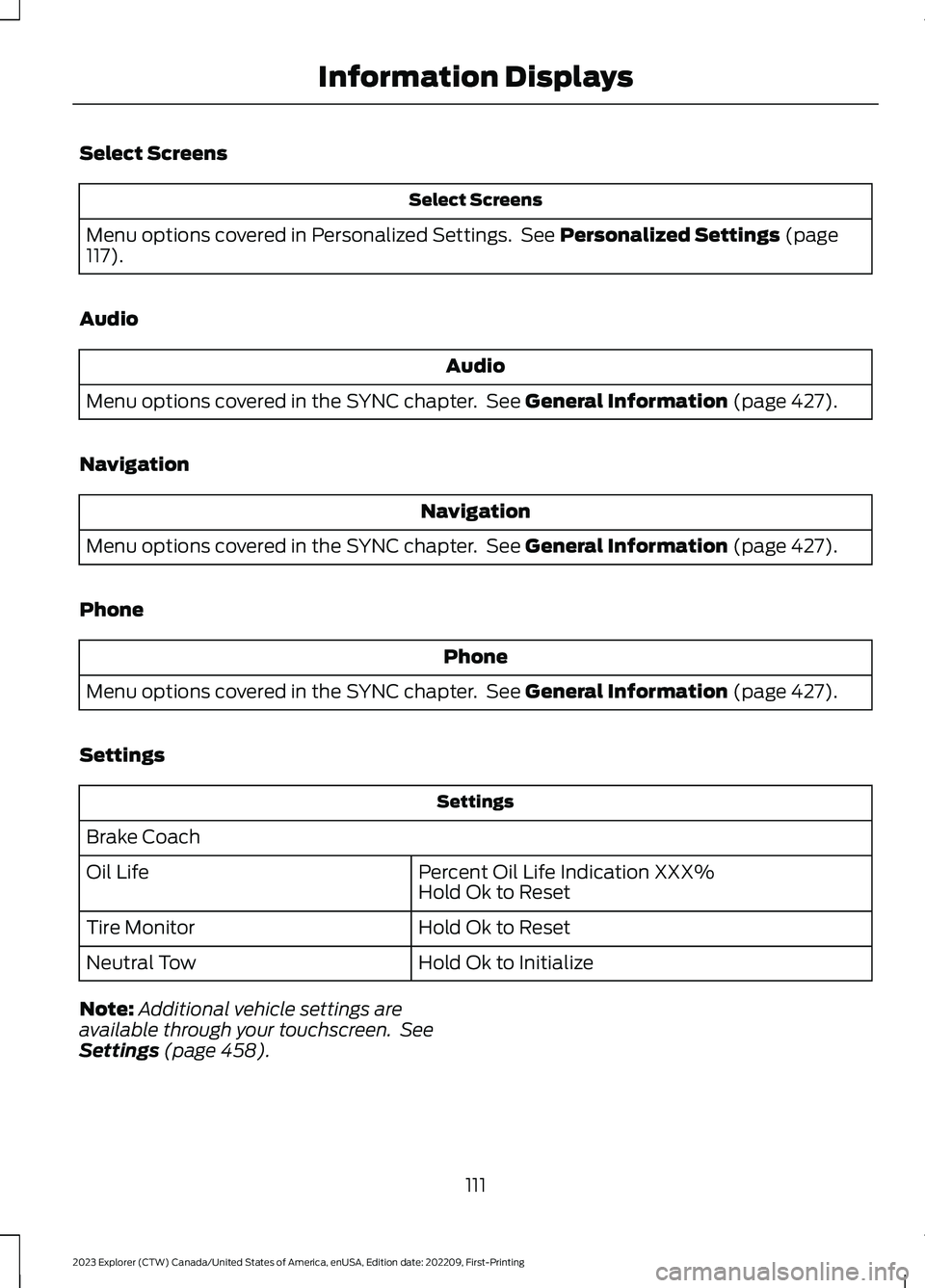
Select Screens
Select Screens
Menu options covered in Personalized Settings. See Personalized Settings (page117).
Audio
Audio
Menu options covered in the SYNC chapter. See General Information (page 427).
Navigation
Navigation
Menu options covered in the SYNC chapter. See General Information (page 427).
Phone
Phone
Menu options covered in the SYNC chapter. See General Information (page 427).
Settings
Settings
Brake Coach
Percent Oil Life Indication XXX%Hold Ok to ResetOil Life
Hold Ok to ResetTire Monitor
Hold Ok to InitializeNeutral Tow
Note:Additional vehicle settings areavailable through your touchscreen. SeeSettings (page 458).
111
2023 Explorer (CTW) Canada/United States of America, enUSA, Edition date: 202209, First-PrintingInformation Displays
Page 117 of 573
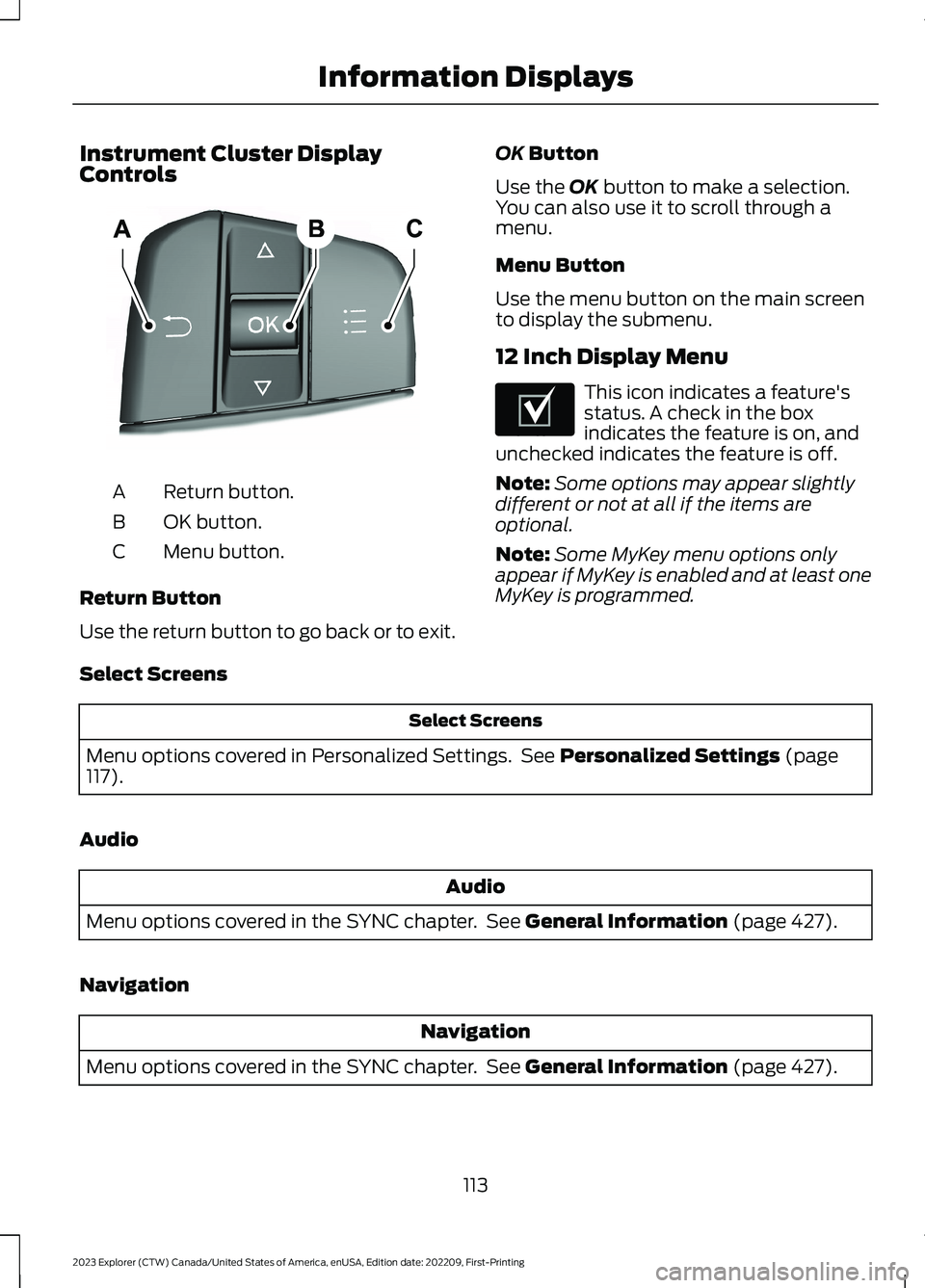
Instrument Cluster DisplayControls
Return button.A
OK button.B
Menu button.C
Return Button
Use the return button to go back or to exit.
OK Button
Use the OK button to make a selection.You can also use it to scroll through amenu.
Menu Button
Use the menu button on the main screento display the submenu.
12 Inch Display Menu
This icon indicates a feature'sstatus. A check in the boxindicates the feature is on, andunchecked indicates the feature is off.
Note:Some options may appear slightlydifferent or not at all if the items areoptional.
Note:Some MyKey menu options onlyappear if MyKey is enabled and at least oneMyKey is programmed.
Select Screens
Select Screens
Menu options covered in Personalized Settings. See Personalized Settings (page117).
Audio
Audio
Menu options covered in the SYNC chapter. See General Information (page 427).
Navigation
Navigation
Menu options covered in the SYNC chapter. See General Information (page 427).
113
2023 Explorer (CTW) Canada/United States of America, enUSA, Edition date: 202209, First-PrintingInformation DisplaysE250032 E204495
Page 120 of 573
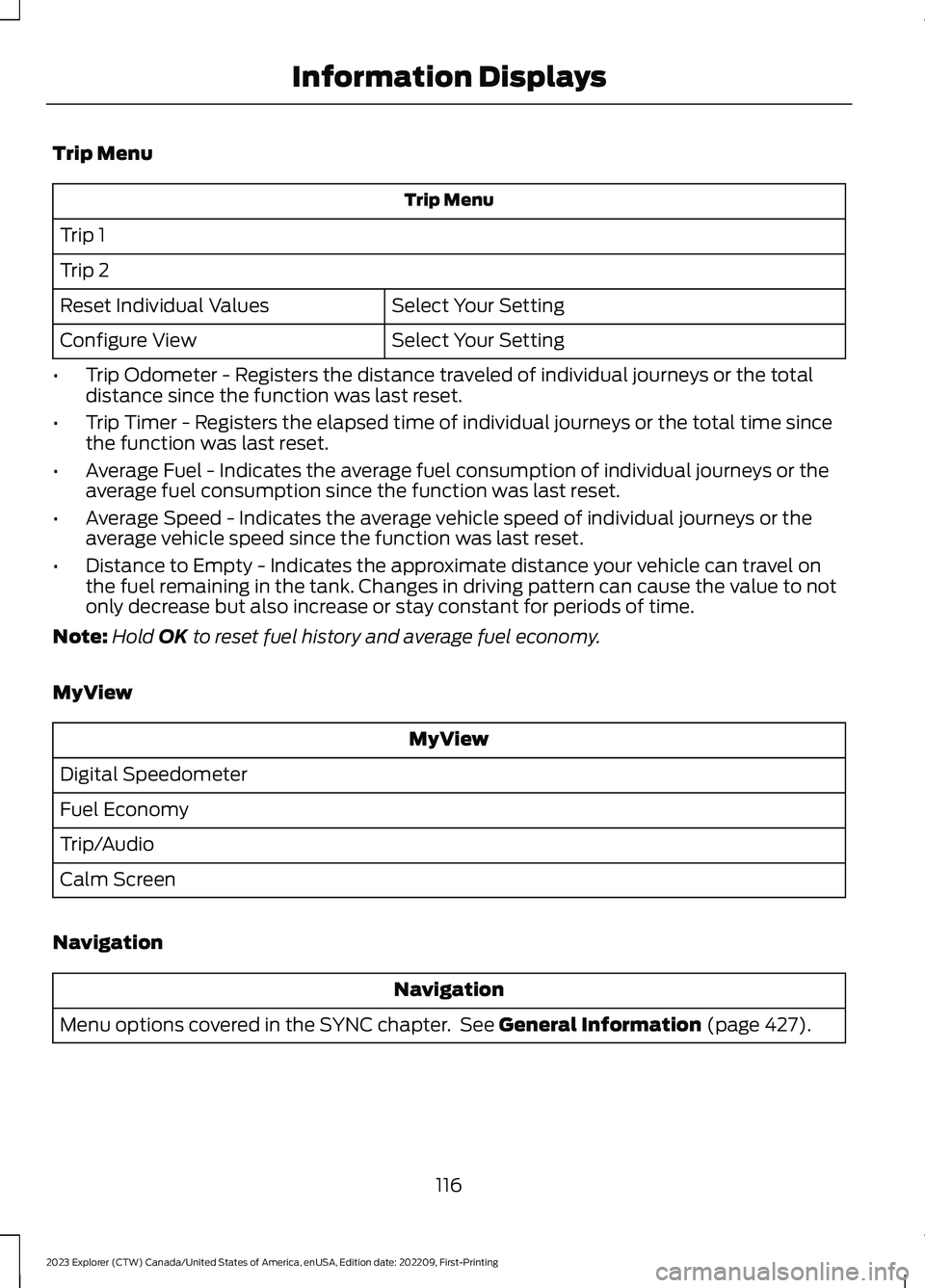
Trip Menu
Trip Menu
Trip 1
Trip 2
Select Your SettingReset Individual Values
Select Your SettingConfigure View
•Trip Odometer - Registers the distance traveled of individual journeys or the totaldistance since the function was last reset.
•Trip Timer - Registers the elapsed time of individual journeys or the total time sincethe function was last reset.
•Average Fuel - Indicates the average fuel consumption of individual journeys or theaverage fuel consumption since the function was last reset.
•Average Speed - Indicates the average vehicle speed of individual journeys or theaverage vehicle speed since the function was last reset.
•Distance to Empty - Indicates the approximate distance your vehicle can travel onthe fuel remaining in the tank. Changes in driving pattern can cause the value to notonly decrease but also increase or stay constant for periods of time.
Note:Hold OK to reset fuel history and average fuel economy.
MyView
MyView
Digital Speedometer
Fuel Economy
Trip/Audio
Calm Screen
Navigation
Navigation
Menu options covered in the SYNC chapter. See General Information (page 427).
116
2023 Explorer (CTW) Canada/United States of America, enUSA, Edition date: 202209, First-PrintingInformation Displays