2023 FORD EXPLORER display
[x] Cancel search: displayPage 253 of 573
Use the touchscreen to select thefollowing:
1.Select Settings.
2.Select Driver Assist.
3.Select Cruise Control.
4.Select Normal.
The cruise control indicatorreplaces the adaptive cruisecontrol indicator if you selectnormal cruise control. The gap settingdoes not display, and the system does notrespond to lead vehicles. Automaticbraking remains active to maintain setspeed. The system remembers the lastsetting when you start your vehicle.
SWITCHING LANE CENTERING
ON AND OFF
The cruise controls are on the steeringwheel. See Cruise Control (page 81).
Press the button.
The indicator appears in the informationdisplay. When the system is on, the colorof the indicator changes to indicate thesystem status. See Adaptive CruiseControl Indicators (page 248).
Note:Adaptive cruise control must be onbefore you can switch lane centering on.
Activating Lane Centering
The system only activates when all of thefollowing occur:
•You have adaptive cruise control withstop-and-go on.
•Your hands are on the steering wheel.
•The system detects both lanemarkings.
Note:If it does not detect valid lanemarkings, the system stays inactive untilvalid markings are available.
You can override the system at any timeby steering your vehicle.
System Alerts and AutomaticCancellation
You must keep your hands on the steeringwheel at all times.
When the system is active and detects nosteering activity for a certain period of time,the system alerts you to put your hands onthe steering wheel. If you do not react tothe warnings the system cancels and slowsyour vehicle down to idle speeds whilemaintaining steering control.
The system also alerts you if your vehiclecrosses lane markings without detectedsteering activity.
Note:The system may detect a light gripor touch on the steering wheel as hands-offdriving.
When an external condition cancels thesystem, for example, no lane markingsavailable, a tone sounds and a messageappears in the information display.
If your vehicle starts to slowdown, you must provide steeringinput to the wheel and press andrelease the button to regain full systemperformance.
Automatic cancellation can also occur if:
•The lane becomes too wide or toonarrow.
•The system cannot detect valid lanemarkings.
•Lane markings are crossed.
Note:The system disables until the nextkey cycle if your vehicle slows down due todriver inactivity twice within a key cycle.
249
2023 Explorer (CTW) Canada/United States of America, enUSA, Edition date: 202209, First-PrintingAdaptive Cruise Control (If Equipped)E71340 E262175
Page 254 of 573

SWITCHING INTELLIGENT
MODE ON AND OFF
WARNING: You are responsible forcontrolling your vehicle at all times. Thesystem is designed to be an aid and doesnot relieve you of your responsibility todrive with due care and attention. Failureto follow this instruction could result inthe loss of control of your vehicle,personal injury or death.
1.Press Settings on the touchscreen.
2.Press Driver Assistance.
3.Press Cruise Control.
4.Press Intelligent.
Changing the Set Speed withIntelligent Adaptive Cruise Control
When intelligent mode is on, the systemadjusts the set speed to the speed limitdetected by the camera and the speedlimit information provided by thenavigation system.
Note:The set speed adjusts when thesystem detects a different maximum speedlimit.
Note:The speed limit information providedby the navigation map data may beinaccurate or out of date. See Navigation(page 449).
Note:The system alerts you if the set speedincreases beyond the speed limit. SeeAdaptive Cruise Control Indicators (page248).
If the system does not detect a speed limit,the vehicle speed remains at the currentset speed.
You can override the set speed at any time.You may need to override or cancel thesystem in certain situations such asinclement weather or if an incorrect speedis set.
Note:The system may not detect and readspeed limit signs with conditionalinformation, for example, when a sign isflashing, during specific time ranges, orwhen children are present.
Note:Under certain conditions, the systemmay not adjust the vehicle speed until afteryour vehicle passes the speed limit sign.
ADJUSTING THE SET SPEED
TOLERANCE
You can set a permanent speed tolerancethat is above or below the detected speedlimit.
1.Press Settings on the touchscreen.
2.Press Driver Assistance.
3.Press Cruise Control.
4.Press Intelligent.
5.Press Tolerance.
6.Use + and - to set the tolerance.
Note:You cannot set the tolerance morethan 20 mph (30 km/h) above or below therecognized speed.
ADAPTIVE CRUISE CONTROL
– TROUBLESHOOTING
ADAPTIVE CRUISE CONTROL –INFORMATION MESSAGES -VEHICLES WITH: LANECENTERING
Note:Depending on your vehicle optionsand instrument cluster type, not allmessages display or are available.
250
2023 Explorer (CTW) Canada/United States of America, enUSA, Edition date: 202209, First-PrintingAdaptive Cruise Control (If Equipped)
Page 256 of 573
ADAPTIVE CRUISE CONTROL –INFORMATION MESSAGES -VEHICLES WITH: INTELLIGENTADAPTIVE CRUISE CONTROL
Note:Depending on your vehicle optionsand instrument cluster type, not allmessages display or are available.
Note:Certain messages may beabbreviated or shortened depending uponwhich cluster type you have.
ActionMessage
Conditions exist preventing the system from being available.Intelligent Cruise ControlSpeed Sign RecognitionNot Available
252
2023 Explorer (CTW) Canada/United States of America, enUSA, Edition date: 202209, First-PrintingAdaptive Cruise Control (If Equipped)
Page 257 of 573

ADAPTIVE CRUISE CONTROL –INFORMATION MESSAGES -VEHICLES WITH: STOP AND GO
Note:Depending on your vehicle optionsand instrument cluster type, not allmessages display or are available.
Note:The system could abbreviate orshorten certain messages depending uponwhich cluster type you have.
ActionMessage
A malfunction is preventing the adaptive cruise from engaging.Adaptive CruiseMalfunction
Front Sensor Not AlignedContact an authorized dealer to have the radar checked forproper coverage and operation.
Conditions exist preventing the system from being available.Adaptive Cruise NotAvailable
You have a blocked radar because of poor radar visibility dueto inclement weather or ice, mud, or water in front of the radar.You can typically clean the sensor to resolve this.
Adaptive Cruise NotAvailable SensorBlocked See ManualDue to the nature of radar technology, it is possible to get ablockage warning with no actual block. This happens, forexample, when driving in sparse rural or desert environments.A false blocked condition either self clears, or clears after yourestart your vehicle.
You have selected normal cruise control. The system doesnot brake or react to traffic.Normal Cruise ActiveAdaptive Braking Off
Displays when the adaptive cruise control is going to canceland you must take control.Adaptive Cruise - DriverResume Control
Displays when the vehicle speed is too slow to activate theadaptive cruise control and there is no lead vehicle in range.Adaptive Cruise SpeedToo Low to Activate
253
2023 Explorer (CTW) Canada/United States of America, enUSA, Edition date: 202209, First-PrintingAdaptive Cruise Control (If Equipped)
Page 258 of 573

DRIVER ALERT
PRINCIPLE OF OPERATION
WARNING: You are responsible forcontrolling your vehicle at all times. Thesystem is designed to be an aid and doesnot relieve you of your responsibility todrive with due care and attention. Failureto follow this instruction could result inthe loss of control of your vehicle,personal injury or death.
WARNING: The system may notfunction if the sensor is blocked.
WARNING: Take regular restbreaks if you feel tired. Do not wait forthe system to warn you.
WARNING: Certain driving stylesmay result in the system warning youeven if you are not feeling tired.
WARNING: In cold and severeweather conditions the system may notfunction. Rain, snow and spray can alllimit sensor performance.
WARNING: The system will notoperate if the sensor cannot track theroad lane markings.
WARNING: If damage occurs in theimmediate area surrounding the sensor,have your vehicle checked as soon aspossible.
WARNING: The system may notcorrectly operate if your vehicle is fittedwith a suspension kit not approved byus.
Note:Keep the windshield free fromobstructions. For example, bird droppings,insects and snow or ice.
Note:If the camera is blocked or if thewindshield is damaged, the system may notfunction.
Note:The system remembers the on or offsetting in the information display menuthrough ignition cycles.
Note:If enabled in the menu, the systemactivates at speeds above 40 mph(64 km/h). When below the activationspeed, the information display informs thedriver that the system is unavailable.
The system automatically monitors yourdriving behavior using various inputsincluding the front camera sensor.
If the system detects that your drivingalertness is reduced below a certainthreshold, the system alerts you using achime and a message in the cluster display.
USING DRIVER ALERT
Switching the System On and Off
Switch the system on or off using thetouchscreen. See Settings (page 458).
When active, the system monitors youralertness level based upon your drivingbehavior in relation to the lane markings,and other factors.
System Warnings
Note:The system does not issue warningsbelow approximately 40 mph (64 km/h).
254
2023 Explorer (CTW) Canada/United States of America, enUSA, Edition date: 202209, First-PrintingDriving AidsE249505
Page 259 of 573

Note:If you receive a warning you shouldconsider resting, even if the currentassessment is within the typical range.
The warning system has two stages. Atfirst, the system issues a temporarywarning that you need to take a rest. Thismessage only appears for a short time. Ifthe system detects further reduction indriving alertness, it may issue anotherwarning that remains in the informationdisplay for a longer time. You can press OKon the steering wheel control to clear thewarning.
Resetting the System
You can reset the system by either:
•Switching the ignition off and on.
•Stopping the vehicle and then openingand closing the driver’s door.
LANE KEEPING SYSTEM
WARNING: You are responsible forcontrolling your vehicle at all times. Thesystem is designed to be an aid and doesnot relieve you of your responsibility todrive with due care and attention. Failureto follow this instruction could result inthe loss of control of your vehicle,personal injury or death.
WARNING: Always drive with duecare and attention when using andoperating the controls and features onyour vehicle.
WARNING: In cold and severeweather conditions the system may notfunction. Rain, snow and spray can alllimit sensor performance.
WARNING: Large contrasts inoutside lighting can limit sensorperformance.
WARNING: The system will notoperate if the sensor cannot track theroad lane markings.
WARNING: The sensor mayincorrectly track lane markings as otherstructures or objects. This can result ina false or missed warning.
WARNING: The system may notoperate properly if the sensor is blocked.Keep the windshield free fromobstruction.
WARNING: If damage occurs in theimmediate area surrounding the sensor,have your vehicle checked as soon aspossible.
WARNING: The system may notcorrectly operate if your vehicle is fittedwith a suspension kit not approved byus.
Note:The system works above 40 mph(64 km/h).
Note:The system works as long as thecamera can detect one lane marking.
Note:When you select aid or alert and aidmode and the system detects no steeringactivity for a short period, the system alertsyou to put your hands on the steering wheel.The system may detect a light grip ortouch on the steering wheel as hands offdriving.
Note:The system may not function if thecamera is blocked, or if the windshield isdamaged or dirty.
255
2023 Explorer (CTW) Canada/United States of America, enUSA, Edition date: 202209, First-PrintingDriving Aids
Page 260 of 573
When you switch the system on and itdetects an unintentional drift out of yourlane is likely to occur, the system notifiesor assists you to stay in your lane throughthe steering system and informationdisplay. In Alert mode (if equipped), thesystem provides a warning by vibrating thesteering wheel. In Aid mode, the systemprovides steering assistance by gentlycounter steering your vehicle back into thelane.
When the system is functioning in thecombined Alert and Aid mode, the systemfirst provides steering assistance by gentlycounter steering your vehicle back into thelane, followed by a warning that vibratesthe steering wheel if the vehicle is still outof the lane markings.
Switching the System On and Off
Note:The system is turned onautomatically at each ignition cycle.
Press the button on the direction indicatorstalk to switch the system on or off.
System Settings
The system has optional setting menusavailable. The system stores the lastknown selection for each of these settings.You do not need to readjust your settingseach time you switch the system on.
Mode: This setting allows you to selectwhich of the system features you canenable.
Alert only (if equipped) – Provides asteering wheel vibration when the systemdetects an unintended lane departure.
256
2023 Explorer (CTW) Canada/United States of America, enUSA, Edition date: 202209, First-PrintingDriving AidsE249505 E288067 E165515
Page 261 of 573
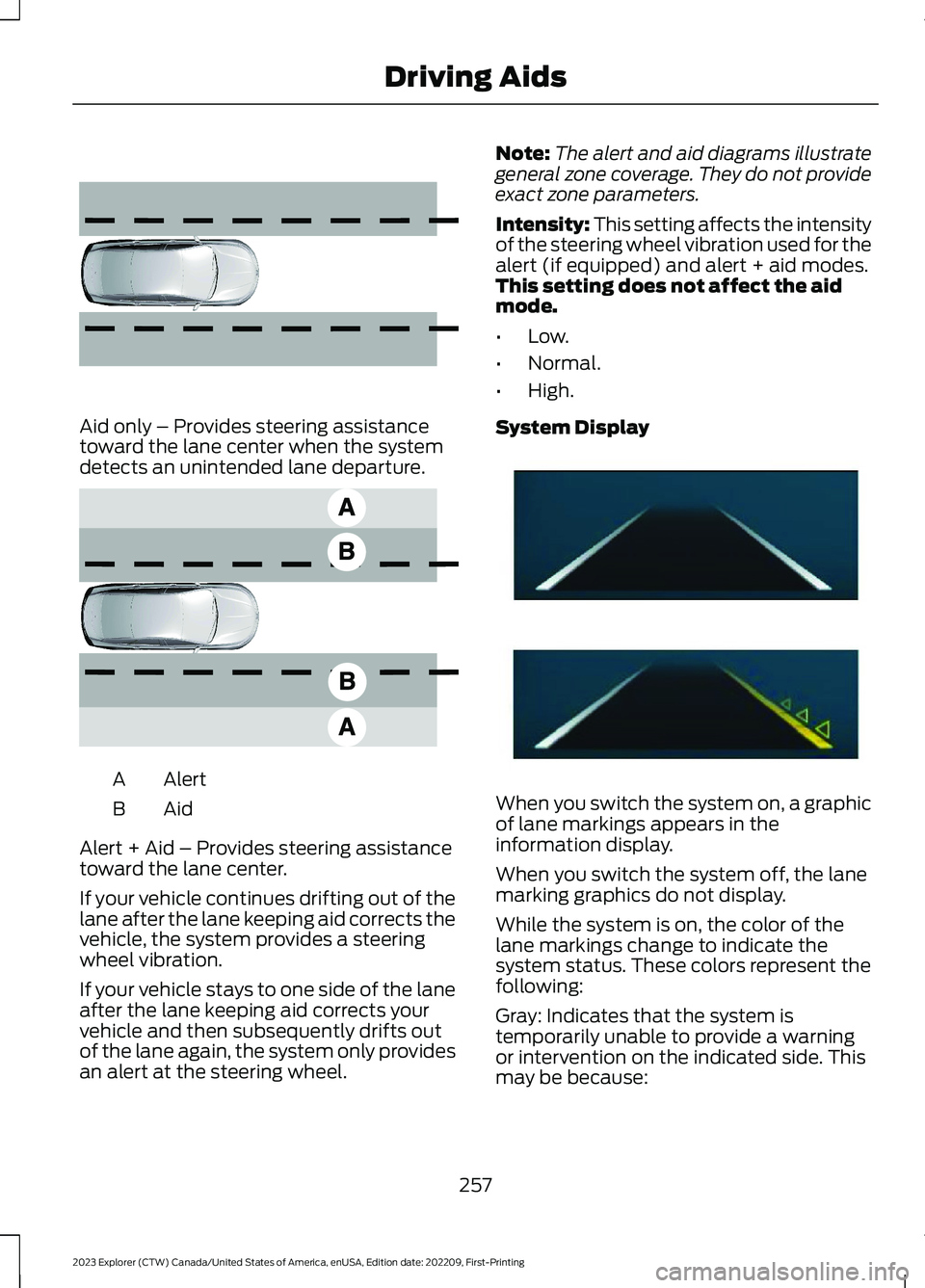
Aid only – Provides steering assistancetoward the lane center when the systemdetects an unintended lane departure.
AlertA
AidB
Alert + Aid – Provides steering assistancetoward the lane center.
If your vehicle continues drifting out of thelane after the lane keeping aid corrects thevehicle, the system provides a steeringwheel vibration.
If your vehicle stays to one side of the laneafter the lane keeping aid corrects yourvehicle and then subsequently drifts outof the lane again, the system only providesan alert at the steering wheel.
Note:The alert and aid diagrams illustrategeneral zone coverage. They do not provideexact zone parameters.
Intensity: This setting affects the intensityof the steering wheel vibration used for thealert (if equipped) and alert + aid modes.This setting does not affect the aidmode.
•Low.
•Normal.
•High.
System Display
When you switch the system on, a graphicof lane markings appears in theinformation display.
When you switch the system off, the lanemarking graphics do not display.
While the system is on, the color of thelane markings change to indicate thesystem status. These colors represent thefollowing:
Gray: Indicates that the system istemporarily unable to provide a warningor intervention on the indicated side. Thismay be because:
257
2023 Explorer (CTW) Canada/United States of America, enUSA, Edition date: 202209, First-PrintingDriving Aids E165516 E165517 E294544