Page 411 of 573
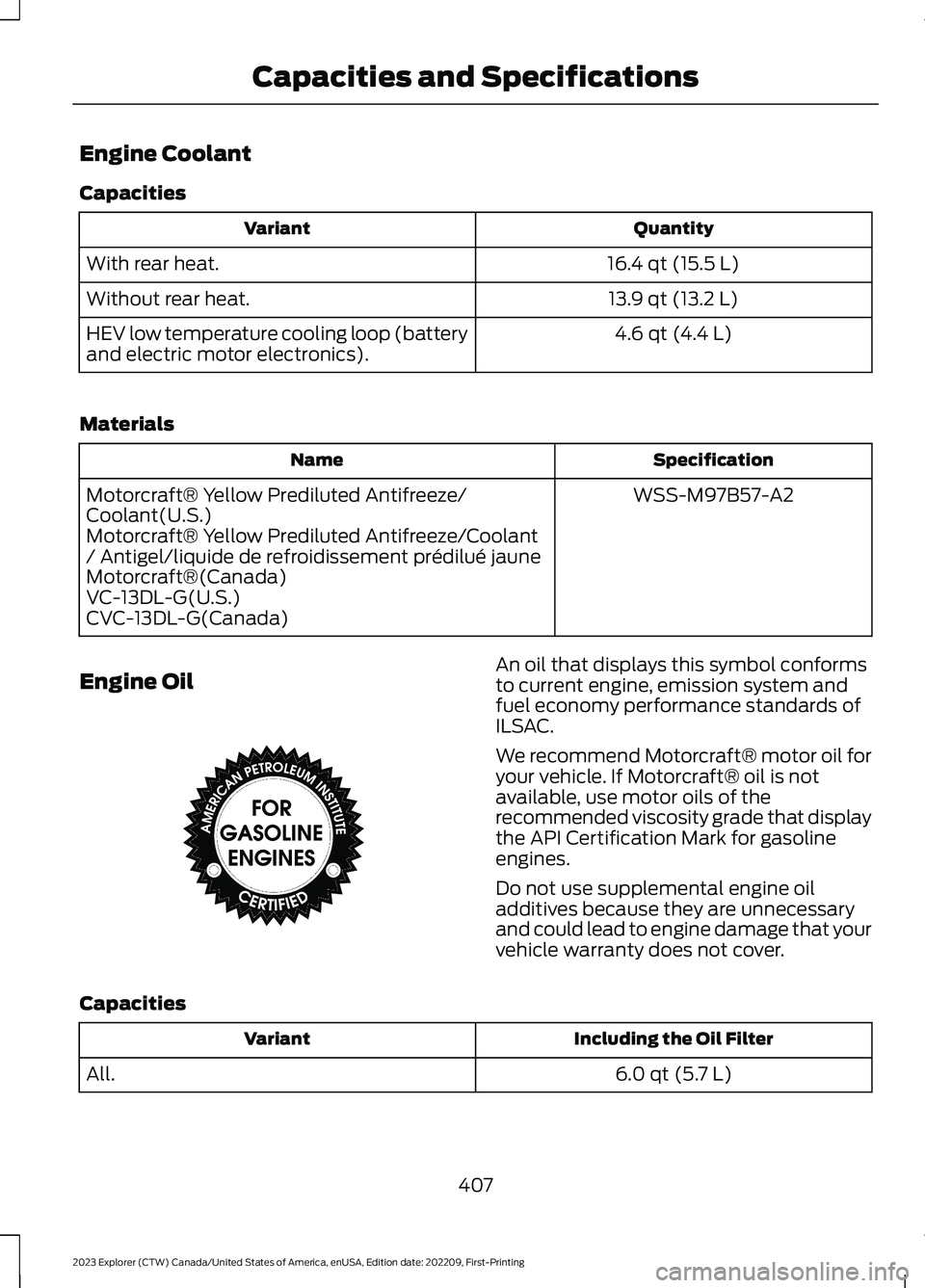
Engine Coolant
Capacities
QuantityVariant
16.4 qt (15.5 L)With rear heat.
13.9 qt (13.2 L)Without rear heat.
4.6 qt (4.4 L)HEV low temperature cooling loop (batteryand electric motor electronics).
Materials
SpecificationName
WSS-M97B57-A2Motorcraft® Yellow Prediluted Antifreeze/Coolant(U.S.)Motorcraft® Yellow Prediluted Antifreeze/Coolant/ Antigel/liquide de refroidissement prédilué jauneMotorcraft®(Canada)VC-13DL-G(U.S.)CVC-13DL-G(Canada)
Engine OilAn oil that displays this symbol conformsto current engine, emission system andfuel economy performance standards ofILSAC.
We recommend Motorcraft® motor oil foryour vehicle. If Motorcraft® oil is notavailable, use motor oils of therecommended viscosity grade that displaythe API Certification Mark for gasolineengines.
Do not use supplemental engine oiladditives because they are unnecessaryand could lead to engine damage that yourvehicle warranty does not cover.
Capacities
Including the Oil FilterVariant
6.0 qt (5.7 L)All.
407
2023 Explorer (CTW) Canada/United States of America, enUSA, Edition date: 202209, First-PrintingCapacities and SpecificationsE142732
Page 427 of 573
Note:This receiver includes the eCosreal-time operating system. eCos ispublished under the eCos License.
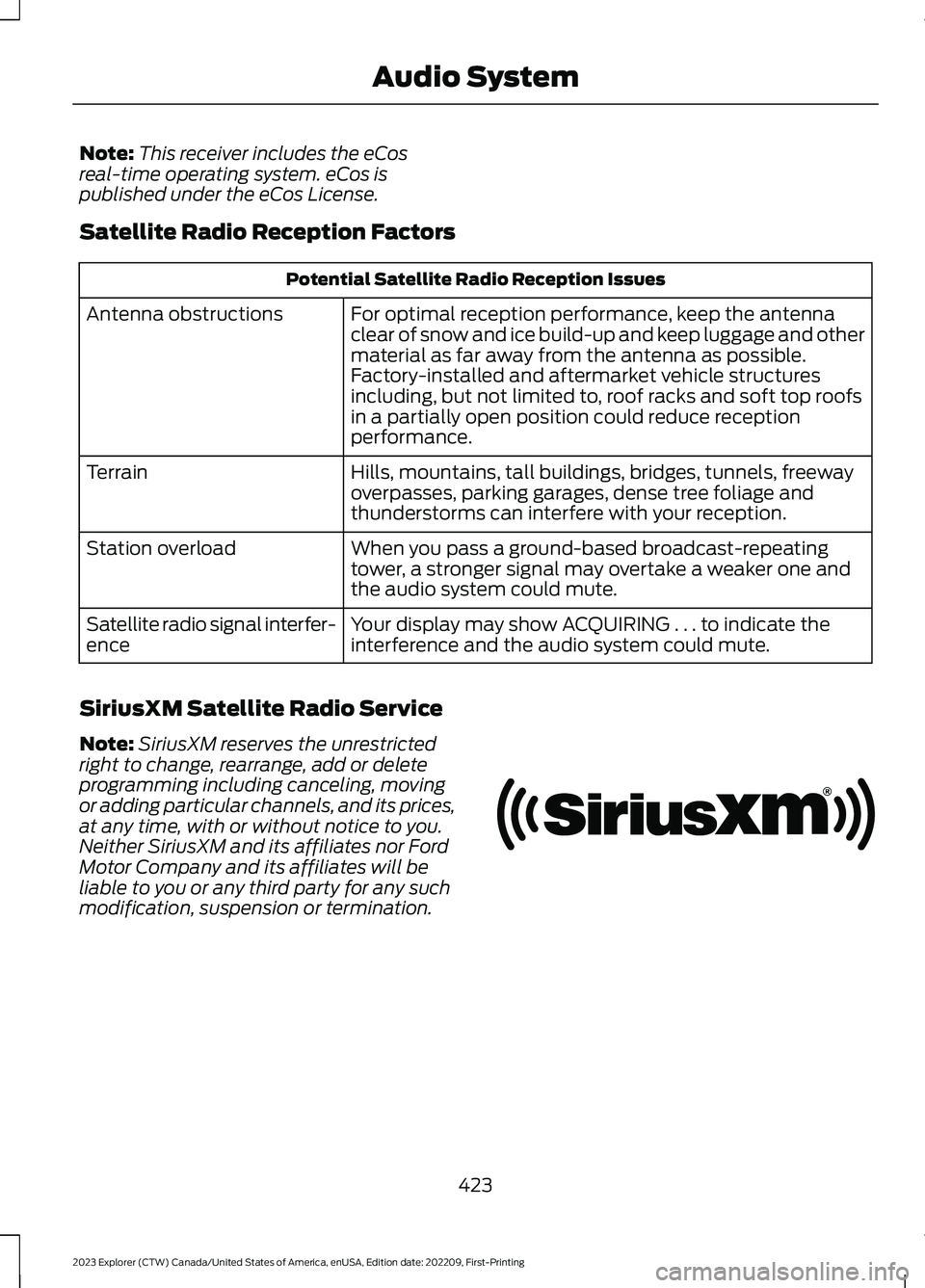
Satellite Radio Reception Factors
Potential Satellite Radio Reception Issues
For optimal reception performance, keep the antennaclear of snow and ice build-up and keep luggage and othermaterial as far away from the antenna as possible.Factory-installed and aftermarket vehicle structuresincluding, but not limited to, roof racks and soft top roofsin a partially open position could reduce receptionperformance.
Antenna obstructions
Hills, mountains, tall buildings, bridges, tunnels, freewayoverpasses, parking garages, dense tree foliage andthunderstorms can interfere with your reception.
Terrain
When you pass a ground-based broadcast-repeatingtower, a stronger signal may overtake a weaker one andthe audio system could mute.
Station overload
Your display may show ACQUIRING . . . to indicate theinterference and the audio system could mute.Satellite radio signal interfer-ence
SiriusXM Satellite Radio Service
Note:SiriusXM reserves the unrestrictedright to change, rearrange, add or deleteprogramming including canceling, movingor adding particular channels, and its prices,at any time, with or without notice to you.Neither SiriusXM and its affiliates nor FordMotor Company and its affiliates will beliable to you or any third party for any suchmodification, suspension or termination.
423
2023 Explorer (CTW) Canada/United States of America, enUSA, Edition date: 202209, First-PrintingAudio SystemE208625
Page 437 of 573
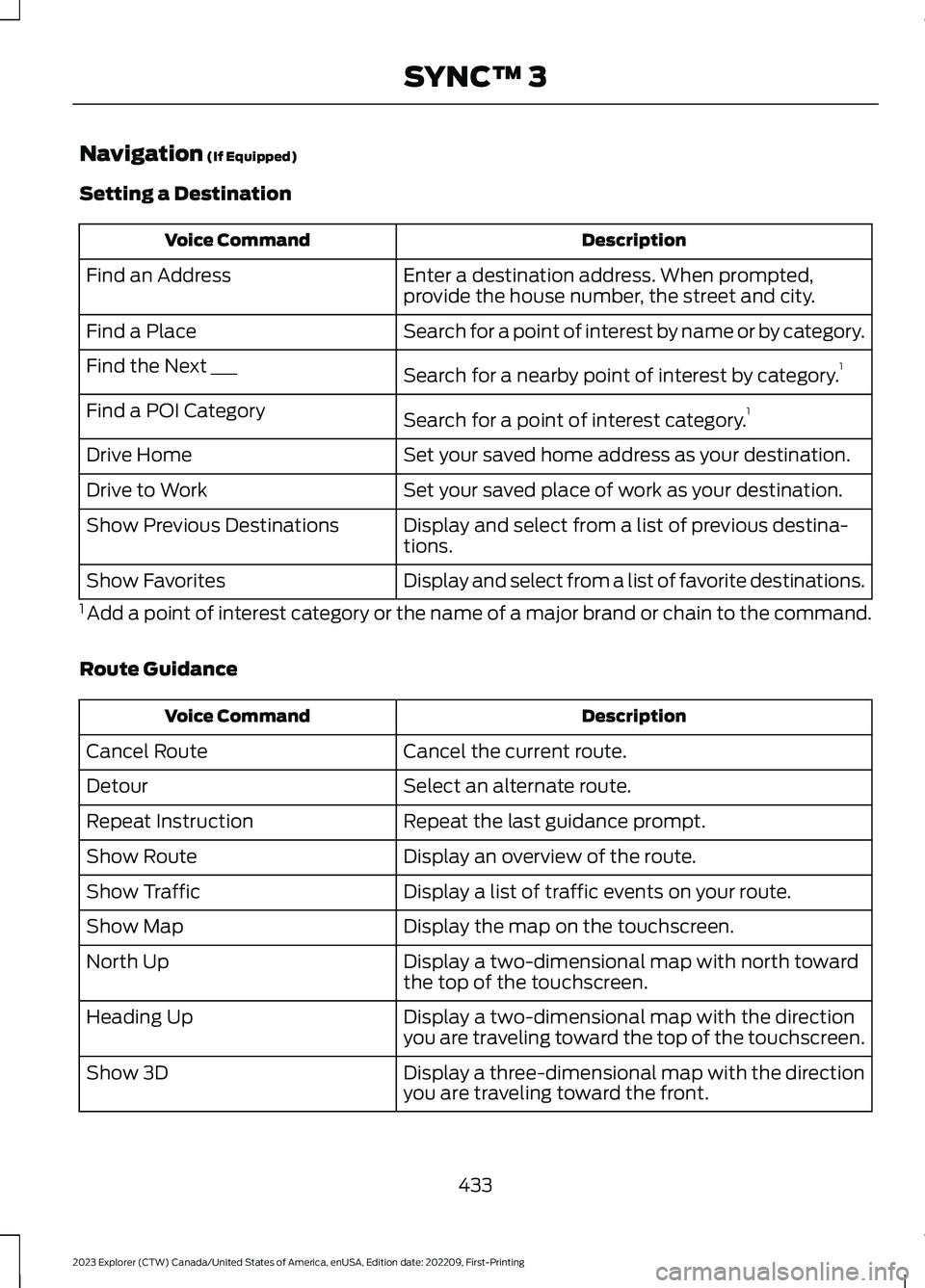
Navigation (If Equipped)
Setting a Destination
DescriptionVoice Command
Enter a destination address. When prompted,provide the house number, the street and city.Find an Address
Search for a point of interest by name or by category.Find a Place
Search for a nearby point of interest by category.1Find the Next ___
Search for a point of interest category.1Find a POI Category
Set your saved home address as your destination.Drive Home
Set your saved place of work as your destination.Drive to Work
Display and select from a list of previous destina-tions.Show Previous Destinations
Display and select from a list of favorite destinations.Show Favorites
1 Add a point of interest category or the name of a major brand or chain to the command.
Route Guidance
DescriptionVoice Command
Cancel the current route.Cancel Route
Select an alternate route.Detour
Repeat the last guidance prompt.Repeat Instruction
Display an overview of the route.Show Route
Display a list of traffic events on your route.Show Traffic
Display the map on the touchscreen.Show Map
Display a two-dimensional map with north towardthe top of the touchscreen.North Up
Display a two-dimensional map with the directionyou are traveling toward the top of the touchscreen.Heading Up
Display a three-dimensional map with the directionyou are traveling toward the front.Show 3D
433
2023 Explorer (CTW) Canada/United States of America, enUSA, Edition date: 202209, First-PrintingSYNC™ 3
Page 438 of 573
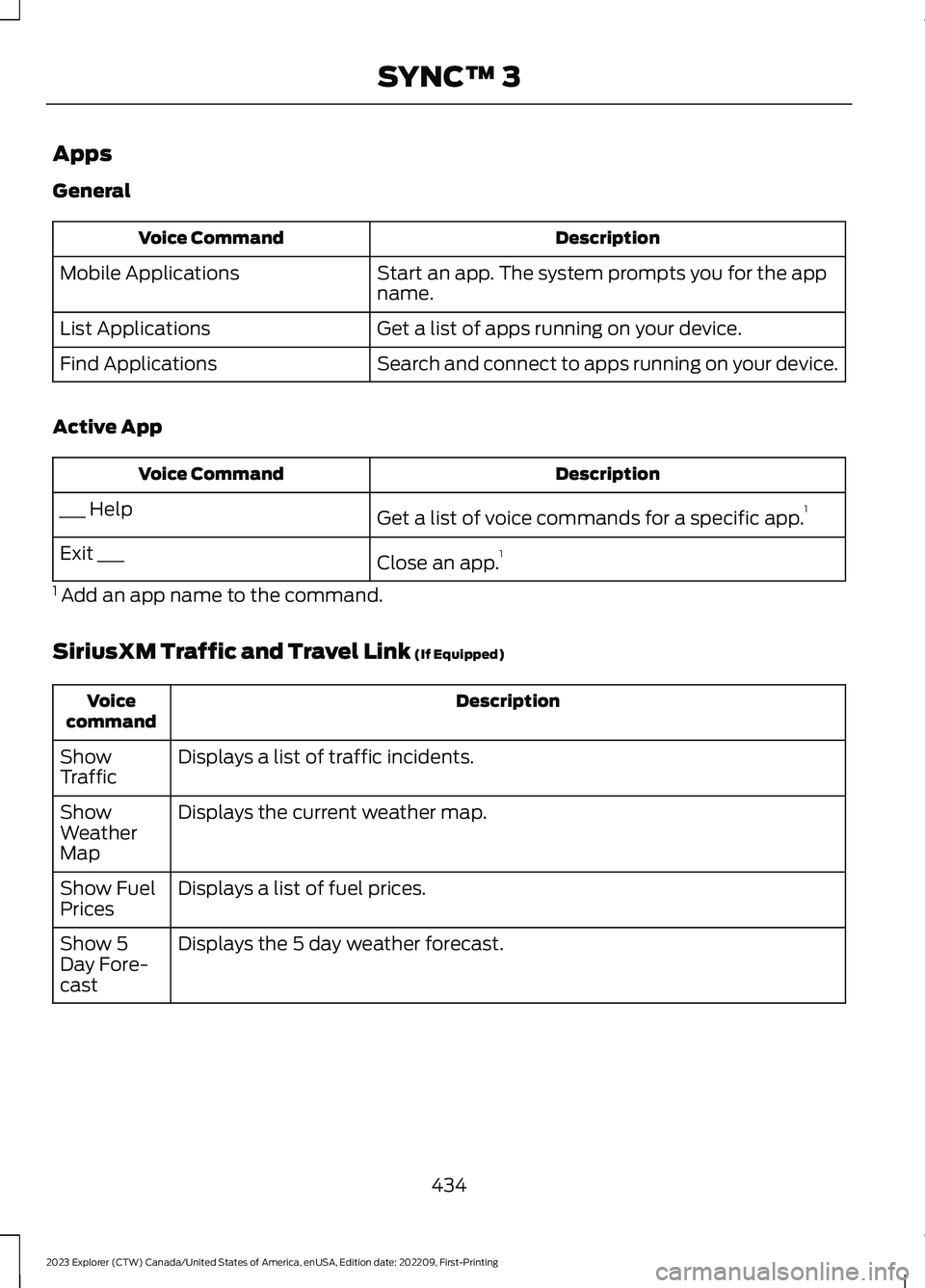
Apps
General
DescriptionVoice Command
Start an app. The system prompts you for the appname.Mobile Applications
Get a list of apps running on your device.List Applications
Search and connect to apps running on your device.Find Applications
Active App
DescriptionVoice Command
Get a list of voice commands for a specific app.1___ Help
Close an app.1Exit ___
1 Add an app name to the command.
SiriusXM Traffic and Travel Link (If Equipped)
DescriptionVoicecommand
Displays a list of traffic incidents.ShowTraffic
Displays the current weather map.ShowWeatherMap
Displays a list of fuel prices.Show FuelPrices
Displays the 5 day weather forecast.Show 5Day Fore-cast
434
2023 Explorer (CTW) Canada/United States of America, enUSA, Edition date: 202209, First-PrintingSYNC™ 3
Page 439 of 573
Voice Settings
DescriptionVoice Command
Go to the voice settings menu.Voice Settings
Switch long voice prompts on.Interaction Mode Novice
Switch short voice prompts on.Interaction Mode Advanced
Switch call confirmation on. The system promptsyou to confirm before making a call.Phone Confirmation On
Switch call confirmation off. The system does notprompt you to confirm before making a call.Phone Confirmation Off
Switch the display of voice commands on.Voice Command Lists On
Switch the display of voice commands off.Voice Command Lists Off
Automatic Blower Motor SpeedReduction
If necessary, the system decreases theblower motor speed when you are usingvoice commands to reduce the amount ofbackground noise in your vehicle. It returnsto normal when you are done.
Switching Automatic Blower MotorSpeed Reduction Off
Simultaneously press the A/C andrecirculated air buttons.
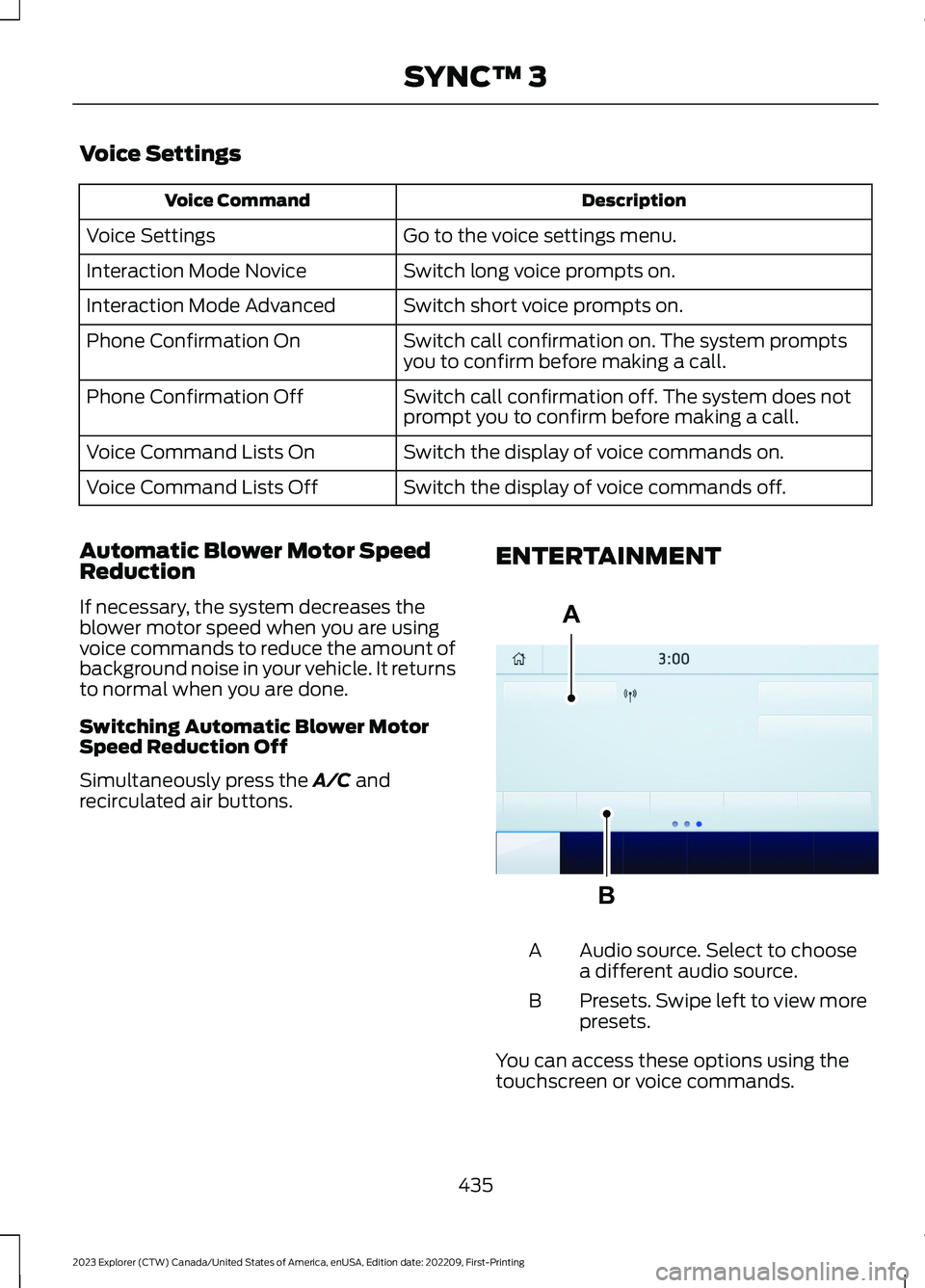
ENTERTAINMENT
Audio source. Select to choosea different audio source.A
Presets. Swipe left to view morepresets.B
You can access these options using thetouchscreen or voice commands.
435
2023 Explorer (CTW) Canada/United States of America, enUSA, Edition date: 202209, First-PrintingSYNC™ 3ABE293491
Page 440 of 573

SourcesPress this button to select the source ofmedia you want to listen to.
Menu Item
AM
FM
1SIRIUS
CD
The name of the USB that is plugged in displays here.USB
Bluetooth Stereo
If you have SYNC 3 compatible apps on your connected smart phone, theydisplay here as individual source selections.Apps
1 This feature may not be available in all markets and requires an active subscription.
AM/FM Radio
Tuning a Station
You can use the tune or seek controls onthe radio bezel to select a station.
To tune a station using thetouchscreen, select:
Menu Item
Direct Tune
A pop up appears, allowing you to type inthe frequency of a station. You can onlyenter a valid station for the source you arecurrently listening to.
You can press the backspace button todelete the previously entered number.
Once you have entered the station'scall numbers, you can select:
Action and Descrip-tionMenu Item
Press to beginplaying the stationyou have entered.
Enter
Press to exitwithout changingthe station.
Cancel
Presets
To set a new preset, tune to the stationand then press and hold one of thememory preset buttons. The audio mutesbriefly while the system saves the stationand then returns.
You may be able to add additional presetpages using the settings option on thefeature bar.
436
2023 Explorer (CTW) Canada/United States of America, enUSA, Edition date: 202209, First-PrintingSYNC™ 3
Page 442 of 573
Action and DescriptionMenu Item
Replay audio on the current channel. You can replay approx-imately 45 minutes of audio as long as you remain tuned tothe current station. Changing stations erases the previousaudio.
Replay
When you are in replay mode, you are notable to select a different preset until youreturn to live audio. Pressing this buttonreturns you to the live broadcast.
Live
Save the current song, artist, or team as a favorite. The systemalerts you when it plays again on any channel.ALERT
Selecting this button allows you to enable and edit alerts.
Memory Presets
To set a preset, tune to the station thenpress and hold one of the memory presetbuttons. The audio mutes briefly while thesystem saves the station and returns oncethe station is stored.
You may be able to add additional presetpages using the settings option on thefeature bar.
SiriusXM Satellite Radio Reception Factors and Troubleshooting
Potential Reception Issues
For optimal reception performance, keep the antenna clearof snow and ice build-up and keep luggage and othermaterials as far away from the antenna as possible.
Antenna obstructions
Hills, mountains, tall buildings, bridges, tunnels, freewayoverpasses, parking garages, dense tree foliage and thunder-storms can interfere with your reception.
Terrain
When you pass a ground-based broadcast-repeating tower,a stronger signal may overtake a weaker one and the audiosystem may mute.
Station overload
Your display may show ACQUIRING... to indicate the interfer-ence and the audio system may mute.Satellite radio signalinterference
438
2023 Explorer (CTW) Canada/United States of America, enUSA, Edition date: 202209, First-PrintingSYNC™ 3
Page 446 of 573
Potential Station Issues
ActionCauseIssues
No action required. The stationis not available in your currentlocation.
The previously stored multicastpreset or direct tune is notavailable in your current recep-tion area.
Cannot access HD2 orHD3 multicast channelwhen recalling a presetor from a direct tune.
Fill out the station issue form.1Data service issue by the radiobroadcaster.Text information doesnot match currentlyplaying audio.
Fill out the station issue form.1Data service issue by the radiobroadcaster.There is no textinformation shown forcurrently selectedfrequency.
1 You can find the form here:
Website
http://hdradio.com/stations/feedback
HD Radio Technology manufactured underlicense from iBiquity Digital Corporationand foreign patents. HD Radio and the HDand HD Radio logos are proprietarytrademarks of DTS. The vehiclemanufacturer and DTS are not responsiblefor the content sent using HD Radiotechnology. Content may be changed,added or deleted at any time at the stationowner's discretion.
CD (If Equipped)
Once you select this option, the systemreturns you to the main audio screen.
The current audio information appears onthe screen.
The following buttons are also available:
FunctionButton
You can use the browse button to select a track.Browse
Select this button and a small number one displays to indicatethe track is set to repeat.Repeat
442
2023 Explorer (CTW) Canada/United States of America, enUSA, Edition date: 202209, First-PrintingSYNC™ 3