2022 TOYOTA SUPRA height
[x] Cancel search: heightPage 134 of 498
1323-1. CONTROLS
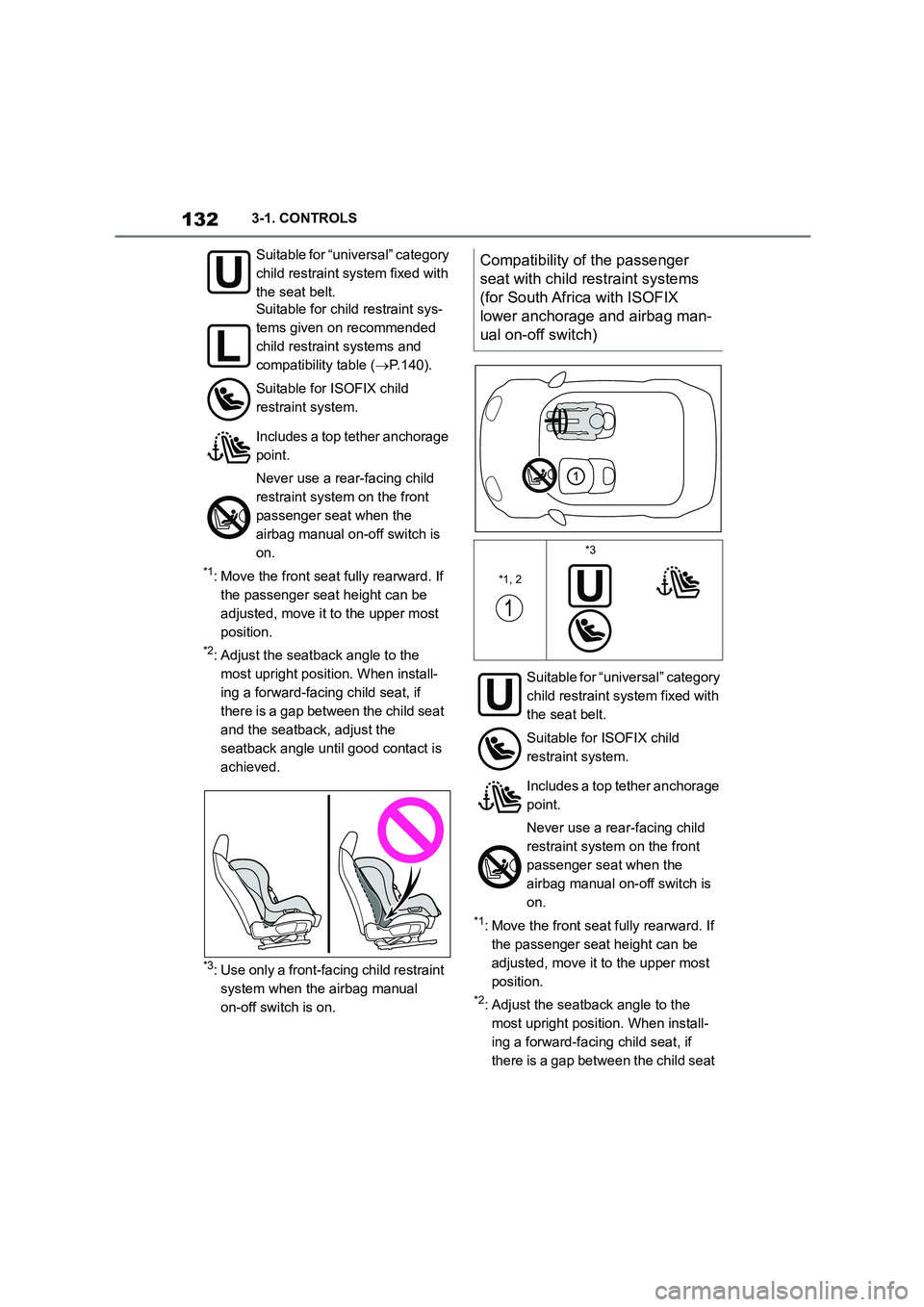
*1: Move the front seat fully rearward. If
the passenger seat height can be
adjusted, move it to the upper most
position.
*2: Adjust the seatback angle to the
most upright position. When install-
ing a forward-facing child seat, if
there is a gap between the child seat
and the seatback, adjust the
seatback angle until good contact is
achieved.
*3: Use only a front-facing child restraint
system when the airbag manual
on-off switch is on.
*1: Move the front seat fully rearward. If
the passenger seat height can be
adjusted, move it to the upper most
position.
*2: Adjust the seatback angle to the
most upright position. When install-
ing a forward-facing child seat, if
there is a gap between the child seat
Suitable for “universal” category
child restraint syst em fixed with
the seat belt.
Suitable for child restraint sys-
tems given on recommended
child restraint systems and
compatibility table ( P.140).
Suitable for ISOFIX child
restraint system.
Includes a top tether anchorage
point.
Never use a rear-facing child
restraint system on the front
passenger seat when the
airbag manual on-off switch is
on.
Compatibility of the passenger
seat with child restraint systems
(for South Africa with ISOFIX
lower anchorage and airbag man-
ual on-off switch)
*1, 2
*3
Suitable for “universal” category
child restraint system fixed with
the seat belt.
Suitable for ISOFIX child
restraint system.
Includes a top tether anchorage
point.
Never use a rear-facing child
restraint system on the front
passenger seat when the
airbag manual on-off switch is
on.
Page 135 of 498
133
3
3-1. CONTROLS
CONTROLS
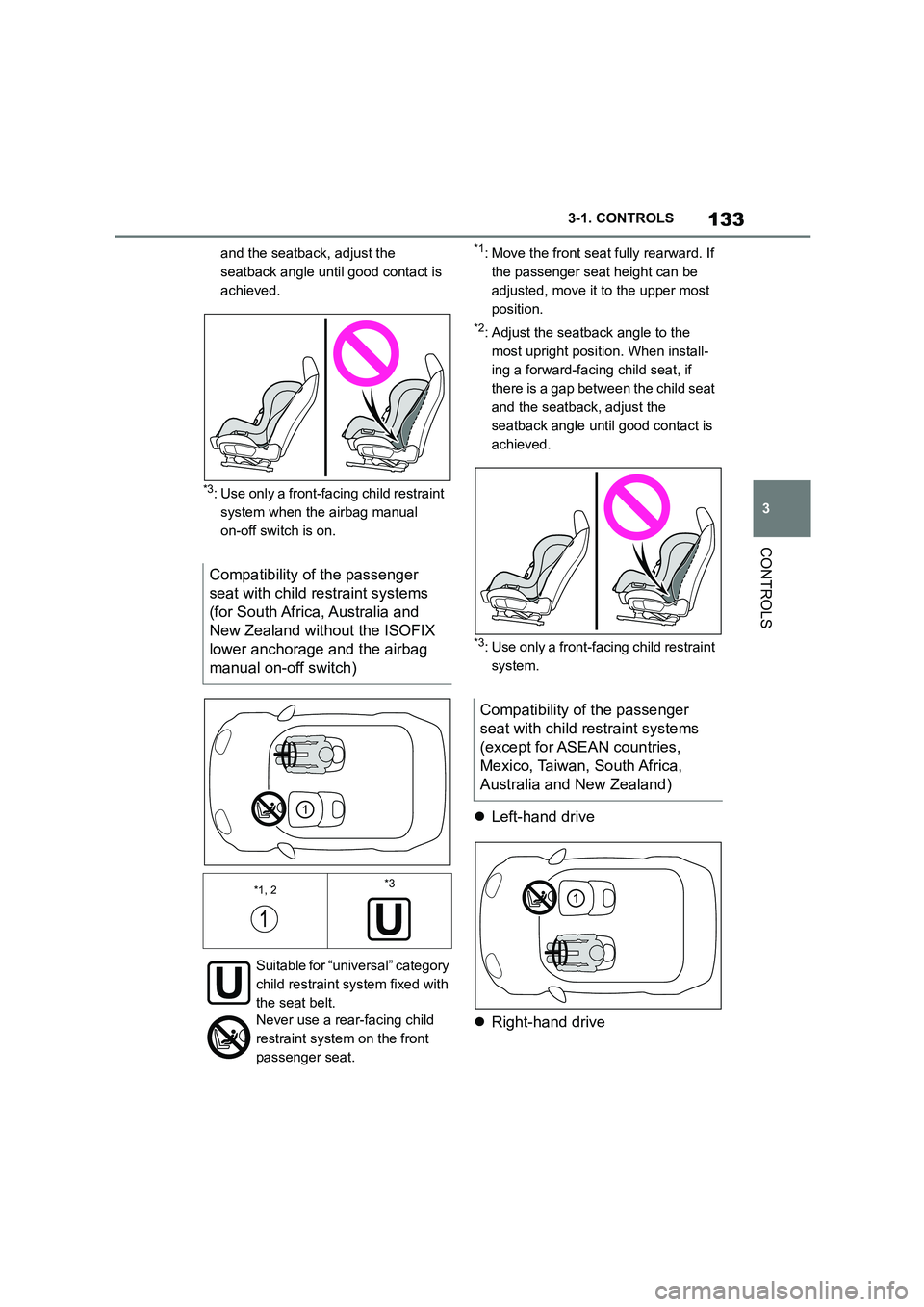
and the seatback, adjust the
seatback angle until good contact is
achieved.
*3: Use only a front-facing child restraint
system when the airbag manual
on-off switch is on.
*1: Move the front seat fully rearward. If
the passenger seat height can be
adjusted, move it to the upper most
position.
*2: Adjust the seatback angle to the
most upright position. When install-
ing a forward-facing child seat, if
there is a gap between the child seat
and the seatback, adjust the
seatback angle until good contact is
achieved.
*3: Use only a front-fa cing child restraint
system.
Left-hand drive
Right-hand drive
Compatibility of the passenger
seat with child restraint systems
(for South Africa, Australia and
New Zealand without the ISOFIX
lower anchorage and the airbag
manual on-off switch)
*1, 2*3
Suitable for “universal” category
child restraint syst em fixed with
the seat belt.
Never use a rear-facing child
restraint system on the front
passenger seat.
Compatibility of the passenger
seat with child restraint systems
(except for ASEAN countries,
Mexico, Taiwan, South Africa,
Australia and New Zealand)
Page 136 of 498
1343-1. CONTROLS
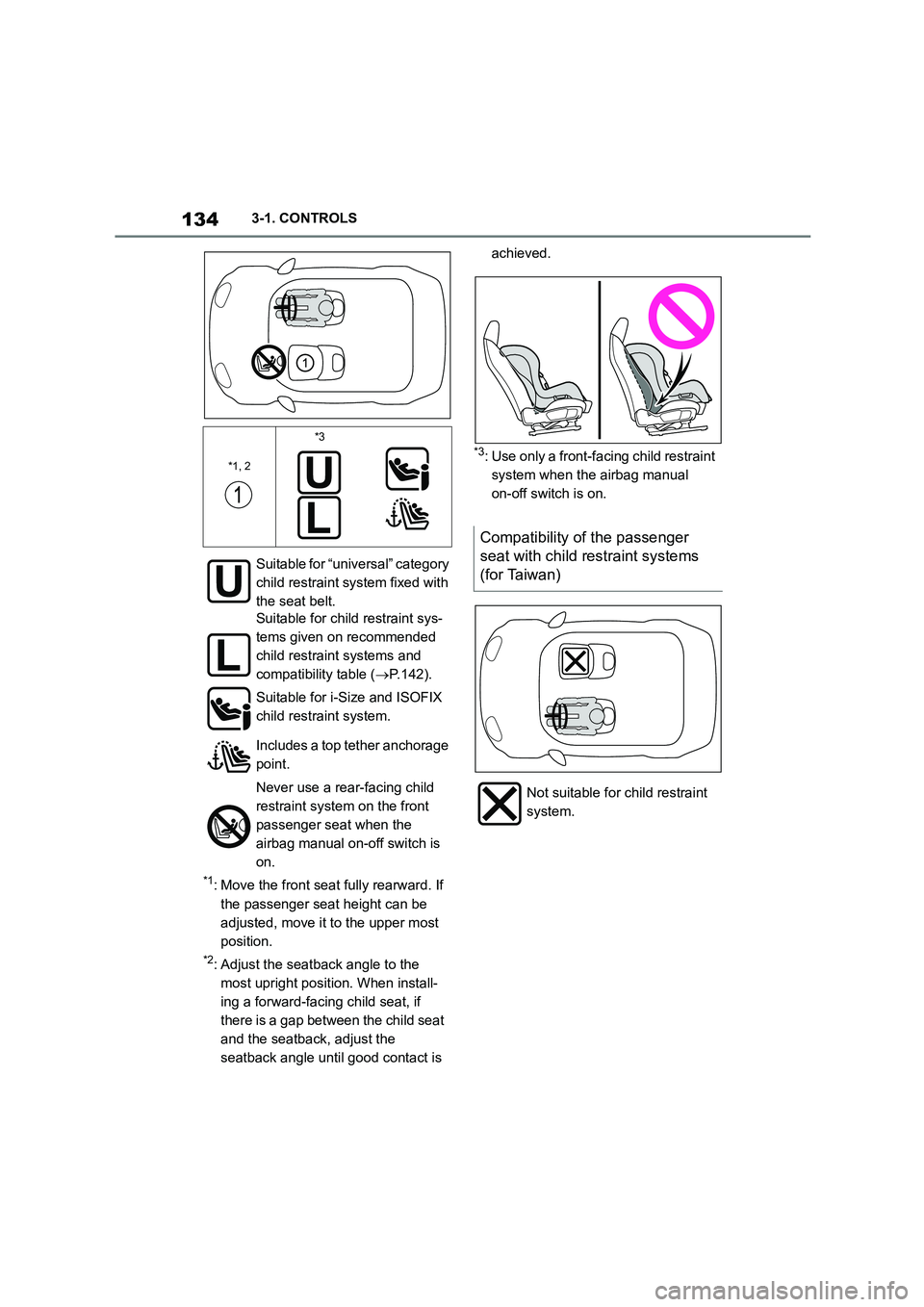
*1: Move the front seat fully rearward. If
the passenger seat height can be
adjusted, move it to the upper most
position.
*2: Adjust the seatback angle to the
most upright position. When install-
ing a forward-facing child seat, if
there is a gap between the child seat
and the seatback, adjust the
seatback angle until good contact is
achieved.
*3: Use only a front-fa cing child restraint
system when the airbag manual
on-off switch is on.
*1, 2
*3
Suitable for “universal” category
child restraint syst em fixed with
the seat belt.
Suitable for child restraint sys-
tems given on recommended
child restraint systems and
compatibility table ( P.142).
Suitable for i-Size and ISOFIX
child restraint system.
Includes a top tether anchorage
point.
Never use a rear-facing child
restraint system on the front
passenger seat when the
airbag manual on-off switch is
on.
Compatibility of the passenger
seat with child restraint systems
(for Taiwan)
Not suitable for child restraint
system.
Page 137 of 498
135
3
3-1. CONTROLS
CONTROLS
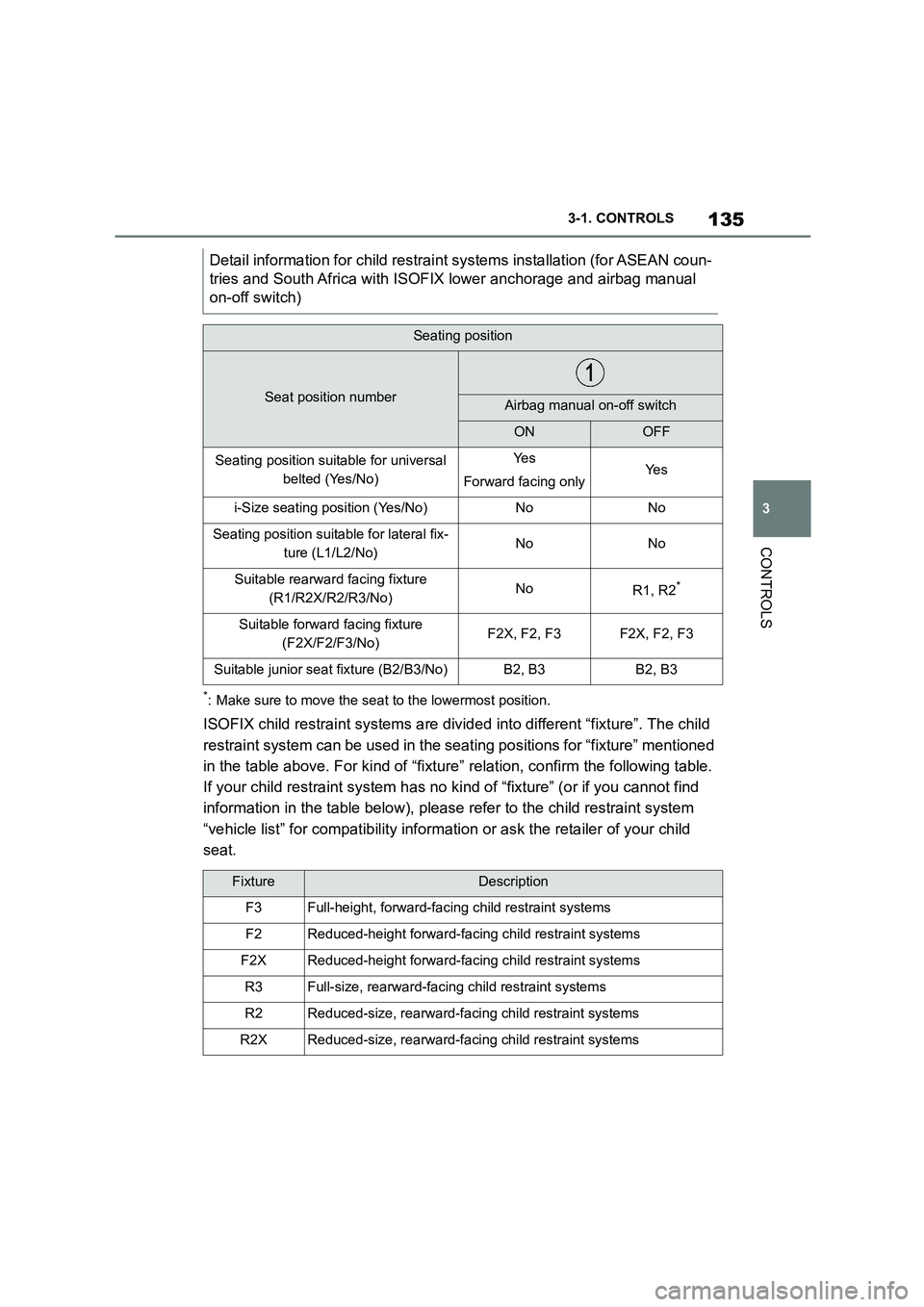
*: Make sure to move the seat to the lowermost position.
ISOFIX child restraint systems are divid ed into different “fixture”. The child
restraint system can be used in the se ating positions for “fixture” mentioned
in the table above. For kind of “fixtu re” relation, confirm the following table.
If your child restraint system has no ki nd of “fixture” (or if you cannot find
information in the table below), please refer to the child restraint system
“vehicle list” for compatib ility information or ask the retailer of your child
seat.
Detail information for chil d restraint systems installation (for ASEAN coun-
tries and South Africa with ISOFIX lower anchorage and airbag manual
on-off switch)
Seating position
Seat position numberAirbag manual on-off switch
ONOFF
Seating position suitable for universal
belted (Yes/No)
Ye s
Forward facing onlyYe s
i-Size seating position (Yes/No)NoNo
Seating position suitable for lateral fix-
ture (L1/L2/No)NoNo
Suitable rearward facing fixture
(R1/R2X/R2/R3/No)NoR1, R2*
Suitable forward facing fixture
(F2X/F2/F3/No)F2X, F2, F3F2X, F2, F3
Suitable junior seat fixture (B2/B3/No)B2, B3B2, B3
FixtureDescription
F3Full-height, forward-faci ng child restraint systems
F2Reduced-height forward-facing child restraint systems
F2XReduced-height forward-facing child restraint systems
R3Full-size, rearward-facing child restraint systems
R2Reduced-size, rearward-facing child restraint systems
R2XReduced-size, rearward-facing child restraint systems
Page 139 of 498
137
3
3-1. CONTROLS
CONTROLS
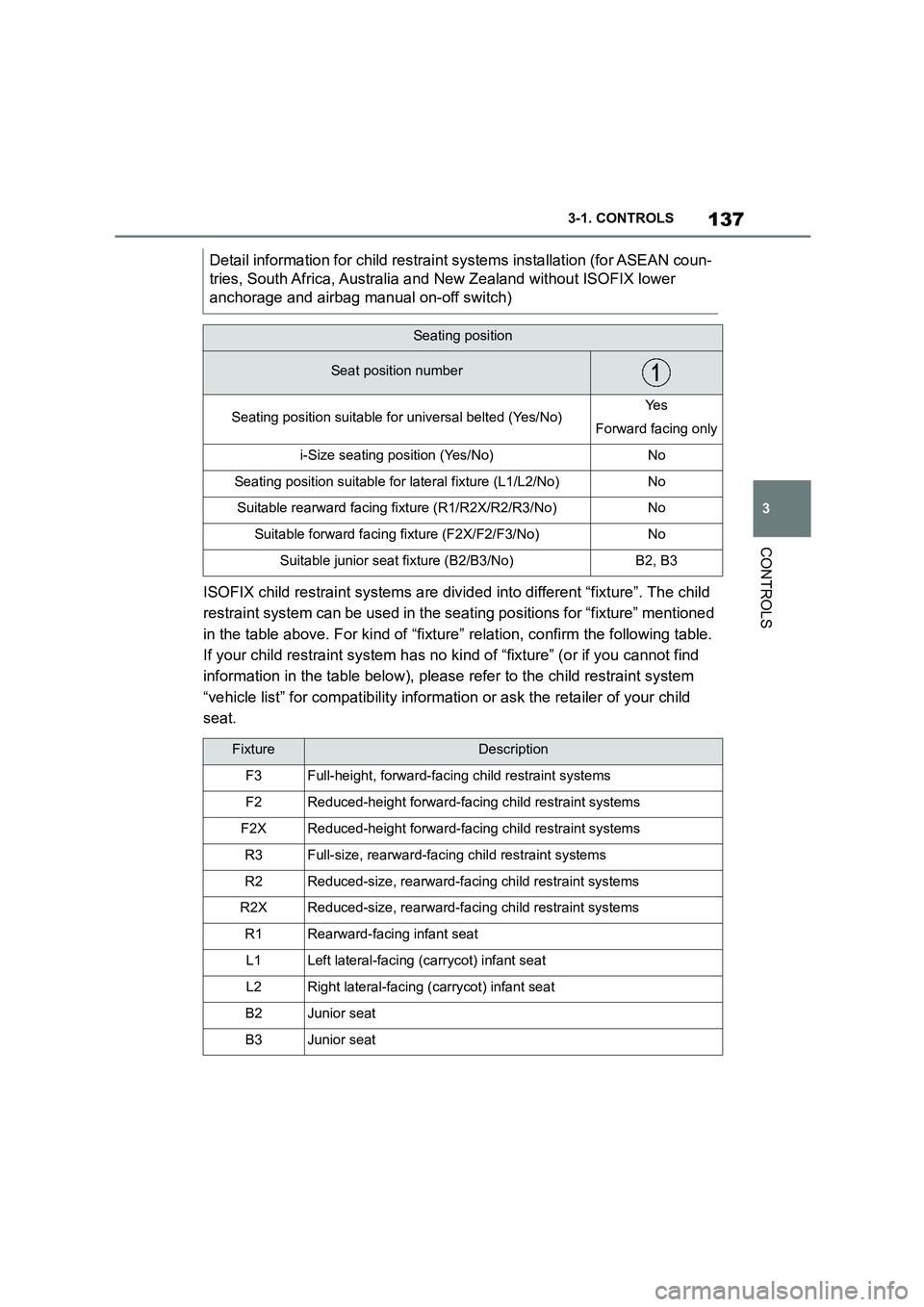
ISOFIX child restraint systems are divid ed into different “fixture”. The child
restraint system can be used in the se ating positions for “fixture” mentioned
in the table above. For kind of “fixtu re” relation, confirm the following table.
If your child restraint system has no ki nd of “fixture” (or if you cannot find
information in the table below), please refer to the child restraint system
“vehicle list” for compatib ility information or ask the retailer of your child
seat.
Detail information for chil d restraint systems installation (for ASEAN coun-
tries, South Africa, Australia and New Zealand without ISOFIX lower
anchorage and airbag manual on-off switch)
Seating position
Seat position number
Seating position suitable for universal belted (Yes/No)Ye s
Forward facing only
i-Size seating position (Yes/No)No
Seating position suitable for lateral fixture (L1/L2/No)No
Suitable rearward facing fixture (R1/R2X/R2/R3/No)No
Suitable forward facing fixture (F2X/F2/F3/No)No
Suitable junior seat fixture (B2/B3/No)B2, B3
FixtureDescription
F3Full-height, forward-faci ng child restraint systems
F2Reduced-height forward-facing child restraint systems
F2XReduced-height forward-facing child restraint systems
R3Full-size, rearward-facing child restraint systems
R2Reduced-size, rearward-facing child restraint systems
R2XReduced-size, rearward-facing child restraint systems
R1Rearward-facing infant seat
L1Left lateral-facing (carrycot) infant seat
L2Right lateral-facing (carrycot) infant seat
B2Junior seat
B3Junior seat
Page 141 of 498
139
3
3-1. CONTROLS
CONTROLS
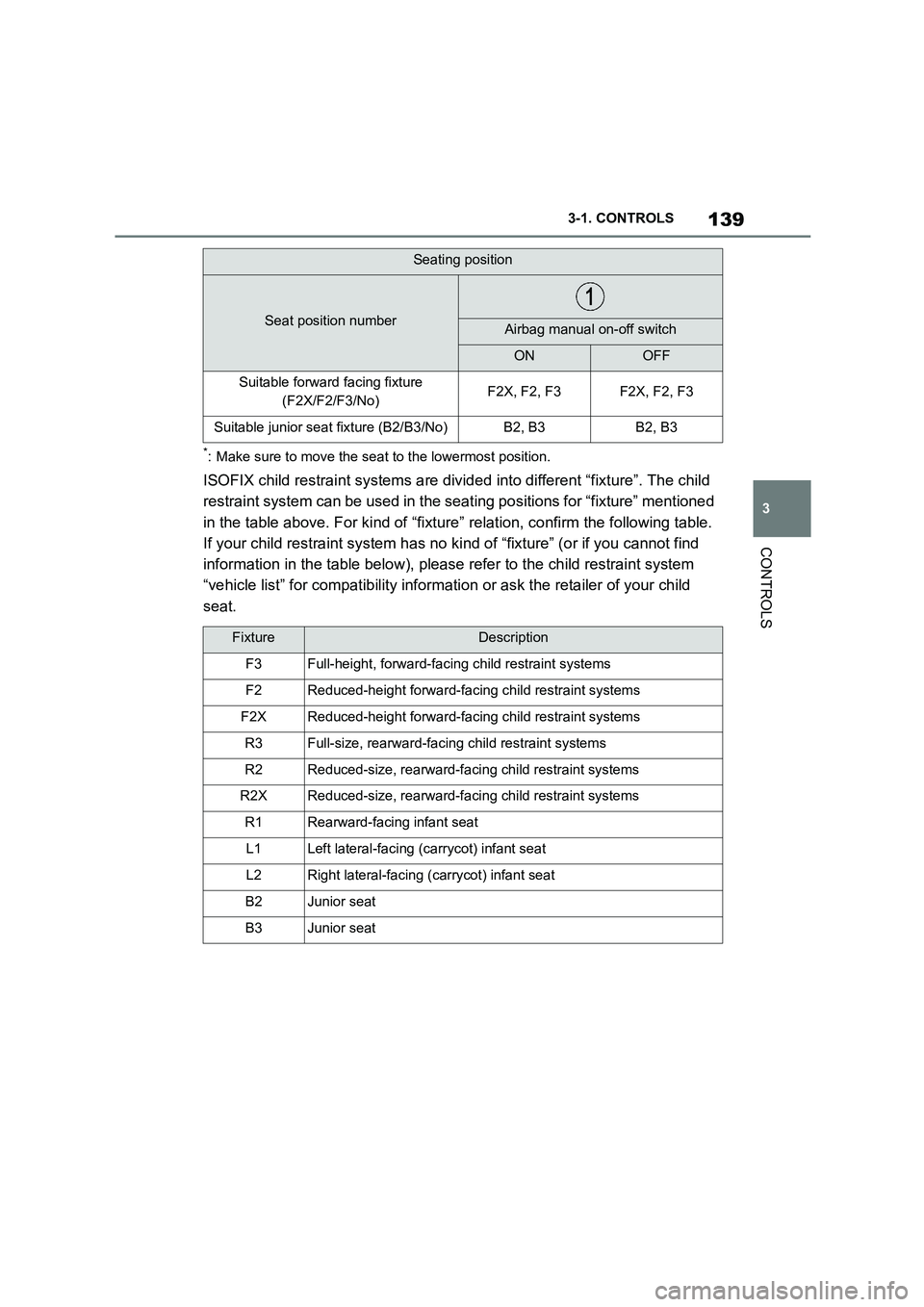
*: Make sure to move the seat to the lowermost position.
ISOFIX child restraint systems are divid ed into different “fixture”. The child
restraint system can be used in the se ating positions for “fixture” mentioned
in the table above. For kind of “fixtu re” relation, confirm the following table.
If your child restraint system has no ki nd of “fixture” (or if you cannot find
information in the table below), please refer to the child restraint system
“vehicle list” for compatib ility information or ask the retailer of your child
seat.
Suitable forward facing fixture
(F2X/F2/F3/No)F2X, F2, F3F2X, F2, F3
Suitable junior seat fixture (B2/B3/No)B2, B3B2, B3
FixtureDescription
F3Full-height, forward-faci ng child restraint systems
F2Reduced-height forward-facing child restraint systems
F2XReduced-height forward-facing child restraint systems
R3Full-size, rearward-facing child restraint systems
R2Reduced-size, rearward-facing child restraint systems
R2XReduced-size, rearward-facing child restraint systems
R1Rearward-facing infant seat
L1Left lateral-facing (carrycot) infant seat
L2Right lateral-facing (carrycot) infant seat
B2Junior seat
B3Junior seat
Seating position
Seat position numberAirbag manual on-off switch
ONOFF
Page 143 of 498
141
3
3-1. CONTROLS
CONTROLS
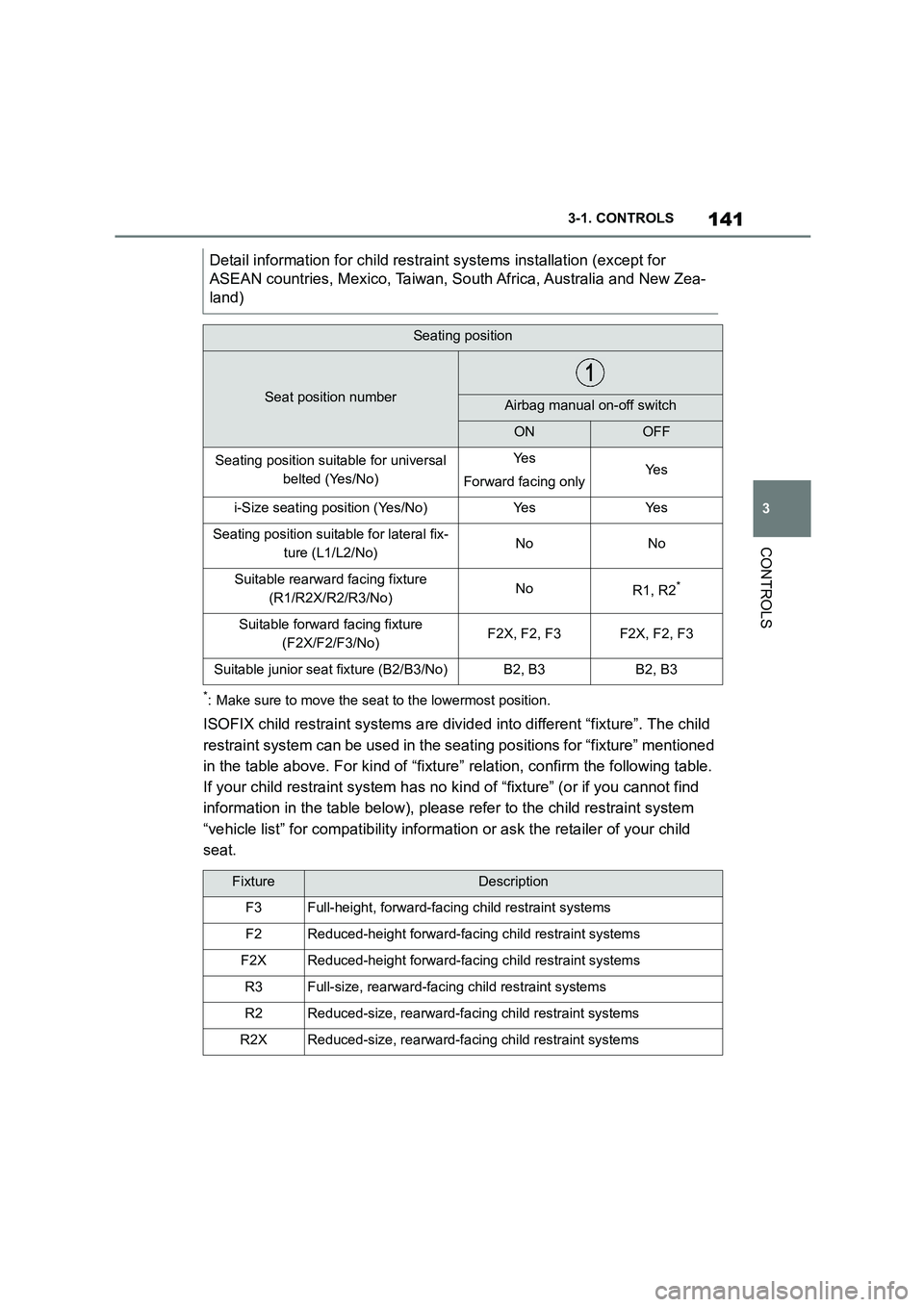
*: Make sure to move the seat to the lowermost position.
ISOFIX child restraint systems are divid ed into different “fixture”. The child
restraint system can be used in the se ating positions for “fixture” mentioned
in the table above. For kind of “fixtu re” relation, confirm the following table.
If your child restraint system has no ki nd of “fixture” (or if you cannot find
information in the table below), please refer to the child restraint system
“vehicle list” for compatib ility information or ask the retailer of your child
seat.
Detail information for ch ild restraint systems installation (except for
ASEAN countries, Mexico, Taiwan, So uth Africa, Australia and New Zea-
land)
Seating position
Seat position numberAirbag manual on-off switch
ONOFF
Seating position suitable for universal
belted (Yes/No)
Ye s
Forward facing onlyYe s
i-Size seating position (Yes/No)Ye sYe s
Seating position suitable for lateral fix-
ture (L1/L2/No)NoNo
Suitable rearward facing fixture
(R1/R2X/R2/R3/No)NoR1, R2*
Suitable forward facing fixture
(F2X/F2/F3/No)F2X, F2, F3F2X, F2, F3
Suitable junior seat fixture (B2/B3/No)B2, B3B2, B3
FixtureDescription
F3Full-height, forward-faci ng child restraint systems
F2Reduced-height forward-facing child restraint systems
F2XReduced-height forward-facing child restraint systems
R3Full-size, rearward-facing child restraint systems
R2Reduced-size, rearward-facing child restraint systems
R2XReduced-size, rearward-facing child restraint systems
Page 185 of 498
183
3
3-1. CONTROLS
CONTROLS
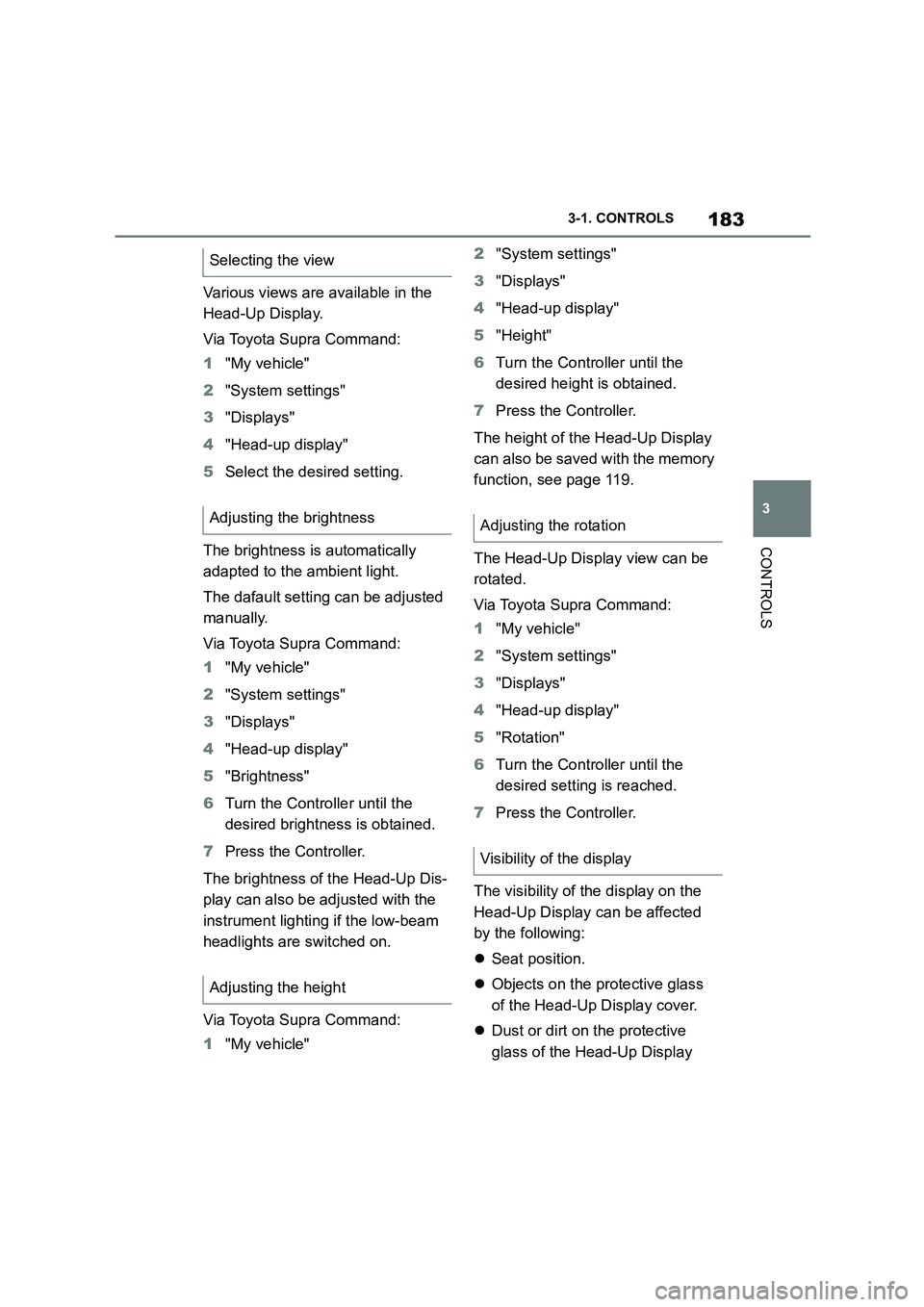
Various views are available in the
Head-Up Display.
Via Toyota Supra Command:
1 "My vehicle"
2 "System settings"
3 "Displays"
4 "Head-up display"
5 Select the desired setting.
The brightness is automatically
adapted to the ambient light.
The dafault setting can be adjusted
manually.
Via Toyota Supra Command:
1 "My vehicle"
2 "System settings"
3 "Displays"
4 "Head-up display"
5 "Brightness"
6 Turn the Controller until the
desired brightness is obtained.
7 Press the Controller.
The brightness of the Head-Up Dis-
play can also be adjusted with the
instrument lighting if the low-beam
headlights are switched on.
Via Toyota Supra Command:
1 "My vehicle"
2 "System settings"
3 "Displays"
4 "Head-up display"
5 "Height"
6 Turn the Controller until the
desired height is obtained.
7 Press the Controller.
The height of the Head-Up Display
can also be saved with the memory
function, see page 119.
The Head-Up Display view can be
rotated.
Via Toyota Supra Command:
1 "My vehicle"
2 "System settings"
3 "Displays"
4 "Head-up display"
5 "Rotation"
6 Turn the Controller until the
desired setting is reached.
7 Press the Controller.
The visibility of the display on the
Head-Up Display can be affected
by the following:
Seat position.
Objects on the protective glass
of the Head-Up Display cover.
Dust or dirt on the protective
glass of the Head-Up Display
Selecting the view
Adjusting the brightness
Adjusting the height
Adjusting the rotation
Visibility of the display