2022 TOYOTA COROLLA CROSS engine
[x] Cancel search: enginePage 427 of 612
4276-2. Using the interior lights
6
Interior features
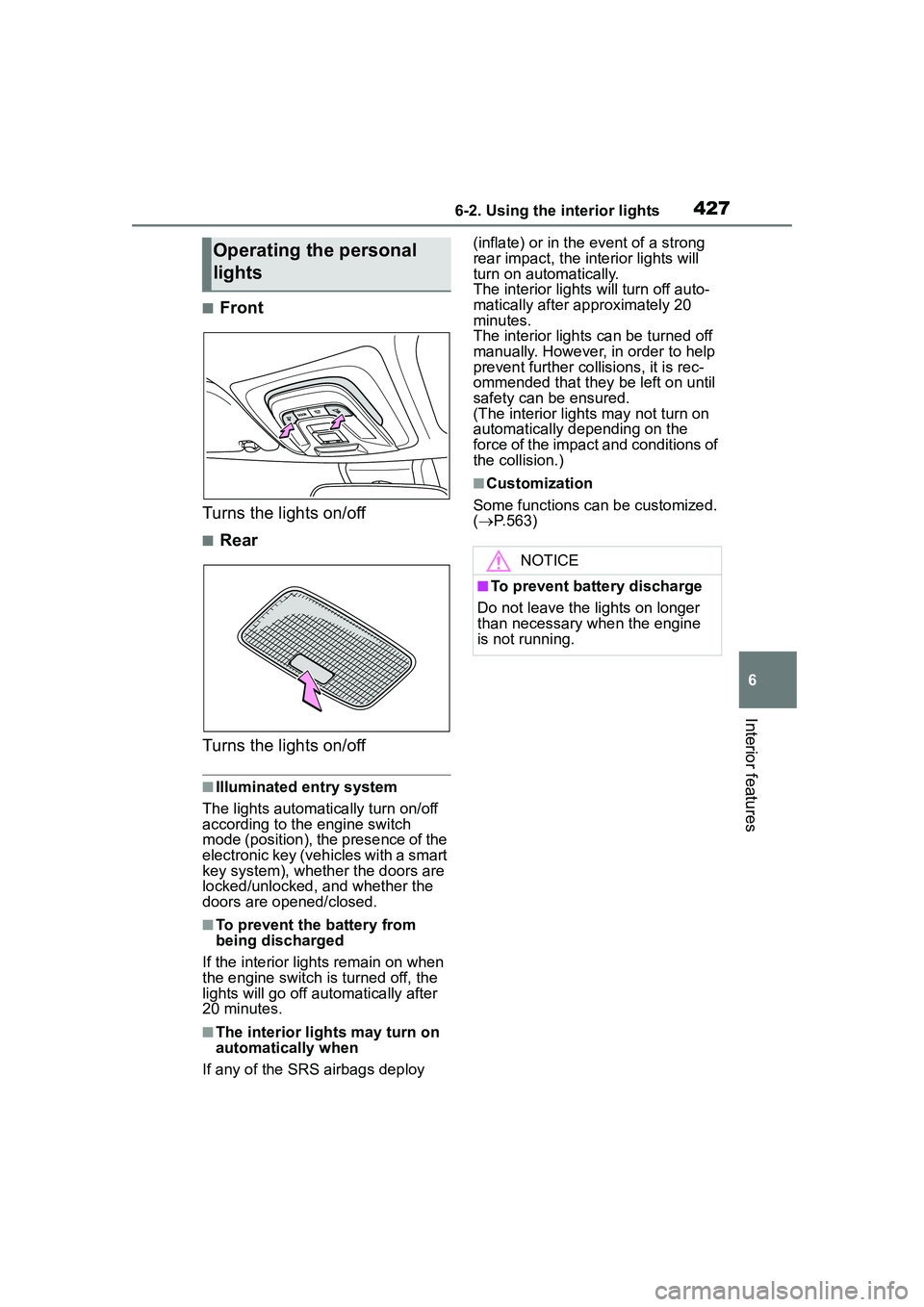
■Front
Turns the lights on/off
■Rear
Turns the lights on/off
■Illuminated entry system
The lights automatically turn on/off
according to the engine switch
mode (position), the presence of the
electronic key (vehicles with a smart
key system), whether the doors are
locked/unlocked, and whether the
doors are opened/closed.
■To prevent the battery from
being discharged
If the interior light s remain on when
the engine switch is turned off, the
lights will go off automatically after
20 minutes.
■The interior lights may turn on
automatically when
If any of the SRS airbags deploy (inflate) or in the event of a strong
rear impact, the interior lights will
turn on automatically.
The interior light
s will turn off auto-
matically after approximately 20
minutes.
The interior lights can be turned off
manually. However, in order to help
prevent further collisions, it is rec-
ommended that they be left on until
safety can be ensured.
(The interior lights may not turn on
automatically depending on the
force of the impact and conditions of
the collision.)
■Customization
Some functions can be customized.
( P.563)
Operating the personal
lights
NOTICE
■To prevent battery discharge
Do not leave the lights on longer
than necessary when the engine
is not running.
Page 433 of 612
4336-4. Other interior features
6
Interior features
6-4.Other interior features
Front: The USB charging port
are used to supply 2.1 A of elec-
tricity at 5 V to external devices.
Rear: The USB charging port
are used to supply 2.5 A (USB
Type-A port) or 3.0 A (USB
Type-C port) of electricity at 5 V
to external devices.
The USB charging port are for
charging only. They are not
designed for data transfer or
other purposes.
Depending on the external
device, it may not charge prop-
erly. Refer to the manual
included with the device before
using a USB charging port.
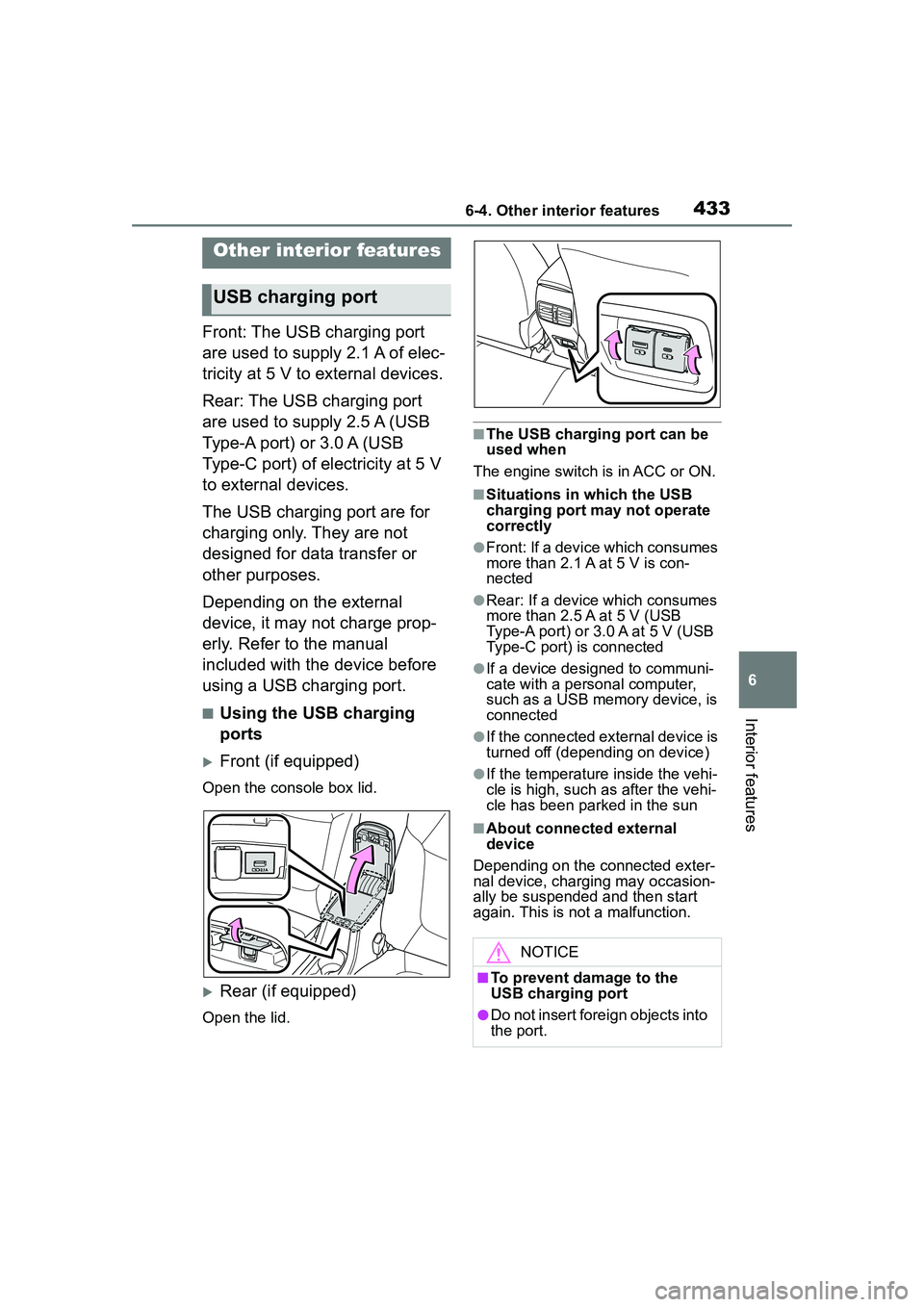
■Using the USB charging
ports
Front (if equipped)
Open the console box lid.
Rear (if equipped)
Open the lid.
■The USB charging port can be
used when
The engine switch is in ACC or ON.
■Situations in which the USB
charging port may not operate
correctly
●Front: If a device which consumes
more than 2.1 A at 5 V is con-
nected
●Rear: If a device which consumes
more than 2.5 A at 5 V (USB
Type-A port) or 3.0 A at 5 V (USB
Type-C port) is connected
●If a device designed to communi-
cate with a personal computer,
such as a USB memory device, is
connected
●If the connected external device is
turned off (depending on device)
●If the temperature inside the vehi-
cle is high, such as after the vehi-
cle has been parked in the sun
■About connected external
device
Depending on the connected exter-
nal device, charging may occasion-
ally be suspended and then start
again. This is not a malfunction.
Other interior features
USB charging port
NOTICE
■To prevent damage to the
USB charging port
●Do not insert foreign objects into
the port.
Page 434 of 612

4346-4. Other interior features
The power outlet can be used
for 12 V accessories that run on
less than 10 A.
Lift the lid while pulling up the
knob and open the power outlet
lid.
■The power outlet can be used
when
The engine switch is in ACC or ON.
■Using the power outlet
When the engine restarts after hav-
ing been stopped by the Stop &
Start system, the power outlets may
be temporarily unusable, but this is
not a malfunction.
■When turning the engine switch
off
Disconnect electrical devices with
charging functions, such as mobile
battery packs.
If such devices ar e left connected,
the engine switch may not be turned
off normally.
A portable device, such as a
smartphone or mobile battery,
can be charged by just placing it
on the charging area, provided
the device is compatible with the
NOTICE
●Do not spill water or other liq-
uids into the port.
●Do not apply excessive force to
or impact the USB charging
port.
●Do not disassemble or modify
the USB charging port.
■To prevent damage to exter-
nal devices
●Do not leave external devices in
the vehicle. The temperature
inside the vehicle may become
high, resulting in damage to an
external device.
●Do not push down on or apply
unnecessary force to an exter-
nal device or the cable of an
external device while it is con-
nected.
■To prevent battery discharge
Do not use the USB charging port
for a long period of time with the
engine stopped.
Power outlet
NOTICE
■To prevent the fuse from
being blown
Do not use an accessory that
uses more than 12 V 10 A.
■To avoid damaging the power
outlet
Close the power outlet lid when
the power outlet is not in use.
Foreign objects or liquids that
enter the power outlet may cause
a short circuit.
■To prevent the battery from
being discharged
Do not use the power outlet lon-
ger than necessary when the
engine is not running.
Wireless charger (if
equipped)
Page 435 of 612
4356-4. Other interior features
6
Interior features
Qi wireless charging standard
created by the Wireless Power
Consortium.
The wireless charger cannot be
used with a portable device that
is larger than the charging area.
Additionally, depending on the
portable device, the wireless
charger may not operate prop-
erly. Refer to the operation man-
ual of the portable device.
■The “Qi” logo
The “Qi” logo is a trademark of
the Wireless Power Consortium.
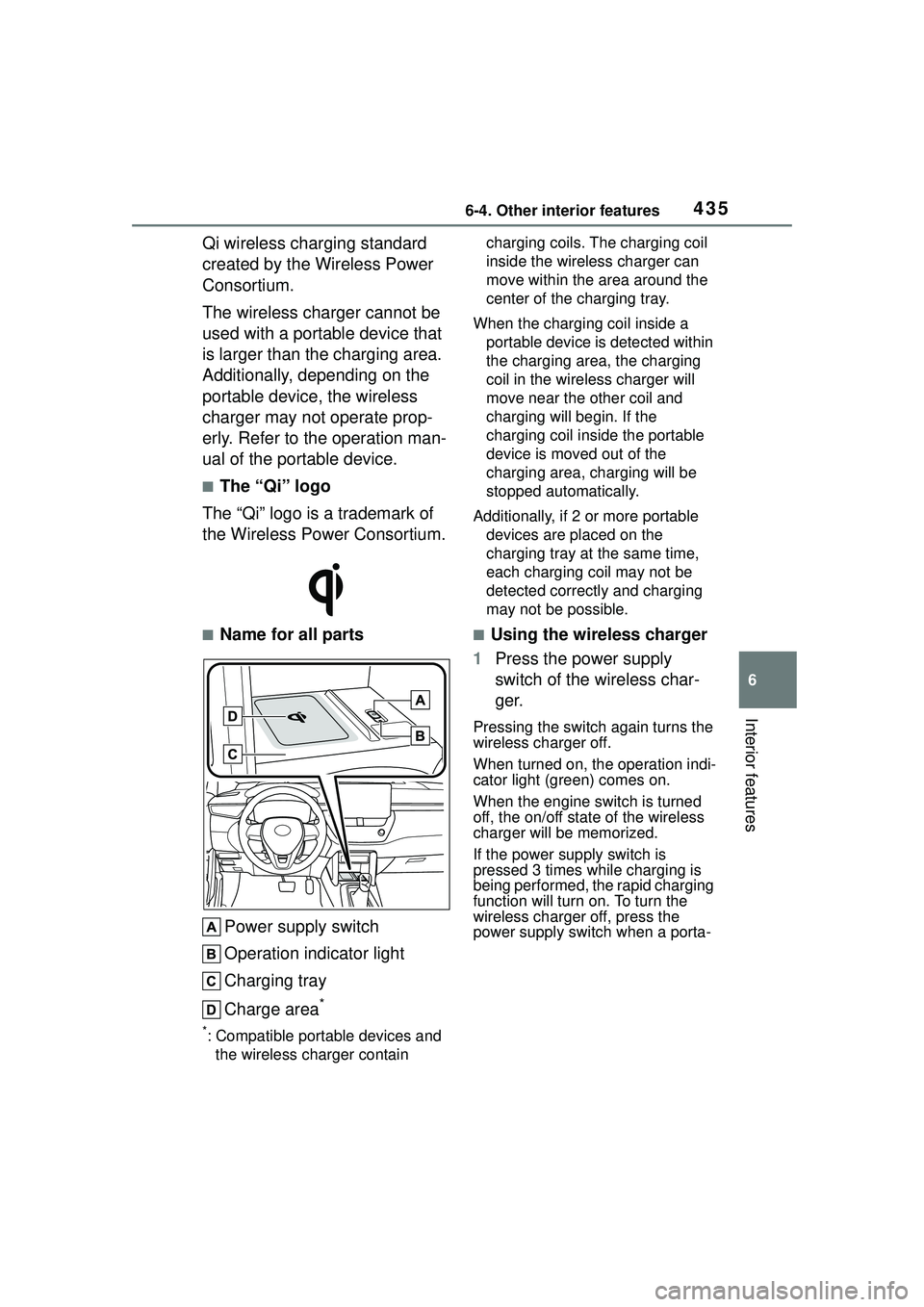
■Name for all parts
Power supply switch
Operation indicator light
Charging tray
Charge area
*
*: Compatible portable devices and the wireless charger contain charging coils. The charging coil
inside the wireless charger can
move within the area around the
center of the charging tray.
When the charging coil inside a portable device is detected within
the charging area, the charging
coil in the wirel ess charger will
move near the other coil and
charging will begin. If the
charging coil inside the portable
device is moved out of the
charging area, charging will be
stopped automatically.
Additionally, if 2 or more portable devices are placed on the
charging tray at the same time,
each charging coil may not be
detected correctly and charging
may not be possible.
■Using the wireless charger
1 Press the power supply
switch of the wireless char-
ger.
Pressing the switch again turns the
wireless charger off.
When turned on, the operation indi-
cator light (green) comes on.
When the engine switch is turned
off, the on/off state of the wireless
charger will be memorized.
If the power supply switch is
pressed 3 times while charging is
being performed, the rapid charging
function will turn on. To turn the
wireless charger off, press the
power supply switch when a porta-
Page 438 of 612

4386-4. Other interior features
■The wireless charger can be
operated when
The engine switch is in ACC or ON.
■Portable devices that can be
charged
●Portable devices compatible with
the Qi wireless charging standard can be charged by the wireless
charger. Howeve
r, compatibility
with all devices which meet the Qi
wireless charging standard is not
guaranteed.
●The wireless charger is designed
to supply low powe r electricity (5
W or less) to a cellular phone,
smartphone, or other portable
Operation indicator lightSuspected causeMeasure
Continuously blinks 1
time per second
Communication mal-
function between the
wireless charger and
smart key system
If the engine is running,
stop the engine and
then restart it.
If the engine switch is in
ACC, start the engine.
( P.163)
Continuously flashes 3
times (orange)
Foreign matter detected
If a metallic foreign
object is detected in the
charge area, the over-
heat prevention func-
tion of the charging coil
will operate
Remove the foreign
object from the charge
area.
Portable device not
aligned correctly
If the charging coil of a
portable device is not
properly positioned on
the charging area, the
overheat prevention
function of the charging
coil will operate
Remove the portable
device from the
charging tray, check that
the operation indicator
light changes back to
green, and then place
the portable device so
that it is near the center
of the charging tray.
Also, if a case or cover
is installed to the porta-
ble device, remove it.
Continuously flashes 4
times (orange)
Temperature inside
wireless charger
exceeded a certain
amount
Stop charging, remove
the portable device from
the charging tray, and
wait for the temperature
to decrease before
attempting to begin
charging again.
Page 439 of 612

4396-4. Other interior features
6
Interior features
device.
●However, portable devices, such
as the following, can be charged
with more than 5 W.
• 7.5 W charging compatible
iPhones can be charged at 7.5 W
or less.
• Portable devices which conform to
WPC Ver 1.2.4 can be charged at
10 W or less.
■Using the smart key system
During charging, when the smart
key system search es for an elec-
tronic key, charging may be tempo-
rarily suspended.
■If a cover or accessory is
attached to the portable device
Do not charge a portable device if a
cover or accessory which is not Qi
compatible is attached. Depending
on the type of cover and/or acces-
sory attached, it may not be possi-
ble to charge the portable device. If
the portable device is placed on the
charging area and does not charge,
remove the cover and/or accesso-
ries.
■If interference is heard in AM
radio broadcasts while
charging
●Turn off the wireless charger and
check if the noise is reduced. If
noise is reduced, press and hold
the power supply switch of the
wireless charger for 2 seconds.
The frequency of the wireless
charger is changed and noise may
be reduced. When the frequency
is changed, the operation indica-
tor light will blink (orange) 2 times.
●Rapid charging for iPhones is per-
formed using a specific radio
wave frequency.
Depending on the version of iOS
installed, while the frequency is
being changed, rapid charging may
not be performed.
■Charging precautions
While charging, the wireless charger
and the portable device will become
warm. This is not a malfunction.
If a portable device becomes warm
while charging and charging stops
due to the protection function of the
portable device, wait until the porta-
ble device cools down and charge it
again.
Also, to decrease the temperature
inside the wireless charger, a fan
may operate. This does not indicate
a malfunction.
■Sound generated during opera-
tion
Operation sounds may be heard
when the power supply switch is
pressed to turn the wireless charger
on, when the engine switch is
pressed to change to ACC or ON
while the wireless charger is on, or
when a portable device is being
detected. This does not indicate a
malfunction.
■Situations in which the wireless
charger may not operate cor-
rectly
In the following situations, the wire-
less charger may not operate cor-
rectly:
●When a portable device is fully
charged
●When a portable device is being
charged by a wired connection
●When there is a foreign object
between the charging area and
portable device
●When the temperature of a porta-
ble device becomes high while
charging
●When the temperature near the
charging tray is 95°F (35°C) or
more due to being in direct sun-
light, etc.
●When a portable device is placed
with its charging surface facing up
●When a portable device is not
Page 442 of 612
4426-4. Other interior features
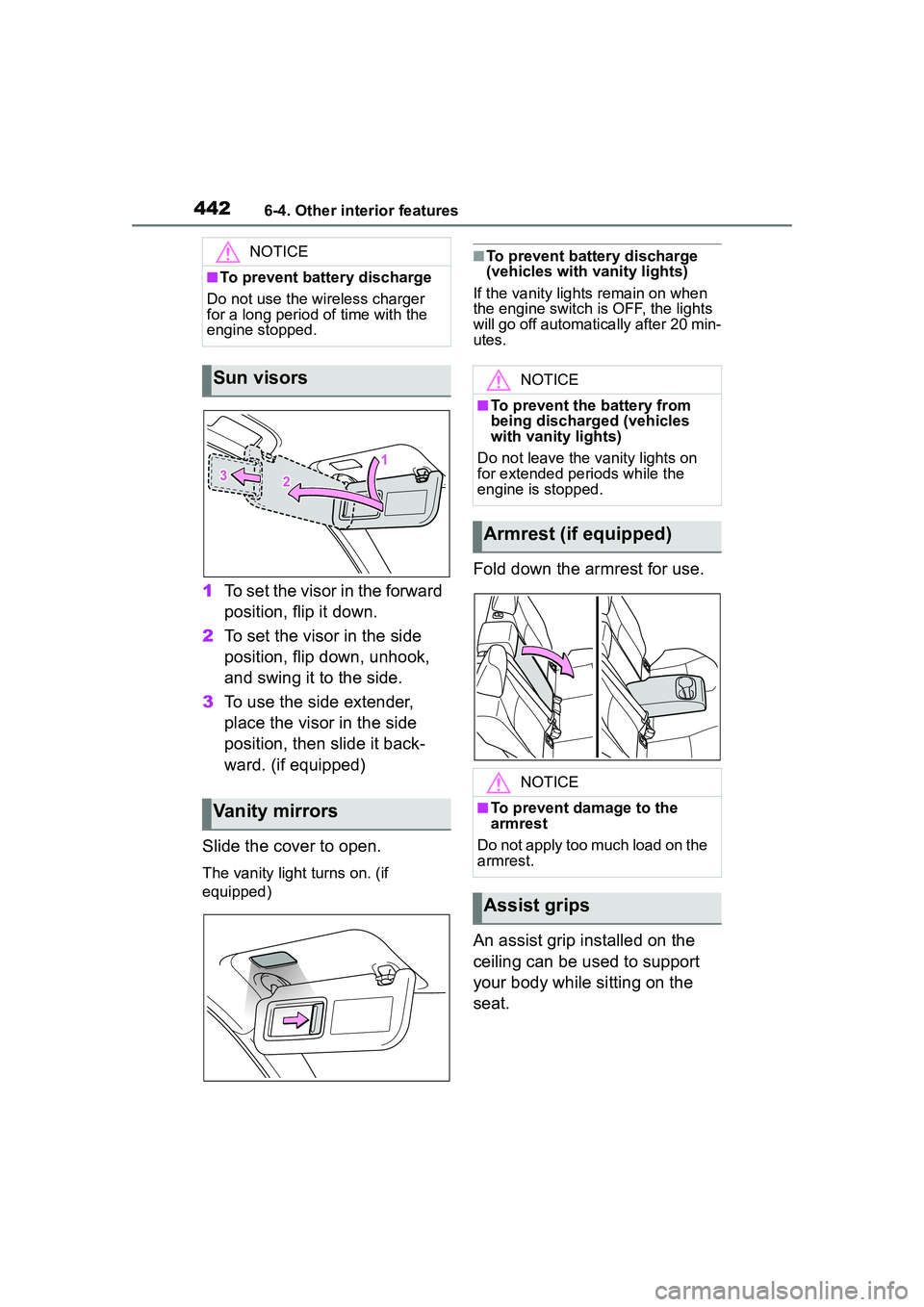
1To set the visor in the forward
position, flip it down.
2 To set the visor in the side
position, flip down, unhook,
and swing it to the side.
3 To use the side extender,
place the visor in the side
position, then slide it back-
ward. (if equipped)
Slide the cover to open.
The vanity light turns on. (if
equipped)
■To prevent battery discharge
(vehicles with vanity lights)
If the vanity lights remain on when
the engine switch is OFF, the lights
will go off automatically after 20 min-
utes.
Fold down the armrest for use.
An assist grip installed on the
ceiling can be used to support
your body while sitting on the
seat.
NOTICE
■To prevent battery discharge
Do not use the wireless charger
for a long period of time with the
engine stopped.
Sun visors
Vanity mirrors
NOTICE
■To prevent the battery from
being discharged (vehicles
with vanity lights)
Do not leave the vanity lights on
for extended periods while the
engine is stopped.
Armrest (if equipped)
NOTICE
■To prevent damage to the
armrest
Do not apply too much load on the
armrest.
Assist grips
Page 445 of 612

445
7
7
Maintenance and care
Maintenance and care
.7-1. Maintenance and careCleaning and protecting the vehicle exterior .......... 446
Cleaning and protecting the vehicle interior ........... 449
7-2. Maintenance Maintenance requirements.................................. 452
General maintenance.. 453
Emission inspection and maintenance (I/M) pro-
grams ........................ 456
7-3. Do-it-yourself mainte- nance
Do-it-yourself service pre- cautions ..................... 457
Hood ........................... 459
Positioning a floor jack .................................. 460
Engine compartment ... 461
Tires ............................ 468
Tire inflation pressure.. 478
Wheels ......... ...............480
Air conditioning filter .... 482
Wireless remote con- trol/electronic key battery.................................. 483
Checking and replacing fuses.......................... 486
Headlight aim .............. 488
Light bulbs................... 489