2022 TOYOTA COROLLA CROSS engine
[x] Cancel search: enginePage 294 of 612

2945-2. Basic information before operation
1Press the “MENU” button.
2 Select “Display”.
3 Select the desired items to
be set.
Select to turn the screen off.
To turn it on, press any but- ton.
Select to turn day mode
on/off. (
P.294)
Select to adjust the screen
display. ( P.294)
Select to adjust the camera
display.
When the screen is viewed through
polarized sunglasses, a rainbow
pattern may appear on the screen
due to optical char acteristics of the
screen. If this is disturbing, please
operate the screen without polarized
sunglasses.
Depending on the position of the
headlight switch, the screen
changes to day or night mode.
This feature is available when
the headlight is switched on.
Select “Day Mode”.
If the screen is set to day mode with
the headlight switch turned on, this
condition is memorized even with
the engine turned off.
The contrast and brightness of
the screen can be adjusted
according to the brightness of
your surroundings.
1 Select “General” or “Cam-
era”.
2 Select the desired item.
“Display (General)” screen only:
Screen adjustment
The contrast and brightness
of the screen display and
the image of the camera dis-
play can be adjusted. The
screen can also be turned
off, and/or changed to either
day or night mode.
(For information regarding
audio/visual screen adjust-
ment: P.329)
Displaying the screen
adjustment screen
Changing between day
and night mode
Adjusting the con-
trast/brightness
Page 302 of 612

3025-3. Connectivity settings
4Select the desired connec-
tion.
“Device Info”: Select to confirm and
change the Bluetooth® device infor-
mation. ( P.304)
When another Bluetooth®
device is connected
To disconnect the Bluetooth®
device, select “Yes”.
5 Check that a confirmation
screen is displayed when the
connection is complete.
If an error message is displayed,
follow the guidance on the screen
to try again.
●It may take time if the device con-
nection is carried out during Blue-
tooth
® audio playback.
●Depending on the type of Blue-
tooth® device being connected, it
may be necessary to perform
additional steps on the device.
●When disconnecting a Bluetooth®
device, it is recommended to dis-
connect using the system.
■Connecting a Bluetooth®
device in a different way
(from phone top screen)
P. 3 6 9
■Connecting a Bluetooth®
device in a different way
(from phone setup screen)
P.382
■Connecting a Bluetooth®
device in a different way
(from Bluetooth
® audio
screen)
P.345
■Auto connection mode
To turn auto connection mode
on, set “Bluetooth Power” to on.
( P.305) Leave the Bluetooth
®
device in a location where the
connection can be established.
When the engine switch is in
ACC or ON, the system
searches for a nearby regis-
tered device.
The system will connect with
the registered device that was
last connected, if it is nearby.
When automatic connection
priority is set to on and there
is more than one registered
Bluetooth
® phone available,
the system will automatically
connect to the Bluetooth
®
phone with the highest prior-
ity. ( P.305)
■Connecting manually
When the auto connection has
failed or “Bluetooth Power” is
turned off, it is necessary to con-
nect the Bluetooth
® device man-
ually.
Page 303 of 612

3035-3. Connectivity settings
5
Audio
1Display the Bluetooth® set-
tings screen. ( P.300)
2 Follow the steps in “Connect-
ing a Bluetooth
® device” from
step 2. (P.301)
■Reconnecting the Blue-
tooth
® phone
If a Bluetooth
® phone is discon-
nected due to poor reception
from the Bluetooth
® network
when the engine switch is in
ACC or ON, the system auto-
matically reconnects the Blue-
tooth
® phone.
Up to 5 Bluetooth
® devices can
be registered.
Bluetooth
® compatible phones
(HFP) and audio players (AVP)
can be registered simultane-
ously.
This operation cannot be per-
formed while driving.
1 Display the Bluetooth
® set-
tings screen. ( P.300)
2 Select “Add New Device”.
When another Bluetooth®
device is connected
To disconnect the Bluetooth®
device, select “Yes”.
When 5 Bluetooth® devices
have already been registered
A registered device needs to be
replaced. Select “Yes”, and select
the device to be replaced.
3 Follow the steps in “Register-
ing a Bluetooth
® phone for
the first time” from step 5.
( P.296)
This operation cannot be per-
formed while driving.
1 Display the Bluetooth
® set-
tings screen. ( P.300)
2 Select “Remove Device”.
3 Select the desired device.
4 Select “Yes” when the confir-
mation screen appears.
5 Check that a confirmation
screen is displayed when the
operation is complete.
When deleting a Bluetooth® phone,
the contact data will be deleted at
the same time.
Registering a Bluetooth®
device
Deleting a Bluetooth®
device
Page 306 of 612

3065-3. Connectivity settings
matically connected when the
engine switch is in ACC or ON.
When “Bluetooth Power” is off:
The Bluetooth
® device is dis-
connected, and the system will
not connect to it next time.
While driving, the auto connection
state can be changed from off to on,
but cannot be changed from on to
off.
The automatic connection prior-
ity of the registered Bluetooth
®
devices can be changed.
1 Select “Preferred Device Set-
tings”.
2 Select the desired item to be
set.
Select to set automatic con-
nection priority on/off.
Select to change the auto-
matic connection priority of
the registered Bluetooth
®
phones. ( P.306)
Select to change the auto-
matic connection priority of
the registered Bluetooth
® audio players. (
P.306)
Select to reset all setup
items.
■Changing Bluetooth®
device automatic connec-
tion priority
1 Select “Preferred Phones” or
“Preferred Audio Players”.
2 Select the desired Bluetooth
®
device and select “Move Up”
or “Move Down” to change
the preferred order.
A newly registered Bluetooth®
device will automatically be given
the highest automatic connection
priority.
1 Select “System Information”.
Setting automatic connec-
tion priority
Editing the system infor-
mation
Page 327 of 612
3275-5. Using the audio/visual system
5
Audio
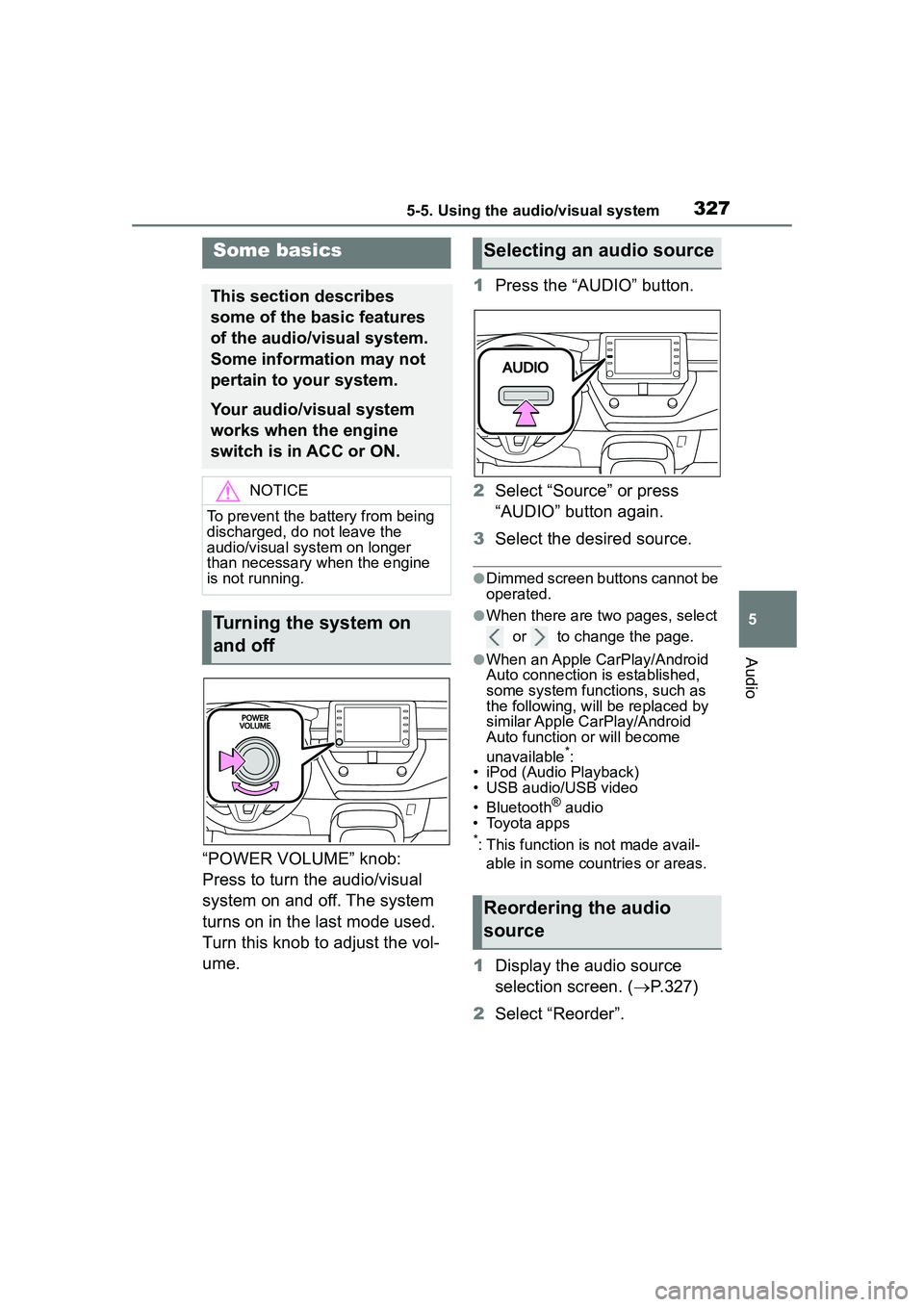
“POWER VOLUME” knob:
Press to turn the audio/visual
system on and off. The system
turns on in the last mode used.
Turn this knob to adjust the vol-
ume.1
Press the “AUDIO” button.
2 Select “Source” or press
“AUDIO” button again.
3 Select the desired source.
●Dimmed screen buttons cannot be
operated.
●When there are two pages, select
or to change the page.
●When an Apple CarPlay/Android
Auto connection is established,
some system functions, such as
the following, will be replaced by
similar Apple CarPlay/Android
Auto function or will become
unavailable
*:
• iPod (Audio Playback)
• USB audio/USB video
• Bluetooth
® audio
• Toyota apps
*: This function is not made avail-
able in some countries or areas.
1 Display the audio source
selection screen. ( P.327)
2 Select “Reorder”.
Some basics
This section describes
some of the basic features
of the audio/visual system.
Some information may not
pertain to your system.
Your audio/visual system
works when the engine
switch is in ACC or ON.
NOTICE
To prevent the battery from being
discharged, do not leave the
audio/visual system on longer
than necessary when the engine
is not running.
Turning the system on
and off
Selecting an audio source
Reordering the audio
source
Page 343 of 612

3435-7. Media operation
5
Audio●Depending on the Bluetooth®
device that is connected to the
system, the music may start play-
ing when selectin g while it is
paused. Conversely, the music
may pause when selecting
while it is playing.
●In the following conditions, the
system may not function:
• The Bluetooth
® device is turned
off.
• The Bluetooth
® device is not con-
nected.
• The Bluetooth
® device has a low
battery.
●When using the Bluetooth® audio
and Wi-Fi® Hotspot functions at
the same time, the following prob-
lems may occur:
• It may take longer than normal to
connect to the Bluetooth
® device.
• The sound may cut out.
●It may take time to connect the phone when Bluetooth
® audio is
being played.
●For operating the portable player,
see the instruction manual that
comes with it.
●If the Bluetooth® device is discon-
nected due to poor reception from
the Bluetooth
® network when the
engine switch is in ACC or ON,
the system automatically recon-
nects the portable player.
●If the Bluetooth® device is discon-
nected on purpose, such as it was
turned off, this does not happen.
Reconnect the portable player
manually.
●Bluetooth® device information is
registered when the Bluetooth®
device is connected to the Blue-
tooth
® audio system. When selling
or disposing of the vehicle,
remove the Bluetooth
® audio
information from the system.
( P.322)
●In some situations, sound output
via the Bluetooth® audio system
may be out of sync with the con-
nected device or output intermit-
tently.
Bluetooth® audio
The Bluetooth® audio sys-
tem enables users to enjoy
listening to music that is
played on a portable player
on the vehicle speakers via
wireless communication.
This audio/visual system
supports Bluetooth
®, a wire-
less data system capable of
playing portable audio
music without cables. If
your device does not sup-
port Bluetooth
®, the Blue-
tooth
® audio system will not
function.
WARNING
●Do not operate the player’s con-
trols or connect to the Blue-
tooth
® audio system while
driving.
Page 358 of 612
3585-11. Voice command system operation
5-11.Voice command system operation
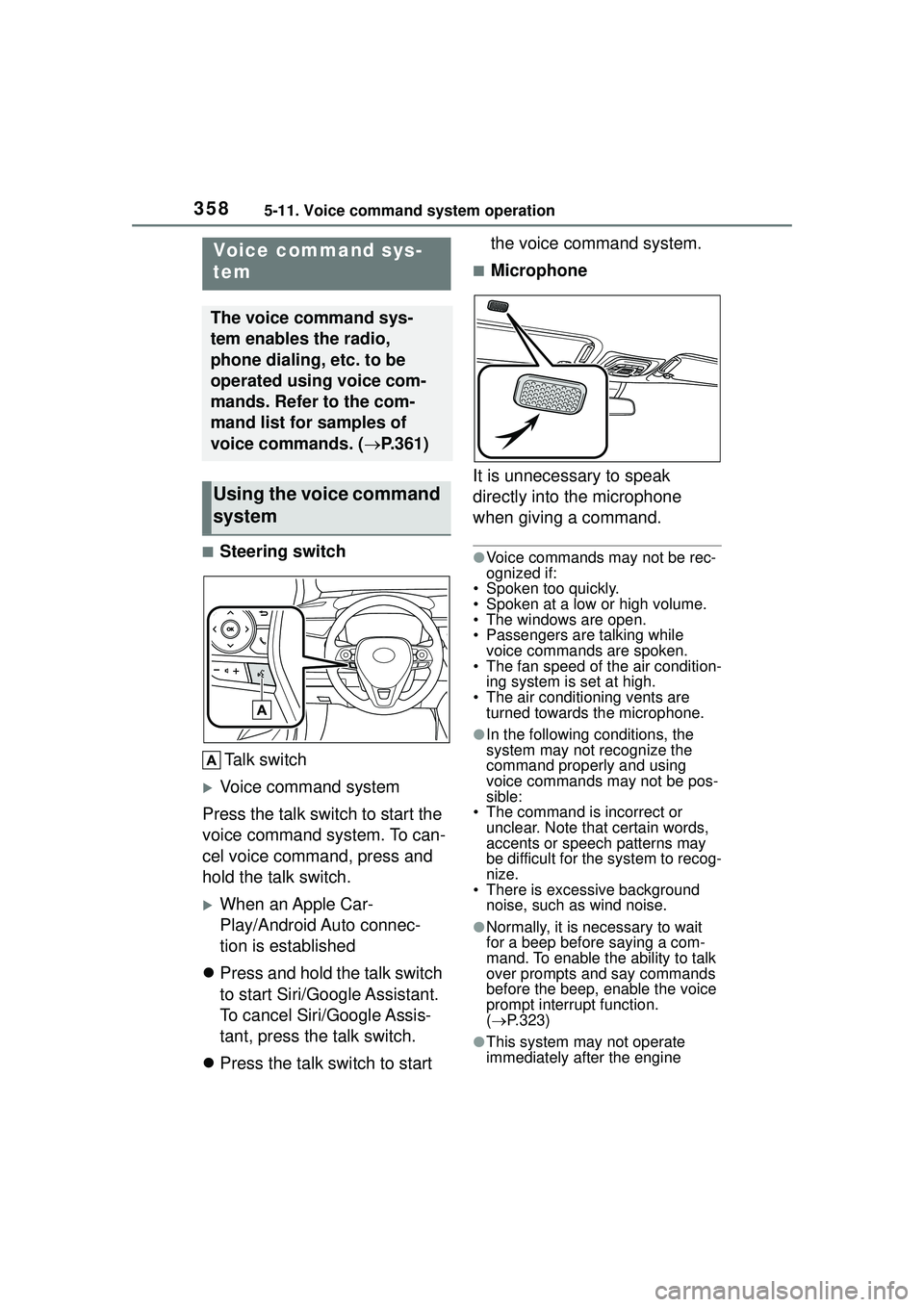
■Steering switchTalk switch
Voice command system
Press the talk switch to start the
voice command system. To can-
cel voice command, press and
hold the talk switch.
When an Apple Car-
Play/Android Auto connec-
tion is established
Press and hold the talk switch
to start Siri/Google Assistant.
To cancel Siri/Google Assis-
tant, press the talk switch.
Press the talk switch to start the voice command system.
■Microphone
It is unnecessary to speak
directly into the microphone
when giving a command.
●Voice commands may not be rec-
ognized if:
• Spoken too quickly.
• Spoken at a low or high volume.
• The windows are open.
• Passengers are talking while voice commands are spoken.
• The fan speed of the air condition-
ing system is set at high.
• The air conditioning vents are turned towards the microphone.
●In the following conditions, the
system may not recognize the
command properly and using
voice commands may not be pos-
sible:
• The command is incorrect or unclear. Note that certain words,
accents or speech patterns may
be difficult for the system to recog-
nize.
• There is excessive background
noise, such as wind noise.
●Normally, it is necessary to wait
for a beep before saying a com-
mand. To enable the ability to talk
over prompts and say commands
before the beep, enable the voice
prompt interrupt function.
( P.323)
●This system may not operate
immediately after the engine
Voice command sys-
tem
The voice command sys-
tem enables the radio,
phone dialing, etc. to be
operated using voice com-
mands. Refer to the com-
mand list for samples of
voice commands. ( P.361)
Using the voice command
system
Page 387 of 612

3875-14. Phone settings
5
Audio
Backed-up contact data (vCard
formatted) can be transferred
from USB device or Bluetooth
®
phone to this system.
1 Connect a USB device.
( P.328)
2 Select “Transfer Contacts
from Device”.
3 Select “From USB”.
4 Select “USB 1” or “USB 2”
when the multiple USB
devices are connected. If a
USB device is connected,
skip this procedure.
5 Select “Replace Contacts” or
“Add Contact”. If the contact
is already registered, skip
this procedure.
“Replace Contacts”: Select to trans-
fer the contact from the connected
USB device or Bluetooth
® phone
and replace the current one.
“Add Contact”: Select to transfer
the desired contact data from the
connected USB device or Blue-
tooth
® phone to add to the current
one.
6 Select a desired file from
vCard file list.
7 Check that a confirmation
screen is displayed when the
operation is complete.
●Depending on the type of Blue-
tooth® phone used and number of
files, it may take time to display
vCard file lists and download con-
tacts.
●Downloading may not complete
correctly in the following cases:
• If the engine switch is turned off
during downloading.
• If the USB device or Bluetooth
®
phone is removed before down-
loading is complete.
New contact data can be regis-
tered.
Up to 4 numbers per person can
be registered. For PBAP com-
patible Bluetooth
® phones, this
function is available when “Auto-
matic Transfer” is set to off.
( P.384)
1 Select “New Contact”.
2 Enter the name and select
“OK”.
3 Enter the phone number and
select “OK”.
4 Select the phone type for the
phone number.
5 To add another number to
this contact, select “Yes”.
■Registering a new contact
in a different way (from the
call history screen)
1 Display the phone top
screen. ( P.367)
2 Select “History” and select a
contact not yet registered in
the contact list.
3 Select “Add to Contacts”.
4 Follow the steps in “Register-
ing a new contact to the con-
From USB device
Registering a new contact
to the contacts list