2022 TOYOTA COROLLA CROSS torque
[x] Cancel search: torquePage 94 of 612

942-1. Instrument cluster
audio source or track on the
meter using the meter control
switches.
This menu icon can be set to be
displayed/not displayed in .
■Drive information
Displays drive information such as
the following:
Drive information type
Drive information items
Displays the following depend-
ing on which drive information
type and drive information items
were selected in . ( P.94)
After start
• Distance: Displays the distance
driven since engine start
• Elapsed time: Displays the elapsed time since engine start
• Average vehicle speed: Displays the average vehicle speed since
engine start
After reset
• Distance: Displays the distance
driven since the display was reset
*
• Elapsed time: Displays the
elapsed time since the display
was reset
*
• Average vehicle speed: Displays the average vehicle speed since
the display was reset
*
*
: To reset, display the desired item and press and hold the
meter control switch.
■Tire pressure
P.470
■AWD Control (if equipped)
Torque distribution display
Displays the drive status of each
wheel in 6 steps from 0 to 5.
■Meter display settings that
can be changed
Language
Select to change the language dis-
played.
Units
Select to change the units of mea-
sure displayed.
Speedometer display (7-inch
Vehicle information dis-
play
Settings display
Page 269 of 612

2694-5. Using the driving support systems
4
Driving■ABS (Anti-lock Brake Sys-
tem)
Helps to prevent wheel lock
when the brakes are applied
suddenly, or if the brakes are
applied while driving on a slip-
pery road surface
■Brake assist
Generates an increased level of
braking force after the brake
pedal is depressed when the
system detects a panic stop sit-
uation
■VSC (Vehicle Stability Con-
trol)
Helps the driver to control skid-
ding when swerving suddenly or
turning on slippery road sur-
faces.
■Enhanced VSC (Enhanced
Vehicle Stability Control)
Provides cooperative control of
the ABS, TRAC, VSC and EPS.
Helps to maintain directional
stability when swerving on slip-
pery road surfaces by con-
trolling steering performance.
■TRAC (Traction Control)
Helps to maintain drive power
and prevent the drive wheels
from spinning when starting the
vehicle or accelerating on slip-
pery roads
■Active Cornering Assist
(ACA)
Helps to prevent the vehicle
from drifting to the outer side by
performing inner wheel brake
control when attempting to
accelerate while turning
■Hill-start assist control
Helps to reduce the backward
movement of the vehicle when
starting on an uphill
■EPS (Electric Power Steer-
ing)
Employs an electric motor to
reduce the amount of effort
needed to turn the steering
wheel.
■Dynamic Torque Control
AWD system (AWD models)
Automatically controls the drive
system such as to front-wheel
drive or AWD (all wheel drive)
according to various running
Driving assist systems
To keep driving safety and
performance, the following
systems operate automati-
cally in response to various
driving situations. Be
aware, however, that these
systems are supplementary
and should not be relied
upon too heavily when oper-
ating the vehicle.
Summary of the driving
assist systems
Page 521 of 612
5218-2. Steps to take in an emergency
8
When trouble arises
When replacing tires on a vehi-
cle with wheel lock nuts, use the
following procedures to remove
and install the wheel lock nuts.
The wheel lock key is stored in
the tray inside the luggage com-
partment. Always return the
wheel lock key to its original
position after use, so that it does
not get lost. (P.519)
■Removal
For ease of removal, the wheel
lock nut should always be the
first one loosened.
1 Place the wheel lock key on
top of the wheel lock nut,
turning until the wheel lock
key and wheel lock nut pat-
terns engage.
2 Place the wheel nut wrench
on the wheel lock key, and
while applying pressure on
the wheel lock key, loosen
the wheel lock nut.
■Installation
For ease of installation, the
wheel lock nut should always be
the last one tightened.
1 By hand, install a wheel lock
nut on the wheel to be
installed.
2 Place the wheel lock key on
top of the wheel lock nut,
turning until the wheel lock
key and wheel lock nut pat-
terns engage.
3 Place the wheel nut wrench
on the wheel lock key, and
while applying pressure on
the wheel lock key, tighten
the wheel lock nut to the rec-
ommended torque.
WARNING
●Do not raise the vehicle while
someone is inside.
●When raising the vehicle, do not
put an object on or under the
jack.
●Do not raise the vehicle to a
height greater than that required
to replace the tire.
●Use a jack stand if it is neces-
sary to get under the vehicle.
●When lowering the vehicle,
make sure that there is no-one
near the vehicle. If there are
people nearby, warn them
vocally before lowering.
Wheel lock nut (if
equipped)
NOTICE
■When using a wheel lock key
(if equipped)
Do not use an impact wrench.
Using an impact wrench may
cause permanent damage to
wheel lock nut and wheel lock
key. If in doubt about wheel lock
application, contact your Toyota
dealer.
Page 525 of 612
5258-2. Steps to take in an emergency
8
When trouble arises
1Remove any dirt or foreign
matter from the wheel con-
tact surface.
If foreign matter is on the wheel
contact surface, the wheel nuts
may loosen while the vehicle is in motion, causing the tire to come off.
2
Install the tire and loosely
tighten each wheel nut by
hand by approximately the
same amount.
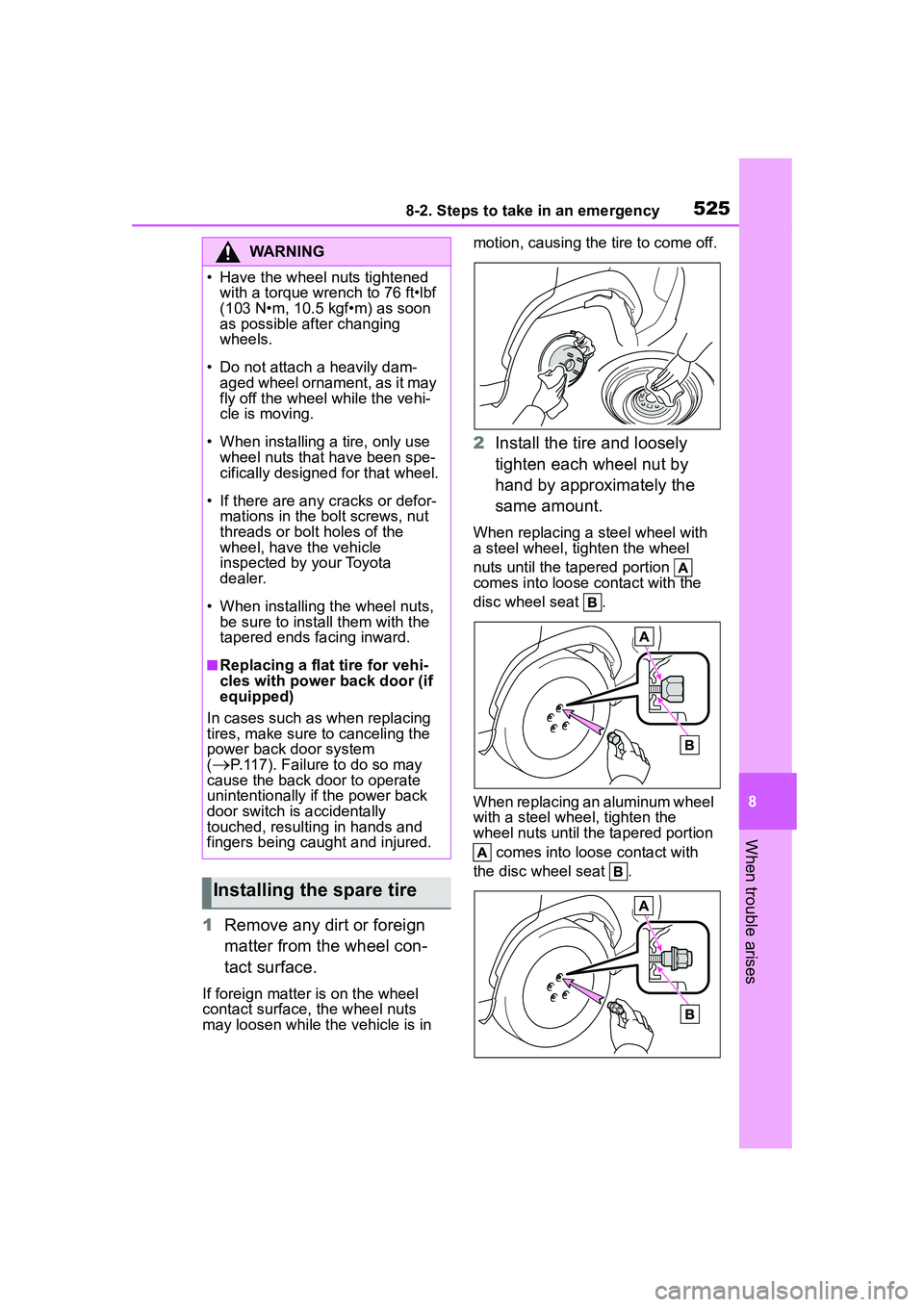
When replacing a steel wheel with
a steel wheel, tighten the wheel
nuts until the tapered portion
comes into loose contact with the
disc wheel seat .
When replacing an aluminum wheel
with a steel wheel, tighten the
wheel nuts until the tapered portion
comes into loose contact with
the disc wheel seat .
WARNING
• Have the wheel nuts tightened with a torque wrench to 76 ft•lbf
(103 N•m, 10.5 kgf•m) as soon
as possible after changing
wheels.
• Do not attach a heavily dam- aged wheel ornament, as it may
fly off the wheel while the vehi-
cle is moving.
• When installing a tire, only use wheel nuts that have been spe-
cifically designed for that wheel.
• If there are any cracks or defor- mations in the bolt screws, nut
threads or bolt holes of the
wheel, have the vehicle
inspected by your Toyota
dealer.
• When installing the wheel nuts, be sure to install them with the
tapered ends facing inward.
■Replacing a flat tire for vehi-
cles with power back door (if
equipped)
In cases such as when replacing
tires, make sure to canceling the
power back door system
(
P.117). Failure to do so may
cause the back door to operate
unintentionally if the power back
door switch is accidentally
touched, resulting in hands and
fingers being caught and injured.
Installing the spare tire
Page 526 of 612
5268-2. Steps to take in an emergency
3Lower the vehicle.
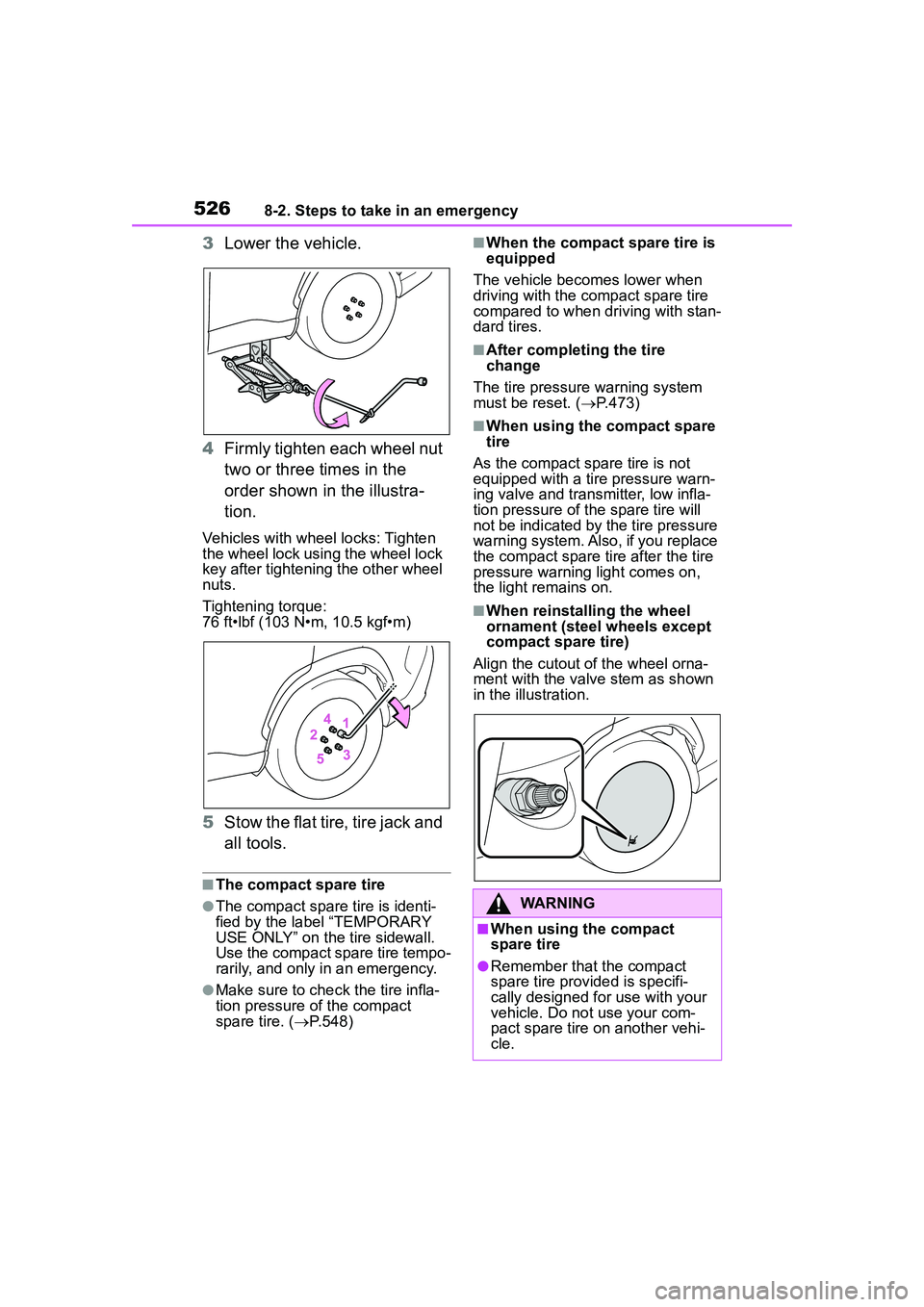
4 Firmly tighten each wheel nut
two or three times in the
order shown in the illustra-
tion.
Vehicles with wheel locks: Tighten
the wheel lock using the wheel lock
key after tightening the other wheel
nuts.
Tightening torque:
76 ft•lbf (103 N•m, 10.5 kgf•m)
5Stow the flat tire, tire jack and
all tools.
■The compact spare tire
●The compact spare tire is identi-
fied by the label “TEMPORARY
USE ONLY” on the tire sidewall.
Use the compact spare tire tempo-
rarily, and only in an emergency.
●Make sure to che ck the tire infla-
tion pressure of the compact
spare tire. ( P.548)
■When the compact spare tire is
equipped
The vehicle becomes lower when
driving with the compact spare tire
compared to when driving with stan-
dard tires.
■After completing the tire
change
The tire pressure warning system
must be reset. ( P.473)
■When using the compact spare
tire
As the compact spare tire is not
equipped with a tire pressure warn-
ing valve and transmitter, low infla-
tion pressure of the spare tire will
not be indicated by the tire pressure
warning system. Also, if you replace
the compact spare tire after the tire
pressure warning light comes on,
the light remains on.
■When reinstalli ng the wheel
ornament (steel wheels except
compact spare tire)
Align the cutout of the wheel orna-
ment with the valve stem as shown
in the illustration.
WARNING
■When using the compact
spare tire
●Remember that the compact
spare tire provided is specifi-
cally designed for use with your
vehicle. Do not use your com-
pact spare tire on another vehi-
cle.
Page 548 of 612
5489-1. Specifications
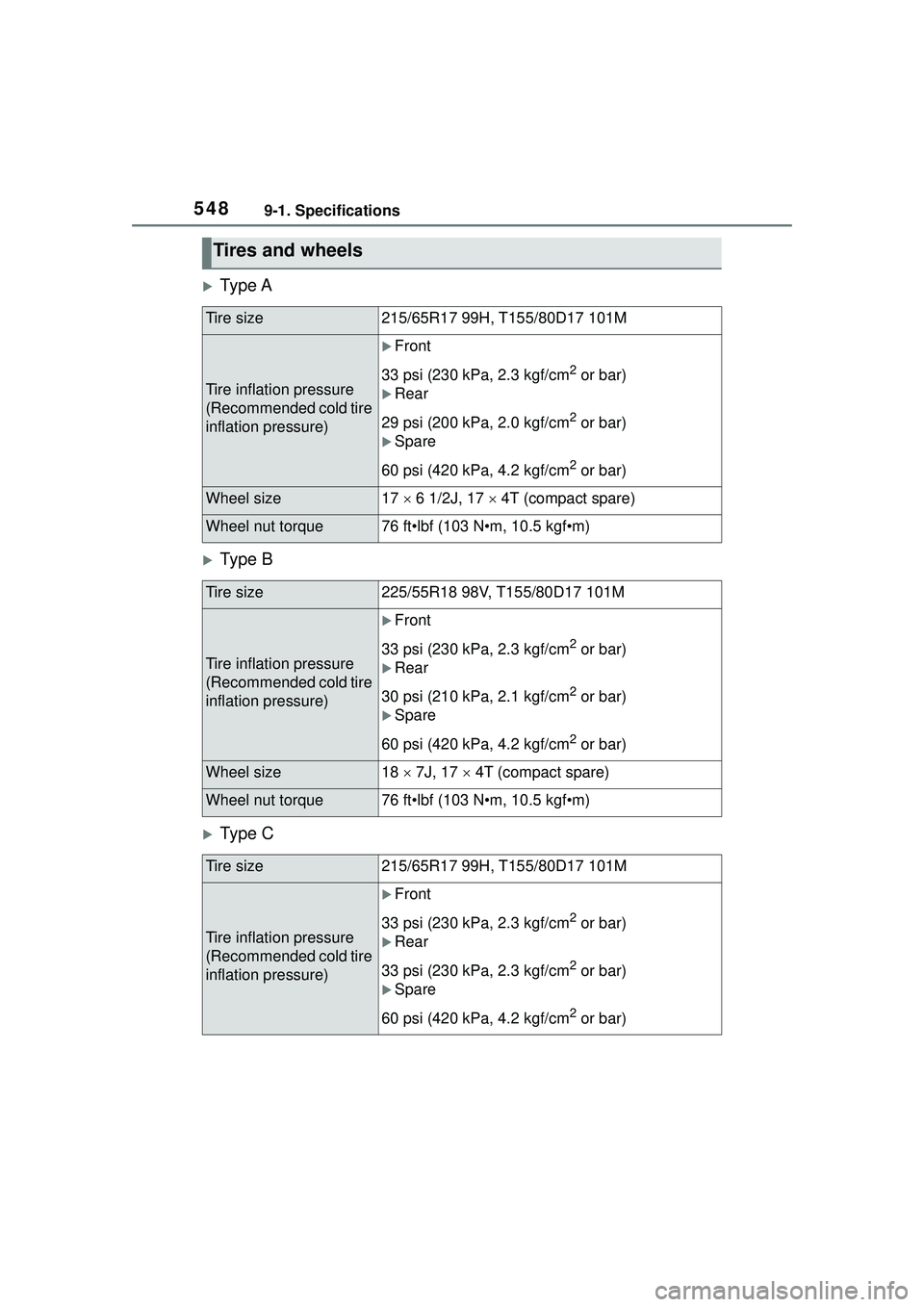
Ty p e A
Ty p e B
Ty p e C
Tires and wheels
Tire size215/65R17 99H, T155/80D17 101M
Tire inflation pressure
(Recommended cold tire
inflation pressure)
Front
33 psi (230 kPa, 2.3 kgf/cm
2 or bar)
Rear
29 psi (200 kPa, 2.0 kgf/cm
2 or bar)
Spare
60 psi (420 kPa, 4.2 kgf/cm
2 or bar)
Wheel size17 6 1/2J, 17 4T (compact spare)
Wheel nut torque76 ft•lbf (103 N•m, 10.5 kgf•m)
Tire size225/55R18 98V, T155/80D17 101M
Tire inflation pressure
(Recommended cold tire
inflation pressure)
Front
33 psi (230 kPa, 2.3 kgf/cm
2 or bar)
Rear
30 psi (210 kPa, 2.1 kgf/cm
2 or bar)
Spare
60 psi (420 kPa, 4.2 kgf/cm
2 or bar)
Wheel size18 7J, 17 4T (compact spare)
Wheel nut torque76 ft•lbf (103 N•m, 10.5 kgf•m)
Tire size215/65R17 99H, T155/80D17 101M
Tire inflation pressure
(Recommended cold tire
inflation pressure)
Front
33 psi (230 kPa, 2.3 kgf/cm
2 or bar)
Rear
33 psi (230 kPa, 2.3 kgf/cm
2 or bar)
Spare
60 psi (420 kPa, 4.2 kgf/cm
2 or bar)
Page 549 of 612
5499-1. Specifications
9
Vehicle specifications
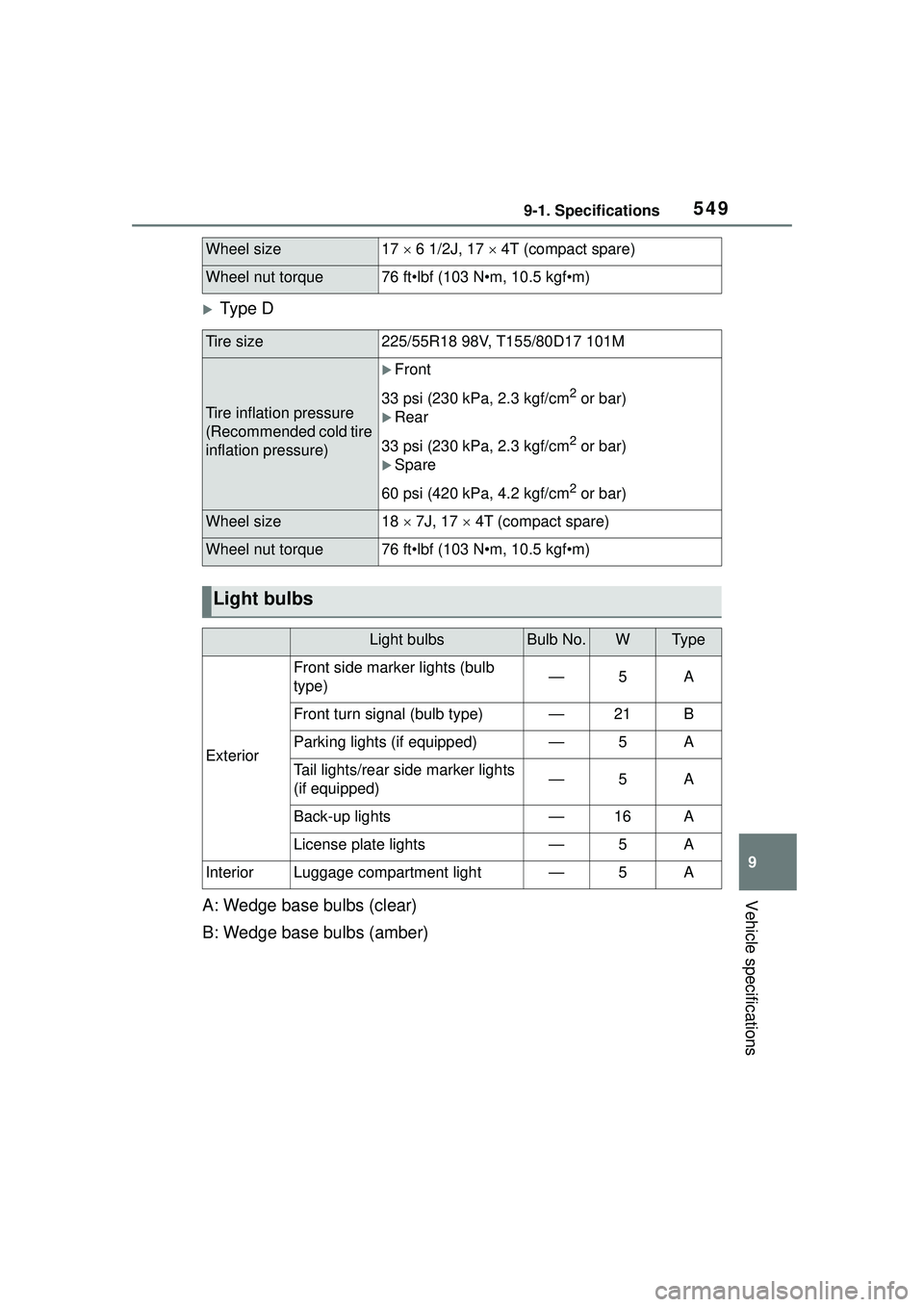
Ty p e D
A: Wedge base bulbs (clear)
B: Wedge base bulbs (amber)
Wheel size17 6 1/2J, 17 4T (compact spare)
Wheel nut torque76 ft•lbf (103 N•m, 10.5 kgf•m)
Tire size225/55R18 98V, T155/80D17 101M
Tire inflation pressure
(Recommended cold tire
inflation pressure)
Front
33 psi (230 kPa, 2.3 kgf/cm
2 or bar)
Rear
33 psi (230 kPa, 2.3 kgf/cm
2 or bar)
Spare
60 psi (420 kPa, 4.2 kgf/cm
2 or bar)
Wheel size18 7J, 17 4T (compact spare)
Wheel nut torque76 ft•lbf (103 N•m, 10.5 kgf•m)
Light bulbs
Light bulbsBulb No.WTy p e
Exterior
Front side marker lights (bulb
type)—5A
Front turn signal (bulb type)—21B
Parking lights (if equipped)—5A
Tail lights/rear side marker lights
(if equipped)—5A
Back-up lights—16A
License plate lights—5A
InteriorLuggage compartment light—5A
Page 590 of 612

590Alphabetical Index
Door lockBack door ............................. 109
Key ....................................... 105
Side doors ............................ 104
Smart key system................. 119
Wireless remote control ....... 102
Doors Automatic door locking and unlocking system................ 108
Back door ............................. 109
Door glasses ........................ 133
Door lock .............................. 109
Open door warning buzzer . 106, 108
Outside rear view mirrors ..... 131
Rear door child-protectors.... 108
Drive distance ........................... 94
Drive information ..................... 94
Drive-Start Control (DSC) Sudden start restraint control147
Driving Break-in tips ......................... 142
Correct driving posture ........... 25
Procedures ........................... 141
Winter drive tips ................... 274
Driving information display ..... 91
Driving range ............................ 92
Driving support system informa- tion display ............................. 93
DSC (Drive-Start Control) Sudden start restraint control147
Dynamic radar cruise control with full-speed range ........... 216Warning message ................ 225
Dynamic Torque Control AWD system ................................... 269
E
Eco Driving Indicator ............... 92
Eco Driving Indicator Light ..... 92
EDR (Event data recorder)......... 9
Elapsed time ............................. 94 Electric Power
Steering (EPS)
...............................................269 Warning light.........................507
Electronic key .........................100 Battery-saving function .........120
If the electronic key does not operate properly .................530
Replacing the battery ...........483
Emergency flashers ...............496
Emergency, in case of If a warning buzzer sounds ..505
If a warning light turns on .....505
If a warning message is dis-played .................................515
If the battery is discharged ...532
If the electronic key does not operate properly .................530
If the engine will not start......528
If the vehicle is submerged or water on the road is rising ..498
If you have a flat tire .............518
If you lose your keys.............530
If you think something is wrong ...........................................503
If your vehicle becomes stuck ...........................................538
If your vehicle has to be stopped in an emergency .................496
If your vehicle ne eds to be towed
...........................................499
If your vehicle overheats ......536
Engine ACCESSORY mode .............166
Compartment........................461
Engine switch ...............162, 163
Fuel pump shut off system ...504
Hood .....................................459
How to start the engine 162, 163
Identification number ............543
If the engine will not start......528
If your vehicle has to be stopped in an emergency .................496