2022 TOYOTA 4RUNNER ignition
[x] Cancel search: ignitionPage 412 of 616

4126-2. Maintenance
4RUNNER (U)■
Resetting the message indicating maintenance is required (U.S.A. only)
After the required maintenance is performed according to the ma intenance
schedule, please reset the message.
To reset the message, follow the procedures described below:
Turn the engine switch off with the trip meter A reading shown. (P. 91)
Vehicles without a smart key system:
While pressing the display change button ( P. 91), turn the engine switch
to the “ON” position (do not start the engine because reset mode will be
canceled).
Vehicles with a smart key system:
While pressing the display change button ( P. 91), turn the engine switch
to the IGNITION ON mode (do not start the engine because otherw ise the
reset mode will be canceled).
Continue to press and hold the button until the trip meter disp lays “000000”.
■ Allow inspection and repairs to be performed by a Toyota dealer
●Toyota technicians are well-trained specialists and are kept up to date with
the latest service information. They are well informed about the operations
of all systems on your vehicle.
● Keep a copy of the repair order. It proves that the maintenance that has
been performed is under warranty coverage. If any problem shoul d arise
while your vehicle is under warranty, your Toyota dealer will p romptly take
care of it.
WARNING
■ If your vehicle is no t properly maintained
Improper maintenance could result in serious damage to the vehi cle and
possible death or serious injury.
■ Handling of the battery
● Engine exhaust, some of its constituents, and a wide variety of automobile
components contain or emit chemicals known to the State of Cali fornia to
cause cancer and birth defects and other reproductive harm. Work in a
well ventilated area.
● Oils, fuels and fluids contained in vehicles as well as waste produced by
component wear contain or emit chemicals known to the State of Califor-
nia to cause cancer and birth defects or other reproductive har m. Avoid
exposure and wash any affected area immediately.
● Battery posts, terminals and related accessories contain lead and lead
compounds which are known to cause brain damage. Wash your hands
after handling. ( P. 430)
1
2
3
Page 444 of 616

4446-3. Do-it-yourself maintenance
4RUNNER (U)■
The initialization operation
●Make sure to carry out initializ
ation after adjusting the tire inflation pres-
sure.
Also, make sure the tires are co ld before carrying out initialization or tire
inflation pressure adjustment.
●If you have accidentally turned the engine switch to the “LOCK” position
(vehicles without a smart key system) or off (vehicles with a s mart key
system) during initialization, it is not necessary to press the reset switch
again as initialization will rest art automatically when the engine switch
has been turned to the “ON” posi tion (vehicles without a smart key sys-
tem) or IGNITION ON mode (vehicl es with a smart key system) for the
next time.
●If you accidentally press the reset switch when initialization is not neces-
sary, adjust the tire inflation pressure to the specified level when the
tires are cold, and cond uct initialization again.
●While the position of each tire is being determined and the inf lation pres-
sures are not being displayed on the multi-information display, if the
inflation pressure of a tire drops, the tire pressure warning l ight will come
on.
■When initialization of the tire pressure warning system has fai led
●Do not move the vehicle backward during initialization. Initialization is
started again from the beginning and it may take longer than usual.
●Initialization may take longer to complete if the vehicle is driven on an
unpaved road.
When performing initialization, drive on a paved road if possib le.
Depending on the driving environment and condition of the tires , initial-
ization will be complet ed in approximately 10 to 30 minutes.
• If initialization is not complet e after driving approximately 30 minutes,
continue driving for a while.
• If initialization is not complet e after driving approximately 1 hour, park
the vehicle in a safe place for approximately 20 minutes. Then drive
straight (with occasional left a nd right turns) at approximatel y 25 mph
(40 km/h) or more
* for approximately 10 to 30 minutes.
• If initialization is still not co mplete, have the vehicle inspected by your
Toyota dealer.
*: Except when making a left/right turn
●In the following situations, the tire inflation pressure will n ot be recorded
and the system will not operate p roperly. Perform initialization again.
• When operating the tire pressure warning reset switch, the tir e pres-
sure warning light does not blink 3 times.
• After performing initialization, the tire pressure warning light blinks for
1 minute then stays on after driving for about 20 minutes.
Page 521 of 616
5217-2. Steps to take in an emergency
7
When trouble arises
4RUNNER (U)
Ensure that the shift lever is in P and depress the brake pedal.
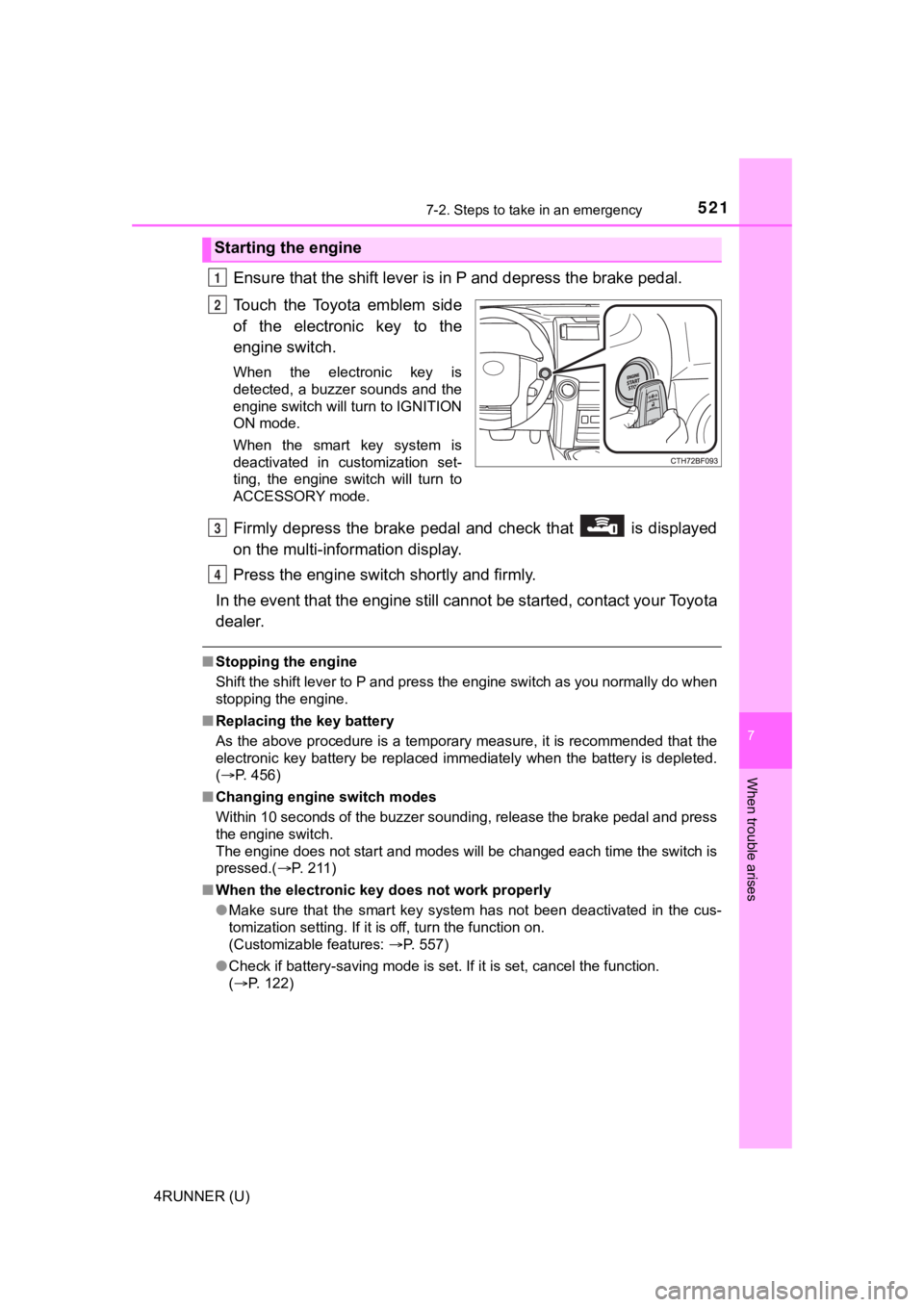
Touch the Toyota emblem side
of the electronic key to the
engine switch.
When the electronic key is
detected, a buzzer sounds and the
engine switch will turn to IGNITION
ON mode.
When the smart key system is
deactivated in customization set-
ting, the engine switch will turn to
ACCESSORY mode.
Firmly depress the brake pedal and check that is displayed
on the multi-information display.
Press the engine switch shortly and firmly.
In the event that the engine still cannot be started, contact your Toyota
dealer.
■ Stopping the engine
Shift the shift lever to P and press the engine switch as you normally do when
stopping the engine.
■ Replacing the key battery
As the above procedure is a temporary measure, it is recommende d that the
electronic key battery be replaced immediately when the battery is depleted.
( P. 456)
■ Changing engine switch modes
Within 10 seconds of the buzzer sounding, release the brake ped al and press
the engine switch.
The engine does not start and modes will be changed each time t he switch is
pressed.( P. 2 1 1 )
■ When the electronic key does not work properly
●Make sure that the smart key system has not been deactivated in the cus-
tomization setting. If it is off, turn the function on.
(Customizable features: P. 557)
● Check if battery-saving mode is set. If it is set, cancel the f unction.
( P. 122)
Starting the engine
1
2
3
4
Page 524 of 616
5247-2. Steps to take in an emergency
4RUNNER (U)
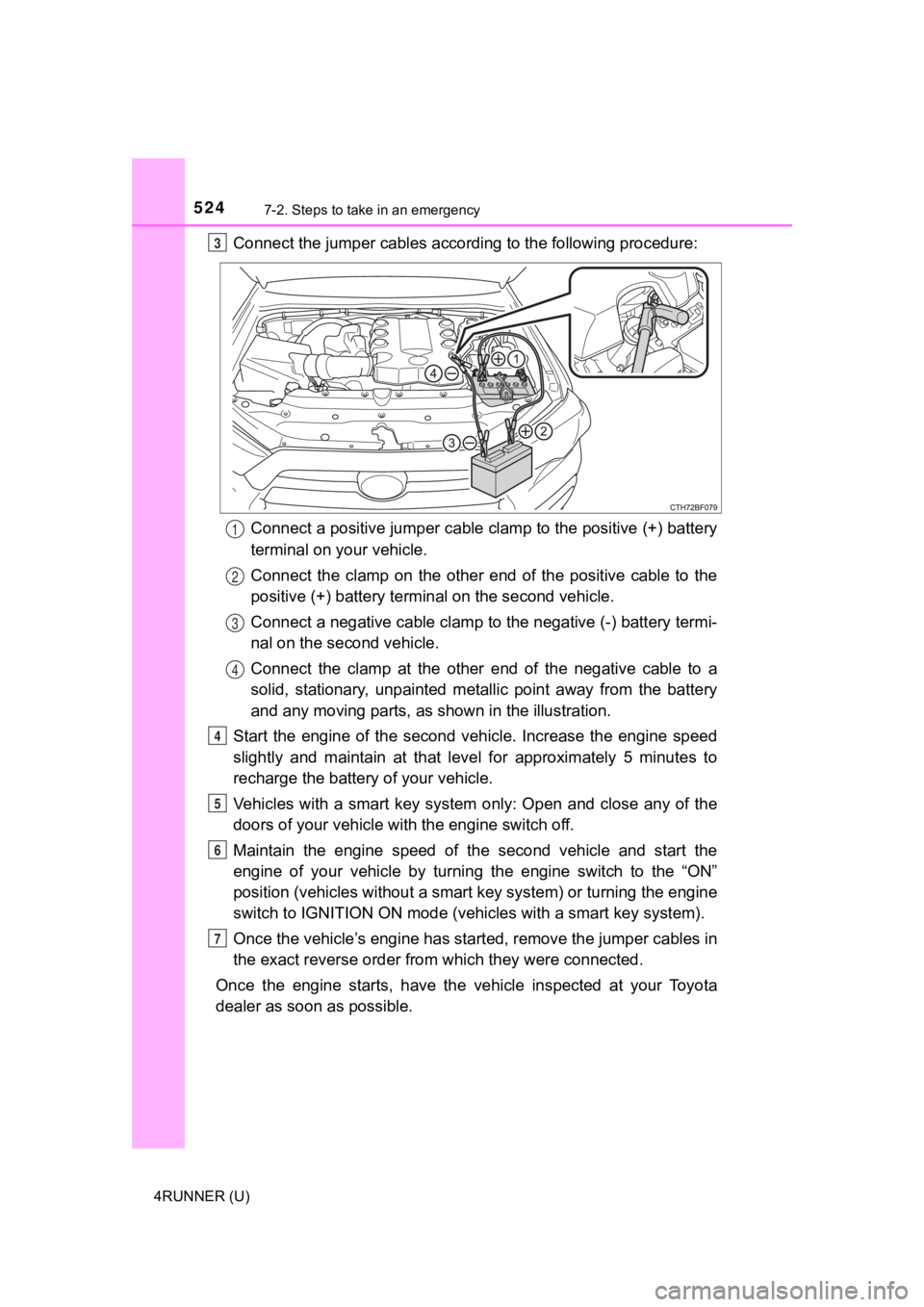
Connect the jumper cables according to the following procedure:Connect a positive jumper cable clamp to the positive (+) batte ry
terminal on your vehicle.
Connect the clamp on the other end of the positive cable to the
positive (+) battery termi nal on the second vehicle.
Connect a negative cable clamp to the negative (-) battery term i-
nal on the s econd vehicle.
Connect the clamp at the other e nd of the negative cable to a
solid, stationary, unpainted meta llic point away from the battery
and any moving parts, as shown in the illustration.
Start the engine of the second v ehicle. Increase the engine speed
slightly and maintain at that lev el for approximately 5 minutes to
recharge the batter y of your vehicle.
Vehicles with a smart key system only: Open and close any of th e
doors of your vehicle wi th the engine switch off.
Maintain the engine speed of the second vehicle and start the
engine of your vehicle by turning the engine switch to the “ON”
position (vehicles without a smart key system) or turning the e ngine
switch to IGNITION ON mode (vehi cles with a smart key system).
Once the vehicle’s engine has st arted, remove the jumper cables in
the exact reverse order from which they were connected.
Once the engine starts, have the vehicle inspected at your Toyota
dealer as soon as possible.3
1
2
3
4
4
5
6
7
Page 536 of 616

5368-1. Specifications
4RUNNER (U)
How to read oil container label:
The International Lubricant Specification Advisory Committee
(ILSAC) Certification Mark is added to some oil containers to help
you select the oil you should use.
Cooling system
Capacity11.1 qt. (10.5 L, 9.2 Imp. qt.)
Coolant type
Use either of the following:
• “Toyota Super Long Life Coolant”
• A similar high-quality ethylene glycol-based non-silicate, non-amine, non-
nitrite, and non-borate coolant with
long-life hybrid organic acid technol-
ogy
Do not use plain water alone.
Ignition system
Spark plug
Make
GapDENSO SK16HR11
0.043 in. (1.1 mm)
NOTICE
■ Iridium-tipped spark plugs
Use only iridium-tipped spark plugs. Do not adjust the spark pl ug gap.
Page 586 of 616
586
4RUNNER (U)
What to do if... (Troubleshooting)
What to do if... (Troubleshooting)
●If you lose your keys or mechanical keys, new genuine mechanical keys
can be made by your Toyota dealer. ( P. 107)
●If you lose your keys or electronic keys, the risk of vehicle t heft increases
significantly. Contact your Toyota dealer immediately. ( P. 109)
●Is the key battery weak or depleted? (P. 455)
●Vehicles with a smart key system:
Is the engine switch in IGNITION ON mode?
When locking the doors, turn the engine switch off. ( P. 2 1 1 )
●Vehicles with a smart key system:
Is the electronic key left inside the vehicle?
When locking the doors, make sure that you have the electronic key on
your person.
●The function may not operate properly due to the condition of t he radio
wave. ( P. 123)
●Is the child-protector lock set?
The rear door cannot be opened from inside the vehicle when the lock is
set. Open the rear door from outside and then unlock the child-protector
lock. ( P. 114)
If you have a problem, check the following before contacting
your Toyota dealer.
The doors cannot be locked, unlocked, opened or closed
You lose your keys
The doors cannot be locked or unlocked
The rear door cannot be opened
Page 587 of 616
587What to do if... (Troubleshooting)
4RUNNER (U)
●Is the shift lever in P? (P. 207)
●Is the steering wheel unlocked? ( P. 207)
●Is the battery discharged? (P. 523)
●Did you press the engine switch while firmly depressing the bra ke pedal?
( P. 210)
●Is the shift lever in P? ( P. 213)
●Is the electronic key anywhere detectable inside the vehicle? ( P. 120)
●Is the electronic key battery weak or depleted?
In this case, the engine can be started in a temporary way. (P. 521)
●Is the battery discharged? (P. 523)
●Vehicles without a smart key system:
Is the engine switch in the “ON” position?
If you cannot release the shift lever by depressing the brake p edal with the
engine switch in the “ON” position. ( P. 219)
●Vehicles with a smart key system:
Is the engine switch in IGNITION ON mode?
If you cannot release the shift lever by depressing the brake p edal with the
engine switch in IGNITION ON mode. ( P. 219)
If you think something is wrong
The engine does not start
(vehicles without a smart key system)
The engine does not start
(vehicles with a smart key system)
The shift lever cannot be shifted from P even if you depress
the brake pedal
Page 588 of 616
588What to do if... (Troubleshooting)
4RUNNER (U)
●It is locked to prevent theft of the vehicle if the key is pulled from the engine
switch. (P. 208)
●Is the window lock switch pressed?
The power window except for the one at the driver’s seat cannot be oper-
ated if the window lock switch is pressed. ( P. 161)
●The auto power off function will be operated if the vehicle is left in ACCES-
SORY or IGNITION ON mode (the engine is not running) for a peri od of
time. ( P. 212)
The steering wheel cannot be turned after the engine is
stopped (Vehicles without a smart key system)
The windows do not open or close by operating the power
window switches
The engine switch is tur ned off automatically
(vehicles with a smart key system)