2022 TOYOTA 4RUNNER four wheel drive
[x] Cancel search: four wheel drivePage 3 of 616

3
1
8 7
6
5
4
3
2
9
4RUNNER (U)4-1. Before driving
Driving the vehicle ............. 174
Cargo and luggage............ 184
Vehicle load limits ............. 189
Trailer towing..................... 190
Dinghy towing.................... 206
4-2. Driving procedures Engine (ignition) switch (vehicles without a
smart key system) ........... 207
Engine (ignition) switch (vehicles with a
smart key system) ........... 210
Automatic transmission ..... 216
Turn signal lever................ 221
Parking brake .................... 222
4-3. Operating the lights and wipers
Headlight switch ................ 223
AHB (Automatic High Beam) ............................. 228
Fog light switch ................. 232
Windshield wipers and washer ............................ 234
Rear window wiper and washer ............................ 237
4-4. Refueling Opening the fuel tank cap .................................. 240 4-5. Using the driving
support systems
Toyota Safety Sense P ...... 243
PCS (Pre-Collision System) ........................... 250
LDA (Lane Departure Alert) ................................ 260
Dynamic radar cruise control.............................. 268
BSM (Blind Spot Monitor) ........................... 281
Intuitive parking assist ............................... 288
RCTA (Rear Cross Traffic Alert) ..................... 297
Four-wheel drive system (part-time 4WD
models)............................ 305
Four-wheel drive system (full-time 4WD
models)............................ 309
Active traction control system ............................. 313
AUTO LSD system (2WD models) ................. 315
Rear differential lock system ............................. 317
Downhill assist control system ............................. 320
Crawl Control ..................... 323
Multi-terrain Select............. 326
Driving assist systems ....... 333
4-6. Driving tips Winter driving tips .............. 342
Off-road precautions .......... 346
4Driving
Page 21 of 616

21Pictorial index
4RUNNER (U)USB port
*2
Seat heater/ventilator switches*1. . . . . . . . . . . . . . . . . . . . . P. 367
Power outlets . . . . . . . . . . . . . . . . . . . . . . . . . . . . . . . . . . . . . P. 390
Front-wheel drive control lever
*1. . . . . . . . . . . . . . . . . . . . . P. 305
Front-wheel drive control switch
*1 . . . . . . . . . . . . . . . . . . . P. 305
Four-wheel drive control switch
*1. . . . . . . . . . . . . . . . . . . . P. 309
USB charging ports . . . . . . . . . . . . . . . . . . . . . . . . . . . . . . . . P. 393
Power back window switch . . . . . . . . . . . . . . . . . . . . . . . . . P. 165
Seat heater switches
*1 . . . . . . . . . . . . . . . . . . . . . . . . . . . . . P. 3 67
*1: If equipped
*2: Refer to “NAVIGATION AND MULTIMEDIA SYSTEM OWNER’S MANUAL”.
1
2
3
4
5
6
7
8
Page 85 of 616
852. Instrument cluster
2
Instrument cluster
4RUNNER (U)
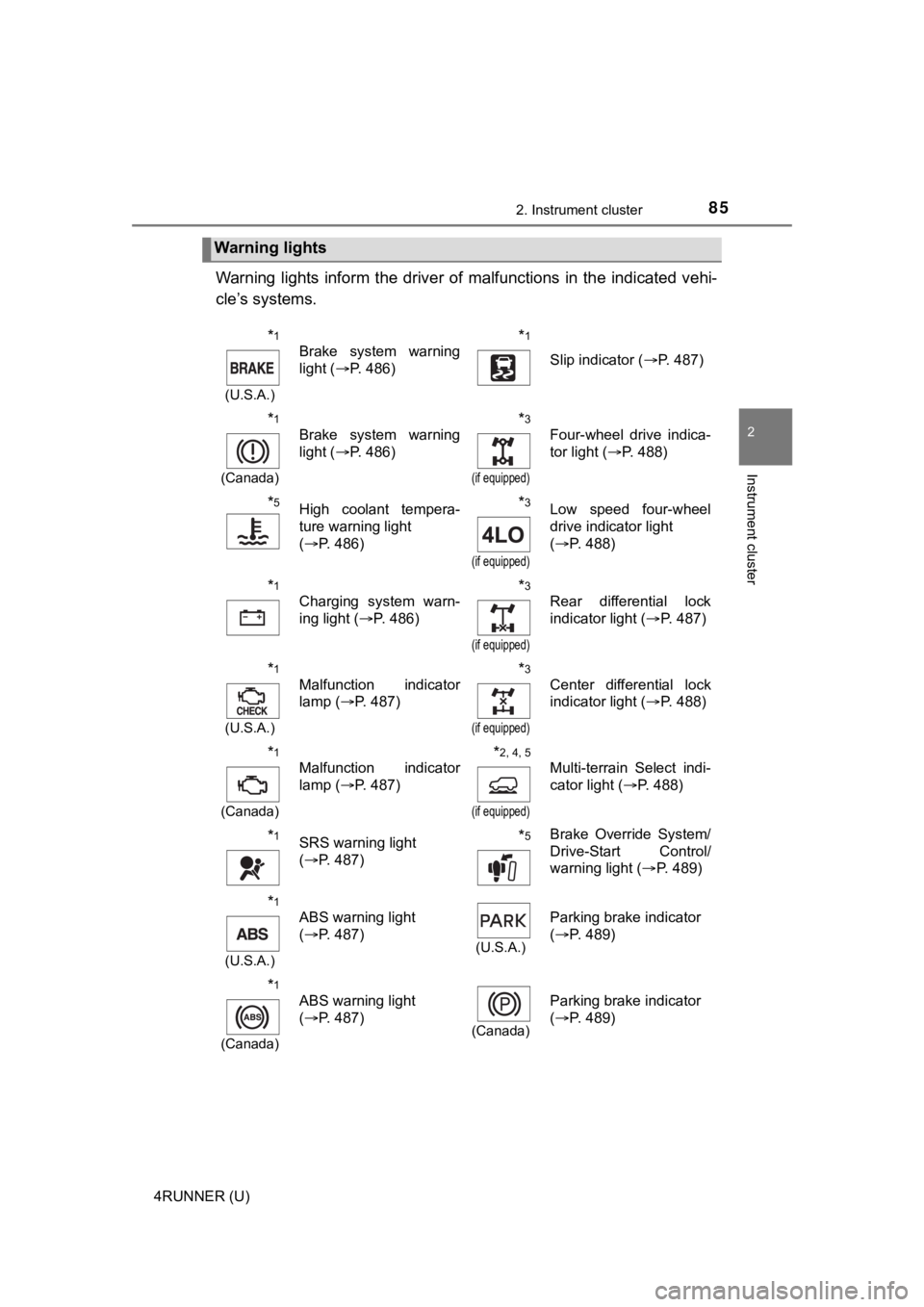
Warning lights inform the driver of malfunctions in the indicated vehi-
cle’s systems.
Warning lights
*1
(U.S.A.)
Brake system warning
light ( P. 486)*1
Slip indicator ( P. 487)
*1
(Canada)
Brake system warning
light (P. 486)*3
(if equipped)
Four-wheel drive indica-
tor light ( P. 488)
*5High coolant tempera-
ture warning light
(P. 486)*3
(if equipped)
Low speed four-wheel
drive indicator light
(P. 488)
*1
Charging system warn-
ing light ( P. 486)*3
(if equipped)
Rear differential lock
indicator light ( P. 487)
*1
(U.S.A.)
Malfunction indicator
lamp ( P. 487)*3
(if equipped)
Center differential lock
indicator light ( P. 488)
*1
(Canada)
Malfunction indicator
lamp ( P. 487)*2, 4, 5
(if equipped)
Multi-terrain Select indi-
cator light ( P. 488)
*1SRS warning light
(P. 487)*5Brake Override System/
Drive-Start Control/
warning light ( P. 489)
*1
(U.S.A.)
ABS warning light
(P. 487)
(U.S.A.)
Parking brake indicator
(P. 489)
*1
(Canada)
ABS warning light
(P. 487)
(Canada)
Parking brake indicator
(P. 489)
Page 88 of 616
882. Instrument cluster
4RUNNER (U)
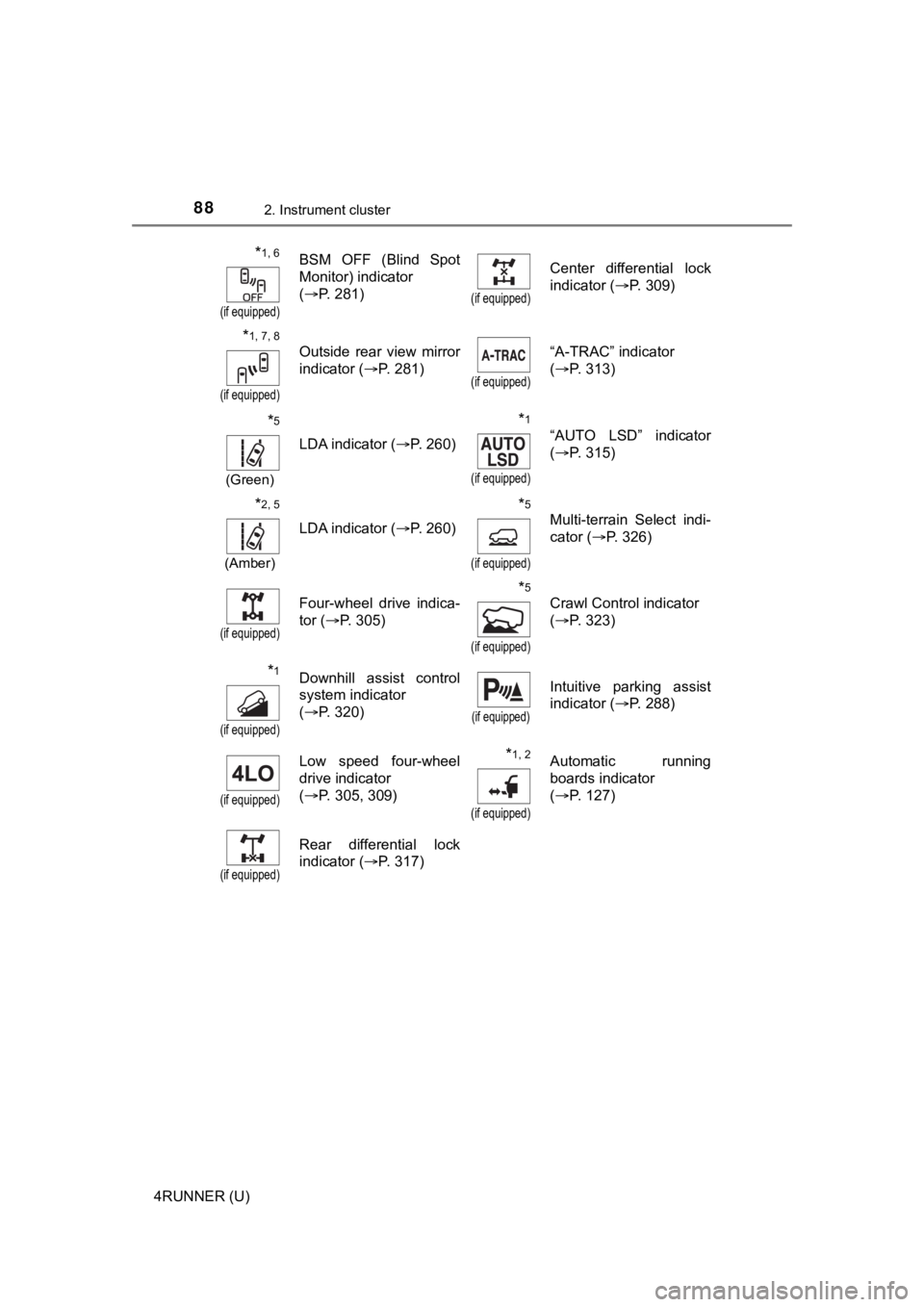
*1, 6
(if equipped)
BSM OFF (Blind Spot
Monitor) indicator
(P. 281)
(if equipped)
Center differential lock
indicator ( P. 309)
*1, 7, 8
(if equipped)
Outside rear view mirror
indicator ( P. 281)
(if equipped)
“A-TRAC” indicator
(P. 313)
*5
(Green)
LDA indicator ( P. 260)
*1
(if equipped)
“AUTO LSD” indicator
(P. 315)
*2, 5
(Amber)
LDA indicator ( P. 260)
*5
(if equipped)
Multi-terrain Select indi-
cator (P. 326)
(if equipped)
Four-wheel drive indica-
tor (P. 305)*5
(if equipped)
Crawl Control indicator
(P. 323)
*1
(if equipped)
Downhill assist control
system indicator
(P. 320)
(if equipped)
Intuitive parking assist
indicator ( P. 288)
(if equipped)
Low speed four-wheel
drive indicator
(P. 305, 309) *1, 2
(if equipped)
Automatic running
boards indicator
(P. 127)
(if equipped)
Rear differential lock
indicator ( P. 317)
Page 173 of 616

173
Driving4
4RUNNER (U)4-1. Before driving
Driving the vehicle ............. 174
Cargo and luggage ........... 184
Vehicle load limits ............. 189
Trailer towing..................... 190
Dinghy towing ................... 206
4-2. Driving procedures Engine (ignition) switch (vehicles without a
smart key system) ........... 207
Engine (ignition) switch (vehicles with a
smart key system) ........... 210
Automatic transmission ..... 216
Turn signal lever................ 221
Parking brake .................... 222
4-3. Operating the lights and wipers
Headlight switch ................ 223
AHB (Automatic High Beam) ............................. 228
Fog light switch ................. 232
Windshield wipers and washer ............................ 234
Rear window wiper and washer ............................ 237
4-4. Refueling Opening the fuel tank cap .................................. 240 4-5. Using the driving
support systems
Toyota Safety Sense P ..... 243
PCS (Pre-Collision System)........................... 250
LDA (Lane Departure Alert) ............................... 260
Dynamic radar cruise control ............................. 268
BSM (Blind Spot Monitor)........................... 281
Intuitive parking assist....... 288
RCTA (Rear Cross Traffic Alert) .................... 297
Four-wheel drive system (part-time 4WD
models) ........................... 305
Four-wheel drive system (full-time 4WD
models) ........................... 309
Active traction control system ............................ 313
AUTO LSD system (2WD models) ................. 315
Rear differential lock system ............................ 317
Downhill assist control system ............................ 320
Crawl Control .................... 323
Multi-terrain Select ............ 326
Driving assist systems ...... 333
4-6. Driving tips Winter driving tips ............. 342
Off-road precautions ......... 346
Page 175 of 616
1754-1. Before driving
4
Driving
4RUNNER (U)
Make sure that the parking brake is set and shift the shift lever to D.
Gently depress the accelerator pedal.
Release the parking brake.
■ Driving in the rain
●Drive carefully when it is raining, because visibility will be reduced, the win-
dows may become fogged-up, and the road will be slippery.
● Drive carefully when it starts to rain, because the road surface will be espe-
cially slippery.
● Refrain from driving at high speeds in the rain, as there may b e a layer of
water between the tires and the road surface, preventing the st eering and
brakes from operating properly.
■ Engine speed while driving
In the following conditions, the engine speed may become high while driving.
This is due to automatic up-shifting control or down-shifting implementation to
meet driving conditions. It does not indicate sudden acceleration.
●The vehicle is judged to be driving uphill or downhill
● When the accelerator pedal is released
■ Restraining the engine out put (Brake Override System)
● When the accelerator and brake pedals are depressed at the same time, the
engine output may be restrained.
● A warning message is displayed on the multi-information display while the
system is operating.
■ Restraining sudden start (Drive-Start Control)
● When the following unusual operation is performed, the engine o utput may
be restrained.
• When the shift lever is shifted from R to D, D to R, N to R, P to D, or P to
R (D includes S) with the accelerator pedal depressed, a warnin g mes-
sage appears on the multi-information display.
• When the accelerator pedal is depressed too much while the veh icle is in
reverse.
● While Drive-Start Control is being activated, your vehicle may have trouble
escaping from the mud or fresh snow. In such case, perform the following
actions to cancel Drive-Start Control so that the vehicle may b ecome able to
escape from the mud or fresh snow.
• Deactivate TRAC ( P. 335, 336)
• 2WD models: When the AUTO LSD system is turned on. ( P. 315)
• Part-time 4WD models: The four-wheel drive control switch is in “L4” position. ( P. 305)
• Full-time 4WD models: The four-wheel drive control switch is i n “L4L”
position. ( P. 309)
Starting off on a steep uphill
1
2
3
Page 254 of 616
2544-5. Using the driving support systems
4RUNNER (U)
■Operational conditions
The pre-collision system is enabled and the system determines that the pos-
sibility of a frontal collision with a vehicle or pedestrian is high.
Each function is operational at the following speeds:
● Pre-collision warning:
• Vehicle speed is between approximately 7 and 110 mph (10 and 1 80
km/h). (For detecting a pedestrian, vehicle speed is between ap proxi-
mately 7 and 50 mph [10 and 80 km/h].)
• The relative speed between your vehicle and the vehicle or ped estrian
ahead is approximately 7 mph (10 km/h) or more.
● Pre-collision brake assist:
• Vehicle speed is between approximately 20 and 110 mph (30 and 180
km/h). (For detecting a pedestrian, vehicle speed is between ap proxi-
mately 20 and 50 mph [30 and 80 km/h].)
• The relative speed between your vehicle and the vehicle or ped estrian
ahead is approximately 20 mph (30 km/h) or more.
● Pre-collision braking:
• Vehicle speed is between approximately 7 and 110 mph (10 and 1 80
km/h). (For detecting a pedestrian, vehicle speed is between ap proxi-
mately 7 and 50 mph [10 and 80 km/h].)
• The relative speed between your vehicle and the vehicle or ped estrian
ahead is approximately 7 mph (10 km/h) or more.
The system may not operate in the following situations:
● If a battery terminal has been disconnected and reconnected and then the
vehicle has not been driven for a certain amount of time
● If the shift lever is in R
● If VSC is disabled (only the pre-collision warning function wil l be opera-
tional)
● If the low speed four-wheel drive indicator is illuminated (onl y the pre-colli-
sion warning function will be operational)
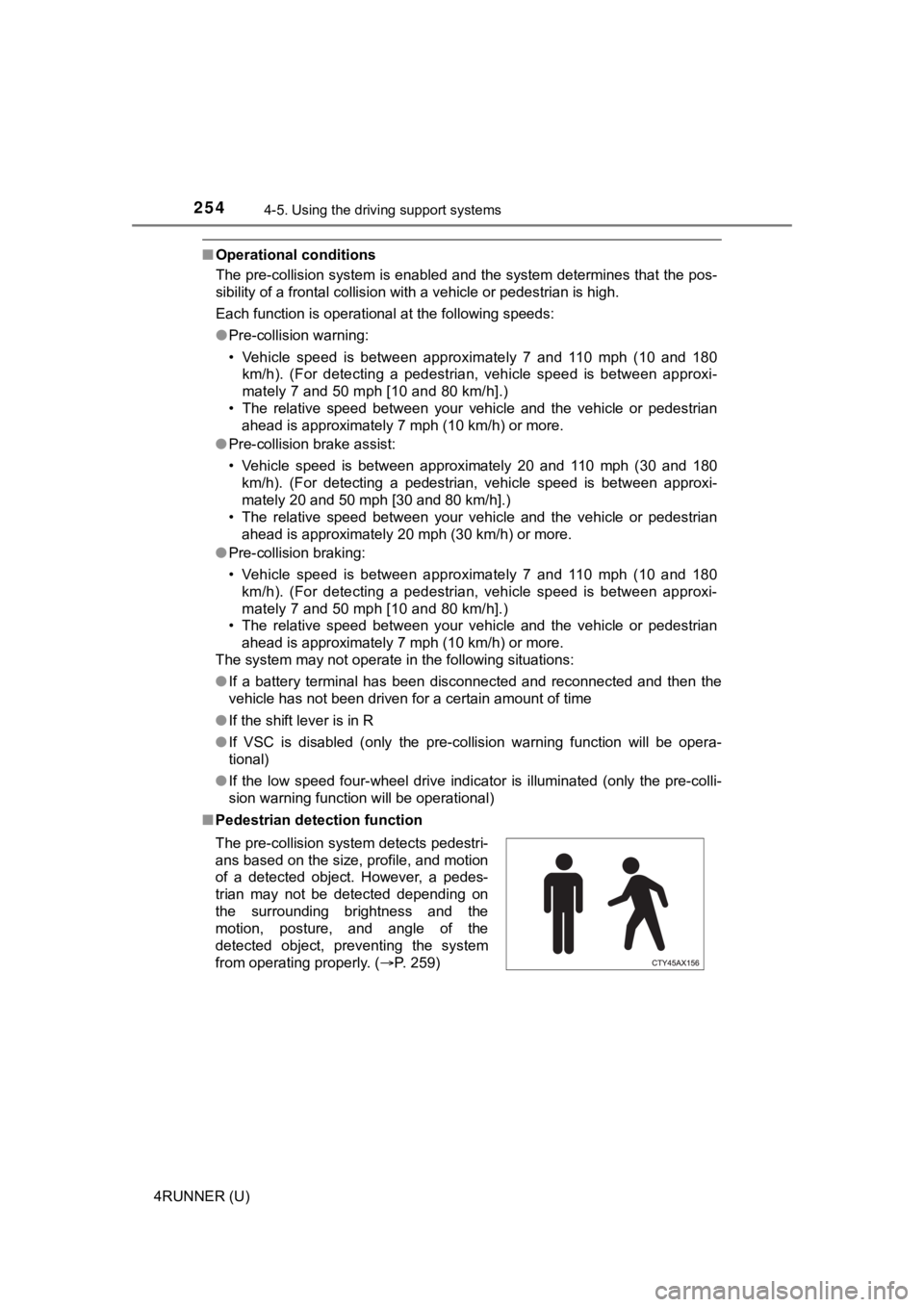
■ Pedestrian detection function
The pre-collision system detects pedestri-
ans based on the size, profile, and motion
of a detected object. However, a pedes-
trian may not be detected depending on
the surrounding brightness and the
motion, posture, and angle of the
detected object, preventing the system
from operating properly. (P. 259)
Page 305 of 616
3054-5. Using the driving support systems
4
Driving
4RUNNER (U)
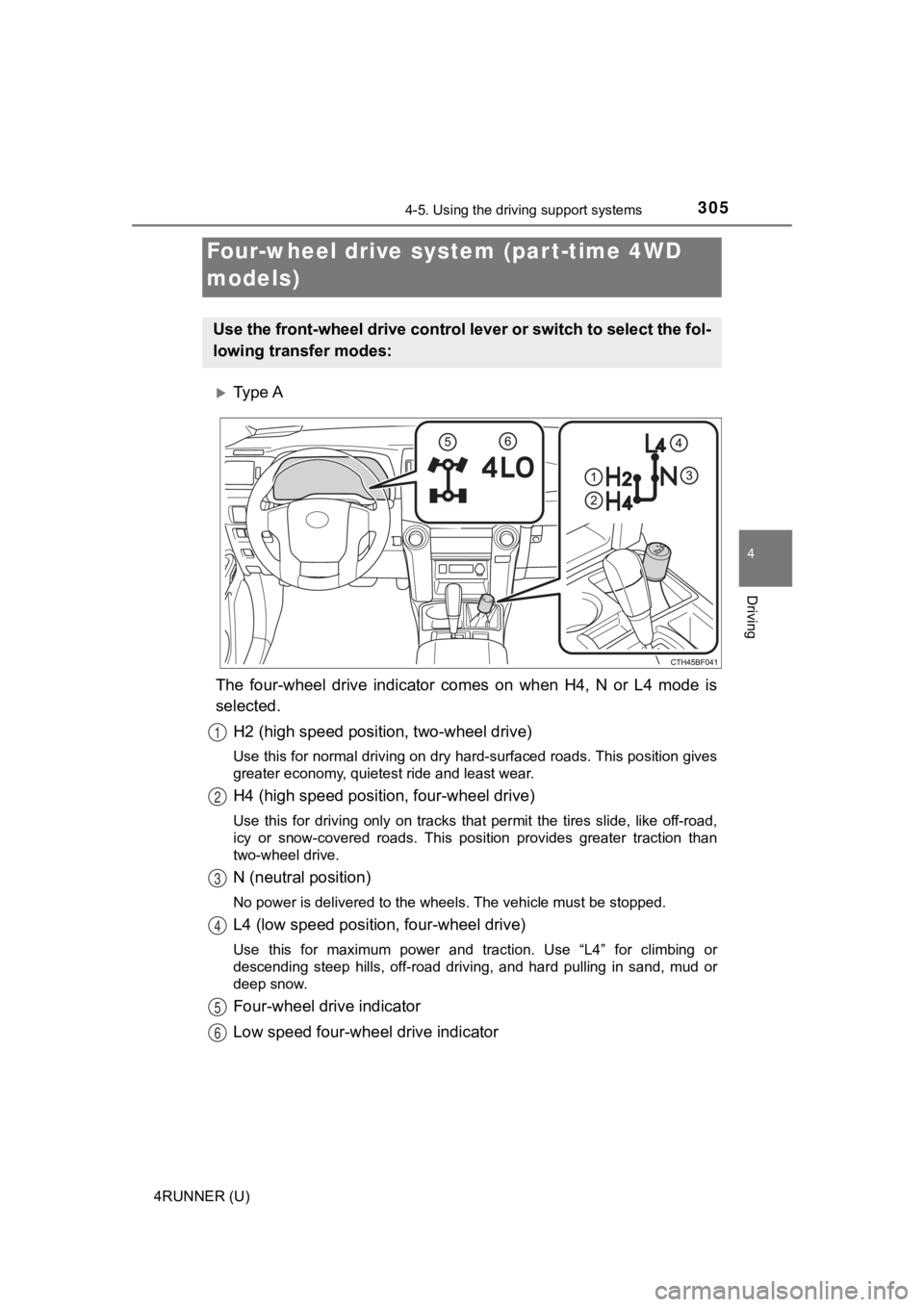
Ty p e A
The four-wheel drive indicator comes on when H4, N or L4 mode i s
selected.
H2 (high speed position, two-wheel drive)
Use this for normal driving on dry hard-surfaced roads. This po sition gives
greater economy, quietest ride and least wear.
H4 (high speed positi on, four-wheel drive)
Use this for driving only on tracks that permit the tires slide , like off-road,
icy or snow-covered roads. This position provides greater tract ion than
two-wheel drive.
N (neutral position)
No power is delivered to the wheels. The vehicle must be stoppe d.
L4 (low speed position, four-wheel drive)
Use this for maximum power and traction. Use “L4” for climbing or
descending steep hills, off-road driving, and hard pulling in s and, mud or
deep snow.
Four-wheel drive indicator
Low speed four-whe el drive indicator
Four-wheel drive system (par t-time 4WD
models)
Use the front-wheel drive control lever or switch to select the fol-
lowing transfer modes:
1
2
3
4
5
6