Page 322 of 616

3224-5. Using the driving support systems
4RUNNER (U)■
Sounds and vibrations caused b y the downhill assist control system
● A sound may be heard from the engine compartment when the engine is
started or just after the vehicle begins to move. This sound do es not indicate
that a malfunction has occurred in downhill assist control syst em.
● Either of the following conditions may occur when the downhill assist control
system is operating. None of these are indicators that a malfunction has
occurred.
• Vibrations may be felt through the vehicle body and steering.
• A motor sound may be heard after the vehicle comes to a stop.
■ System malfunction
In the following cases, have your vehicle checked by your Toyota dealer.
●The downhill assist control system indicator does not come on w hen the
engine switch is turned to the “ON” position (vehicles without a smart key
system) or the engine switch is turned to IGNITION ON mode (veh icles with
a smart key system).
● The downhill assist control system indicator does not come on w hen the
“DAC” switch is pressed.
● The slip indicator comes on.
WARNING
■When using downhill assist control system
Do not rely overmuch on the downhill assist control system. Thi s function
does not extend the vehicle’s performance limitations. Always t horoughly
check the road conditions, and drive safely.
■ The system may not operate on the following surfaces, which may lead
to an accident causing death or serious injury
● Slippery surfaces such as wet or muddy roads
● Icy surface
● Unpaved roads
Page 356 of 616
3565-1. Using the air conditioning system and defogger
4RUNNER (U)
■Fogging up of the windows
●The windows will easily fog up when the humidity in the vehicle is high.
Turning on will dehumidify the air from the outlets and defog the wind-
shield effectively.
● If you turn off, the windows may fog up more easily.
● The windows may fog up if the recirculated air mode is used.
■ When driving on dusty roads
Close all windows. If dust thrown up by the vehicle is still drawn into the vehi-
cle after closing the windows, it is recommended that the air intake mode be
set to outside air mode and the fan speed to any setting except off.
■ Outside/recirculated air mode
Setting to the recirculated air mode temporarily is recommended in prevent-
ing dirty air from entering the vehicle interior and helping to cool the vehicle
when the outside air temperature is high.
■ When the outside temperature exceeds 75°F (24°C) and the air co ndition-
ing system is on
● In order to reduce the air conditioning power consumption, the air condition-
ing system may switch to recirculated air mode automatically. This may also
reduce fuel consumption.
● Recirculated air mode is selected as a default mode when the en gine switch
is turned to the “ON” position (vehicles without a smart key system) or the
engine switch is turned to IGNITION ON mode (vehicles with a sm art key
system).
● It is possible to switch to outside air mode at any time by pre ssing
.
■When the indicator light on flashes
Press
to turn off the cooling and dehumidification function and turn it on
again. There may be a problem in the air conditioning system if the indicator
light continues to flash. Turn the air conditioning system off and have it
inspected by your Toyota dealer.
Page 364 of 616
3645-1. Using the air conditioning system and defogger
4RUNNER (U)■
Fogging up of the windows
●The windows will easily fog up when the humidity in the vehicle is high.
Turning on will dehumidify the air from the outlets and defog the wind-
shield effectively.
● If you turn off, the windows may fog up more easily.
● The windows may fog up if the recirculated air mode is used.
■ When driving on dusty roads
Close all windows. If dust thrown up by the vehicle is still drawn into the vehi-
cle after closing the windows, it is recommended that the air intake mode be
set to outside air mode and the fan speed to any setting except off.
■ Outside/recirculated air mode
●Setting to the recirculated air mode temporarily is recommended in prevent-
ing dirty air from entering the vehicle interior and helping to cool the vehicle
when the outside air temperature is high.
● Outside/recirculated air mode may automatically switch dependin g on the
temperature setting, outside temperature, pressure, engine cool ant tem-
perature or inside temperature.
■ When the outside temperature exceeds 75°F (24°C) and the air co ndition-
ing system is on
● In order to reduce the air conditioning power consumption, the air condition-
ing system may switch to recirculated air mode automatically. This may also
reduce fuel consumption.
● Recirculated air mode is selected as a default mode when the en gine switch
is turned to the “ON” position (vehicles without a smart key system) or the
engine switch is turned to IGNITION ON mode (vehicles with a sm art key
system).
● It is possible to switch to outside air mode at any time by pre ssing
.
■When the outside tempera ture falls to nearly 32F (0 C)
The dehumidification function may not operate even when is pre ssed.
■ When driving on dusty roads
Close all windows. If dust thrown up by the vehicle is still drawn into the vehi-
cle after closing the windows, it is recommended that the air intake mode be
set to outside air mode and the fan speed to any setting except off.
■ When the indicator light on flashes
Press
to turn off the cooling and dehumidification function and turn it on
again. There may be a problem in the air conditioning system if the indicator
light continues to flash. Turn the air conditioning system off and have it
inspected by your Toyota dealer.
Page 368 of 616
3685-1. Using the air conditioning system and defogger
4RUNNER (U)
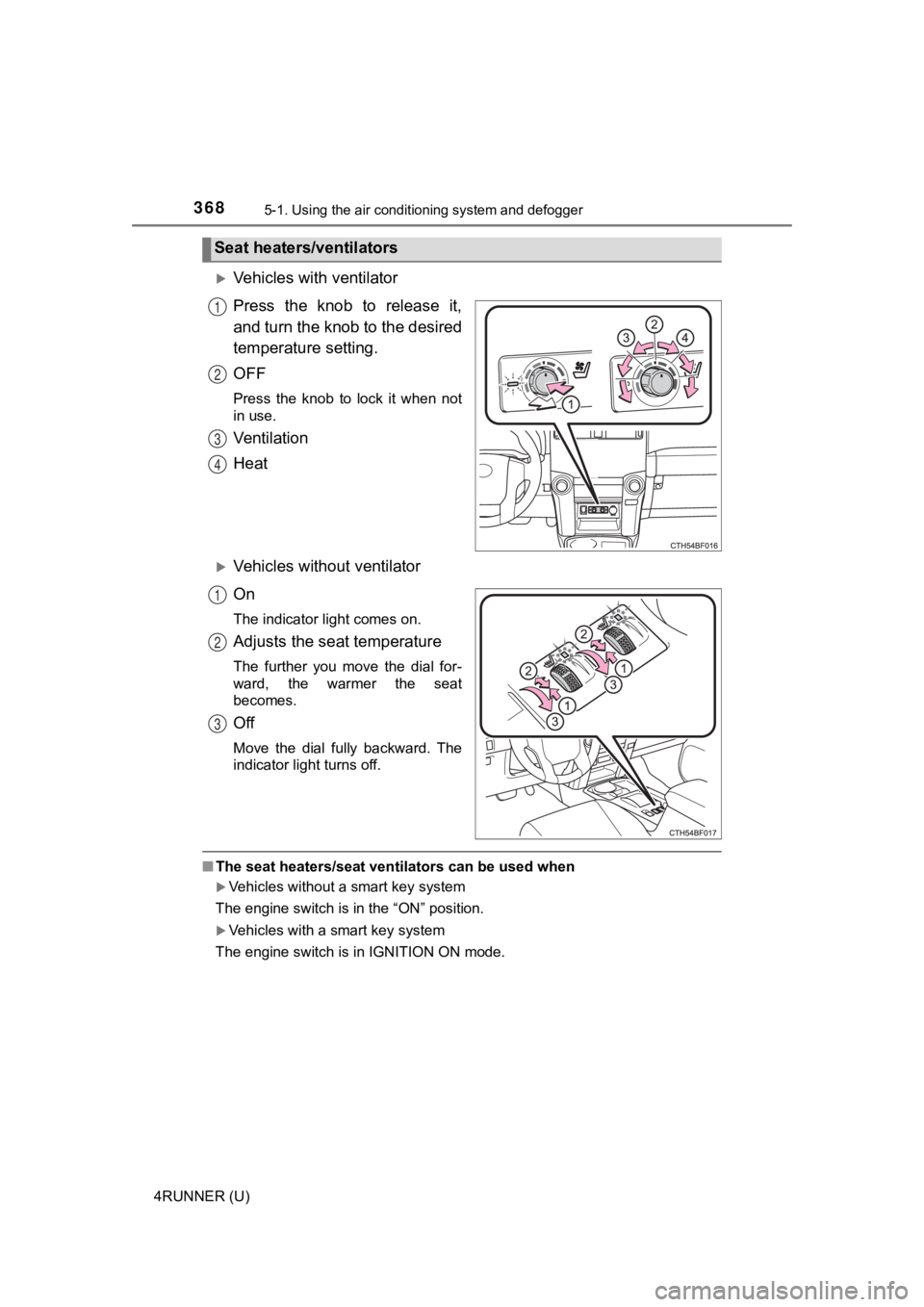
Vehicles with ventilator
Press the knob to release it,
and turn the knob to the desired
temperature setting.
OFF
Press the knob to lock it when not
in use.
Ventilation
Heat
Vehicles without ventilator
On
The indicator light comes on.
Adjusts the seat temperature
The further you move the dial for-
ward, the warmer the seat
becomes.
Off
Move the dial fully backward. The
indicator light turns off.
■The seat heaters/seat ventilators can be used when
Vehicles without a smart key system
The engine switch is in the “ON” position.
Vehicles with a smart key system
The engine switch is in IGNITION ON mode.
Seat heaters/ventilators
1
2
3
4
1
2
3
Page 369 of 616
369
5
Interior features
4RUNNER (U)
5-2. Using the interior lights
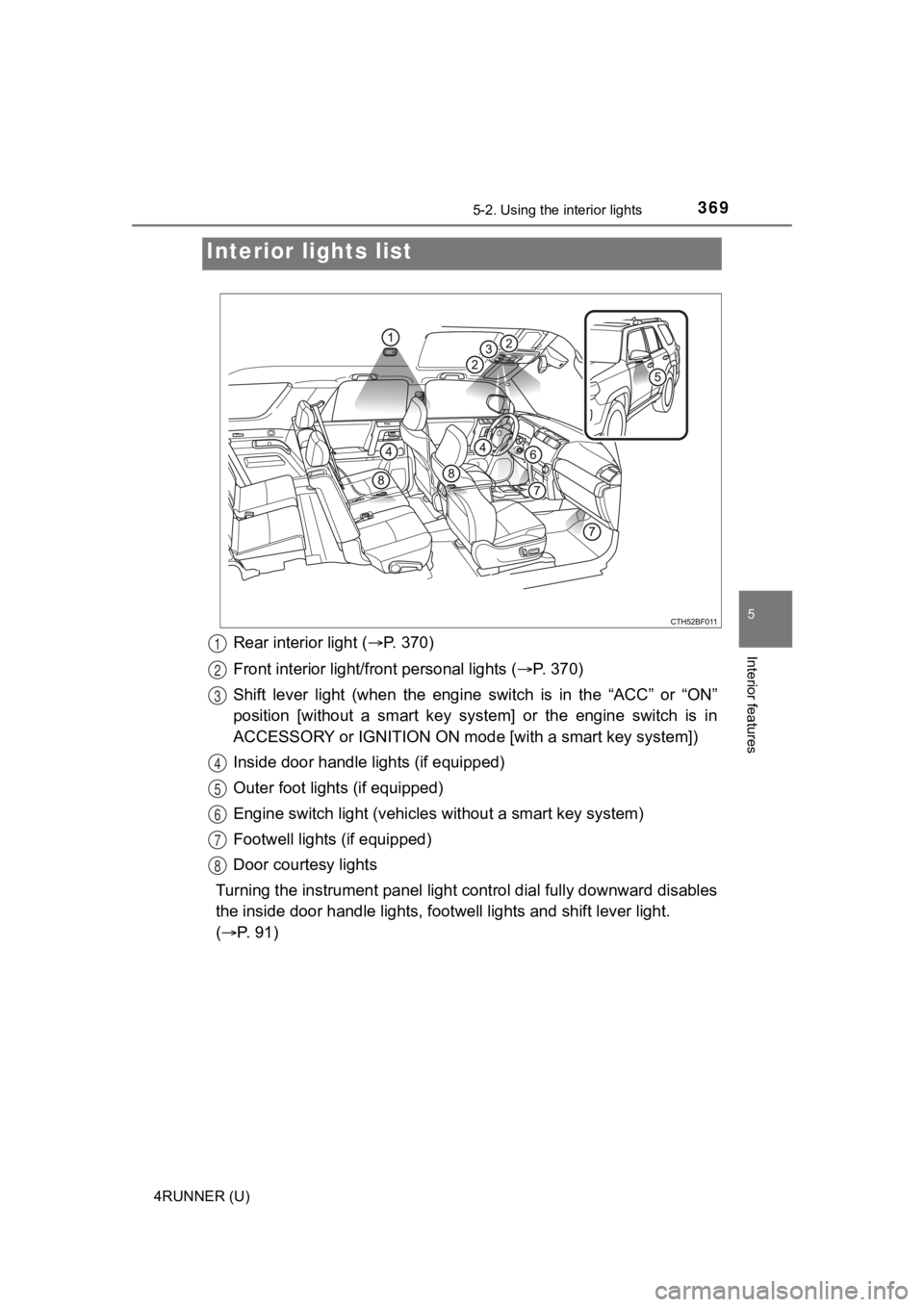
Rear interior light (P. 370)
Front interior light/fr ont personal lights ( P. 3 7 0 )
Shift lever light (when the engine switch is in the “ACC” or “O N”
position [without a smart key s ystem] or the engine switch is i n
ACCESSORY or IGNITION ON mode [with a smart key system])
Inside door handle lights (if equipped)
Outer foot lights (if equipped)
Engine switch light (vehicles without a smart key system)
Footwell lights (if equipped)
Door courtesy lights
Turning the instrument panel light control dial fully downward disables
the inside door handle lights, f ootwell lights and shift lever light.
( P. 91)
Interior li ghts list
1
2
3
4
5
6
7
8
Page 385 of 616
3855-4. Other interior features
5
Interior features
4RUNNER (U)
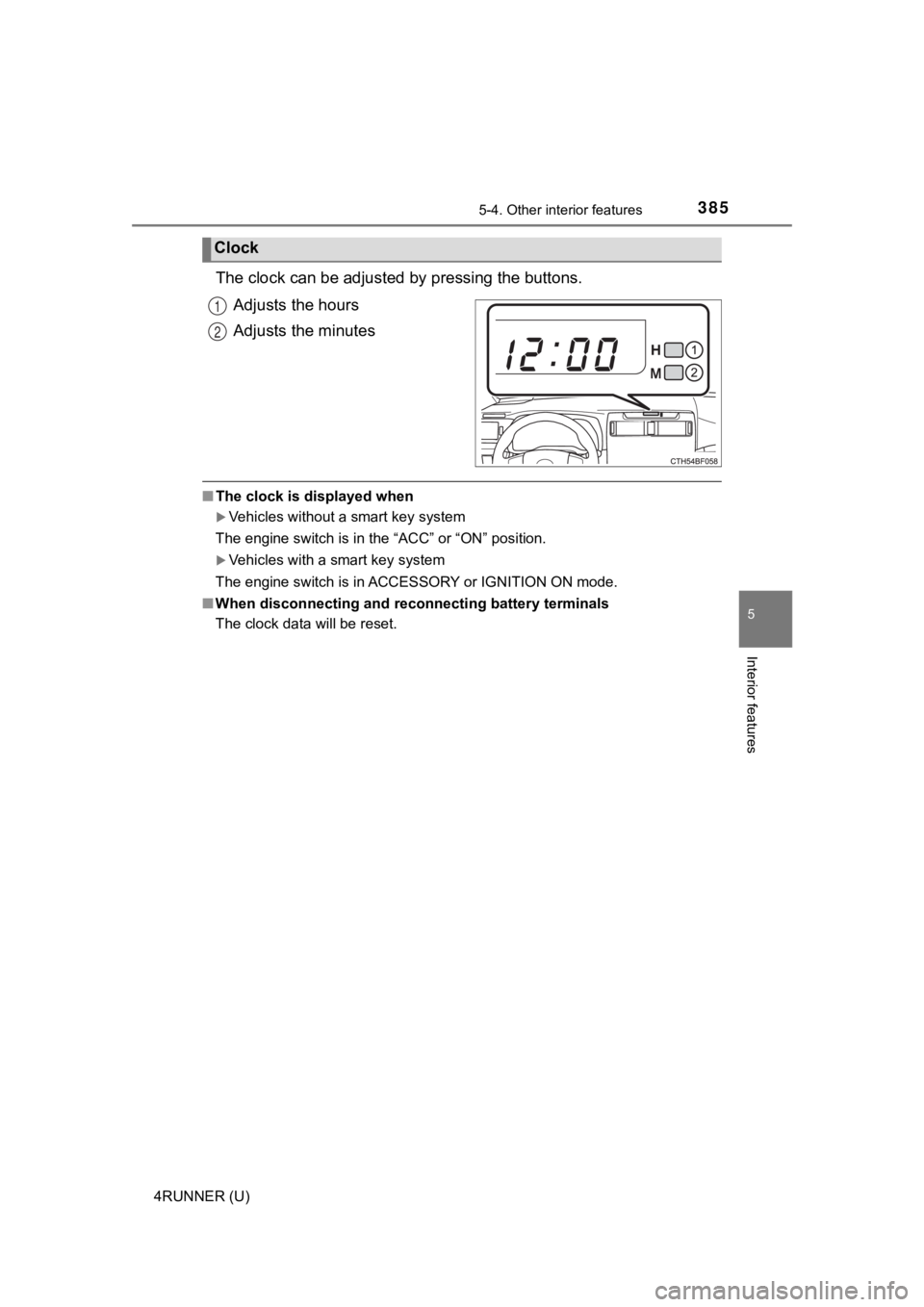
The clock can be adjusted by pressing the buttons.
Adjusts the hours
Adjusts the minutes
■ The clock is displayed when
Vehicles without a smart key system
The engine switch is in the “ACC” or “ON” position.
Vehicles with a smart key system
The engine switch is in ACCESSORY or IGNITION ON mode.
■ When disconnecting and reco nnecting battery terminals
The clock data will be reset.
Clock
1
2
Page 392 of 616
3925-4. Other interior features
4RUNNER (U)
■The power outlets can be used when
Vehicles without a smart key system
The engine switch is in the “ACC” or “ON” position.
Vehicles with a smart key system
The engine switch is in ACCESSORY or IGNITION ON mode.
■ When turning the engine switch off
Disconnect electrical devices with charging functions, such as mobile battery
packs.
If such devices are left connected, the engine switch may not b e turned off
normally.
NOTICE
■To avoid damaging the power outlets
Close the power outlet lids when the power outlets are not in use.
Foreign objects or liquids that enter the power outlets may cau se a short cir-
cuit.
■ To prevent battery discharge
Do not use the power outlets longer than necessary when the eng ine is off.
Page 393 of 616
3935-4. Other interior features
5
Interior features
4RUNNER (U)
The USB charging ports are used to supply 2.1 A of electricity at 5 V
to external devices (power consumption of 10.5 W).
The USB charging ports are for charging only. They are not desi gned
for data transfer or other purposes.
Depending on the external device, it may not charge properly. R efer to
the manual included with the dev ice before using a USB charging
port.
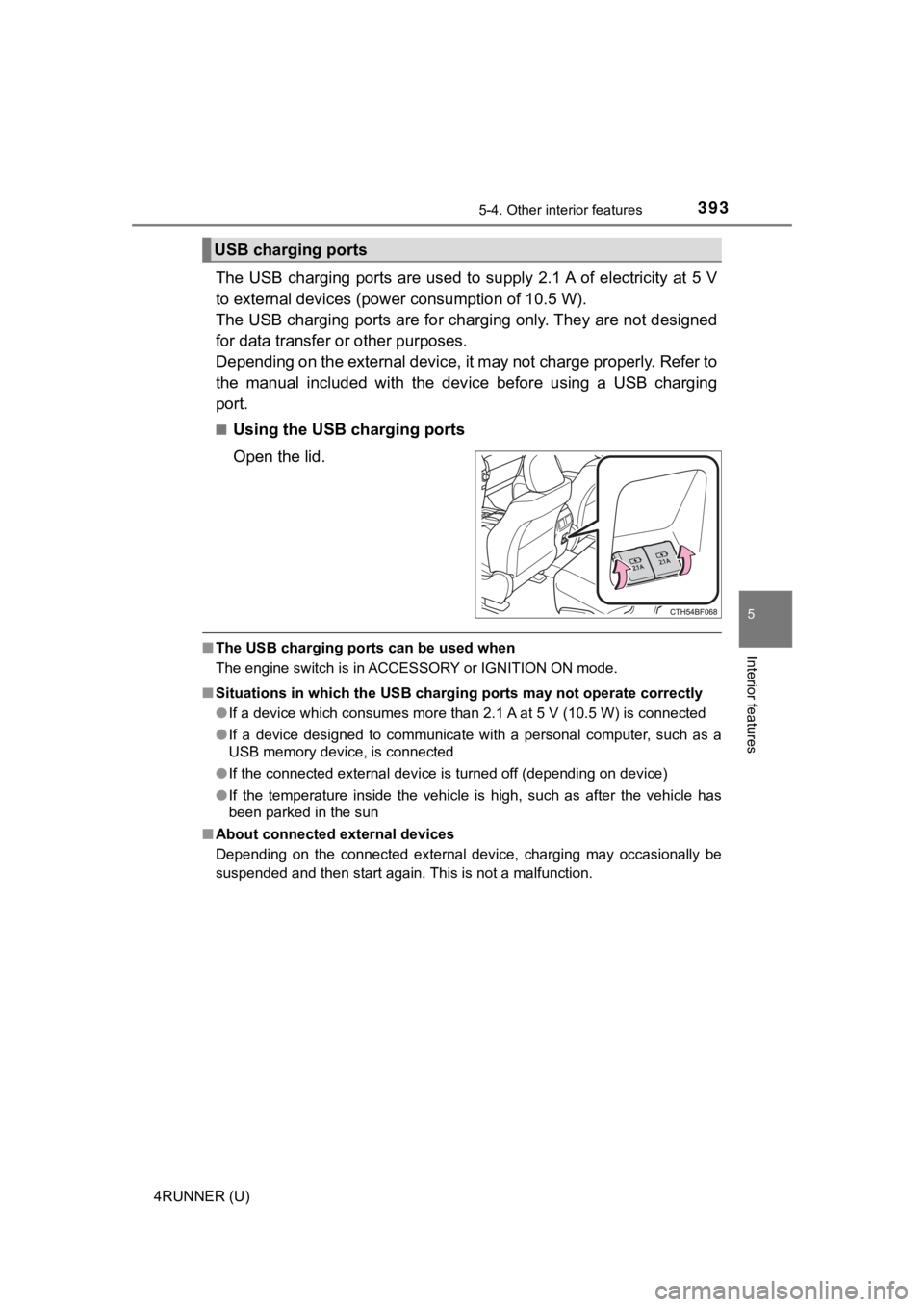
■Using the USB charging ports
Open the lid.
■ The USB charging ports can be used when
The engine switch is in ACCESSORY or IGNITION ON mode.
■ Situations in which the USB charg ing ports may not operate correctly
● If a device which consumes more than 2.1 A at 5 V (10.5 W) is connected
● If a device designed to communicate with a personal computer, s uch as a
USB memory device, is connected
● If the connected external device is turned off (depending on de vice)
● If the temperature inside the vehicle is high, such as after the vehicle has
been parked in the sun
■ About connected external devices
Depending on the connected external device, charging may occasi onally be
suspended and then start again. This is not a malfunction.
USB charging ports