2021 MERCEDES-BENZ GLE COUPE tow
[x] Cancel search: towPage 268 of 525
%
Manoeuvring assis tant mu stbe active forthe
function of Drive AwayAssi st (/ page 263)
and Cross Traf fic Alert (/ page 264). Tr
ailer Manoeuvring Assist Fu
nction of Trailer Manoeuvring Assist &
WARNING Risk of accident due to
unsuitable trailers
Tr ailers with a steered axle or a fift h wheel
cannot be used with Trailer Manoeuv ring
Assi st.
Due tothis, the trailer cann otbe man‐
oeuvred in the desired direction and you can
cause a collision or the trailer can overturn. #
Onlyuse Trailer Manoeuv ring Assi st
with trailers with fixe d dr awbars and
axles. *
NO
TEDama getotraile rswith a stabilisa‐
tion device against swerving In
the case of trailers with a stabilisation
device against swerving, the trailer or trailer
to w hit chcould be damaged. #
If a trailer coupling with Trailer Manoeu‐
vring Assist is used, on lyuse trailers
without a stabilisation device against
swerving. *
NO
TEDama gedue to ov erhanging loads
in front or draw bar installations The
vehicle and the trailer may be damaged
during manoeuvring due toove rhanging
loads at the front of the trailer or dr awbar
ins tallations. #
Pay attention to overhanging loads or
dr aw bar ins tallations while manoeu‐
vring. Tr
ailer Manoeuv ring Assi stassists you when
re ve rsing with a trailer. By means of a turning
angle sensor in the trailer coupling, Trailer Manoeuv
ring Assi stmonitors the articulation
angle between theve hicle and trailer and
adjusts it toa specified value.
Tr ailer Manoeuv ring Assi stis only an aid. It is not
a substitute foryo ur attention tothe sur round‐
ings. The responsibility for safe manoeuvring and
parking remains with you. Make sure that there
are no persons, animals or objects in the
manoeuvring area while manoeuvring and park‐
ing in/exiting parking spaces.
Yo u can either en terth e articulation angle value
directly via the multimedia sy stem or use a
st ra ightening manoeuvre. When car rying out a
st ra ightening manoeuvre, the sy stem calculates
th e articulation angle automatically and stra ight‐
ens theve hicle/trailer combination tothe trail‐
er's cur rent di rection.
Tr ailer Manoeuv ring Assi stmust be taught-in
before it can adjust the articulation angle
(/ page 266).
Obser vethe no tes on towing a trailer
(/ page 267). Driving and parking
265
Page 270 of 525
or
#
Toactivate thest ra ightening manoeuvre:
select º.
The sy stem calculates the articulation angle
in such a wayth at the direction of the trailer
at the time of activation is maintained. There
is a short counter steering mo vement of the
trailer while theve hicle is reve rsed, which
th en guides it back tothe desired line. In this
wa y,theve hicle is aligned stra ight with the
trailer and, at the same time, the direction of
th e trailer is maintained. #
Accelerate and brake as requ ired.
% Pay attention toyour sur roundings and be
re ady tobrake at all times. Tr
ailer hitch Note
s on trailer operation *
NO
TEMercedes-AMG vehicles #
Obser vethe no tes in the Supplement.
Yo u could otherwise failto recognise
dangers. *
NO
TEPlug-in hybrid #
Obser vethe no tes in the Supplement.
Yo u could otherwise failto recognise
dangers. Obser
vethefo llowing no tes on theto ngue
we ight:
R Do not use a tongue weight that exceeds or
fa lls below the permissible tongue weight
R Use a tongue weight as close as possible to
th e maximum tongue weight
Do not exceed thefo llowing values:
R Perm issible towing capacity
R Perm issible rear axle load of theto wing vehi‐
cle
R Perm issible gross weight of theto wing vehi‐
cle
R Perm issible grossweight of the trailer
R Maximum permissible speed of the trailer Ensure
thefo llowing before starting a journey:
R The tyre pressure on there ar axle of theto w‐
ing vehicle is set for a maximum load
R The lighting of the connected trailer is opera‐
tional
In theeve nt of increased rear axle load, the car/
trailer combination must not exceed a maximum
speed of 100 km/h forre asons concerning the
operating permit. This also applies in countri es
in which the permissible maximum speed for
car/trailer combinations is above 100 km/h.
Ve hicles with AIRMATIC or E- ACTIVE BODY
CONT ROL:ifth e soc ket of the trailer hitch is
occupied, e.g. bya trailer or rear bicycle rack,
th eve hicle is set tothe normal le velre ga rdless
of the drive prog ram at speeds greater than
30 km/h.
% When you are reve rsing with a trailer,
re member touse theTr ailer Manoeuvering
Assist function (/ page 265). Driving and parking
267
Page 277 of 525
Mercedes-Benz
recommends removing all
de tach able parts from bicycles (e.g. bask ets,
ch ild seats, rech arge able bat teries) before load‐
ing them onto the bicycle rack . This will impr ove
th e aerodynamic resis tance and centre of gr avity
of the bicycle rack.
Alw ays secure the bicycles topreve ntthem from
moving around and check them at regular inter‐
va ls to ensure that they are secure.
Do not use tarp aulins or other co vers. The driv‐
ing characteristics and rear view may be
impaired. In addition, aerodynamic resis tance
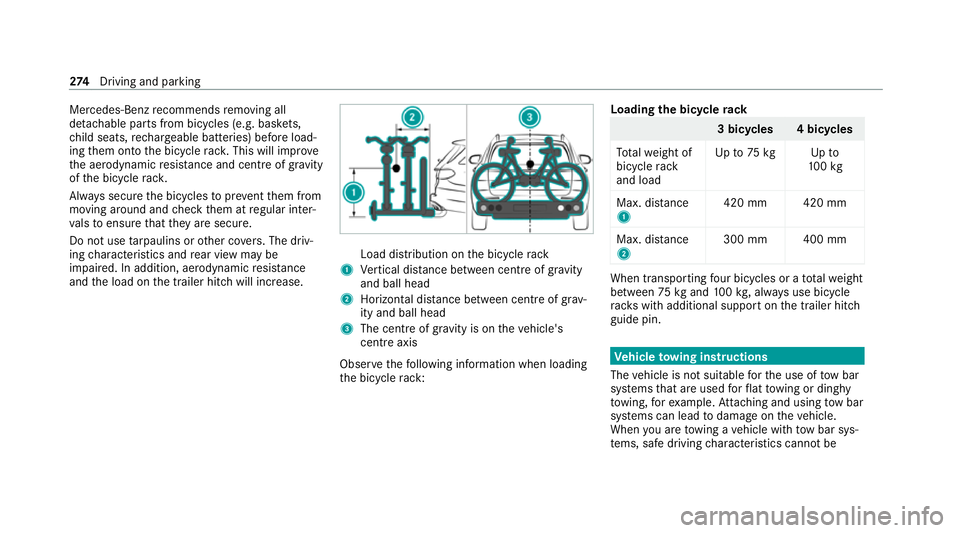
and the load on the trailer hitch will increase. Load distribution on
the bicycle rack
1 Vertical dis tance between centre of gr avity
and ball head
2 Horizon tal dis tance between centre of gr av‐
ity and ball head
3 The centre of gr avity is on theve hicle's
centre axis
Obse rveth efo llowing information when loading
th e bicycle rack: Loading
the bicycle rack 3 bicycles 4 bicycles
To talwe ight of
bicycle rack
and load Up
to75 kg Up to
10 0kg
Max. dis tance
1 420 mm 420 mm
Max. di stance
2 300 mm 400 mm When transpo
rting four bic ycles or a totalwe ight
between 75kgand 100kg , alw ays use bicycle
ra ck s with additional support on the trailer hitch
guide pin. Ve
hicle towing instructions
The vehicle is not suitable forth e use of tow bar
sy stems that are used forflat towing or ding hy
to wing, forex ample. Attach ing and using tow bar
sy stems can lead todamage on theve hicle.
When you are towing a vehicle with tow bar sys‐
te ms, safe driving characteristics cannot be 274
Driving and pa rking
Page 278 of 525
guaranteed
forth eto wing vehicle or theto wed
ve hicle. The vehicle-trailer combination may
swer vefrom side toside. Comply with the per‐
mitted towing me thods (/ page 362) and the
instructions forto wing with bo thaxles on the
ground (/ page 363). Driving and parking
275
Page 292 of 525
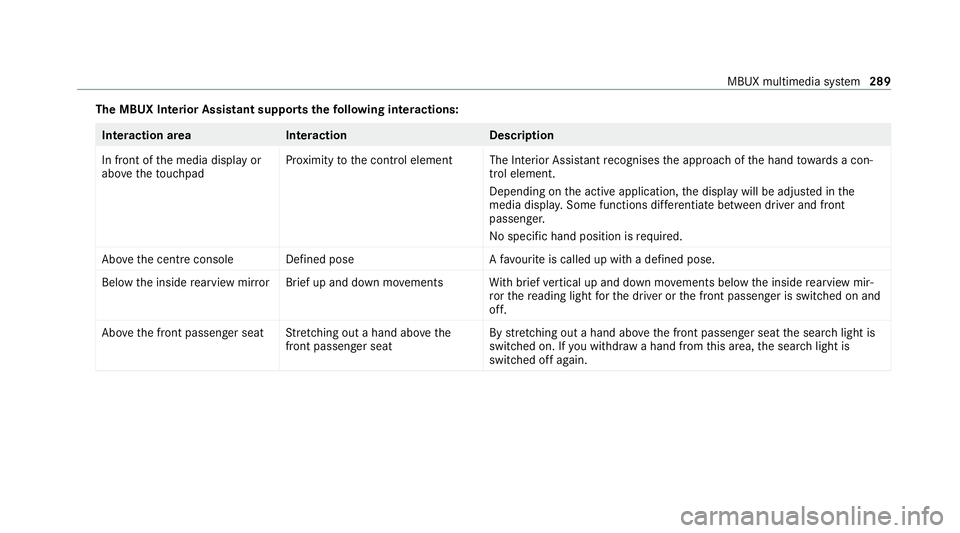
The MBUX In
terior Assistant supports thefo llowing interactions: Interaction area
Interaction Description
In front of the media display or
abo vetheto uchpad Pr
ox imity tothe control element The Interior Assis tant recognises the approach of the hand towa rds a con‐
trol element.
Depending on the active application, the display will be adjus ted in the
media displa y.Some functions di fferentiate between driver and front
passenger.
No specific hand position is requ ired.
Abo vethe cent reconsole Defined pos eAfavo urite is called up with a defined pose.
Bel ow the inside rearview mir rorB rief up and down mo vements With brief vertical up and down mo vements below the inside rearview mir‐
ro rth ere ading light forth e driver or the front passenger is switched on and
off.
Abo vethe front passenger seat Stretching out a hand ab ovethe
front passenger seat By
stre tching out a hand ab ovethe front passenger seat the sear chlight is
switched on. If you withdraw a hand from this area, the sear chlight is
switched off again. MBUX multimedia sy
stem 289
Page 303 of 525
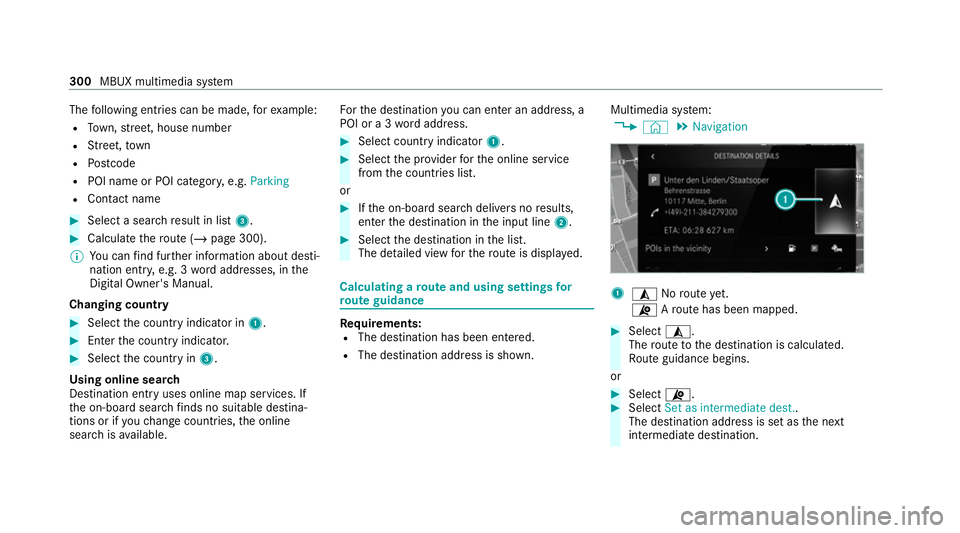
The
following ent ries can be made, forex ample:
R Town, stre et, house number
R Street,to wn
R Postcode
R POI name or POI catego ry, e.g. Parking
R Contact name #
Select a sear chresult in list 3. #
Calculate thero ute (/ page 300).
% You can find fur ther information about desti‐
nation entry , e.g. 3wordaddresses, in the
Digital Owner's Manual.
Changing country #
Select the count ryindicator in 1. #
Enterth e count ryindicator. #
Select the count ryin3.
Using online sear ch
Destination entry uses online map services. If
th e on-board sear chfinds no suitable dest ina‐
tions or if youch ange countries, the online
sear chisavailable. Fo
rth e destination you can en ter an addre ss, a
POI or a 3 wordaddress. #
Select country indicator 1. #
Select the pr ovider forth e online service
from the count ries list.
or #
Ifth e on-board sear chdelivers no results,
enter the destination in the input line 2. #
Select the destination in the list.
The de tailed view forth ero ute is displ ayed. Calculating a
route and using settings for
ro ute guidance Re
quirements:
R The destination has been entered.
R The destination address is shown. Multimedia sy
stem:
4 © 5
Navigation 1
¥ Noroute yet.
¦ Aro ute has been mapped. #
Select ¥.
The route tothe destination is calculated.
Ro ute guidance begins.
or #
Select ¦. #
Select Set as intermediate dest..
The destination address is set as the next
intermediate destination. 300
MBUX multimedia sy stem
Page 308 of 525
Ha
ve the camera checked in a Mercedes-
Benz service centre. Te
lephone Te
lephony Note
s ontelephony &
WARNING Risk of dist raction from oper‐
ating integrated communication equip‐
ment while theve hicle is in motion
If yo u operate communication equipment
integrated in theve hicle when driving, you
could be dist racted from the tra ffic situation.
This could also cause youto lose control of
th eve hicle. #
Only operate this equipment when the
traf fic situation permits. #
Ifyo u cannot be sure of this, stop the
ve hicle whilst paying attention toroad
and traf fic conditions and ope rate the
equipment with theve hicle stationar y. &
WARNING Risk of an accident from
ope rating mobile communication equip‐
ment while theve hicle is in motion
Mobile communications devices distract the
driver from the traf fic situation. This could
also cause the driver tolose control of the
ve hicle. #
Asthe driver, only operate mobile com‐
munications devices when theve hicle is
st ationar y. #
As a vehicle occupant, only use mobile
communications devices in the areas
intended forth is purpose, e.g. in the
re ar passenger compartment. Yo
u must obse rveth e legal requirements forthe
country in whi chyou are cur rently driving when
operating mobile communication equipment in
th eve hicle. &
WARNING Risk of injury duetoobjects
being stowed inco rrectly
If objects in theve hicle interior are stowed
incor rectly, they can slide or be thrown
around and hit vehicle occupants. In addi‐
tion, cup holders, open stowage spaces and
mobile phone recep tacles cannot al ways
re tain all objects within.
There is a risk of injur y,particularly in the
ev ent of sudden braking or a sudden change
in direction. #
Alw aysstow objects so that they can‐
not be throw n around in su chsitua‐
tions. #
Alw ays make sure that objects do not
pr otru de from stowage spaces, luggage
nets or stowage nets. #
Close the loc kable stow age spaces
before starting a journe y. #
Alw aysstow and secure heavy, hard,
poin ted, sharp-edged, fragile or bulky
objects in the boot/load compartment. MBUX multimedia sy
stem 305
Page 309 of 525
Obser
vethe additional information on stowing
mobile communications devices cor rectly:
R Loading theve hicle (/ page114)
Blue tooth ®
connection:
The menu view and theav ailable functions in the
te lephone menu are in part dependent on the
Blu etoo th®
profile of the connected mobile
phone. Full functionality is only available if the
mobile phone supports bo thofthefo llowing
Blue tooth ®
profiles:
R PBAP (Phone Book Access Profile)
- The contacts on the mobile phone are
shown automatically on the multimedia
sy stem.
R MAP (Message Access Profile)
- The mobile phone message functions can
be used on the multimedia sy stem.
Ir re spective of this, Blue tooth ®
audio functional‐
ity can byused with any mobile radio unit.
Fo r information on thera nge of functions of the
mobile radio unit tobe connec ted, see the man‐
ufacturer's operating instructions. Ne
twork connection:
The following cases can lead tothe call being
disconnected while theve hicle is in motion:
R You swit chinto a transmission/reception
st ation, in which no communication channel
is free.
R The SIM card used is not compatible with the
network available
R A mobile phone with "Twincard" is logged
into the network with the second SIM card at
th e same time
The multimedia sy stem supports calls in HD
Vo ice ®
for impr oved speech qualit y.Arequ ire‐
ment forth is is that the mobile phone and the
mobile phone network pr ovider of the person
yo u are calling suppo rtHD Voice ®
.
Depending on thequ ality of the connection, the
vo ice quality may fluctuate.
Fu rther information can be obtained from a
Mercedes-Benz service centre or at: https://
www.mercedes-benz.com/connect 306
MBUX multimedia sy stem