Page 1 of 792
PRIUS PRIME_OM_OM47C77U_(U)
Pictorial indexSearch by illustration
1For safety
and securityMake sure to read through them
2Plug-in hybrid
systemPlug-in hybrid system features, charging method,
etc.
3Instrument
clusterHow to read the gauges and meters, the variety of
warning lights and indicators, etc.
4Operation of
each componentOpening and closing the doors and windows,
adjustment before driving, etc.
5DrivingOperations and advice which are necessary for
driving
6Interior featuresUsage of the interior features, etc.
7Maintenance
and careCaring for your vehicle and maintenance
procedures
8When trouble
arisesWhat to do in case of malfunction or emergency
9Vehicle
specificationsVehicle specifications, customizable features, etc.
10For ownersReporting safety defects for U.S. owners, and seat
belt, SRS airbag and headlight aim instructions for
Canadian owners
IndexSearch by symptom
Search alphabetically
Page 4 of 792

TABLE OF CONTENTS4
PRIUS PRIME_OM_OM47C77U_(U)5-5. Using the driving support
systems
Toyota Safety Sense P ..... 373
PCS (Pre-Collision System) ........................... 381
LDA (Lane Departure Alert with steering
control) ............................ 393
Dynamic radar cruise control with full-speed
range ............................... 403
Driving mode select switch .............................. 419
BSM (Blind Spot Monitor) ........ 421
• The Blind Spot Monitor
function ......................... 425
• The Rear Cross Traffic Alert function ................. 428
Intuitive parking assist ....... 433
Parking Support Brake function ........................... 443
S-APGS (Simple Advanced Parking
Guidance System) .......... 455
Driving assist systems....... 489
5-6. Driving tips Winter driving tips.............. 495 6-1. Using the air conditioning
system and defogger
Automatic air conditioning system (vehicles with
7-inch display) ................. 500
Automatic air conditioning system (vehicles with
11.6-inch display) ............ 511
Remote Air Conditioning System ............................ 522
Heated steering wheel/ seat heaters..................... 526
6-2. Using the interior lights Interior lights list................. 528• Front interior light .......... 529
• Front personal lights ...... 529
• Rear interior light ........... 530
6-3. Using the storage features List of storage features ...... 531• Glove box ...................... 532
• Console box .................. 532
• Cup holders ................... 533
• Bottle holders/door pockets.................. 534
• Auxiliary boxes .............. 535
• Seat back pockets ......... 535
Luggage compartment features ........................... 536
6Interior features
Page 23 of 792
23Pictorial index
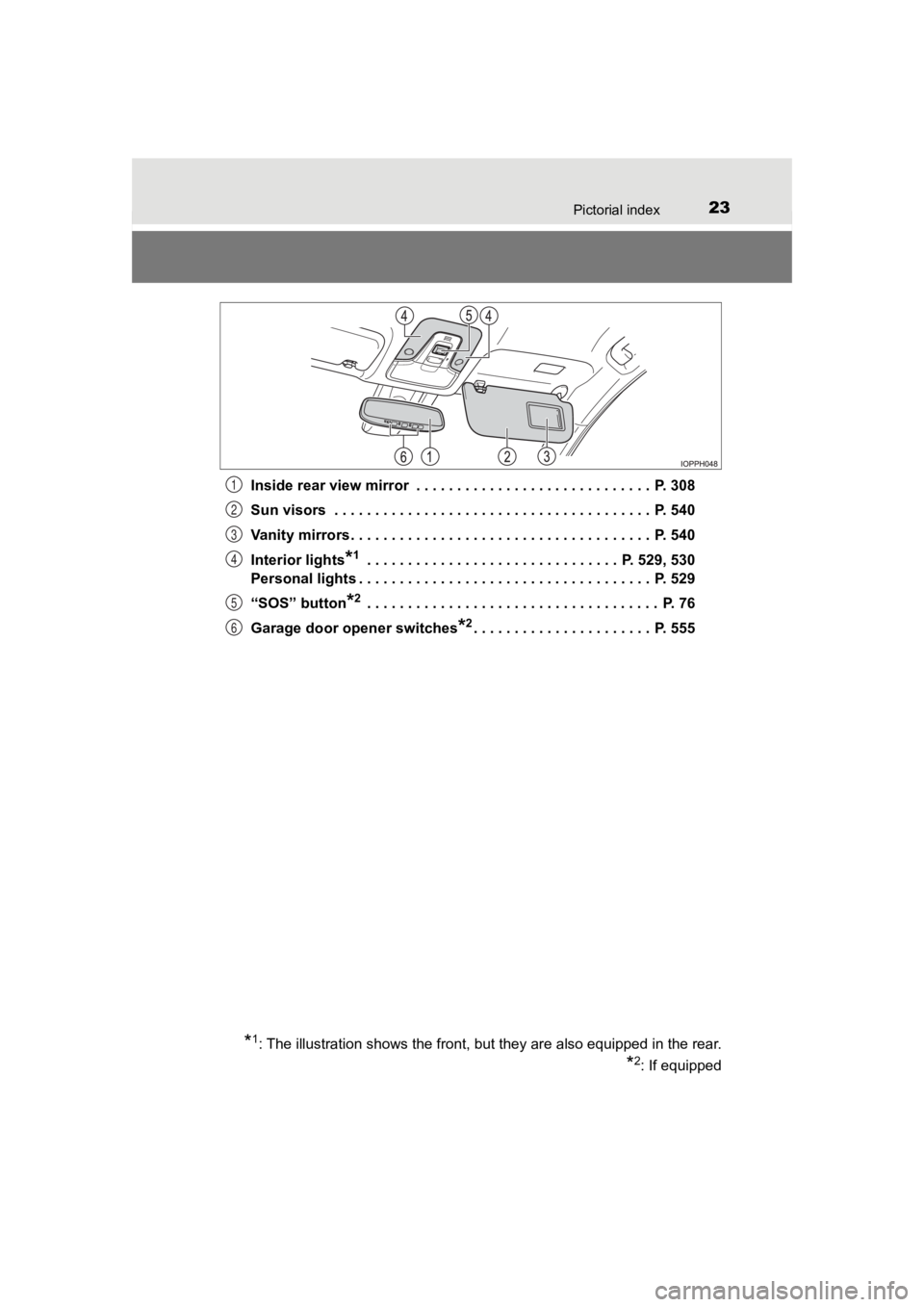
PRIUS PRIME_OM_OM47C77U_(U)Inside rear view mirror . . . . . . . . . . . . . . . . . . . . . . . . . . . . . P. 308
Sun visors . . . . . . . . . . . . . . . . . . . . . . . . . . . . . . . . . . . . . . . P. 540
Vanity mirrors . . . . . . . . . . . . . . . . . . . . . . . . . . . . . . . . . . . . . P. 540
Interior lights
*1 . . . . . . . . . . . . . . . . . . . . . . . . . . . . . . . P. 529, 530
Personal lights . . . . . . . . . . . . . . . . . . . . . . . . . . . . . . . . . . . . P. 529
“SOS” button
*2 . . . . . . . . . . . . . . . . . . . . . . . . . . . . . . . . . . . . P. 76
Garage door opener switches
*2. . . . . . . . . . . . . . . . . . . . . . P. 555
*1: The illustration shows the front, but they are also equipped in the rear.
*2: If equipped
1
2
3
4
5
6
Page 499 of 792

499
PRIUS PRIME_OM_OM47C77U_(U)
6Interior features
6-1. Using the air conditioning system and defogger
Automatic air conditioning system (vehicles with
7-inch display) ................. 500
Automatic air conditioning system (vehicles with
11.6-inch display) ............ 511
Remote Air Conditioning System ............................ 522
Heated steering wheel/ seat heaters .................... 526 6-2. Using the interior lights
Interior lights list ................ 528• Front interior light .......... 529
• Front personal lights ..... 529
• Rear interior light .......... 530
6-3. Using the storage features List of storage features ..... 531• Glove box...................... 532
• Console box .................. 532
• Cup holders .................. 533
• Bottle holders/door pockets ................. 534
• Auxiliary boxes.............. 535
• Seat back pockets ........ 535
Luggage compartment features ........................... 536
6-4. Using the other interior features
Other interior features ....... 540 • Sun visors ..................... 540
• Vanity mirrors................ 540
• Power outlets ................ 541
• USB charging ports....... 542
• Wireless charger ........... 544
• Armrest ......................... 553
• Coat hooks.................... 553
• Assist grips ................... 554
Garage door opener.......... 555
Page 528 of 792
528
PRIUS PRIME_OM_OM47C77U_(U)
6-2. Using the interior lights
Interior lights list
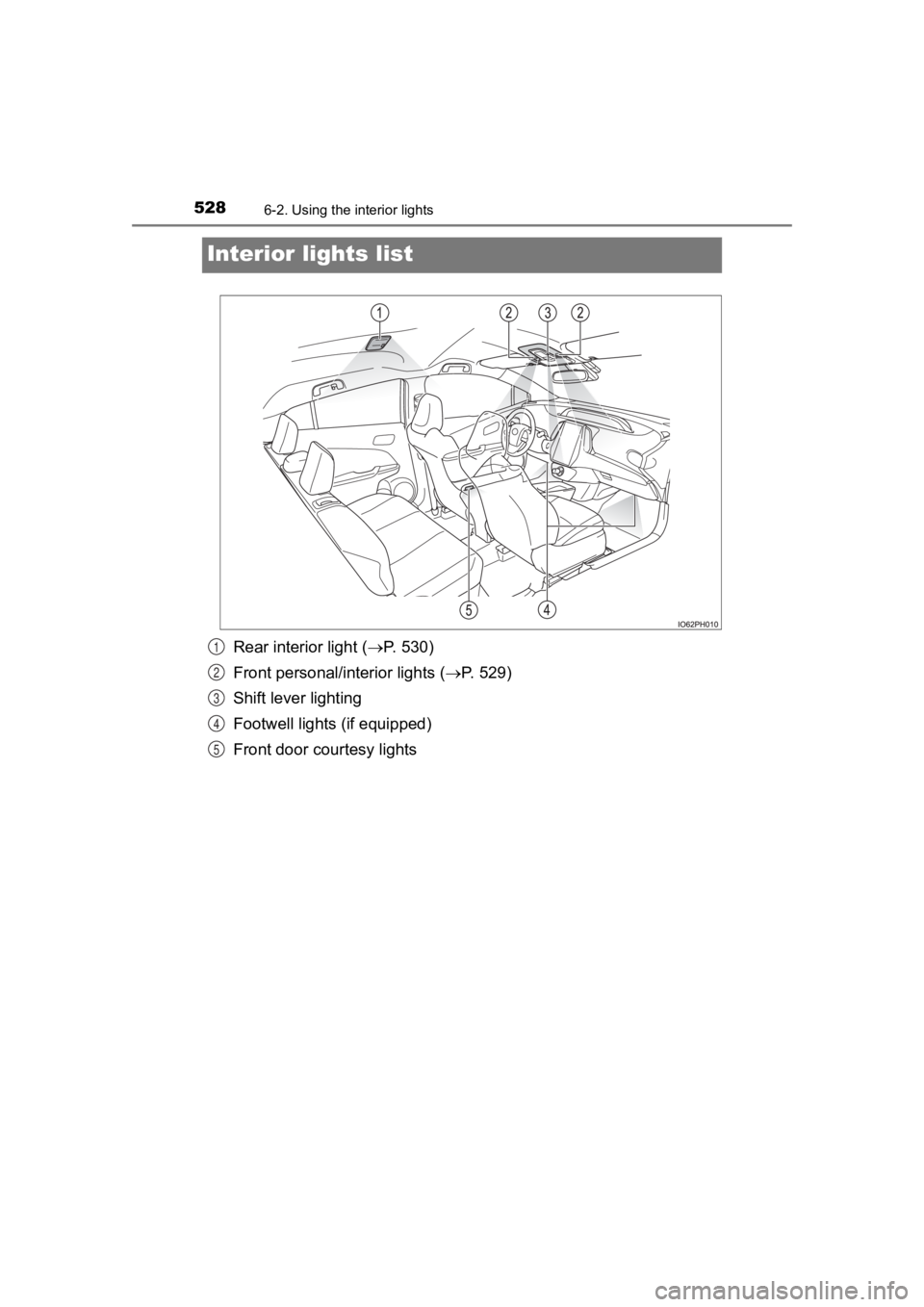
Rear interior light ( P. 530)
Front personal/interior lights ( P. 529)
Shift lever lighting
Footwell lights (if equipped)
Front door courtesy lights1
2
3
4
5
Page 529 of 792
PRIUS PRIME_OM_OM47C77U_(U)
5296-2. Using the interior lights
6
Interior features
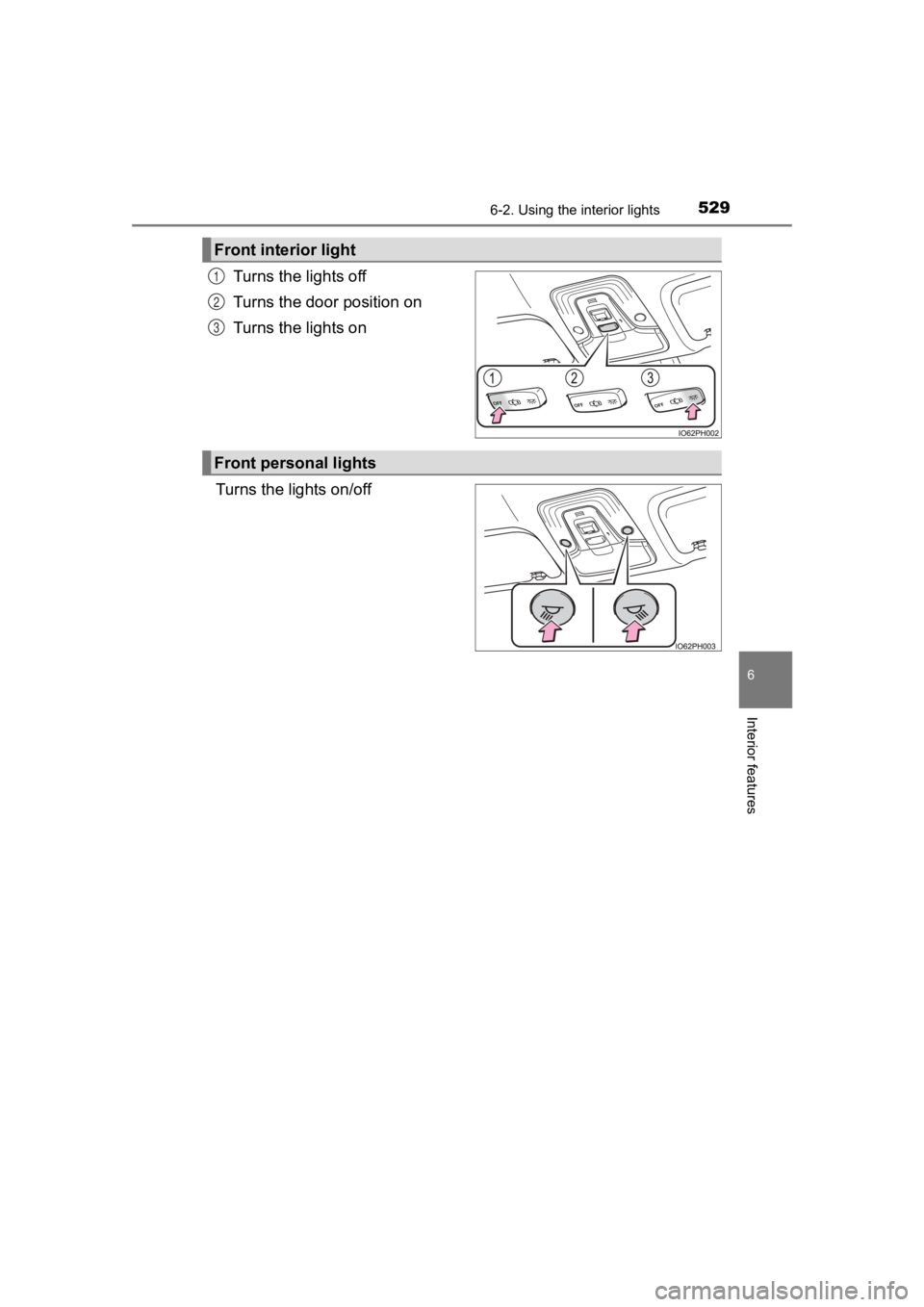
Turns the lights off
Turns the door position on
Turns the lights on
Turns the lights on/off
Front interior light
1
2
3
Front personal lights
Page 530 of 792
530
PRIUS PRIME_OM_OM47C77U_(U)
6-2. Using the interior lights
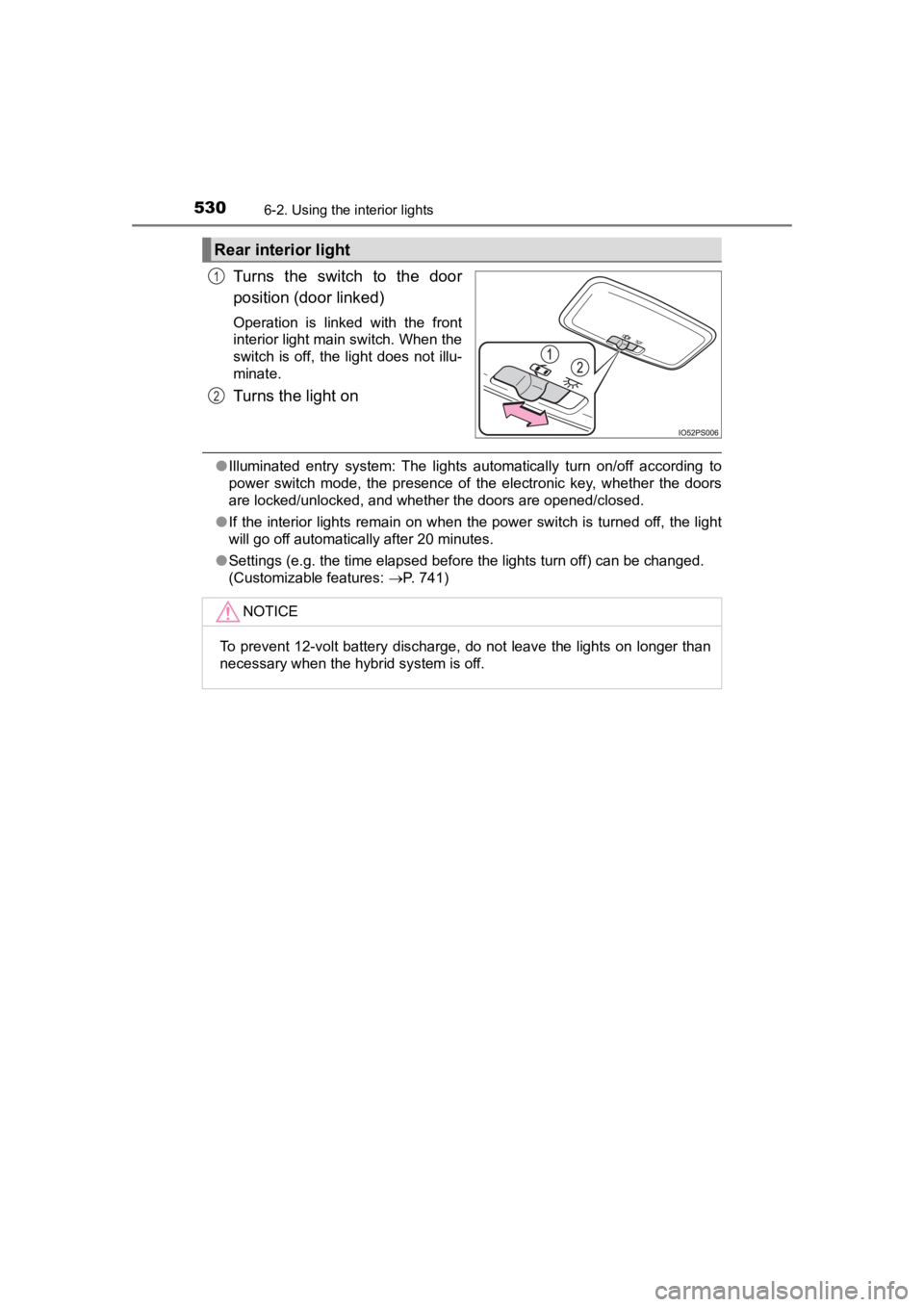
Turns the switch to the door
position (door linked)
Operation is linked with the front
interior light main switch. When the
switch is off, the light does not illu-
minate.
Turns the light on
●Illuminated entry system: The lights automatically turn on/off according to
power switch mode, the presence of the electronic key, whether the doors
are locked/unlocked, and whether the doors are opened/closed.
● If the interior lights remain on when the power switch is turne d off, the light
will go off automatically after 20 minutes.
● Settings (e.g. the time elapsed before the lights turn off) can be changed.
(Customizable features: P. 741)
Rear interior light
1
2
NOTICE
To prevent 12-volt battery discharge, do not leave the lights on longer than
necessary when the hybrid system is off.
Page 546 of 792
546
PRIUS PRIME_OM_OM47C77U_(U)
6-4. Using the other interior features
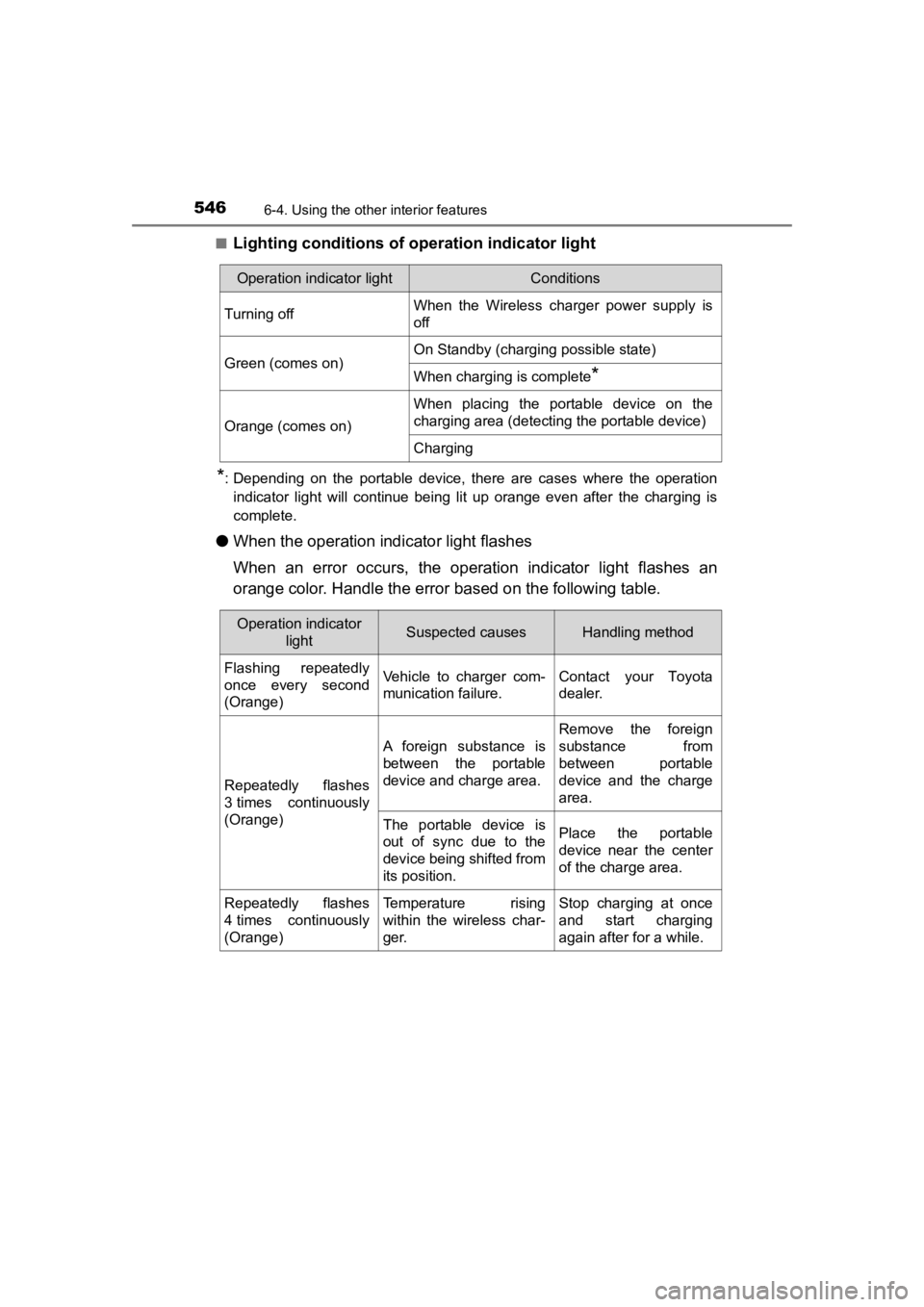
■Lighting conditions of ope ration indicator light
*: Depending on the portable device, there are cases where the op eration
indicator light will continue being lit up orange even after the charging is
complete.
● When the operation indi cator light flashes
When an error occurs, the operat ion indicator light flashes an
orange color. Handle the error based on the following table.
Operation indicator lightConditions
Turning offWhen the Wireless charger power supply is
off
Green (comes on)On Standby (charging possible state)
When charging is complete*
Orange (comes on)
When placing the portable device on the
charging area (detecting the portable device)
Charging
Operation indicator
lightSuspected causesHandling method
Flashing repeatedly
once every second
(Orange)Vehicle to charger com-
munication failure.Contact your Toyota
dealer.
Repeatedly flashes
3 times continuously
(Orange)
A foreign substance is
between the portable
device and charge area.
Remove the foreign
substance from
between portable
device and the charge
area.
The portable device is
out of sync due to the
device being shifted from
its position.Place the portable
device near the center
of the charge area.
Repeatedly flashes
4 times continuously
(Orange)Temperature rising
within the wireless char-
ger.Stop charging at once
and start charging
again after for a while.