2020 Hyundai Tucson wheel
[x] Cancel search: wheelPage 307 of 637
4-32
Multimedia System
You cannot access the Phone
screen if there is no connected
mobile phone. To use the
Bluetooth phone function, con-
nect a mobile phone to the sys-
tem.
The Bluetooth Handsfree func-
tion may not work when you are
passing out of the mobile serv-
ice coverage area, such as,
when you are in a tunnel, under-
ground, or in a mountainous
area.
Call quality may be degraded in
the following environments:
- The reception of the mobile
phone is poor
- The inside of the vehicle is
noisy
- The mobile phone is placed
near metallic objects, such as
a beverage can
Depending on the connected
mobile phone, the volume and
sound quality of the Bluetooth
Handsfree may vary.
Making a call
If your mobile phone is connected to
the system, you can make a call by
selecting a name from your call his-
tory or contacts list.
1. On the control panel, press the
[PHONE] button.
Alternatively, press the Call/
Answer button on the steering
wheel.
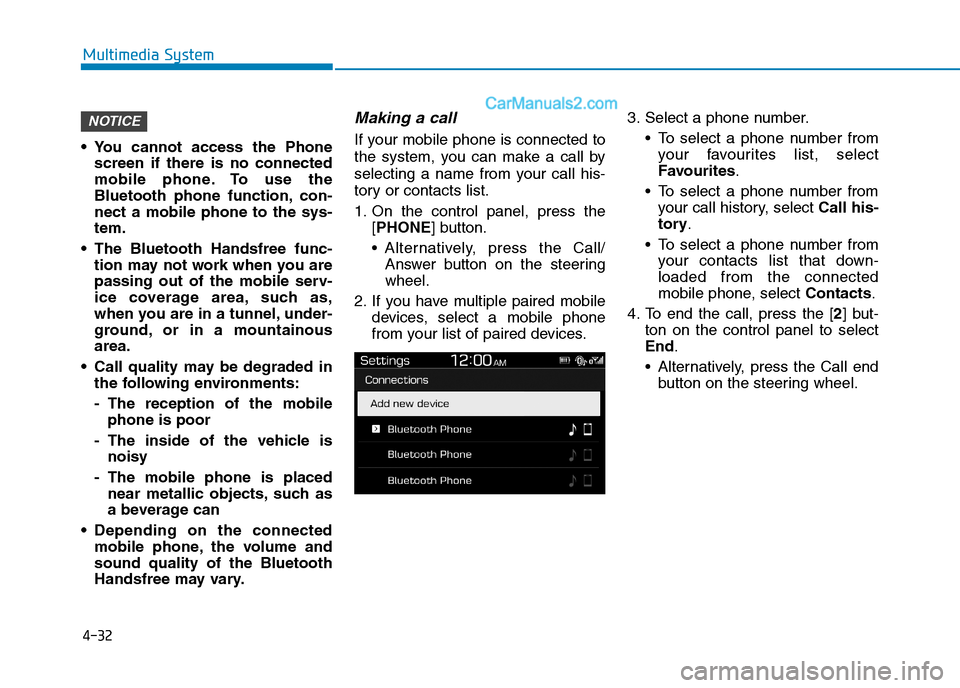
2. If you have multiple paired mobile
devices, select a mobile phone
from your list of paired devices.3. Select a phone number.
To select a phone number from
your favourites list, select
Favourites.
To select a phone number from
your call history, select Call his-
tory.
To select a phone number from
your contacts list that down-
loaded from the connected
mobile phone, select Contacts.
4. To end the call, press the [2] but-
ton on the control panel to select
End.
Alternatively, press the Call end
button on the steering wheel.
NOTICE
Page 310 of 637
4-35
Multimedia System
4
Special characters and figures
used in the contact name may
not be displayed properly.
Permission is required to down-
load contacts from the mobile
phone. When you attempt to
download data, you may need to
permit the download on the
mobile phone. If the download
fails, check the mobile phone
screen for any notification or the
mobile phone’s permission set-
ting.
Depending on the mobile phone
type or status, downloading may
take longer.
When you download your con-
tacts, any old data will be deleted.
You cannot edit or delete your
contacts on the system.
When you connect a new mobile
phone, your contacts down-
loaded from the previous mobile
phone will not be displayed, but
they will remain in your system
until you delete the previous
phone from the device list.Answering calls
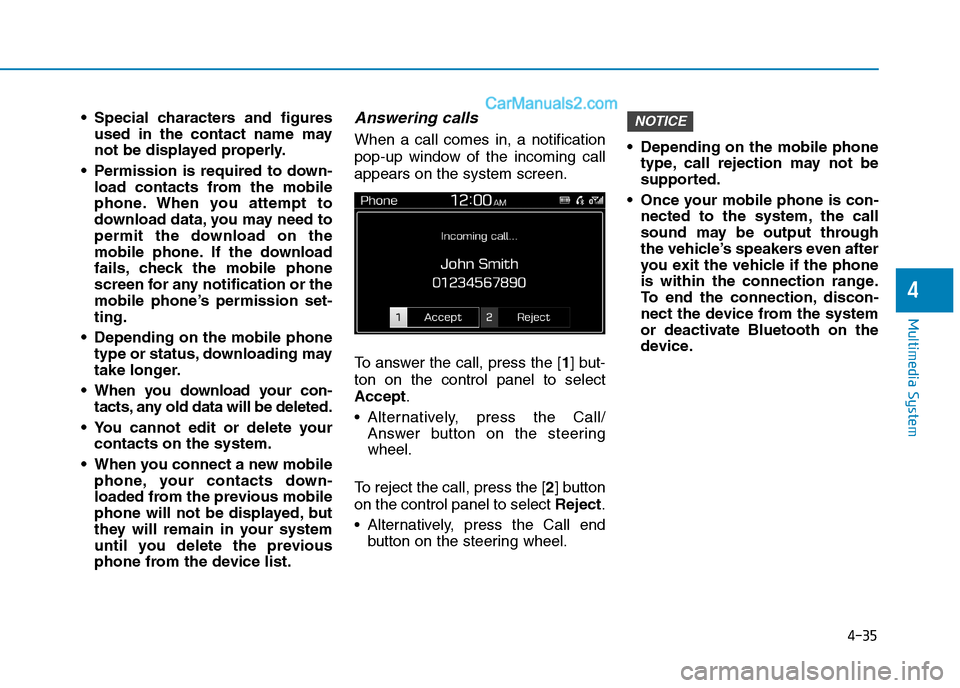
When a call comes in, a notification
pop-up window of the incoming call
appears on the system screen.
To answer the call, press the [1] but-
ton on the control panel to select
Accept.
Alternatively, press the Call/
Answer button on the steering
wheel.
To reject the call, press the [2] button
on the control panel to select Reject.
Alternatively, press the Call end
button on the steering wheel. Depending on the mobile phone
type, call rejection may not be
supported.
Once your mobile phone is con-
nected to the system, the call
sound may be output through
the vehicle’s speakers even after
you exit the vehicle if the phone
is within the connection range.
To end the connection, discon-
nect the device from the system
or deactivate Bluetooth on the
device.
NOTICE
Page 311 of 637
4-36
Multimedia System
Using options during a call
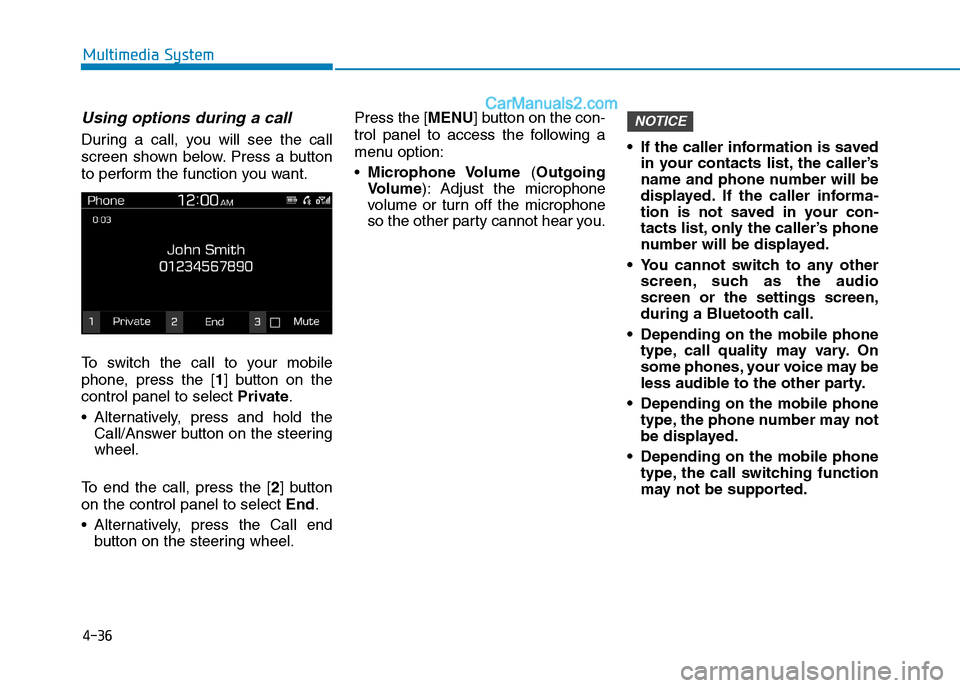
During a call, you will see the call
screen shown below. Press a button
to perform the function you want.
To switch the call to your mobile
phone, press the [1] button on the
control panel to select Private.
Alternatively, press and hold the
Call/Answer button on the steering
wheel.
To end the call, press the [2] button
on the control panel to select End.
Alternatively, press the Call end
button on the steering wheel.Press the [MENU] button on the con-
trol panel to access the following a
menu option:
Microphone Volume (Outgoing
Volume): Adjust the microphone
volume or turn off the microphone
so the other party cannot hear you. If the caller information is saved
in your contacts list, the caller’s
name and phone number will be
displayed. If the caller informa-
tion is not saved in your con-
tacts list, only the caller’s phone
number will be displayed.
You cannot switch to any other
screen, such as the audio
screen or the settings screen,
during a Bluetooth call.
Depending on the mobile phone
type, call quality may vary. On
some phones, your voice may be
less audible to the other party.
Depending on the mobile phone
type, the phone number may not
be displayed.
Depending on the mobile phone
type, the call switching function
may not be supported.
NOTICE
Page 318 of 637
Driving your vehicle
Before driving.........................................................5-4
Before entering the vehicle ...........................................5-4
Before starting...................................................................5-4
Ignition switch ........................................................5-6
Key ignition switch ............................................................5-6
Engine Start/Stop button ..............................................5-11
Manual transmission............................................5-20
Manual transmission operation ...................................5-20
Good driving practices ...................................................5-22
Automatic transmission .......................................5-24
Automatic transmission operation ..............................5-24
Parking ...............................................................................5-29
Good driving practices ...................................................5-29
Dual clutch transmission .....................................5-31
Dual clutch transmission operation ............................5-31
LCD display for transmission temperature and
warning message.............................................................5-33
Parking ...............................................................................5-41
Good driving practices ...................................................5-41
Braking system.....................................................5-43
Power brakes ...................................................................5-43
Disc brakes wear indicator ...........................................5-44
Parking brake ...................................................................5-44
Electronic Parking Brake (EPB)...................................5-46
AUTO HOLD ......................................................................5-52
Anti-lock Brake System (ABS) ....................................5-56Electronic Stability Control (ESC)................................5-58
Vehicle Stability Management......................................5-62
Hill-Start Assist Control (HAC) ....................................5-63
Downhill Brake Control (DBC) ......................................5-63
Low Vacuum Assist (LVA) ..............................................5-65
Emergency Stop Signal (ESS) ......................................5-65
Good braking practices ................................................5-66
Four wheel drive (4WD) ......................................5-66
4WD operation .................................................................5-68
Emergency precautions .................................................5-72
Reducing the risk of a rollover ...................................5-73
Flex steering wheel .............................................5-75
Drive mode integrated control system .............5-77
Forward collision-avoidance assist (FCA)
system - camera type .........................................5-79
System setting and activation......................................5-79
FCA warning message and system control ..............5-81
FCA sensor........................................................................5-84
System malfunction ........................................................5-86
Limitations of the system .............................................5-87
Forward collision-avoidance assist (FCA)
system- sensor fusion type
(front radar + front camera) .............................5-92
System setting and activation......................................5-92
FCA warning message and system control ..............5-94
FCA sensor........................................................................5-97
5
Page 321 of 637
5-4
Driving your vehicle
Before entering the vehicle
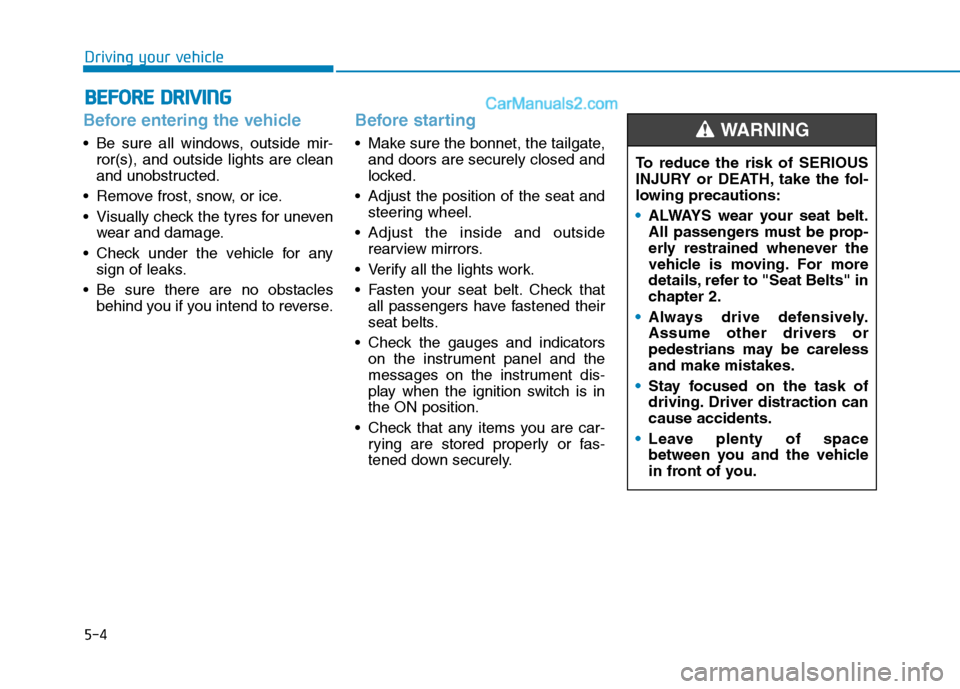
• Be sure all windows, outside mir-
ror(s), and outside lights are clean
and unobstructed.
Remove frost, snow, or ice.
Visually check the tyres for uneven
wear and damage.
Check under the vehicle for any
sign of leaks.
Be sure there are no obstacles
behind you if you intend to reverse.
Before starting
Make sure the bonnet, the tailgate,
and doors are securely closed and
locked.
Adjust the position of the seat and
steering wheel.
Adjust the inside and outside
rearview mirrors.
Verify all the lights work.
Fasten your seat belt. Check that
all passengers have fastened their
seat belts.
Check the gauges and indicators
on the instrument panel and the
messages on the instrument dis-
play when the ignition switch is in
the ON position.
Check that any items you are car-
rying are stored properly or fas-
tened down securely.
B BE
EF
FO
OR
RE
E
D
DR
RI
IV
VI
IN
NG
G
To reduce the risk of SERIOUS
INJURY or DEATH, take the fol-
lowing precautions:
•ALWAYS wear your seat belt.
All passengers must be prop-
erly restrained whenever the
vehicle is moving. For more
details, refer to "Seat Belts" in
chapter 2.
Always drive defensively.
Assume other drivers or
pedestrians may be careless
and make mistakes.
Stay focused on the task of
driving. Driver distraction can
cause accidents.
Leave plenty of space
between you and the vehicle
in front of you.
WARNING
Page 323 of 637
5-6
Driving your vehicle
I IG
GN
NI
IT
TI
IO
ON
N
S
SW
WI
IT
TC
CH
H
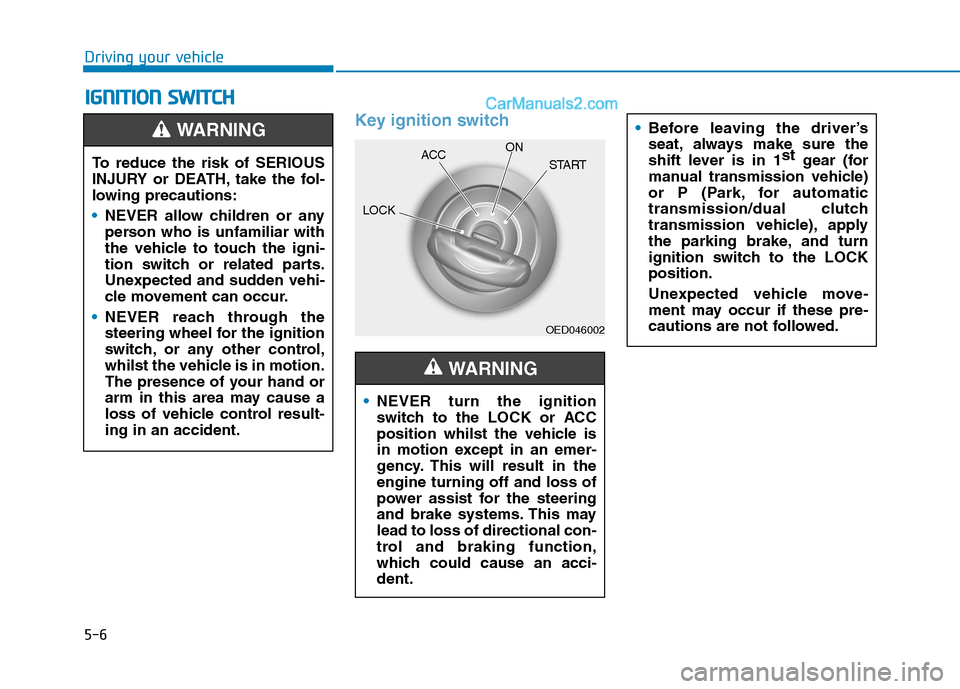
Key ignition switch
OED046002
NEVER turn the ignition
switch to the LOCK or ACC
position whilst the vehicle is
in motion except in an emer-
gency. This will result in the
engine turning off and loss of
power assist for the steering
and brake systems. This may
lead to loss of directional con-
trol and braking function,
which could cause an acci-
dent.
WARNING
Before leaving the driver’s
seat, always make sure the
shift lever is in 1st
gear (for
manual transmission vehicle)
or P (Park, for automatic
transmission/dual clutch
transmission vehicle), apply
the parking brake, and turn
ignition switch to the LOCK
position.
Unexpected vehicle move-
ment may occur if these pre-
cautions are not followed.
To reduce the risk of SERIOUS
INJURY or DEATH, take the fol-
lowing precautions:
NEVER allow children or any
person who is unfamiliar with
the vehicle to touch the igni-
tion switch or related parts.
Unexpected and sudden vehi-
cle movement can occur.
NEVER reach through the
steering wheel for the ignition
switch, or any other control,
whilst the vehicle is in motion.
The presence of your hand or
arm in this area may cause a
loss of vehicle control result-
ing in an accident.
WARNING
LOCKACCON
START
Page 324 of 637
5-7
Driving your vehicle
5
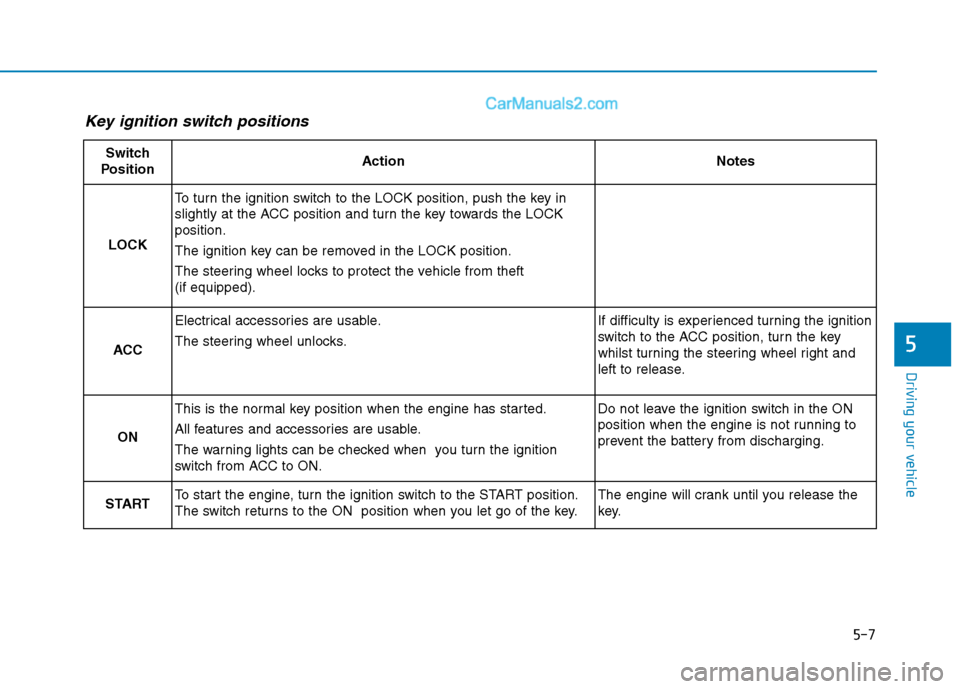
Key ignition switch positions
Switch
PositionActionNotes
LOCK
To turn the ignition switch to the LOCK position, push the key in
slightly at the ACC position and turn the key towards the LOCK
position.
The ignition key can be removed in the LOCK position.
The steering wheel locks to protect the vehicle from theft
(if equipped).
ACC
Electrical accessories are usable.
The steering wheel unlocks.If difficulty is experienced turning the ignition
switch to the ACC position, turn the key
whilst turning the steering wheel right and
left to release.
ON
This is the normal key position when the engine has started.
All features and accessories are usable.
The warning lights can be checked when you turn the ignition
switch from ACC to ON.Do not leave the ignition switch in the ON
position when the engine is not running to
prevent the battery from discharging.
STARTTo start the engine, turn the ignition switch to the START position.
The switch returns to the ON position when you let go of the key.The engine will crank until you release the
key.
Page 329 of 637
5-12
Driving your vehicle
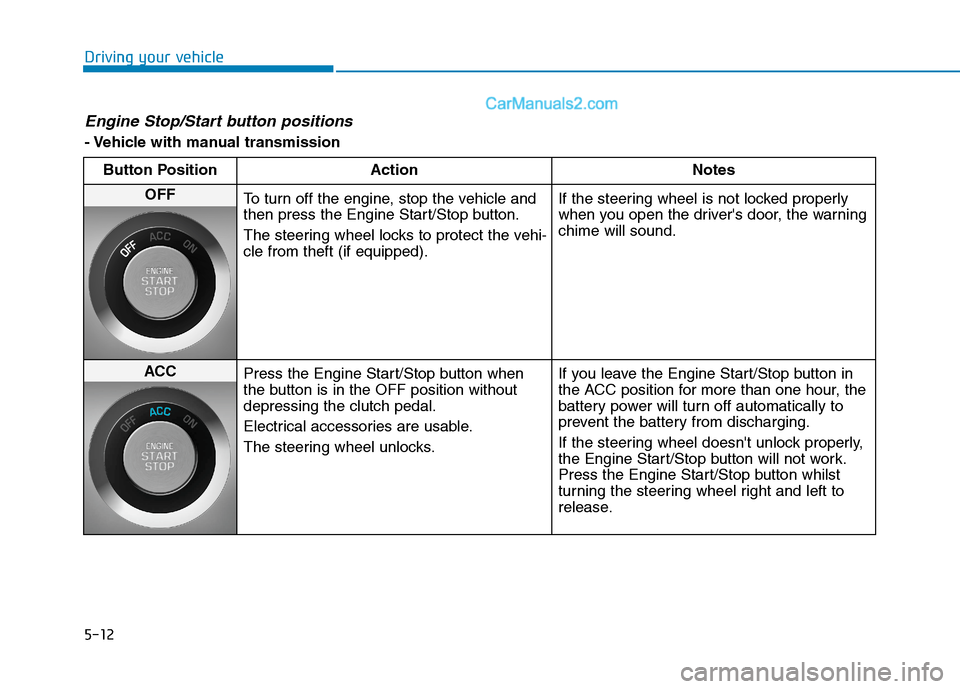
Engine Stop/Start button positions
- Vehicle with manual transmission
Button Position Action Notes
OFF
To turn off the engine, stop the vehicle and
then press the Engine Start/Stop button.
The steering wheel locks to protect the vehi-
cle from theft (if equipped).If the steering wheel is not locked properly
when you open the driver's door, the warning
chime will sound.
ACC
Press the Engine Start/Stop button when
the button is in the OFF position without
depressing the clutch pedal.
Electrical accessories are usable.
The steering wheel unlocks.If you leave the Engine Start/Stop button in
the ACC position for more than one hour, the
battery power will turn off automatically to
prevent the battery from discharging.
If the steering wheel doesn't unlock properly,
the Engine Start/Stop button will not work.
Press the Engine Start/Stop button whilst
turning the steering wheel right and left to
release.