2019 VOLVO XC60 TWIN ENGINE light
[x] Cancel search: lightPage 593 of 695

LOADING, STORAGE AND PASSENGER COMPARTMENT
591
Status indicator lightCauseAction
Steady green lightThe outlet is providing electrical current to a connected device.None.
Flashing orange light The outlet's voltage converter is too hot (e.g. if the device draws too much cur-rent or if the temperature in the passenger compartment is very high).Unplug the device, let the voltage converter cooldown and plug in the device again.
The connected device is drawing too much current (at the moment or con-stantly) or is not functioning properly.None. The device cannot be used in the outlet.
Indicator light off The outlet has not detected a device plugged into the outlet.Make sure the device is correctly plugged intothe outlet.
The outlet is not active.Make sure the vehicle's ignition is in at leastmode I.
The outlet has been active but has been deactivated.Start the engine and/or charge the start battery.
Related information
Passenger compartment interior (p. 588)
Using the electrical outlets (p. 592)
Page 594 of 695

LOADING, STORAGE AND PASSENGER COMPARTMENT
* Option/accessory.592
Using the electrical outlets
The 12 V outlet can be used for devicesintended for this such as MP3 players, coolersand cellular phones.
The high-voltage outlet* can be used for devicesintended for this, such as chargers, laptops, etc.
The ignition must be in at least mode I for theoutlets to supply current. The outlets will then beactive as long as there is sufficient charge in thestart battery.
If the engine is turned off and the vehicle islocked, the outlets will be deactivated. If theengine is turned off and the vehicle remainsunlocked, the sockets will remain active for up to7 minutes.
NOTE
Bear in mind that using the electrical outletswhen the engine is off could cause the starterbattery to have too low of a charge level,which could limit other functionality.
Accessories connected to the electrical out-lets can be activated even when the vehicleelectrical system is off or if preconditioning isused. For this reason, disconnect plugs whenthey are not in use to prevent the starter bat-tery from becoming discharged.
WARNING
Do not use accessories with large orheavy plugs – they could damage the out-let or come loose while you are driving.
Do not use accessories that could causedisruptions to e.g. the vehicle's radioreceiver or electrical system.
Position the accessory so that there is norisk of it injuring the driver or passengersin the event of heavy braking or a colli-sion.
Pay attention to connected accessoriesas they can generate heat that could burnpassengers or the interior.
Using 12 V outlets
1. Remove the stopper (tunnel console) or folddown the cover (trunk/cargo compartment)over the socket and plug in the device.
2. Unplug the device and put the stopper backin (tunnel console) or fold up the cover(trunk/cargo compartment) when the socketis not in use or left unattended.
CAUTION
The maximum power is 120 W (10 A) peroutlet.
Using high-voltage outlets
The ignition must be in at least mode I for outletsto supply current. The outlets will then be activeas long as there is sufficient charge in the startbattery.
1.Slide down the cover over the outlet and plugin the device.
>The LED2 light on the outlet will indicateits status.
2. The outlet is supplying electrical currentwhen the light is glowing steadily green.
3. Disconnect the device by pulling out the plug(do not pull on the cord).
Pull up the cover when the outlet is not inuse or is left unattended.
CAUTION
The maximum power is 150 W.
WARNING
Do not attempt to alter or repair the high-volt-age outlet on your own. Volvo recommendscontacting an authorized Volvo workshop.
2LED (Light Emitting Diode)
Page 596 of 695

||
LOADING, STORAGE AND PASSENGER COMPARTMENT
* Option/accessory.594
The illustration is generic – the design may vary.
To lock the glove compartment:
Insert the key into the lock on the glove com-partment.
Turn the key 90 degrees clockwise.
Remove the key from the lock.
–To unlock, perform the above steps inreverse.
Using the glove box as a cooled area *
The glove compartment can be used to cool e.g.drinks or food. Cooling is possible when the cli-mate system is active (i.e. when the ignition is inmode II or when the engine is running).
The illustration is generic – the design may vary.
Activate cooling
Deactivate cooling
–Activate or deactivate cooling by moving thecontrol as far as possible toward the passen-ger compartment/glove compartment.
Related information
Passenger compartment interior (p. 588)
Private Locking (p. 265)
Sun visors
In the ceiling in front of the driver and front pas-senger, there are sun visors that can be loweredand angled to the side as necessary.
The illustration is generic – the design may vary.
The mirror lighting* comes on automatically whenthe cover is lifted up.
The mirror frame has a holder for e.g. cards ortickets.
Related information
Passenger compartment interior (p. 588)
Page 601 of 695
LOADING, STORAGE AND PASSENGER COMPARTMENT
}}
599
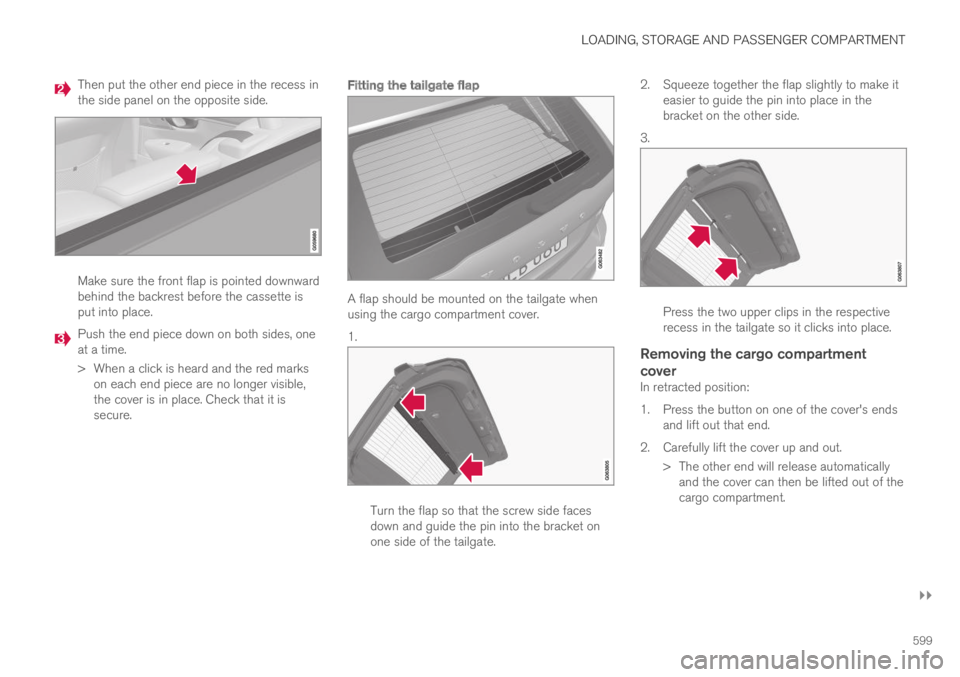
Then put the other end piece in the recess inthe side panel on the opposite side.
Make sure the front flap is pointed downwardbehind the backrest before the cassette isput into place.
Push the end piece down on both sides, oneat a time.
>When a click is heard and the red markson each end piece are no longer visible,the cover is in place. Check that it issecure.
Fitting the tailgate flap
A flap should be mounted on the tailgate whenusing the cargo compartment cover.
1.
Turn the flap so that the screw side facesdown and guide the pin into the bracket onone side of the tailgate.
2.Squeeze together the flap slightly to make iteasier to guide the pin into place in thebracket on the other side.
3.
Press the two upper clips in the respectiverecess in the tailgate so it clicks into place.
Removing the cargo compartment
cover
In retracted position:
1. Press the button on one of the cover's endsand lift out that end.
2. Carefully lift the cover up and out.
> The other end will release automaticallyand the cover can then be lifted out of thecargo compartment.
Page 602 of 695
||
LOADING, STORAGE AND PASSENGER COMPARTMENT
* Option/accessory.600
Removing the tailgate flap
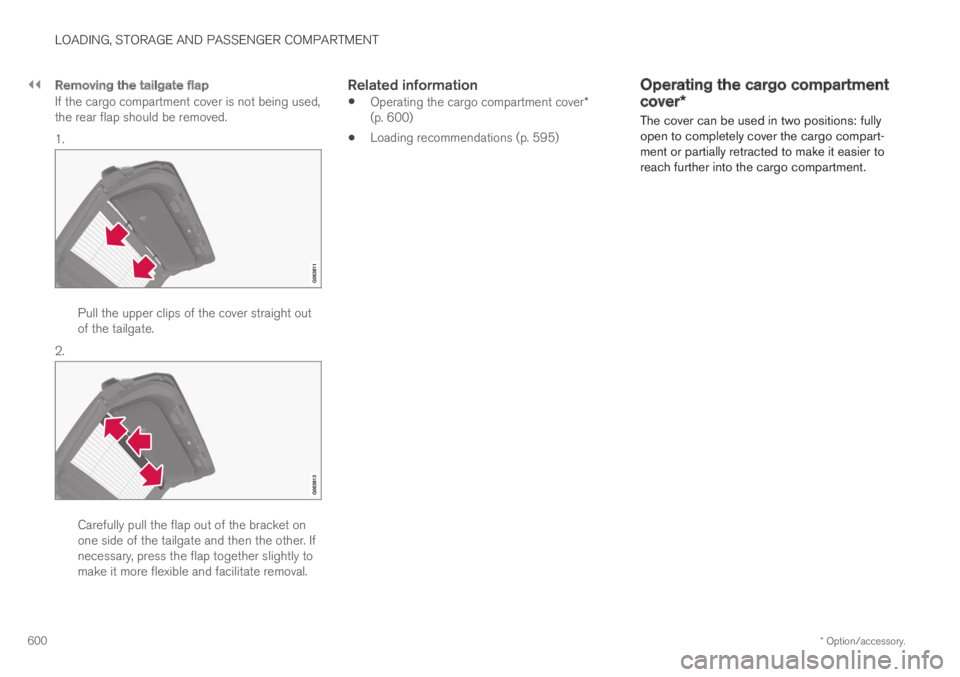
If the cargo compartment cover is not being used,the rear flap should be removed.
1.
Pull the upper clips of the cover straight outof the tailgate.
2.
Carefully pull the flap out of the bracket onone side of the tailgate and then the other. Ifnecessary, press the flap together slightly tomake it more flexible and facilitate removal.
Related information
Operating the cargo compartment cover*(p. 600)
Loading recommendations (p. 595)
Operating the cargo compartment
cover*
The cover can be used in two positions: fullyopen to completely cover the cargo compart-ment or partially retracted to make it easier toreach further into the cargo compartment.
Page 603 of 695
LOADING, STORAGE AND PASSENGER COMPARTMENT
}}
601
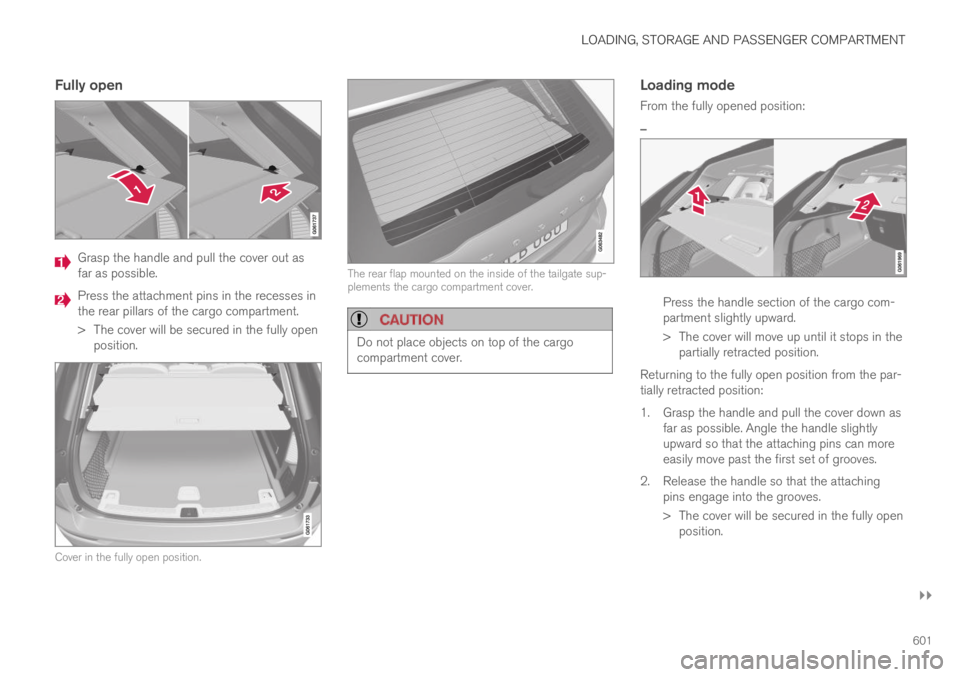
Fully open
Grasp the handle and pull the cover out asfar as possible.
Press the attachment pins in the recesses inthe rear pillars of the cargo compartment.
>The cover will be secured in the fully openposition.
Cover in the fully open position.
The rear flap mounted on the inside of the tailgate sup-plements the cargo compartment cover.
CAUTION
Do not place objects on top of the cargocompartment cover.
Loading mode
From the fully opened position:
–
Press the handle section of the cargo com-partment slightly upward.
>The cover will move up until it stops in thepartially retracted position.
Returning to the fully open position from the par-tially retracted position:
1. Grasp the handle and pull the cover down asfar as possible. Angle the handle slightlyupward so that the attaching pins can moreeasily move past the first set of grooves.
2. Release the handle so that the attachingpins engage into the grooves.
> The cover will be secured in the fully openposition.
Page 607 of 695
LOADING, STORAGE AND PASSENGER COMPARTMENT
605
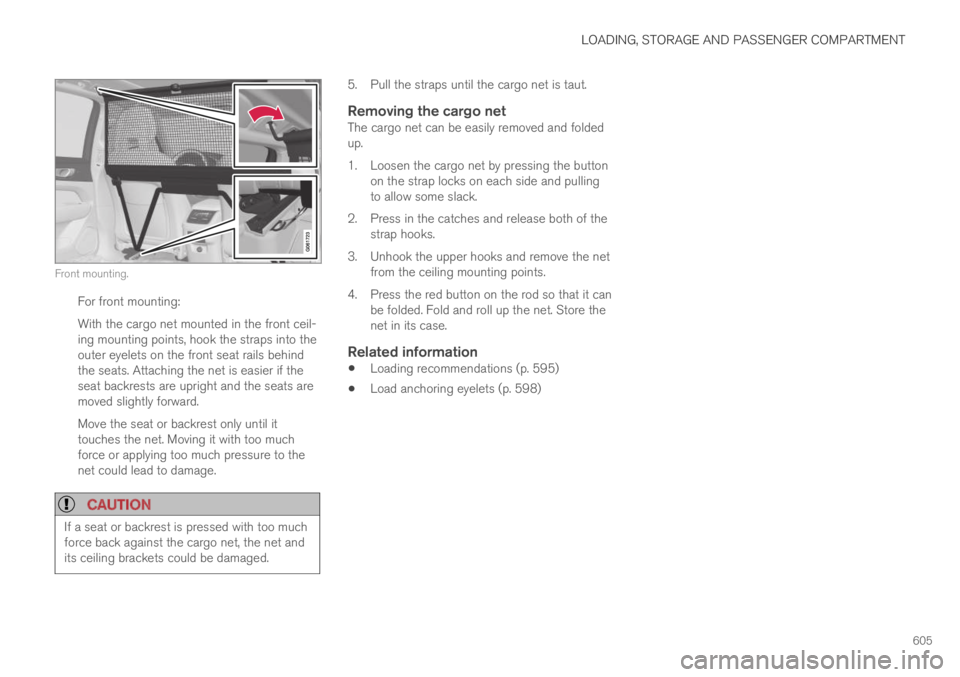
Front mounting.
For front mounting:
With the cargo net mounted in the front ceil-ing mounting points, hook the straps into theouter eyelets on the front seat rails behindthe seats. Attaching the net is easier if theseat backrests are upright and the seats aremoved slightly forward.
Move the seat or backrest only until ittouches the net. Moving it with too muchforce or applying too much pressure to thenet could lead to damage.
CAUTION
If a seat or backrest is pressed with too muchforce back against the cargo net, the net andits ceiling brackets could be damaged.
5. Pull the straps until the cargo net is taut.
Removing the cargo net
The cargo net can be easily removed and foldedup.
1. Loosen the cargo net by pressing the buttonon the strap locks on each side and pullingto allow some slack.
2. Press in the catches and release both of thestrap hooks.
3. Unhook the upper hooks and remove the netfrom the ceiling mounting points.
4. Press the red button on the rod so that it canbe folded. Fold and roll up the net. Store thenet in its case.
Related information
Loading recommendations (p. 595)
Load anchoring eyelets (p. 598)
Page 611 of 695

MAINTENANCE AND SERVICE
}}
609
Periodic maintenance helps minimize
emissions
NOTE
Refer to your Service and Warranty Book-let for a comprehensive service and main-tenance schedule up to 240,000 km(150,000 miles). This program containsinspections and services necessary forthe proper function of your vehicle andincludes components that affect vehicleemissions.
The Warranty and Service Records Infor-mation booklet also contains detailedinformation concerning the warrantiesthat apply to your vehicle.
On-board Diagnostic System
OBD II is part of your vehicle's computerizedengine management system. It stores diagnosticinformation about your vehicle's emission con-trols. It can light the Check Engine light (MIL) if itdetects an emission control "fault." A "fault" is acomponent or system that is not performingwithin an expected range. A fault may be perma-nent or temporary. OBD II will store a messageabout any fault.
Emission inspection readiness
How do states use OBD II for emission
inspections?
Many states connect a computer directly to avehicle's OBD II system. The inspector can thenread "faults." In some states, this type of inspec-tion has replaced the tailpipe emission test.
How can my vehicle fail OBD II emission
inspection?
Your vehicle can fail OBD II emission inspectionfor any of the following reasons:
If your Check Engine (MIL) light is lit, yourvehicle may fail inspection.
If your vehicle's Check Engine light was lit,but went out without any action on your part,OBD II will still have a recorded fault. Yourvehicle may pass or fail, depending on theinspection practices in your area.
If you had recent service that required dis-connecting the battery, OBD II diagnosticinformation may be incomplete and "notready" for inspection. A vehicle that is notready may fail inspection.
How can I prepare for my next OBD II
emission inspection?
If your Check Engine (MIL) light is lit or waslit but went out without service, have your
vehicle diagnosed and, if necessary, servicedby a qualified Volvo technician.
If you recently had service for a lit CheckEngine light, or if you had service thatrequired disconnecting the battery, a periodof driving is necessary to bring the OBD IIsystem to "ready" for inspection. Two half-hour trips of mixed stop-and-go/highwaydriving are typically needed to allow OBD II toreach readiness. Your Volvo retailer can pro-vide you with more information on planning atrip.
Maintain your vehicle in accordance with yourvehicle's maintenance schedule.
Owner maintenance
Periodic maintenance requirements and intervalsare described in your vehicle's Warranty andService Records Information booklet.
The following points can be carried out betweenthe normally scheduled maintenance services.
Each time the car is refueled:
Check the engine oil level.
Clean the windshield, windshield wipers,headlights, and taillights.