2019 VOLVO XC60 TWIN ENGINE light
[x] Cancel search: lightPage 485 of 695

STARTING AND DRIVING
483
Disabling the automatic check
The automatic light check can be disabled in thecenter display.
1.Tap Settings in the Top view.
2.Tap My CarLights and Lighting.
3.Deselect Automatic Trailer Lamp Check.
Manual check
If the automatic check has been disabled, thecheck can be started manually.
1.Tap Settings in the Top view.
2.Tap My CarLights and Lighting.
3.Select Manual Trailer Lamp Check.
>The light check will begin. Get out of thevehicle to perform the check.
Related information
Driving with a trailer (p. 479)
Towing using a towline
This section refers to one vehicle being towedbehind another using a towline.
Twin Engine vehicles may not be towed behindanother vehicle due to the risk of damage to theelectric motor. The vehicle must be lifted onto atow truck and transported with all four wheels onthe bed or lifting platform of the truck (no wheelsmay touch the road).
Towing another vehicle
Towing another vehicle requires a lot of power -use the AWD drive mode. This helps charge thehybrid battery and improve the vehicle's drivingand roadholding characteristics.
Before towing another vehicle, check applicablespeed limit regulations.
Jump starting
Do not tow the vehicle to start the engine. Use anauxiliary battery if the start battery's charge levelis so low that the engine cannot be started.
CAUTION
Attempts to tow-start the vehicle could causedamage to the electrical drive motor andthree-way catalytic converter.
Related information
Attaching and removing the towing eyelet(p. 484)
Hazard warning flashers (p. 161)
Recovery (p. 485)
Jump starting using another battery (p. 477)
Selecting ignition mode (p. 434)
Page 487 of 695

STARTING AND DRIVING
}}
* Option/accessory.485
Recovery
This section refers to transporting the vehiclewith a tow truck or similar vehicle.
Call a professional towing service for assistance.
In certain conditions, the towing eyelet can beused to pull the vehicle onto a flatbed tow truck.
CAUTION
Note that vehicles with Twin Engine mustalways be towed raised with all wheels on thetow truck.
For vehicles equipped with leveling control*:If the vehicle is equipped with pneumatic suspen-sion, this feature must be turned off before thevehicle is lifted onto a tow truck. Turning off thefunction in the center display.
1.Tap Settings in the Top view.
2.Tap My CarParking Brake andSuspension.
3.Select Disable Leveling Control.
The vehicle's location and ground clearancedetermine if it can be lifted onto a tow truck. Ifthe incline of the tow truck is too steep or if theground clearance under the vehicle is insufficient,attempting to pull it up may result in damage. Inthis case, the vehicle should only be lifted withthe tow truck's lifting equipment.
WARNING
No person or object should be behind the towtruck when the vehicle is lifted onto the bedof the truck.
Related information
Attaching and removing the towing eyelet(p. 484)
HomeLink®*10
HomeLink®11 is a programmable remote control,integrated in the vehicle electrical system, thatcan control up to three different devices (e.g.garage door opener, alarm system, outdoor andindoor lighting) and thereby replace the remotecontrols for these.
General
The illustration is generic – the design may vary.
Button 1
Button 2
Button 3
Indicator light
HomeLink® is delivered integrated in the rearview
mirror. The HomeLink® panel consists of three
Page 488 of 695
||
STARTING AND DRIVING
* Option/accessory.486
programmable buttons and an indicator light inthe mirror.
For more information about HomeLink®, pleasevisit www.HomeLink.com, www.youtube.com/HomeLinkGentex or call 1-800-355-3515.
Save the original remote controls for future pro-gramming (e.g. for use in another vehicle). It isalso advisable to delete the button programmingif the vehicle is sold.
Related information
Using HomeLink®* (p. 487)
Programming HomeLink®* (p. 486)
Type approval for HomeLink®* (p. 488)
Programming HomeLink®*12
Follow these instructions to program
HomeLink®, reset all programming, or programindividual buttons.
NOTE
In some vehicles, the ignition must be on or in
the "accessory position" before HomeLink®
can be programmed or used. It can be a goodidea to put new batteries in the remote con-
trol being replaced by HomeLink® for fasterprogramming and better radio signal trans-
mission. The HomeLink® buttons should bereset before programming.
WARNING
While HomeLink® is being programmed, thegarage door or gate being programmed maybe activated. Make sure that no one is nearthe door or gate during programming. Whenprogramming a garage door opener, it isadvised to park outside of the garage.
1.Point the remote control at the HomeLink®
button to be programmed and hold it about2-8 cm (1-3 inches) from the button. Do not
obstruct the HomeLink® indicator light.
Note: Some remote controls are more effec-
tive at programming HomeLink® from a dis-tance of about 15-20 cm (6-12 inches). Trymoving the remote control closer or furtheraway if you are experiencing any difficultiesprogramming.
2.Press and hold both the remote control but-
ton and the HomeLink® button to be pro-grammed.
3. Do not release the buttons until the indicatorlight has stopped flashing slowly (about oncea second) and either flashes quickly (about10 times a second) or glows steadily.
>Steady glow: Indication that program-ming is complete. Press the programmedbutton twice to activate.
Flashing quickly: The device being pro-
grammed with HomeLink® may have asecurity function that requires an extrastep. Try pressing the programmed buttontwice to see whether the programmingworks. Otherwise, continue with the fol-lowing steps.
10Certain markets only.11HomeLink and the HomeLink house symbol are registered trademarks of Gentex Corporation.12Certain markets only.
Page 489 of 695

STARTING AND DRIVING
}}
* Option/accessory.487
4. Locate the "training" button13 on thereceiver for the e.g. garage door opener. It isusually located near the antenna bracket onthe receiver.
5.Press and release the "training" button once.Programming must be completed within 30seconds after pressing the button.
6.Press and release the HomeLink® button tobe programmed. Repeat the press/hold/release sequence a second time. For somereceivers, the sequence may need to berepeated a third time.
> Programming is now completed and thegarage door, gate, etc. should now beactivated when the programmed button ispressed.
If you experience any difficulties programming,
please contact HomeLink® at:www.HomeLink.com, www.youtube.com/HomeLinkGentex or call 1-800-355-3515.
Programming individual buttons
To program an individual HomeLink® button:
1. Press and hold the desired button for about20 seconds.
2.When the indicator light on HomeLink®
starts flashing slowly, it is possible to pro-gram as usual.
Note: If the button you are reprogrammingdoes not program with a new device, it willreturn to the previously saved programming.
Resetting the HomeLink ®
buttons
It is only possible to reset all HomeLink® buttonsat once. It is not possible to reset individual but-tons. Individual buttons can only be reprogram-med.
–Press and hold the outer buttons (1 and 3)
on HomeLink® for about 10 seconds.
>When the indicator light goes from asteady glow to flashing, the buttons havebeen reset and are ready for reprogram-ming.
Related information
Using HomeLink®* (p. 487)
HomeLink®* (p. 485)
Type approval for HomeLink®* (p. 488)
Using HomeLink®*14
Once HomeLink® is programmed, it can beused instead of the separate remote controls.
Press and hold the programming button. Thegarage door, gate, alarm system, etc. will be acti-vated (this may take several seconds). If the but-ton is held down for more than 20 seconds,reprogramming will begin. The indicator light willglow steadily or flash when the button has beenpressed. The original remote controls may be
used concurrently with HomeLink® if desired.
NOTE
If the ignition is off, HomeLink® works for30 minutes after the driver's door has beenopened.
13The name and color of the button varies depending on the manufacturer.
Page 570 of 695

||
WHEELS AND TIRES
* Option/accessory.568
NOTE
Always remember to calibrate the Tire Pres-sure Monitoring System when the wheelshave been changed or the tire inflation pres-sure has been corrected according to the tirepressure decal or tire inflation pressure table.
If correct reference values have not been set,the system cannot issue low tire pressurealerts correctly.
The vehicle must be stationary with theengine running to access the calibration but-ton and to start the calibration process.
WARNING
The exhaust gases contain carbon monoxide,which is invisible and odorless but very poi-sonous. For this reason, always perform thecalibration procedure outdoors or in a work-shop with exhaust gas evacuation equipment.
Related information
Recommended tire pressure (p. 565)
Adjusting tire pressure (p. 564)
Viewing tire pressure status in the centerdisplay* (p. 568)
Action when warned of low tire pressure(p. 569)
Tire pressure monitoring system* (p. 565)
Viewing tire pressure status in the
center display*
With the system for tire pressure monitoring 10,tire pressure status can be viewed in the centerdisplay.
Checking status
1.Open the Car Status app in App view.
2.Tap TPMS to display the status of the tires.
Status indicator light
The graphic in the center display shows the sta-
tus of each tire11.
Green tire:
Inflation pressure is above the warningthreshold.
Yellow tire:
The tire's inflation pressure is too low. Stopand check/inflate the tire as soon as possi-ble. Recalibrate the system after adjustingthe tire pressure.
All tires yellow:
The inflation pressure is too low in one ormore tires. Stop and check/inflate the tiresas soon as possible. Recalibrate the systemafter adjusting tire pressure.
10Tire Pressure Monitoring System (TPMS)
Page 573 of 695

WHEELS AND TIRES
}}
* Option/accessory.571
Jack*
The jack can be used to lift the vehicle to e.g.change a wheel.
The illustration is generic – the design may vary.
CAUTION
When not in use, the jack* should be keptin its storage compartment under thecargo compartment floor.
The jack provided with your vehicle isintended to be used only in temporary sit-uations such as changing wheels in theevent of a flat tire. Only the jack thatcame with your particular model shouldbe used to lift the vehicle. If the vehicleneeds to be lifted more frequently or for aprolonged period, using a garage jack orhoist is recommended. Always follow thisdevice's instructions for use.
The jack needs to be cranked together to thecorrect position in order to fit.
Models with leveling control *
If the vehicle is equipped with the optional pneu-matic suspension, it must be turned off beforethe vehicle is lifted on a jack.
Related information
Tool kit (p. 570)
Wheel bolts
The wheel bolts hold the wheel in place on thewheel hub.
CAUTION
The wheel bolts should be tightened to140 Nm (103 ft. lbs.). Over-tightening orunder-tightening could damage the threadedjoints.
Only use rims that have been tested andapproved by Volvo and are included in Volvo'soriginal product range.
Use a torque wrench to check that the wheelbolts are tightened correctly.
Do not grease the wheel bolt threads.
WARNING
The wheel bolts may need to be tightenedagain several days after a wheel change.Temperature fluctuations and vibrations cancause them to loosen slightly.
Locking wheel bolts *
A tool for removing the locking wheel bolts islocated in the foam block under the cargo com-partment floor.
Page 577 of 695
WHEELS AND TIRES
}}
* Option/accessory.575
1.Clean the contact surfaces between thewheel and the wheel hub.
2. Lift the wheel into place. Tighten the wheelbolts securely.
Do not grease the wheel bolt threads.
3. Lower the vehicle so that the wheel cannotrotate.
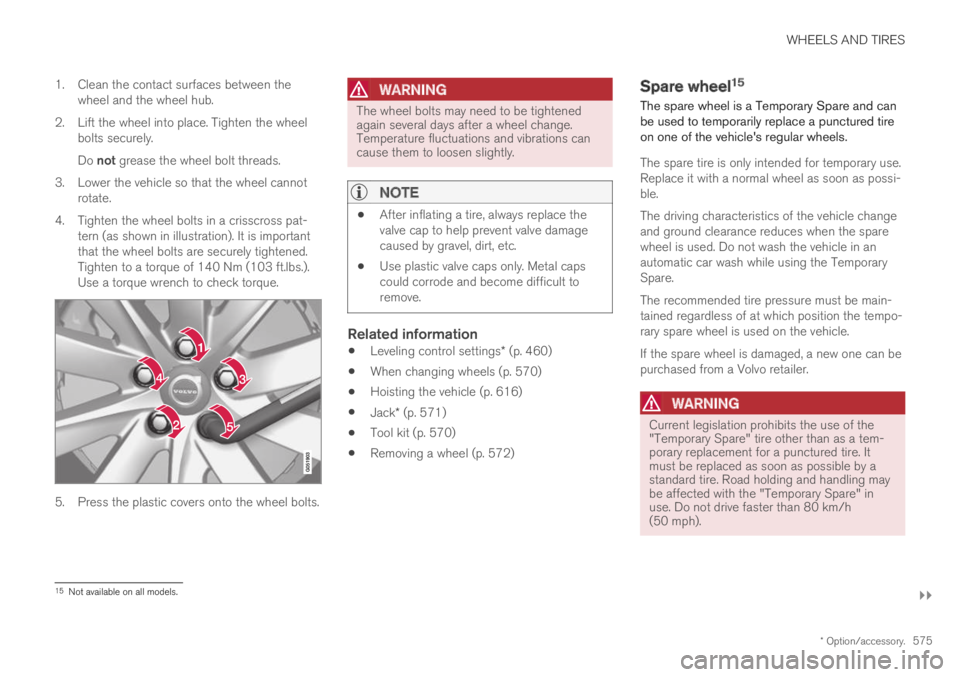
4. Tighten the wheel bolts in a crisscross pat-tern (as shown in illustration). It is importantthat the wheel bolts are securely tightened.Tighten to a torque of 140 Nm (103 ft.lbs.).Use a torque wrench to check torque.
5. Press the plastic covers onto the wheel bolts.
WARNING
The wheel bolts may need to be tightenedagain several days after a wheel change.Temperature fluctuations and vibrations cancause them to loosen slightly.
NOTE
After inflating a tire, always replace thevalve cap to help prevent valve damagecaused by gravel, dirt, etc.
Use plastic valve caps only. Metal capscould corrode and become difficult toremove.
Related information
Leveling control settings* (p. 460)
When changing wheels (p. 570)
Hoisting the vehicle (p. 616)
Jack* (p. 571)
Tool kit (p. 570)
Removing a wheel (p. 572)
Spare wheel15
The spare wheel is a Temporary Spare and canbe used to temporarily replace a punctured tireon one of the vehicle's regular wheels.
The spare tire is only intended for temporary use.Replace it with a normal wheel as soon as possi-ble.
The driving characteristics of the vehicle changeand ground clearance reduces when the sparewheel is used. Do not wash the vehicle in anautomatic car wash while using the TemporarySpare.
The recommended tire pressure must be main-tained regardless of at which position the tempo-rary spare wheel is used on the vehicle.
If the spare wheel is damaged, a new one can bepurchased from a Volvo retailer.
WARNING
Current legislation prohibits the use of the"Temporary Spare" tire other than as a tem-porary replacement for a punctured tire. Itmust be replaced as soon as possible by astandard tire. Road holding and handling maybe affected with the "Temporary Spare" inuse. Do not drive faster than 80 km/h(50 mph).
15Not available on all models.
Page 592 of 695

LOADING, STORAGE AND PASSENGER COMPARTMENT
* Option/accessory.590
Electrical outlets
There are two 12 V electrical outlets and one120 V electrical outlet* in the tunnel console,and one 12 V electrical outlet* in the trunk/cargocompartment.
If a problem occurs with an electrical socket,contact a workshop - an authorized Volvo work-shop is recommended.
12 V outlets
12 V outlet in the tunnel console, front seat.
The 12 V outlets can be used for devicesintended for this such as MP3 players, coolersand cellular phones.
12 V outlet in the tunnel console, rear seat.
12 V outlet in the cargo compartment*.
Electrical outlets in the tunnel console -
rear seat *
Electrical outlets in the tunnel console, rear seat.
The high-voltage outlet* can be used for devicesintended for this, such as chargers, laptops, etc.
High-voltage outlet status indicator
light
An LED1 light on the outlet indicates its status:
1LED (Light Emitting Diode)