2019 VOLVO XC60 TWIN ENGINE light
[x] Cancel search: lightPage 434 of 695
||
STARTING AND DRIVING
432
CAUTION
When starting in cold weather, the auto-matic transmission may shift up at slightlyhigher engine speeds than normal untilthe automatic transmission fluid reachesnormal operating temperature.
Do not race a cold engine immediatelyafter starting. This could prevent fluidsfrom properly lubricating vital compo-nents in the engine before it has reachedthe proper operating temperature.
The engine should be idling when thegear selector is moved. Never accelerateuntil the gear is fully engaged. Accelerat-ing rapidly before a gear is properlyengaged could lead to harder wear ofcomponents.
To help prevent the transmission oil fromoverheating, select P or N when idling ata standstill for prolonged periods of time.
Related information
Switching off the vehicle (p. 432)
Ignition modes (p. 433)
Adjusting the steering wheel (p. 198)
Jump starting using another battery (p. 477)
Selecting ignition mode (p. 434)
Switching off the vehicle
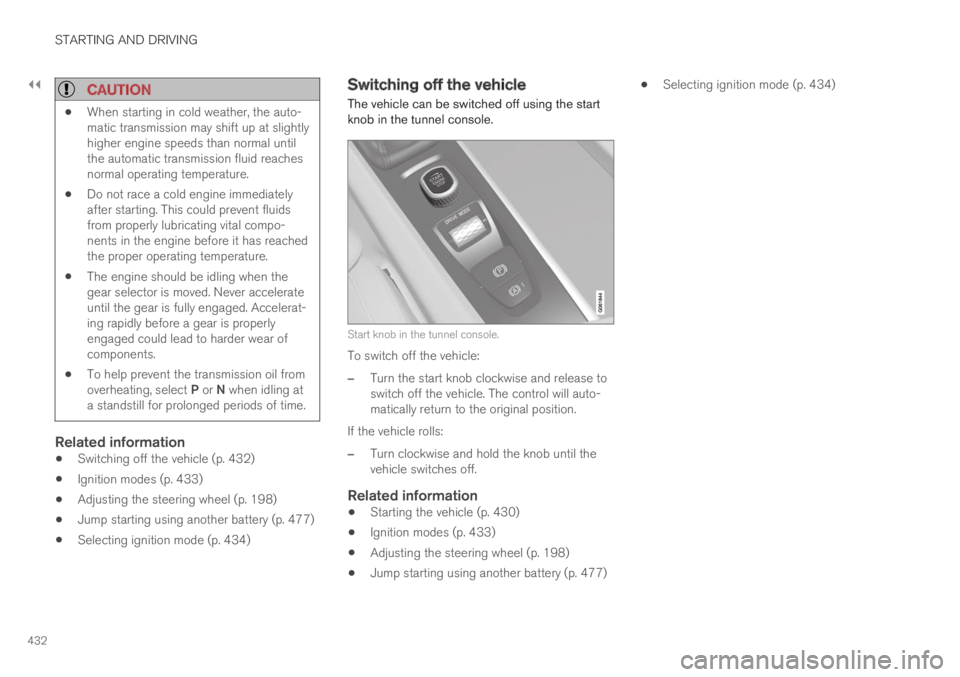
The vehicle can be switched off using the startknob in the tunnel console.
Start knob in the tunnel console.
To switch off the vehicle:
–Turn the start knob clockwise and release toswitch off the vehicle. The control will auto-matically return to the original position.
If the vehicle rolls:
–Turn clockwise and hold the knob until thevehicle switches off.
Related information
Starting the vehicle (p. 430)
Ignition modes (p. 433)
Adjusting the steering wheel (p. 198)
Jump starting using another battery (p. 477)
Selecting ignition mode (p. 434)
Page 435 of 695

STARTING AND DRIVING
* Option/accessory.433
Ignition modes
The vehicle's ignition can be put in variousmodes (levels) to make different functions availa-ble.
To enable the use of a limited number of func-tions when the engine is not running, the ignitioncan be put in one of three different levels: 0, Iand II. These levels are referred to as "ignitionmodes" in the Owner's Manual.
The following table shows which functions areavailable in each ignition mode:
ModeFunctions
0The odometer, clock and tem-
perature gauge are illuminatedA.
The power* seats can beadjusted.
The power windows can be used.
The center display is activated
and can be usedA.
The infotainment system can be
usedA.
In this mode, the functions are availa-ble for a limited time and then switchoff automatically.
IThe panoramic roof, power win-dows, 12-volt electrical socket inthe passenger compartment,Bluetooth, navigation, phone,blower and windshield wipers canbe used.
The power seats can be adjusted.
The 12-volt electrical socket* inthe cargo compartment can beused.
Electrical current will be takenfrom the battery in this ignitionmode.
ModeFunctions
IIThe headlights illuminate.
Warning/indicator lights illumi-nate for 5 seconds.
A number of other systems areactivated. However, seat and rearwindow heating can only be acti-vated when the engine is running.
This ignition mode uses a lot ofcurrent from the battery andshould be avoided whenever pos-sible!
AAlso activated when the door is opened.
Related information
Starting the vehicle (p. 430)
Adjusting the steering wheel (p. 198)
Jump starting using another battery (p. 477)
Selecting ignition mode (p. 434)
Page 436 of 695

STARTING AND DRIVING
434
Selecting ignition mode
The vehicle's ignition can be put in variousmodes (levels) to make different functions availa-ble.
Selecting an ignition mode
Start knob in the tunnel console.
Ignition mode 0 - Unlock the vehicle andkeep the remote key in the passenger com-partment.
NOTE
To set level I or II without engine start – donot depress the brake pedal (or clutch pedalfor vehicles with manual transmission) whenselecting this ignition mode.
Ignition mode I - Turn the start knob clock-wise and release it. The control will automati-cally return to the original position.
Ignition mode II - Turn the start knob clock-wise and hold it there for approx. 5 seconds.Release the knob, which will automaticallyreturn to its original position.
Back to ignition mode 0 - To return to igni-tion mode 0 from mode I and II, turn the startknob clockwise and release it. The controlwill automatically return to the original posi-tion.
Related information
Starting the vehicle (p. 430)
Switching off the vehicle (p. 432)
Ignition modes (p. 433)
Adjusting the steering wheel (p. 198)
Jump starting using another battery (p. 477)
Brake functions
The vehicle's brakes are used to reduce speedor prevent the vehicle from rolling.
In addition to the wheel brakes and parkingbrakes, the vehicle is also equipped with a num-ber of automatic brake assist functions. Thesesystems help the driver by e.g. keeping the vehi-cle stationary when the brake pedal is notdepressed (e.g. at a traffic light or intersection),when starting up a hill or when driving down a hill.
Depending on how the vehicle is equipped, thefollowing brake assist functions may be included:
Auto-hold brakes (Auto Hold)
Hill Start Assist (Hill Start Assist)
Braking assist after a collision
City Safety
Hill Descent Control (Hill Descent Control)
Related information
Brakes (p. 435)
Parking brake (p. 438)
Auto-hold brakes (p. 442)
Braking assist after a collision (p. 443)
Hill Start Assist (p. 443)
City Safety™ (p. 335)
Hill Descent Control (p. 462)
Page 437 of 695

STARTING AND DRIVING
}}
435
Brakes
The brake pedal is used to apply the vehicle'sregular brakes, which are part of the brake sys-tem.
The vehicle is equipped with two brake circuits. Ifone brake circuit is damaged, the brake pedal willgo down further when depressed. More pressurewill then be required from the driver for normalbraking effect.
WARNING
The power brakes only work when the electricmotor or combustion engine is running.
If the brake pedal is used when the engine isswitched off, greater pressure must be applied tobrake the vehicle.
In very hilly areas or when driving with a heavyload, gear position B can be used to augment thebrakes with engine braking.
Use the Off Road drive mode to increase theengine braking effect when driving on steepdowngrades at low speeds.
Anti-lock brakes
The vehicle is equipped with an Anti-lock BrakingSystem (ABS), which helps prevent the wheelsfrom locking and helps maintain steering controlwhen braking. Vibrations may be felt from the
brake pedal when ABS is operating, which is nor-mal.
After the vehicle is started, a brief test of theABS system is automatically performed when thedriver releases the brake pedal. An additionalautomatic test of the system may be performedwhen the vehicle is traveling at a low speed. Dur-ing the test, the brake pedal may feel as though itis pulsating.
Light braking charges the hybrid battery
When the brakes are applied lightly, the electricmotor braking function is used. This converts thevehicle's kinetic energy into electrical energy,which is used to charge the hybrid battery. Whenthe battery is being charged with the electricmotor braking function, this will be indicated inthe instrument panel.
When the battery is being charged with the electricmotor braking function, this will be indicated in theinstrument panel.
This function is active at speeds in the range of150-5 km/h (93-3 mph). When braking atspeeds outside of this range, or during harderbraking, the hydraulic braking system is used toaugment braking. This is indicated in the instru-ment panel with the pointer down in the red area.
Page 438 of 695

||
STARTING AND DRIVING
436
Symbols in the instrument panel
SymbolMeaning
A
B
Check the brake fluid level. If thelevel is low, fill brake fluid andcheck to determine the reason forthe loss of brake fluid.
A
B
Fault in pedal sensor.
SymbolMeaning
A
B
Steady glow for 2 seconds afterthe engine is started: Automaticfunction check.
Steady glow for more than 2 sec-onds: Fault in the ABS system. Thevehicle's regular brake system isstill working, but without the ABSfunction.
If the message Brake pedal Cha-racteristics changed Servicerequired is displayed, the "Brake-by-wire" system is not functioningproperly. Greater pressure will berequired to brake the vehicle.
AIn Canada.BIn the US.
WARNING
If the warning symbols for both brake faultand ABS fault are lit simultaneously, theremay be a fault in the brake system.
If the brake fluid reservoir level is normalwhen this occurs, drive carefully to thenearest workshop to have the brake sys-tem checked - an authorized Volvo work-shop is recommended.
If the brake fluid has fallen below the MINlevel in the brake fluid reservoir, the vehi-cle should not be driven until the brakefluid has been filled. The reason for thebrake fluid loss must be checked.
Related information
Brake Assist System (p. 437)
Auto-hold brakes (p. 442)
Hill Start Assist (p. 443)
Braking on wet roads (p. 437)
Braking on salted roads (p. 437)
Maintenance of the brake system (p. 438)
Brake lights (p. 160)
Page 439 of 695

STARTING AND DRIVING
437
Brake Assist System
The brake enhancing system, Brake AssistSystem (BAS), helps increase braking force andthereby reduce braking distance.
The system monitors the driver's braking habitsand increases braking force when necessary.Braking force can be increased up to the point atwhich the ABS intervenes. The function is deacti-vated when pressure on the brake pedal isdecreased.
Related information
Brakes (p. 435)
Braking on wet roads
Prolonged driving in heavy rain without brakingmay cause braking effect to be slightly delayedthe first time the brakes are applied.
This may also occur after washing the vehicle. Itwill then be necessary to apply greater pressureto the brake pedal. You should therefore maintaina greater distance to the vehicle ahead.
Firmly apply the brakes after washing the vehicleor driving on wet roads. This helps warm up thebrake discs, enabling them to dry more quicklyand protecting them against corrosion. Considerthe current traffic situation when braking.
Related information
Brakes (p. 435)
Braking on salted roads (p. 437)
Braking on salted roads
When driving on salted roads, a layer of salt mayform on the brake discs and brake pads.
This could increase stopping distance. Maintainan extra large safety distance to the vehicleahead. Make sure to also:
Apply the brakes from time to time to helpremove salt. Make sure braking does notpose a risk to any other road users.
Gently apply the brakes when you have fin-ished driving and before driving again.
Related information
Brakes (p. 435)
Braking on wet roads (p. 437)
Page 444 of 695

STARTING AND DRIVING
442
Auto-hold brakes
With the Auto-hold brake function, the driver canrelease the brake pedal and the brakes willremain applied, for example, when the vehiclehas stopped at a traffic light or intersection.
When the vehicle stops, the brakes are activatedautomatically. The function can use either thenormal brakes or the parking brakes to keep thevehicle stationary and works on flat surfaces orhills. When driving off, the brakes will be automat-ically released if the driver's seat belt is buckled.
NOTE
When braking to a stop on an uphill or down-hill gradient, depress the brake pedal withslightly more force than usual before releas-ing to ensure that the vehicle cannot move atall.
The parking brake is activated if:
the vehicle is switched off
the driver's door is opened
the driver's seat belt is removed
the vehicle has been stationary for a pro-longed period of time (5-10 minutes)
Symbols in the instrument panel
SymbolMeaning
This symbol illuminates when thefunction is using the normal brakesto keep the vehicle stationary.
A
B
This symbol illuminates when thefunction is using the parking braketo keep the vehicle stationary.
ACanadian models.BUS models.
Related information
Activating and deactivating Auto-hold at astandstill (p. 442)
Brakes (p. 435)
Parking brake (p. 438)
Hill Start Assist (p. 443)
Activating and deactivating Auto-hold at a standstill
The Auto-hold brake function at a standstill isactivated with the button in the tunnel console.
–Press the button in the tunnel console toactivate or deactivate the function.
>The indicator light in the button will illumi-nate when the function is activated. Thefunction will remain active the next timethe vehicle is started.
Page 445 of 695

STARTING AND DRIVING
}}
443
When shutting off
If the function is active and holding thevehicle stationary using the normalbrakes (A symbol lit), the brake pedalmust be depressed while pressing thebutton in order to deactivate Auto-hold.
The function will remain off until it is reactiva-ted.
When Auto-hold is switched off, Hill StartAssist (HSA) will remain active to help pre-vent the vehicle from rolling backward whenstarting up a hill.
Related information
Auto-hold brakes (p. 442)
Hill Start Assist
The function for assisting when starting the vehi-cle on inclines, Hill Start Assist (HSA), helpsprevent the vehicle from rolling backward whenstarting on an uphill gradient. When backing upa hill, HSA helps prevent the vehicle from rollingforward.
The function retains pressure from the brakepedal in the brake system for several secondsafter the brake pedal has been released.
This temporary braking effect is released after afew seconds or when the driver begins driving.
Hill Start Assist is available even if the Auto-holdbrake function is switched off.
Related information
Auto-hold brakes (p. 442)
Brakes (p. 435)
Braking assist after a collision
In a collision in which the activation level isreached for the pyrotechnic seat belt tensionersor airbags, or if a collision with a large animal isdetected, the vehicle's brakes will be automati-cally activated. This function is intended to helpprevent or reduce the effects of any subsequentcollision.
After a serious collision, it may no longer be pos-sible to control and steer the vehicle. In order toavoid or mitigate a possible further collision witha vehicle or an object in the vehicle's path, thebrake assist system is activated automatically tohelp stop the vehicle safely.
The brake lights and hazard warning flashers areactivated during braking. When the vehicle hasstopped, the hazard warning flashers will con-tinue to flash and the parking brake will beapplied.
If braking is not appropriate, e.g. if there is a riskof being hit by passing traffic, the driver can over-ride the system by depressing the acceleratorpedal.
This function assumes that the brake system isintact after a collision.
Brake assist is part of the Rear Collision Warningand Blind Spot Information safety systems.