2019 VOLVO XC60 TWIN ENGINE warning
[x] Cancel search: warningPage 383 of 695
DRIVER SUPPORT
* Option/accessory.381
Steering assistance during collision
risks from behind*
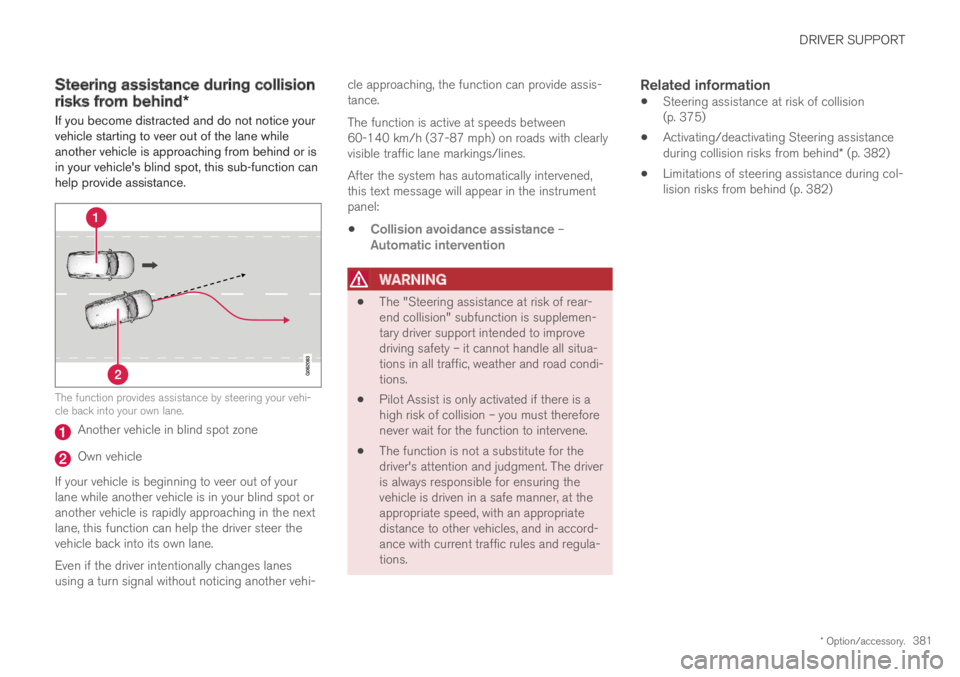
If you become distracted and do not notice yourvehicle starting to veer out of the lane whileanother vehicle is approaching from behind or isin your vehicle's blind spot, this sub-function canhelp provide assistance.
The function provides assistance by steering your vehi-cle back into your own lane.
Another vehicle in blind spot zone
Own vehicle
If your vehicle is beginning to veer out of yourlane while another vehicle is in your blind spot oranother vehicle is rapidly approaching in the nextlane, this function can help the driver steer thevehicle back into its own lane.
Even if the driver intentionally changes lanesusing a turn signal without noticing another vehi-
cle approaching, the function can provide assis-tance.
The function is active at speeds between60-140 km/h (37-87 mph) on roads with clearlyvisible traffic lane markings/lines.
After the system has automatically intervened,this text message will appear in the instrumentpanel:
Collision avoidance assistance –Automatic intervention
WARNING
The "Steering assistance at risk of rear-end collision" subfunction is supplemen-tary driver support intended to improvedriving safety – it cannot handle all situa-tions in all traffic, weather and road condi-tions.
Pilot Assist is only activated if there is ahigh risk of collision – you must thereforenever wait for the function to intervene.
The function is not a substitute for thedriver's attention and judgment. The driveris always responsible for ensuring thevehicle is driven in a safe manner, at theappropriate speed, with an appropriatedistance to other vehicles, and in accord-ance with current traffic rules and regula-tions.
Related information
Steering assistance at risk of collision(p. 375)
Activating/deactivating Steering assistanceduring collision risks from behind* (p. 382)
Limitations of steering assistance during col-lision risks from behind (p. 382)
Page 387 of 695

DRIVER SUPPORT
* Option/accessory.385
Park Assist*
The Park Assist function can help the driverwhen maneuvering in tight spaces by indicatingdistances to obstacles using audible signals andgraphics in the center display.
Display view showing obstacle zones and sensor sec-tors.
The center display shows an overview of the vehi-cle in relation to objects that have been detected.
The marked sector indicates where the obstacleis located. The closer the vehicle symbol is to amarked sector forward/rearward, the closer thedetected obstacle is to your vehicle.
The side sectors change color as the distancebetween the vehicle and an object decreases.
The audible signals will also speed up the closerthe obstacle is to the vehicle. The volume of theaudio system will be automatically lowered.
Audible signals for obstacles in front and to thesides of the vehicle are active when the vehicle ismoving but will cease after the vehicle has beenstationary for approx. 2 seconds. Audible signalsfor obstacles behind the vehicle will remain activeeven when the vehicle is stationary.
If a detected obstacle is within approx. 30 cm(1 ft) from the front or rear of the vehicle, thetone will become constant and the active sen-sor's field closest to the vehicle symbol will befilled in.
At distances within approx. 25 cm (0.8 ft) from anobstacle to the sides of the vehicle, an rapid puls-ing signal will be given and the active sectorfields will change color from ORANGE to RED.
The volume of the Park Assist audible signalscan be adjusted while the signal is being givenusing the >II knob or in the center display's Topview under Settings.
NOTE
Besides in the sector closest to the vehi-cle symbol, audible warnings are only pro-vided for objects located directly in thevehicle's path.
WARNING
The Parking Assist function is supple-mentary driver support intended to facili-tate driving and help make it safer – itcannot handle all situations in all traffic,weather and road conditions.
The parking sensors have dead/blindspots where objects cannot be detected.
Pay particular attention to people andanimals near the vehicle.
Parking Assist is not a substitute for thedriver's attention and judgment. The driveris always responsible for ensuring thevehicle is driven in a safe manner, at theappropriate speed, with an appropriatedistance to other vehicles, and in accord-ance with current traffic rules and regula-tions.
Related information
Park Assist front, rear and sides (p. 386)
Activating/deactivating Park Assist (p. 387)
Park Assist limitations (p. 388)
Recommended maintenance for Park Assist(p. 389)
Park Assist symbols and messages (p. 390)
Page 388 of 695

DRIVER SUPPORT
386
Park Assist front, rear and sides
Park Assist has different parameters dependingon which part of the vehicle is approaching anobstacle.
Front camera
Continuous tone warning signal when the obstacle isless than approx. 30 cm (1 ft) from the vehicle 111.
Park Assist's front sensors are automatically acti-vated when the engine is started. They are activeat speeds below 10 km/h (6 mph).
The distance monitored extends approx. 80 cm(2.5 ft) in front of the vehicle.
NOTE
The Parking Assist system is deactivatedwhen the parking brake is applied or when Pis selected on vehicles with automatic trans-mission.
CAUTION
When installing auxiliary lights: Make surethese do not obscure the sensors – the auxili-ary lights could be perceived as an obstacle.
Back
Continuous tone warning signal when the obstacle isless than approx. 30 cm (1 ft) from the vehicle 111
The rear sensors will be activated if the vehiclebegins rolling backward or if reverse gear isengaged.
The distance monitored extendsapprox. 1.5 meters (5 ft) behind the vehicle.
The Parking Assist system's rear sensors will beautomatically deactivated if the vehicle is backingup with a trailer connected to the vehicle's elec-trical system.
NOTE
When reversing with e.g. a trailer or bike car-rier on the trailer hitch – without Volvo originaltrailer cables – the Parking Assist system mayhave to be turned off manually to prevent thesensors from reacting to these.
111The illustration is generic - details may vary according to vehicle model.
Page 389 of 695

DRIVER SUPPORT
* Option/accessory.387
Side sensors
Rapid pulsing warning signal when the obstacle is lessthan approx. 25 cm (0.8 ft) from the vehicle 111.
Park Assist's side sensors are automatically acti-vated when the engine is started. They are activeat speeds below 10 km/h (6 mph).
The distance monitored is approx. 25 cm (0.8 ft)out from the sides.
The detection area increases significantly whenthe steering angle of the front wheels increasesand depending on the steering wheel position,obstacles up to approx. 90 cm (3 ft) directlybehind or in front of the vehicle can be detected(also see “Side sensor fields” in the section “Sen-sor field from Park Assist for Park Assist Cam-era”).
Related information
Park Assist* (p. 385)
Sensor field from Park Assist for Park AssistCamera (p. 396)
Activating/deactivating Park Assist
The Park Assist Pilot function can be activated/deactivated.
On/Off
Park Assist's front and side sensors are automat-ically activated when the engine is started. Therear sensors are activated if the vehicle is movingbackward or reverse gear is engaged.
The function can be activated/deactivated in the center dis-play's Function view.
–Tap the Park Assist button in Function view.
>The Park Assist Pilot indicator light showsthe status of the function: GREEN (on) orGRAY (off).
In vehicles equipped with Park Assist Camera,Park Assist can also be activated/deactivatedfrom the relevant camera view.
Related information
Park Assist* (p. 385)
111The illustration is generic - details may vary according to vehicle model.
Page 390 of 695

DRIVER SUPPORT
* Option/accessory.388
Park Assist limitations
Park Assist may not be able to detect all condi-tions in all situations and functionality may there-fore be limited in certain cases.
The driver should be aware of the following limi-tations for Park Assist:
WARNING
Be extra cautious whenreversing if this symbol isshown when a trailer, bikecarrier or similar is attachedand electrically connectedto the vehicle.
The symbol indicates thatthe rear parking assist sensors are deacti-vated and will not warn of any obstacles.
CAUTION
Objects such as chains, thin and glossy polesor low obstacles may end up in the "signalshadow" and then go temporarily undetectedby the sensors – the pulsating tone may thenunexpectedly stop instead of becoming aconstant tone as expected.
The sensors cannot detect high objects, suchas protruding ramps.
In such situations, pay extra attention andmaneuver/drive the vehicle very slowly orstop the current parking maneuver –there may be a high risk of damage tothe vehicle or other objects since infor-mation from the sensors is not alwaysreliable in such situations.
CAUTION
In some circumstances, the Park Assist Sys-tem may produce false warnings due to exter-nal sound sources with the same ultrasonicfrequencies as those the system works with.
Examples of such sources are horns, wet tireson asphalt, pneumatic brakes, exhaust noisefrom motorcycles, etc.
NOTE
When a trailer hitch is configured with thevehicle electrical system, the trailer hitch pro-trusion is included when the function meas-ures the distance to objects behind the vehi-cle.
Related information
Park Assist* (p. 385)
Page 391 of 695

DRIVER SUPPORT
* Option/accessory.389
Recommended maintenance forPark Assist
For Park Assist to function optimally, its sensorsmust be cleaned regularly with water and carwashing detergent.
Location of the Park Assist sensors112.
NOTE
Dirt, ice and snow covering the sensors couldcause false warnings, reduced function, or nofunction.
Related information
Park Assist* (p. 385)
112Note: This illustration is general and details may vary depending on model.
Page 392 of 695

DRIVER SUPPORT
* Option/accessory.390
Park Assist symbols and messages
Symbols and messages for the Park Assist maybe displayed in the instrument panel and/or thecenter display.Some examples of symbols and messages are shown in the table below.
SymbolMessageMeaning
The rear Park Assist sensors are turned off and no acoustic warnings for obstacles/objects willbe provided.
Park Assist System
Sensors blocked, cleaning nee-ded
One or more of the sensors are blocked. Check and clean/remove the obstacle as soon as pos-sible.
Park Assist System
Unavailable Service required
The system is not functioning as intended. Contact a workshop ‒ an authorized Volvo workshopis recommended.
A text message can be erased by briefly pressing
the button in the center of the right-sidesteering wheel keypad.
If the message persists: Contact a workshop ‒ anauthorized Volvo workshop is recommended.
Related information
Park Assist* (p. 385)
Page 393 of 695

DRIVER SUPPORT
}}
* Option/accessory.391
Park Assist Camera*
The Park Assist Camera can help provide thedriver when maneuvering in tight spaces by alert-ing the driver to obstacles using the camerascreen and graphics in the center display.
The Park Assist Camera is a support functionthat is automatically activated when reverse gearis engaged. It can also be started manually fromthe center display.
Example camera view113.
Zoom114 - zoom in/out
360° view* - activate/deactivate all cameras
PAS* - activate/deactivate Parking Assist
Lines - activate/deactivate trajectory lines
Towbar* - activate/deactivate trajectory lines
for towbar*115
CTA* - activate/deactivate Cross Traffic Alert
WARNING
The Parking Camera function is supple-mentary driver support intended to facili-tate driving and help make it safer – itcannot handle all situations in all traffic,weather and road conditions.
The parking cameras have dead/blindspots where objects cannot be detected.
Pay particular attention to people andanimals near the vehicle.
Objects/obstacles may be closer to thevehicle than they appear on the screen.
The parking cameras are not a substitutefor the driver's attention and judgment.The driver is always responsible forensuring the vehicle is driven in a safemanner, at the appropriate speed, with anappropriate distance to other vehicles,and in accordance with current trafficrules and regulations.
113The illustration is generic - details may vary according to vehicle model.114The trajectory lines will not be displayed when zooming in.115Not available in all markets.