2019 VOLVO XC60 TWIN ENGINE warning
[x] Cancel search: warningPage 367 of 695

DRIVER SUPPORT
}}
* Option/accessory.365
NOTE
The function uses the vehicle's camera unit,which has some general limitations – see thesection "Camera unit limitations".
Related information
Road Sign Information* (p. 359)
Camera limitations (p. 332)
Driver Alert Control
The Driver Alert Control (DAC) function isdesigned to help capture the driver becomeaware of erratic behavior, e.g. if the driver is dis-tracted or showing signs of fatigue.
The objective of DAC is to detect slowly deterio-rating driving behavior and is primarily intended tobe used on major roads. The function is notintended for use in city traffic.
DAC is activated when the vehicle's speedexceeds 65 km/h (40 mph) and remains activeas long as speeds are above 60 km/h (37 mph).
DAC detects the vehicle's position in the traffic lane.
A camera monitors the traffic lane's marker linesand compares the direction of the road with thedriver's movements of the steering wheel.
The vehicle is moving erratically in the lane.
If driving behavior becomesconsiderably erratic, the driverwill be alerted by this symbol inthe instrument panel, an audi-ble signal and the messageTime for a break.
If the vehicle is equipped with SensusNavigation* and the Rest Stop Guidance func-tion is activated, a suitable place to take a breakwill also be suggested (see section “Selectingguidance to a rest stop if a Driver Alert Controlwarning has been given”).
The warning will be repeated after a short time ifdriving behavior does not improve.
Page 368 of 695

||
DRIVER SUPPORT
366
WARNING
The Driver Alert Control function is sup-plementary driver support intended tofacilitate driving and help make it safer –it cannot handle all situations in all traffic,weather and road conditions.
Driver Alert Control must not be used toextend a period of driving. The drivershould plan in breaks at regular intervalsand make sure they are well rested.
Driver Alert Control is not a substitute forthe driver's attention and judgment. Thedriver is always responsible for ensuringthe vehicle is driven in a safe manner, atthe appropriate speed, with an appropri-ate distance to other vehicles, and inaccordance with current traffic rules andregulations.
WARNING
An alarm from Driver Alert Control should betaken very seriously since a sleepy driver isoften not aware of their own condition.
If the alarm sounds or you feel fatigued:
Stop the vehicle safely as soon as possi-ble and rest.
Studies have shown that it is just as danger-ous to drive while tired as it is to drive underthe influence of alcohol or other stimulants.
Related information
Activating/deactivating Driver Alert Control(p. 366)
Selecting guidance to a rest area if theDriver Alert Control warning has been given(p. 367)
Driver Alert Control limitations (p. 367)
Activating/deactivating Driver AlertControl
The Driver Alert Control (DAC) function can beactivated/deactivated.
On/Off
To change DAC settings:
1.Tap Settings in the center display's Topview.
2.Select My CarIntelliSafeDriver AlertControl.
3.Select/deselect Alertness Warning to acti-vate/deactivate DAC.
Related information
Driver Alert Control (p. 365)
Page 369 of 695

DRIVER SUPPORT
}}
* Option/accessory.367
Selecting guidance to a rest area ifthe Driver Alert Control warning hasbeen given
The Rest Stop Guidance function can beswitched on or off.
In vehicles equipped with Sensus Navigation*, thedriver can activate a guide that can automaticallysuggest a suitable rest stop if the DAC warningis given.
To select Rest Stop Guidance:
1.Tap Settings in the center display's Topview.
2.Select My CarIntelliSafeDriver AlertControl.
3.Select/deselect Rest Stop Guidance toactivate/deactivate the function.
Related information
Driver Alert Control (p. 365)
Driver Alert Control limitations
Driver Alert Control (DAC) functionality may bereduced in certain situations.
In certain situations, the system may provide awarning even if it has not detected a change indriving behavior, e.g.:
in strong crosswinds
on grooved road surfaces.
WARNING
In certain cases, driving behavior might not beaffected despite the driver's fatigue – whenusing the Pilot Assist function – resulting inthe driver not getting a warning from DAC.
It is therefore very important to always stopand take a break at the slightest sign of fati-gue, regardless of whether the DAC functionhas issued a warning or not.
NOTE
The function uses the vehicle's camera unit,which has some general limitations – see thesection "Camera unit limitations".
Related information
Driver Alert Control (p. 365)
Camera limitations (p. 332)
Lane Keeping Aid
Lane Keeping Aid (LKA103) is designed toactively steer the vehicle on freeways, highwaysand other major roads to help the driver reducethe risk of the vehicle unintentionally veering outof the lane.
Lake Keeping Assistance steers the vehicle backinto the lane and/or alerts the driver using vibra-tions in the steering wheel.
Lane Keeping Aid is active at speeds between65-200 km/h (40-125 mph) on roads withclearly visible traffic lane marker lines.
On narrow roads, the function may be unavailableand go into standby mode. The function willbecome available again when the road becomessufficiently wide.
A camera monitors the road/traffic lane's marker lines.
103Lane Keeping Aid
Page 370 of 695
||
DRIVER SUPPORT
368
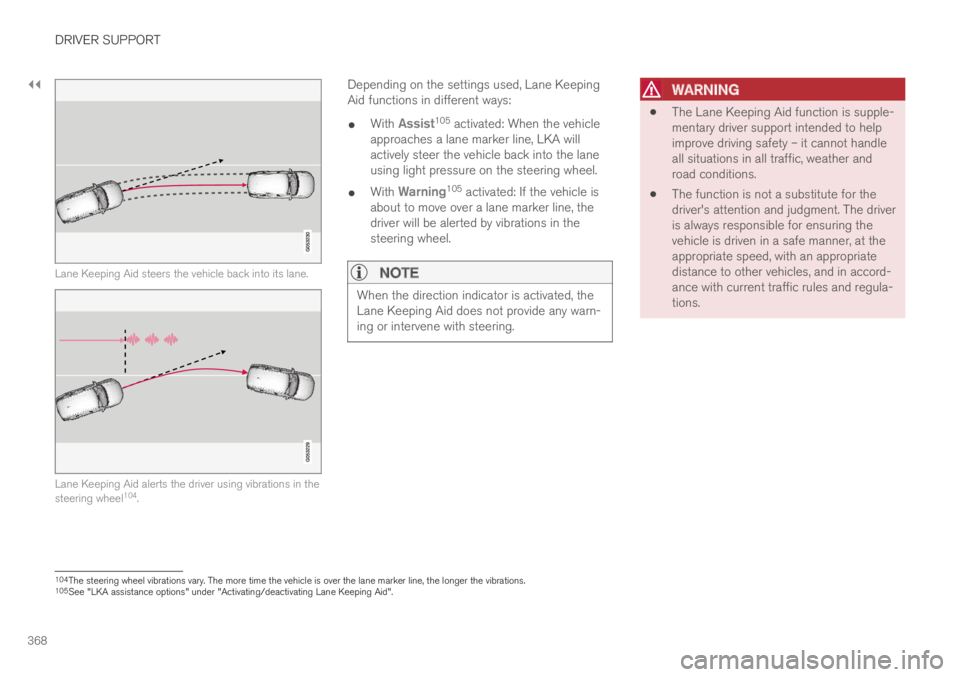
Lane Keeping Aid steers the vehicle back into its lane.
Lane Keeping Aid alerts the driver using vibrations in thesteering wheel104.
Depending on the settings used, Lane KeepingAid functions in different ways:
With Assist105 activated: When the vehicleapproaches a lane marker line, LKA willactively steer the vehicle back into the laneusing light pressure on the steering wheel.
With Warning105 activated: If the vehicle isabout to move over a lane marker line, thedriver will be alerted by vibrations in thesteering wheel.
NOTE
When the direction indicator is activated, theLane Keeping Aid does not provide any warn-ing or intervene with steering.
WARNING
The Lane Keeping Aid function is supple-mentary driver support intended to helpimprove driving safety – it cannot handleall situations in all traffic, weather androad conditions.
The function is not a substitute for thedriver's attention and judgment. The driveris always responsible for ensuring thevehicle is driven in a safe manner, at theappropriate speed, with an appropriatedistance to other vehicles, and in accord-ance with current traffic rules and regula-tions.
104The steering wheel vibrations vary. The more time the vehicle is over the lane marker line, the longer the vibrations.105See "LKA assistance options" under "Activating/deactivating Lane Keeping Aid".
Page 372 of 695

||
DRIVER SUPPORT
370
vated, another symbol will illuminate and thefollowing message will be displayed:
– Lane Keeping Aid – Applysteering
LKA will then be deactivated until the driverbegins actively steering the vehicle again.
The audible signal will stop and the informationsymbol and message will disappear when LKAdetects that the driver is actively steering thevehicle again.
Related information
Lane Keeping Aid (p. 367)
Activating/deactivating LaneKeeping Aid
The Lane Keeping Aid (LKA107) function can beswitched On or Off.
On/Off
Press the Lane Keeping Aidbutton in the center display'sFunction view.
GREEN button indicator light - LKA is acti-vated.
GRAY button indicator light - LKA is deacti-vated.
Related information
Lane Keeping Aid (p. 367)
Selecting type of assistance forLane Keeping Aid
The driver can determine what types of assis-
tance LKA108 should provide if the vehicle veersfrom its lane.
1. Select SettingsMy CarIntelliSafe inthe center display's Top view.
2.Under Lane Keeping Aid Mode, selectwhat assistance LKA should provide:
Assist the driver will receive steeringassistance but no warning.
Both - the driver will receive both steeringassistance and a warning.
Warning - the driver will only receive awarning.
Related information
Lane Keeping Aid (p. 367)
107Lane Keeping Aid108Lane Keeping Aid
Page 376 of 695
DRIVER SUPPORT
374
Lane Keeping Aid symbols in theinstrument panel
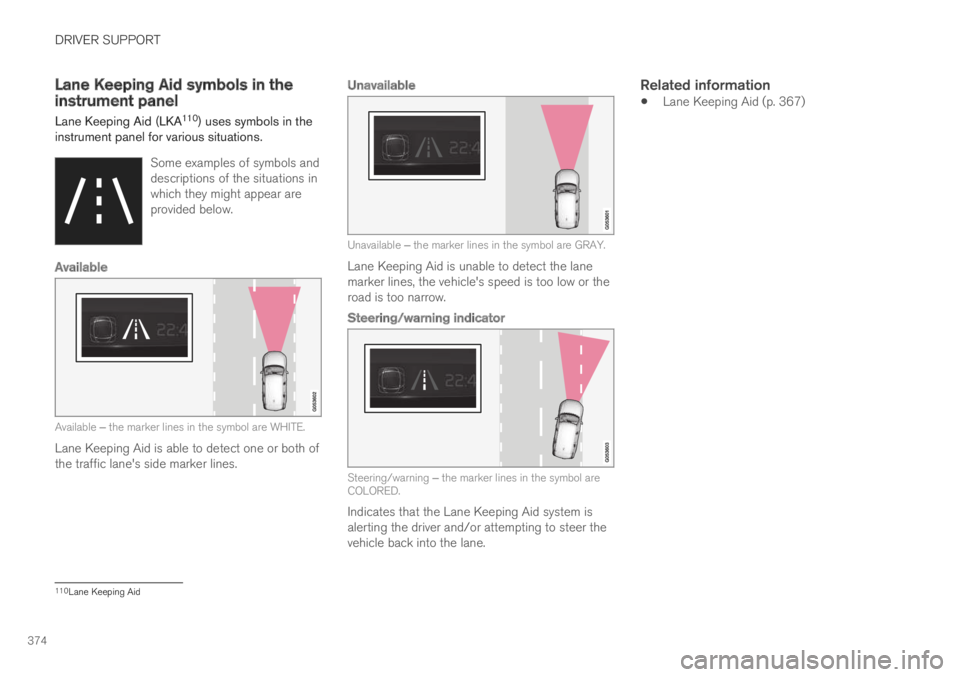
Lane Keeping Aid (LKA110) uses symbols in theinstrument panel for various situations.
Some examples of symbols anddescriptions of the situations inwhich they might appear areprovided below.
Available
Available ‒ the marker lines in the symbol are WHITE.
Lane Keeping Aid is able to detect one or both ofthe traffic lane's side marker lines.
Unavailable
Unavailable ‒ the marker lines in the symbol are GRAY.
Lane Keeping Aid is unable to detect the lanemarker lines, the vehicle's speed is too low or theroad is too narrow.
Steering/warning indicator
Steering/warning ‒ the marker lines in the symbol areCOLORED.
Indicates that the Lane Keeping Aid system isalerting the driver and/or attempting to steer thevehicle back into the lane.
Related information
Lane Keeping Aid (p. 367)
110Lane Keeping Aid
Page 378 of 695
DRIVER SUPPORT
376
Run-Off Mitigation with steeringassistance
This sub-function is intended to help reduce therisk of the vehicle inadvertently running off theroad by actively steering the vehicle back ontothe road.
The function is active at speeds between65-140 km/h (40-87 mph) on roads with clearlyvisible traffic lane markings/lines.
The system uses a camera to monitor the edgesof the road and the painted side marker lines. Ifthe vehicle is about to cross the edge of the road,the function will attempt to steer the vehicle backonto the road. If this is not sufficient to keep thevehicle on the road, the brakes will also beapplied.
However, the function will not provide eithersteering assistance or braking if the turn signal isused. The function will also not be activated if itdetects that the driver is actively operating thevehicle.
After the system has automatically intervened,this text message will appear in the instrumentpanel:
Collision avoidance assistance –Automatic intervention
WARNING
The "Steering assistance at risk of run-off" subfunction is supplementary driversupport intended to help improve drivingsafety – it cannot handle all situations inall traffic, weather and road conditions.
The function cannot detect barriers, railsor similar obstacles at the side of theroad.
"Steering assistance at risk of run-off" isnot a substitute for the driver's attentionand judgment. The driver is alwaysresponsible for ensuring the vehicle isdriven in a safe manner, at the appropri-ate speed, with an appropriate distance toother vehicles, and in accordance withcurrent traffic rules and regulations.
Related information
Steering assistance at risk of collision(p. 375)
Run-Off Mitigation with steeringassistance levels
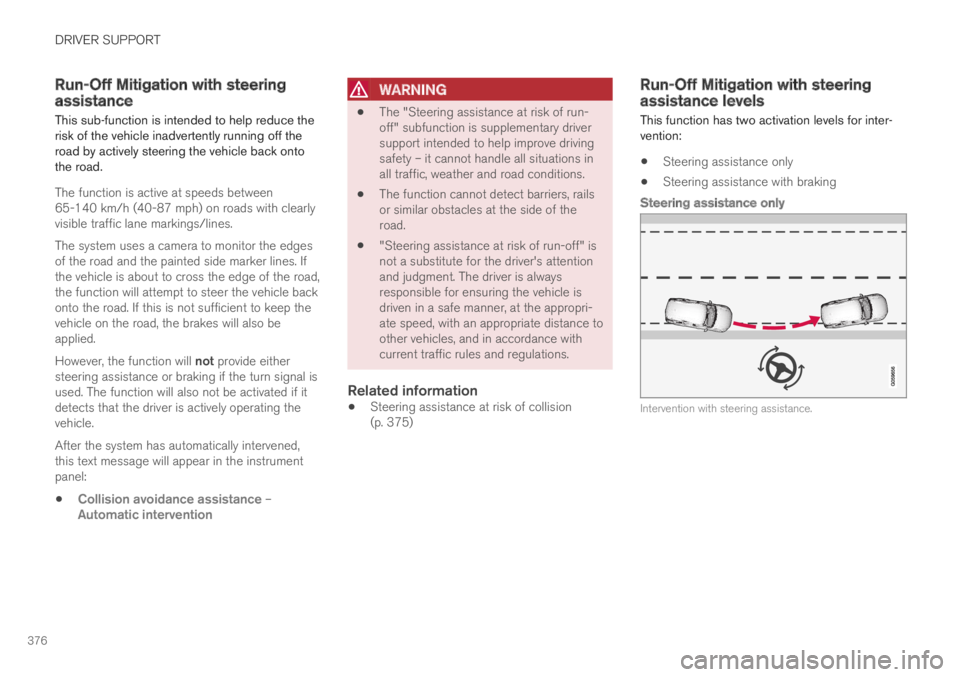
This function has two activation levels for inter-vention:
Steering assistance only
Steering assistance with braking
Steering assistance only
Intervention with steering assistance.
Page 381 of 695

DRIVER SUPPORT
}}
* Option/accessory.379
However, the function will not provide steeringassistance if the turn signal is used. The functionwill also not be activated if it detects that thedriver is actively operating the vehicle.
After the system has automatically intervened,this text message will appear in the instrumentpanel:
Collision avoidance assistance –Automatic intervention
WARNING
The "Steering assistance at risk of head-on collision" subfunction is supplemen-tary driver support intended to improvedriving safety – it cannot handle all situa-tions in all traffic, weather and road condi-tions.
Pilot Assist is only activated if there is ahigh risk of collision – you must thereforenever wait for the function to intervene.
The function is not a substitute for thedriver's attention and judgment. The driveris always responsible for ensuring thevehicle is driven in a safe manner, at theappropriate speed, with an appropriatedistance to other vehicles, and in accord-ance with current traffic rules and regula-tions.
Related information
Steering assistance at risk of collision(p. 375)
Activating/deactivating Steering assistanceduring collision risks with oncoming vehicles(p. 379)
Limitations of steering assistance during col-lision risks from oncoming traffic (p. 380)
Activating/deactivating Steeringassistance during collision riskswith oncoming vehicles
The driver can choose to have this function Onor Off.
Use this button in the centerdisplay's Function view to turnthe function On and Off.
NOTE
When the Collision avoidance assistancefunction is deactivated, all subfunctions of thefollowing are deactivated:
Steering assistance at risk of run-off
Steering assistance at risk of head-oncollision
Steering assistance during collision risksfrom behind*
Although it is possible to deactivate the func-tion, the driver is advised to keep it activatedsince it can help improve driving safety inmost cases.