2019 Peugeot Expert Screen
[x] Cancel search: ScreenPage 182 of 324

180
Malfunction
Reversing camera with
display in the interior
mirror
Refer to the General recommendations on
the use of driving and manoeuvring aids.
The visual reversing assistance camera is
activated automatically when reverse gear is
engaged. If a malfunction occurs, when
shifting to reverse, this warning lamp
comes on in the instrument panel,
accompanied by the display of a
message and an audible signal (short
b e e p).
Contact a PEUGEOT dealer or a qualified
workshop to have the system checked. The function may be supplemented by parking
sensors.
The image is displayed in the interior mirror. They are represented as lines marked
"on the ground" and do not indicate the
position of the vehicle in relation to tall
obstacles (e.g. other vehicles).
Some distortion of the image is normal.
It is normal to have a part of the number
plate showing at the bottom of the screen.
Opening the tailgate or rear door
(depending on equipment) can interfere
with the display.
If a side-hinged door is open, allow for the
space it occupies.
The blue lines ( 1) represent the width of the
vehicle including the mirrors.
The red line ( 2) represents a distance of 30 cm
from the rear bumper and the thin blue lines
1
m (A) and 2 m ( B) respectively. Check the cleanliness of the camera lens
regularly.
Clean the reversing camera regularly
using a soft, dry cloth.
Visiopark 1
Refer to the General recommendations on
the use of driving and manoeuvring aids
.
Driving
Page 183 of 324

181
As soon as reverse gear is engaged with the
engine running, this system displays views of
your vehicle’s close surroundings on the touch
screen using a camera located at the rear of
the vehicle.
The screen is divided into two parts: on the
left, a contextual view; on the right, a view from
above the vehicle in its close surroundings.Different contextual views can be displayed in
the left-hand part:
-
s
tandard view,
-
1
80° view,
-
z
oom view.
AUTO mode is activated by default.
In this mode, the system chooses the best view
to display (standard or zoom) according to the
information transmitted by the parking sensors.
You can change the type of view at any time
during a manoeuvre.
The state of the function is not saved when the
ignition is switched off.
Principle of operation
An image from above your vehicle in its close
surroundings is reconstructed (represented
between the blue brackets) in real time and as
the manoeuvre progresses.
This representation facilitates the alignment of
your vehicle when parking and allows obstacles
close to the vehicle to be seen.
This image is automatically deleted if the
vehicle remains stationary for too long.
The parking sensors supplement the
information on the view from above the vehicle.
The display disappears above
approximately 6 mph (10
km/h).
The system is automatically deactivated
about 7 seconds after coming out of
reverse or on opening a door or the boot.
Activation
Activation is automatic on engaging reverse at
a speed lower than 6 mph (10 km/h).
Using the rear camera, the vehicle's
surroundings are recorded during manoeuvres
at low speed.
6
Driving
Page 184 of 324
182
When the sub-menu is displayed, select one of
the four views: You can choose the display mode at any time
by pressing on this area."Standard view".
"180° view".
"Zoom view".
"AUTO m o de".
The function will be deactivated:
-
I
f a trailer is attached or a bicycle
carrier is fitted on a towing device
(vehicle fitted with a towing device
installed in line with the manufacturer's
recommendations).
-
A
bove about 6 mph (10 km/h).
-
O
n opening the tailgate.
-
W
hen shifting out of reverse (the image
remains displayed for 7 seconds).
-
B
y pressing the red cross or the white
arrow in the top left-hand corner of the
touch screen.
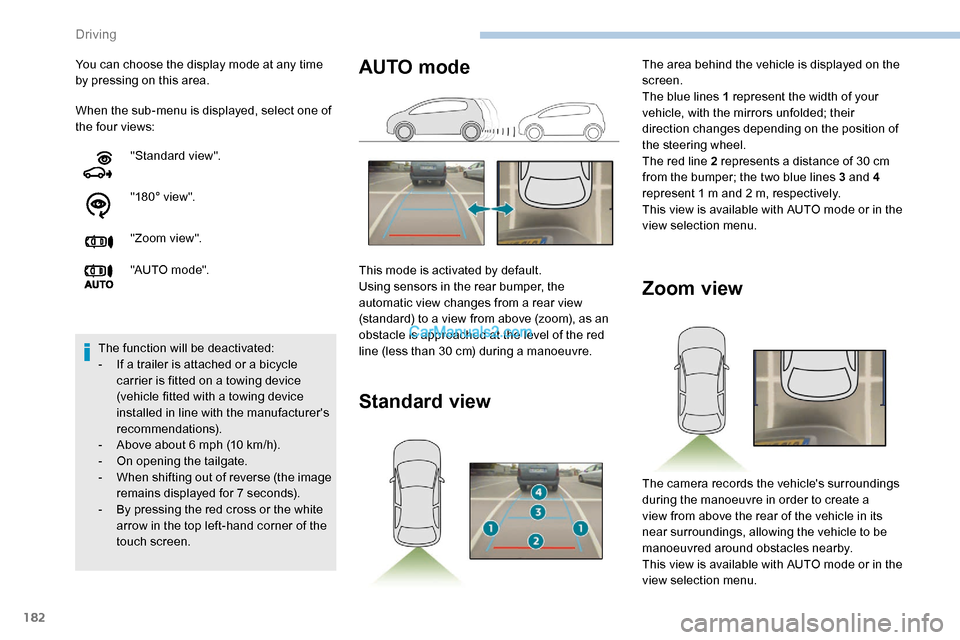
Zoom view
The camera records the vehicle's surroundings
during the manoeuvre in order to create a
view from above the rear of the vehicle in its
near surroundings, allowing the vehicle to be
manoeuvred around obstacles nearby.
This view is available with AUTO mode or in the
view selection menu.
AUTO mode
This mode is activated by default.
Using sensors in the rear bumper, the
automatic view changes from a rear view
(standard) to a view from above (zoom), as an
obstacle is approached at the level of the red
line (less than 30 cm) during a manoeuvre.
Standard view
The area behind the vehicle is displayed on the
screen.
The blue lines 1 represent the width of your
vehicle, with the mirrors unfolded; their
direction changes depending on the position of
the steering wheel.
The red line 2 represents a distance of 30 cm
from the bumper; the two blue lines 3 and 4
represent 1 m and 2 m, respectively.
This view is available with AUTO mode or in the
view selection menu.
Driving
Page 191 of 324
189
Energy economy mode
System which manages the duration of use of
certain functions to conser ve a sufficient level
of charge in the battery.
After switching off the engine and for a
maximum cumulative period of around 40
minutes, you can continue to use functions
such as the audio and telematics system,
the wipers, the dipped beam headlamps, the
courtesy lamps, etc.
Switching to this mode
A message appears in the instrument panel
screen indicating that the vehicle has switched
to economy mode and the active functions are
put on standby.If a telephone call is being made at this
time, it will be maintained for around
10
minutes with the Bluetooth hands-free
system of your audio system.
Exiting the mode
These functions will be automatically
reactivated the next time the vehicle is used.
In order to restore the use of these functions
immediately, start the engine and let it run:
-
f
or less than 10 minutes, to use the
equipment for approximately 5 minutes, A flat battery prevents the engine from
starting.
For more information on the 12 V batter y
,
refer to the corresponding section.
Load reduction mode
System which manages the use of certain
functions according to the level of charge
remaining in the battery.
When the vehicle is being driven, the load
reduction function temporarily deactivates
certain functions, such as the air conditioning
and the heated rear screen.
The deactivated functions are reactivated
automatically as soon as conditions permit. -
f
or more than 10 minutes, to use the
equipment for approximately 30 minutes.
Let the engine run for the duration specified to
ensure that the battery charge is sufficient.
Do not repeatedly and continuously restart the
engine in order to charge the battery.
Roof bars/Roof rack
As a safety measure and to avoid
damaging the roof, it is essential to use
the roof bars and racks approved for the
vehicle.
Obser ve the instructions on fitting and use
contained in the guide supplied with the
roof bars and racks.
Recommendations
Distribute the load uniformly, taking care
to avoid overloading one of the sides.
Arrange the heaviest part of the load as
close as possible to the roof.
Secure the load securely.
Drive gently: the vehicle will be more
susceptible to the effects of side winds
and its stability may be affected.
Regularly check the security and tight
fastening of the roof bars, at least before
each trip.
Remove the roof bars once they are no
longer needed.
7
Practical information
Page 193 of 324
191
When the engine is hot, handle the
exterior safety catch and the bonnet
stay with care (risk of burns), using the
protected area.
When the bonnet is open, take care not to
damage the safety catch.
Do not open the bonnet under very windy
conditions.
The cooling fan may star t after
switching off the engine: take care
with articles and clothing that might be
caught by the fan blades.
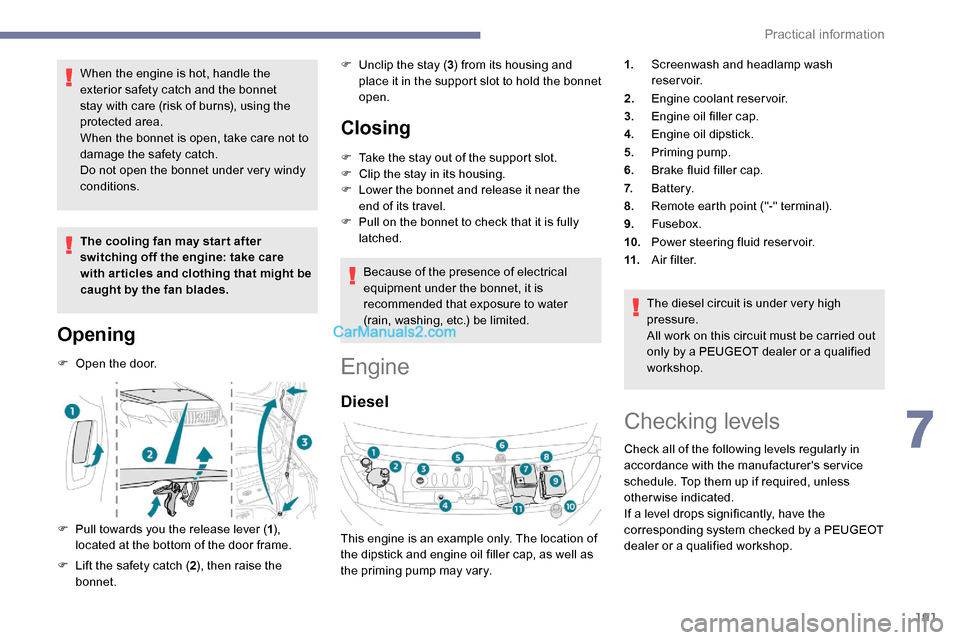
Opening
F Open the door.
F
P
ull towards you the release lever ( 1),
located at the bottom of the door frame.
F
L
ift the safety catch ( 2), then raise the
bonnet. F
U
nclip the stay (
3) from its housing and
place it in the support slot to hold the bonnet
open.
Closing
F Take the stay out of the support slot.
F C lip the stay in its housing.
F
L
ower the bonnet and release it near the
end of its travel.
F
P
ull on the bonnet to check that it is fully
latched.
Because of the presence of electrical
equipment under the bonnet, it is
recommended that exposure to water
(rain, washing, etc.) be limited.
Engine
Diesel
The diesel circuit is under very high
pressure.
All work on this circuit must be carried out
only by a PEUGEOT dealer or a qualified
workshop.
This engine is an example only. The location of
the dipstick and engine oil filler cap, as well as
the priming pump may vary. 1.
Screenwash and headlamp wash
reservoir.
2. Engine coolant reservoir.
3. Engine oil filler cap.
4. Engine oil dipstick.
5. Priming pump.
6. Brake fluid filler cap.
7. Battery.
8. Remote earth point ("-" terminal).
9. Fusebox.
10. Power steering fluid reservoir.
11. A i r f i l t e r.
Checking levels
Check all of the following levels regularly in
accordance with the manufacturer's service
schedule. Top them up if required, unless
otherwise indicated.
If a level drops significantly, have the
corresponding system checked by a PEUGEOT
dealer or a qualified workshop.
7
Practical information
Page 195 of 324
193
During the 30 minutes after topping up the
oil, the check per formed with the oil level
indicator in the instrument panel when the
ignition is switched on is not valid.
Brake fluid
The level of this fluid should be
close to the "MAX" mark. If not,
check the brake pad wear.
To know how often the brake fluid should be
replaced, refer to the manufacturer's servicing
schedule. If topping up, clean the cap before
replacing it. Use only DOT4 brake fluid
from a sealed canister.
F
A
dd more oil if necessary.
F
A
fter checking the level, carefully refit the oil
filler cap and the dipstick in its tube.
Power steering fluid
The level of this fluid should be
close to the " MAX" mark. With the
engine cold and the vehicle standing
on level ground, check this by
reading the level on the filler neck.
Engine coolant
Check the engine coolant level
regularly.
It is normal to top up this fluid
between two services.
The check and top-up must only be done with
the engine cold.
A low level presents a risk of serious damage
to the engine.
The level of this fluid should be close to the
" MAX " mark but should never exceed it.
If the level is close to or below the " MIN” mark,
it is essential to top up. Once the pressure has dropped, remove the
cap and top up to the required level.
Screen and headlamp
washer fluid
Top up the reser voir when you next
stop the vehicle.
Fluid specification
The fluid must be topped up with a ready-to-
use mixture.
In winter (temperatures below zero), a liquid
containing an agent to prevent freezing must
be used which is appropriate for the prevailing
conditions, in order to protect the elements of
the system (pump, tank, ducts, jets, etc.).
When the engine is hot, the temperature of this
fluid is regulated by the fan.
In addition, as the cooling system is
pressurised, wait at least one hour after
switching off the engine before carrying out any
work.
To avoid the risk of scalding if you need to top
up in an emergency, wrap a cloth around the
cap and unscrew the cap by two turns to allow
the pressure to drop. Filling with pure water is prohibited
under all circumstances (risk of freezing,
limestone deposits, etc.).
Diesel fuel additive (Diesel
with particle filter)
or
The minimum level in the particle
filter additive tank is indicated by
fixed illumination of this warning
lamp, accompanied by an audible
warning and a message warning that
the level of additive is too low.
7
Practical information
Page 220 of 324

218
PEUGEOT accepts no responsibility for
the cost incurred in repairing your vehicle
or for rectifying malfunctions resulting
from the installation of accessories
not supplied and not recommended by
PEUGEOT and not installed in accordance
with specifications, in particular when the
combined power consumption of all of the
additional equipment connected exceeds
10 milliamperes.
For more information on installing a
towbar or equipment of the TA XI type,
contact a PEUGEOT dealer.
Version 1 (Eco)
The fuses described below vary according to
the equipment in the vehicle.Fuse
No. Rating
(A) Functions
F4 15Horn.
F5 20Front/rear screenwash
pump.
F6 20Front/rear screenwash
pump.
F7 10Rear 12 V accessory
socket.
F8 20Single or double rear
wipers.
F10/F11 30Internal/external locks,
front and rear.
F14 5Alarm, emergency and
assistance calls
F24 5Touch screen,
reversing camera and
parking sensors.
F29 20Audio system, touch
screen, CD player,
navigation.
F32 15Front 12 V accessory
socket
Version 2 (Full)
The fuses described below vary according to
the equipment in the vehicle.
FuseNo. Rating
(A) Functions
F5 5Touch screen, reversing
camera and parking
sensors.
F8 20Single or double rear
wipers.
F10/F11 30Internal/external locks,
front and rear.
F12 3Alarm.
F17 10Rear 12 V accessory
socket.
F33 15Front 12 V accessory
socket
F36 20Audio system, touch
screen, CD player,
navigation.
In the event of a breakdown
Page 221 of 324
219
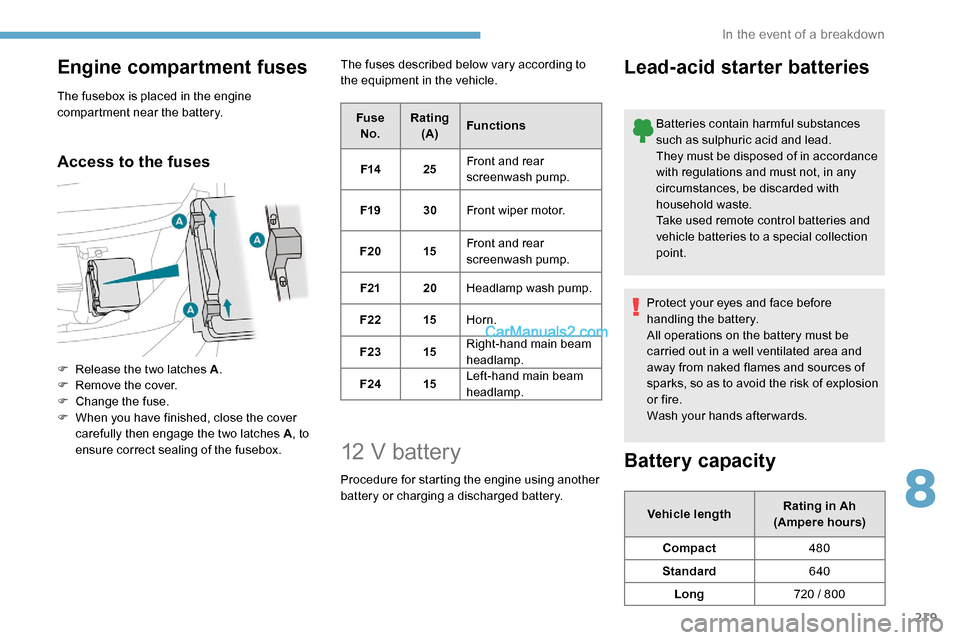
Engine compartment fuses
The fusebox is placed in the engine
compartment near the battery.
Access to the fuses
F Release the two latches A.
F R emove the cover.
F
C
hange the fuse.
F
W
hen you have finished, close the cover
carefully then engage the two latches A , to
ensure correct sealing of the fusebox. The fuses described below vary according to
the equipment in the vehicle.
FuseNo. Rating
(A) Functions
F14 25Front and rear
screenwash pump.
F19 30Front wiper motor.
F20 15Front and rear
screenwash pump.
F21 20Headlamp wash pump.
F22 15Horn.
F23 15Right-hand main beam
headlamp.
F24 15Left-hand main beam
headlamp.
12 V battery
Procedure for starting the engine using another
battery or charging a discharged battery.
Lead-acid starter batteries
Batteries contain harmful substances
such as sulphuric acid and lead.
They must be disposed of in accordance
with regulations and must not, in any
circumstances, be discarded with
household waste.
Take used remote control batteries and
vehicle batteries to a special collection
point.
Protect your eyes and face before
handling the battery.
All operations on the battery must be
carried out in a well ventilated area and
away from naked flames and sources of
sparks, so as to avoid the risk of explosion
or fire.
Wash your hands afterwards.
Battery capacity
Vehicle length Rating in Ah
(Ampere hours)
Compact 480
Standard 640
Long 720 / 800
8
In the event of a breakdown