2019 MERCEDES-BENZ SPRINTER interior lights
[x] Cancel search: interior lightsPage 49 of 354

card contains, in compact
form ,th e most impor‐
ta nt information about your vehicle e.g. thero ut‐
ing of electric cables.
Fu rther information can be found at http://
www.mercedes-benz.de/qr-code. Data
storage Electronic control units
Electronic control units are ins
talled in your vehi‐
cle. Some of these are necessary forth e safe
operation of your vehicle, while some assist you
when driving (driver assis tance sy stems). In addi‐
tion, your vehicle pr ovides com fort and enter tain‐
ment functions, which are also made possible by
electronic cont rol units.
The elect ronic control units contain da tamemo‐
ri es which can temp orarily or permanently store
te ch nical information about theve hicle's operat‐
ing state, component loads, main tenance requ ire‐
ments and tech nical events or malfunctions.
In general, this information documents thest ate
of a component part, a module, a sy stem or the
sur roundings such as:
R operating states of sy stem components (e.g.
fl uid le vels, battery status, tire pressure)
R status messages concerning theve hicle and
its individual components (e.g. number of
wheel revo lutions/speed, deceleration, lateral
acceleration, display of thefast ened seat
belts)
R malfunctions or defects in impor tant sy stem
components (e.g. lights, brakes)
R information on events leading tovehicle dam‐
age
R system reactions in special driving situations
(e.g. airbag deployment, inter vention of sta‐
bility control sy stems)
R ambient conditions (e.g. temp erature, rain
sensor)
In addition toprov iding the actual cont rol unit
function, this data assists the manufacturer in
de tecting and rectifying malfunctions and opti‐
mizing vehicle functions. The majority of this data
is temp orary and is only processed in theve hicle
itself. Only a small portion of the data is stored in
th eeve nt or malfunction memo ry.
When your vehicle is serviced, tech nical da ta
from theve hicle can be read out byservice net‐
wo rkemplo yees (e.g. workshops, manufacturers)
or third parties (e.g. breakdown services). Serv‐ ices include
repair services, maintenance pro‐
cesses, warranty claims and quality assurance
measures, forex ample. The read out is per‐
fo rm ed via the legally prescribed port forthe
diagnostics connection in theve hicle. The
re spective service network locations or third par‐
ties collect, process and use this data. They
document tech nical statuses of theve hicle,
assist in finding malfunctions and impr oving qual‐
ity and are transmitted tothe manufacturer, if
necessar y.Fu rthermore, the manufacturer is sub‐
ject toproduct liability. Forth is, the manufacturer
re qu ires tech nical da tafrom vehicles.
Malfunction memories in theve hicle can be reset
by a service outlet as part of repair or mainte‐
nance work.
Depending on the selected equipment, you can
import data into vehicle con venience and info‐
ta inment functions yourself.
This includes, forex ample:
R multimedia data such as music, films or pho‐
to sfo r playback in an integrated multimedia
sy stem
R address book data for use in connection with
an integrated hands-free sy stem or an inte‐
grated navigation sy stem
R entered navigation destinations
R data about the use of Internet services
This data can be sa ved locally in theve hicle or it
is located on a device which you ha veconnected
to theve hicle (e.g. smartphone, USB flash drive
or MP3 pla yer). If this data is stored in theve hi‐
cle, you can dele teit at any time. This data is
sent tothird parties only at your requ est, particu‐
lar lywhen you use online services in accordance
with the settings that you ha veselected.
Yo u can store or change con venience settings/
individualization in theve hicle at any time.
Depending on the equipment, this includes, for
ex ample:
R seat and steering wheel position settings
R suspension and climate cont rol settings
R Individualization such as interior lighting
If yo ur vehicle is accordingly equipped, you can
connect your smartphone or ano ther mobile end
device totheve hicle. You can control this by
means of the cont rol elements integrated in the
ve hicle. Images and audio from the smartphone
can be output via the multimedia sy stem. Cer tain General no
tes25
Page 52 of 354
Re
stra int sy stem Pr
otection bythere stra int sy stem The
restra int sy stem includes thefo llowing com‐
ponents:
R Seat belt sy stem
R Airbags
R Child restra int sy stem
R Child seat securing sy stems
The restra int sy stem can help pr eventtheve hicle
occupants from coming into contact with parts of
th eve hicle interior in theeve nt of an accident. In
th eeve nt of an accident, there stra int sy stem can
also reduce thefo rc es towhich theve hicle occu‐
pants are subjected.
A seat belt can only pr ovide the best le vel of pro‐
te ction if it is worncor rectly. Depending on the
de tected accident situation, Emer gency Tension‐
ing Devices and/or airbags supplement the pro‐
te ction of fere dby a cor rectly wornseat belt.
Emer gency Tensioning Devices and/or airbags
are not depl oyed in every accident.
Ve hicles with a front passenger bench seat: the
Emergency Tensioning Device on the front
passenger seat is triggered whe ther or not the
seat belt tongue is engaged in the seat belt
buckle.
If th eve hicle does not ha vea driver's airbag, the
seat belt sy stem does not include an Emer gency
Te nsioning Device or a seat belt forc e limiter.
In order forth ere stra int sy stem toprov ide the
intended le vel of pr otection, each vehicle occu‐
pant must obser vethefo llowing information:
R Fasten seat belts cor rectl y.
R Sit in an almost up right seat position with
th eir back against the seat backrest.
R Sit with their feet resting on thefloor, if possi‐
ble.
R Always secure persons under 5 ft(1.50 m)
ta ll in an additional restra int sy stem suitable
fo rth is vehicle.
Ho wever,no sy stem available today can com‐
ple tely eliminate injuries and fata lities in every
accident situation. In particular, the seat belt and
airbag general lydo not pr otect against objects
penetrating theve hicle from the outside. It is also
not possible tocomple tely rule out therisk of
injury caused bythe airbag deploying. Limited pr
otection from there stra int sy stem &
WARNING Risk of inju ryor death from
modifications tothere stra int sy stem
The restra int sy stem can no longer function
cor rectly af ter alterations ha vebeen made.
The restra int sy stem may then not pr otect the
ve hicle occupants as intended byfailing in an
accident or triggering unexpec tedly, forex am‐
ple #
Never alter the parts of there stra int
sy stem. #
Neverta mp er with the wiring or any
electronic component parts or their
software. If it is necessary
toadjust theve hicle toaccom‐
modate a person with disabilities, con tact an
au thorized Mercedes-Benz Center for de tails.
USA only: con tact our Cu stomer Assis tance Cen‐
te r at 1‑8 77‑762‑826 7for de tails. Re
stra int sy stem functionality When
the ignition is switched on, a self-test is
per form ed, during which the0075 restra int sys‐
te m wa rning lamp lights up. It goes out no later
th an a few seconds af terth eve hicle is star ted.
The components of there stra int sy stem are then
functional. Malfunctioning
restra int sy stem A malfunction has occur
red in there stra int sys‐
te m if:
R The 0075 restra int sy stem warning lamp does
not light up when the ignition is switched on
R The 0075 restra int sy stem warning lamp
lights up continuously or repeatedly during a
journey &
WARNING Risk of inju rydue tomalfunc‐
tions in there stra int sy stem
If th ere stra int sy stem is malfunctioning,
re stra int sy stem components may be trig‐
ge red unintentionally or may not deploy as
intended during an accident. This may af fect
th e Emer gency Tensioning Devices or airbags,
fo rex ample. 28
Occupant saf ety
Page 81 of 354

Arming/disarming
theto w- aw ay alarm Arming/disarming
#
Lock theve hicle with thekey.
The tow- aw ay alarm is automatically armed
af te r about 40 seconds: #
Open theve hicle with thekey.
The tow- aw ay alarm is deactivated.
The tow- aw ay alarm is only armed when thefo l‐
lowing components are closed:
R the driver's door and the front-passenger
door
R the side doors
R there ar-end doors
Deactivating #
Swit choff the po wer supply (/ page103). #
Press but ton1.
When the button is released, indicator lamp
2 inthe button lights up for appro ximately
fi ve seconds. #
Lock theve hicle with thekey.
The tow- aw ay alarm is deactivated.
The tow- aw ay alarm remains deactivated until
yo u lock theve hicle again.
Deactivate theto w- aw ay alarm when locking your
ve hicle in thefo llowing situations:
R when loading and/or transporting theve hicle
on a ferry or car transpor ter,fo rex ample
R when parking theve hicle on a mo vable sur‐
fa ce, such as a split-le velga rage
This will pr eventfalse alarms. Interior motion sensor
Fu
nction
If th e activated the interior motion sensor de tects
motion in theve hicle interior, a visual and acous‐
tic alarm is triggered. This can happen if some‐
one reaches into theve hicle interior, forex ample. Ac
tivating/deactivating the in terior motion
sensor Ac
tivating #
Close the side windo ws. #
Make sure that no thing (such as masc ots or
coat hangers) is hanging on the inside rear‐
view mir ror or on the grab handles on the
headliner. This will pr event false alarms. #
Lock theve hicle with thekey.
The interior motion sensor is activated af ter
appr oximately 30 seconds.
The interior motion sensor is only activated when
th efo llowing components are closed:
R the driver's door and the co-driver door
R the side doors
R there ar-end doors
Deactivating #
Unlock theve hicle with thekey.
The interior motion sensor automatically
switches off.
Deactivating #
Switch off the po wer supply (/ page103). Opening and closing
57
Page 82 of 354

#
Press button 1.
When the button is released, indicator lamp
2 inthe button lights up for about five sec‐
onds. #
Lock theve hicle with thekey.
The interior motion sensor is deactivated.
The interior motion sensor remains deactivated
until you lock theve hicle again.
Deactivate the interior motion sensor when lock‐
ing your vehicle in thefo llowing situations:
R ifth ere are people or animals remaining
inside
R ifth e side windo wsremain open
R when transporting theve hicle on a ferry or
car transpor ter,fo rex ample
This will pr eventfalse alarms. 58
Opening and closing
Page 106 of 354
The
exterior lighting remains on for 40 seconds
af te rth eve hicle is unloc ked. When youstart the
ve hicle, the sur round lighting will be deactivated
and the automatic driving lights activated. Ad
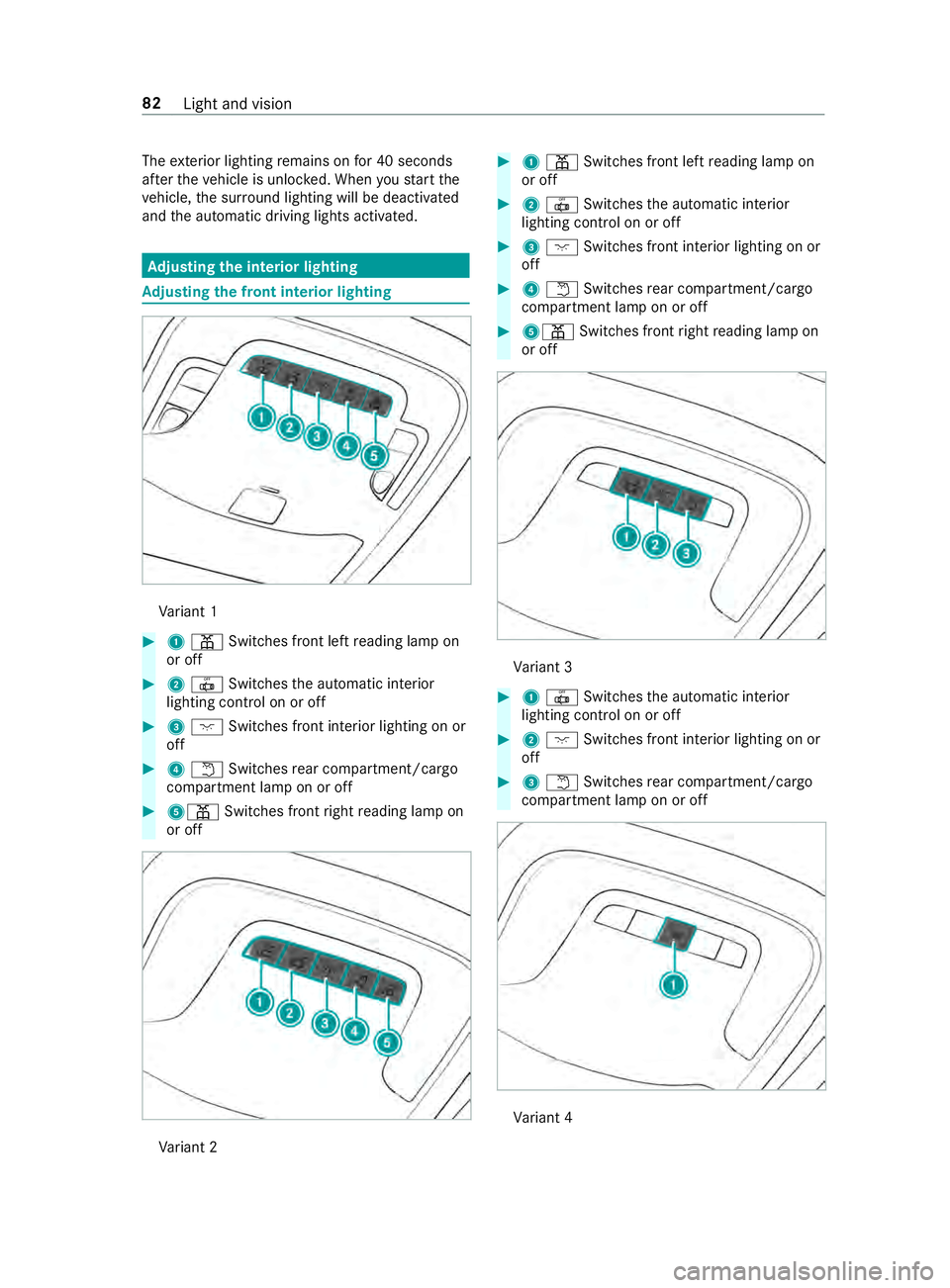
justing the in terior lighting Ad
justing the front in terior lighting Va
riant 1 #
1003D Switches front left reading lamp on
or off #
20033 Switches the automatic interior
lighting cont rol on or off #
3004A Switches front interior lighting on or
off #
40044 Switches rear compartment/cargo
compartment lamp on or off #
5003D Switches front right reading lamp on
or off Va
riant 2 #
1003D Switches front left reading lamp on
or off #
20033 Switches the automatic interior
lighting cont rol on or off #
3004A Switches front interior lighting on or
off #
40044 Switches rear compartment/cargo
compartment lamp on or off #
5003D Switches front right reading lamp on
or off Va
riant 3 #
10033 Switches the automatic interior
lighting cont rol on or off #
2004A Switches front interior lighting on or
off #
30044 Switches rear compartment/cargo
compartment lamp on or off Va
riant 4 82
Light and vision
Page 112 of 354
Re
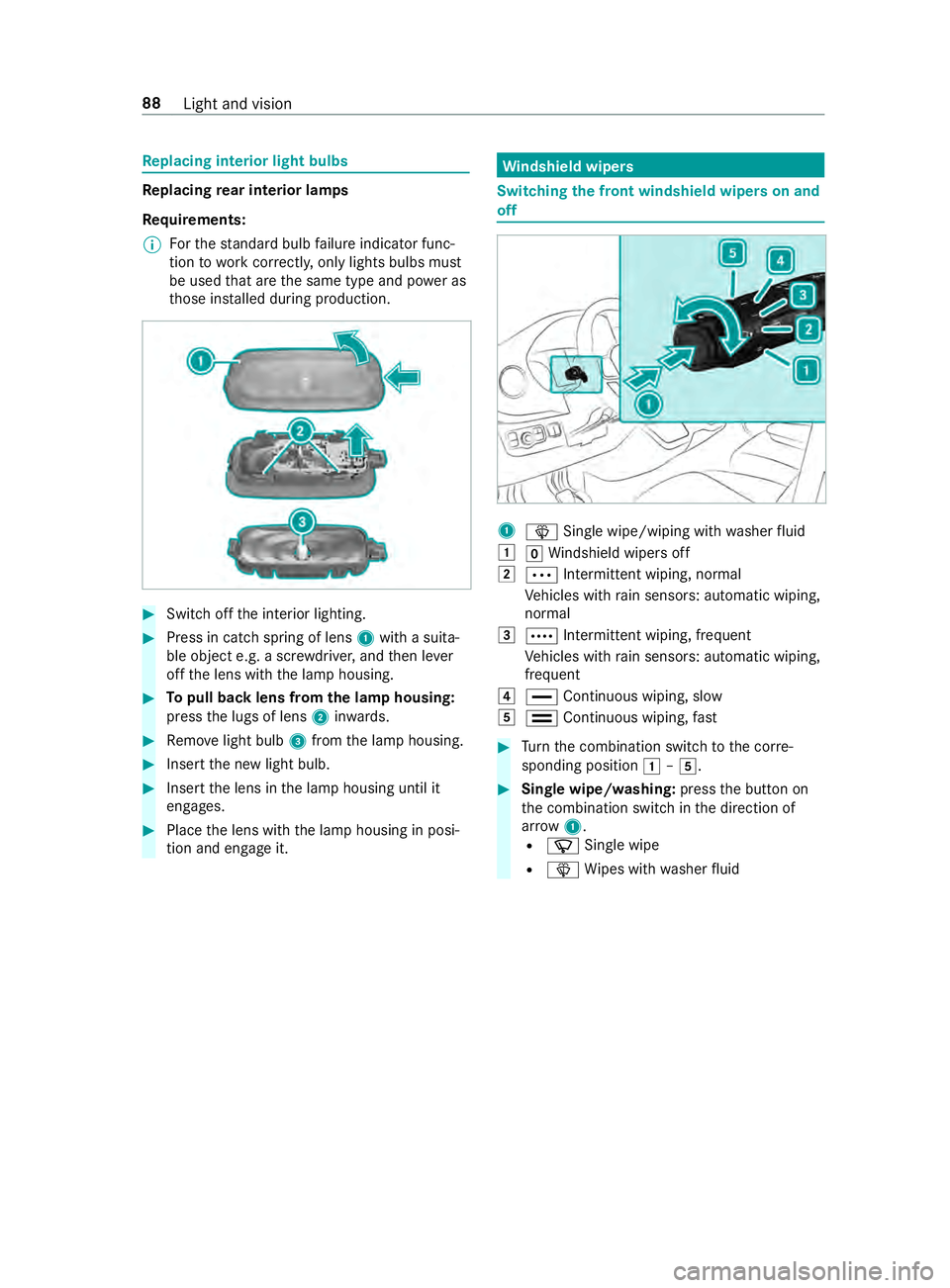
placing interior light bulbs Re
placing rear interior lamps
Re quirements:
% Fo
rth est andard bulb failure indicator func‐
tion towo rkcor rectly, only lights bulbs must
be used that are the same type and po wer as
th ose ins talled during production. #
Swit choff the interior lighting. #
Press in catch spring of lens 1with a suita‐
ble object e.g. a scr ewdriver, and then le ver
off the lens with the lamp housing. #
Topull back lens from the lamp housing:
press the lugs of lens 2inwa rds. #
Remo velight bulb 3from the lamp housing. #
Insert the new light bulb. #
Insert the lens in the lamp housing until it
engages. #
Place the lens with the lamp housing in posi‐
tion and engage it. Wi
ndshield wipers Switching
the front windshield wipers on and
off 1
00D4 Single wipe/wiping with washer fluid
0047 005AWindshield wipe rsoff
0048 0062 Intermittent wiping, normal
Ve hicles with rain sensors: automatic wiping,
normal
0049 0063 Intermit tent wiping, frequent
Ve hicles with rain sensors: automatic wiping,
frequent
004A 00AA Continuous wiping, slow
004B 00A9 Continuous wiping, fast #
Turn the combination switch tothe cor re‐
sponding position 0047–004B. #
Single wipe/washing: pressthe button on
th e combination switch in the direction of
ar row 1.
R 00D3 Single wipe
R 00D4 Wipes with washer fluid 88
Light and vision
Page 122 of 354
#
Vehicles with windshield heating: press
th e button.
#
Close the center air vent (/ page 98) and
air vents forth e headroom (/ page 99) and
re ar compartment (/ page 99).
Misting on the outside of windo ws #
Switch on the windshield wiper (/ page 88).Switching air-recirculation mode on and off
#
Press the0089 button.
The interior air is recirculated.
The ai r-re circulation mode switches off au tomati‐
cally.
% When air-recirculation mode is switched off,
th
e windo wsmay fog up more quickl y.Switch
on ai r-re circulation mode only briefly.
Air-recirculation mode au tomatical lyswitches on
in thefo llowing cases:
R at high outside temp eratures
R while theve hicle is driving in a tunnel (only
ve hicles with 3-zone automatic climate con‐
trol)
R when the windshield wipers are switched on
(/ page 88)
The indicator lamp on the0089 button will not
light up in this case. Af ter a maximum of
30 minutes, outside air is automatically intro‐
duced again. Switching
the windshield heating on and off %
In
theeve nt of high outside temp eratures,
th e windshield heating may not turn on. #
Press the button forth e windshield heating.
If th e indicator lamp lights up, the windshield
heating is switched on.
% The windshield heating switches off automat‐
ically af ter a few minutes.
% If
th e battery voltage is too lo w,it may not be
possible toswitch the windshield heating on.
If th e battery voltage becomes too low while
th e windshield heating is in operation, the
windshield heating will swit choff automati‐
cally. Switching
there ar window defros ter on or off #
Press the006C button.
If th e indicator lamp lights up, there ar win‐
dow defros ter is switched on. Operating air
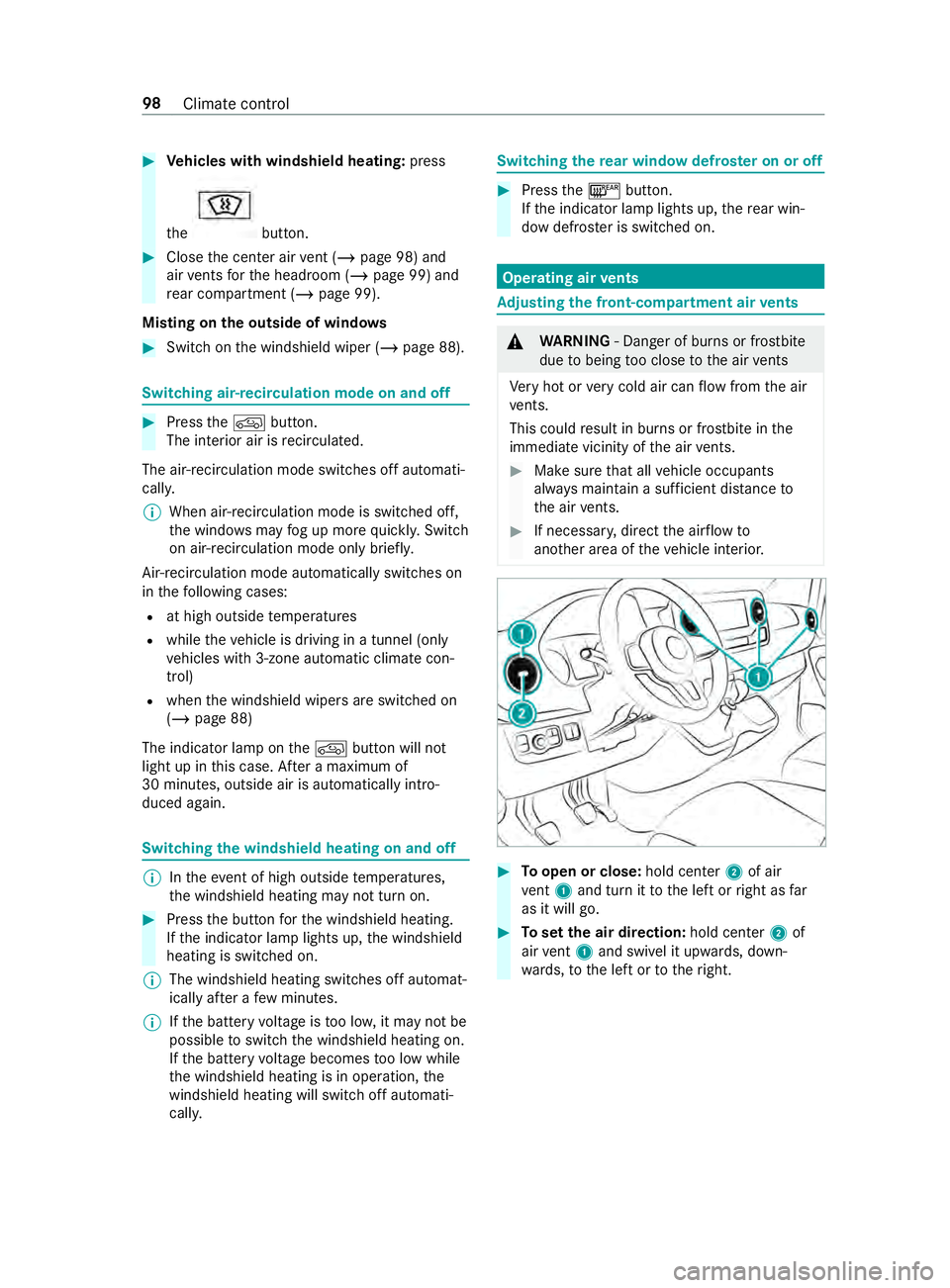
vents Ad
justing the front-compartment air vents &
WARNING ‑ Danger of bu rns or frostbite
due tobeing too close tothe air vents
Ve ry hot or very cold air can flow from the air
ve nts.
This could result in burns or frostbite in the
immediate vicinity of the air vents. #
Makesure that all vehicle occupants
alw ays maintain a suf ficient dis tance to
th e air vents. #
If necessa ry, direct the air flow to
ano ther area of theve hicle interior. #
Toopen or close: hold center2 of air
ve nt 1 and turn it tothe left or right as far
as it will go. #
Toset the air direction: hold center2 of
air vent 1 and swivel it up wards, down‐
wa rds, to the left or totheright. 98
Climate control
Page 331 of 354

Sound settings .................................
188
Tr ans ferred vehicle data ...................1 88
Animals Pets in theve hicle .............................. 40
Anti-lock braking sy stem
see ABS (Anti-lock Braking Sy stem)
Anti-skid chains
see Snow chains
Anti-theft Alarm sy stem
see ATA (Anti -Theft Alarm sy stem)
Anti-theft pr otection
Immobilizer ........................................ 55
Anti- theft pr otection
see ATA (Anti -Theft Alarm sy stem)
Apple CarPlay™ .................................... 186
Connecting an iPhone ®
............ 186, 187
Ending .............................................. 187
No tes ................................................ 186
Overview .......................................... 186
Sound settings .................................. 187
Tr ans ferred vehicle data ...................1 88
Ashtr ays
In the windshield stowage com‐
partment ............................................ .74
ASR (accele ration skid control) ...........137
Assistance graphic (on-board com‐
puter) ..................................................... 16 6
ASS YST PLUS ........................................ 202
Battery disconnection pe riods ......... 202
Displaying the service due date .......2 02
Fu nction/no tes ................................ 202
Re gular maintenance work ............... 202
Special service requirements .......... .202
ATA (Anti-Theft Alarm sy stem) .............. 56
Ac tivating/deactivating the interior
motion sensor .................................... 57
Fu nction ............................................. 56
Interior motion sensor function .......... 57
St opping the alarm ............................. 56
Switching theto w- aw ay alarm
on/off ................................................ 57
To w- aw ay alarm function .................... 56
At tachments .......................................... .19
AT TENTION ASSI ST....................... 151, 15 2
Fu nction ............................................ 151
Setting .............................................. 15 2
Sy stem limitations ............................1 51
Au thorized workshop
see Qualified specialist workshop Au
tomatic distance control
see Active Dis tance Assi stDISTRONIC
Au tomatic driving lights ........................79
Au tomatic transmission
DIRECT SELECT le ver ........................ 11 5
Engaging drive position ..................... 11 7
Engaging neutral ............................... 11 6
Engaging reve rsege ar ...................... .116
Kickdown .......................................... 11 8
Re stricting the shift range ................. 11 7
Selecting pa rkposition .....................1 16
Tr ansmission position display .......... .115
Tr ansmission positions ...................... 11 5
Au xiliary heating .................................... 99
Fu nction ............................................. 99
Axle load ................................................ 261 B
Back suppo rt
see Lumbar support (4-w ay)
BA S (Brake Assist Sy stem) .................. 137
Battery Charging ........................................... 219
Charging a vehicle battery ................2 19
Disconnecting the auxiliary battery
in the engine compartment .............. 224
Disconnecting thest ar ter battery .... 222
Jump -sta rting (vehicle) ...................... 219
Ke y .................................................... .42
No tes (vehicle) ..................................2 18
Re moving or ins talling thest ar ter
battery .............................................2 23
St arter battery .................................. 221
Battery main switch Notes ................................................ 11 4
Switching the po wer supp lyon/off ... 11 4
Belt see Seat belt
Blind Spot Assi st.................................. 15 2
Ac tivating/deactivating .................... 154
Fu nction ........................................... 15 2
Re ar Cross Traf fic Alert .................... 154
Sy stem limitations ............................1 52
Blue tooth ®
............................................ 180
Ac tivating/deactivating .................... 180
Information .......................................1 80
Bottle holder .......................................... .74
Brake ABS (Anti-lo ckBraking Sy stem) ........ 137
Ac tive Brake Assi st........................... 13 9
BA S (Brake Assi stSystem) ............... 137 Index
307