2019 MERCEDES-BENZ SPRINTER key slot
[x] Cancel search: key slotPage 30 of 354

1
Steering wheel paddle shif ters →
11 7
2 DIRECT SELECT le ver→
11 5
3 Inside rearview mir ror →
91
4 Overhead control panel →
82
5 DIN slot, e.g. for mounting the
timer forth est ationary heater
6 MBUX multimedia sy stem dis‐
play →
173
7 MBUX multimedia sy stem con‐
trol elements →
175
8 Climate control sy stem →
93
9 Stow age compartment co ver→
229
A Cup holder →
74
B 12V soc ket →
75
C 115 V soc ket
D Opens and closes the electric
sliding door →
47
E Switches the hazard warning
lights on and off →
80
F Vehicles with KEYLESS STAR T:
ke y slot →
104
G USB port
H Start/ stop button →
104
I Right-hand swit chpanel Ac
tivates/deacti vates all-wheel
drive →
11 9
Engages/disengages LOW
RANGE →
11 9
Ac tivates/deacti vates DSR →
12 0
Ra ises/lo werstheve hicle le vel→
12 3
Ac tivates/deacti vateswo rking
speed control (ADR) →
157
Ac tivates/deacti vates cargo
compartment ventilation →
102
J Steering wheel buttons →
16 4
K Opens the hood →
202
L Left-hand switch panel
Sets thewo rking speed (ADR) →
157
M Light switch
Headlamp range adjus ter
N Steering wheel buttons →
16 4
O Combination swit ch
Tu rn signals →
80
High beam →
80
Wi ndshield wiper →
88
Re ar wind owwiper →
89 6
Ataglance – Cockpit
Page 66 of 354
Do not
keep the SmartK eytoge ther with elec‐
tronic devices or me tallic objects. This can af fect
th e SmartK ey's functionality.
% If
th e battery check lamp does not light up
when you press the0036 or0037 button, the
battery is dischar ged.
Re place the SmartK eybattery (/ page 42). Ac
tivating/deactivating the acoustic lo cking
ve rification signal Multimedia sy
stem:
4 © 5
Settings 5
Vehicle #
Switch Acoustic Lock on or off. Changing
the unlocking settings The
key has thefo llowing adjus table unlocking
functions:
R unlock cent rally
R unlock driver's and front-passenger door
(Cargo Van)
R unlock driver's door (Passenger Van,chassis
ve rsion) #
Toswitch between the settings: press and
hold the0036 and0037 buttons at the same
time for appro ximately six seconds until the
battery check lamp flashes twice.
When the locking function is selected forth e driv‐
er's door or the driver's and front-passenger
door:
R pressing the0036 button a second time
unloc kstheve hicle centra lly Re
ducing the energy consum ption of the
SmartK ey If
yo u do not use theve hicle or a SmartK ey for an
ex tended pe riod, you may deactivate the KEY‐
LESS START function of the SmartK ey. #
Todeactivate: pressthe0037 button on the
SmartK eytwice in quick succession.
The battery check lamp on the SmartK ey
lights up twice quickly and once for longer. #
Toactivate: press any button on the Smart‐
Ke y.
When starting theve hicle with the SmartK eyin
th e slot in the shift console, the SmartK eyfunc‐
tions are activated auto matically. Re
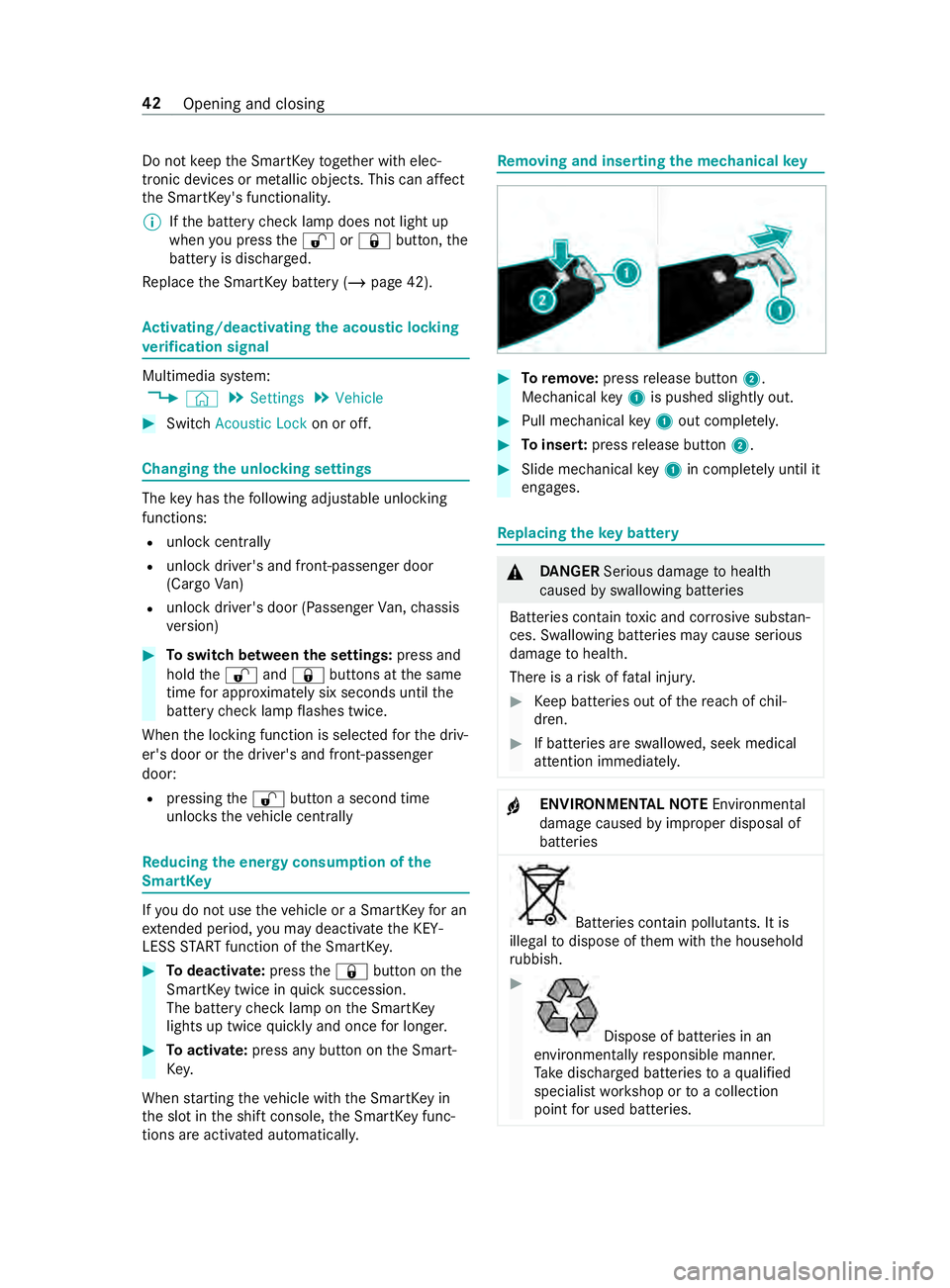
moving and inse rting the mechanical key #
Toremo ve:press release button 2.
Mechanical key1 is pushed slight ly out. #
Pull me chanical key1 out co mplete ly. #
Toinser t:press release button 2. #
Slide mechanical key1 in co mplete ly until it
engages. Re
placing the key battery &
DANG ER Serious damage tohealth
caused byswallowing batteries
Batteries contain toxic and cor rosive subs tan‐
ces. Swallowing batteries may cause serious
damage tohealth.
There is a risk of fata l injur y. #
Keep batteries out of there ach of chil‐
dren. #
If batteries are swallo wed, seek medical
attention immediately. +
ENVIRONMEN
TALNO TEEnvironmental
damage caused byimproper disposal of
batteries Bat
teries contain pollutants. It is
illegal todispose of them with the household
ru bbish. #
Dispose of batteries in an
environmen tally responsible manner.
Ta ke dischar ged batteries toaqu alified
specialist workshop or toa collection
point for used batteries. 42
Opening and closing
Page 129 of 354

#
Remo vekey1 from your keyring. #
Inse rtkey1 into the slot.
The vehicle is star ted af ter a brief time. #
Leavetheke y inser ted during the entire jour‐
ne y. #
Ifyo u pull key1 out of the slot, the engine
continues torun. #
Have key1 checked at a qualified specialist
wo rkshop.
If th eve hicle does not star t: #
Leavekey1 inthe slot. #
Press the brake pedal. #
Start theve hicle with thest art/ stop button.
% Yo
u can also swit chon the po wer supp lyor
th e ignition with thest art/ stop button. Breaking-in no
tes Pr
otect the engine during thefirs t1, 000 miles
(1,500 km) by:
R driving at varying road and engine speeds.
R shifting tothe next gear up when or before
th etac home ter needle is 00C3ofthewa yto the
re d area.
R avoiding stre ss on theve hicle such as driving
at full thro ttle.
R not shi fting manually toa lo werge ar to brake.
R afte r1, 000 miles (1,500 km), gradually
increasing the engine speed and accelerate
th eve hicle up tofull speed.
R vehicles with automatic transmission: not
depressing the accelera tor pedal be yond the
pressure point (kickdown). This also applies if
the engine or parts of the driv‐
et ra in ha vebeen replaced.
Also obser vethefo llowing breaking-in no tes:
R The sensors of the ESP ®
driving saf ety sy stem
adjust automatically while a cer tain di stance
is being driven af terth eve hicle has been
delivered or af terre pairs. Full sy stem ef fec‐
tiveness is not reached until the end of this
te ach-in process.
R New or exch anged brakepads, brake discs
and tires only pr ovide optimal braking and
bonding af ter se veral hundred kilom eters.
Un tilthen, compensate forth ere duced brak‐
ing ef fect by applying greater pressure tothe
brake pedal. Driving tips
Note
s on driving &
WARNING Risk of accident due to
objects in the driver's foot we ll
Objects in the driver's foot we ll may impede
pedal tr avel or block a depressed pedal.
This jeopardizes the operating and road
saf ety of theve hicle. #
Stow all objects in theve hicle securely
so that they cannot getinto the driver's
fo ot we ll. #
Ensure floor mats and carpets cannot
slip and pr ovide suf ficient room forthe
pedals. #
Do not lay multiple floor mats or carpets
on top of one ano ther. &
WARNING Risk of accident due to
unsuitable foot we ar
Operation of the pedals may be restricted due
to unsuitable foot we ar such as:
R Shoes with plat form soles
R Shoes with high heels
R Slippers #
When driving alw ayswe ar suitable
shoes in order tobe able tooperate the
pedals safel y. Driving and pa
rking 105
Page 315 of 354

Display messages
Possible causes/consequences and 0050 0050Solutions #
Check the tires.
0077 Check Tires *T
he pressure in one or more tires has fallen significantl y.The wheel
position is shown. &
WARNING Risk of an accident due toinsuf ficient tire pres‐
sure
Ti re pressures that are too low pose thefo llowing hazards:
R The tires may bur st, especially as the load and vehicle speed
increase.
R The tires may wearexc essively and/or une venly, which may
greatly impair tire traction.
R The driving characteristics, as well as steering and braking,
may be greatly impaired.
Yo u could then lose cont rol of theve hicle. #
Obser vethere commended tire pressu re. #
Adjust the tire pressure if necessar y. #
Stop in accordance with the tra ffic conditions. #
Check the tire pressure (/ page 234) andthe tires.
0077 Please Correct Tire Pres-
sure *T
he pressure in at least one tire is too low or the pressures of the
individual tires deviate too much from each other. #
Check the tire pressure, and add air if necessar y. #
When the tire pressure has been set cor rectl y,re-sta rt the tire
pressure monitor (/ page240).
Tire Pressure Monitor
Inoperative *T
he tire pressure monitor is malfunctioning. #
Visit a qualified specialist workshop. Key
Display messages
Possible causes/consequences and 0050 0050Solutions
00AF
Don't Forget Your Key *T
his message reminds you not tolea veyour key in theve hicle. #
Take theke y with you when youget out of theve hicle.
00AF Place the Key in the
Marked Space See Oper-
ator's Manual *K
eydetection is malfunctioning. #
Change theke y's position in theve hicle. #
Start theve hicle with theke y in the slot(/ page104).
00AF *T
hekey is not de tected and may no longer be in theve hicle.
The key is no lon ger in theve hicle and you swit chthe engine off:
R You can no lon gerst art the engine. Display messages and
warning and indicator lamps 291
Page 316 of 354

Display messages
Possible causes/consequences and 0050 0050Solutions
Key Not Detected (red
display message) R
You cannot lock theve hicle centra lly. #
Ensure that theke y is in theve hicle.
If th eke y de tection function has a malfunction due toastro ngradio
signal source, proceed as follo ws: #
Stop theve hicle immediately, paying attention toroad and traf‐
fi c conditions. #
Place theke y in the slot forst arting with theke y (/ page104).
00AF Key No t Detected (white
display message) *T
hekey is cur rently not de tected. #
Change theke y's position in theve hicle. #
Ifth eke y is still not de tected, start the engine with theke y in
th e slot(/ page104).
00AF
Replace Key Ba ttery*T
hekey's bat tery isflat. #
Change the battery (/ page 42).
00AF
Obtain a New Key *T
hekey must be replaced. #
Visit a qualified specialist workshop. Ve
hicle Display messages
Possible causes/consequences and 0050 0050Solutions
00B2
Check Washer Fluid *W
asher fluid le vel in washer reser voir has fallen below the minimum. #
Top up washer fluid (/ page 208). *A
t least one door is open. #
Close all the doors. *T
he hood is open. &
WARNING Risk of accident if the engine hood is unlatched
while driving
An unloc ked engine hood may open up when theve hicle is in
motion and block your vie w. #
Never unlatch the engine hood while driving. #
Before every trip, ensure that the engine hood is latched. #
Stop in a safe location immediately. #
Close the hood. 292
Display messages and warning and indicator lamps