2019 MERCEDES-BENZ SPRINTER audio
[x] Cancel search: audioPage 42 of 354

Environmental pr
otection
+ ENVIRONMENTAL
NOTEEnvironmental
damage due tooperating conditions and
personal driving style The pollutant emission of
your vehicle is
directly related totheve hicle's operation.
Yo u can make a contribution toenvironmen tal
pr otection byoperating your vehicle in an
environmentally responsible manner. Todo
th is, obser vethefo llowing recommendations
on ope rating conditions and your personal
driving style.
Operating conditions: #
Make sure that the tire pressures are
alw ays cor rect. #
Do not transport any unnecessa ry
we ight (e.g. a roof rack which is no lon‐
ge rre qu ired). #
Obser vethe service inter vals.
A regularly serviced vehicle will contri b‐
ute toenvironmen tal pr otection. #
Always ha vemaintenance workcar ried
out at a qualified specialist workshop.
Pe rsonal driving style: #
Do not depress the accelera tor pedal
when starting the engine. #
Do not warm upthe engine while sta‐
tionar y. #
Drive carefully and maintain a su fficient
dis tance to ot hervehicles. #
Avoid frequent, sudden acceleration and
braking. #
Shift gears in good time and use each
ge ar only up to00C3 of its maximum
engine speed. #
Switch off the engine when in stationary
traf fic fo r a prolonged time. #
Drive in a fuel-ef ficient manne r.Pay
attention tothe ECO display for a fuel-
ef ficient driving style. Environmental issues and
recommendations
It is recommended torege nerate and recycle sub‐
st ances ins tead of immediately disposing of
th em.
The releva nt environmental guidelines and regula‐
tions ser vetoprotect the environment and
should be follo we d carefully. Mercedes-Benz Genuine
Parts
+ ENVIRONMENTAL
NOTEEnvironmental
damage caused bynot using recycled
re conditioned components Daimler
AGoffers recycled reconditioned
components and pa rts with the same quality
as new parts. The same entitlement from the
Limited Warranty is valid as for new parts. #
Use recycled reconditioned components
and pa rts from Daimler AG. *
NO
TEThe ef fectiveness of there stra int
sy stems can be impaired byinstalling
accessory parts, per form ing repairs or
we lding operations Airbags, Emer
gency Tensioning Devices as
we ll as control units and sensors forthe
re stra int sy stems can be ins talled in thefo l‐
lowing areas of theve hicle:
R Door frames
R Roof frames
R Doors
R Door pillars
R Door sills
R Seats
R Cockpit
R Instrument clus ter
R Center console #
Do not ins tall any accessories such as
audio sy stems in these areas. #
Do not per form repairs or welding oper‐
ations. #
Have accesso ryparts ins talled at a
qu alified specialist workshop. If
yo u use parts, tires, wheels or saf ety-re leva nt
accesso ries which ha venot been appr ovedby
Mercedes-Benz, the operating saf ety of theve hi‐
cle may be jeopardized. Saf ety-re leva nt sy stems,
e.g. the brake sy stem, may malfunction. Only use
Mercedes-Benz Genuine Parts or parts of equal
qu ality. Use only tires, wheels and accesso ry
parts that are appr oved foryo ur vehicle model.
Mercedes-Benz tests original parts, con version
parts and accessory parts that ha vebeen
appr ovedfo ryo ur vehicle model forre liability,
saf ety and suitabilit y.Despite ongoing ma rket
re sear ch,we are unable toassess other parts. 18
General no tes
Page 49 of 354

card contains, in compact
form ,th e most impor‐
ta nt information about your vehicle e.g. thero ut‐
ing of electric cables.
Fu rther information can be found at http://
www.mercedes-benz.de/qr-code. Data
storage Electronic control units
Electronic control units are ins
talled in your vehi‐
cle. Some of these are necessary forth e safe
operation of your vehicle, while some assist you
when driving (driver assis tance sy stems). In addi‐
tion, your vehicle pr ovides com fort and enter tain‐
ment functions, which are also made possible by
electronic cont rol units.
The elect ronic control units contain da tamemo‐
ri es which can temp orarily or permanently store
te ch nical information about theve hicle's operat‐
ing state, component loads, main tenance requ ire‐
ments and tech nical events or malfunctions.
In general, this information documents thest ate
of a component part, a module, a sy stem or the
sur roundings such as:
R operating states of sy stem components (e.g.
fl uid le vels, battery status, tire pressure)
R status messages concerning theve hicle and
its individual components (e.g. number of
wheel revo lutions/speed, deceleration, lateral
acceleration, display of thefast ened seat
belts)
R malfunctions or defects in impor tant sy stem
components (e.g. lights, brakes)
R information on events leading tovehicle dam‐
age
R system reactions in special driving situations
(e.g. airbag deployment, inter vention of sta‐
bility control sy stems)
R ambient conditions (e.g. temp erature, rain
sensor)
In addition toprov iding the actual cont rol unit
function, this data assists the manufacturer in
de tecting and rectifying malfunctions and opti‐
mizing vehicle functions. The majority of this data
is temp orary and is only processed in theve hicle
itself. Only a small portion of the data is stored in
th eeve nt or malfunction memo ry.
When your vehicle is serviced, tech nical da ta
from theve hicle can be read out byservice net‐
wo rkemplo yees (e.g. workshops, manufacturers)
or third parties (e.g. breakdown services). Serv‐ ices include
repair services, maintenance pro‐
cesses, warranty claims and quality assurance
measures, forex ample. The read out is per‐
fo rm ed via the legally prescribed port forthe
diagnostics connection in theve hicle. The
re spective service network locations or third par‐
ties collect, process and use this data. They
document tech nical statuses of theve hicle,
assist in finding malfunctions and impr oving qual‐
ity and are transmitted tothe manufacturer, if
necessar y.Fu rthermore, the manufacturer is sub‐
ject toproduct liability. Forth is, the manufacturer
re qu ires tech nical da tafrom vehicles.
Malfunction memories in theve hicle can be reset
by a service outlet as part of repair or mainte‐
nance work.
Depending on the selected equipment, you can
import data into vehicle con venience and info‐
ta inment functions yourself.
This includes, forex ample:
R multimedia data such as music, films or pho‐
to sfo r playback in an integrated multimedia
sy stem
R address book data for use in connection with
an integrated hands-free sy stem or an inte‐
grated navigation sy stem
R entered navigation destinations
R data about the use of Internet services
This data can be sa ved locally in theve hicle or it
is located on a device which you ha veconnected
to theve hicle (e.g. smartphone, USB flash drive
or MP3 pla yer). If this data is stored in theve hi‐
cle, you can dele teit at any time. This data is
sent tothird parties only at your requ est, particu‐
lar lywhen you use online services in accordance
with the settings that you ha veselected.
Yo u can store or change con venience settings/
individualization in theve hicle at any time.
Depending on the equipment, this includes, for
ex ample:
R seat and steering wheel position settings
R suspension and climate cont rol settings
R Individualization such as interior lighting
If yo ur vehicle is accordingly equipped, you can
connect your smartphone or ano ther mobile end
device totheve hicle. You can control this by
means of the cont rol elements integrated in the
ve hicle. Images and audio from the smartphone
can be output via the multimedia sy stem. Cer tain General no
tes25
Page 170 of 354
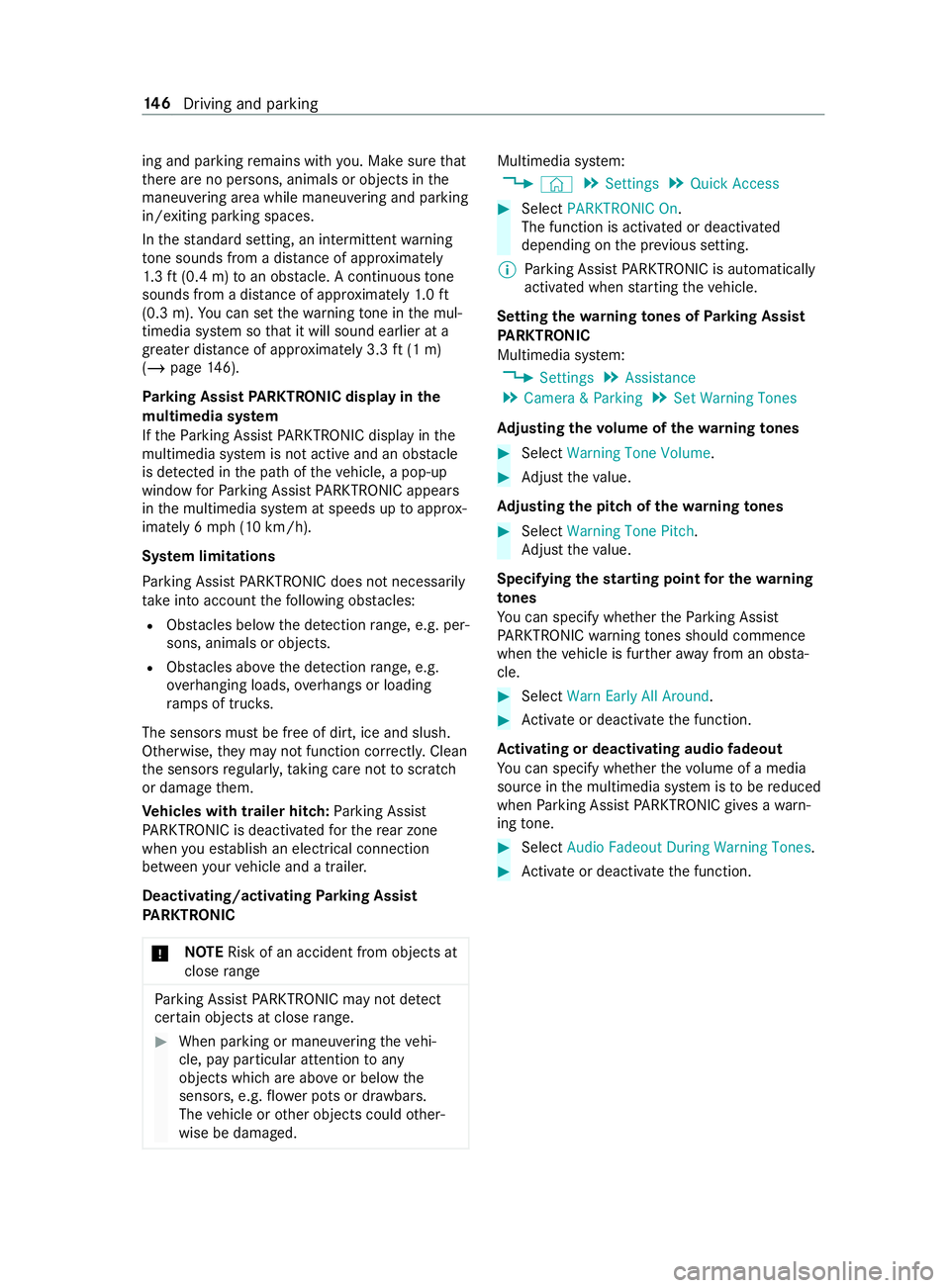
ing and parking
remains with you. Make sure that
th ere are no persons, animals or objects in the
maneuvering area while maneuvering and parking
in/exiting parking spaces.
In thest andard setting, an intermit tent wa rning
to ne sounds from a di stance of appr oximately
1. 3 ft (0.4 m) toan obs tacle. A continuous tone
sounds from a di stance of appr oximately 1.0 ft
(0.3 m). You can set thewa rning tone in the mul‐
timedia sy stem so that it will sound earlier at a
grea ter dis tance of appr oximately 3.3 ft(1 m)
(/ page 146).
Pa rking Assist PARKTRONIC displ ayinthe
mu ltimedia sy stem
If th ePa rking Assist PARKTRONIC display in the
multimedia sy stem is not active and an obs tacle
is de tected in the path of theve hicle, a pop-up
window forPa rking Assist PARKTRONIC appears
in the multimedia sy stem at speeds up toappr ox‐
imately 6 mph (10 km/h).
Sy stem limitations
Pa rking Assist PARKTRONIC does not necessarily
take into account thefo llowing obs tacles:
R Obs tacles bel owthe de tection range, e.g. per‐
sons, animals or objects.
R Obs tacles ab oveth e de tection range, e.g.
ov erhanging loads, overhangs or loading
ra mp s of truc ks.
The sensors must be free of dirt, ice and slush.
Otherwise, they may not function cor rectl y.Clean
th e sensors regular ly,ta king care not toscratch
or damage them.
Ve hicles with trailer hitch: Parking Assist
PA RKTRONIC is deactivated forth ere ar zone
when you es tablish an electrical connection
between your vehicle and a trailer.
Deactivating/activating Parking Assist
PA RKTRONIC
* NO
TERisk of an accident from objects at
close range Pa
rking Assist PARKTRONIC may not de tect
cer tain objects at close range. #
When pa rking or maneuvering theve hi‐
cle, pay particular attention toany
objects which are abo veor below the
sensors, e.g. flowe r pots or dr awbars.
The vehicle or other objects could other‐
wise be damaged. Multimedia sy
stem:
4 © 5
Settings 5
Quick Access #
Select PARKTRONIC On .
The function is activated or deactivated
depending on the pr evious setting.
% Pa
rking Assist PARKTRONIC is automatical ly
activated when starting theve hicle.
Setting thewa rning tones of Parking Assist
PA RKTRONIC
Multimedia sy stem:
4 Settings 5
Assistance
5 Camera & Parking 5
Set Warning Tones
Ad justing the volume of thewa rning tones #
Select Warning Tone Volume. #
Adjust theva lue.
Ad justing the pitch of the warning tones #
Select Warning Tone Pitch.
Ad just theva lue.
Specifying thest arting point for the warning
to nes
Yo u can specify whe ther thePa rking Assist
PA RKTRONIC warning tones should commence
when theve hicle is fur ther aw ay from an obs ta‐
cle. #
Select Warn Early All Around. #
Activate or deacti vate the function.
Ac tivating or deactivating audio fadeout
Yo u can specify whe ther thevo lume of a media
source in the multimedia sy stem is tobe reduced
when Parking Assist PARKTRONIC gives a warn‐
ing tone. #
Select Audio Fadeout During Warning Tones. #
Activate or deacti vate the function. 14 6
Driving and pa rking
Page 199 of 354
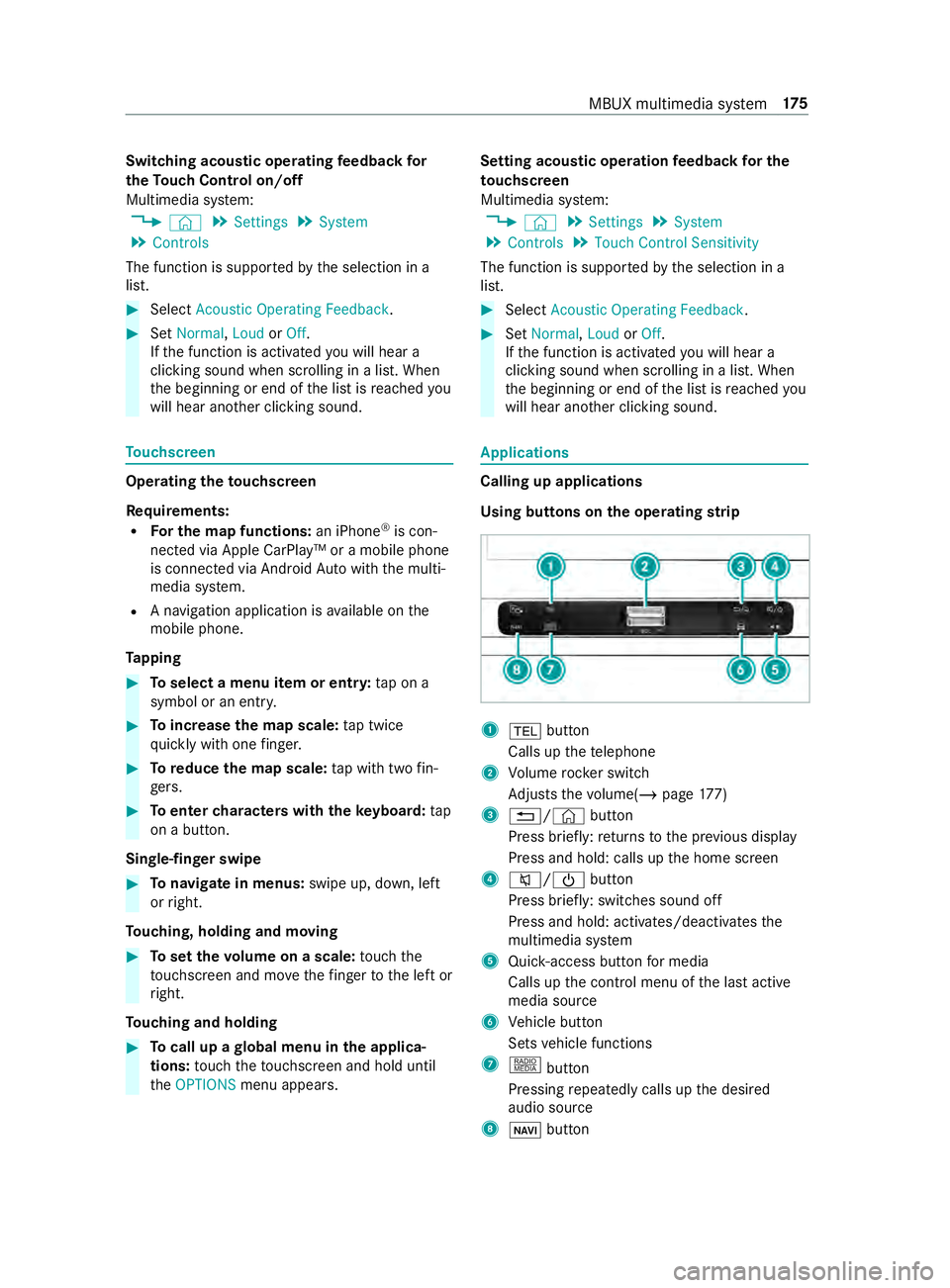
Switching acoustic operating
feedba ckfor
th eTo uch Control on/off
Multimedia sy stem:
4 © 5
Settings 5
System
5 Controls
The function is suppor tedby the selection in a
list. #
Select Acoustic Operating Feedback .#
Set Normal, LoudorOff.
If th e function is activated you will hear a
clicking sound when sc rolling in a list. When
th e beginning or end of the list is reached you
will hear ano ther clicking sound. To
uchscreen Operating
theto uchscreen
Re quirements:
R For the map functions: an iPhone®
is con‐
nected via Apple CarPl ay™ or a mobile phone
is connected via Android Autowith the multi‐
media sy stem.
R A navigation application is available on the
mobile phone.
Ta pping #
Toselect a menu item or entr y:tap on a
symbol or an ent ry. #
Toincrease the map scale: tap twice
qu ickly with one finger. #
Toreduce the map scale: tap with two fin‐
ge rs. #
Toenter characters with theke yboard: tap
on a button.
Single-finger swipe #
Tonavigate in menus: swipe up, down, left
or right.
To uching, holding and moving #
Toset thevo lume on a scale: touch the
to uchsc reen and mo vethefinger tothe left or
ri ght.
To uching and holding #
Tocall up a global menu in the applica‐
tions: touch theto uchsc reen and hold until
th eOPTIONS menu appears. Setting acoustic operation
feedba ckfor the
to uchscreen
Multimedia sy stem:
4 © 5
Settings 5
System
5 Controls 5
Touch Control Sensitivity
The function is suppor tedby the selection in a
list. #
Select Acoustic Operating Feedback . #
Set Normal, LoudorOff.
If th e function is activated you will hear a
clicking sound when sc rolling in a list. When
th e beginning or end of the list is reached you
will hear ano ther clicking sound. Applications
Calling up applications
Using buttons on
the operating strip 1
002B button
Calls up thete lephone
2 Volume rocker switch
Ad justs thevo lume(/ page177)
3 0038/ ©button
Press brief ly:re turns tothe pr evious display
Press and hold: calls up the home screen
4 0063/00D0 button
Press brief ly: switches sound off
Press and hold: acti vates/deactivates the
multimedia sy stem
5 Quic k-access button for media
Calls up the cont rol menu of the last active
media source
6 Vehicle button
Sets vehicle functions
7 | button
Pressing repeatedly calls up the desired
audio source
8 00CB button MBUX multimedia sy
stem 175
Page 200 of 354

Calls up navigation
Re
quiremen t:the mobile phone is connected
to the multimedia sy stem via the USB port
00C2 using a suitable cable. Via Apple Car‐
Play™ or Android Autothe navigation applica‐
tion of the mobile phone can be used. #
Toaccess stations and music trac ks
qu ickl y:press button 5.
The control menu appears forth e audio
source that wa s last selected. #
Swipe tothe left or right.
Ra dio: the pr evious or next station is set.
Media source: the pr evious or the next music
tra ck is selec ted. #
Tohide the control menu: press button5.
Using the home screen
The home screen is shown in the media display
when youstart theve hicle. #
Select the application byswiping and tapping.
or #
In any displa y:press the© button on the
To uch Control.
or #
Tap on the© symbol on theto uchsc reen.
The applications are displa yed. #
Select the application byswiping and tapping.
Changing the ar rangement of applications on
th e home screen #
Call up the home screen #
Touch and hold an application on the
to uchsc reen until symbols appear. #
Tap on 0059 or0065 and mo vethe applica‐
tion in the menu. #
Tap on 00FB. Switching
the sound on/off On
the multifunction steering wheel #
Tomute: pressvolume control 1.
The 0063 symbol appears in thest atus line of
th e multimedia sy stem displa y.
Yo u will also hear traf fic announcements and
navigation announcements even when the
sound is muted. #
Toswitch on: turnvolume control 1or
ch ange the media source.
On the multimedia sy stem #
Toswitch off: briefly press button 1.
The 0063 symbol appears in thest atus line of
th e multimedia sy stem displa y.
Yo u will also hear traf fic announcements and
navigation announcements even when the
sound is muted. #
Toswitch on: brieflypress button 1or
ch ange the media source. 176
MBUX multimedia sy stem
Page 201 of 354
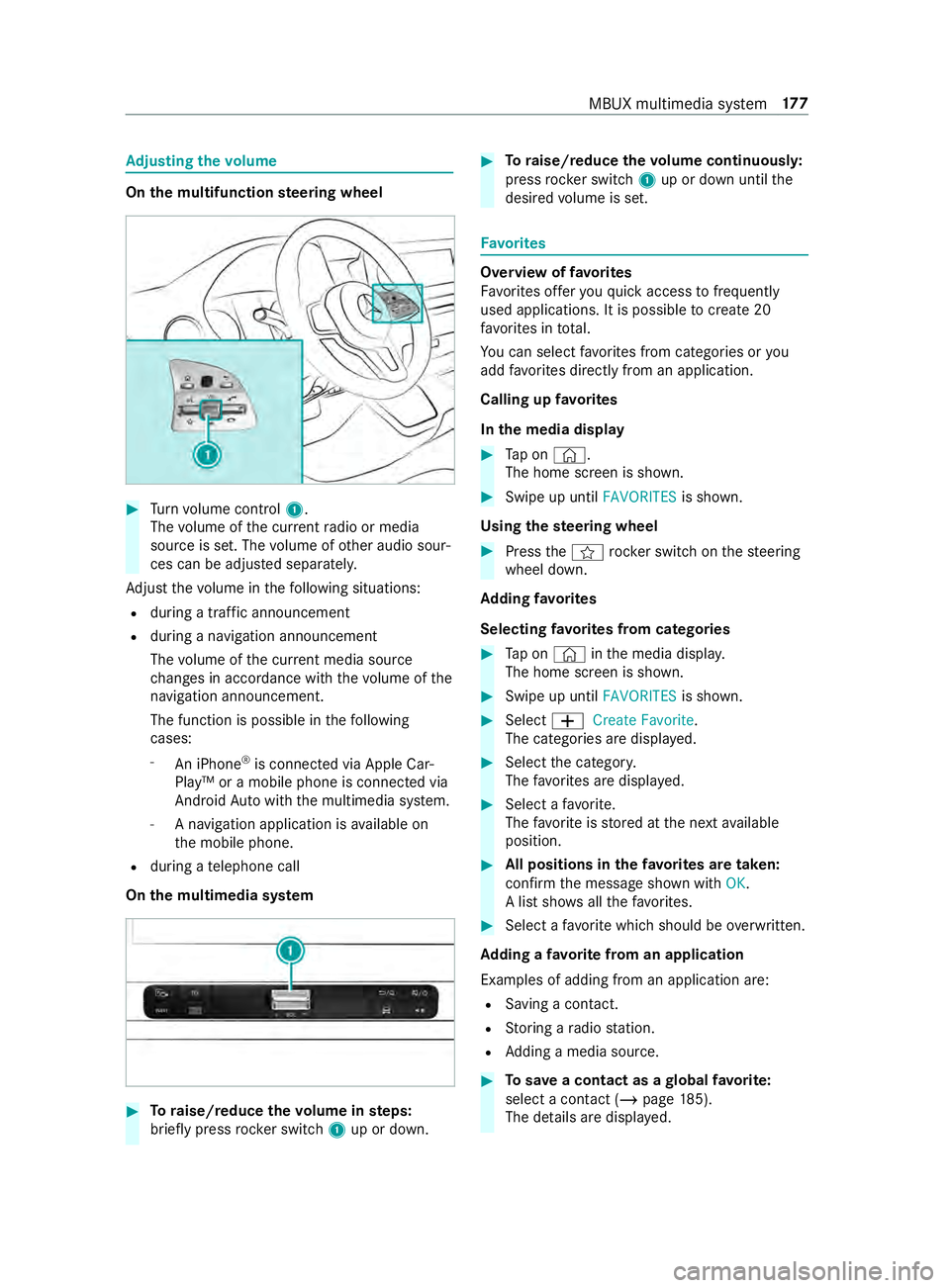
Ad
justing the volume On
the multifunction steering wheel #
Turn volume control 1.
The volume of the cur rent radio or media
source is set. The volume of other audio sour‐
ces can be adjus ted separately.
Ad just thevo lume in thefo llowing situations:
R during a traf fic announcement
R during a navigation announcement
The volume of the cur rent media sou rce
ch anges in accordance with thevo lume of the
navigation announcement.
The function is possible in thefo llowing
cases:
- An iPhone ®
is connec ted via Apple Car‐
Play™ or a mobile phone is connected via
Android Autowith the multimedia sy stem.
- A navigation application is available on
th e mobile phone.
R during a telephone call
On the multimedia sy stem #
Toraise/reduce thevo lume in steps:
brief lypress rocker switch 1up or down. #
Toraise/reduce thevo lume continuousl y:
press rocker switch 1up or down until the
desired volume is set. Favo
rites Overview of
favo rites
Favo rite s of feryo uqu ick access tofrequently
used applications. It is possible tocrea te20
fa vo rite s in tota l.
Yo u can select favo rite s from categories or you
add favo rite s directly from an application.
Calling up favo rites
In the media display #
Tap on ©.
The home screen is shown. #
Swipe up until FAVORITESis shown.
Using thest eering wheel #
Press the004B rocker switch on thesteering
wheel down.
Ad ding favo rites
Selecting favo rite s from categories #
Tap on © inthe media displa y.
The home screen is shown. #
Swipe up until FAVORITESis shown. #
Select 0081Create Favorite .
The categories are displa yed. #
Select the categor y.
The favo rite s are displa yed. #
Select a favo rite.
The favo rite isstored at the next available
position. #
All positions in thefa vo rite s are taken:
confirm the message shown with OK.
A list sho wsallthefa vo rite s. #
Select a favo rite which should be overwritten.
Ad ding a favo rite from an application
Examples of adding from an application are: R Saving a contact.
R Storing a radio station.
R Adding a media source. #
Tosave a contact as a global favo rite :
select a contact (/ page 185).
The de tails are displa yed. MBUX multimedia sy
stem 17 7
Page 204 of 354

%
The cor rect time is requ ired forth efo llowing
functions:
R Route guidance with time-dependent traf‐
fi c guidance.
R Calculation of expected time of ar riva l.
Setting the time zone
Multimedia sy stem:
4 © 5
Settings 5
System
5 Time and Date
Setting the time zone manually #
Select Time Zone: .
The list of countries is displa yed.
% If
th ere are se veral time zones available in a
countr y,these will be shown af terth e coun‐
try is selected. #
Select a count ryand, if requ ired, a time zone.
The time zone set is displa yed af terTime
Zone:.
Setting the time zone automatically #
Activate Automatic Time Zone.
Setting the time and date form at
Multimedia sy stem:
4 © 5
Settings 5
System
5 Time and Date 5
Set Format #
Set the date and time form at003B.
Setting the time and da temanually
Re quirements:
R The Manual Time Adjustment function is
switched on.
R For setting the date manuall y:no GPS is
ins talled in theve hicle.
Multimedia sy stem:
4 © 5
Settings 5
System
5 Time and Date
Setting the time (without time zone) #
Select Set Time. #
Set a time.
Setting the time (with time zone) #
Select Set Time.
If a time zone is set the time is set automatically
using the time zone. The time can be adjus tedby
a maximum of plus or minus 60 minutes. #
Adjust the time using the slide cont rol.
Setting the da te #
Select Set Date . #
Set a da te.
% In
vehicles with GPS, a date cannot be set
eve n wi thactive manual time adjustments.
The date is then set automatically thro ugh
th e selected time zone. Blue
tooth ® Information about Blu
etoo th®
Bl ue tooth ®
tech nology is a standard for short-
ra nge wi reless data transfer up toappr oximately
32.8 ft(10 m).
Yo u can use Blue tooth®
to connect your mobile
phone tothe multimedia sy stem and use thefo l‐
lowing functions, forex ample:
R Hands-free sy stem with access tothefo llow‐
ing options:
- Call lists (/ page185)
R Inte rn et connection
R Listening tomusic via Blue tooth®
audio
R Trans ferring business cards (vCards) into the
ve hicle
Blue tooth ®
is a regis tere d trademark of Blue tooth
Special Interest Group (SIG) Inc.
% Internet connection via Blu etoo th®
is not
av ailable in all countries.
Ac tivating/deactivating Blue tooth ®
Multimedia sy stem:
4 © 5
Settings 5
System
5 Wi-Fi & Bluetooth #
Toswitch on Blue tooth ®
:select Connect
via Bluetooth. #
Activate Bluetooth. #
Toswitch off Blue tooth ®
:select Settings . #
Deactivate Bluetooth. Wi
-Fi Wi
-Fi connection overview
The Wi-Fi network in your vehicle ser ves only for
th e use of Apple ®
CarPla y.Yo u can on lyconnect
wi th th e network using this application.
Fu rther information about Apple ®
CarPlay
(/ page 186). 18 0
MBUX multimedia sy stem
Page 207 of 354
Multimedia sy
stem:
4 © 5
Phone 5
00A5
Sear ching for a mobile phone #
Select Connect New Device.
Connecting a mobile phone (authorization
using Secure Si mplePa iring) #
Select a mobile phone. #
A code is displa yed in the multimedia sy stem
and on the mobile phone. #
Ifth e codes match: confirm the code on the
mobile phone.
% Fo
r older mobile phone models, enter a one
to sixteen-digit number code on the mobile
phone and on the multimedia sy stem for
authorization.
% Up
to15 mobile phones can be authorized on
th e multimedia sy stem.
Auth orized mobile phones are reconnected
au tomatical ly.
% The connected mobile phone can also be
used as Blue tooth®
audio equipment
(/ page 190).
Re placing a mobile phone
Multimedia sy stem:
4 Phone 5
00A5 #
Noauthorized mobile phone available:
select Connect New Device .#
Select a mobile phone. #
Newly authorized mobile phone: confirm
th e number code on the mobile phone.
Switching mobile phones #
Select an authorized mobile phone.
The selected mobile phone is connected to
th e multimedia sy stem.
% For iPhone ®
:yo u can swit chbetween the
Apple CarPl ay™ and Blu etoo th®
equipment
connection variants.
De-authorizing a mobile phone
Multimedia sy stem:
4 © 5
Phone 5
00A5 #
Select 0062inthe line of the mobile phone. #
Select Deauthorize . Information on
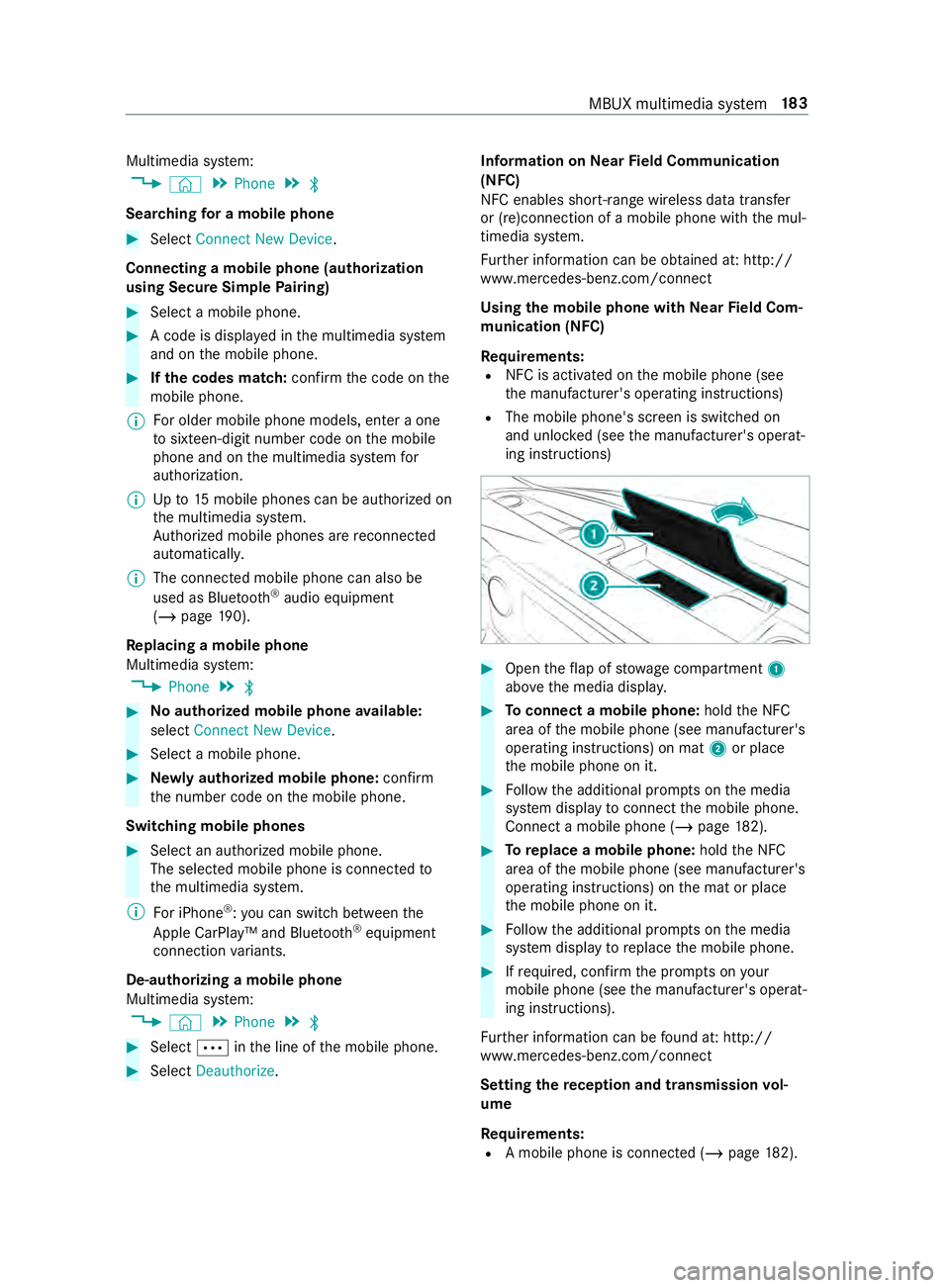
NearField Communication
(NFC)
NFC enables short- range wi reless data transfer
or (re)connection of a mobile phone with the mul‐
timedia sy stem.
Fu rther information can be obtained at: http://
www.mercedes-benz.com/connect
Using the mobile phone with NearField Com‐
munication (NFC)
Re quirements:
R NFC is activated on the mobile phone (see
th e manufacturer's operating instructions)
R The mobile phone's screen is switched on
and unloc ked (see the manufacturer's operat‐
ing instructions) #
Open theflap of stowage compartment 1
abo vethe media displa y. #
Toconnect a mobile phone: holdthe NFC
area of the mobile phone (see manufacturer's
operating instructions) on mat 2or place
th e mobile phone on it. #
Follow the additional prom pts on the media
sy stem display toconnect the mobile phone.
Connect a mobile phone (/ page182). #
Toreplace a mobile phone: holdthe NFC
area of the mobile phone (see manufacturer's
operating instructions) on the mat or place
th e mobile phone on it. #
Follow the additional prom pts on the media
sy stem display toreplace the mobile phone. #
Ifre qu ired, con firm the prom pts on your
mobile phone (see the manufacturer's operat‐
ing instructions).
Fu rther information can be found at: http://
www.mercedes-benz.com/connect
Setting there ception and transmission vol‐
ume
Re quirements:
R A mobile phone is connec ted (/ page182). MBUX multimedia sy
stem 18 3