2019 MERCEDES-BENZ SPRINTER ignition
[x] Cancel search: ignitionPage 52 of 354
Re
stra int sy stem Pr
otection bythere stra int sy stem The
restra int sy stem includes thefo llowing com‐
ponents:
R Seat belt sy stem
R Airbags
R Child restra int sy stem
R Child seat securing sy stems
The restra int sy stem can help pr eventtheve hicle
occupants from coming into contact with parts of
th eve hicle interior in theeve nt of an accident. In
th eeve nt of an accident, there stra int sy stem can
also reduce thefo rc es towhich theve hicle occu‐
pants are subjected.
A seat belt can only pr ovide the best le vel of pro‐
te ction if it is worncor rectly. Depending on the
de tected accident situation, Emer gency Tension‐
ing Devices and/or airbags supplement the pro‐
te ction of fere dby a cor rectly wornseat belt.
Emer gency Tensioning Devices and/or airbags
are not depl oyed in every accident.
Ve hicles with a front passenger bench seat: the
Emergency Tensioning Device on the front
passenger seat is triggered whe ther or not the
seat belt tongue is engaged in the seat belt
buckle.
If th eve hicle does not ha vea driver's airbag, the
seat belt sy stem does not include an Emer gency
Te nsioning Device or a seat belt forc e limiter.
In order forth ere stra int sy stem toprov ide the
intended le vel of pr otection, each vehicle occu‐
pant must obser vethefo llowing information:
R Fasten seat belts cor rectl y.
R Sit in an almost up right seat position with
th eir back against the seat backrest.
R Sit with their feet resting on thefloor, if possi‐
ble.
R Always secure persons under 5 ft(1.50 m)
ta ll in an additional restra int sy stem suitable
fo rth is vehicle.
Ho wever,no sy stem available today can com‐
ple tely eliminate injuries and fata lities in every
accident situation. In particular, the seat belt and
airbag general lydo not pr otect against objects
penetrating theve hicle from the outside. It is also
not possible tocomple tely rule out therisk of
injury caused bythe airbag deploying. Limited pr
otection from there stra int sy stem &
WARNING Risk of inju ryor death from
modifications tothere stra int sy stem
The restra int sy stem can no longer function
cor rectly af ter alterations ha vebeen made.
The restra int sy stem may then not pr otect the
ve hicle occupants as intended byfailing in an
accident or triggering unexpec tedly, forex am‐
ple #
Never alter the parts of there stra int
sy stem. #
Neverta mp er with the wiring or any
electronic component parts or their
software. If it is necessary
toadjust theve hicle toaccom‐
modate a person with disabilities, con tact an
au thorized Mercedes-Benz Center for de tails.
USA only: con tact our Cu stomer Assis tance Cen‐
te r at 1‑8 77‑762‑826 7for de tails. Re
stra int sy stem functionality When
the ignition is switched on, a self-test is
per form ed, during which the0075 restra int sys‐
te m wa rning lamp lights up. It goes out no later
th an a few seconds af terth eve hicle is star ted.
The components of there stra int sy stem are then
functional. Malfunctioning
restra int sy stem A malfunction has occur
red in there stra int sys‐
te m if:
R The 0075 restra int sy stem warning lamp does
not light up when the ignition is switched on
R The 0075 restra int sy stem warning lamp
lights up continuously or repeatedly during a
journey &
WARNING Risk of inju rydue tomalfunc‐
tions in there stra int sy stem
If th ere stra int sy stem is malfunctioning,
re stra int sy stem components may be trig‐
ge red unintentionally or may not deploy as
intended during an accident. This may af fect
th e Emer gency Tensioning Devices or airbags,
fo rex ample. 28
Occupant saf ety
Page 69 of 354
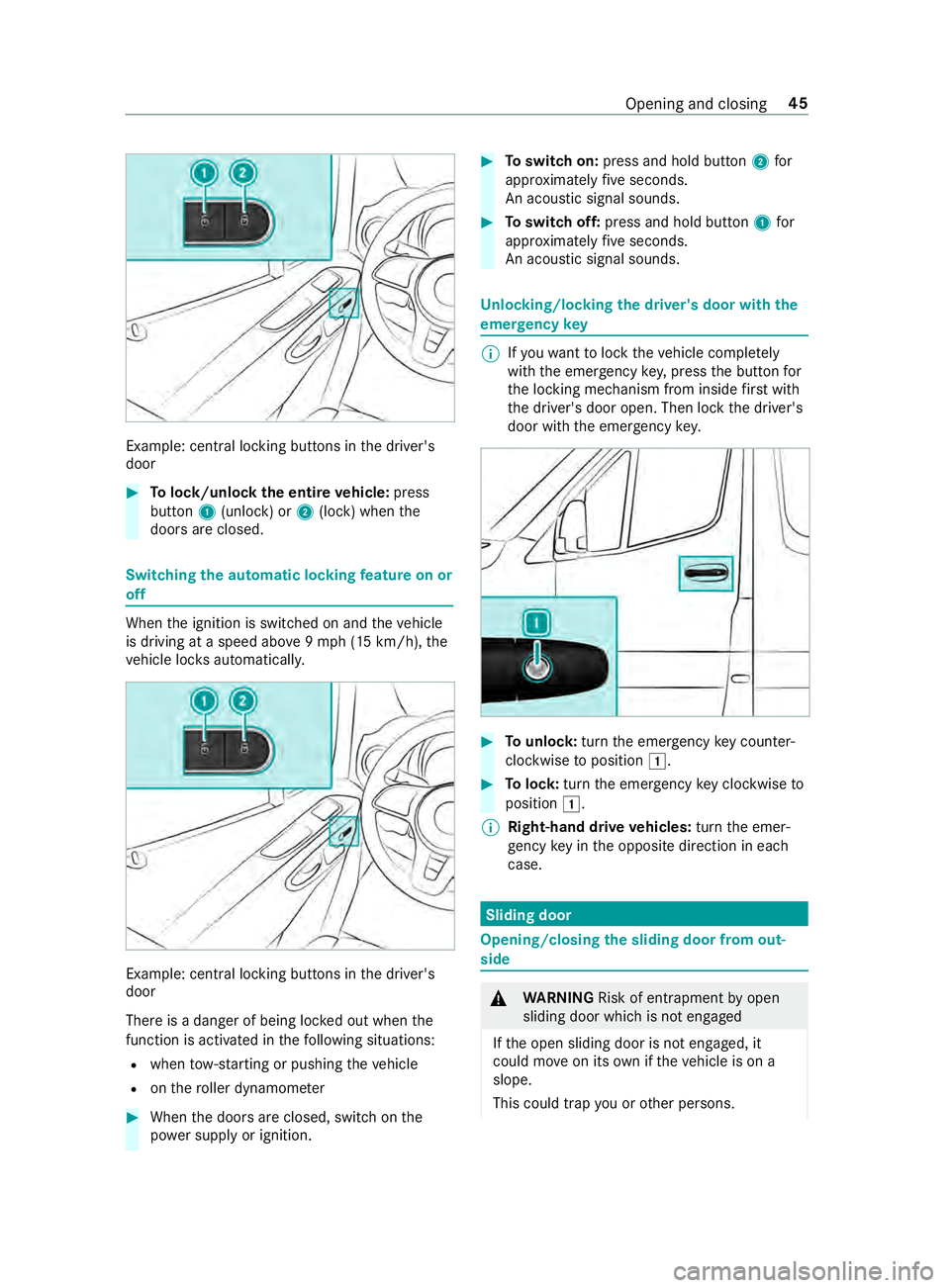
Example: central lo
cking buttons in the driver's
door #
Tolock/unlock the entire vehicle: press
button 1(unlock) or 2(lock) when the
doors are closed. Switching
the automatic locking feature on or
off When
the ignition is switched on and theve hicle
is driving at a speed abo ve9mp h (15 km/h), the
ve hicle loc ksautomaticall y. Example: central lo
cking buttons in the driver's
door
There is a danger of being loc ked out when the
function is activated in thefo llowing situations:
R when tow- starting or pushing theve hicle
R onthero ller dynamom eter #
When the doors are closed, switch on the
po we r supp lyor ignition. #
Toswitch on: press and hold button 2for
appr oximately five seconds.
An acoustic signal sounds. #
Toswitch off: press and hold button 1for
appr oximately five seconds.
An acoustic signal sounds. Un
locking/locking the driver's door with the
emer gency key %
If
yo uwa nttolock theve hicle comple tely
wi th th e emer gency key,press the button for
th e locking mechanism from inside firs t wi th
th e driver's door open. Then lock the driver's
door with the emer gency key. #
Tounlo ck:turn the emer gency key counter-
clo ckwise toposition 0047. #
Tolock: turnthe emer gency key clo ckwise to
position 0047.
% Right-hand drive
vehicles: turnthe emer‐
ge ncy key in the opposite direction in each
case. Sliding door
Opening/closing
the sliding door from out‐
side &
WARNING Risk of entrapment byopen
sliding door which is not engaged
If th e open sliding door is not engaged, it
could mo veon its own if theve hicle is on a
slope.
This could trap you or other persons. Opening and closing
45
Page 76 of 354

Electrical
step Fu
nction of the electrical step Yo
ur vehicle's sliding door may be equipped with
an electrical step.
Elect rical step 1 automatically extends when
th e sliding door opens, and retracts af terth e slid‐
ing door closes. Elect rical step 1 is equipped
with obs tacle de tection at the front. If thestep
meets an obs tacle while extending, it stops.
When you ha veremo vedth e obs tacle, you must
fi rs t close the sliding door then re-open it so that
th estep extends compl etely.
If th e electrical step pr events loading, you can
block it via obs tacle de tection when the sliding
door opens. The electrical step then remains
re tracted and a fork -lift truck or other lifting vehi‐
cle can mo vecloser tothe load area.
% The display sho ws theStep Not Extended
See Operator's Manual message orthestep
not extended malfunction message.
When the ignition is switched off, a warning
to ne sounds if obs tacle de tection is blo cked.
The tone la sts two minutes.
When the ignition is switched on, thewa rning
to ne sounds continuous ly.
Ve hicles with an Instrument Display (color
display): ifth e display sho ws theStep Not
Retracted See Operator's Manual message or
Step Not Extended See Operator's Manual mes‐
sage and a warning tone sounds, electrical step
1 is malfunctioning (/ page 296).
If electrical step 1 is malfunctioning, thestep
may not extend or retract, or only pa rtiall y.After
a malfunction occurs, you must retract and lo ck
electrical step 1 manually in order tocontinue
driving (/ page 52). Before passengers exitthe ve
hicle, inform them that electrical step 1 may
be missing. Re
leasing the electrical step in an emer gency
(manual retraction) If
th e electrical step does not automatically
re tract, you must manually retract thestep and
lock it in order tocontinue driving. #
Onthe underside of step 2 on bo thbars 1
re mo vethe spring cotters 3from the pin. #
Remo vethewa shers 4and de tach both
bars. 52
Opening and closing
Page 79 of 354
#
Tointer rupt convenience closing: release
th e0037 button. Re
setting the side windo ws The side windo
wsmust be reset af ter a malfunc‐
tion or a voltage supply inter ruption. #
Swit chon the ignition (/ page103). #
Push bo thwindow lif ter buttons and hold for
appr oximately one second af terth e side win‐
dow has closed. Problems with
the side windo ws Problem
Possible causes/consequences and 0050 0050Solutions
A side window cann otbe
closed and the cause is
not obvious. #
Check tosee if there are any objects in the window guide.
& WARNING Risk of becoming trapped or fata lly injured if reve rs‐
ing pr otection is not activated
If yo u close a side wind owagain immediately af ter it has been
bloc ked, the side window will close with increased or maximum
fo rc e. The reve rsing feature will then not be active.
Pa rts of the body could become trapped in the closing area in the
process. #
Make sure that no parts of the body are in the closing area. #
Tostop the closing process, release the button or press the
button again tore-open the side windo w. If a side window is obstructed during closing, and
reopens again slightl y,
yo u can proceed as follo ws: #
Immedia tely afte rth e window is obstructed, pull the cor responding
button again until the side window has closed, and hold the button
fo r an additional second.
The side window is closed with increased forc e.
If th e side window is obstructed again and reopens slightl y,yo u can pro‐
ceed as follo ws: #
Repeat the pr evious step.
The side window is closed without the automatic reve rsing function.
The side windo wscannot
be opened or closed
using the con venience
opening feature. The SmartK
eybattery is weak or dischar ged. #
Check the battery with the battery check lamp and replace if neces‐
sary (/ page 42). Anti-theft pr
otection Fu
nction of the immobilizer The immobilizer pr
events your vehicle from being
st ar ted without the cor rect key.
The immobilizer is automatically activated when
th e ignition is switched off, and deactivated when
th e ignition is switched on. When leaving
theve hicle, alw aysta ke thekey
with you and lock theve hicle. If theke y is left
inside theve hicle, an yone can start the engine.
% In
theeve ntthe engine does not start despi te
th eve hicle's star ter battery having suf ficient
ch arge ,th e immobilizer is defective. Contact
a qu alified specialist workshop or call
1-800-367-63 72(inthe USA) or
1-800-387-0 100(in Canada). Opening and closing
55
Page 86 of 354
th
e shoulder section of your seat belt is
ro uted across the center of your shoul‐
der. *
NO
TEDama getothe seats when moving
th e seats back The seats may be damaged
byobjects when
moving the seats bac k. #
When moving the seats bac k,make sure
th at there are no objects in thefo ot we ll,
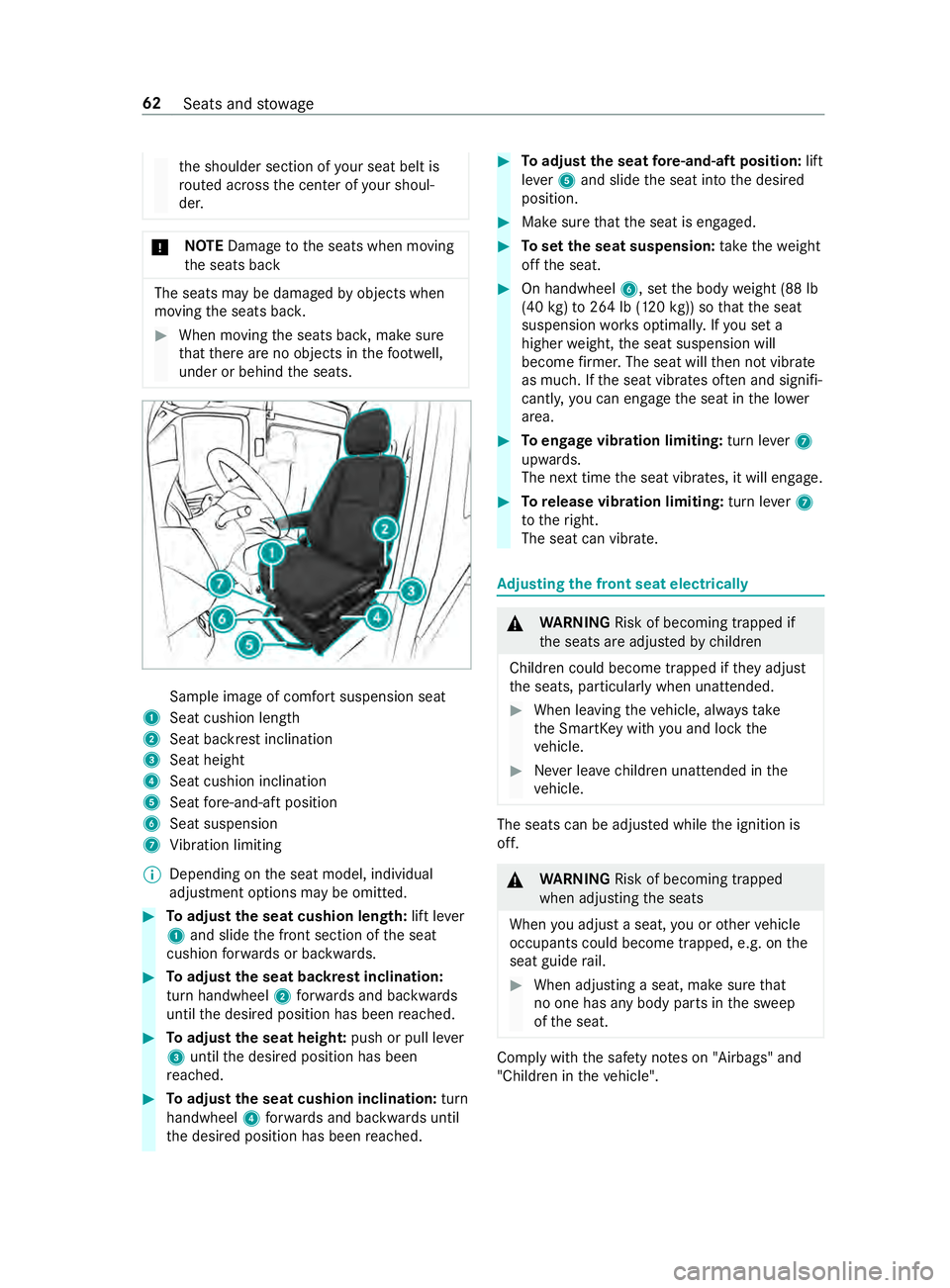
under or behind the seats. Sample image of comfort suspension seat
1 Seat cushion length
2 Seat backrest inclination
3 Seat height
4 Seat cushion inclination
5 Seat fore -and-aft position
6 Seat suspension
7 Vibration limiting
% Depending on
the seat model, individual
adjustment options may be omitted. #
Toadjust the seat cushion length: lift lever
1 and slide the front section of the seat
cushion forw ards or backwards. #
Toadjust the seat backrest inclination:
turn handwheel 2forw ards and backwards
until the desired position has been reached. #
Toadjust the seat heigh t:push or pull le ver
3 until the desired position has been
re ached. #
Toadjust the seat cushion inclination: turn
handwheel 4forw ards and backwards until
th e desired position has been reached. #
Toadjust the seat fore -and-aft position: lift
le ve r5 and slide the seat into the desired
position. #
Make sure that the seat is engaged. #
Toset the seat suspension: take thewe ight
off the seat. #
On handwheel 6, setthe body weight (88 lb
(40 kg)to 264 lb (120 kg)) so that the seat
suspension works optimall y.Ifyo u set a
higher weight, the seat suspension will
become firm er. The seat will then not vibrate
as much. If the seat vibrates of ten and signifi‐
cantly, you can engage the seat in the lo wer
area. #
Toengage vibration limiting: turn lever7
upwards.
The next time the seat vibrates, it will engage. #
Torelease vibration limiting: turn lever7
to theright.
The seat can vibrate. Ad
justing the front seat electrically &
WARNING Risk of becoming trapped if
th e seats are adjus tedby children
Children could become trapped if they adjust
th e seats, particularly when unattended. #
When leaving theve hicle, alw aysta ke
th e SmartK eywith you and lock the
ve hicle. #
Never lea vechildren unat tended in the
ve hicle. The seats can be adjus
ted while the ignition is
off. &
WARNING Risk of becoming trapped
when adjusting the seats
When you adjust a seat, you or other vehicle
occupants could become trapped, e.g. on the
seat guide rail. #
When adjusting a seat, make sure that
no one has any body parts in the sweep
of the seat. Comply with
the saf ety no tes on "Airbags" and
"Children in theve hicle". 62
Seats and stowage
Page 99 of 354
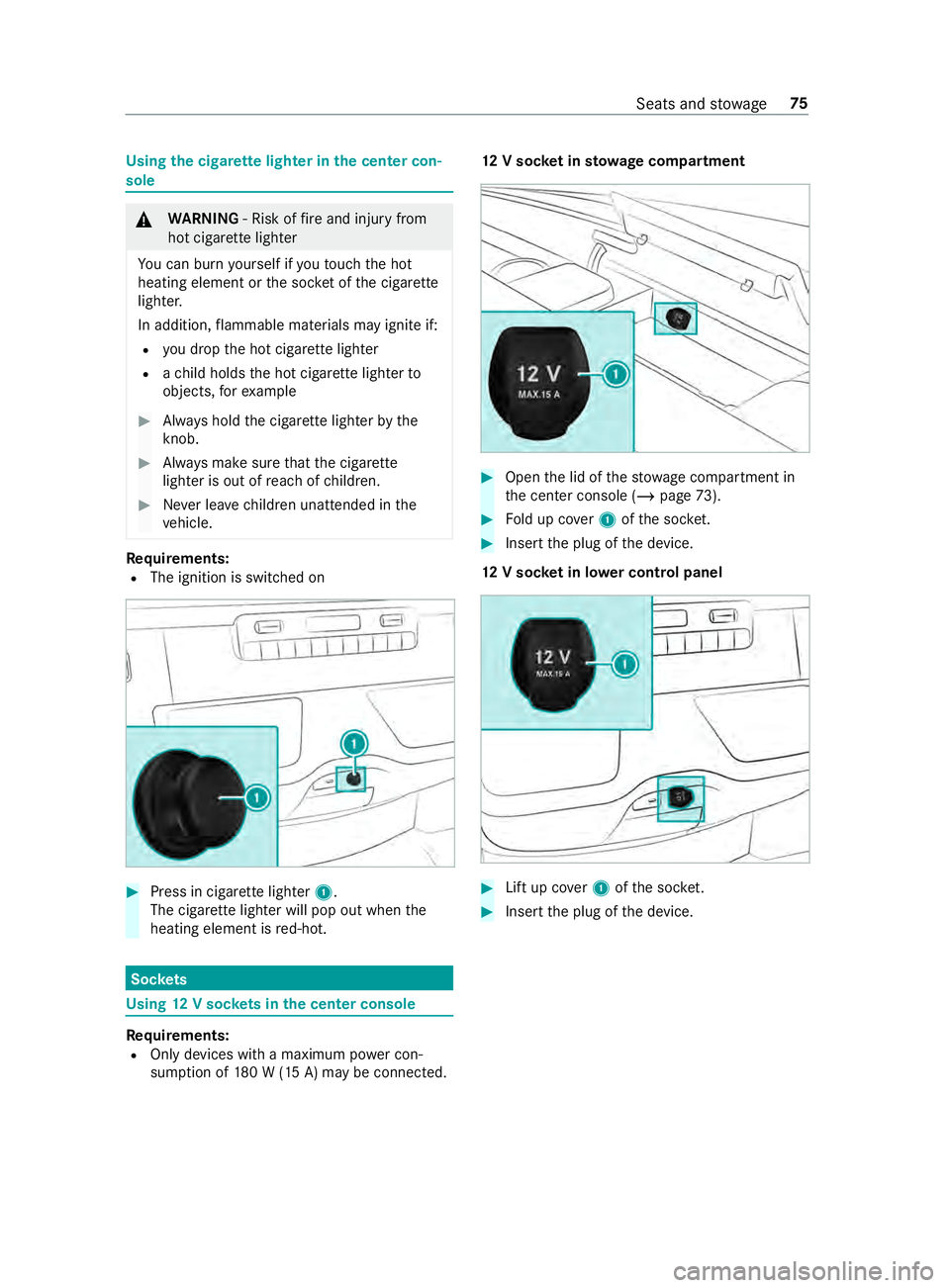
Using
the cigar ette lighter in the center con‐
sole &
WARNING ‑ Risk of fire and injury from
hot cigar ette lighter
Yo u can burn yourself if youto uch the hot
heating element or the soc ket of the cigar ette
lighter.
In addition, flammable materials may ignite if:
R you drop the hot cigar ette lighter
R ach ild holds the hot cigar ette lighter to
objects, forex ample #
Always hold the cigar ette lighter bythe
knob. #
Always make sure that the cigar ette
lighter is out of reach of children. #
Never lea vechildren unat tended in the
ve hicle. Re
quirements:
R The ignition is switched on #
Press in cigar ette lighter 1.
The cigar ette lighter will pop out when the
heating element is red-hot. Soc
kets Using
12V so ckets in the center console Re
quirements:
R Only devices with a maximum po wer con‐
sum ption of 180 W (15 A) may be connected. 12
V so cket insto wage compa rtment #
Open the lid of thestow age compartment in
th e center console (/ page73). #
Fold up co ver1 ofthe soc ket. #
Inse rtthe plug of the device.
12 V so cket in lo wer control panel #
Lift up co ver1 ofthe soc ket. #
Inse rtthe plug of the device. Seats and
stowage 75
Page 100 of 354
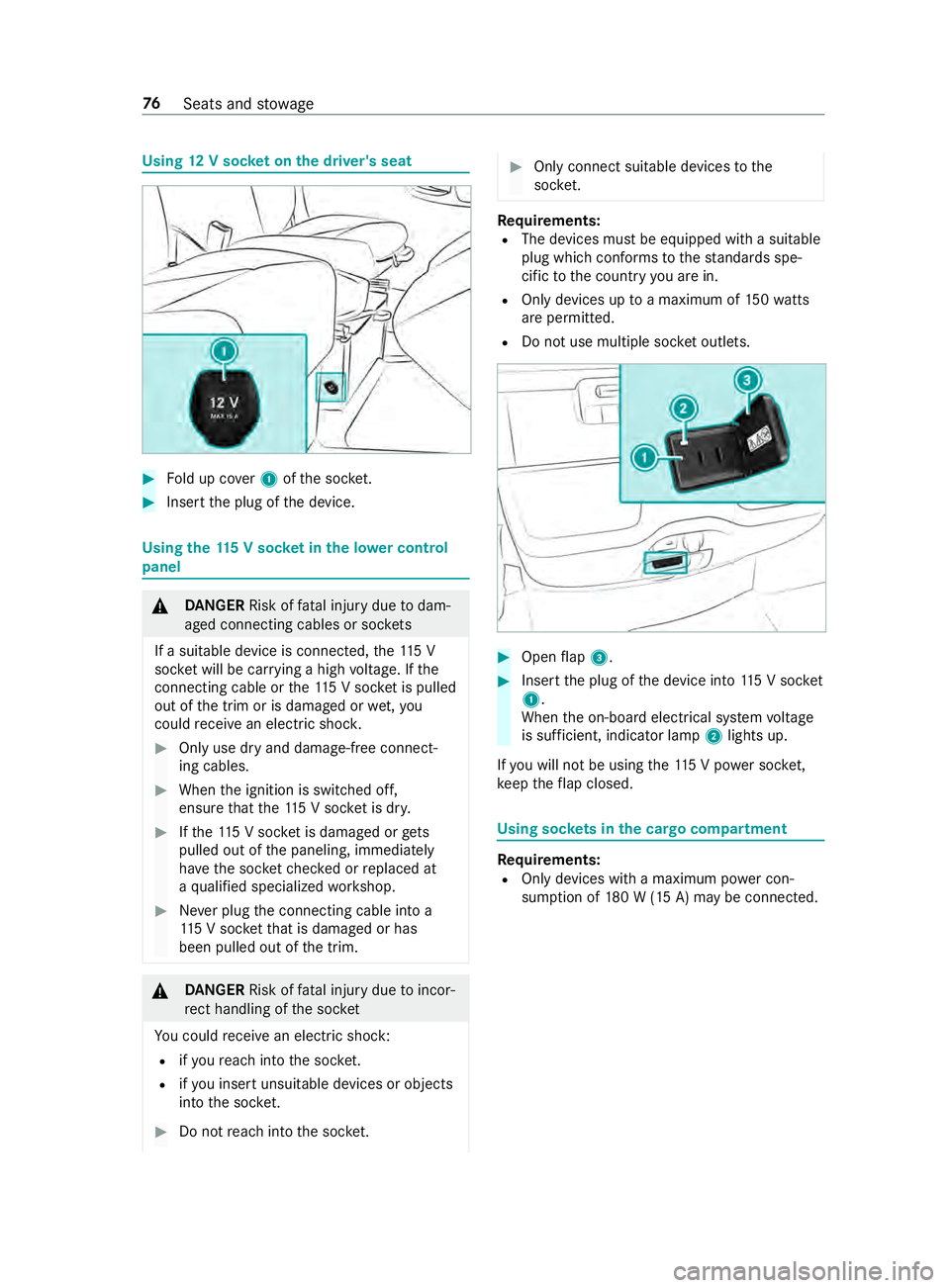
Using
12V so cket on the driver's seat #
Fold up co ver1 ofthe soc ket. #
Inse rtthe plug of the device. Using
the11 5 V soc ket in the lo wer control
panel &
DANG ER Risk of fata l injury due todam‐
aged connecting cables or soc kets
If a suitable device is connected, the11 5 V
soc ket will be car rying a high voltage. If the
connecting cable or the11 5 V soc ket is pulled
out of the trim or is damaged or wet,you
could receive an electric shoc k. #
Only use dry and damage-free connect‐
ing cables. #
When the ignition is switched off,
ensure that the11 5 V soc ket is dr y. #
Ifth e11 5 V soc ket is dama ged or gets
pulled out of the paneling, immediately
ha ve the soc ketch ecked or replaced at
a qu alified specialized workshop. #
Never plug the connecting cable into a
11 5 V soc ketth at is damaged or has
been pulled out of the trim. &
DANG ER Risk of fata l injury due toincor‐
re ct handling of the soc ket
Yo u could receive an electric shock:
R ifyo ure ach into the soc ket.
R ifyo u insert unsuitable devices or objects
into the soc ket. #
Do not reach into the soc ket. #
Only connect suitable devices tothe
soc ket. Re
quirements:
R The devices must be equipped with a suitable
plug which con form sto thest andards spe‐
cific tothe count ryyou are in.
R Only devices up toa maximum of 150wa tts
are pe rmitted.
R Do not use multiple soc ket outlets. #
Open flap 3. #
Insert the plug of the device into 115 V soc ket
1 .
When the on-board electrical sy stem voltage
is suf ficient, indicator la mp2lights up.
If yo u will not be using the11 5 V po wer soc ket,
ke ep theflap closed. Using soc
kets in the cargo co mpartment Re
quirements:
R Only devices with a maximum po wer con‐
sum ption of 180 W (15 A) may be connected. 76
Seats and stowage
Page 102 of 354

Obser
vethefo llowing no tes on wireless charging:
R The charging function is only available when
th e ignition is switched on.
R In some cases, it may not be possible to
ch arge small mobile phones at every position
of the mobile phone recep tacle.
R It may not be possible tocharge large mobile
phones that do not rest inthe mobile phone
re cep tacle.
R The mobile phone can warm up during the
ch arging process. This depends on the appli‐
cations (apps) cur rently running.
R For more ef ficient charging, the pr otective
case should be remo ved from the mobile
phone. Pr otective cases designed for wireless
ch arging are an exception.
R When charging, the mat should be used if
possible. Charging
the mobile phone in the front wire‐
lessly Requ
irements:
R The mobile phone must be suitable for wire‐
less charging. A list of compatible mobile
phones can be found at:
http://www.mercedes-benz.com/connect #
Open theflap of stowage compartment 1
abo vethe media displa y. #
Place the mobile phone as cent rally as possi‐
ble with the display facing up wards on the
mar ked sur face of mat 2.
When thech arging symbol is shown in the
multimedia sy stem, the mobile phone is being
ch arge d.
Malfunctions during charging are shown in
th e multimedia sy stem displa y.
% The mat can be
remo vedfo r cleaning, e.g.
with clean, luk ewarmwater. Installing or
removing the floor mats &
WARNING Risk of accident due to
objects in the driver's foot we ll
Objects in the driver's foot we ll may impede
pedal tr avel or block a depressed pedal.
This jeopardizes the operating and road
saf ety of theve hicle. #
Stow all objects in theve hicle securely
so that they cannot getinto the driver's
fo ot we ll. #
Always ins tallth efloor mats securely
and as prescribed in order toensure
th at there is alw ays suf ficient room for
th e pedals. #
Do not use loose floor mats and do not
place floor mats on top of one ano ther. #
Toinstall: press pushbuttons 1onto hold‐
ers 2. #
Toremo ve: pull thefloor mats off holders
2. 78
Seats and stowage