2019 MERCEDES-BENZ SPRINTER ESP
[x] Cancel search: ESPPage 211 of 354

Connecting an iPhone
®
via Apple CarPlay™
(wireless)
Requ irements:
R The multimedia sy stem is equipped with the
function.
R The cur rent version of your device's operating
sy stem is being used (see the manufacturer's
operating instructions).
R Blue tooth ®
is activated on the device (see the
manufacturer's operating instructions).
R The device is "visible" forot her devices.
R There is an Internet connection forth e full
ra nge of functions for Apple CarPlay™.
Multimedia sy stem:
4 © 5
Phone 5
00A5
Sear ching for a mobile phone #
Select Connect New Device.
The available iPhone ®
is shown.
Connecting a mobile phone #
Select the iPhone ®
. #
Select Start Apple CarPlay.
% It is possible at any time
toswitch between
connection via Blue tooth®
or via Apple Car‐
Play™ (wireless) in the device list.
Ac cepting/rejecting the data pr otection pro‐
visions
A message with the data pr otection pr ovisions
appears. #
Select Accept & Start.
% When
the Apple CarPlay™ connection is
active, you can swit chStart Automatically on
or off.
Exiting Apple CarPlay™ #
Press the00E2 button.
% If Apple CarPlay™
was not displa yed in the
fo re ground before disconnecting, the applica‐
tion starts in the bac kground when reconnec‐
te d. You can call up Apple CarPlay™ in the
main menu.
Calling up Apple CarPlay™ sound settings
Multimedia sy stem:
4 © 5
Smartphone 5
Apple CarPlay
5 Z #
Select sound settings. Ending Apple CarPlay™ #
Toend the connection of Apple Carplay™
(cable): disconnect the connection via the
connecting cable between the iPhone ®
and
multimedia sy stem. #
Toend the connection of Apple Carplay™
(wireless): de-authorize the iPhone ®
in the device list under
the application.
% Re
gardless of whe ther the connection is via
cable or wireless, Mercedes-Benz recom‐
mends disconnection only when theve hicle
is stationar y. Android
Auto Android
Autoove rview &
WARNING Risk of distraction from infor‐
mation sy stems and communications
equipment
If yo u operate information and communica‐
tion equipment integ rated in theve hicle when
driving, you will be distracted from the tra ffic
situation. This could also cause youto lose
control of theve hicle. #
Only operate this equipment when the
traf fic situation permits. #
Ifyo u cannot be sure of this, stop the
ve hicle whilst paying attention toroad
and traf fic conditions and ope rate the
equipment with theve hicle stationar y. Yo
u must obse rveth e legal requirements forthe
country in whi chyou are cur rently driving when
ope rating the multimedia sy stem.
Mobile phone functions can be used with Android
Au tousing the Android operating sy stem on the
multimedia sy stem. It is operated using the
to uchsc reen or thevo ice-operated control sys‐
te m. You can activate thevo ice-opera ted control
sy stem bypressing and holding the£ button
on the multifunction steering wheel.
Only one mobile phone at a time can be connec‐
te d via Android Auto to the multimedia sy stem.
The availability of Android Autoand Android Auto
apps may vary according tothe count ry.
The service pr ovider is responsible forth is appli‐
cation and the services and content connected to
it. MBUX multimedia sy
stem 187
Page 212 of 354

Information on Android
Auto
While using Android Auto,va rious functions of
th e multimedia sy stem, forex ample the media
source Blue tooth®
audio, are not available.
Connecting a mobile phone via Android Auto
Requ irements:
R The mobile phone supports Android Auto
from Android 5.0.
R The Android Autoapp is ins talled on the
mobile phone.
R In order touse thete lephone functions, the
mobile phone must be connected tothe mul‐
timedia sy stem via Blue tooth®
(/ page 182).
If th ere was no prior Internet connection, this
is es tablished with the use of the mobile
phone with Android Auto.
R The mobile phone is connected tothe multi‐
media sy stem via the USB port 00C2using a
suitable cable (/ page190).
R There is an Internet connection forth e full
ra nge of functions for Android Auto.
Multimedia sy stem:
4 © 5
Smartphone
5 Mercedes PRO & Apps 5
Android Auto
5 Start Android Auto
Ac cepting/rejecting the data pr otection pro‐
visions
% The
firs t acti vation of Android Autoon the
multimedia sy stem must be car ried out when
th eve hicle is stationary for saf etyre asons.
A message with the data pr otection pr ovisions
appears. #
Select Accept & Start.
Exiting Android Auto #
Press the00E2 button.
% If Android
Autowa s not displa yed in thefo re‐
ground before disconnecting, the application
st arts in the bac kground when reconnected.
Yo u can call up Android Autointhe main
menu.
Calling up the Android Autosound settings
Multimedia sy stem:
4 © 5
Smartphone 5
Android Auto
5 Z #
Select sound settings. Ending Android
Auto #
Disconnect the connecting cable between the
mobile phone and multimedia sy stem.
Mercedes-Benz recommends disconnecting
th e connecting cable only when theve hicle is
st ationar y. Tr
ansfer redve hicle data with Android Auto
and Apple CarPlay™ Overview of transfer
redve hicle data
When using Android Autoor Apple CarPlay™, cer‐
ta in vehicle data is transfer redto the mobile
phone. This enables youto getth e best out of
selected mobile phone services. Vehicle data is
not directly accessible.
The following sy stem information is transmit ted:
R Software release of the multimedia sy stem
R System ID (anonymized)
The transfer of this data is used tooptimize com‐
munication between theve hicle and the mobile
phone.
To do this, and toassign se veralve hicles tothe
mobile phone, a vehicle ID is random lyge ner‐
ated.
This has no connection totheve hicle identifica‐
tion number (VIN) and is dele ted when the multi‐
media sy stem is reset (/ page181).
The following vehicle status data is transmitted:
R Transmission position engaged
R Distinction between par ked, standstill, rolling
and driving
R Day/night mode of the instrument clus ter
The transfer of this data is used toalter how con‐
te nt is displ ayedto cor respond tothe driving sit‐
uation.
The following position data is transmitte d:
R Coordinates
R Speed
R Compass direction
R Accele ration di rection
This da tais only transfer red while the navigation
sy stem is active, in order toimpr ove it (e.g. so it
can continue functioning when in a tunnel). 18 8
MBUX multimedia sy stem
Page 216 of 354
R
Podcasts (Apple®
devices)
R Audiobooks (Apple®
devices)
% The categories are
available as soon as the
entire media content has been read in and
analyzed.
St arting a sear chin categories
Multimedia sy stem:
4 © 5
Media 5
5 #
Select a categor y.
The media files are shown cor responding to
th e selected categor y,e.g. all albums will be
shown forth eAlbums category.
Sorting results shown or playing back all
media found #
Select 0062. #
Toplay back all results found in the cate‐
gor y:select Play All.
If, forex ample, the album category is active,
all albums found bythe desired artist will be
pla yed bac k. #
Tosort results alphabeticall y:select Sort
from A-Z. #
Tosort results in reve rse alphab etical
order: selectSort from Z-A.
% The
available options depend on the selected
category and the connected device.
Using theke yword sear ch
Multimedia sy stem:
4 © 5
Media 5
5
In the categories under 5you can use the
ke yword sear chwith free text input tolook for
content. #
Select a catego ry. #
Select Search.
A ke yboard forch aracter ent ryappears. #
Enterth ete rm sear ched for.
% The sear
chbegins with thefirs tch aracter
entered. The more characters entered the
more concr eteth e sear chresults become. #
Select the desired entry fromthere sult list.
If th e selected result is an album, song or a
playback list then playback is star ted. If the
selected result is a new category then this is
opened in the sear ch. Ra
dio Switching on the
radio Multimedia sy
stem:
4 © 5
Radio #
Alternatively: press the| button.
The radio display appears. You will hear the
last station pla yed on the last frequency band
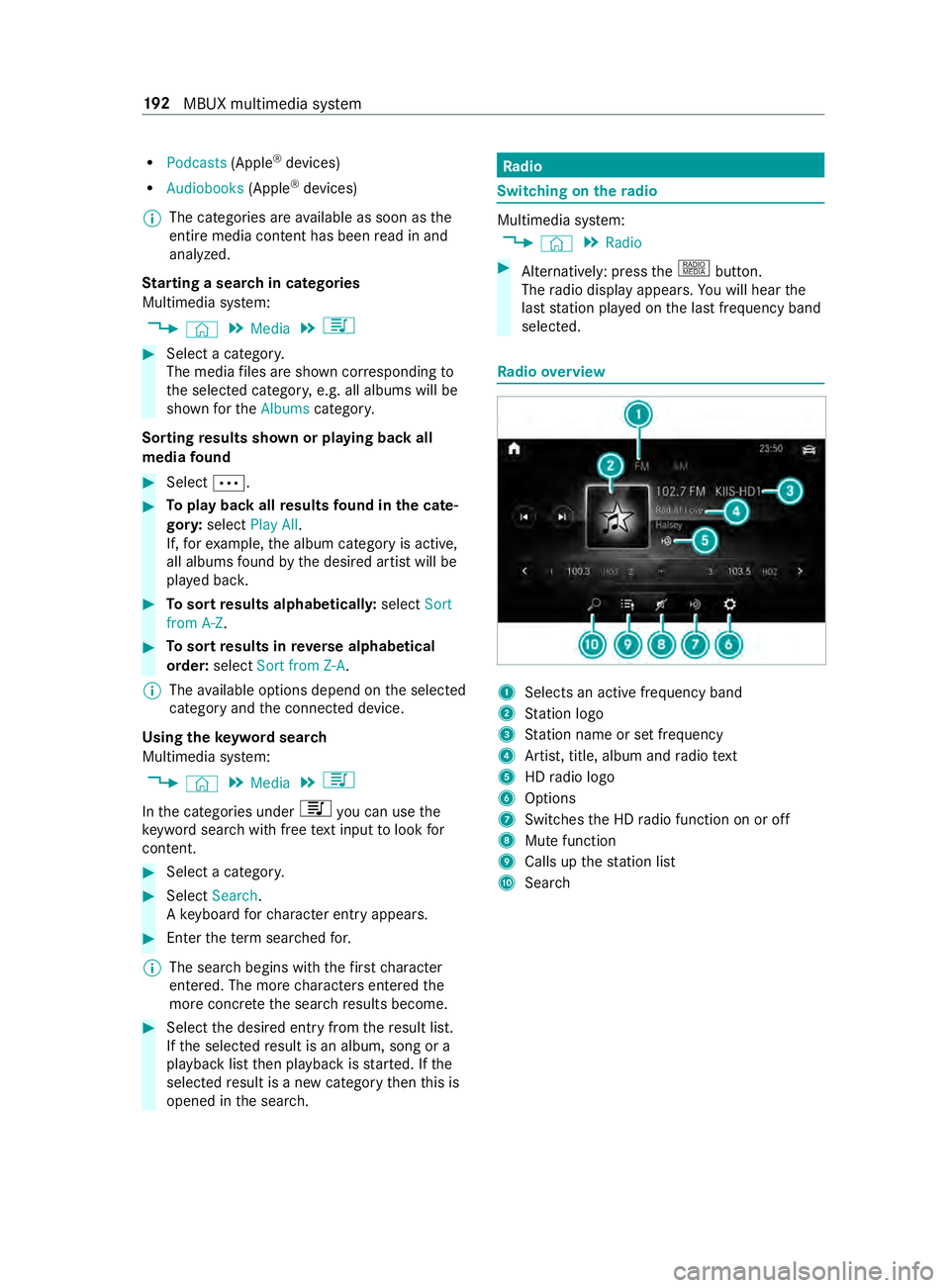
selected. Ra
dio overview 1
Selects an active frequency band
2 Station logo
3 Station name or set frequency
4 Artist, title, album and radio text
5 HDradio logo
6 Options
7 Switches the HD radio function on or off
8 Mute function
9 Calls up thest ation list
A Sear ch 19 2
MBUX multimedia sy stem
Page 219 of 354

Note
s on loading guidelines &
DANG ER Risk of poisoning from exhaust
ga ses
Combustion engines emit poisonous exhaust
ga ses, such as carbon monoxide. Exhaust
ga ses can enter theve hicle interior if the
re ar-end door is open when the engine is run‐
ning, especially if theve hicle is in motion. #
Always switch off the engine before
opening there ar-end door. #
Never drive with there ar-end door
open. &
WARNING Risk of inju ryfrom unsecu red
objects in theve hicle
When objects are unsecured or inadequately
secured, they can slip, tip over or be thro wn
about, striking vehicle occupants.
This also applies to:
R Luggage or loads
R Seats which ha vebeen remo ved and are
being transpor ted in theve hicle in an
ex ceptional case
The reis a risk of injur y,particular lyin the
eve nt of braking maneuvers or ab rupt
ch anges in direction. #
Alwaysstow objects in such a wayth at
th ey cannot be tossed about. #
Before tr aveling, secure objects, lug‐
ga ge or load topreve ntthem slipping or
tipping over. #
When a seat is remo ved, keep it prefera‐
bly outside theve hicle. &
WARNING Risk of inju rydue toobjects
being stowed incor rectly
If yo u do not adequately stowobjects in the
ve hicle interior, they could slip or be tossed
around and thereby strike vehicle occupants.
In addition, cup holders, open stowage
spaces and mobile phone brac kets cannot
al wa ys restra in the objects they contain in the
eve nt of an accident.
The reis a risk of injur y,particular lyin the
eve nt of sudden braking or a sudden change
in direction. #
Alwaysstow objects in such a wayth at
th ey cannot be tossed about in these or
similar situations. #
Always make sure that objects do not
project from stowage spaces, parcel
nets or stowage nets. #
Close the loc kable stow age spaces
before starting a journe y. #
Stow and secure objects that are heavy,
hard, poin ted, sharp-edged, fragile or
to o lar geinthe cargo compartment. &
WARNING Risk of bu rning from theta il‐
pipe or tailpipe trim
The tailpipe and tailpipe trim can become
ve ry hot. If you come into con tact wi th these
car parts, you could burn yourself. #
Always be particularly careful when in
th e vicinity of theta ilpipe and tailpipe
trims and supervise children very
closely when in this area. #
Before any con tact, allow the car parts
to cool down. If
yo u are using a roof rack , please no tethe maxi‐
mum roof load and the maximum load capacity of
th ero of rack.
Yo u will find information about the maximum roof
load in the "Technical data" chap ter and informa‐
tion about roof rack s in the "Car rier sy stems"
section .
Camera-based driving sy stems and the sensor
functions of the inside rearview mir ror may be
impaire d ifyou are transpo rting a load on the
ro of and it pr otru des more than 16 in (40 cm)
ove rth e edge of thero of. Therefore, make sure
th at the load does not overhang bymore than
16 in (40 cm).
The handling characteristics of your vehicle are
dependent on the load distribution. Therefore,
please obser vethefo llowing no tes when loading:
R when transporting a load, ne verex ceed the
permissible gross mass or the gross axle
we ight rating forth eve hicle (including occu‐
pants). The values are specified on theve hi‐
cle identification plate on the B-pillar.
R the load must not pr otru de abo vethe upper
edge of the seat backrests.
R if possible, alw ays transport the load in the
cargo compa rtment. Tr
ansporting 19 5
Page 220 of 354
R
fastenthe load tothe tie-down eyes and
spread the load as evenly as possible.
R use tie-down eyes and fastening components
which are suitable forth ewe ight and size of
th e load. Load distribution
* NO
TERisk of damage tothefloor co ver‐
ing Excessive point loading on
the cargo com‐
partment floor or on the load area can nega‐
tively af fect the driving characteristics and
could damage thefloor co vering. #
Vehicles with rear-wheel drive: dis‐
tribu tethe load uniformly. When doing
so, ensure that theove rall cen ter of
gr av ity of the load is alw ays as low and
close tothe center as possible and
between the axles near there ar axle. #
Vehicles with all-wheel drive: distrib‐
ute the load uniforml y.When doing so,
ensure that theove rall cen ter of gr avity
of the load is alw ays as low and close to
th e center as possible and between the
axles. Excessive point loading on
the cargo compart‐
ment floor or on the load area can negatively
af fect the driving characteristics and could dam‐
age thefloor co vering.
On Cargo Van and Passenger Van:
R alwa ys transpo rtthe load in the cargo com‐
partment.
R alwaysfast enthe load tothere ar ben chseat
backrests.
R movelarge and heavy loads as farto wa rds
th e front of theve hicle as possible against
th ere ar ben chseat. Stow loads flush with the
re ar ben chseat.
R always additionally secure the load with suita‐
ble load securing aids or tie downs.
R the load must not pr otru de abo vethe upper
edge of the seat backrests.
R transport loads behind seats that are not
occupied.
R ifth ere ar ben chseat is not occupied, insert
th e seat belts crosswise into the buckle of the
opposite seat belt. Securing loads
Note
s on load securing &
WARNING Risk of accident and injury
due toincor rect use of the lashing stra ps
If yo u attach the lashing stra p incor rectly
when secu ring loads, thefo llowing may occur
in theev ent of abrupt changes in direction,
braking maneuver or an acciden t:
R The tie-down eyes may become de tach ed
or the lashing stra p may tear if the per‐
missible load is exceeded.
R The load cann otbe restra ined.
This may cause the load toslip, tip over or be
fl ung about, striking vehicle occupants. #
Alwayste nsion the lashing stra ps in the
proper manner and only between the
described tie-down eyes. #
Always use lashing stra ps designed spe‐
cifically forth e loads. %
Obser
vethe information relating tothe maxi‐
mum loading capacity of the individual cargo
tie-down point. If you combine various cargo
tie-down points tosecure a load, alw aysta ke
th e maximum loading capacity of thewe ak‐
est cargo tie-down point into account. During
maximum full- stop braking, forc es may act
which can multiply thewe ight of the load.
Alw ays use se veral cargo tie-down points to
distribute and spread the load. Spread the
load evenly between the cargo tie-down
points or tie-down eyes.
Alw ays obser vethe operating instructions or the
lashing stra p manufacturer's instructions forthe
operation of the lashing stra p.
Obser vethe information relating tothe maximum
loading capacity of the cargo tie-down points
(/ page 275).
As the driver, you are responsible for ensuring the
fo llowing:
R The load is secured against slipping, tipping,
rolling or falling off.
Ta ke usual traf fic conditions as well as swerv‐
ing or full brake application and bad roads
into account.
R The applicable requ irements and guidelines
re lating toload-securing practices are met.
If th is is not the case, this may con stitute a
punishable of fense, depending on local legis‐ 19 6
Transporting
Page 231 of 354

If
yo u ha vetocar ryout any workinthe engine
compartment, touch only thefo llowing compo‐
nents:
R Hood
R Engine oil filler opening cap
R Washer fluid reser voir cap
R Coolant expansion reser voir cap &
WARNING Danger of bu rns when open‐
ing the hood
If yo u open the hood when the engine has
ove rheated or during a fire inthe engine com‐
partment, you could come into con tact wi th
hot gases or other escaping operating fluids. #
Before opening the hood, allow the
engine tocool down. #
Intheeve nt of a fire inthe engine com‐
partment, keep the hood closed and call
th efire service. &
WARNING Risk of scalding from hot
coolant
The engine cooling sy stem is pressurized,
particular lywhen the engine is warm. If you
open the cap, you could be scalded byhot
coolant spr aying out. #
Let the engine cool down before open‐
ing the cap. #
When opening the cap, wear pr otective
gl ove s and saf etygl asses. #
Open the cap slowly torelease pres‐
sure. Allow
the engine and the engine cooling sy stem
to cool down before checking the coolant le vel or
re filling coolant.
* NO
TEPaint wo rkdamage due tocoolant If coolant
gets on painted sur faces, the paint‐
wo rkcan be damaged. #
Add coolant carefully. #
Remo vespilled coolant. Checking
the coolant le vel Example: coolant
expansion reser voir #
Park theve hicle on an even sur face. #
Open the hood (/ page 202). #
Slowly turn coolant expansion reser voir cap
1 half a turn coun ter-clockwise and allow
exc ess pressure toescape. #
Turn coolant expansion reser voir cap 1fur‐
th er and remo veit. #
Check the coolant le vel.
There is enough coolant in coolant expansion
re ser voir if the coolant reaches the MAX
mar k.
Ad ding coolant #
Refill th e coolant tothe MAX mark on the
coolant expansion reser voir.
Only use coolant appr oved byMercedes-Benz to
avo id damaging the engine cooling sy stem. #
Replace coolant expansion reser voir cap 1
and tigh ten in a clo ckwise direction. #
Start the engine. #
After appro ximately five minutes, switch off
th e engine again and allow it tocool down. #
Che ckthe coolant le vel again and add coolant
if necessar y.
% Obser
veadditional coolant information
(/ page 269). Main
tenance and care 207
Page 234 of 354

#
Place a suitable collector beneath drain hose
2. #
Switch on the ignition. #
Open drain scr ew1 until thewate r/fuel
mixture emerges from drain hose 2.#
Close drain scr ew1 as soon as around
0.2 qt (0.2 liter) of thewate r/fuel mixture has
been collected.
Af ter 30 seconds, the electrical fuel pump
automatically stops the discharge of the
wate r/fuel mixture. #
After draining, switch off the ignition. #
Dispose of the collected water/fuel mixture
in an environmentally responsible manner,
e.g. at a qualified specialist workshop. #
Check that drain scr ew1 has been closed.
If th e engine is running while drain scr ew1
is open, you will lose fuel thro ugh drain hose
2. #
Close the hood (/ page 202). #
003A The indicator lamp does not go out
af te r draining: drainthe fuel filter again. #
003AThe indica tor lamp does not go out
af te r the second draining: consult aquali‐
fi ed specialist workshop.
Mercedes-Benz recommends that you ha vethe
fuel filter drained at a qualified specialist work‐
shop. Cleaning and care
Note
s onwashing theve hicle in an automatic
car wash &
WARNING Risk of accident due to
re duced braking ef fect af terwa shing the
ve hicle
The braking ef fect is reduced af terwa shing
th eve hicle. #
Afterth eve hicle has been washed,
brake carefully while paying attention to
th e traf fic conditions until the braking
ef fect has been ful lyrestored. *
NO
TERisk of damage tothe paintwork
and plastic components If
yo uwa sh your vehicle in Touchless Auto‐
matic Car Wash sy stems that use special
cleaning agents, the cleaning agents used can damage
the paintwork or plastic components
of theve hicle. #
Do not wash theve hicle in Touchless
Au tomatic Car Wash sy stems that use
special cleaning agents. Make sure
that the automatic car wash is suitable
fo rth e size of theve hicle.
Before washing theve hicle in an automatic car
wa sh, fold in the outside mir rors and remo veany
additional antennas. Otherwise, the outside mir‐
ro rs, antennas or theve hicle itself could be dam‐
aged.
Make sure any additional antennas are re-ins tal‐
led and that the outside mir rors are fully folded
out again when you lea vethe automatic car
wa sh.
To avo id damage to yourvehicle, obser vethefo l‐
lowing before using an automatic car wash:
R the side windo wsand the sliding window are
comple tely closed.
R the blo werfo rve ntilation and heating is
switched off.
R the windshield wiper switch is in position 005A.
If th eve hicle is very dirty, wash off excess dirt
before cleaning theve hicle in an automatic car
wa sh.
% Re
moving thewa x from the windshield and
th e wiper rubbers af terwa shing theve hicle,
will help avoid smearing and reduce wiper
noise. Note
s on use of a po werwa sher &
WARNING Risk of accident when using
high-pressu recleaning equipment wi th
ro und-spr aynozzles
The wate r jet from a round-spray nozzle (dirt
grinder) may cause damage totires and sus‐
pension components that is not visible.
Components damaged in this wa y may fail
unexpec tedly. #
Do not use high-p ressure cleaning
equipment with round-spray nozzles to
clean your vehicle. #
Damaged tires or suspension compo‐
nents must be replaced immediatel y. Ne
ver use a po werwa sher in theve hicle interior.
The pressurized water created bythe po wer 210
Maintenance and care
Page 241 of 354

Message in
the media displa y:
SOS NOT READY :th e ignition is not on or eCall is
not available.
During an active emer gency call, 0053appears in
th e displa y.
Yo u can find more information on there gional
av ailability of eCall at: http://www.mercedes-
benz.com/connect_ecall
% If an emer
gency call is una vailable or mal‐
functioning, a message tothis ef fect also
appea rsinthe multifunction display of the
instrument clus ter. Tr
iggering an automatic emer gency call Re
quirements:
R The ignition is switched on.
R The star ter battery has suf ficient charge.
If re stra int sy stems such as airbags or Emer gency
Te nsioning Devices ha vebeen activated af ter an
accident, eCall may automatically initia tean
emer gency call.
The eme rgency call has been made:
R Avo ice connection is made tothe Mercedes-
Benz emer gency call center.
R A messa gewith accident data is transmitted
to the Mercedes-Benz emer gency call center.
The Mercedes-Benz emergency call center
can transmit theve hicle position data toone
of the emer gency call centers.
The SOS button in theove rhead cont rol panel
fl ashes until the emer gency call is finished.
It is not possible toimmediately end an auto‐
matic emer gency call.
If no connection can be made tothe emer gency
services ei ther, a cor responding message
appears inthe media displa y. #
Dial the local emer gency number on your
mobile phone.
If an emer gency call has been initia ted:
R Remain in theve hicle if thero ad and traf fic
conditions permit youto do so until a voice
connection is es tablished with the emer gency
call center service pr ovider.
R Based on the call, the operator decides
whe ther it is necessary tocall rescue teams
and/or the police tothe accident site.
R If no vehicle occupant answers, an ambu‐
lance is sent totheve hicle immediately. Tr
iggering a manual emer gency call #
Using the SOS but ton in theove rhead con‐
trol panel: pressthe SOS button at least one
second long.
The emer gency call has been made:
R Avo ice connection is made tothe Mercedes-
Benz emer gency call center.
R A messa gewith accident data is transmitted
to the Mercedes-Benz emer gency call center.
The Mercedes-Benz emergency call center
can transmit theve hicle position data toone
of the emer gency call centers.
R Remain in theve hicle if thero ad and traf fic
conditions permit youto do so until a voice
connection is es tablished with the emer gency
call center service pr ovider.
If no connection can be made tothe emer gency
services ei ther, a cor responding message
appears inthe media displa y. #
Dial the local emer gency number on your
mobile phone.
Ending an unin tentional emer gency call #
Select 0076onthe multifunction steering
wheel. Depress the button for se veral sec‐
onds. Tr
ansmitted data with the emer gency call Data transmit
tedby the eCall includes but is not
limited to:
R Vehicle's GPS position data
R GPS position data on thero ute (a few hun‐
dred me ters before the incident)
R Direction of tra vel
R Vehicle identification number
R Vehicle drive type
R Estimated number of people in theve hicle
R Whe ther Mercedes PRO connect is available
or not
R Whe ther the emer gency call was initiated
manually or automatically
R Time of the accident
R Language setting on the multimedia sy stem
Data transmit ted is vehicle information. For any
qu estions about the collection, use and sharing
of the eCall sy stem data, please contact MBU‐ Breakdown assis
tance 217