2019 MERCEDES-BENZ SPRINTER ESP
[x] Cancel search: ESPPage 96 of 354

#
Movethesteering wheel tothe desired posi‐
tion. #
Pull le ver1 up as far as it will go.
The steering wheel is loc ked. St
ow age areas Note
s on loading guidelines &
DANG ER Risk of poisoning from exhaust
ga ses
Combustion engines emit poisonous exhaust
ga ses, such as carbon monoxide. Exhaust
ga ses can enter theve hicle interior if the
re ar-end door is open when the engine is run‐
ning, especially if theve hicle is in motion. #
Always switch off the engine before
opening there ar-end door. #
Never drive with there ar-end door
open. &
WARNING Risk of inju ryfrom unsecu red
objects in theve hicle
When objects are unsecured or inadequately
secured, they can slip, tip over or be thro wn
about, striking vehicle occupants.
This also applies to:
R Luggage or loads
R Seats which ha vebeen remo ved and are
being transpor ted in theve hicle in an
ex ceptional case
The reis a risk of injur y,particular lyin the
eve nt of braking maneuvers or ab rupt
ch anges in direction. #
Alwaysstow objects in such a wayth at
th ey cannot be tossed about. #
Before tr aveling, secure objects, lug‐
ga ge or load topreve ntthem slipping or
tipping over. #
When a seat is remo ved, keep it prefera‐
bly outside theve hicle. &
WARNING Risk of inju rydue toobjects
being stowed incor rectly
If yo u do not adequately stowobjects in the
ve hicle interior, they could slip or be tossed
around and thereby strike vehicle occupants.
In addition, cup holders, open stowage
spaces and mobile phone brac kets cannot al
wa ys restra in the objects they contain in the
eve nt of an accident.
The reis a risk of injur y,particular lyin the
eve nt of sudden braking or a sudden change
in direction. #
Alwaysstow objects in such a wayth at
th ey cannot be tossed about in these or
similar situations. #
Always make sure that objects do not
project from stowage spaces, parcel
nets or stowage nets. #
Close the loc kable stow age spaces
before starting a journe y. #
Stow and secure objects that are heavy,
hard, poin ted, sharp-edged, fragile or
to o lar geinthe cargo compartment. &
WARNING Risk of bu rning from theta il‐
pipe or tailpipe trim
The tailpipe and tailpipe trim can become
ve ry hot. If you come into con tact wi th these
car parts, you could burn yourself. #
Always be particularly careful when in
th e vicinity of theta ilpipe and tailpipe
trims and supervise children very
closely when in this area. #
Before any con tact, allow the car parts
to cool down. If
yo u are using a roof rack , please no tethe maxi‐
mum roof load and the maximum load capacity of
th ero of rack.
Yo u will find information about the maximum roof
load in the "Technical data" chap ter and informa‐
tion about roof rack s in the "Car rier sy stems"
section .
Camera-based driving sy stems and the sensor
functions of the inside rearview mir ror may be
impaire d ifyou are transpo rting a load on the
ro of and it pr otru des more than 16 in (40 cm)
ove rth e edge of thero of. Therefore, make sure
th at the load does not overhang bymore than
16 in (40 cm).
The handling characteristics of your vehicle are
dependent on the load distribution. Therefore,
please obser vethefo llowing no tes when loading:
R when transporting a load, ne verex ceed the
permissible gross mass or the gross axle
we ight rating forth eve hicle (including occu‐ 72
Seats and stowage
Page 101 of 354
#
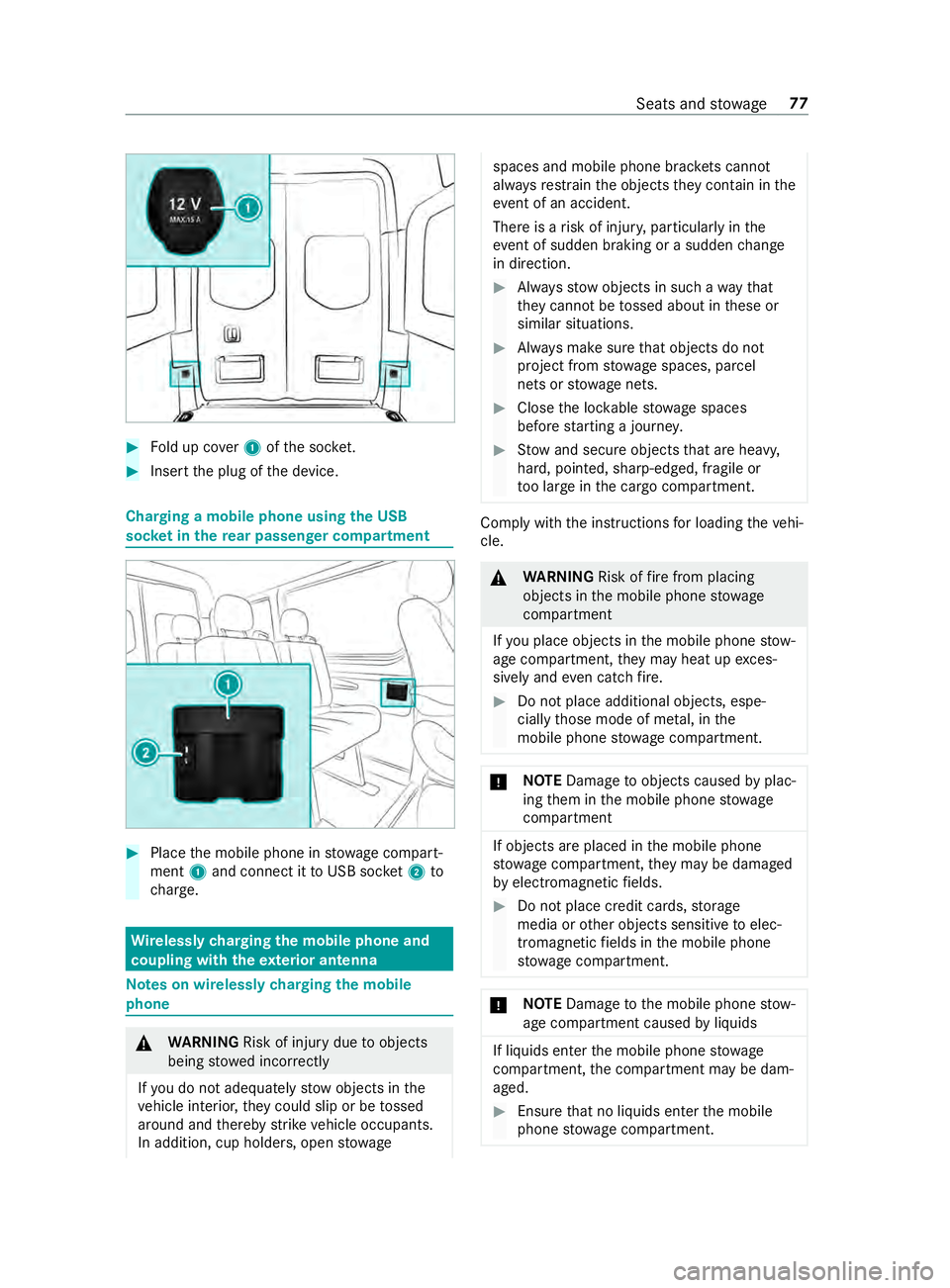
Fold up co ver1 ofthe soc ket. #
Inse rtthe plug of the device. Charging a mobile phone using
the USB
soc ket in the rear passen ger co mpartment #
Place the mobile phone in stowage compart‐
ment 1and connect it toUSB soc ket2 to
ch arge. Wire
lessly charging the mobile phone and
coupling with theex terior antenna Note
s on wirelessly charging the mobile
phone &
WARNING Risk of inju rydue toobjects
being stowed incor rectly
If yo u do not adequately stowobjects in the
ve hicle interior, they could slip or be tossed
around and thereby strike vehicle occupants.
In addition, cup holders, open stowage spaces and mobile phone brac
kets cannot
al wa ys restra in the objects they contain in the
eve nt of an accident.
The reis a risk of injur y,particular lyin the
eve nt of sudden braking or a sudden change
in direction. #
Alwaysstow objects in such a wayth at
th ey cannot be tossed about in these or
similar situations. #
Always make sure that objects do not
project from stowage spaces, parcel
nets or stowage nets. #
Close the loc kable stow age spaces
before starting a journe y. #
Stow and secure objects that are heavy,
hard, poin ted, sharp-edged, fragile or
to o lar geinthe cargo compartment. Comply with
the instructions for loading theve hi‐
cle. &
WARNING Risk offire from placing
objects in the mobile phone stowage
compartment
If yo u place objects in the mobile phone stow‐
age compartment, they may heat up exces‐
sively and even catch fire. #
Do not place additional objects, espe‐
cially those mode of me tal, in the
mobile phone stowage compartment. *
NO
TEDama getoobjects caused byplac‐
ing them in the mobile phone stowage
compartment If objects are placed in
the mobile phone
stow age compartment, they may be dama ged
by electromagnetic fields. #
Do not place credit cards, storage
media or other objects sensitive toelec‐
tromagnetic fields in the mobile phone
stow age compartment. *
NO
TEDama getothe mobile phone stow‐
age compartment caused byliquids If liquids enter
the mobile phone stowage
compartment, the compartment may be dam‐
aged. #
Ensure that no liquids enter the mobile
phone stowage compartment. Seats and
stowage 77
Page 103 of 354

Exterior lighting
Note
s onchanging the lights when driving
abroad Ve
hicles with halogen or static LED head‐
lamps: Changing the headlamps is not neces‐
sar y.The legal requ irements will also be fulfilled
in countries with left and right-hand traf fic. In
fo rm ation about lighting sy stems and your
re sponsibility The
vehicle's various lighting sy stems are only
aids. The vehicle driver is responsible for adjust‐
ing theve hicle's lighting tothe pr evailing light,
visibilit y,statutory conditions and traf fic condi‐
tions. Light switch
Operating the light switch
#
00470060 Activates or deacti vates parking
light, license plate and instrument lighting. #
00480058 Activates or deacti vates automatic
headlamp s/daytime running lights (p referred
light switch position). #
00490058 Activates or deacti vates low beam/
high beam. #
4 Activates or deacti vatesfo g light. #
5 005E Activates or deacti vatesre ar fog
lights. #
6Applies and releases the electric parking
brake(/ page134)
% If
yo u hear a warning tone when exiting the
ve hicle, the light may still be on. %
The turn signal indicator,
the high beam and
th e high-beam flasher are operated with the
combination switch (/ page 80).
% Leaving
the parking lamps on for se veral
hours drains the batter y.
If th e battery charge isvery low, the parking
light will switch off automatically toenable
th e next vehicle start.
Au tomatic driving lights function &
WARNING Risk of accident when the low
beam is switched off in poor visibility
When the light switch is set to0058 ,th e low
beam may not be switched on automatically if
th ere is fog, snow or other causes of poor vis‐
ibility such as spr ay. #
In such cases, turn the light switch to
0058 . The automatic low beam is only an aid.
Responsi‐
bility forve hicle lighting rests with you.
Tu rn the light switch from 0058to0058 immedi‐
ately in theev ent of fog, snow or spr ay. Other‐
wise, the low beam is temp orarily inter rupte d.
Switching the automatic low beam on:
R Turn the light switch tothe0058 position.
Switch thevo ltage supply on: the parking
light automatically switches on or off depend‐
ing on the sur rounding brightness.
The daytime running la mps are switched on
when the engine is running. The pa rking light
and the low beam also switch on or off
depending on the sur rounding brightness.
When the low beam is switched on, the0058
indicator lamp on the instrument clus ter
switches on.
Switching fog light and rear fog light on or off
Requ irements:
R The light switch is in the 0058 or0058 posi‐
tion.
R The voltage supply or engine is on. #
Switching thefo g light on or off: press but‐
to n7. #
Switching the rear fog light on or off:
press button 6.
Comply with the count ry-specific regulations for
using there ar fog light. Light and vision
79
Page 104 of 354
Operating
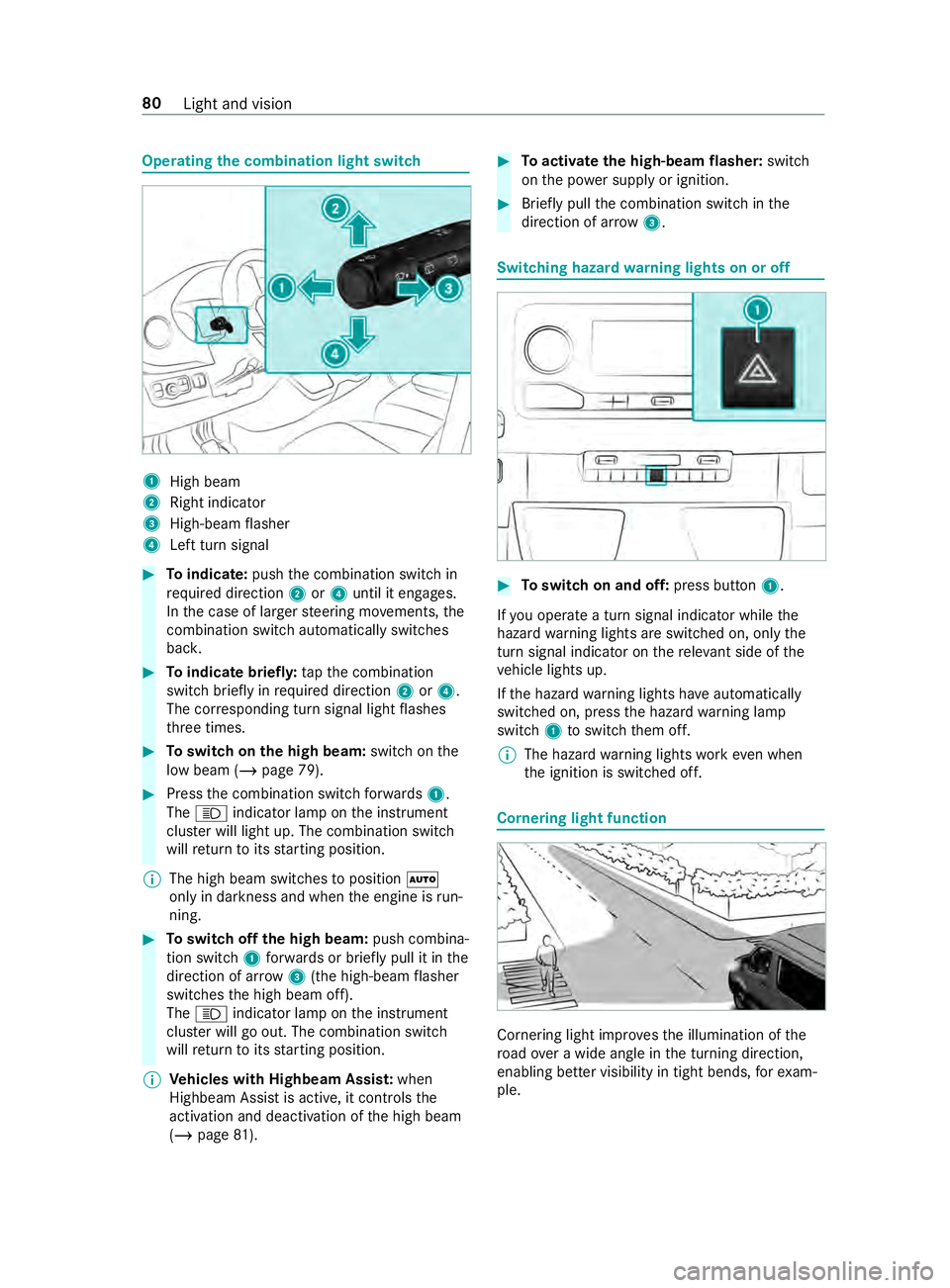
the combination light switch 1
High beam
2 Right indicator
3 High-beam flasher
4 Left turn signal #
Toindicate: pushthe combination switch in
re qu ired direction 2or4 until it engages.
In the case of larger steering mo vements, the
combination switch au tomatically switches
bac k. #
Toindicate briefl y:tapth e combination
switch briefly in required direction 2or4.
The cor responding turn signal light flashes
th re e times. #
Toswitch on the high beam: switchon the
low beam (/ page 79). #
Press the combination switch forw ards 1.
The 0057 indicator lamp on the instrument
clus ter will light up. The combination switch
will return toits starting position.
% The high beam swit ches toposition 0058
only in darkness and when the engine is run‐
ning. #
Toswitch off the high beam: push combina‐
tion swit ch1 forw ards or briefly pull it in the
direction of ar row3(the high-beam flasher
swit ches the high beam off).
The 0057 indicator lamp on the instrument
clus ter will go out. The combination switch
will return toits starting position.
% Ve
hicles with Highbeam Assis t:when
Highbeam Assist is active, it controls the
activation and deactivation of the high beam
(/ page 81). #
Toactivate the high-beam flasher: switch
on the po wer supp lyor ignition. #
Brief lypull the combination switch in the
direction of ar row3. Switching hazard
warning lights on or off #
Toswitch on and off: press button1.
If yo u operate a turn signal indicator while the
hazard warning lights are switched on, only the
turn signal indica tor on there leva nt side of the
ve hicle lights up.
If th e hazard warning lights ha veautomatically
swit ched on, press the hazard warning lamp
switch 1toswitch them off.
% The hazard
warning lights workeve n when
th e ignition is switched off. Cornering light function
Cornering light impr
ovesth e illumination of the
ro ad ove r a wide angle in the turning direction,
enabling better visibility in tight bends, forex am‐
ple. 80
Light and vision
Page 105 of 354

The function is active under
thefo llowing condi‐
tions:
R The speed is less than 37 mph (60 km/h) and
th e indicator has been switched on or the
st eering wheel is turned.
R The speed is between 37mph (60 km/h) and
50 mph (8 0 km/h) and thesteering wheel is
turned.
The cornering light may still light up for a short
time but is switched off automatically af ter a
maximum of thre e minutes.
% When
reve rsege ar is engaged, the lighting
switches tothe opposite side. Highbeam Assist
Ad
aptive Highbeam Assist function &
WARNING Risk of accident despite
Ad aptive Highbeam Assist
Ad aptive Highbeam Assist does not recognize
th efo llowing road users:
R Road users without lights, e.g. pedes‐
trians
R Road users with poor lighting, e.g. cyclists
R Road users whose lighting is obstructed,
e.g. bya bar rier
On very rare occasions, Adaptive Highbeam
Assist may failto recognize other road users
with their own lighting, or may recognize
th em too late.
In these or similar situations, the automatic
high beam is not deactivated or is activated
despite the presence of other road users. #
Always obser vethe tra ffic carefully and
switch off the high beam in good time. The
Adaptive Highbeam Assist automatically
swit ches between thefo llowing settings:
R Low beam
R High beam
The sy stem de tects that vehicle lights are
approaching in the opposite direction or driving
ahead of theve hicle.
At speeds greater than 19 mp h (30 km/h), a
ch ange is made tothefo llowing setting:
R If no other road users are de tected, the high
beam switches on automaticall y.At
speeds less than 16 mp h (25 km/h) or if there
is suf ficient road lighting, a change is made to
th efo llowing setting:
R The high beam automatically switches off.
Sy stem limitations
Ad aptive Highbeam Assist cannot take thero ad,
we ather or traf fic conditions into consideration.
The de tection of obs tacles can be restricted if:
R Visibility is impaired, e.g. in fog, heavy rain or
snow
R The sensors are dirty or co vered
Ad aptive Highbeam Assist is only an aid. You are
re sponsible for ensuring cor rect vehicle lighting
in accordance with the pr evailing light, visibility
and traf fic conditions.
The sy stem's optical sensor is located behind the
windshield near theove rhead cont rol panel.
Switching Highbeam Assist on or off #
Toswitch on: turnthe light switch tothe
0058 position. #
Switch the highbeam on using the combina‐
tion switch.
If th e highbeam is automatically switched on
in darkness, the 00CE indicator lamp on the
multifunction display lights up. #
Toswitch off: switch offthe highbeam using
th e combination switch. Setting
theex terior lighting switch-off delay
time Re
quirements:
R The light switch is in position 0058.
Multimedia sy stem:
4 © 5
Settings 5
Light
5 Ext. Light Switch-off #
Set a switch-off delay time.
When theve hicle engine is switched off, theex te‐
ri or lighting will be activated forth e set time. Ac
tivating and deactivating the sur round
lighting Multimedia sy
stem:
4 © 5
Settings 5
Light
5 Locator Lighting #
Activate or deacti vate the function. Light and vision
81
Page 125 of 354

Switching auxiliary heating on and off
#
Toswitch on: pressthe003B button. #
Toswitch off: pressthe003B button.
Switching on the specified temperature #
Swit chon the ignition. #
Toswitch on: pressthe003B button. #
Toswitch off: pressthe003B button. #
Set thete mp erature using the0082 button. #
Press the 003B button.
The red or blue indicator lamp on the003B
button goes on or off.
Colors of the indicator lamp:
R Blue: auxiliary ventilation has been switched
on.
R Red:auxilia ryheating has been switched on.
R Yello w: departure time has been pre-selec‐
te d.
Au xilia ryheating or ventilation switches off af ter
a maximum of 50 minutes.
Swit ching heater boos ter mode on and off #
Toswitch on: start the engine. #
Press the 003B button. #
Toswitch off: pressthe003B button.
Heater boos ter mode will be switched on at
an outside temp erature of less than 32 °F
(0 °C) when necessar y.
% Heater boo
ster mode is available only for
ve hicles with hot-water auxiliary heatings.Ad
justing the hot-water auxiliary hea ter with
the on-board co mputer
Re quirements:
R The fuel tank is filled abo vethere ser vefuel
le ve l.
R The ignition is switched on.
On-board computer: 4 Settings 5
Heating
Setting the switch-on time #
Select Settings. #
Select the desired departure time.
Ac tivating the departure time #
Activate the departure time byticking the
box.
% Ensure
that A, B and C ea chcor respond to a
programmed departure time.
% The programmed time
remains set only until
th e next time the engine is star ted.
Selecting prog rammed time #
Set therequ ired programmed time A,B or C.
% The
requ ired prog rammed time A,B or C will
appear only if the box toactivate the depar‐
ture time is tic ked. #
Select there qu ired prog rammed time by
swiping left or right, e.g. A,B or C.
Problems with hot water auxiliary heating Problem
Possible causes/consequences and 0050 0050Solutions
FA IL00A3 Signal transmission between transmitter and
vehicle is malfunctioning. #
Change your position in relation totheve hicle, moving closer if nec‐
essar y.
FA IL Thestar ter battery is not suf ficiently charge d. #
Charge thest ar ter batter y.
The fuel tank is not filled up tothere ser veleve l. #
Refuel at the nearest gasst ation.
FA IL0099 Au
xilia ryheating is malfunctioning. #
Have the auxiliary heating checked at a qualified specialist work‐
shop. Climate
control 101
Page 129 of 354

#
Remo vekey1 from your keyring. #
Inse rtkey1 into the slot.
The vehicle is star ted af ter a brief time. #
Leavetheke y inser ted during the entire jour‐
ne y. #
Ifyo u pull key1 out of the slot, the engine
continues torun. #
Have key1 checked at a qualified specialist
wo rkshop.
If th eve hicle does not star t: #
Leavekey1 inthe slot. #
Press the brake pedal. #
Start theve hicle with thest art/ stop button.
% Yo
u can also swit chon the po wer supp lyor
th e ignition with thest art/ stop button. Breaking-in no
tes Pr
otect the engine during thefirs t1, 000 miles
(1,500 km) by:
R driving at varying road and engine speeds.
R shifting tothe next gear up when or before
th etac home ter needle is 00C3ofthewa yto the
re d area.
R avoiding stre ss on theve hicle such as driving
at full thro ttle.
R not shi fting manually toa lo werge ar to brake.
R afte r1, 000 miles (1,500 km), gradually
increasing the engine speed and accelerate
th eve hicle up tofull speed.
R vehicles with automatic transmission: not
depressing the accelera tor pedal be yond the
pressure point (kickdown). This also applies if
the engine or parts of the driv‐
et ra in ha vebeen replaced.
Also obser vethefo llowing breaking-in no tes:
R The sensors of the ESP ®
driving saf ety sy stem
adjust automatically while a cer tain di stance
is being driven af terth eve hicle has been
delivered or af terre pairs. Full sy stem ef fec‐
tiveness is not reached until the end of this
te ach-in process.
R New or exch anged brakepads, brake discs
and tires only pr ovide optimal braking and
bonding af ter se veral hundred kilom eters.
Un tilthen, compensate forth ere duced brak‐
ing ef fect by applying greater pressure tothe
brake pedal. Driving tips
Note
s on driving &
WARNING Risk of accident due to
objects in the driver's foot we ll
Objects in the driver's foot we ll may impede
pedal tr avel or block a depressed pedal.
This jeopardizes the operating and road
saf ety of theve hicle. #
Stow all objects in theve hicle securely
so that they cannot getinto the driver's
fo ot we ll. #
Ensure floor mats and carpets cannot
slip and pr ovide suf ficient room forthe
pedals. #
Do not lay multiple floor mats or carpets
on top of one ano ther. &
WARNING Risk of accident due to
unsuitable foot we ar
Operation of the pedals may be restricted due
to unsuitable foot we ar such as:
R Shoes with plat form soles
R Shoes with high heels
R Slippers #
When driving alw ayswe ar suitable
shoes in order tobe able tooperate the
pedals safel y. Driving and pa
rking 105
Page 132 of 354

Information about transport
byrail
Tr ansporting your vehicle byrail may be subject
to cer tain restrictions or requ ire special meas‐
ures tobe take n in some countries due tovarying
tunnel heights and loading standards.
Yo u can obtain information about this from any
authorized Mercedes-Benz Center.
Note s on brakes &
WARNING Risk of skidding and of an
accident due toshifting down on slippery
ro ad sur faces
If yo u shift down on slippery road sur faces to
inc rease the engine braking ef fect, the drive
wheels may lose traction. #
Do not shift down on slippery road sur‐
fa ces toinc rease the engine braking
ef fect. &
WARNING Risk of accident due tothe
brake sy stem overheating
If yo u lea veyour foot on the brake pedal
when driving, the brake sy stem may overheat.
This increases the braking dis tance and the
brake sy stem may evenfa il. #
Never use the brake pedal as a foot re st. #
Do not depress the brake pedal and the
accelerator pedal at the same time
while driving. Downhill
gradients
On long and steep downhill gradients you should
obse rveth efo llowing instructions:
R invehicles with an automatic transmission,
shift down toshift ranges 2or 1in good time
so that the engine is running at a medium to
high engine speed (/ page117).
% Cha
nge the shift range in good time when
cruise control is acti vated. Obser vethe driv‐
ing tips (/ page105).
Yo uth ereby make use of the braking ef fect of the
engine and do not ha vetobrake as of tento main‐
tai nth e speed. This relie vesth e load on the
service brake and pr events the brakes from over‐
heating and wearing tooqu ickl y. Heavy and light loads &
WARNING Risk of accident due tothe
brake sy stem overheating
If yo u lea veyour foot on the brake pedal
when driving, the brake sy stem may overheat.
This increases the braking dis tance and the
brake sy stem may evenfa il. #
Never use the brake pedal as a foot re st. #
Do not depress the brake pedal and the
accelerator pedal at the same time
while driving. If
th e brakes ha vebeen subjected toa heavy
load, do not stop theve hicle immediately. Drive
on for a short while. The brakes cool down more
qu ickly in the air flow.
If th e brakes ha vebeen used only moderatel y,
yo u should occasionally test their ef fectiveness.
To do this, brake more firm lyfrom a higher speed
while paying attention tothe tra ffic conditions.
The brakes will grip better as a result.
We tro ad sur faces
If yo u ha vebeen driving for a long time in heavy
ra in without braking, there may be a dela yed
re sponse when youfirs t apply the brakes. This
may also occur af ter driving thro ugh a car wash
or deep water.Yo u must depress the brake pedal
more firm ly. Main tain a longer di stance tothe
ve hicle in front.
While paying attention tothe tra ffic conditions,
yo u should brake theve hicle firm ly af ter driving
on a wetro ad sur face or thro ugh a car wash. This
heats the brake discs so that they dry more
qu ickl y,which pr otects them against cor rosion.
Limited braking ef fect on salt-trea tedro ads:
R a layer of salt on the brake discs or brakepads
can increase braking dis tances conside rably,
or braking may happen on only one side
R maintain an especially lar gesafe dis tance to
th eve hicle in front
To remo vethe la yer of salt:
R apply the brakes from time totime, paying
attention totraf fic conditions
R carefully dep ress the brake pedal at the end
of a journey and af terth est art of a new jour‐
ney
Checking the brakepad thickness
In addition tomonitoring using the brakepad wear
sensor, regular lymonitor and check all of the 108
Driving and pa rking