2019 MERCEDES-BENZ SPRINTER lights
[x] Cancel search: lightsPage 109 of 354
#
Low beam/perime ter lights: pull back
housing co ver1. #
Pull out the soc ketto wa rdsth ere ar. #
Remo vethe bulb from the soc ket. #
Inse rtthe new bulb into the soc ket su chthat
th e base of the bulb rests fully against the
base of the soc ket. #
Align and insert the soc ket. #
Attach housing co ver1. #
High beam/daytime running lights: pull
back housing co ver2. #
Turn the soc ket counter-clo ckwise and pull it
out. #
Remo vethe bulb from the soc ket. #
Inse rtthe new bulb into the soc ket su chthat
th e base of the bulb rests fully against the
base of the soc ket. #
Inse rtthe soc ket and turn it clo ckwise. #
Attach housing co ver2. #
Turn signal indicator: #
Turn soc ket3 counter-clo ckwise and
re mo veit. #
Gently turn the bulb counter-clockwise and
ta ke it out of the soc ket. #
Inse rtthe new bulb into the soc ket and turn it
clo ckwise. #
Insert soc ket3 and turn it clo ckwise.
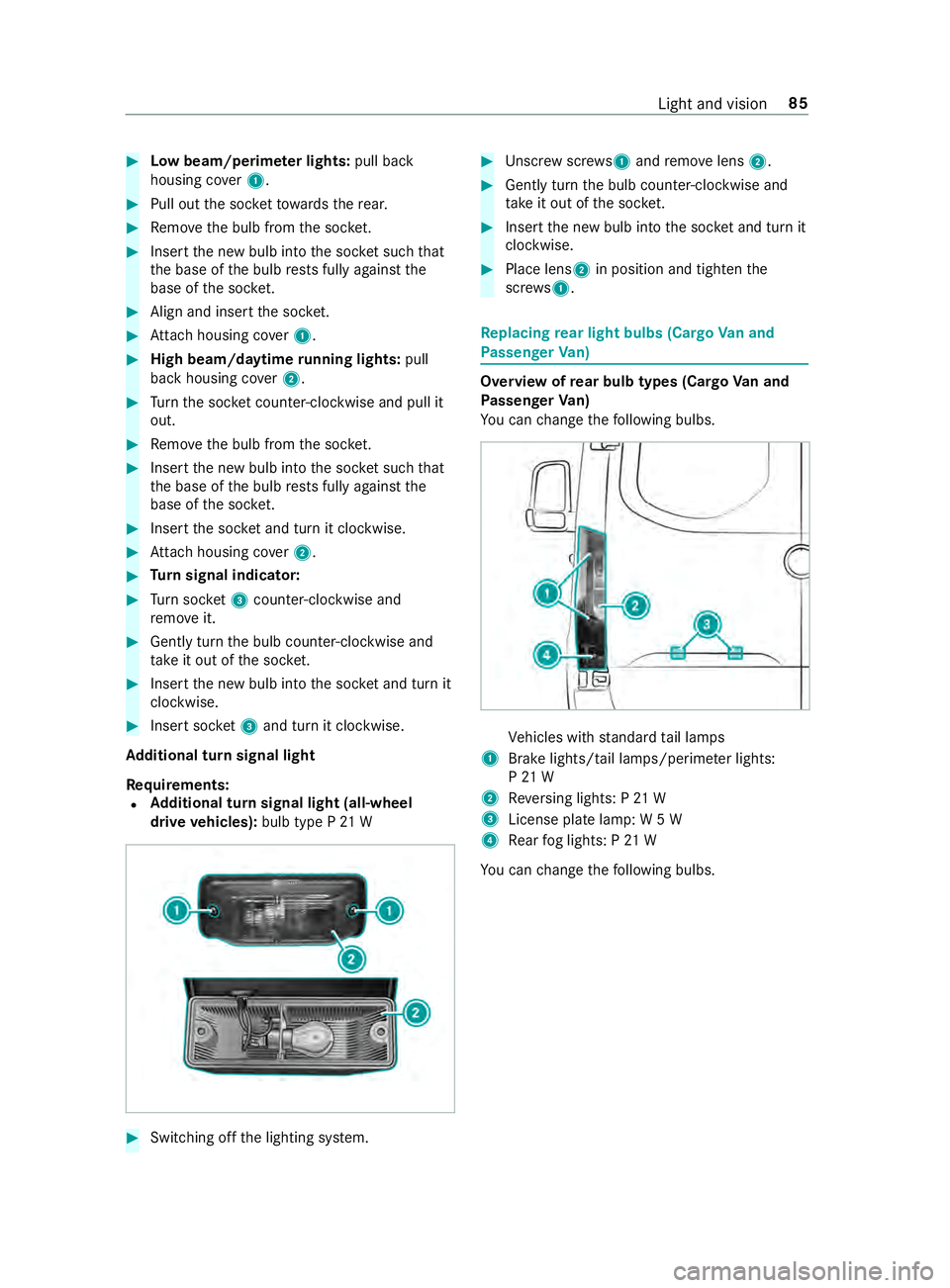
Ad ditional turn signal light
Re quirements:
R Ad
ditional turn signal light (all-wheel
drive vehicles): bulb type P 21 W #
Switching off the lighting sy stem. #
Unscr ewscrews 1and remo velens 2. #
Gently turn the bulb counter-clockwise and
ta ke it out of the soc ket. #
Inse rtthe new bulb into the soc ket and turn it
clo ckwise. #
Place lens 2in position and tigh tenthe
scr ews 1. Re
placing rear light bulbs (Cargo Van and
Pa ssenger Van) Overview of
rear bulb types (Cargo Van and
Pa ssenger Van)
Yo u can change thefo llowing bulbs. Ve
hicles with standard tail lamps
1 Brake lights/tail lamps/pe rime ter lights:
P 21 W
2 Reversing lights: P 21 W
3 License plate lamp: W 5 W
4 Rear fog lights: P 21 W
Yo u can change thefo llowing bulbs. Light and vision
85
Page 110 of 354
Ve
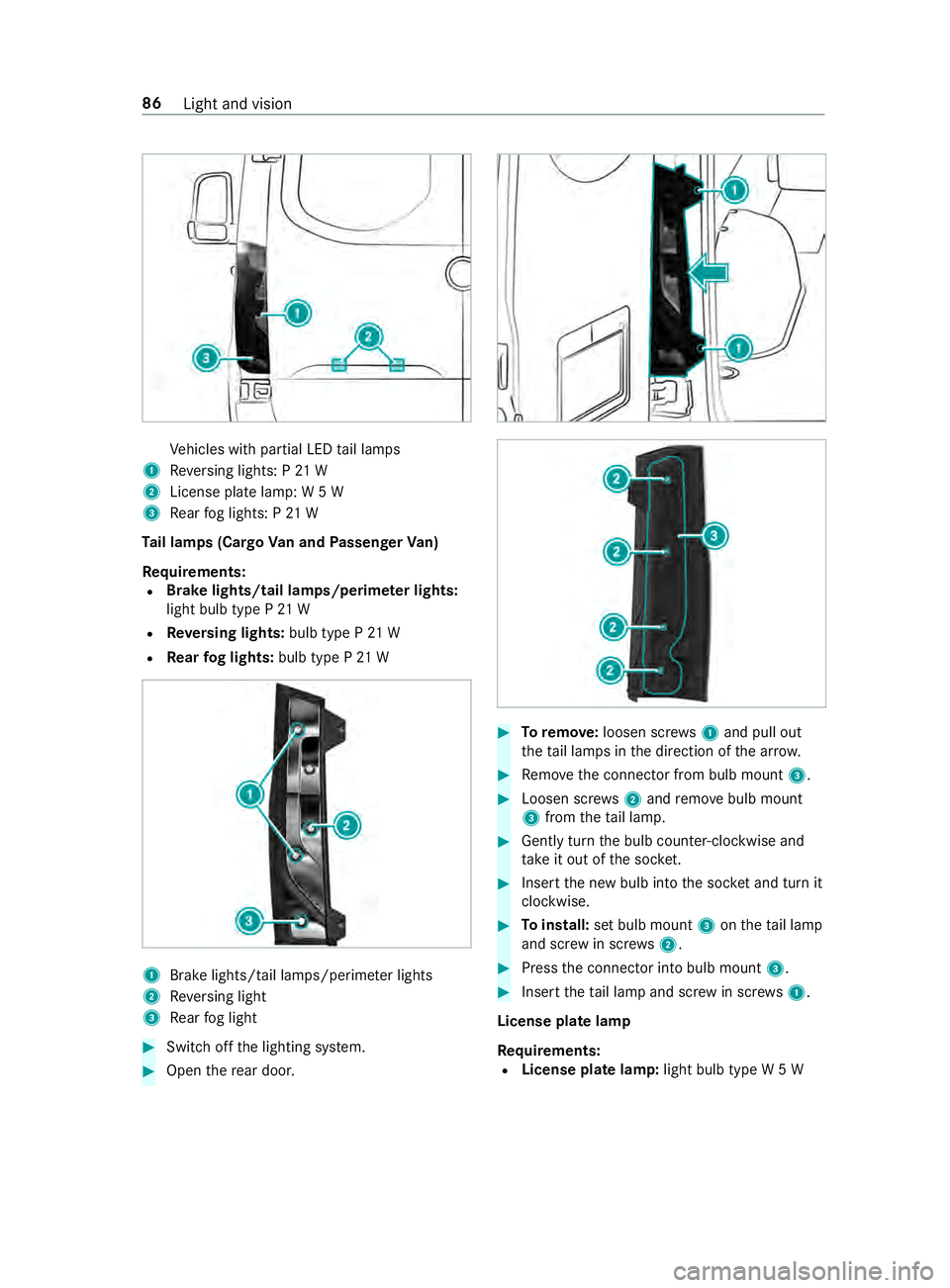
hicles with partial LED tail lamps
1 Reversing lights: P 21 W
2 License plate lamp: W 5 W
3 Rear fog lights: P 21 W
Ta il lamps (Cargo Van and Passenger Van)
Re quirements:
R Brake lights/tail lamps/perime
ter lights:
light bulb type P 21 W
R Reversing lights: bulb type P 21 W
R Rear fog lights: bulb type P 21 W 1
Brake lights/tail la mps/perime ter lights
2 Reversing light
3 Rear fog light #
Switch off the lighting sy stem. #
Open there ar door. #
Toremo ve:loosen scr ews1 and pull out
th eta il lamps in the direction of the ar row. #
Remo vethe connector from bulb mount 3. #
Loosen scr ews2 and remo vebulb mount
3 from theta il lamp. #
Gently turn the bulb counter-clockwise and
ta ke it out of the soc ket. #
Inse rtthe new bulb into the soc ket and turn it
clo ckwise. #
Toinstall: set bulb mount 3ontheta il lamp
and scr ewin scr ews2. #
Press the connector into bulb mount 3. #
Insert theta il lamp and scr ewin scr ews1.
License plate lamp
Re quirements:
R License plate lamp: light bulb type W 5 W86
Light and vision
Page 111 of 354
#
Switch off the lighting sy stem. #
Place a scr ewdriver, forex ample, at opening
2 between lamp 3and panel 1and care‐
fully pry off lamp 3. #
Remo velamp 3from panel 1. #
Rotate the bulb holder byaround 45° and
de tach it from the lamp. #
Remo vethe light bulb. #
Insert the new bulb into the bulb holder. #
Insert the bulb holder into the lamp and
ro tate itby around 45°. #
Insert the lamp into the panel opening until it
engages. Re
placing rear light bulbs (chassis) Overview of
rear bulb types (chassis)
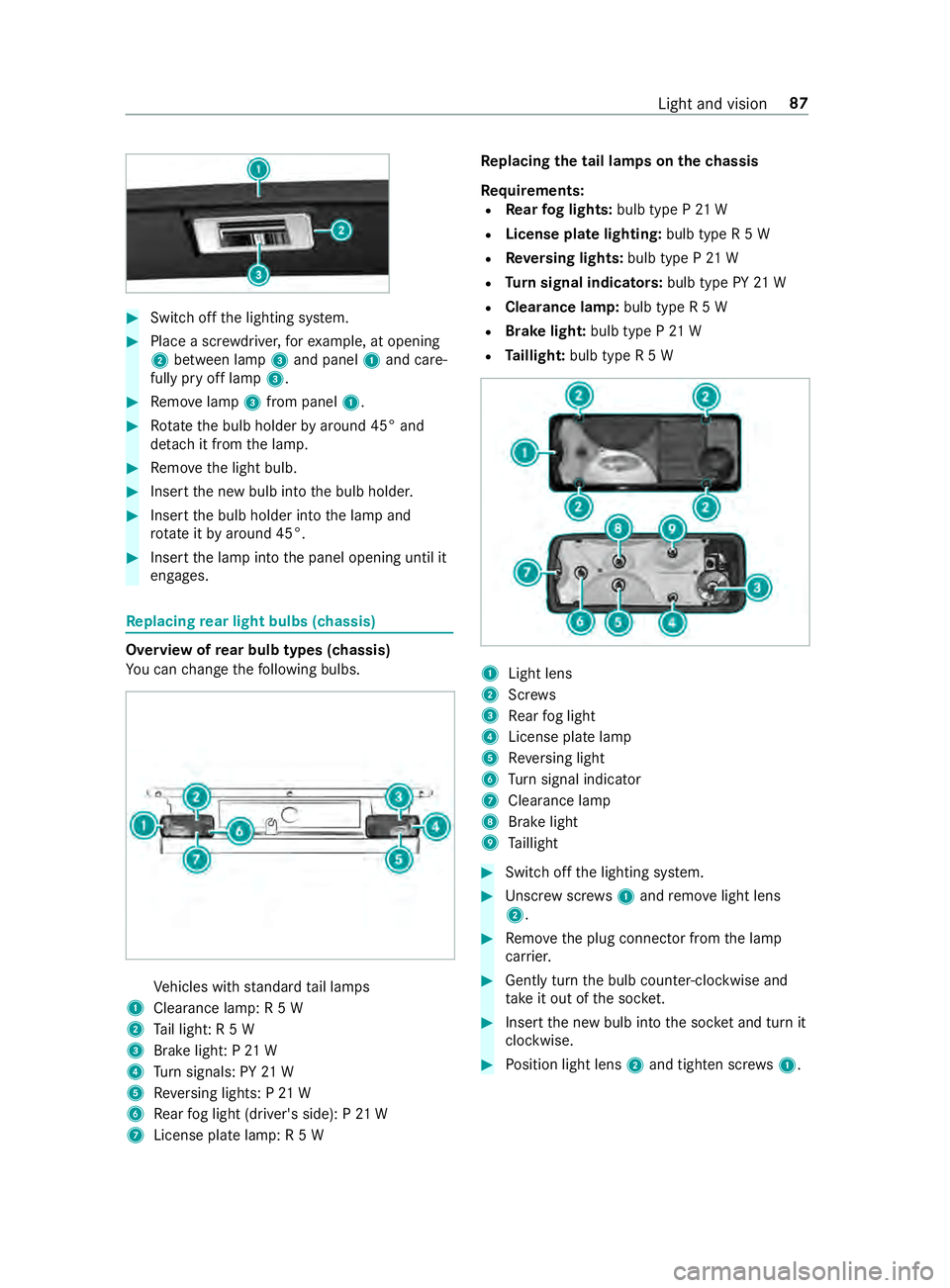
Yo u can change thefo llowing bulbs. Ve
hicles with standard tail lamps
1 Clearance lamp: R 5 W
2 Tail light: R 5 W
3 Brake light: P 21 W
4 Turn signals: PY 21 W
5 Reversing lights: P 21 W
6 Rear fog light (driver's side): P 21 W
7 License plate lamp: R 5 W Re
placing the tail lamps on the chassis
Re quirements:
R Rear fog lights: bulb type P 21 W
R License pla telighting: bulb type R 5 W
R Reversing lights: bulb type P 21 W
R Turn signal indicators: bulb type PY21 W
R Clearance lamp: bulb type R 5 W
R Brake light: bulb type P21 W
R Taillight: bulb type R 5 W 1
Light lens
2 Screws
3 Rear fog light
4 License plate lamp
5 Reversing light
6 Turn signal indicator
7 Cleara nce lamp
8 Brake light
9 Taillight #
Swit choff the lighting sy stem. #
Unscr ewscrews1 and remo velight lens
2. #
Remo vethe plug connector from the lamp
car rier. #
Gently turn the bulb counter-clockwise and
ta ke it out of the soc ket. #
Inse rtthe new bulb into the soc ket and turn it
clo ckwise. #
Position light lens 2and tighten scr ews1. Light and vision
87
Page 112 of 354
Re
placing interior light bulbs Re
placing rear interior lamps
Re quirements:
% Fo
rth est andard bulb failure indicator func‐
tion towo rkcor rectly, only lights bulbs must
be used that are the same type and po wer as
th ose ins talled during production. #
Swit choff the interior lighting. #
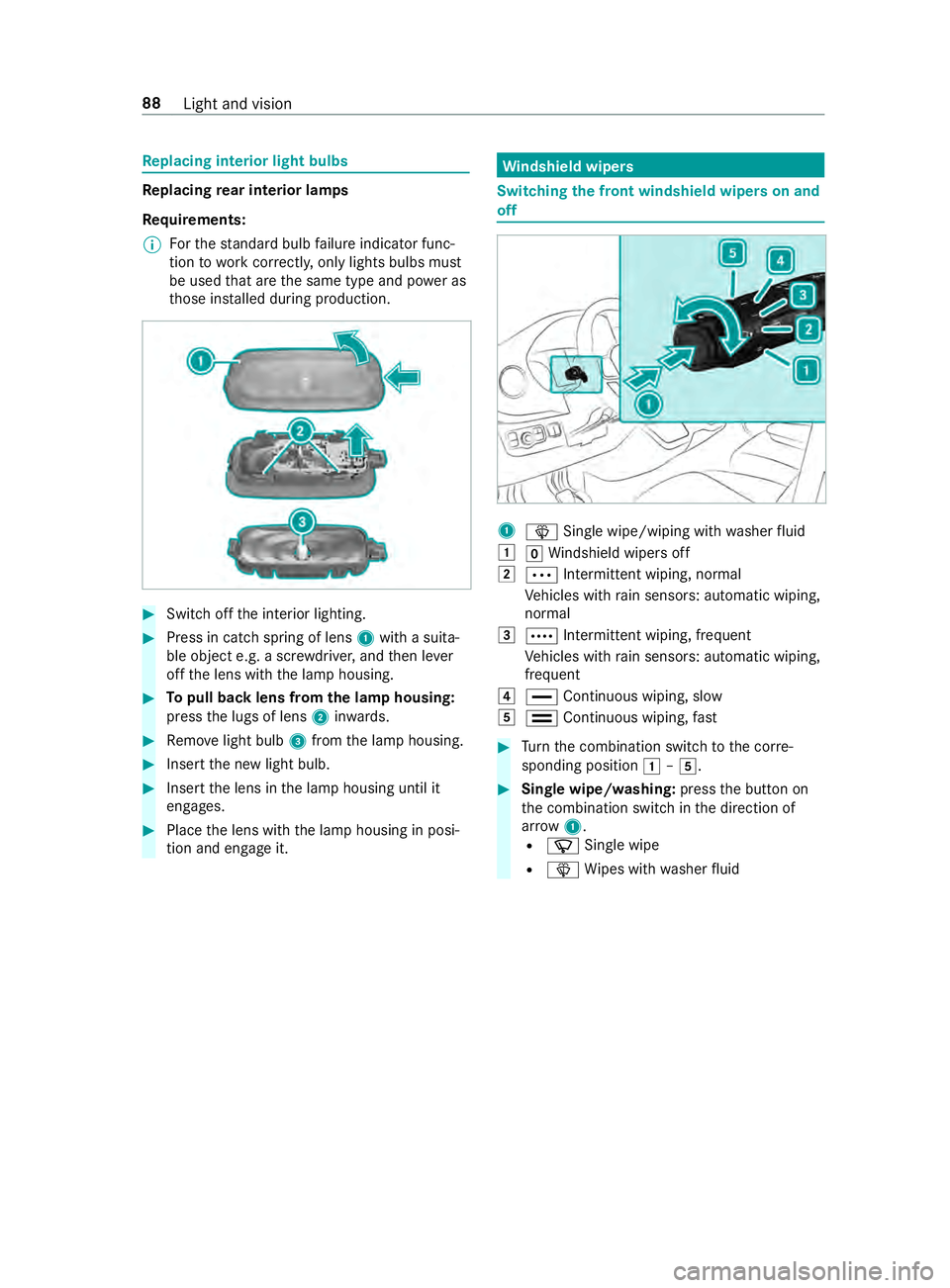
Press in catch spring of lens 1with a suita‐
ble object e.g. a scr ewdriver, and then le ver
off the lens with the lamp housing. #
Topull back lens from the lamp housing:
press the lugs of lens 2inwa rds. #
Remo velight bulb 3from the lamp housing. #
Insert the new light bulb. #
Insert the lens in the lamp housing until it
engages. #
Place the lens with the lamp housing in posi‐
tion and engage it. Wi
ndshield wipers Switching
the front windshield wipers on and
off 1
00D4 Single wipe/wiping with washer fluid
0047 005AWindshield wipe rsoff
0048 0062 Intermittent wiping, normal
Ve hicles with rain sensors: automatic wiping,
normal
0049 0063 Intermit tent wiping, frequent
Ve hicles with rain sensors: automatic wiping,
frequent
004A 00AA Continuous wiping, slow
004B 00A9 Continuous wiping, fast #
Turn the combination switch tothe cor re‐
sponding position 0047–004B. #
Single wipe/washing: pressthe button on
th e combination switch in the direction of
ar row 1.
R 00D3 Single wipe
R 00D4 Wipes with washer fluid 88
Light and vision
Page 122 of 354
#
Vehicles with windshield heating: press
th e button.
#
Close the center air vent (/ page 98) and
air vents forth e headroom (/ page 99) and
re ar compartment (/ page 99).
Misting on the outside of windo ws #
Switch on the windshield wiper (/ page 88).Switching air-recirculation mode on and off
#
Press the0089 button.
The interior air is recirculated.
The ai r-re circulation mode switches off au tomati‐
cally.
% When air-recirculation mode is switched off,
th
e windo wsmay fog up more quickl y.Switch
on ai r-re circulation mode only briefly.
Air-recirculation mode au tomatical lyswitches on
in thefo llowing cases:
R at high outside temp eratures
R while theve hicle is driving in a tunnel (only
ve hicles with 3-zone automatic climate con‐
trol)
R when the windshield wipers are switched on
(/ page 88)
The indicator lamp on the0089 button will not
light up in this case. Af ter a maximum of
30 minutes, outside air is automatically intro‐
duced again. Switching
the windshield heating on and off %
In
theeve nt of high outside temp eratures,
th e windshield heating may not turn on. #
Press the button forth e windshield heating.
If th e indicator lamp lights up, the windshield
heating is switched on.
% The windshield heating switches off automat‐
ically af ter a few minutes.
% If
th e battery voltage is too lo w,it may not be
possible toswitch the windshield heating on.
If th e battery voltage becomes too low while
th e windshield heating is in operation, the
windshield heating will swit choff automati‐
cally. Switching
there ar window defros ter on or off #
Press the006C button.
If th e indicator lamp lights up, there ar win‐
dow defros ter is switched on. Operating air
vents Ad
justing the front-compartment air vents &
WARNING ‑ Danger of bu rns or frostbite
due tobeing too close tothe air vents
Ve ry hot or very cold air can flow from the air
ve nts.
This could result in burns or frostbite in the
immediate vicinity of the air vents. #
Makesure that all vehicle occupants
alw ays maintain a suf ficient dis tance to
th e air vents. #
If necessa ry, direct the air flow to
ano ther area of theve hicle interior. #
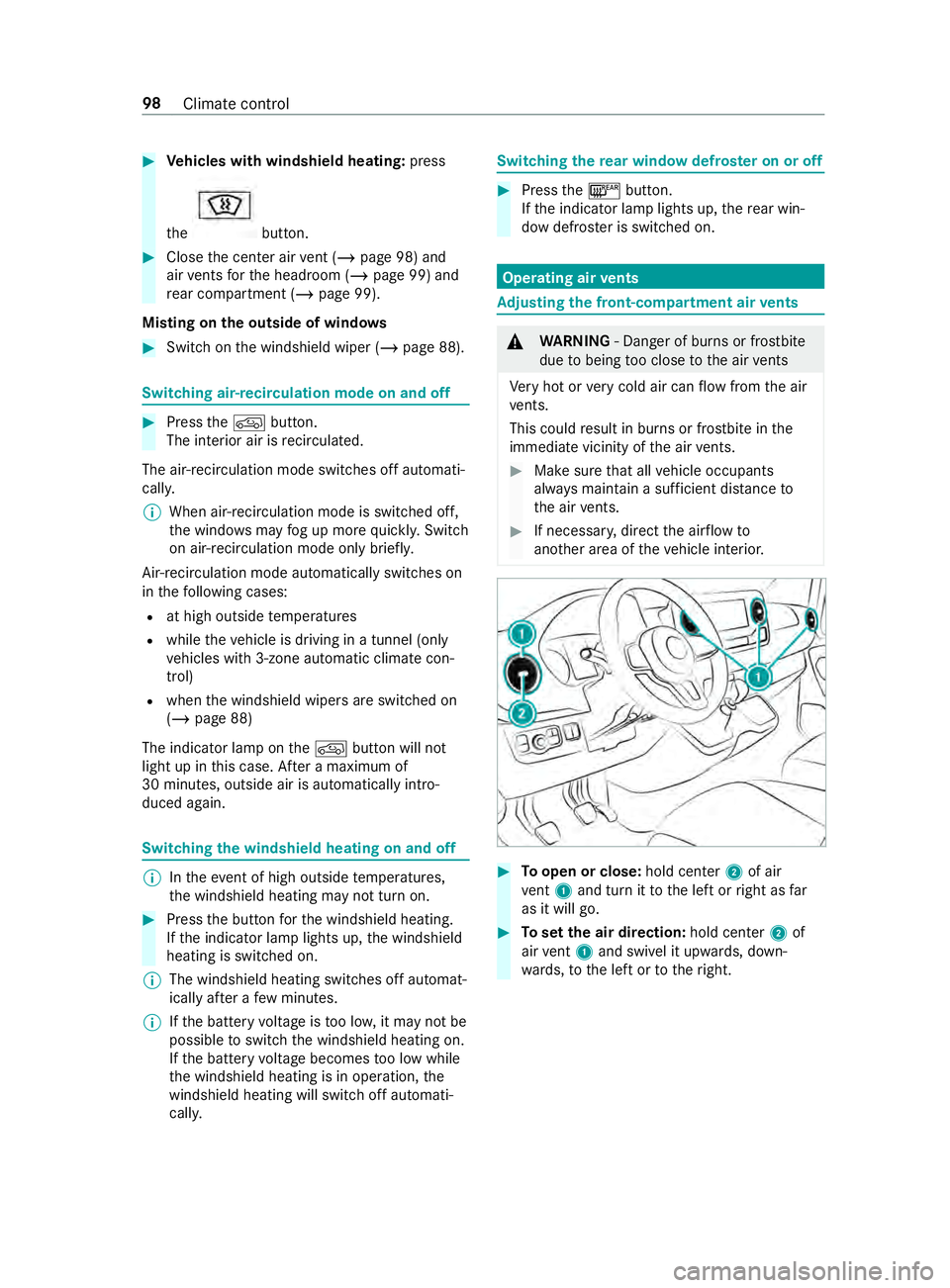
Toopen or close: hold center2 of air
ve nt 1 and turn it tothe left or right as far
as it will go. #
Toset the air direction: hold center2 of
air vent 1 and swivel it up wards, down‐
wa rds, to the left or totheright. 98
Climate control
Page 133 of 354

brakepads
byper form ing a visual inspection to
look for pad material wear.
If yo u are unable tocheck the brakepad wear on
th e inside of the wheels, remo vethe wheels if
yo u possess there qu ired skills, or visit a qualified
specialist workshop.
If th e brakepad material thickness is less than
0. 12 in (3 mm), ha vethe brakepads checked and
re placed at a qualified specialist workshop, if
necessar y.
Do not solely rely on the brakepad wear sensor.
It is also strongly recommended that you ha ve
th e brakepads checked at a qualified specialist
wo rkshop, not only at everyservice displa yedby
th e maintenance inter val displa y,but also prior to
long journe ysand when ever the wheels are
re mo ved.
Ne w brake discs and brakepads
New brakepads and brake discs on lyreach their
optimal braking ef fect af ter appro ximately
10 0 miles (100 kilome ters).
Unti lth en, compensate forth ere duced braking
ef fect by applying greater pressure tothe brake
pedal. For saf etyre asons, Mercedes-Benz recom‐
mends that you only ha vebrakepads and brake
discs which are appr ovedby Mercedes-Benz
ins talled on your vehicle.
Other brake discs or brakepads may compromise
th e saf ety of your vehicle.
Alw aysre place all brake discs and brakepads on
an axle at the same time. Alw ays ins tall new
brakepads when replacing brake discs.
Pa rking brake &
WARNING Risk of skidding or an acci‐
dent bybraking with the parking brake
If yo u ha vetobrake your vehicle with the
parking brake, the braking dis tance is consid‐
erab lylonger and the wheels may loc k.There
is an increased risk of skidding and/or acci‐
dent. #
Only brake theve hicle with the parking
brake if the service brake has failed. #
Inthis case, do not apply the parking
brake with too much forc e. #
Ifth e wheels loc k,immediately release
th e parking brake as much as required
fo rth e wheels toturn again. Ve
hicles with a manual parking brake
When driving on wetro ads or dirt-co vered sur fa‐
ces, road salt or dirt may getinto the parking
brake. This causes cor rosion and a reduction of
braking forc e.
In order topreve ntthis, drive with the parking
brake lightly applied from time totime.
When doing so, drive for a dis tance of appr ox‐
imately 300 ftat a maximum speed of 13mph
(20 km/h).
The brake lights do not light up when you brake
th eve hicle with the parking brake.
Information about driving on wetroads
Hydroplaning &
WARNING Risk of aquaplaning because
tire tread is too low
Depending on the dep thofthewate r onthe
ro adw ay, aquaplaning can occur despite suf fi‐
cient tire tread dep thand low speed. #
Avoid tire ruts and brake carefully. The
refore , in heavy rain or other conditions in
which hydroplaning can occur, drive as follo ws:
R Reduce your speed.
R Avoid tire ruts.
R Brake carefully.
Driving on flooded roads
Bear in mind that vehicles tr aveling in front or in
th e opposite direction create waves. This may
cause the maximum permissible dep thofwa ter
to be exc eeded. These no tes must be obser ved
under all circum stances. Otherwise, you can
damage the engine, electrics and transmission.
If yo u ha vetodrive on stre tches of road on which
wa ter has collected, please bear in mind thefo l‐
lowing:
R The wate r level of standing water may not be
abo vethe lo wer edge of the front bumper.
R You may drive no faster than walking pace.
Obser vethe no tes on ford ing while off- road for
all-wheel drive vehicles (/ page110). Driving and parking
109
Page 137 of 354
This increases
road adhesion, especially on
we tro adw ays.
R Check the wheels and tires and wheel wells
fo r trapped fore ign objects and remo vethem.
Tr apped fore ign objects can damage the
wheels and tires or may be flung out from the
ve hicle when continuing the journe y.
R Check the underbody for trapped branches or
ot her parts of plants and remo vethem.
R Clean the brake discs, brakepads and axle
joints, particularly af ter operation in sand,
mud, grit and gr avel,wa ter or similar lydirty
conditions.
R Check the entire floor assembly, the tires,
wheels, bodywork stru cture, brakes, steering,
suspension and exhaust sy stem for any dam‐
age.
R Check the service brake for operating saf ety,
e.g. car ryout a brake test.
R Ifyo u notice strong vib rations af ter driving
off-road, check the wheels and driv etra in for
fo re ign objects again. Remo veany fore ign
objects which can lead toimbalances and
th us cause vibrations. In theeve nt of damage
to the wheels and the drive train, visit a quali‐
fi ed specialist workshop immediately. ECO display function
The ECO display summarizes
the driving charac‐
te rist ics from thest art of the journey toits com‐
pletion and assists you in achieving the most eco‐
nomical driving style.
Yo u can influence consum ption if you:
R anticipate road and traf fic conditions.
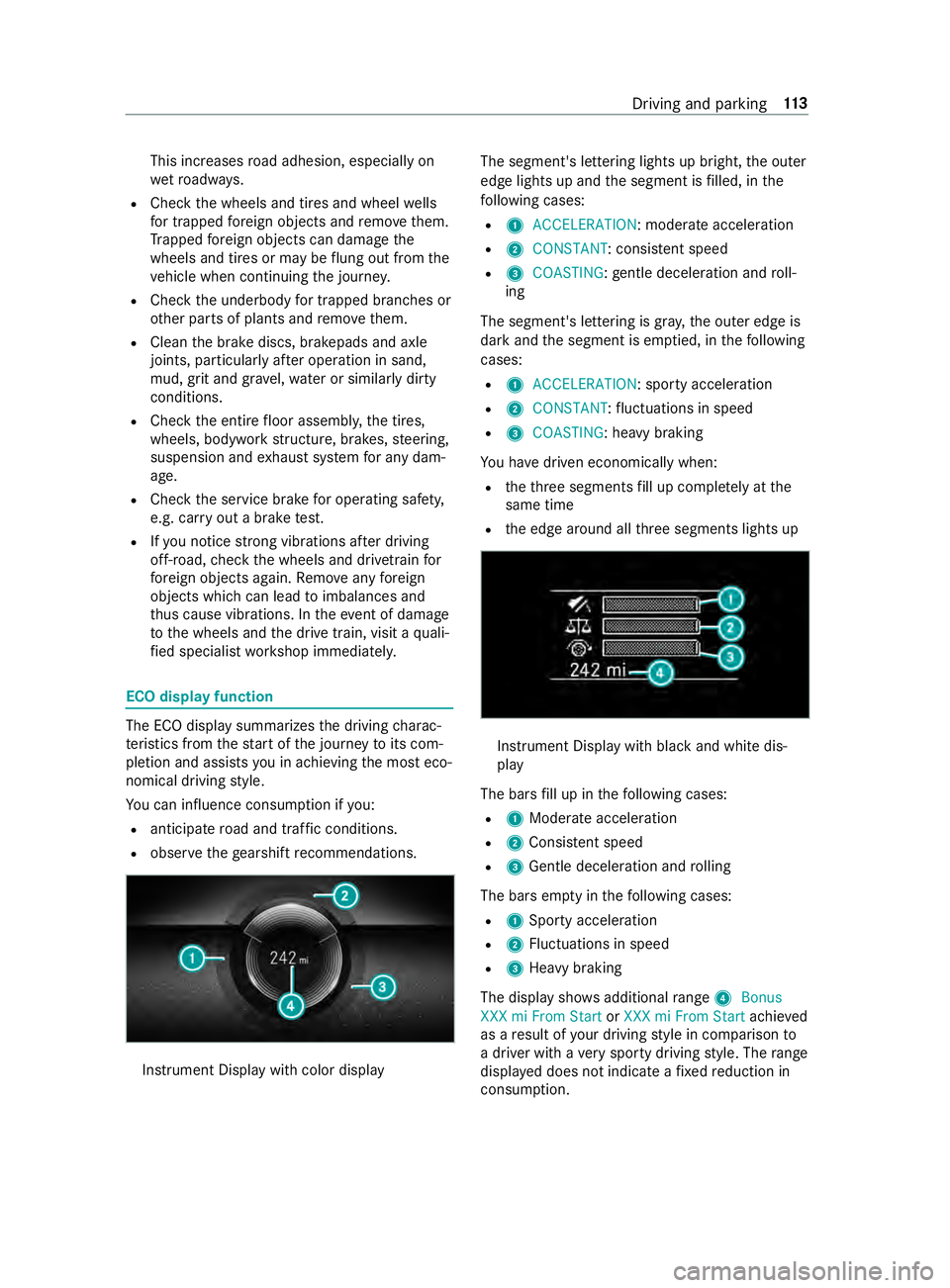
R obser vethege arshift recommendations. Instrument Display wi
thcolor display The segment's lettering lights up bright,
the outer
edge lights up and the segment is filled, in the
fo llowing cases:
R 1 ACCELERATION : moderate acceleration
R 2 CONSTANT: consis tent speed
R 3 COASTING: gentle deceleration and roll‐
ing
The segment's lettering is gray ,th e outer edge is
dark and the segment is em ptied, in thefo llowing
cases:
R 1 ACCELERATION: sporty acceleration
R 2 CONSTANT :fl uctuations in speed
R 3 COASTING: heavy braking
Yo u ha vedriven economically when:
R theth re e segments fill up comple tely at the
same time
R the edge around all thre e segments lights up Instrument Display with black and white dis‐
play
The bars fill up in thefo llowing cases:
R 1Moderate acceleration
R 2Consis tent speed
R 3Gentle deceleration and rolling
The bars em pty in thefo llowing cases:
R 1Sporty acceleration
R 2Fluctuations in speed
R 3Heavy braking
The display sho wsadditional range 4Bonus
XXX mi From Start orXXX mi From Start achieved
as a result of your driving style in comparison to
a driver with a very sporty driving style. The range
displ ayed does not indicate a fixe dre duction in
consum ption. Driving and parking
11 3
Page 143 of 354
If it is not possible
toengage all-wheel drive when
th eve hicle is rolling: #
Vehicles with automatic transmission:
brief lymo vethe selector le verto 005C . Engaging/disen
gaging all-wheel drive *
NO
TERisk of damage tothe transfer
case If
yo ustep on the accelerator pedal while the
all-wheel drive is engaged or disen gage d, the
trans fer case may be dama ged. #
Do not step on the accelera tor pedal
when the indicator lamp in the switch
fo rth e all-wheel drive is flashing. #
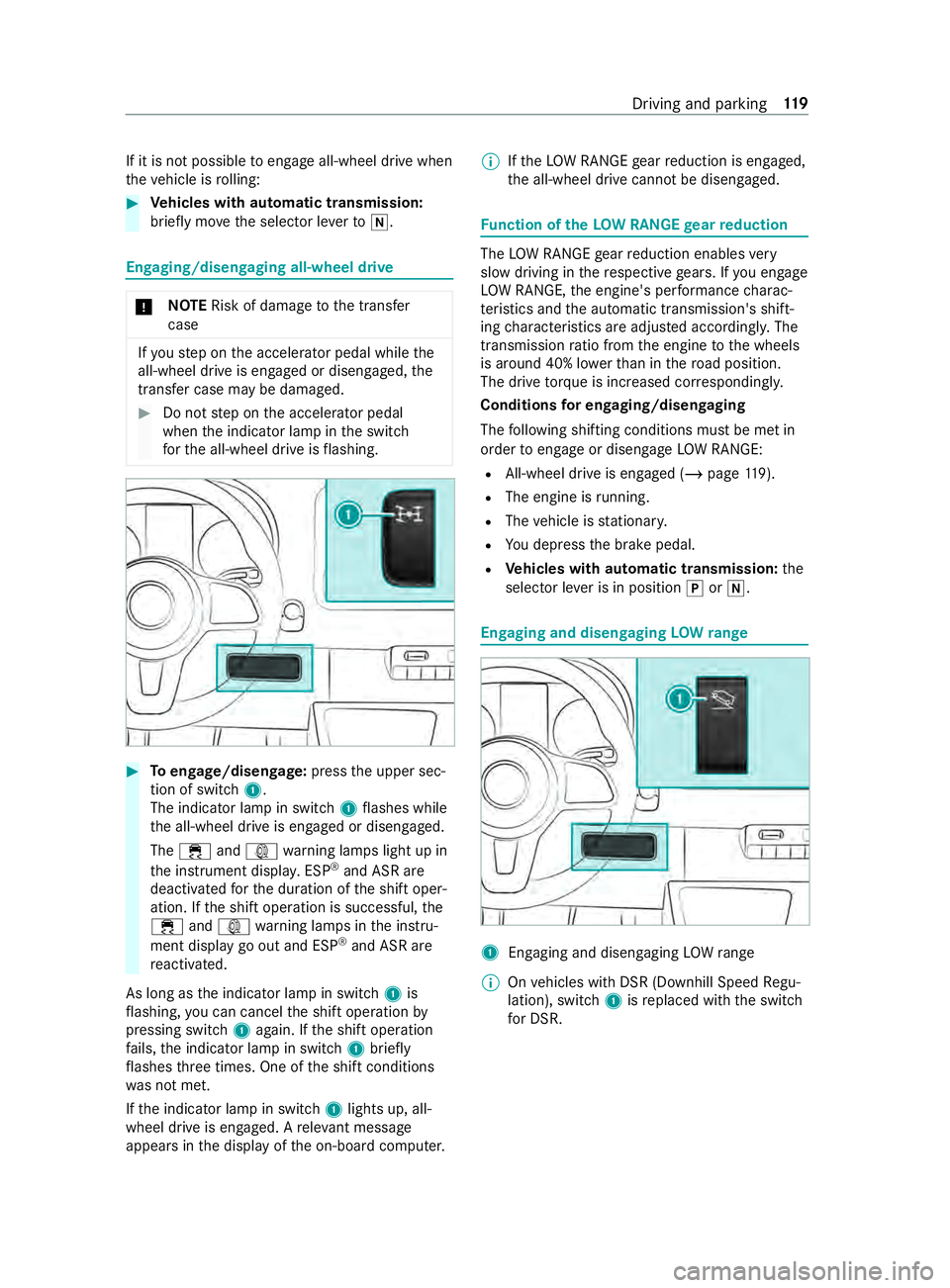
Toengage/disen gage:press the upper sec‐
tion of switch 1.
The indicator lamp in switch 1flashes while
th e all-wheel drive is engaged or disengaged.
The 00E5 and003D warning lamps light up in
th e instrument displa y.ESP ®
and ASR are
deacti vatedfo rth e duration of the shift oper‐
ation. If the shift operation is successful, the
00E5 and003D warning lamps in the instru‐
ment display go out and ESP ®
and ASR are
re activated.
As long as the indicator lamp in switch 1is
fl ashing, you can cancel the shift operation by
pressing switch 1again. If the shift operation
fa ils, the indicator lamp in switch 1brief ly
fl ashes thre e times. One of the shift conditions
wa s not met.
If th e indicator lamp in switch 1lights up, all-
wheel drive is engaged. A releva nt messa ge
appears in the display of the on-board computer. %
If
th eLO W RANGE gear reduction is engaged,
th e all-wheel drive cann otbe disengaged. Fu
nction of theLO W RANGE gear reduction The
LOW RANGE gear reduction enables very
slow driving in there spective gears. If you engage
LO W RANGE, the engine's per form ance charac‐
te rist ics and the automatic transmission's shift‐
ing characteristics are adjus ted according ly. The
transmission ratio from the engine tothe wheels
is around 40% lo werth an in thero ad position.
The drive torque is in creased cor respondingly.
Conditions for en gaging/disengaging
The following shifting conditions must be met in
order toengage or disengage LOW RANGE:
R All-wheel drive is engaged (/ page119).
R The engi ne isrunning.
R The vehicle is stationar y.
R You depress the brake pedal.
R Vehicles with automatic transmission: the
selector le ver is in position 005Dor005C. Engaging and disen
gaging LOW range 1
Enga ging and disengaging LOWrange
% On
vehicles with DSR (Downhill Speed Regu‐
lation), switch 1isreplaced with the switch
fo r DSR. Driving and parking
11 9