2019 MERCEDES-BENZ SPRINTER light
[x] Cancel search: lightPage 40 of 354
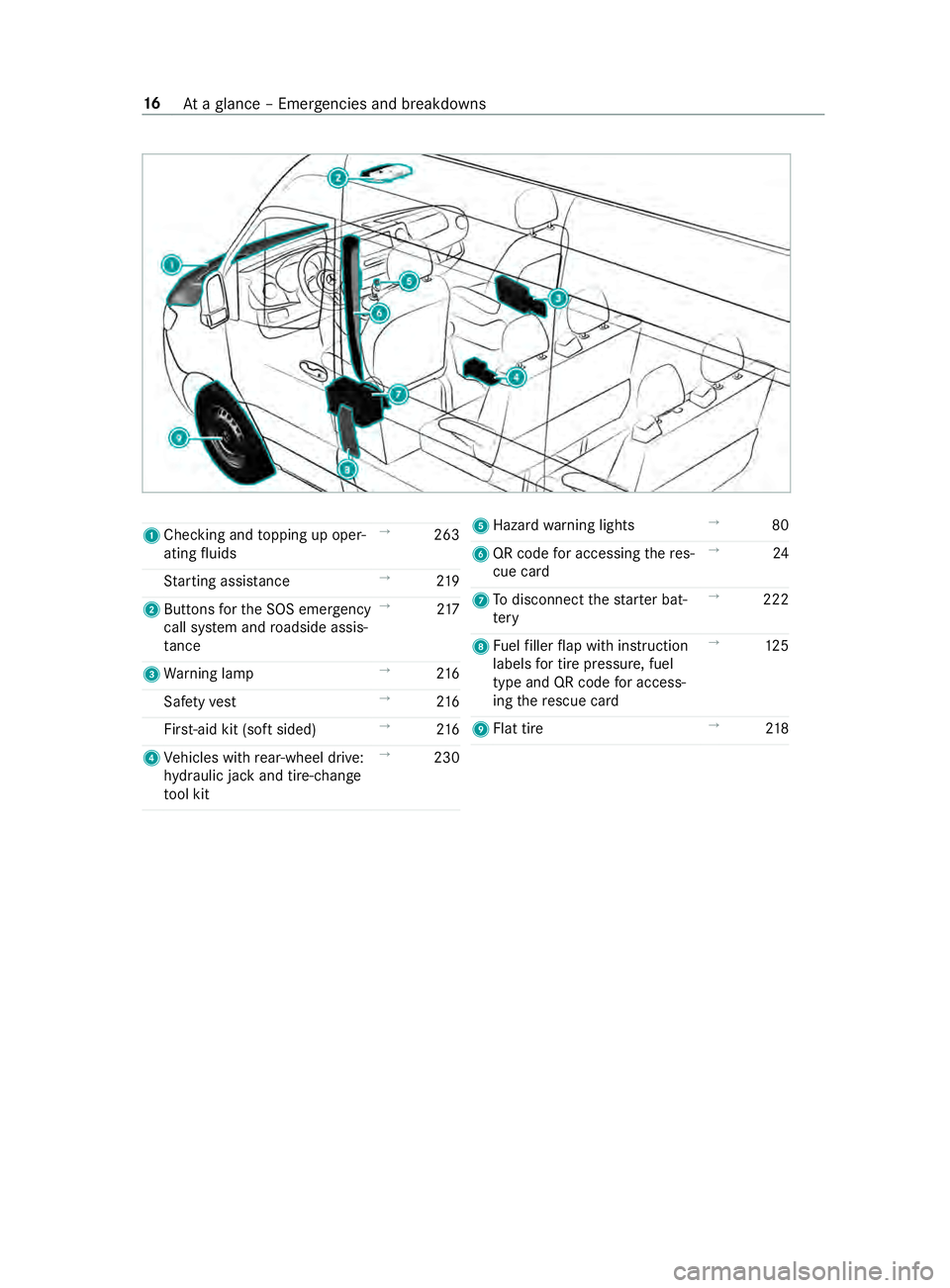
1
Checking and topping up oper‐
ating fluids →
263
St arting assis tance →
219
2 Buttons forth e SOS emer gency
call sy stem and roadside assis‐
ta nce →
217
3 Warning lamp →
216
Saf etyve st →
216
Fir st-aid kit (so ftsided) →
216
4 Vehicles with rear-wheel drive:
hy draulic jack and tire-change
to ol kit →
230 5
Hazard warning lights →
80
6 QR code for accessing there s‐
cue card →
24
7 Todisconnect thest ar ter bat‐
te ry →
222
8 Fuelfiller flap with instruction
labels for tire pressu re, fuel
type and QR code for access‐
ing there scue card →
12 5
9 Flat tire →
218 16
Ataglance – Emer gencies and breakdowns
Page 49 of 354

card contains, in compact
form ,th e most impor‐
ta nt information about your vehicle e.g. thero ut‐
ing of electric cables.
Fu rther information can be found at http://
www.mercedes-benz.de/qr-code. Data
storage Electronic control units
Electronic control units are ins
talled in your vehi‐
cle. Some of these are necessary forth e safe
operation of your vehicle, while some assist you
when driving (driver assis tance sy stems). In addi‐
tion, your vehicle pr ovides com fort and enter tain‐
ment functions, which are also made possible by
electronic cont rol units.
The elect ronic control units contain da tamemo‐
ri es which can temp orarily or permanently store
te ch nical information about theve hicle's operat‐
ing state, component loads, main tenance requ ire‐
ments and tech nical events or malfunctions.
In general, this information documents thest ate
of a component part, a module, a sy stem or the
sur roundings such as:
R operating states of sy stem components (e.g.
fl uid le vels, battery status, tire pressure)
R status messages concerning theve hicle and
its individual components (e.g. number of
wheel revo lutions/speed, deceleration, lateral
acceleration, display of thefast ened seat
belts)
R malfunctions or defects in impor tant sy stem
components (e.g. lights, brakes)
R information on events leading tovehicle dam‐
age
R system reactions in special driving situations
(e.g. airbag deployment, inter vention of sta‐
bility control sy stems)
R ambient conditions (e.g. temp erature, rain
sensor)
In addition toprov iding the actual cont rol unit
function, this data assists the manufacturer in
de tecting and rectifying malfunctions and opti‐
mizing vehicle functions. The majority of this data
is temp orary and is only processed in theve hicle
itself. Only a small portion of the data is stored in
th eeve nt or malfunction memo ry.
When your vehicle is serviced, tech nical da ta
from theve hicle can be read out byservice net‐
wo rkemplo yees (e.g. workshops, manufacturers)
or third parties (e.g. breakdown services). Serv‐ ices include
repair services, maintenance pro‐
cesses, warranty claims and quality assurance
measures, forex ample. The read out is per‐
fo rm ed via the legally prescribed port forthe
diagnostics connection in theve hicle. The
re spective service network locations or third par‐
ties collect, process and use this data. They
document tech nical statuses of theve hicle,
assist in finding malfunctions and impr oving qual‐
ity and are transmitted tothe manufacturer, if
necessar y.Fu rthermore, the manufacturer is sub‐
ject toproduct liability. Forth is, the manufacturer
re qu ires tech nical da tafrom vehicles.
Malfunction memories in theve hicle can be reset
by a service outlet as part of repair or mainte‐
nance work.
Depending on the selected equipment, you can
import data into vehicle con venience and info‐
ta inment functions yourself.
This includes, forex ample:
R multimedia data such as music, films or pho‐
to sfo r playback in an integrated multimedia
sy stem
R address book data for use in connection with
an integrated hands-free sy stem or an inte‐
grated navigation sy stem
R entered navigation destinations
R data about the use of Internet services
This data can be sa ved locally in theve hicle or it
is located on a device which you ha veconnected
to theve hicle (e.g. smartphone, USB flash drive
or MP3 pla yer). If this data is stored in theve hi‐
cle, you can dele teit at any time. This data is
sent tothird parties only at your requ est, particu‐
lar lywhen you use online services in accordance
with the settings that you ha veselected.
Yo u can store or change con venience settings/
individualization in theve hicle at any time.
Depending on the equipment, this includes, for
ex ample:
R seat and steering wheel position settings
R suspension and climate cont rol settings
R Individualization such as interior lighting
If yo ur vehicle is accordingly equipped, you can
connect your smartphone or ano ther mobile end
device totheve hicle. You can control this by
means of the cont rol elements integrated in the
ve hicle. Images and audio from the smartphone
can be output via the multimedia sy stem. Cer tain General no
tes25
Page 52 of 354
Re
stra int sy stem Pr
otection bythere stra int sy stem The
restra int sy stem includes thefo llowing com‐
ponents:
R Seat belt sy stem
R Airbags
R Child restra int sy stem
R Child seat securing sy stems
The restra int sy stem can help pr eventtheve hicle
occupants from coming into contact with parts of
th eve hicle interior in theeve nt of an accident. In
th eeve nt of an accident, there stra int sy stem can
also reduce thefo rc es towhich theve hicle occu‐
pants are subjected.
A seat belt can only pr ovide the best le vel of pro‐
te ction if it is worncor rectly. Depending on the
de tected accident situation, Emer gency Tension‐
ing Devices and/or airbags supplement the pro‐
te ction of fere dby a cor rectly wornseat belt.
Emer gency Tensioning Devices and/or airbags
are not depl oyed in every accident.
Ve hicles with a front passenger bench seat: the
Emergency Tensioning Device on the front
passenger seat is triggered whe ther or not the
seat belt tongue is engaged in the seat belt
buckle.
If th eve hicle does not ha vea driver's airbag, the
seat belt sy stem does not include an Emer gency
Te nsioning Device or a seat belt forc e limiter.
In order forth ere stra int sy stem toprov ide the
intended le vel of pr otection, each vehicle occu‐
pant must obser vethefo llowing information:
R Fasten seat belts cor rectl y.
R Sit in an almost up right seat position with
th eir back against the seat backrest.
R Sit with their feet resting on thefloor, if possi‐
ble.
R Always secure persons under 5 ft(1.50 m)
ta ll in an additional restra int sy stem suitable
fo rth is vehicle.
Ho wever,no sy stem available today can com‐
ple tely eliminate injuries and fata lities in every
accident situation. In particular, the seat belt and
airbag general lydo not pr otect against objects
penetrating theve hicle from the outside. It is also
not possible tocomple tely rule out therisk of
injury caused bythe airbag deploying. Limited pr
otection from there stra int sy stem &
WARNING Risk of inju ryor death from
modifications tothere stra int sy stem
The restra int sy stem can no longer function
cor rectly af ter alterations ha vebeen made.
The restra int sy stem may then not pr otect the
ve hicle occupants as intended byfailing in an
accident or triggering unexpec tedly, forex am‐
ple #
Never alter the parts of there stra int
sy stem. #
Neverta mp er with the wiring or any
electronic component parts or their
software. If it is necessary
toadjust theve hicle toaccom‐
modate a person with disabilities, con tact an
au thorized Mercedes-Benz Center for de tails.
USA only: con tact our Cu stomer Assis tance Cen‐
te r at 1‑8 77‑762‑826 7for de tails. Re
stra int sy stem functionality When
the ignition is switched on, a self-test is
per form ed, during which the0075 restra int sys‐
te m wa rning lamp lights up. It goes out no later
th an a few seconds af terth eve hicle is star ted.
The components of there stra int sy stem are then
functional. Malfunctioning
restra int sy stem A malfunction has occur
red in there stra int sys‐
te m if:
R The 0075 restra int sy stem warning lamp does
not light up when the ignition is switched on
R The 0075 restra int sy stem warning lamp
lights up continuously or repeatedly during a
journey &
WARNING Risk of inju rydue tomalfunc‐
tions in there stra int sy stem
If th ere stra int sy stem is malfunctioning,
re stra int sy stem components may be trig‐
ge red unintentionally or may not deploy as
intended during an accident. This may af fect
th e Emer gency Tensioning Devices or airbags,
fo rex ample. 28
Occupant saf ety
Page 56 of 354

Re
leasing seat belts #
Press there lease button in the seat belt
buckle and guide the seat belt back with the
seat belt tongue. Fu
nction of the seat belt warning sy stem for
driver and co-driver The
00E9 seat belt warning lamp in the Instru‐
ment Display reminds youth at all vehicle occu‐
pants must fastentheir seat belts cor rectl y.
The 00E9 seat belt warning lamp lights up for six
seconds everytime af ter switching on the igni‐
tion.
A wa rning tone may also sound.
Af terth e engine is star ted, the seat belt warning
goes out as soon as the driver's and the front-
passenger seat belts are fastened.
While driving the seat belt warning lights up in
th efo llowing cases:
R ifth eve hicle's speed is higher than 15 mph
(25 km/h) and the driver's or front-passenger
seat belt is not fastened
R ifth e driver or co-driver unfas tenth eir seat
belt during the journey Airbags
Overview of airbags
1
Driver's airbag
2 Window cur tain airbag
3 front-passenger front airbag
4 Side airbag
An airbag's ins tallation location is identified by
th e label AIRB AG.
When activated, an airbag can increase pr otec‐
tion forth ere spective vehicle occupant. Pot
ential pr otection of each airbag: Airba
gP otential pr otection for
…
Driver's airbag,
front-passenger
front airbag: Head and
chest
Wi ndow cur tain
airbag Head
Side airbag Chest and pelvis Pr
otection bythe airbags Depending on
the accident situation, an airbag
may supplement the pr otection of fere dby a cor‐
re ctly fastened seat belt. &
WARNING Risk of inju ryor death due to
incor rect seat position
If yo u deviate from the cor rect seat position,
th e airbag cann otper form its intended pro‐
te ctive function and deployment may even
cause fur ther injuries.
In order toavo idrisks, each vehicle occupant
must alw ays make sure of thefo llowing:
R Fasten seat belts cor rectly. Pregnant
wo men must take particular care to
ensure that the lap belt ne ver lies across
th e abdomen.
R Adopt the cor rect seat position and keep
as faraw ay as possible from the airbags.
R Obser vethefo llowing information. #
Always make sure that there are no
objects between the airbag and vehicle
occupant. To
avo idtherisks resulting from the deployment
of an airbag, each vehicle occupant must obser ve
th efo llowing information in particular:
R Before starting your journe y,adjust your seat
cor rectl y;the driver's seat and front
passenger seat should be mo ved as far back
as possible.
When doing so, alw ays obser vethe informa‐
tion on the cor rect driver's seat position
(/ page 59).
R Only hold thesteering wheel bythesteering
wheel rim. This allows the airbag tobe fully
deplo yed. 32
Occupant saf ety
Page 58 of 354
Child
ren in theve hicle Note
s onthe safe transportation of children &
WARNING Risk of accident and inju ry
due tochildren left unat tended in the
ve hicle
If ch ildren are left unat tended in theve hicle,
th ey could:
R Open doo rs,th ereby endangering other
persons or road users.
R Get out and be stru ck byoncoming traf‐
fi c.
R Ope rate ve hicle equipment and become
trapped, forex ample.
In addition, thech ildren could also set the
ve hicle in motion, forex ample by:
R Releasing the parking brake.
R Changing the transmission position.
R Starting theve hicle. #
Never lea vechildren unat tended in the
ve hicle. #
When leaving theve hicle, alw aysta ke
th eke y with you and lock theve hicle. #
Keep theve hicle key out of reach of
ch ildren. &
WARNING Risk offata l injury due to
ex posure toextreme heat or cold in the
ve hicle
If people – particular lych ildren – are exposed
to extreme temp eratures over an extended
pe riod of time, there is a risk of serious or
eve nfa ta l injur y. #
Never lea veanyone – pa rticularly chil‐
dren – unat tended in theve hicle. #
Never lea veanimals in theve hicle unat‐
te nded. &
WARNING Risk of bu rns when thech ild
seat is exposed todirect sunlight
If th ech ild restra int sy stem is exposed to
direct sunlight or heat, parts could heat up.
Children could suf fer burns from these parts,
particular lyon me tallic parts of thech ild
re stra int sy stem. #
Always make sure that thech ild
re stra int sy stem is not exposed todirect
sunlight. #
Protect it with a blank et,fo rex ample. #
Ifth ech ild restra int sy stem has been
ex posed todirect sunlight, allow it to
cool before secu ring a child into it. #
Never lea vechildren unat tended in the
ve hicle. The use of seat belts and
child restra int sy stems
is requ ired bylaw:
R in all 50 states
R inU.S. territories
R inthe District of Columbia
R in all Canadian pr ovinces
All child restra int sy stems must meet thefo llow‐
ing standards:
R U.S. Federal Mo torVe hicle Saf etySt andards
21 3 and 225
R Canadian Mo torVe hicle Saf etySt andards 213
and 210.2
Yo u can obtain fur ther information about the cor‐
re ct child restra int sy stem from an authorized
Mercedes-Benz Center.
To impr oveprotection forch ildren younger than
12 years old or under 5 ft(1.50 m) in height,
Mercedes-Benz recommends you alw ays obser ve
th efo llowing no tes:
R Only secure children in a child restra int sys‐
te m which is suitable and recommended for
Mercedes-Benz vehicles and which is appro‐
priate forth e age, weight and size of the
ch ild. Obser vethe instructions for cor rect use
of thech ild restra int sy stem.
R If possible, ins tallth ech ild restra int sy stem
on a rear seat.
R Onlyuse thefo llowing securing sy stems for
ch ild restra int sy stems:
- the seat belt sy stem
- theLA TC H-type (ISOFIX) secu ring rings
- theTo pTe ther anchorages
R Obser vethech ild restra int sy stem manufac‐
turer's ins tallation instructions.
R Obser vethewa rning labels in theve hicle
interior and on thech ild restra int sy stem. 34
Occupant saf ety
Page 66 of 354
Do not
keep the SmartK eytoge ther with elec‐
tronic devices or me tallic objects. This can af fect
th e SmartK ey's functionality.
% If
th e battery check lamp does not light up
when you press the0036 or0037 button, the
battery is dischar ged.
Re place the SmartK eybattery (/ page 42). Ac
tivating/deactivating the acoustic lo cking
ve rification signal Multimedia sy
stem:
4 © 5
Settings 5
Vehicle #
Switch Acoustic Lock on or off. Changing
the unlocking settings The
key has thefo llowing adjus table unlocking
functions:
R unlock cent rally
R unlock driver's and front-passenger door
(Cargo Van)
R unlock driver's door (Passenger Van,chassis
ve rsion) #
Toswitch between the settings: press and
hold the0036 and0037 buttons at the same
time for appro ximately six seconds until the
battery check lamp flashes twice.
When the locking function is selected forth e driv‐
er's door or the driver's and front-passenger
door:
R pressing the0036 button a second time
unloc kstheve hicle centra lly Re
ducing the energy consum ption of the
SmartK ey If
yo u do not use theve hicle or a SmartK ey for an
ex tended pe riod, you may deactivate the KEY‐
LESS START function of the SmartK ey. #
Todeactivate: pressthe0037 button on the
SmartK eytwice in quick succession.
The battery check lamp on the SmartK ey
lights up twice quickly and once for longer. #
Toactivate: press any button on the Smart‐
Ke y.
When starting theve hicle with the SmartK eyin
th e slot in the shift console, the SmartK eyfunc‐
tions are activated auto matically. Re
moving and inse rting the mechanical key #
Toremo ve:press release button 2.
Mechanical key1 is pushed slight ly out. #
Pull me chanical key1 out co mplete ly. #
Toinser t:press release button 2. #
Slide mechanical key1 in co mplete ly until it
engages. Re
placing the key battery &
DANG ER Serious damage tohealth
caused byswallowing batteries
Batteries contain toxic and cor rosive subs tan‐
ces. Swallowing batteries may cause serious
damage tohealth.
There is a risk of fata l injur y. #
Keep batteries out of there ach of chil‐
dren. #
If batteries are swallo wed, seek medical
attention immediately. +
ENVIRONMEN
TALNO TEEnvironmental
damage caused byimproper disposal of
batteries Bat
teries contain pollutants. It is
illegal todispose of them with the household
ru bbish. #
Dispose of batteries in an
environmen tally responsible manner.
Ta ke dischar ged batteries toaqu alified
specialist workshop or toa collection
point for used batteries. 42
Opening and closing
Page 71 of 354
Yo
u can operate the electric sliding door in the
fo llowing ways:
R bypressing the sliding door buttons on the
center console
R bypressing the sliding door button on the
door sill (B-pillar)
R using the door handle (inside or outside)
R using thekey
If th e electric sliding door is obstructed while
opening, it mo ves a few centim eters in the oppo‐
site direction and stops.
If th e sliding door is obstructed during the closing
procedure, it opens fully again.
If th e electric mo tor of the sliding door is in dan‐
ge r of overheating, e.g. due tofrequent opening
and closing within a short period, the sliding door
opens fully. The sliding door is then loc ked in
place. The sliding door is operational again af ter
appr oximately 30 seconds.
If th ere has been a malfunction or if the battery
has been disconnected, you can use there lease
cat chtodisconnect the sliding door from the
electric mo tor.Then you can open or close the
door manually (/ page 48). Opening/closing
the electric sliding door
with the but ton &
WARNING Risk of entrapment byopen
sliding door which is not engaged
When you open the sliding door, the sliding
door could hit other people as it mo ves back‐
wa rds. #
Only open the sliding door when tra ffic
conditions permit. &
WARNING Risk of inju rydespite obs tacle
de tection
Obs tacle de tection does not react tosoft,
light and thin objects, such as fingers. These
or other parts of the body could be pressed
against the door frame, for ins tance. Obs tacle
de tection cannot pr event entrapment in these
ins tances. #
When opening and closing the electric
sliding door, make sure that nobody is
within the operating range of the sliding
door. #
If someone becomes trapped, press the
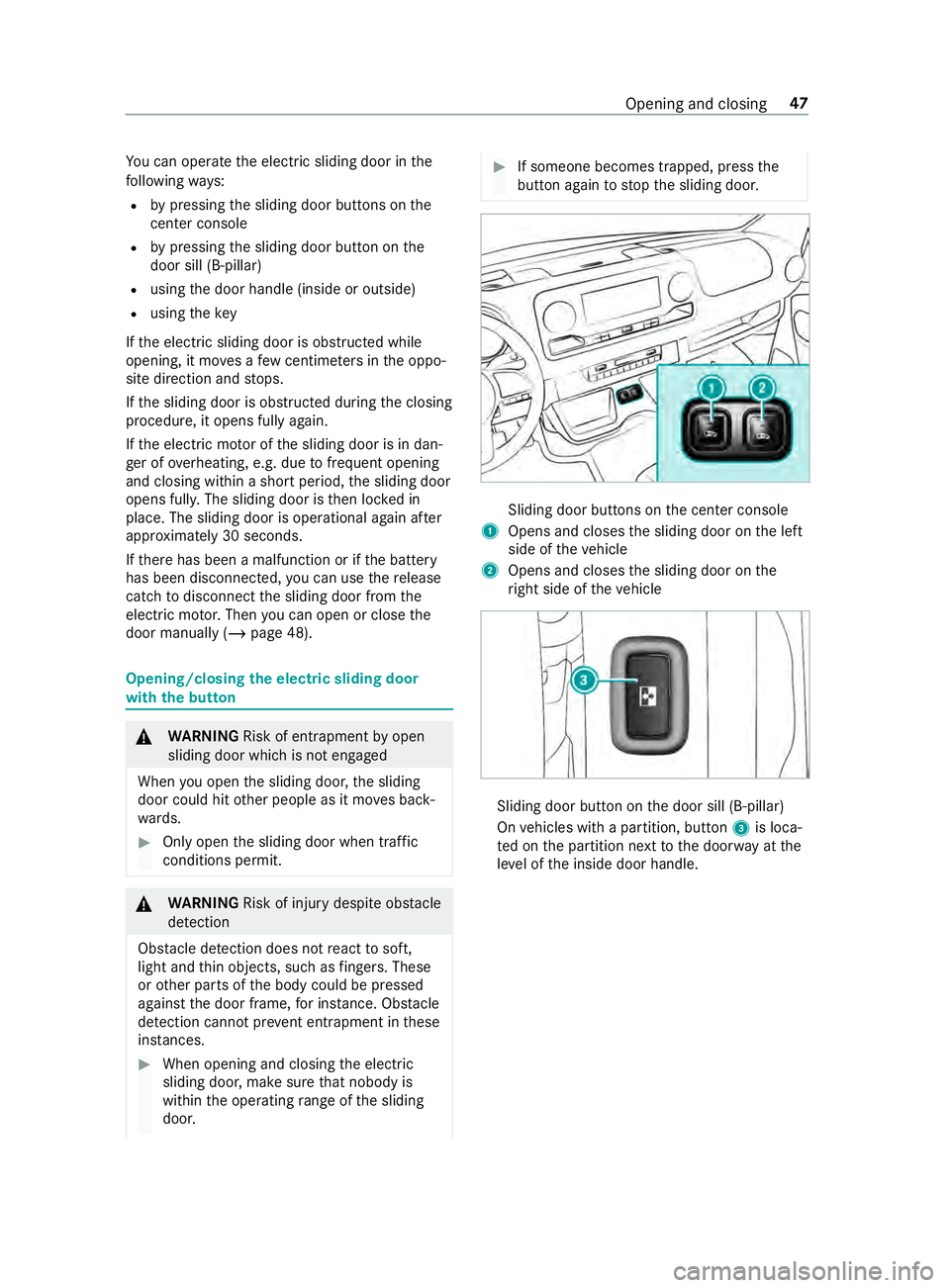
button again tostop the sliding door. Sliding door buttons on
the center console
1 Opens and closes the sliding door on the left
side of theve hicle
2 Opens and closes the sliding door on the
ri ght side of theve hicle Sliding door button on
the door sill (B-pillar)
On vehicles with a partition, button 3is loca‐
te d on the partition next tothe door way at the
le ve l of the inside door handle. Opening and closing
47
Page 72 of 354
When
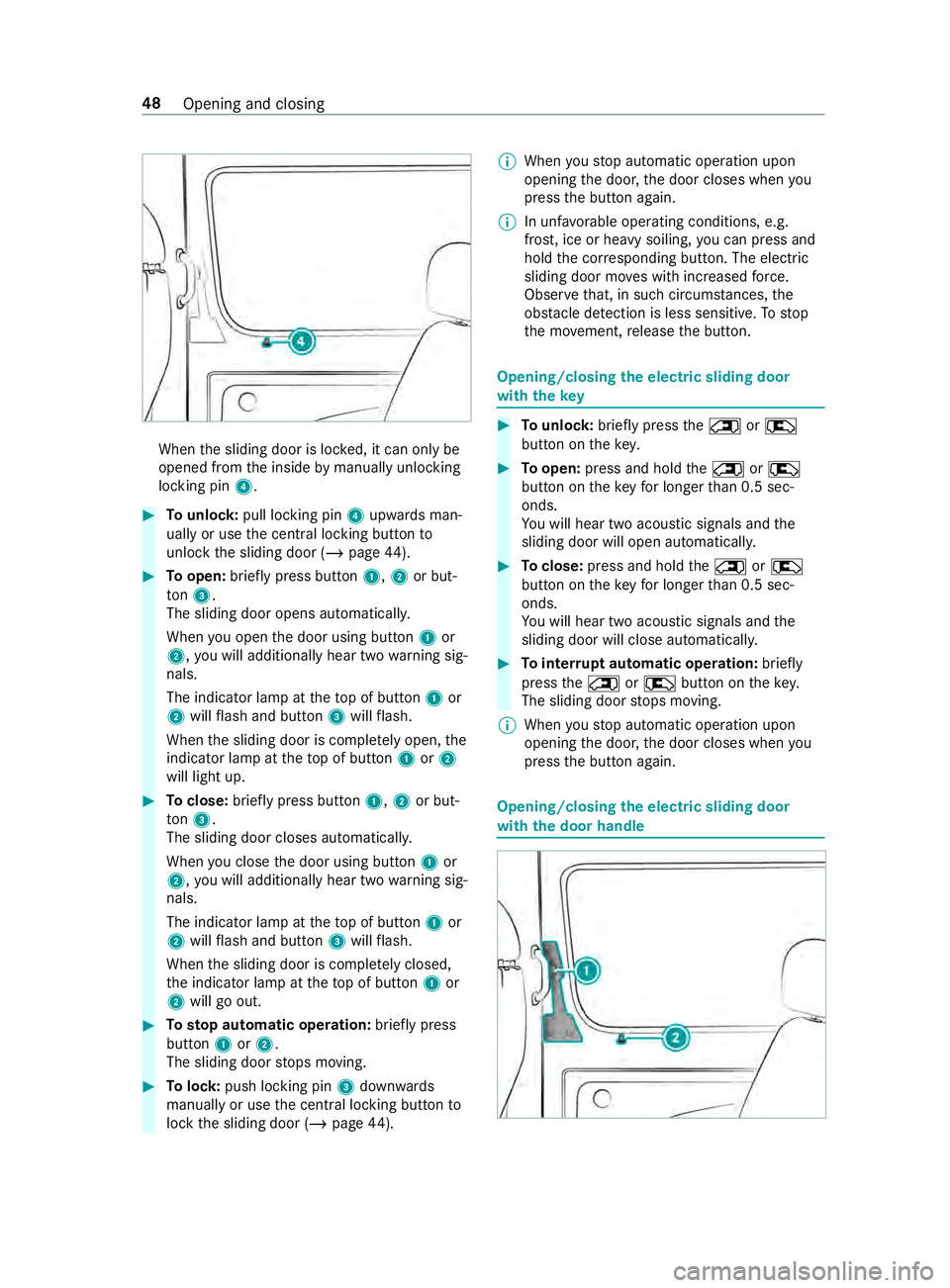
the sliding door is loc ked, it can only be
opened from the inside bymanually unlocking
locking pin 4. #
Tounlo ck:pull lo cking pin 4upwards man‐
ually or use the cent ral locking button to
unlo ckthe sliding door (/ page44). #
Toopen: briefly press button 1,2or but‐
to n3.
The sliding door opens au tomatical ly.
When you open the door using button 1or
2, you will additionally hear two warning sig‐
nals.
The indicator lamp at theto p of button 1or
2 will flash and button 3will flash.
When the sliding door is comple tely open, the
indicator lamp at theto p of button 1or2
will light up. #
Toclose: briefly press button 1,2or but‐
to n3.
The sliding door closes au tomatical ly.
When you close the door using button 1or
2, you will additionally hear two warning sig‐
nals.
The indicator lamp at theto p of button 1or
2 will flash and button 3will flash.
When the sliding door is comple tely closed,
th e indicator lamp at theto p of button 1or
2 will go out. #
Tosto p automatic ope ration: briefly press
but ton1 or2.
The sliding door stops moving. #
Tolock: push locking pin 3down wards
manually or use the cent ral locking button to
lock the sliding door (/ page44). %
When
youstop automatic operation upon
opening the door, the door closes when you
press the button again.
% In unf
avorable operating conditions, e.g.
frost, ice or heavy soiling, you can press and
hold the cor responding button. The electric
sliding door mo ves with increased forc e.
Obser vethat, in such circum stances, the
obs tacle de tection is less sensitive. Tostop
th e mo vement, release the button. Opening/closing
the electric sliding door
with thekey #
Tounlo ck:brie fly press the0042 or0041
button on thekey. #
Toopen: press and hold the0042 or0041
button on theke yfo r longer than 0.5 sec‐
onds.
Yo u will hear two acoustic signals and the
sliding door will open automaticall y. #
Toclose: press and hold the0042 or0041
button on theke yfo r longer than 0.5 sec‐
onds.
Yo u will hear two acoustic signals and the
sliding door will close automaticall y. #
Tointer rupt automatic operation: briefly
press the0042 or0041 button on theke y.
The sliding door stops moving.
% When
youstop automatic operation upon
opening the door, the door closes when you
press the button again. Opening/closing
the electric sliding door
with the door handle 48
Opening and closing